
GK46TIMSUO - Cooker V-ZUG - Free user manual and instructions
Find the device manual for free GK46TIMSUO V-ZUG in PDF.


| Type of product | Induction hob (built-in) |
| Brand | V-ZUG |
| Model | GK46TIMSUO |
| Number of cooking zones | 4 |
| Heating technology | Induction |
| Cooking zone dimensions (each) | 18 × 20 cm |
| Energy consumption per cooking zone | Approx. 185.9 Wh/kg |
| Energy consumption of entire hob | 185.9 Wh/kg |
| Power levels | Melting (40°C), Keep warm (65°C), Simmer (94°C), 1–9 |
| Special functions | PowerPlus, Bridging, Automatic boost, Timer, Pause cooking, Wipe protection, Childproof lock, Restore function |
| Pan detection | Yes, automatic detection of suitable induction cookware |
| Residual heat indicator | Yes, shows 'H' while hot |
| Safety features | Childproof lock, automatic shut-off, pause cooking, overheat protection, pan detection |
| Cleaning and maintenance | Use soft cloth and mild detergent; use glass ceramic scraper for stubborn residues |
| Cookware requirements | Magnetic base (induction-compatible); avoid copper or aluminium bases |
| OptiGlass coating (if applicable) | Yes, on GK46TIMSUO models for enhanced scratch resistance |
| Childproof lock | Yes, lockable to prevent accidental activation |
| Timer | Independent timer (1 min – 9 h 59 min) and per-zone operating time (1 min – 1 h 59 min) |
| Power management | PowerPlus limited to one zone per group (A or B) at a time |
| Warranty | Standard V-ZUG warranty; registration required online |
Frequently Asked Questions - GK46TIMSUO V-ZUG
User questions about GK46TIMSUO V-ZUG
0 question about this device. Answer the ones you know or ask your own.
Ask a new question about this device
Download the instructions for your Cooker in PDF format for free! Find your manual GK46TIMSUO - V-ZUG and take your electronic device back in hand. On this page are published all the documents necessary for the use of your device. GK46TIMSUO by V-ZUG.
USER MANUAL GK46TIMSUO V-ZUG
natural_image
Simple diagram with a circle, a gray rectangle, and four small circles on the left (no text or symbols)
natural_image
Simple diagram with four circles and a gray rectangle at the bottom (no text or symbols)
natural_image
Simple diagram with four circles and a gray rectangle at the bottom (no text or symbols)Operating instructions
GK46TIMS | GK46TIMXS | GK56TIMS
Induction hob
Thank you for choosing to buy one of our products. Your appliance is made to high standards and is easy to use. Nevertheless, please take the time to read these operating instructions in order to familiarise yourself with the appliance and get the best use out of it.
Please follow the safety precautions.
Modifications
Text, diagrams and data correspond to the technical standard of the appliance at the time these operating instructions went to press. The right to make technical modifications for the purpose of the further development of the appliance is reserved.
Validity
The product family (model number) corresponds to the first alphanumerics on the identification plate. These operating instructions apply to:
| Type Product family | |
| GK56TIMSC/O, GK56TIMSZ/O 31081 | |
| GK46TIMSC/O, GK46TIMSZ/O, GK46TIMSU/O 31086 | |
| GK46TIMXSC, GK46TIMXSZ 31087 |
Variations depending on the model are noted in the text.
Contents
1 Safety precautions 5
1.1 Symbols used 5
1.2 General safety precautions 6
1.3 Appliance-specific safety precautions.... 7
1.4 Instructions for use 7
2 Disposal 10
3 Using for the first time 11
4 Your appliance 12
4.1 Appliance overview.... 12
4.2 Operating and display elements 13
4.3 How induction hobs function 14
4.4 Pan detection.... 14
4.5 Flexible cooking 14
4.6 Cookware 15
4.7 OptiGlass.... 15
5 Operating the appliance 16
5.1 Switching the appliance on and off.... 16
5.2 Selecting a cooking zone.... 16
5.3 Switching a cooking zone off 16
5.4 Residual heat indicator 16
5.5 Overview of power levels.... 17
5.6 Melting function.... 17
5.7 Keep warm function.... 18
5.8 Simmer function 18
5.9 PowerPlus.... 18
5.10 Bridging function 21
5.11 Automatic boost 21
5.12 Operating time.... 22
5.13 Timer.... 24
5.14 Childproof lock 25
5.15 Restore function 26
5.16 Pause cooking.... 26
5.17 Wipe protection 26
6 User settings 27
6.1 Changing user settings.... 28
7 Care and maintenance 29
8 Trouble-shooting 30
9 Technical data 33
9.1 Product fiche 33
Index 35
10 Notes 37
11 Service & Support 39
1 Safety precautions
1.1 Symbols used

Denotes important safety precautions.
Failure to observe said precautions can result in injury or in damage to the appliance or fittings!

Information and precautions that should be observed.
Information on disposal

Information about the operating instructions
▶ Indicates step-by-step instructions.
– Describes how the appliance reacts to the steps taken.
- Indicates a list.
1.2 General safety precautions

- Read the operating instructions before using the appliance for the first time!

- This appliance can be used by children aged 8 and above and by persons with reduced physical, sensory or mental capabilities, or lack of experience and/or knowledge, provided they are supervised or have been instructed on the safe use of the appliance and have understood the hazards involved. Children shall not play with the appliance. Cleaning and user maintenance shall not be undertaken by children without supervision.
- If an appliance is not equipped with a mains cable and a plug or other means for disconnecting from the mains with a contact opening on each pole complying with the conditions of overvoltage category III for full isolation, an isolating device must be incorporated into the permanently installed electrical installation in accordance with the installation regulations.
- If the mains cable of this appliance is damaged, it must be replaced by the manufacturer or its Customer Services or a similarly qualified person in order to avoid hazard.
1.3 Appliance-specific safety precautions

- WARNING: If the surface has a crack running through the thickness of the material, switch the appliance off and disconnect it from the mains to avoid possible electric shock.
- WARNING: The appliance and its accessible parts get hot during use. Be careful not to touch the heating elements.
- Under no circumstances use a steam cleaner to clean the appliance.
- Do not place metal objects such as knives, forks, spoons, lids or aluminium foil on the hob as they can get hot.
- After use, switch the hob off using the controls and do not rely on the pan detector.
- WARNING: It can be dangerous to leave the hob unattended when cooking with fat or oil, as this can lead to fires. NEVER attempt to extinguish a fire with water. Instead, switch the appliance off and then carefully smother the flames with, for example, a lid or a fire blanket.
- WARNING: Never store objects on the hob due to the risk of fire.
- WARNING: The cooking process should always be supervised. Shorter cooking processes, in particular, must be supervised the entire time.
- Do not operate the appliance using an external time switch or a separate remote control system.
1.4 Instructions for use
Before using for the first time
- The appliance must be installed and connected to the electricity supply in accordance with the separate installation instructions. Have a qualified fitter/electrician carry out the necessary work.
Correct use
- The appliance is designed for use in the home for preparing food. No liability is assumed for any damage caused by improper use or incorrect handling.
- Any repairs, modifications or manipulations to the appliance, especially any electrically live parts, may only be carried out by the manufacturer, its Customer Services or a similarly qualified person. Repairs if carried out incorrectly may cause serious injury, damage to the appliance and fittings, as well as affect the functioning of the appliance. If the appliance is not working properly or in case of a repair order, follow the instructions given in the 'Repair service' section. Contact our Customer Services if necessary.
- Use original spare parts only.
- Retain these operating instructions for future reference. If you sell the appliance or pass it on to a third party, please ensure these operating instructions accompany the appliance, together with the installation instructions.
- The appliance corresponds to recognized technology standards and the relevant safety regulations. However, proper use of the appliance is essential to avoid damage and accidents. Please therefore follow the precautions given in these operating instructions.
- The heated surface will remain hot for some time after it is switched off and will cool down only slowly to room temperature. Please allow sufficient time for the appliance to cool down before, for instance, cleaning it.
Note on use
- Tests have shown that under normal circumstances there is no risk to cardiac pacemaker users. If, as the user of a cardiac pacemaker (or a hearing aid or another type of implant), you would like to be reassured that using the appliance does not pose a risk, you are advised to consult a competent medical authority.
Caution: Burns hazard
- Overheated fat and oil can easily catch fire. Never attempt to extinguish burning oil or fat with water. Danger of explosion! Smother the flames with a fire blanket. Keep doors and windows closed.
Caution: Risk of injury
- Keep pets away from the appliance.
Caution: Risk to life
- Packaging materials, e.g. plastic film and polystyrene, can be dangerous for children. Danger of suffocation! Keep packaging material away from children.
How to avoid damaging the appliance
- In case of overheating, switch the hotplate off and allow it to cool down completely. Do not put any dishes on it. Under no circumstances use cold water to cool it down quickly.
- Do not climb on to the appliance.
- Do not put hot cookware on the hob frame in order not to damage the silicone joints.
- Do not cut or prepare food on the surface and avoid impact with hard objects. Do not drag cookware across the surface.
- Take particular care that sugary foods or juices do not get onto the hot cooking zones as it can damage them. If sugary foods or juices do get on to the hot cooking zones clean away immediately (while still hot) with a scraper.
- Pots with pure copper or aluminium bases should not be used for cooking as they can leave behind traces that can be difficult to clean. If the traces are not removed immediately after cooking with a suitable cleaning agent, they can be permanently burned on and therefore permanently ruin the visual appearance of the appliance.
- Sliding pans and cookware across the glass ceramic causes scratches. This can be largely prevented by lifting pans and cookware up and then placing them down in position.
- The hob is designed to be used – signs of use, such as scratches or the wear and tear from pans and cookware, are normal. The more intensively it is used, the greater the signs of use; however, the appliance remains in perfect working order and therefore does not give a right of complaint. Safety is guaranteed at all times.
- There is no such thing as completely scratch-proof glass; scratches can even develop on sapphire glass, which is used in watches. The glass ceramic used is of the best quality available on the market.
2 Disposal
Packaging
- All packaging materials (cardboard, plastic film (PE) and polystyrene (EPS)) are marked and should, if possible, be collected for recycling and disposed of in an environmentally friendly way.
Disconnection
- Disconnect the appliance from the mains. With a fixed appliance, this is to be carried out by a qualified electrician!
Safety
- Disable the appliance to prevent accidents caused by improper use, especially through children playing.
- Pull the plug out of the mains socket or have the appliance disconnected from the mains by an electrician. Then cut the mains cable off flush with the appliance.
Disposal
- The old appliance should not be discarded as worthless rubbish. If disposed of correctly, the raw materials can be recovered for recycling.
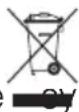
- The symbol on the identification plate warns that the appliance may not be disposed of in normal household waste.
- The appliance must be disposed of in accordance with local regulations on waste disposal. For more information on the handling, disposal and recycling of the product, please contact the local authorities, the local recycling facilities for household waste or the retailer from whom you purchased the appliance.
3 Using for the first time

The appliance must be installed and connected to the electricity supply in accordance with the separate installation instructions. Have a qualified fitter/electrician carry out the necessary work.

During the first few hours of use, a cooking zone can give off an unpleasant smell. This is normal for brand new appliances. Ensure that the room is well ventilated.
Where is the identification plate?
The identification plate and the connection plate are located on the underside of the hob.
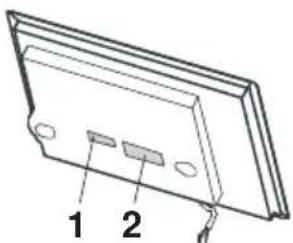
1 Identification plate with serial number (FN)
2 Connection plate
A second identification plate is supplied and should be affixed in the fitted unit underneath the hob.
Note down the serial number (FN) of your appliance on the back page of these operating instructions.

The serial number is required for identifying the appliance. Only then can customer services guarantee a faultless service.
4 Your appliance
4.1 Appliance overview
GK46TIMSC/O, GK46TIMSU/O, GK46TIMSZ/O
- 4 adjustable cooking zones
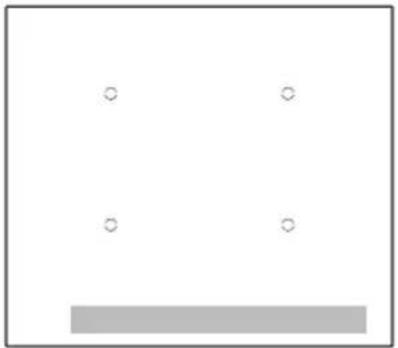
natural_image
Simple diagram with four circles and a gray rectangle at the bottom (no text or symbols)- 4 adjustable cooking zones
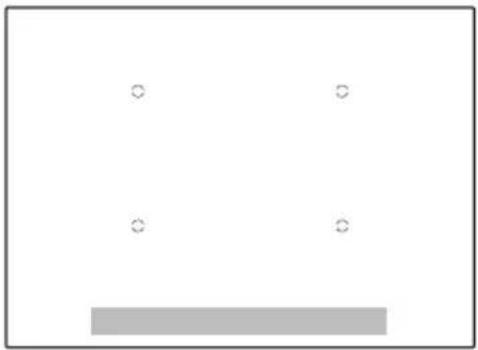
natural_image
Simple diagram with four circles and a gray rectangle at the bottom (no text or symbols)GK56TIMSC/O, GK56TIMSZ/O
- 4 adjustable cooking zones
- Central cooking zone ∅ 280 mm
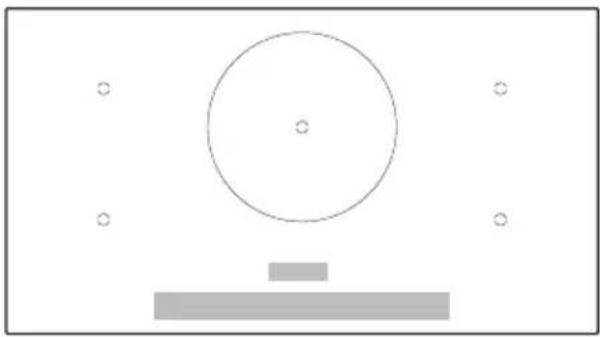
natural_image
Simple diagram with a circle, horizontal bar, and small circles (no text or symbols)4.2 Operating and display elements
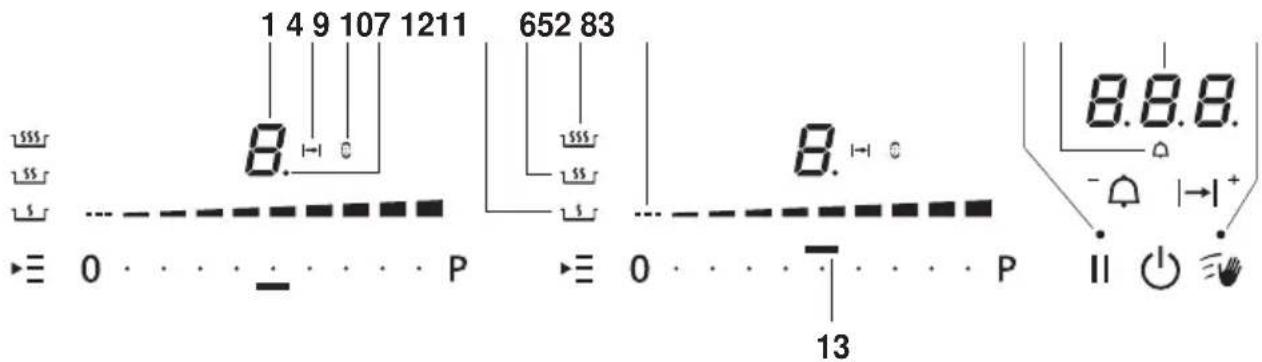
Buttons
Appliance ON/OFF Slider (for setting the power level)
· · P PowerPlus Wipe protection ON/OFF
II Pause cooking ON/OFF and restore function
| |^+ Operating time / function as plus button
Timer / function as minus button
▶ Multi-function button
Displays
1 Cooking zone power level
2 Operating time activated
3 Bridging function activated
4 Activated operating time for the cooking zone
5 Melting power level activated
6 Keep warm power level activated
7 Simmering power level activated
8 Special function activated
9 Pause activated
10 Timer activated
11 Operating time / timer
12 Wipe protection activated
13 Corresponding cooking zone for slider
4.3 How induction hobs function
Induction hobs work very differently from conventional hobs or hot plates. The induction coils under the glass ceramic plate produce a rapidly changing magnetic field which directly heats up the magnetic base of the cookware.
The glass ceramic plate is only warmed by the hot cookware. Removing the cookware from the cooking zone immediately interrupts the supply of energy. Induction hobs are:
- quick reacting
- finely adjustable
- powerful
- energy-efficient
- safe.

Induction hobs can only be used with cookware with a complete/full magnetic base.
4.4 Pan detection
Each cooking zone is equipped with pan detection. This detects suitable induction compatible cookware with a magnetic base.
- If the cookware is removed during operation or if unsuitable cookware is used,
- the power level selected flashes alternately with
- If no suitable cookware is placed on the cooking zone before the pan detection time (10 minutes) elapses,
- the cooking zone switches off.
- the display changes from 4 to .0
- the appliance switches off after 10 seconds if no other cooking zone is in use.
4.5 Flexible cooking
In flexible cooking, there are no marked cooking zones.
Pans with different diameters can be placed on any cooking zone. Must, however, be covered for pan detection.

For even frying, the pan must be centred on ⒽThe diameter of the base of the pan should not be greater than the diameter of the cooking zone.
4.6 Cookware
Suitable cookware
Only cookware with a full magnetic base is suitable for use with the induction hob.
This can be checked in the follow ways:
- A magnet sticks anywhere on the base of the cookware.
- On the hob, the power level set illuminates and does not alternate with the power level.

Do not heat any unsuitable cookware using aids such as metal rings and the like. This can damage the hob.
Energy-efficient cooking
For maximum energy efficiency and even heat distribution note the following:
- The base of the cookware must be clean, dry and smooth.
- Centre the cookware in the middle of the cooking zone.
- Use a well-fitting lid.
- Match the diameter of the cookware to the quantity of food to be cooked.
Coated cookware
- Coated cookware may be operated above power level 7 provided that the bottom of the pan is completely covered with liquid.
- The coating may otherwise become overheated and damaged.
- For frying, do not use a higher power level than 7.

Never use PowerPlus with coated frying pans.
Noise during cooking
Cookware can make noise during cooking. This does not indicate any malfunction, nor does it affect the functioning of the appliance in any way.

Noise depends on the cookware used. If the noise causes considerable disturbance, it can help to change the cookware.
4.7 OptiGlass
Applies to GK56TIMSCO, GK56TIMSZO, GK46TIMSCO, GK46TIMSZO, GK46TIMSUO
Hobs with OptiGlass have an additional coating on the glass. This coating is very hard and renders the glass more resistant to scratches.
5 Operating the appliance
5.1 Switching the appliance on and off
All the appliances are operated in the same way.
▶ To switch the appliance on: Depress the ⏻ button for 1 second.
- 0flashes in all the power level displays.
- If no other entry is made, the appliance switches off again after about 10 seconds for safety reasons.
▶ To switch the appliance off: Press the 📊 button.
5.2 Selecting a cooking zone
- Touch the slider of the required cooking zone or swipe it to set the power level.
5.3 Switching a cooking zone off
▶ Touch power level 0 on the slider.
- If no other entry is made and the other cooking zones are switched off, the appliance switches off after 10 seconds.
5.4 Residual heat indicator
After a cooking zone is switched off, H remains illuminated as long as there is a risk of burns.
5.5 Overview of power levels
| Power level Cooking method Use | ||
| Melting Butter, chocolate, gelatine, sauces, approx. 40 °C | ||
| Keep warm Keeps food warm, approx. 65 °C | ||
| Simmering Water temperature stays below boiling point, approx. 94 °C | ||
| 1 | Melting, gentle warming | Butter, chocolate, gelatine, sauces |
| 2 | ||
| 3 | Swelling Rice | |
| 4 | Continued cooking, reducing, stewing, steaming | Vegetables, potatoes, sauces, fruit, fish |
| 5 | ||
| 6 | Continued cooking, braising | Pasta, soup, braised meat |
| 7 | Gentle frying Rösti, omelettes, breaded fried foods, sausages | |
| 8 | Frying, deep frying Meat, chips | |
| 9 | Flash frying Steak | |
5.6 Melting function
With the melting function L, butter, chocolate or honey, for instance, can be gently melted at approx. 40 °C.
Switching the melting function on
▶ Touch the ▶ button 1×.
- The symbol illuminates.
Switching the melting function off
▶ Use the slider 0 to set any power level or switch off via « ». 0
5.7 Keep warm function
The keep warm function keeps cooked food warm at approx. 65 °C.
Switching the keep warm function on
▶ Touch the ▶Button 2×.
- The symbol illuminates.
Switching the keep warm function off
▶ Use the slider 0 to set any power level or switch off via « ». 0
5.8 Simmer function

The precision of the simmer function depends on the cookware used. Water can start to boil. If this is the case, we recommend the pan lid be left off when using the simmer function.
For locations over 1,500 meters above sea level, it is generally recommended the pan lid be left off when using the simmer function.
With the simmer function 1,1,2,3,4,5,6,7,8,9,10,11,12,13,14,15,16,17,18,19,20,21,22,23,24,25,26,27,28,29,30,31,32,33,34,35,36,37,38,39,40,41,42,43,44,45,46,47,48,49,50,51,52,53,54,55,56,57,58,59,60,61,62,63,64,65,66,67,68,69,70,71,72,73,74,75,76,77,78,79,80,81,82,83,84,85,86,87,88,89,90,91,92,93,94,95,96,97,98,99
Switching the simmer function on
▶ Touch the ▶ button 3×.
- The symbol illuminates.
Switching the simmer function off
▶ Use the slider 0 to set any power level or switch off via « ». 0
5.9 PowerPlus
All the cooking zones are equipped with the PowerPlus booster.
When PowerPlus is switched on, the cooking zone selected works at extra high power for 10 minutes. PowerPlus can be used, for instance, to heat a large quantity of water quickly.
Switching PowerPlus on
▶ Touch · on the slider.
- P is illuminated in the display.
- After 10 minutes, it automatically reverts to power level9.

If the cookware is removed, PowerPlus is interrupted. PowerPlus continues as soon as the cookware is placed back on the cooking zone.
Ending PowerPlus before time
▶ Touch the desired power level on the slider.
Power management
GK46TIMSC/O, GK46TIMSU/O, GK46TIMSZ/O, GK46TIMXSC, GK46TIMXSZ
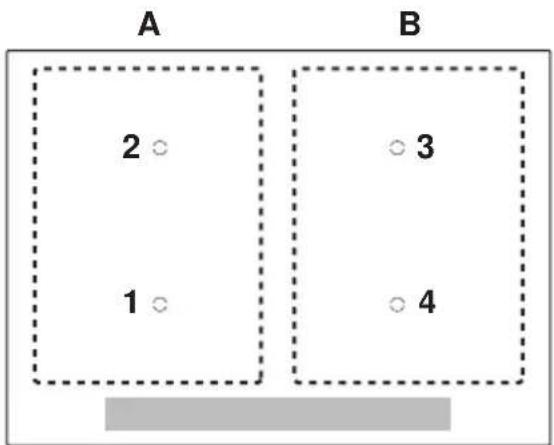
PowerPlus cannot be used with both cooking zones of a group (A or B) at the same time. If PowerPlus is activated with both cooking zones of a group, then the power output is reduced for the cooking zone that was first selected.
| PowerPlus with cooking zone | Group A * | |
| 1 | 2 | |
| 1 | P | 5 |
| 2 | 5 | P |
| PowerPlus with cooking zone | Group B * | |
| 3 | 4 | |
| 3 | P | 5 |
| 4 | 5 | P |
*Maximum available power level with cooking zones

If the power level is increased above these levels, PowerPlus switches off.
GK56TIMSC/O, GK56TIMSZ/O
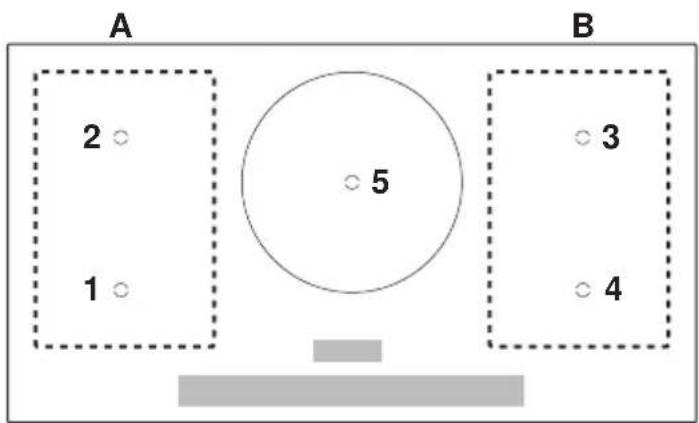
PowerPlus cannot be used with both cooking zones of a group (A or B) at the same time. If PowerPlus is activated with both cooking zones of a group, then the power output is reduced for the cooking zone that was first selected. Cooking zone 5 can be operated with PowerPlus independently of groups A and B.
| PowerPlus with cooking zone | Group A * | |
| 1 | 2 | |
| 1 | P | 5 |
| 2 | 5 | P |
| PowerPlus with cooking zone | Group B * | |
| 3 | 4 | |
| 3 | P | 5 |
| 4 | 5 | P |
*Maximum available power level with cooking zones

If the power level is increased above these levels, PowerPlus switches off.
5.10 Bridging function
The bridging function allows two individual cooking zones lying one behind the other to be switched on together and to be adjusted together.
Switching the bridging function on
▶ Touch both sliders at the same time.
- Illuminates next to the slider.
▶ Set the desired temperature.

If, when the bridging function is switched on, a cooking zone is already running, the power level and operating time of this cooking zone will be taken over for both zones. If both cooking zones are already running, the operating times are cleared and flashes in the power level displays.
Switching the bridging function off
▶ Touch both sliders at the same time.
- Both cooking zones revert to the previous settings.
– Each cooking zone can be regulated individually again.
5.11 Automatic boost

Do not leave the hob unattended when using the automatic boost. Risk of boiling over, burning on and igniting!
All the cooking zones are equipped with a selectable automatic boost. With this function, a cooking zone heats at power level 9 for a certain length of time (see table). Then it automatically switches back to the power level set.

The automatic boost function must be activated anew each time a cooking zone is switched on.
| Power level / function | 1 2 3 4 5 6 | 7 8/9 | |||||
| Automatic boost in mins.:secs. | 0:40 1:15 2:0 | 0 3:00 | 4:15 7:1 | 5 2:00 | 3:15 |

If during the automatic boost a higher power level is selected, the duration will change automatically.
Switching the automatic boost on
▶ Hold the desired power level on the slider 0 depressed for 3 seconds.
- R and the power level illuminate alternately in the display when the automatic boost is activated.
- When the automatic boost is over, the heat output is reduced again to the power level selected.
Switching the automatic boost off before time
▶ Use the slider to set a lower power level.
5.12 Operating time

Do not leave the hob unattended during use. Risk of boiling over, burning on and igniting!
With the operating time function, a Cooking zone switches off automatically after a set time 1 min.-1 h 59 min..
Setting the operating time
▶ Select the required cooking zone.
▶ Touch the I button.
- 0.0 flashes in the display.
▶ Touch the slider 0 for the required cooking zone.
- The symbol for the cooking zone selected illuminates.
- The indicator light for the cooking zone selected illuminates.
▶ Use the I button to increase the operating time or use the button to reduce the operating time.
- The first time the button is touched, illuminates in the display.
- The first time the button is touched, illuminates in the display.

The default value 30 can be adjusted in the user settings.
Changing the operating time
▶ Touch the I button.
- 0.0 flashes in the display.
▶ Touch the slider for the required cooking zone.
- The remaining operating time for the cooking zone selected is displayed.
- The indicator light for the cooking zone illuminates.
▶ Use the ^- or button to change the operating time.

To quickly change the operating time, press and hold the or | |^+ button.
If the setting is not changed, it will be automatically accepted after 5 seconds. Alternatively, the setting can also be confirmed manually by touching the slider for the corresponding cooking zone.
Switching the operating time function off before time
▶ Touch the I button.
▶ Touch the slider Q or the required cooking zone.
- Touch the - and buttons at the same time.
- 0.0 flashes in the display.
- The cooking zone continues to run.
End of the operating time
When the operating time is up
– the relevant cooking zone switches off
– an acoustic signal is emitted
- and flash above the slider.
Touch the ^- of button to switch off the acoustic signal and the display.
- If no buttons are pressed, the acoustic signal switches off automatically after 1 minute.
Several operating times
If operating times are set for several cooking zones,
– the shortest operating time is displayed.
– the corresponding cooking zone indicator light illuminates.
- the symbol illuminates with the set operating time for each cooking zone.
To display another operating time:
▶ Touch the I button.
▶ Touch the slider for the required cooking zone.
- The operating time is displayed and can be changed.
5.13 Timer
The timer functions like an egg timer (1 min.-9 h 59 min.).
It can be used at any time and independently of all other functions.
Setting the timer
▶ Switch the appliance on.
▶ Touch the button.
- The symbol illuminates.
- 0.0 flashes in the display.
▶ Use the I button to increase the duration of the timer or use the button to reduce the duration of the timer.
- The first time the button is touched, illuminates in the display.
▶ The first time the button is touched, illuminates in the display.

The standard value 30 can be adjusted in the user settings.

To quickly change the duration of the timer, press and hold the I ^+ button.
Changing the timer
If no Cooking zone is in use, first switch the appliance on.
▶ Touch the button.
- The time left on the timer flashes.
▶ Use the ^- or button to change the duration of the timer.
Switching the timer off before time
If no Cooking zone is in use, first switch the appliance on.
▶ Touch the button.
▶ Touch the - and buttons at the same time.
- 0.0 flashes in the display.
5.14 Childproof lock
The childproof lock is to prevent the appliance from being accidentally switched on.
Switching the childproof lock on
▶ Switch the appliance on.
Ensure all cooking zones are switched off.
▶ Touch the I and buttons at the same time.
– An acoustic signal is emitted.
▶ Touch the I button again.
– An acoustic signal is emitted.
- The childproof lock is now switched on.
- -illuminates in all the power level displays for 10 seconds.
Operating the appliance with the childproof lock activated
▶ Switch the appliance on.
▶ Touch the ll and buttons at the same time.
– An acoustic signal is emitted.
- The childproof lock is overridden. The appliance can now be used as normal.
The childproof lock is automatically reactivated 1 minute after switching off the hob.
Switching the childproof lock off
▶ Switch the appliance on.
Ensure all cooking zones are switched off.
▶ Touch the I and buttons at the same time.
- An acoustic signal is emitted.
▶ Touch the button again.
- A double acoustic signal is emitted.
- The childproof lock is now switched off.
- 0flashes in all the power level displays for 10 seconds.
If the appliance has been inadvertently switched off with the ⏻ button, the settings can be restored within 6 seconds.
▶ Switch the appliance on.
- The indicator light for the II button flashes.
▶ Touch the I button.
5.16 Pause cooking
After pause cooking, the appliance can continue to be operated using the previous settings.
▶ Touch the I button.
- The power level of the cooking zone switched on changes to 1.
- The operating time is interrupted.
- The timer continues to run.
- All buttons except, and are inactive.

If the pause cooking function is not turned off within 10 minutes, the appliance switches off completely.
▶ Touch the I button again to resume cooking.
- The cooking zones resume operation using the previous settings.
5.17 Wipe protection
This function prevents the power level from being changed accidentally, for instance when wiping the control panel with a cloth.
▶ Touch the button.
- The indicator light for the button illuminates.
▶ Wipe protection is switched off by touching the button again or automatically after 30 seconds.

Press the ⏻ button to switch the appliance off at any time.
6 User settings
The following user settings can be set and stored individually:
| User setting Setting value Factory setting | ||||
| P0 | Acoustic signal loudness | 0 Low 2 | ||
| 1 Medium | ||||
| 2 High | ||||
| P1 | Acoustic signal at end of operating time / timer | 0 No acoustic signal 2 | ||
| 1 Automatically off after 10 secs. | ||||
| 2 Automatically off after 1 min. | ||||
| P2 | Operating time PowerPlus | 0 Ends after 5 mins. 1 | ||
| 1 Ends after 10 mins. | ||||
| 2 Ends after 15 mins. | ||||
| P3 | Automatic boost | 0 Automatic boost off 1 | ||
| 1 Automatic boost on | ||||
| P4 | Default operating time / timer duration | 0 Default duration 0 mins. 3 | ||
| 1-9 Adjustable in steps from 10-90 mins. | ||||
| P5 | Acoustic signal when buttons are pressed | 0 Acoustic signal off 1 | ||
| 1 Acoustic signal on | ||||
| P6 | Restore factory settings | 0 Restore factory settings: Hold the II button depressed for 2 secs. | ||
6.1 Changing user settings
- With the appliance switched off, simultaneously hold the - and but I^+ tons depressed for 3 seconds.
- An acoustic signal is emitted.
- Touch both sliders left of display 3. For appliances with only one slider, simply touch the available slider.
- An acoustic signal is emitted.
- The indexed user setting, e.g., appears in display 3.
- The current user setting value is shown in display2.
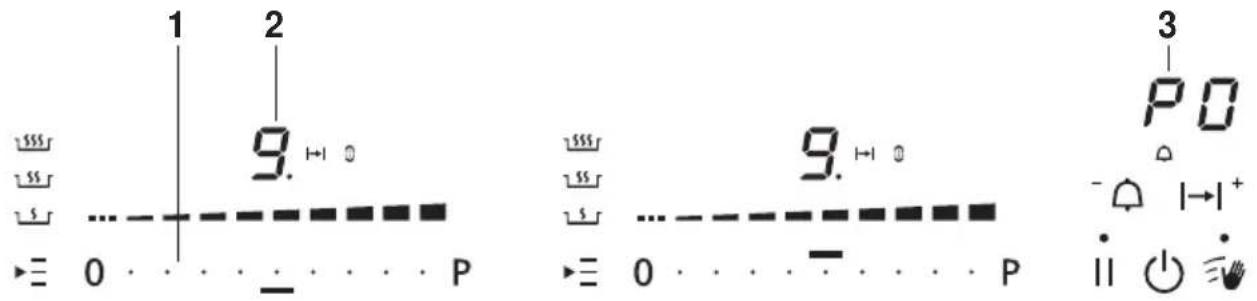
▶ Use the I button to select the next highest and the button the next lowest user setting.
- Touch the left or right side of the active slider 1 to select a higher or lower setting value.
Saving entry
▶ Hold the I button depressed for 2 seconds.
- An acoustic signal is emitted.
- The «User settings» mode is ended.
Cancelling user settings
▶ Press the ⏻ button.
- Any changes made to the default values are not saved.
- The «User settings» mode is ended.
7 Care and maintenance

Clean the appliance only when it has completely cooled down. Burns hazard!
Always clean the hob after use. This prevents food residue from burning on. Dried-on or burned-on food residue is harder to clean off.
Use of improper cleaning techniques can result in damage to the markings or surface.

Avoid cleaning the surface of the glass ceramic hob with abrasive cleaning agents, scouring pads, wire wool, etc. as it can damage them. Refer to the homepage for tips on suitable cleaning materials.
- Use only a soft cloth or sponge with water and a suitable detergent for cleaning everyday soiling. Always follow the detergent manufacturer's instructions for use. Using a detergent with a protective additive is recommended.
- Remove stubborn soiling, e.g. boiled-over milk, while still warm using a glass ceramic hob scraper. Always follow the scraper manufacturer's instructions for use.
▶ Foods with a high sugar content, e.g. marmalade, that boil over should be removed while still hot using a glass ceramic hob scraper. The surface of the glass ceramic hob could otherwise become damaged.
▶ Remove melted plastic while still warm using a glass ceramic hob scraper. The surface of the glass ceramic hob could otherwise become damaged.
▶ Remove limescale stains when cool with a small amount of limescale remover, e.g. vinegar or lemon juice. Then wipe clean with a damp cloth.
8 Trouble-shooting
What to do if ...
... the appliance is not working and all the displays are dark?
| Possible cause Solution | |
| The fuse or circuit breaker for electrical installations in the home is defective. | ▶ Change the fuse.▶ Reset the circuit breaker. |
| The fuse or circuit breaker keeps blowing. | ▶ Call Customer Services. |
| An interruption in the power supply. | ▶ Check the power supply. |
... flashes alternately with the power level in the display?
| Possible cause Solution | |
| Cookware is not suitable for use with induction hobs. | ▶ Use suitable magnetic cookware. See «Cookware» section. |
| Cookware is too small for the cooking zone selected. | ▶ Ensure cookware corresponds to the size of the cooking zone. |
... -illuminates in the displays?
| Possible cause Solution | |
| The childproof lock is activated. | For operating the appliance with the childproof lock activated, see «Operating the appliance» section.Switch the childproof lock off. |
... A continuous acoustic signal is emitted, r'flashes in a display and the appli-ance switches off?
| Possible cause Solution | |
| A button or a slider was touched for longer than 10 seconds. | Remove object or food that has boiled over.The appliance can be used again as normal. |
| Object (e.g. pan, dish) on the control panel. | |
| Food boiled over onto the control panel. |
... Hand flash alternately in the display?
| Possible cause Solution | |
| The automatic safety shut-off was triggered. | Switch the cooking zone back on again if required. |

If a cooking zone has been running for longer without any settings being changed, the appliance switches the cooking zone off automatically, after how much time depends on the power level set.
| Power level / function | 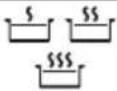 | 1 2 | 3 4 5 | 6 7 8 | 9 | |||||
| Safety shut-off after hrs.:mins. | 2:00 8 | 30 6 | 30 5 | 30 4:3 | 0 3:3 | 0 3:00 | 2:30 | 2:00 | 1:30 |
... Hflashes in the display?
| Possible cause Solution | |
| The excess temperature protection of a cooking zone was triggered. | Allow the cooking zone to cool down.Continue cooking on a different cooking zone.Check cookware. |
...uflashes in the display?
| Possible cause Solution | |
| An interruption in the power supply. | Press any button to quit the error message.The appliance can be used again as normal. |
... E and B are illuminated in the display?
| Possible cause Solution | |
| An object (e.g. paper) underneath the hob is obstructing the air intake. | Remove any objects in the drawer underneath the hob.Touch any button to cancel the error.After 10 minutes the appliance can be used again as normal. |
| Ventilation is defective. ▶ Note | down the error number.Note down the serial number (FN) of the appliance. See the identification plate for this.Call Customer Services. |
...Eor and a number illuminate in the display?
| Possible cause Solution | |
| • Internal error occurred. ▶ Note down the error number. ▶ Note down the serial number (FN) of the appliance. See the identification plate for this. ▶ Call Customer Services. | |
9 Technical data
9.1 Product fiche
In accordance with EU Regulation No. 66/2014
| Model number GK 31081 | ||||||
| Type designation GK GK5 | 6TIMSC/O, GK56TIMSZ/O | |||||
| Number of cooking zones | 5 | |||||
| Heating technology Induction cooking zone | ||||||
| Dimensions of cooking zone | cm 18 × 20 18 × 20 ø | 28 18 × | 20 18 × | 20 | ||
| Energy consumption per cooking zone | Wh/kg | 185.5 18 | 7.8 184. | 5 184.1 | 192.6 | |
| Energy consumption of the entire hob EC | Wh/kg | 186.9 | ||||
| Model number GK 31086 | |||||
| Type designation GK GK4 | 6TIMSC/O, GK46TIMSU/O,GK46TIMSZ/O | ||||
| Number of cooking zones | 4 | ||||
| Heating technology Induction cooking zone | |||||
| Dimensions of cooking zone | cm 18 × 20 18 | × 20 18 × | 20 18 × 20 | ||
| Energy consumption per cooking zone | Wh/kg | 185.6 184.4 184.3 | 189.2 | ||
| Energy consumption of the entire hob EC | Wh/kg | 185.9 | |||
9 Technical data
| Model number GK 31087 | |||||
| Type designation GK GK4 | 6TIMXSC, GK46TIMXSZ | ||||
| Number of cooking zones | 4 | ||||
| Heating technology Induction cooking zone | |||||
| Dimensions of cooking zone | cm 18 × 20 18 × 20 18 × 20 18 × 20 | ||||
| Energy consumption per cooking zone | Wh/kg | 185.7 185.7 181.6 189.4 | |||
| Energy consumption of the entire hob EC | Wh/kg | 185.6 | |||
Index
A
Appliance Switching on and off.... 16
Appliance overview 12
Appliance-specific safety precautions 7
Automatic boost .... 21 Switching off before time .... 22 Switching on.... 22
B
Bridging function.... 21 Switching off.... 21 Switching on.... 21
C
Care and maintenance 29
Childproof lock 25 Operating the appliance with the childproof lock activated.... 25 Switching off.... 25 Switching on.... 25
Connection plate.... 11
Cooking zone 16
Cookware .... 15 Coated cookware .... 15 Energy-efficient cooking.... 15 Noise during cooking .... 15 Suitable cookware.... 15
D
Disconnection.... 10 Disposal.... 10
|
Instructions for use 7
K
Keep warm function .... 18 Switching off.... 18 Switching on.... 18
M
Melting function.... 17 Switching off.... 17 Switching on.... 17
Model number 2
N
Notes.... 37
O
Operating and display elements.... 13
Buttons .... 13
Displays.... 13
Operating time.... 22
Changing .... 22
Finished.... 23
Setting .... 22
Several operating times .... 23
Switching off before time .... 23
OptiGlass.... 15 Overview of power levels .... 17
P
Packaging .... 10 Pan detection.... 14 Pause cooking.... 26 Power levels.... 18 PowerPlus.... 18 Ending before time.... 19 Switching on.... 18 Product family.... 2 Product fiche.... 33
R
Residual heat indicator.... 16 Restore function .... 26
S
Safety ...... 10 Safety precautions General...... 6 Safety shut-off ...... 31 Serial number (FN) ...... 11 Service & Support...... 39 Simmer function ...... 18 Switching off...... 18 Switching on...... 18 Symbols ...... 5
T
Technical data 33
Technical questions.... 39
Timer 24
Changing 24
Ending before time.... 24
Setting 24
Trouble-shooting 30
Type.... 2
U
User settings.... 27
Changing 28
Switching off before time 28
Using for the first time.... 11
V
Validity.... 2
W
Warranty extensions 39
Where is the identification plate?...... 11
Wipe protection 26
10 Notes
11 Service & Support

The «Troubleshooting» chapter provides valuable information for dealing with minor operating faults. This saves you the time, effort and potential cost of having to call out a service technician.
Information on the V-ZUG warranty can be found at www.vzug.com →Service →Warranty information. Please read this information carefully.
Please register your V-ZUG appliance online immediately at www.vzug.com →Service →Warranty registration. This will allow you to take advantage of the best possible support in the event of an fault in the appliance during the warranty period. You will require the serial number (FN) and appliance designation to complete the registration process. This information can be found on the identification plate for your appliance.
My appliance information:
FN: ____ Appliance: ____
Always have this appliance information to hand when you contact V-ZUG. Thank you.
The identification plate and connection plate are located on the underside of the hob.
Your repair order
At www.vzug.com →Service→Service number you will find the telephone number of your nearest V-ZUG service centre.
Technical questions, accessories, warranty extensions
V-ZUG is happy to help you with any general administrative or technical queries, to take your orders for accessories and spare parts and to inform you about our progressive service agreements.
Quick instructions
Please first read the safety precautions in the operating instructions!
Switching the appliance on
▶ Hold the ⏻ button depressed for 1 second.
To set a cooking zone
- Touch the slider for the required cooking zone or swipe it to set the power level.
Or:
▶ Touch · to· heat a large quantity of water quickly.
To switch cooking zone off
▶ Touch 0 on the slider.
To switch appliance off
Touch the ⏻ button.

1021059-R02
- Operating instructions
- Please follow the safety precautions.
- Modifications
- Validity
- Contents
- Safety precautions 5
- Disposal 10
- Using for the first time 11
- Your appliance 12
- Operating the appliance 16
- User settings 27
- Safety precautions
- Symbols used
- General safety precautions
- Appliance-specific safety precautions
- Instructions for use
- Before using for the first time
- Correct use
- Note on use
- Caution: Burns hazard
- Caution: Risk of injury
- Caution: Risk to life
- How to avoid damaging the appliance
- Disposal
- Packaging
- Disconnection
- Safety
- Disposal
- Using for the first time
- Where is the identification plate?
- Your appliance
- Appliance overview
- GK56TIMSC/O, GK56TIMSZ/O
- Operating and display elements
- Buttons
- Displays
- How induction hobs function
- Pan detection
- Flexible cooking
- Cookware
- Suitable cookware
- Energy-efficient cooking
- Coated cookware
- Noise during cooking
- OptiGlass
- Operating the appliance
- Switching the appliance on and off
- Selecting a cooking zone
- Switching a cooking zone off
- Residual heat indicator
- Overview of power levels
- Melting function
- Switching the melting function on
- Switching the melting function off
- Keep warm function
- Switching the keep warm function on
- Switching the keep warm function off
- Simmer function
- Switching the simmer function on
- Switching the simmer function off
- PowerPlus
- Switching PowerPlus on
- Ending PowerPlus before time
- Power management
- Bridging function
- Switching the bridging function on
- Switching the bridging function off
- Automatic boost
- Do not leave the hob unattended when using the automatic boost. Risk of boiling over, burning on and igniting!
- Switching the automatic boost on
- Switching the automatic boost off before time
- Operating time
- Do not leave the hob unattended during use. Risk of boiling over, burning on and igniting!
- Setting the operating time
- Changing the operating time
- Switching the operating time function off before time
- End of the operating time
- Several operating times
- Timer
- Setting the timer
- Changing the timer
- Switching the timer off before time
- Childproof lock
- Switching the childproof lock on
- Operating the appliance with the childproof lock activated
- Switching the childproof lock off
- Pause cooking
- Wipe protection
- User settings
- Changing user settings
- Saving entry
- Cancelling user settings
- Care and maintenance
- Clean the appliance only when it has completely cooled down. Burns hazard!
- Trouble-shooting
- What to do if ...
- Technical data
- Product fiche
- Index
- A
- B
- C
- D
- |
- K
- M
- N
- O
- P
- R
- S
- T
- U
- V
- W
- Notes
- Service & Support
- Your repair order
- Technical questions, accessories, warranty extensions
- Quick instructions
- Switching the appliance on
- To set a cooking zone
- To switch cooking zone off
- To switch appliance off
Brand : V-ZUG
Model : GK46TIMSUO
Category : Cooker