
KPC-LND45NU - Security Camera KT&C - Free user manual and instructions
Find the device manual for free KPC-LND45NU KT&C in PDF.


| Product Type | Dome Security Camera |
| Image Sensor | 1/3" 960H SONY Double Scan Super HAD CCD II |
| Horizontal Resolution | 750 TV Lines |
| Minimum Illumination | 0 Lux (IR on) / 0.1 Lux (color) |
| IR LEDs | 15x 850nm, distance up to 15m |
| Lens | Board lens (fixed) |
| Digital Zoom | 3x |
| Day/Night | True Day & Night with ICR mechanism |
| Wide Dynamic Range (WDR) | ON/OFF, level adjustable |
| Back Light Compensation (BLC) | ON/OFF, zone and level adjustable |
| High Light Compensation (HLC) | ON/AUTO/OFF, level adjustable |
| 3D Digital Noise Reduction | ON/OFF, level adjustable |
| Motion Detection | 4 zones, level and area adjustable |
| Privacy Masking | 15 zones, area adjustable |
| White Balance | ATW, PUSH, USER1, USER2, ANTI CR, MANUAL, PUSH-LOCK |
| OSD Control | Built-in joystick |
| Video Output | 1.0 Vp-p Composite 75Ω |
| Power Supply | DC12V (±10%) or AC24V (±10%), dual power |
| Power Consumption | Max 340mA (DC) / 4.0W (AC) |
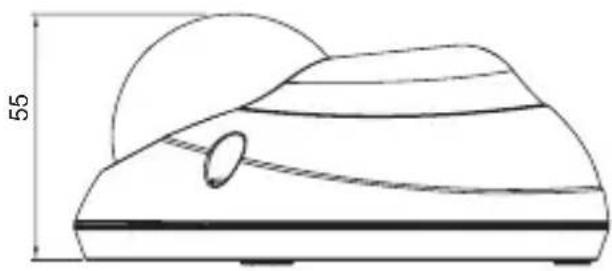
| Dimensions | ∅120mm x 55mm |
| Weight | Approx. 350g |
| IP Rating | IP66 |
| Operating Temperature | 14°F~122°F (-10°C~+50°C) |
| Storage Temperature | -4°F~140°F (-20°C~+60°C) |
| Safety | Use Class 2 power supply only; do not disassemble; avoid rain |
Frequently Asked Questions - KPC-LND45NU KT&C
User questions about KPC-LND45NU KT&C
0 question about this device. Answer the ones you know or ask your own.
Ask a new question about this device
Download the instructions for your Security Camera in PDF format for free! Find your manual KPC-LND45NU - KT&C and take your electronic device back in hand. On this page are published all the documents necessary for the use of your device. KPC-LND45NU by KT&C.
USER MANUAL KPC-LND45NU KT&C
natural_image
Two identical white spherical objects with internal dark lenses, no text or symbols visible.- CAUTIONS
- IMPORTANT SAFETY INSTRUCTIONS
- EQUIPMENT AND ACCESSORIES
- CAMERA COMPONENT DESCRIPTIONS
- INSTALLATION
- DIMENSIONS
- SPECIFICATIONS
- OSD MANUAL
- Menu Structure
- Function Description
CAUTION
These servicing instructions are for use by qualified service personnel only. To reduce the risk of electric shock, do not perform any servicing other than that contained in the operating instructions unless you are qualified to do so.
Use Class 2 Power Supply Only
This device complies with Part 15 of the FCC Rules. Operation is subject to the following two conditions:
- This device may not cause harmful interference.
- This device must accept any interference received, including interference that may cause undesired operation.
Note
This equipment has been tested and found to comply with the limits for a Class A digital device, pursuant to part 15 of the FCC Rules. These limits are designed to provide reasonable protection against harmful interference when the equipment is operated in a commercial environment. This equipment generates, uses, and can radiate radio frequency energy and, if not installed and used in accordance with the instruction manual, may cause harmful interference to radio communications. Operation of this equipment in a residential area is likely to cause harmful interference in which case the user will be required to correct the interference at his own expense.
WARNING
This is a class A product. In a domestic environment this product may cause radio interference in which case the user may be required to take adequate measures.
Caution
Any changes or modifications in construction of this devices which are not expressly approved by the party responsible for compliance could void the user's authority to operate the equipment.
CAUTION
- A regulated DC12V 500mA power supply is recommended for use with this camera for the best picture and the most stable operation.
An unregulated power supply can cause damage to the camera.
When an unregulated power supply is applied, the product warranty will be void. - It is recommended that the camera be used with a monitor that has a CCTV quality 75 video impedance level. If your monitor is switched to high impedance then please adjust accordingly.
- Do not attempt to disassemble the camera to gain access to the internal components. Refer servicing to your dealer.
- Never face the camera towards the sun or any bright or reflective light, which may cause smears on the picture and possible damage to the image sensor.
- Do not remove the serial sticker for the warranty service.
- Do not expose the camera to rain or other types of liquid.
- The apparatus must be connected to a main socket-outlet with a protective earth connection.

WEEE
(Waste Electrical & Electronic Equipment)
This marking shown on the product or its literature, indicates that it should not be disposed with other household wastes at the end of its working life. To prevent possible harm to the environment or human health from uncontrolled waste disposal, please separate this from other types of wastes and recycle it responsibly to promote the sustainable reuse of material resources. Household users should contact either the retailer where they purchased this product, or their local government office, for details of where and how they can take item for environmentally safe recycling.
Business users should contact their supplier and check the terms and conditions of the purchase contract.
This product should not be mixed with other commercial wastes for disposal.

CAUTION
RISK OF ELECTRIC SHOCK DO NOT OPEN

CAUTION: TO REDUCE THE RISK OF ELECTRIC SHOCK, DO NOT REMOVE COVER (OR BACK). NO USER SERVICEABLE PARTS INSIDE. REFER SERVICING TO QUALIFIED SERVICE PERSONNEL

This symbol is intended to alert the user to the presence of un-insulated “dangerous voltage” within the product’s enclosure that may be of sufficient magnitude to constitute a risk of electric shock.

This symbol is intended to alert the user to the presence of important operating and maintenance (servicing) instructions in the literature accompanying the appliance.
2. IMPORTANT SAFETY INSTRUCTIONS
1) Read these instructions.
2) Keep these instructions.
3) Heed all warnings.
4) Follow all instructions.
5) Do not use this apparatus near water.
6) Clean only with dry cloth.
7) Do not block any ventilation openings. Install in accordance with the manufacturer's instructions.
8) Do not install near any heat sources such as radiators, heat registers, stoves, or other apparatuses (including amplifiers) that produce heat.
9) Do not defeat the safety purpose of the polarized or grounding-type plug. A polarized plug has two blades with one wider than the other. A grounding type plug has two blades and a third grounding prong. The wide blade or the third prong are provided for your safety. If the provided plug does not fit into your outlet, consult an electrician for replacement of the obsolete outlet.
10) Protect the power cord from being walked on or pinched particularly at plugs, convenience receptacles, and the point where it exits from the apparatus.
11) Only use attachments/accessories specified by the manufacturer.
12) Use only with the cart, stand, tripod, bracket, or table specified by the manufacturer, or sold with the apparatus. When a cart is used, use caution when moving the cart/apparatus combination to avoid injury from tip-over.
13) Unplug this apparatus during lightning storms or when unused for long periods of time.
14) Refer all servicing to qualified service personnel. Servicing is required when the apparatus has been damaged in any way, such as when the power-supply cord or plug is damaged, liquid has been spilled or objects have fallen into the apparatus, or the apparatus has been exposed to rain or moisture, does not operate normally, or has been dropped.

3. EQUIPMENT AND ACCESSORIES
| Dome Type |
| Mount Guide |
| Manual | |
| Screws(3ea) / L-Wrench Service Video Output Test Cable | |
4. CAMERA COMPONENT DESCRIPTIONS
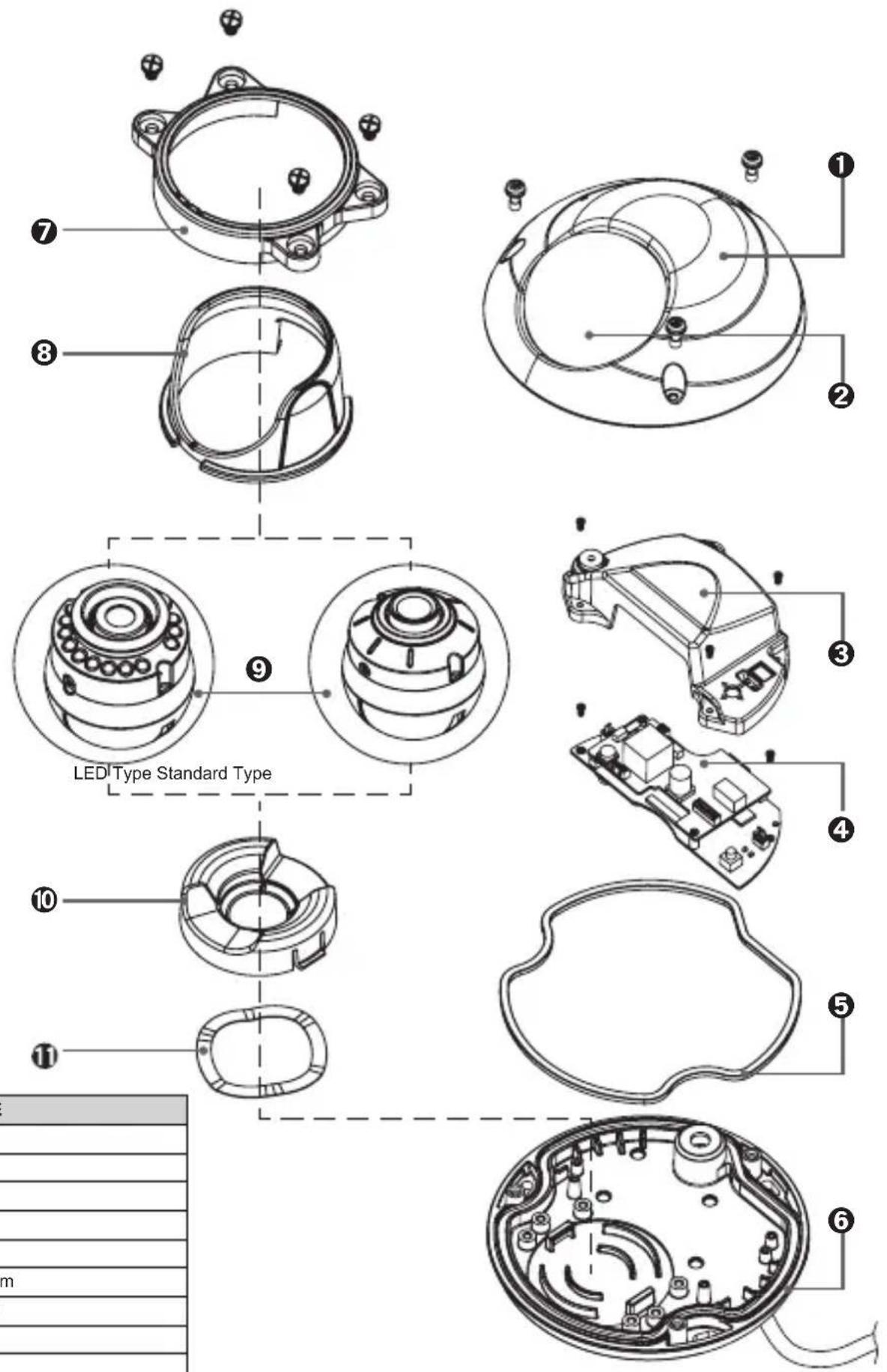
| NO PART NAME |
| 1 Housing Top |
| 2 Window |
| 3 Cover PCB |
| 4 PCB Module |
| 5 Rubber Case |
| 6 Housing Bottom |
| 7 Holder Middle |
| 8 Holder Top |
| 9 Ball Ass'y |
| 10 Holder Bottom |
| 11 Wave Water |
5. INSTALLATION
- Attach the Camera to the ceiling with using the screws provided, taking into considering the camera angle required for the surveillance function.

- Adjust the LENS ANGLE to the desired location by hand.

CAUTION: With certain wide-angle lenses, the upper part of the image may be obscured when the tilt angle exceeds 80°
CAUTION: panning(Pan + Horizontal) the bracket in excess of 1 rotations in one direction may cause damage to the cable.
5. INSTALLATION
- Connect the VIDEO OUT CABLE and check the video image. Change the SETTINGS accordingly using the OSD controller.

- After the SETTING is completed, install the TOP COVER.

5. INSTALLATION
• MONITOR CONNECTION
- DC12V/AC24V

flowchart
graph TD
    A["2V/AC24V"] --> B["DC12V/AC24V (TERMINAL BLOCK)"]
    B --> C["BNC FEMALE"]
    C --> D["VIDEO IN"]
    D --> E["MONITOR"]
    B --> F["DC12V/AC24V POWER SUPPLY"]
CAMERA
- DC12V

flowchart
graph TD
    A["DC12V (DC JACK)"] --> B["BNC FEMALE"]
    C["DC12V ADAPTER"] --> D["VIDEO IN"]
    B --> E["Monitor"]
    D --> E
    style A fill:#f9f,stroke:#333
    style C fill:#ccf,stroke:#333
    style E fill:#cff,stroke:#333
CAMERA

When you install the camera, please glue the end of cable to keep it stable in order to protect the camera from humidity problems.

natural_image
Pure technical diagram of concentric circular rings with no text, numbers, or symbols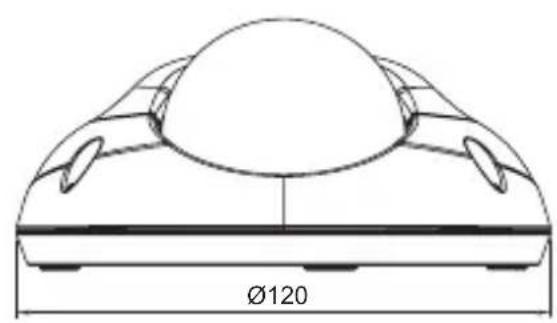
natural_image
Technical line drawing of a mechanical component with a circular top and flanged side (no text or symbols)
natural_image
Technical line drawing of a mechanical component with dimension标注 (no text or symbols)Unit(mm)
- SPECIFICATIONS
| LED Type Standard Type | |||
| Image Sensor 1/3" 960H | SONY Double Scan Super HAD CCD II | ||
| Scanning System 2 : 1 Interlace | |||
| H Resolution. 750TV Lines | |||
| Scanning Frequency NTSC: 15.734KHz(H), 59.94Hz(V) / PAL: 15.625KHz(H), 50Hz(V) | |||
| Total Pixels No. NTSC: 1028(H) X 508(V) / PAL: 1028(H) X 596(V) | |||
| Effective Pixels No. NTSC: 976(H) X 494(V) / PAL: 976(H) X 582(V) | |||
| S/N Ratio More than 50dB(3DNR ON) | |||
| Min. Illumination 0Lux 0.1 Lux | |||
| Sync System Internal | |||
| Gamma r= 0.45 | |||
| Video Output 1.0 Vp-p Composite(75Ω) | |||
| Lens Board Lens | |||
| Digital Zoom Ratio 3x | |||
| Electronic Shutter NTSC: 1/60 ~1/100,000sec, PAL: 1/50 ~1/100,000sec | |||
| Digital Slow Shutter | OFF, 2 ~ 256 Field | ||
| Flickerless | ON / OFF | ||
| WDR | ON / OFF (Level adjustable) | ||
| BLC | ON / OFF (Level adjustment, Area selection) | ||
| HLC | ON / AUTO / OFF (Level adjustable) | ||
| AGC | OFF, 6 ~ 36dB | ||
| DNR(2D/3D) | ON / OFF (Level adjustable) | ||
| Image Function | Image reverse(NORMAL/H / V / HV), Freeze, Contrast, Sharpness | ||
| Day & Night | True Day & Night With ICR Mechanism COLOR / BW / AUTO | COLOR / BW / AUTO | |
| IR LED | 850nm, 15ea | - | |
| IR LED Distance | up to 15M | - | |
| Motion Detection 4 Zones (Level adjustable, Area adjustment) | |||
| Privacy Masking | 15 Zones (Area adjustment) | ||
| White Balance | ATW / PUSH / USER1 / USER2 / ANTI CR / MANUAL / PUSH-LOCK | ||
| OSD | Built in (Joystick) | ||
| Language | ENGLISH / JAPANESE / GERMAN / FRENCH / RUSSIAN / PORTUGUESE / SPANISH / CHINESE HINDI, TAMIL, TURKISH, ARABIC, FARSI | ||
| Operating Temperature | 14°F~122°F(-10°C~+50°C) | ||
| Storage Temperature | -4°F~140°F(-20°C~+60°C) | ||
| Humidity | Less than 80% | ||
| Power Consumption | DC | DC12V (±10%), Max. 250mA | DC12V (±10%), Max. 150mA |
| DUAL | DC12V (±10%), Max. 340mA AC24V (±10%), Max. 4.0W | DC12V (±10%), Max. 200mA AC24V (±10%), Max. 2.5W | |
| Dimension (mm) | ∅120mm x 55mm | ||
| Weight | Approx. 350g | ||
| IP Rating | IP 66 | ||
Specifications and designs are subject to change for improving the functionality of this product without notice.
- Menu structure
| Main MENU 1st | Sub MENU 2nd | Sub MENU 3rd Sub | MENU 4th Sub MENU 5th Sub MENU | ||
| EXPOSURE | AUTO | HIGH LUMINANCE | FLICKERLESS OFF / ON | ||
| BRIGHTNESS 0 ~ 255 | |||||
| LOW LUMINANCE | MODE | OFF, AGC, SLOW, AGC->SLOW,SLOW->AGC, AGC->SLOW->AGC | |||
| AGC MAX 6, 12, 18, 24, | 30, 36 | ||||
| DSS MAX 2, 4, 8, 16, 32, | 64, 128, 256 | ||||
| BRIGHTNESS x0.25,x0 | 50,x0.75,x1.00 | ||||
| RETURN | |||||
| MANUAL | MODE SHUT, SLOW | ||||
| SHUT | MODE (SHUT) ONLY1/50(PAL), 1/60(NTSC), 1/100(NTSC), 1/120(PAL),1/250, 1/500, 1/1000, 1/2000, 1/4000, 1/10000, 1/50000, 1/100000MODE (SLOW) ONLY 2, 4, 8, 16, 32, 64, 128, 256 | ||||
| AGC 6, 12, 18, 24, 30 | 36, 42, 44.8 | ||||
| RETURN | |||||
| WHITEBALANCE | ATW | SPEED 0 ~ 255 | |||
| DELAY CNT 0 ~ 255 | |||||
| ATW FRAME x0.5, x1 | 0, x1.5, x2.0 | ||||
| ENVIRONMENT INDOOR, OUTDOOR | |||||
| RETURN | |||||
| PUSH | |||||
| USER1 | B-GAIN 0 ~ 255 | ||||
| R-GAIN 0 ~ 255 | |||||
| RETURN | |||||
| USER2 | B-GAIN 0 ~ 255 | ||||
| R-GAIN 0 ~ 255 | |||||
| RETURN | |||||
| ANTI CR | |||||
| MANUAL | LEVEL UP | PUSH ENTER | |||
| LEVEL DOWN | PUSH ENTER | ||||
| PRESET | |||||
| RETURN | |||||
| PUSH LOCK | |||||
| DAY&NIGHT | COLOR | ||||
| AUTO | BURST OFF, ON | ||||
| DELAY CNT 0 ~ 15 | |||||
| DAY > NIGHT | (000 ~ 014) (LED TYPE)(000 ~ 254) | ||||
| NIGHT > DAY | (001 ~ 015) (LED TYPE)(001 ~ 255) | ||||
| IR OPTIMIZER(LED TYPE) | ON | MODE | CENTER, AUTO | ||
| LEVEL | 000 ~ 031 | ||||
| OFF | |||||
| RETURN | |||||
| BW | BURST OFF, ON | ||||
| IR OPTIMIZER(LED TYPE) | ON | MODE | CENTER, AUTO | ||
| LEVEL | 000 ~ 031 | ||||
| OFF | |||||
| RETURN | |||||
- OSD MANUAL
| Main MENU 1st Sub MENU 2nd | Sub MENU 3rd Sub MENU 4th Sub MENU 5th Sub MENU | ||||
| WDR/BLC | WDR MODE | ON | LEVEL 0~15 | ||
| CONTRAST1 0~7 | |||||
| CONTRAST2 0~4 | |||||
| OFF | |||||
| BLC MODE | ON | BLC ZONE | CENTER, TOP, BOTTOM, LEFT, RIGHT | ||
| LEVEL 0~254 | |||||
| OFF | |||||
| HLC MODE | ON, AUTO | CLIP LEVEL 0~255 | |||
| SCALE 0~15 | |||||
| OFF | |||||
| DNR | 2DNR MODE OFF, ON | ||||
| 2DNR LEVEL 0~15 | |||||
| 3DNR MODE OFF, ON | |||||
| 3DNR LEVEL 0~63 | |||||
| RETURN | |||||
| IMAGE | MIRROR OFF, V-FLIP, H-FLIP, HV-FLIP | ||||
| FREEZE OFF, ON | |||||
| EZOOM 1.0x~3.0x | |||||
| CONTRAST 0~63 | |||||
| SHARPNESS 0~15 | |||||
| RETURN | |||||
| SPECIAL | CAMERA TITLE | ON | EDIT MODE | ||
| RETURN | |||||
| OFF | |||||
| LANGUAGE | ENGLISH/中文/Русский/ESPAÑOL/DEUTSCH/FRANCAIS/PORTUGUÊS/日本語/HINDI/TAMIL/TURKISH/ARABIC/FARSI | ||||
| PRIVACY | AREA SEL 1/15~ | 15/15 | |||
| MODE | OFF, ON | ||||
| POSITION PUSH | ENTER | ||||
| COLOR | "WHITE, BLACK, RED, GREEN, BLUE, YELLOW, CYAN, MAGENTA" | ||||
| TRANSP | 0.00, 0.50, 0.75, 1.00 | ||||
| MOSAIC OFF, ON | |||||
| RETURN | |||||
| MOTION DET | ON | DETECT SENSE | 0~127 | ||
| BLOCK DISP | OFF, ON | ||||
| MONITOR AREA | AREA SEL | 1/4~4/4 | |||
| MODE | OFF, ON | ||||
| TOP | 0~15 | ||||
| BOTTOM | 0~15 | ||||
| LEFT | 0~23 | ||||
| RIGHT | 0~23 | ||||
| RETURN | |||||
| OFF | |||||
| RETURN | |||||
| FACTORY DEFAULT | |||||
| EXIT | |||||
| SAVE&EXIT | |||||
Brand : KT&C
Model : KPC-LND45NU
Category : Security Camera