
Flicks 140 - Video projector AIPTEK - Free user manual and instructions
Find the device manual for free Flicks 140 AIPTEK in PDF.


| Product Type | LED video projector |
| Dimensions (L x W x H) | 299 mm x 166 mm x 135 mm |
| Weight | 2.9 kg |
| Power Supply Input | 100-240V, 1.5A AC |
| Power Supply Output | 19V, 4.74A DC |
| Battery Type | Embedded 13,000 mAh, 10.8V Li-ion rechargeable |
| Battery Life (Movie) | 4 hours |
| Battery Life (Music) | 28 hours |
| Optical Technology | DLP |
| Light Source | RGB-LED (lifetime up to 20,000h) |
| Native Resolution | 1280 x 800 pixels (HD Ready) |
| Aspect Ratio | 16:9 (4:3 compatible) |
| Brightness | Up to 700 lumens |
| Contrast Ratio | 10000:1 |
| Projection Image Size (Diagonal) | 49 - 305 cm (19" - 120") |
| Projection Distance | 50 - 310 cm (20" - 122") |
| Throw Ratio | 1.2 |
| Focus | Manual |
| Keystone Correction | Vertical +/-40° (automatic default) |
| Image Flip | Yes (rear projection) |
| Speaker System | Stereo 2x10W full range + passive radiator subwoofer |
| Connections | HDMI in (Type A), AUX in 3.5mm, Audio out 3.5mm, USB for charging, Bluetooth 4.0 |
| Smartphone Charging | Yes (via USB) |
| Safety Features | Automatic thermal management, high power LED warning |
| Maintenance | Clean with soft lint-free cloth; do not use liquids |
| Package Contents | Flicks 140, remote control, power supply, HDMI cable, user manual |
Frequently Asked Questions - Flicks 140 AIPTEK
User questions about Flicks 140 AIPTEK
0 question about this device. Answer the ones you know or ask your own.
Ask a new question about this device
Download the instructions for your Video projector in PDF format for free! Find your manual Flicks 140 - AIPTEK and take your electronic device back in hand. On this page are published all the documents necessary for the use of your device. Flicks 140 by AIPTEK.
USER MANUAL Flicks 140 AIPTEK
About the product....2
General safety information 2
Notice for Long-time Projection ....4
Package Content 4
Knowing your LED Projector ....5
Getting Started 6
CHARGE YOUR FLICKS....6
WATCH MOVIES IN FLICKS....7
Turning on the projector....7
Adjusting Volume 7
Adjusting Focus....7
Keystone Correction....7
Flipping image horizontally (Rear projection)....7
Adjusting projection angle....7
Turning off the projector....7
LISTENING TO BLUETOOTH MUSIC ON FLICKS....7
Turning on speakers ....7
Adjusting Volume 8
Turning off speaker 8
Charging the External Mobile Device 8
Troubleshooting....8
Technical Data 9
User's Manual
EN
Welcome
Thank you very much for purchasing this product. Before you start, you are recommended to read this manual step by step to obtain the best results with your new projector. We wish you enjoy it.
About the product
Flicks is a mobile party powerhouse bringing video and music to any environment. The LED HD projector projects ultra-bright and sharp pictures from a HDMI source. The DLP chip in use, known from large cinema projectors, provides rich colors and high contrasts. With an embedded rechargeable battery, Flicks is free from any power source for real mobile presentations and movie nights. The 3ways speakers with subwoofer are well balanced and powerful enough for your party. Enjoy movies or music with Flicks wherever you are, free from a power source.
General safety information
Physical injury or damage to the device or loss of data can result from improper handling.
SETTING UP THE DEVICE
The device should be placed securely on a stable, flat surface. Position all cables in such a way that no one will stumble on them, thus avoiding possible injuries to persons or damage to the device itself.
Do not plug in the device in moist rooms. Never touch the mains cable or the mains connection with wet hands.
The device must have sufficient ventilation and may not be covered. Do not put your device in closed cabinets or boxes.
Do not place the machine on soft surfaces such as tablecloths or carpets and do not cover the ventilation slits. Otherwise the device could overheat or catch fire.
Protect the device against direct sunlight, heat, large temperature fluctuations and moisture. Do not place the device in the vicinity of heaters or air conditioners.
Do not allow liquids to enter into the device. Switch off the device and disconnect it from the mains supply if liquids or foreign substances end up inside the device. Have the unit inspected by a technical service department.
Always handle the unit with care. Avoid touching the lens. Never place heavy or sharp objects on the projector or the power cable.
If the projector gets too hot or emits smoke, shut it down immediately and unplug the power cable. Arrange for your device to be investigated by a technical service centre. To prevent the spread of fire, open flames should be kept away from the device.
Under the following conditions, a layer of moisture can appear inside the device which can lead to malfunctions:
- if the device is moved from a cold to a warm area • after a cold room is heated
- when this device is placed in a damp room
User's Manual
Proceed as follows to avoid any moisture build-up:
- Seal this device in a plastic bag before moving it to another room, in order for it to adapt to room conditions.
- Wait one to two hours before you take the device out of the plastic bag.
The device should not be used in a very dusty environment. Dust particles and other foreign objects may damage the unit.
Do not expose the device to extreme vibrations. It may damage the internal components.
Do not allow children to handle the device without supervision. The packing materials should be kept out of the hands of children.
REPAIRS
Do not repair the device yourself. Improper maintenance can result in injuries or damage to the device. Your device must be repaired by an authorised service centre.
Find details of authorised service centres on the warranty card.
Do not remove the type label from your device; this would void the warranty.
AUTOMATIC DEVICE TEMPERATURE CONTROL
This device includes an automatic thermal management controller. If the internal temperature gets too hot, the fan speed will automatically increase (noise increase) and the product will automatically turn off.
POWER SUPPLY
Before turning on your device, check that the outlet that you are going to plug it into conforms to the indications shown on the information plate (voltage, current, power network frequency) located on your device. This device shall be connected to a single phase power network. The device shall not be installed on bare ground.
Only use the power cable that is supplied with your device. Your device is delivered with a grounded power cord. It is imperative to connect a grounded connector to a grounded outlet connected to the building earthing.
The socket outlet shall be installed near the equipment and shall be easily accessible. In case of failure, turn off the master switch and disconnect the power cable from the electrical outlet.
Turn off the device and unplug from the power outlet before cleaning the surface. Use a soft, lint-free cloth. Never use liquid, gaseous or easily flammable cleansers (sprays, abrasives, polishes, alcohol). Do not allow any moisture to reach the interior of the device.
DANGER!

High Power LED
This device is equipped with high power LED (Light Emitting Diode), which emits very bright light. Do not look directly into the projector lens. This could cause eye irritation or damage.
User's Manual
Z
WIRELESS NETWORK (BLUETOOTH)
The functioning of security systems, medical equipment or sensitive devices can be disrupted by the transmission power of the device. Observe any usage regulations (or restrictions) in the vicinity of such equipment.
The use of this device can affect the operation of insufficiently shielded medical devices and hearing aids and pacemakers through the release of high frequency radiation. Also consult a doctor or the manufacturer of the medical device to establish whether these are sufficiently shielded from external high frequency radiation.
Avoid Hearing Damage:
Listening at high volume for a long period of time could cause damage to your ears.

Notice for Long-time Projection
The built-in battery supports approximately 4 hours of movie playback and 28 hours of music playback. For long time projection, you are recommended to use AC adapter.
When the battery is too weak to stay in operation, the low battery capacity icon will flash. You need to charge the product while the icon showed.
It's normal that the projector will feel warm with continuous use due to its high performance. If the projector runs for a long time and over-heated, the Fan speed will automatically increase (noise increase) and the product will automatically turned off.
Package Content
Please check if the following items are located in your packaging:
- Flicks 140
- Remote Control • Power Supply
- HDMI cable
- User's Manual
User's Manual
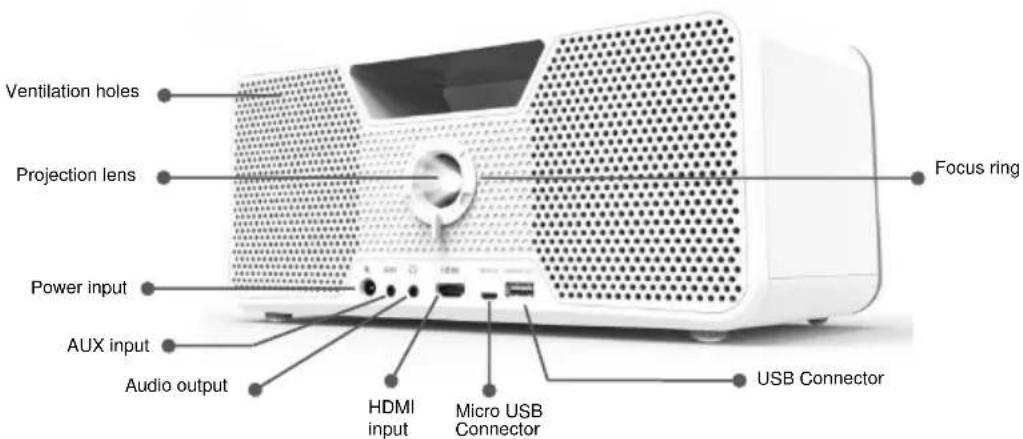
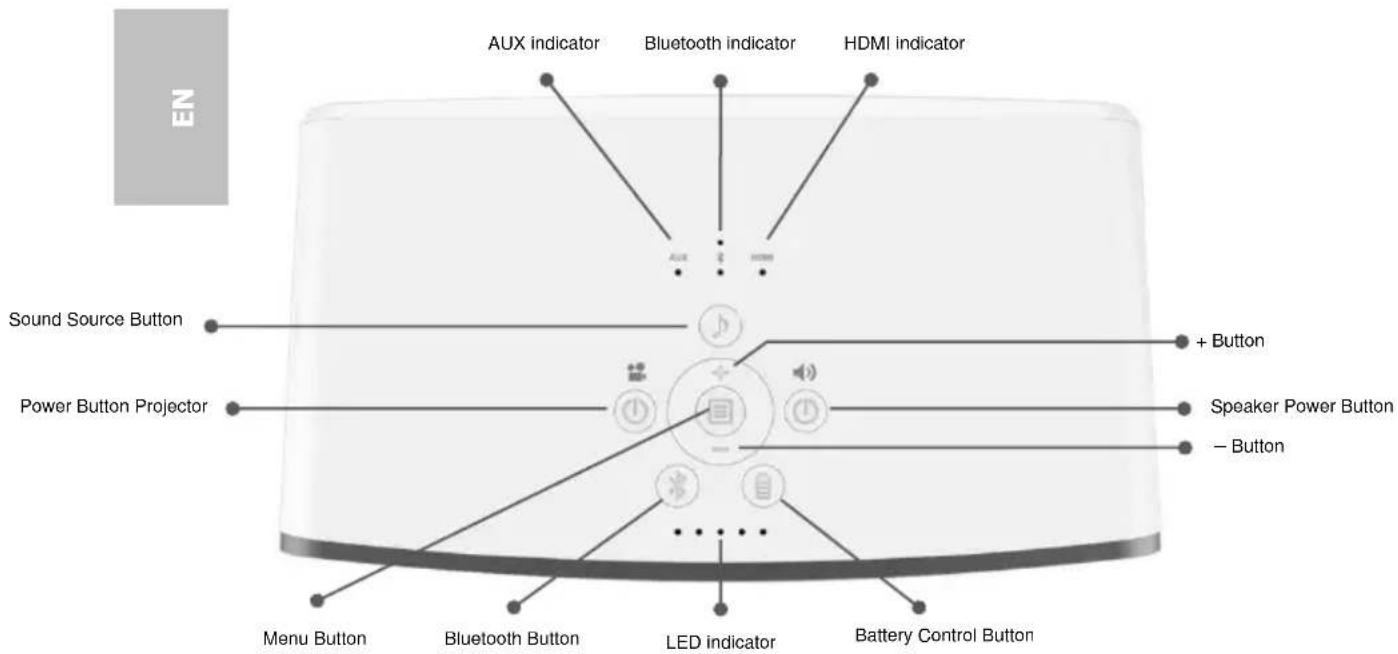
Knowing your LED Projector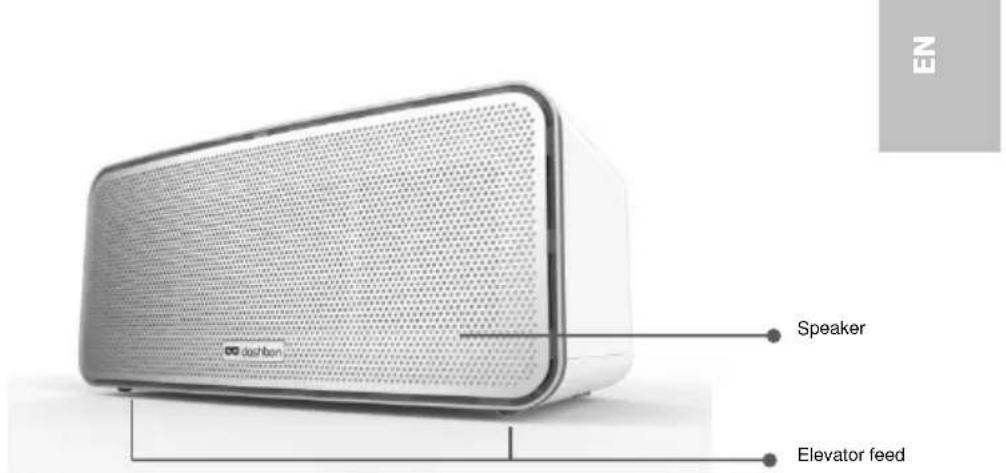
User's Manual
Getting Started
TURN ON THE MASTER SWITCH
You won't be able to operate Flicks without turning on the master switch located at the bottom of Flicks.
CHARGE YOUR FLICKS
Fully charge your Flicks using only the included power adapter before first use. It will take approximately 4 to 10 hours to fully charge your Flicks depending on the Flicks models you purchase:
• 140WH Flicks models fully charged in 4 to 6 hours • 280WH Flicks models fully charged in 8 to 10 hours
The battery level indicator (4 white LEDs) will flash and show the charging status. The LEDs will go off when your Flicks is fully charged.
WATCH MOVIES IN FLICKS
Turning on the projector
- Press and hold the projector power button for 2 seconds to turn on the projector. The speaker will turn on automatically along with the projector so you don't need to do anything else.
- The HDMI sound source will be automatically selected and the LED indicator will be lit. If not, manually press the sound source button to make the selection.
- Connect Flicks to your HDMI-compatible device using the included HDMI cable.
Adjusting Volume
Adjust the volume of your movie by pressing the + and - buttons located on the top panel of Flicks.
Adjusting Focus
Place the projector on a flat surface and toward a wall or a projection screen. The projection distance and projection size are:
Distance: 50 – 310 cm
Size: 49 – 305 cm
Rotate the focus ring clockwise / counterclockwise to sharpen the image.
Keystone Correction
Press the Menu button until you see the Keystone adjustment icon. Press the + or - button to make the adjustment. The default setting is automatic keystone.
Flipping image horizontally (Rear projection)
Press the menu button until you see the image Flip adjustment icon. Press the + or - button to flip the image horizontally to project from behind a translucent screen.
Adjusting projection angle
Flicks is equipped with two elevator feet. They change the image height and vertical projection angle. Screw the elevator feet clockwise / counterclockwise to fine tune the angle until the image is positioned where you want it.
Turning off the projector
Press and hold the projector power button for 2 seconds. Turn off the projector by pressing the projector power button again.
- Press and hold the speaker power button for 2 seconds to turn on the speakers.
User's Manual
EN
- The Bluetooth sound source will be automatically selected and the LED indicator will be lit. If not, manually press the sound source button to make the selection.
- Turn on Bluetooth on your Bluetooth-enabled device.
- When prompted select "Dashbon Flicks" to pair. It may take up to a minute to pair.
Adjusting Volume
Adjust the music volume by pressing the + and - buttons located on the top panel of Flicks or the volume buttons on your Bluetooth-enabled device.
Turning off speaker
Press and hold the speaker power button for 2 seconds to turn off the speaker.
Checking the Battery Status
Press the Battery control button to check the battery status. All four LEDs of the battery indicator will flash once. Afterwards, depending on the battery level, 1, 2, 3, or all 4 LEDs will flash again once and then the battery indicator will turn off again.
Charging the External Mobile Device
The built-in battery can not only be used for projection but also to charge mobile devices.
Connect your mobile device to the projector via the USB cable with the end of Type A connector plugged into the USB port on the front side of the projector.
The device will be charged automatically.
Some MHL devices do not follow the standard power design, so that their batteries cannot be charged by the projector (e.g., Samsung Galaxy Nexus, HTC M8).
Note: A USB cable is not included in the package content.
Troubleshooting
If your projector does not seem to be functioning properly, check the items below before you contact an authorized service center.
| Symptom | Check Point |
| The projector does not work when connecting to a smartphone notebook or PC with cable. | Check if the HDMI cable is plugged correctly. |
| The projected image is too dark. | 1. Use the projector in a darker environment.2. Increase the brightness by using the power adapter.3. Scale down the projectional image size. |
User's Manual
| The projected image is blurred. | 1. Adjust the focus. Please refer to “Adjusting Focus”.2. Check if the lens is dirty. |
| The surface temperature of projector is high. | Because of the high-luminance LED, it is normal that this projector generates heat in long-time use. It will not affect the performance of the projector. Always keep the ventilation slots free of dirt or obstructions and operate the projector in a properly ventilated environment. |
EN
Technical Data
| PRODUCT FEATURES | |
| Optical Technology | DLP |
| Light Source | RGB-LED |
| LED Lifetime | Up to 20.000h |
| Contrast | 10000:1 |
| Native Resolution | 1280 x 800 Pixel (HD Ready) |
| Aspect Ratio | 16:9 (4:3 compatible) |
| Projection image Size (Diagonal) | 49 ~ 305 cm (19" ~ 120") |
| Projection distance | 50 ~ 310 cm (20" ~ 122") |
| Throw ratio | 1.2 |
| Brightness | Up to 700 lumens |
| Focus | Manual |
| Offset | 100% |
| Projection source | HDMI |
| Audio source | AUX, HDMI, Bluetooth |
| Smarthphone charging | Yes |
| Adjustable feed | Yes |
| Microphone | Yes |
| FUNCTIONS | |
| Volume | Yes |
| Image flip | Yes (Rear projection) |
| Keystone correction | Vertical: +/-40° |
| SPEAKER | |
| Drivers | Stereo, full range, 2x 10 Watt |
| Subwoofer | Passive Radiator |
| CONNECTIONS | |
| USB | For charging Smartphones (micro USB for service updates) |
| HDMI in | HDMI (Type A) |
| AUX in | 3.5 mm mini jack |
| Audio Out | 3.5 mm mini jack |
| Bluetooth | 4.0 |
| PRODUCT DETAILS | |
| Dimensions | 299 mm x 166 mm x 135 mm (LxWxH) |
| Color | White |
| Weight | 2.9 kg |
| Cooling | Active |
| Model-Code | BK01DW45AW |
| POWER | |
| Power supply | Input: 100 ~ 240V, 1.5 A AC Output: 19V, 4.74 A DC |
| Battery type | Embeeded, 13.000 mAh, 10.8 V Lithium-Ion rechargeable battery |
| Battery lifetime | Movie playback: 4 hrs Music playback: 28 hrs Standby: 28 days |
| Power consumption | Movie playback: 35 W Music playback: 5 W Standby: < 0.5 W |
CE Marking
The CE marking certifies that the product meets the main requirements of the European Parliament and Council directives 1999/5/EG, 2006/95/CE, 2004/108/CE and 2009/125/CE on information technology equipment, regarding safety and health of users and regarding electromagnetic interference. The declaration of compliance can be consulted on the site www.aiptek.de.
Preservation of the environment as part of a sustainable development plan is an essential concern of Aiptek International GmbH. The desire of Aiptek is to operate systems observing the environment and consequently it has decided to integrate environmental performances in the life cycle of its products, from manufacturing to commissioning use and elimination.
User's Manual
Packaging: The presence of the logo (green dot) means that a contribution is paid to an approved national organisation to improve package recovery and recycling infrastructures. Please respect the sorting rules set up locally for this kind of waste.
Product: The crossed-out waste bin stuck on the product means that the product belongs to the family of electrical and electronic equipment. In this respect, the European regulations ask you to dispose of it selectively;
- At sales points in the event of the purchase of similar equipment.
- At the collection points made available to you locally (drop-off centre, selective collection, etc.).
EN
In this way you can participate in the re-use and upgrading of Electrical and Electronic Equipment Waste, which can have an effect on the environment and human health. The paper and cardboard packaging used can be disposed of as recyclable paper. Have the plastic wrapping and Styrofoam packaging recycled or dispose of it in the non-recyclable waste, depending on the requirements in your country.
Trademarks
The mentioned references in this manual are trademarks of the respective companies. The lack of the trademarks ® and TM does not justify the assumption that these dedicated terminologies are free trademarks. Other product names used herein are for identification purposes only and may be trademarks of their respective owners. Aiptek International GmbH disclaims any and all rights in those marks.
Neither Aiptek International GmbH nor its affiliates shall be liable to the purchaser of this product or third parties for damages, losses, costs, or expenses incurred by the purchaser or third parties as a result of accident, misuse, or abuse of this product or unauthorized modifications, repairs, or alterations to this product, or failure to strictly comply with Aiptek International GmbH operating and maintenance instructions. Aiptek International GmbH shall not be liable for any damages or problems arising from the use of any options or any consumable materials other than those designated as original Aiptek International GmbH / Dashbon products or Aiptek International GmbH / Dashbon approved products. Aiptek International GmbH shall not be held liable for any damage resulting from electromagnetic interference that occurs from the use of any interface cables other than those designated as Aiptek International GmbH / Dashbon products.
All rights reserved. No part of this publication may be reproduced, stored in a retrieval system or transmitted in any form or by any means, electronic, mechanical, photocopying, recording, or otherwise, without the prior written permission of Aiptek International GmbH. The information contained herein is designed only for use with this product. Aiptek International GmbH is not responsible for any use of this information as applied to other devices.
This user manual is a document that does not represent a contract.
Errors, printing errors and changes are reserved.
Copyright © 2015 Aiptek International GmbH

- USER'S MANUAL
- WELCOME
- ABOUT THE PRODUCT
- GENERAL SAFETY INFORMATION
- SETTING UP THE DEVICE
- REPAIRS
- AUTOMATIC DEVICE TEMPERATURE CONTROL
- POWER SUPPLY
- DANGER
- HIGH POWER LED
- WIRELESS NETWORK (BLUETOOTH)
- AVOID HEARING DAMAGE
- NOTICE FOR LONG-TIME PROJECTION
- PACKAGE CONTENT
- GETTING STARTED
- TURN ON THE MASTER SWITCH
- CHARGE YOUR FLICKS
- WATCH MOVIES IN FLICKS
- TURNING ON THE PROJECTOR
- ADJUSTING VOLUME
- ADJUSTING FOCUS
- KEYSTONE CORRECTION
- FLIPPING IMAGE HORIZONTALLY (REAR PROJECTION)
- ADJUSTING PROJECTION ANGLE
- TURNING OFF THE PROJECTOR
- TURNING OFF SPEAKER
- CHECKING THE BATTERY STATUS
- CHARGING THE EXTERNAL MOBILE DEVICE
- TROUBLESHOOTING
- CE MARKING
- TRADEMARKS
Brand : AIPTEK
Model : Flicks 140
Category : Video projector