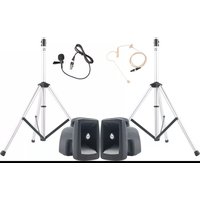
MEGA-DP DUAL/EM/LM - Loudspeaker Anchor Audio - Free user manual and instructions
Find the device manual for free MEGA-DP DUAL/EM/LM Anchor Audio in PDF.


| Product Type | Portable PA Speaker System |
| Model | MEGA-DP DUAL/EM/LM |
| Brand | Anchor Audio |
| Dimensions (H x W x D) | 14 x 10 x 9 inches (approx.) |
| Weight | 12 lbs (approx.) |
| Power Source | Rechargeable battery (12V, 4.5Ah) |
| Battery Life | 8-10 hours at moderate volume |
| Charging Time | 3-4 hours |
| Audio Output Power | 60W RMS |
| Frequency Response | 80 Hz - 20 kHz |
| Drivers | Dual 6.5" woofers and 1" tweeter |
| Inputs | 1/4" and XLR combo jacks, 3.5mm aux |
| Outputs | Line out (RCA) |
| Wireless Microphone | Includes UHF handheld and headset (EM/LM) |
| Range | Up to 300 feet (line of sight) |
| Material | High-impact ABS plastic with metal grille |
| Mounting | Pole mount (1.5" socket) and tripod ready |
| Compliance | UL, CE, RoHS |
| Maintenance | Wipe with dry cloth, avoid moisture |
| Included Accessories | Power cord, wireless mic, user manual |
Frequently Asked Questions - MEGA-DP DUAL/EM/LM Anchor Audio
User questions about MEGA-DP DUAL/EM/LM Anchor Audio
0 question about this device. Answer the ones you know or ask your own.
Ask a new question about this device
Download the instructions for your Loudspeaker in PDF format for free! Find your manual MEGA-DP DUAL/EM/LM - Anchor Audio and take your electronic device back in hand. On this page are published all the documents necessary for the use of your device. MEGA-DP DUAL/EM/LM by Anchor Audio.
USER MANUAL MEGA-DP DUAL/EM/LM Anchor Audio
MegaVox Pro Public Address System Owners Manual
MADE IN USA

SIX YEAR WARRANTY
A Message from the President
Congratulations on purchasing an Anchor Audio sound system, the choice of thousands of satisfied customers including the White House, prestigious universities, school districts nationwide, police and fire departments, and all branches of the U.S. military. Our products are made of the finest materials and built with pride in the U.S.
We've incorporated the latest technology into your sound system yet kept it simple to use. Just take a few minutes to review this manual to ensure the maximum enjoyment of your Anchor system. Or, you can view a demonstration video complete with a trouble shooting section at www.anchoraudio.com.
Feel free to call our friendly customer support staff at 1-800-ANCHOR1 Monday thru Friday between 7:00am and 5:00pm Pacific Standard Time with any questions. We love to hear from our customers.

Janet Jacobs, President on behalf of all Anchor employees
CONTENTS
GETTING STARTED / WARRANTY INFORMATION .... 1
Please check your new unit carefully for any damage which may have occurred during shipment. Each Anchor product is carefully inspected at the factory and packed in specially designed boxes for safe transport.
Notify the freight carrier immediately of any damage to the shipping box or product. Repack the unit in the original box and wait for inspection by the carrier's claim agent. Notify your dealer of the pending freight claim.
NOTE: All damage claims must be made with freight carrier!
RETURNING SYSTEMS FOR SERVICE OR REPAIR
For service or repair, please contact the dealer you purchased your system from or Anchor Audio Customer Service at 800.262.4671 to obtain a RA (Return Authorization) number. You may also complete an online RA request form at www.anchoraudio.com. All shipments to Anchor Audio must include a RA number and must be shipped prepaid. C.O.D. shipments will be refused and returned at your expense.
IMPORTANT: Save the shipping box & packing materials,
they were specially designed to ship your unit!
WARRANTY REGISTRATION
Visit our website at www.anchoraudio.com and select "Warranty Registration." Complete the online form to activate the six-year limited warranty on your MegaVox Public Address System and two-year limited warranty for the microphones.
100-0058-000 rev. A 12/10
MegaVox Pro Public Address System Owners Manual
MADE IN USA

SIX YEAR WARRANTY
NOTE: Fully Charge Batteries Before First Use!
- Before turning the systems power on: Set all Input Level Controls
- Plug a microphone into a MIC jack and/or a line-level audio source into the LINE IN jack
- Switch POWER to ON - The red BATTERY LED will turn on (If the light flashes or stays off charge the battery)
- Slowly increase the Level Controls for the input jacks used to desired volume level
IMPORTANT: Make all connections with shielded cables to avoid hum, buzzing or interference.
SPEAKER STAND SETUP
- Loosen the Lower Collar Knob
- Separate the stand legs until the leg support Cross Braces are parallel to the floor
- Tighten the Lower Collar Knob
- Loosen the Upper Collar Knob and extend the center pole
- Adjust height and retighten the Upper Collar Knob
- Place your Anchor sound system on the stand

CAUTION: The signal alert sound can produce VERY high or harmful sound pressure levels that can cause hearing damage.
MegaVox Pro Public Address System Owners Manual
MADE IN USA

SIX YEAR WARRANTY
CONNECTING TWO OR MORE MEGAVOX PRO PA SYSTEMS
UNPOWERED MEGAVOX PRO COMPANION SPEAKER (MEGA-6001)
Connect one end of a speaker cable (SC-50) to the SPKR OUT jack on the back of a powered MegaVox PRO PA system.
The other end connects to the jack labeled IN on the back of a MegaVox PRO unpowered companion speaker.
NOTE: AC power is not required for an unpowered companion speaker.
POWERED MEGAVOX PRO PA SYSTEMS WITH LINE OUT
Connect speaker cable (EX-50PP) from LINE OUT on first powered MegaVox PRO to LINE IN on second powered MegaVox PRO. Set volume level of the second system to maximum, this gives full volume control to the first or primary PA system.
DAISY-CHAINING
Use the Line Out method above to connect up to six powered MegaVox PRO PA Systems. Make all connections with power off.
Set volume level to maximum on all secondary systems so the primary unit Level Control sets the volume for the entire chain.
To avoid speaker popping, which can cause damage, power speakers on in order, primary unit first, and power speakers off in reverse order, primary unit last.

CORRECT SYSTEM PLACEMENT WRONG SYSTEM PLACEMENT


CONTROLLING FEEDBACK
Feedback, a howling noise or shrill sound, is self-generated by the sound system. It's caused by a microphone picking up the sound coming from the speaker and then re-amplifying it. Once a feedback loop starts, it continues until the system is adjusted.
FEEDBACK CAUSES
- Microphone too close, pointing towards or in front of speaker
• Volume setting is too loud for room
• Sound reflecting off hard surfaces
AVOIDING & ELIMINATING FEEDBACK
- Point microphone in a different direction
- Keep microphone away from the speaker
• Place speaker in FRONT of the microphone - Reduce the sound system volume levels
CAUTION: Feedback can damage your equipment & may be hazardous to hearing.
MegaVox Pro Public Address System Owners Manual
MADE IN USA

SIX YEAR WARRANTY
DIVERSITY WIRELESS BY ANCHOR AUDIO
Anchor Audio UHF wireless is a 16 channel, diversity wireless system that receives signals with two independent antennae. With diversity wireless the receiver processes the stronger signal, effectively minimizing dropouts and interference from other transmitting sources. The antennae are mounted internally so there are no obstructions or risk of damage.
CHANNEL SELECTION - BUILT-IN RECEIVER
Select a channel, set the built-in receiver & microphone transmitter to that channel before using your wireless system.
- Choose any available wireless channel/frequency from 1 thru 16 (see page 5 for transmitter instructions)
- Set the Wireless Channel Selector Knob to the channel/frequency you choose in step 1
If you have two wireless receivers repeat above for the second receiver. Remember, each receiver/transmitter pair must be set to different channels to avoid interference.
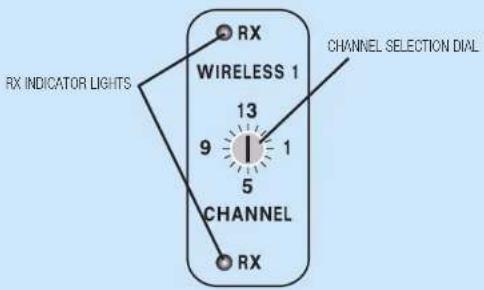
NOTE: Ongoing wireless interference? The frequency you selected may be in use by other systems in the area! Change channels until you find a clear frequency!
MegaVox Pro Public Address System Owners Manual
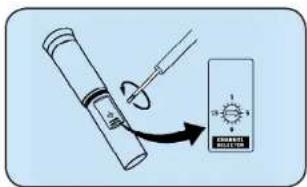
- Unscrew battery cover on bottom of microphone
- Set the CHANNEL SELECTOR dial to match the channel setting of your receiver
- Replace battery cover and tighten firmly
CHANNEL SELECTION - BODY-PACK TRANSMITTER
- The channel selection dial is located on the side of the transmitter
- Set the CHANNEL selection dial to match the channel setting of the receiver
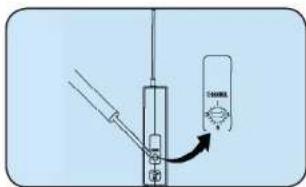
NOTE: When using dual wireless, each microphone must be set to a different channel!
After you have set the transmitter channel (see above) you are ready to use your wireless microphone:
- Body-pack transmitter users must insert the mic
plug into the transmitter jack marked MIC -
Turn the transmitter power switch to ON (The red LED will flash when the mic is turned on. If the red LED stays on, the battery is low)
-
Turn the MegaVox power switch to ON
- The RX indicators will light (only one indicator will light at a time) when the wireless signal is being transmitted and received
CAUTION: Harmful feedback may occur when walking in front of a sound system or speaker with a wireless microphone. Always point microphone away from speakers!
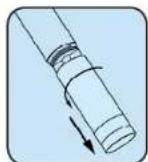
REPLACE BATTERY - HANDHELD TRANSMITTER
- Unscrew battery cover on bottom of microphone
- Replace old batteries with two fresh size 'AA' alkaline batteries
- Replace battery cover and tighten firmly

REPLACE BATTERY - BODY-PACK TRANSMITTER
- Slide open battery cover on front of transmitter
- Replace old batteries with two fresh size 'AA' alkaline batteries
- Replace battery cover by sliding firmly into place


NOTE: Transmitter power must be OFF when changing batteries!
For System Setup & Operation Videos Visit Our Website: www.anchoraudio.com
MegaVox Pro Public Address System Owners Manual
MADE IN USA

SIX YEAR WARRANTY
CARING FOR YOUR BUILT-IN BATTERIES
It is very important that you fully charge the batteries in your new pa system before the first time its used. To preserve battery life it is also recommended that batteries be fully charged as soon as possible after every use regardless of the length of operation.
UNDERSTANDING THE BATTERY LEVEL INDICATOR
LED Flashing Red: Battery charge is very low, in 15-30 minutes the Battery Protection Circuit will turn the system off. LED Off: Battery is completely drained and must be charged.
NOTE: System can be used while batteries charge!
OPERATING IN AC MODE
Plug your sound system into an AC outlet. Operate as normal while charging the built-in batteries at the same time. The Charger LED will light during charging and flash when the battery is fully charged.
BATTERY SERVICE TIME
With the batteries fully charged you can expect approx.: 8-12 hrs @ Medium Volume 3-6 hrs @ Full Volume of continuous music input (longer for speech). Service time will vary depending on control settings and use of accessories (built-in wireless receivers and/or a companion speaker).
IMPORTANT: For longer battery life always store your system with batteries fully charged!

CHARGING YOUR BUILT-IN BATTERIES
An automatic charging system is built-in to your MegaVox PRO PA System. It is designed to properly charge and maintain the systems built-in batteries. To charge batteries:
- Plug the power cord into your sound system
-
Plug the other end of the cord into AC outlet - Charger LED will stay on during charging
-
Batteries fully charged in approximately 15 - 20 hrs - Charger LED will flash
When in AC mode the system automatically transfers power from the battery charger to the power amplifier at high volume output, causing the Charger LED to flicker.
Always store your sound system with the batteries fully charged. For extended periods of storage leave the system plugged into an AC outlet. If this is not possible, charge the system at least once each month for a minimum of 24 hours.
Waste electrical and electronic products must not be disposed of with household waste. Please recycle where facilities exist. Check with your Local Authority or Retailer for recycling advice.

For System Setup & Operation Videos Visit Our Website: www.anchoraudio.com
MegaVox Pro Public Address System Owners Manual
HAVING TROUBLE WITH YOUR PA SYSTEM?
CONDITION POSSIBLE CAUSE
No Sound (power LED = OFF) • power switch is in OFF position
- batteries are fully discharged - LED may flash briefly
Charge Indicator Not On • confirm proper charger - replace if necessary
No Sound (power LED = ON) • no output from source
- input cable unplugged or
- Input volume control is low or off
Shortened Battery Life • short in external speaker cable or speaker
• total external speaker impedance < 8Ω
- batteries are not fully charged or need to be replaced
Distorted Sound • poor connection on input cable
- input signal too strong
Excessive Hum or Noise • input cable not shielded
HAVING TROUBLE WITH YOUR WIRELESS SYSTEM? (WIRELESS MODELS ONLY)
CONDITION POSSIBLE CAUSE
No Sound (RX ON Indicator = ON) • wireless volume control is to low or off
• no mic plugged into belt-pack transmitter
No Sound (RX ON Indicator = OFF) • sound system not turned on
• transmitter power switch turned off
- low battery or no battery in transmitter
• transmitter and receiver are not on the same channel
NEED MORE HELP? MegaVox Pro PA Setup & Operation Videos!
Visit Our Website: www.anchoraudio.com
MEGAVOX PRO TECHNICAL SPECIFICATIONS
Rated Power Output 22 watts
Max SPL @ Rated Power 126 dB @ 1 meter
Frequency Response 400 Hz - 10 kHz
Charger (RC-6000) 18V DC/universal input
(100Vac - 240Vac, 50 - 63Hz)
Battery 12 volt rechargeable, 5.4 AH
Dimensions (HWD) 13" x 9" x 14" (33 x 23 x 36 cm)
Weight 15 lbs / 6.8 Kg
Inputs
Line
Mic 1
Hi-Z, unbalanced, 1/4"-phone
Lo-Z, unbalanced, 1/4" phone
fused for wireless on
MEGA-600001)
Mic 2
Outputs
Line (post fader)
Lo-Z, unbalanced, 1/4" - phone
Lo-Z, 1/4"-phone
Speaker Out 4Ω, unswitched, 1/4"-phone

(Specifications Subject to Change Without Notice)
MADE IN USA

SIX YEAR WARRANTY

Scan for MegaVox Pro Technical Specs

Scan for MegaVox Pro Brochure

Scan for MegaVox Pro Website

Scan for How to Videos & Articles
ANCHOR AUDIO CUSTOMER SERVICE 800.262.4671
FOR ADDITIONAL INFORMATION visit www.anchoraudio.com
- MEGAVOX PRO PUBLIC ADDRESS SYSTEM OWNERS MANUAL
- A MESSAGE FROM THE PRESIDENT
- CONTENTS
- RETURNING SYSTEMS FOR SERVICE OR REPAIR
- WARRANTY REGISTRATION
- SPEAKER STAND SETUP
- CONNECTING TWO OR MORE MEGAVOX PRO PA SYSTEMS
- UNPOWERED MEGAVOX PRO COMPANION SPEAKER (MEGA-6001)
- POWERED MEGAVOX PRO PA SYSTEMS WITH LINE OUT
- DAISY-CHAINING
- CONTROLLING FEEDBACK
- FEEDBACK CAUSES
- AVOIDING & ELIMINATING FEEDBACK
- DIVERSITY WIRELESS BY ANCHOR AUDIO
- CHANNEL SELECTION - BUILT-IN RECEIVER
- CHANNEL SELECTION - BODY-PACK TRANSMITTER
- REPLACE BATTERY - HANDHELD TRANSMITTER
- REPLACE BATTERY - BODY-PACK TRANSMITTER
- CARING FOR YOUR BUILT-IN BATTERIES
- UNDERSTANDING THE BATTERY LEVEL INDICATOR
- OPERATING IN AC MODE
- BATTERY SERVICE TIME
- CHARGING YOUR BUILT-IN BATTERIES
- HAVING TROUBLE WITH YOUR PA SYSTEM
- MEGAVOX PRO TECHNICAL SPECIFICATIONS
- ANCHOR AUDIO CUSTOMER SERVICE 800.262.4671
- FOR ADDITIONAL INFORMATION VISIT WWW.ANCHORAUDIO.COM
Brand : Anchor Audio
Model : MEGA-DP DUAL/EM/LM
Category : Loudspeaker