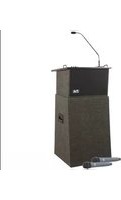
ACL-DP/HH/EM - Loudspeaker Anchor Audio - Free user manual and instructions
Find the device manual for free ACL-DP/HH/EM Anchor Audio in PDF.


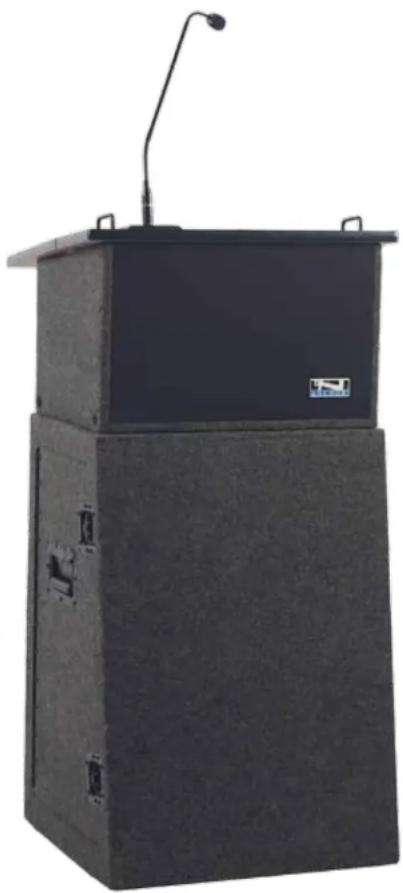
| Product Type | Portable Lectern Sound System with Built-in Wireless Receiver |
| Model | ACL-DP/HH/EM (Acclaim Series) |
| Dimensions (Base) | 14" x 22.5" x 13.5" (HWD) |
| Table Top Size | 22.5" x 19" |
| Weight | 30 lbs (13.6 kg) |
| Power Output | 22 watts |
| Frequency Response | 400 Hz - 10 kHz |
| Max SPL | 126 dB @ 1 meter |
| Battery | 12V rechargeable, 5.4 AH (sealed lead-acid) |
| Battery Charger | 18V DC, universal input (100-240V AC, 50/60 Hz) |
| Battery Life | 8-12 hours at medium volume, 3-6 hours at full volume (speech) |
| Charge Time | 6-8 hours |
| Wireless System | Built-in UHF diversity receiver, 16 selectable channels |
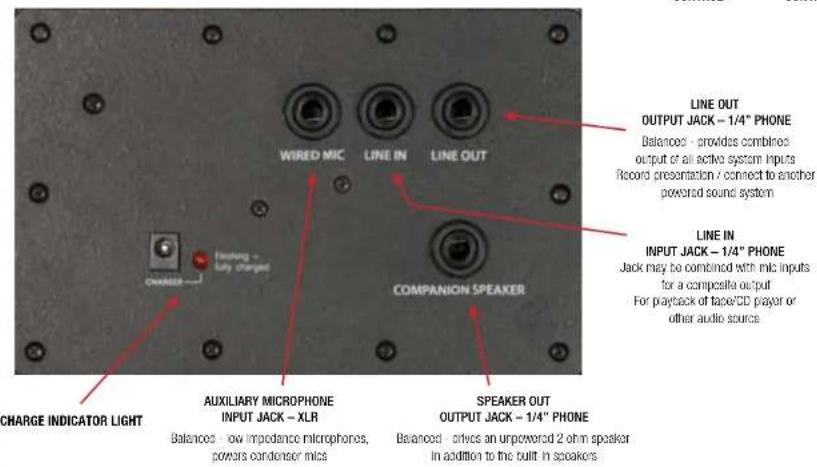
| Inputs | Lectern Mic (XLR, balanced, phantom power), Wired Mic (1/4" unbalanced), Line (1/4" unbalanced) |
| Outputs | Line (post fader, 1/4"), Speaker Out (4W, unswitched 1/4") |
| Warranty | 6 years on sound system, 2 years on microphones |
| Country of Origin | Made in USA |
| Construction Material | High-quality industrial components |
| Special Feature | Automatic battery charging system, battery level indicator, internal antennas |
Frequently Asked Questions - ACL-DP/HH/EM Anchor Audio
User questions about ACL-DP/HH/EM Anchor Audio
0 question about this device. Answer the ones you know or ask your own.
Ask a new question about this device
Download the instructions for your Loudspeaker in PDF format for free! Find your manual ACL-DP/HH/EM - Anchor Audio and take your electronic device back in hand. On this page are published all the documents necessary for the use of your device. ACL-DP/HH/EM by Anchor Audio.
USER MANUAL ACL-DP/HH/EM Anchor Audio
Acclaim Portable Lectern Sound System Owners Manual

natural_image
Exterior view of a black industrial electrical cabinet with a mounted microphone (no visible text or symbols)A Message from the President
Congratulations on purchasing an Anchor Audio sound system, the choice of thousands of satisfied customers including the White House, prestigious universities, school districts nationwide, police and fire departments, and all branches of the U.S. military. Our products are made of the finest materials and built with pride in the U.S.
We've incorporated the latest technology into your sound system yet kept it simple to use. Just take a few minutes to review this manual to ensure the maximum enjoyment of your Anchor system. Or, you can view a demonstration video complete with a trouble shooting section at www.anchoraudio.com.
Feel free to call our friendly customer support staff at 1-800-ANCHOR1 Monday thru Friday between 7:00am and 5:00pm Pacific Standard Time with any questions. We love to hear from our customers.

Janet Jacobs, President on behalf of all Anchor employees
CONTENTS
GETTING STARTED 1
ACCLAIM LECTERN BASIC SYSTEM OPERATION 2
OPERATING THE BUILT-IN UHF WIRELESS RECEIVER 3
Please check your new unit carefully for any damage which may have occurred during shipment. Each Anchor product is carefully inspected at the factory and packed in specially designed boxes for safe transport.
Notify the freight carrier immediately of any damage to the shipping box or product. Repack the unit in the original box and wait for inspection by the carrier's claim agent. Notify your dealer of the pending freight claim.
NOTE: All damage claims must be made with freight carrier!
RETURNING SYSTEMS FOR SERVICE OR REPAIR
For service or repair, please contact the dealer you purchased your system from or Anchor Audio Customer Service at 800.262.4671 to obtain a RA (Return Authorization) number. You may also complete an online RA request form at www.anchoraudio.com. All shipments to Anchor Audio must include a RA number and must be shipped prepaid. C.O.D. shipments will be refused and returned at your expense.
IMPORTANT: Save the shipping box & packing materials,
they were specially designed to ship your unit!
WARRANTY REGISTRATION
Visit our website at www.anchoraudio.com and select "Warranty Registration." Complete the online form to activate the six-year limited warranty on your Acclaim Portable Lectern and two-year limited warranty for the microphones.
100-0163-000/C - 1/11
Acclaim Portable Lectern Sound System Owners Manual
MADE IN USA

SIX YEAR WARRANTY
NOTE: Fully Charge Batteries Before First Use!
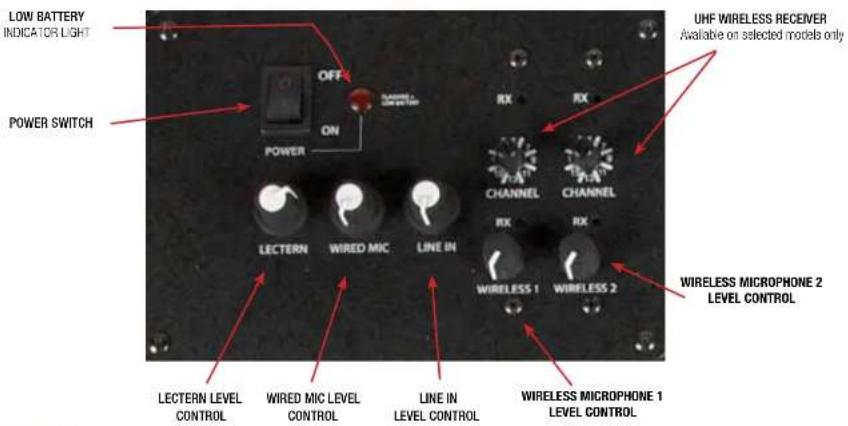
- Set all Input Level Controls to minimum & Tones Controls to flat (the middle setting) before turning your system on
- Plug lectern gooseneck microphone into the Lectern Mic Jack located on the tabletop
- Switch POWER to ON, the BATTERY LED will light
- Slowly increase the Level Control for the input jacks used to the desired volume
- Adjust BASS & TREBLE controls to desired sound quality
IMPORTANT: Make all connections with shielded cables to avoid hum, buzzing or interference.
TOP PANEL OF ACL-7500U2
BACK PANEL OF ACL-7500U2

Acclaim Portable Lectern Sound System Owners Manual
MADE IN USA

SIX YEAR WARRANTY
DIVERSITY WIRELESS BY ANCHOR AUDIO
Anchor Audio UHF wireless is a 16 channel, diversity wireless system that receives signals with two independent antennae. With diversity wireless the receiver processes the stronger signal, effectively minimizing dropouts and interference from other transmitting sources. The antennae are mounted internally so there are no obstructions or risk of damage.
CHANNEL SELECTION - BUILT-IN RECEIVER
Select a channel, set the built-in receiver & microphone transmitter to that channel before using your wireless system.
- Choose any available wireless channel/ frequency from 1 thru 16 (see page 4 for transmitter instructions)
- Set the Wireless Channel Selector Knob to the channel/frequency you choose in step 1
If you have two wireless receivers repeat above for the second receiver. Remember, each receiver/transmitter pair must be set to different channels to avoid interference.

flowchart
graph TD
    A["WIRELESS 1 CHANNEL SELECTION"] --> B["RX"]
    C["WIRELESS 1 RX INDICATOR LIGHTS"] --> D["CHANNEL"]
    E["WIRELESS 2 CHANNEL SELECTION"] --> F["RX"]
    G["WIRELESS 2 RX INDICATOR LIGHTS"] --> H["CHANNEL"]
    I["WIRELESS 1 VOLUME CONTROL"] --> J["RX"]
    K["WIRELESS 2 VOLUME CONTROL"] --> L["RX"]
NOTE: Ongoing wireless interference? The frequency you selected may be in use by other systems in the area! Change channels until you find a clear frequency!
Acclaim Portable Lectern Sound System Owners Manual
- Unscrew battery cover on bottom of microphone
- Set the CHANNEL SELECTOR dial to match the channel setting of your receiver
- Replace battery cover and tighten firmly
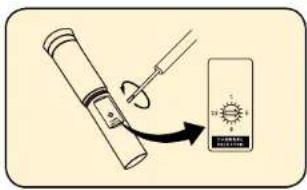
CHANNEL SELECTION - BODY-PACK TRANSMITTER
- The channel selection dial is located on the side of the transmitter
- Set the CHANNEL selection dial to match the channel setting of the receiver

NOTE: When using dual wireless, each microphone must be set to a different channel!
After you have set the transmitter channel (see above) you are ready to use your wireless microphone:
- Body-pack transmitter users must insert the mic
plug into the transmitter jack marked MIC -
Turn the transmitter power switch to ON (The red LED will flash when the mic is turned on. If the red LED stays on, the battery is low)
-
Turn the Acclaim power switch to ON
- The RX indicators will light (only one indicator will light at a time) when the wireless signal is being transmitted and received
CAUTION: Harmful feedback may occur when walking in front of a sound system or speaker with a wireless microphone. Always point microphone away from speakers!
REPLACE BATTERY - HANDHELD TRANSMITTER
- Unscrew battery cover on bottom of microphone
- Replace old batteries with two fresh size 'AA' alkaline batteries
- Replace battery cover and tighten firmly


REPLACE BATTERY - BODY-PACK TRANSMITTER
- Slide open battery cover on front of transmitter
- Replace old batteries with two fresh size 'AA' alkaline batteries
- Replace battery cover by sliding firmly into place
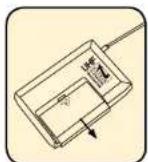

NOTE: Transmitter power must be OFF when changing batteries!
For System Setup & Operation Videos Visit Our Website: www.anchoraudio.com
Acclaim Portable Lectern Sound System Owners Manual
MADE IN USA

SIX YEAR WARRANTY
CARING FOR YOUR BUILT-IN BATTERIES
It is very important that you fully charge the batteries in your new portable lectem before the first time its used. To preserve battery life it is also recommended that batteries be fully charged as soon as possible after every use regardless of the length of operation.
UNDERSTANDING THE BATTERY LEVEL INDICATOR
LED Flashing Red: Battery charge is very low, in 15-30 minutes the Battery Protection Circuit will turn the system off. LED Off: Battery is completely drained and must be charged.
NOTE: System can be used while batteries charge!
OPERATING IN AC MODE
Plug your portable lectern into an AC outlet. Operate as normal while charging the built-in batteries at the same time. The Charger LED will light during charging and flash when the battery is fully charged.
BATTERY SERVICE TIME
With the batteries fully charged you can expect approx.: 8-12 hrs @ Medium Volume 3-6 hrs @ Full Volume of continuous music input (longer for speech). Service time will vary depending on control settings and use of accessories (built-in wireless receivers and/or a companion speaker).
IMPORTANT: For longer battery life always store your system with batteries fully charged!
natural_image
Exterior view of a black industrial storage unit with a mounted top and side panels, no visible text or symbols.CHARGING YOUR BUILT-IN BATTERIES
An automatic charging system is built-in to your Acclaim Portable Lectern. It is designed to properly charge and maintain the systems built-in batteries. To charge batteries:
- Plug the power cord into your sound system
- Plug the other end of the cord into AC outlet - Charger LED will stay on during charging
- Batteries fully charge in approximately 6-8 hrs - Charger LED will flash
When in AC mode the system automatically transfers power from the battery charger to the power amplifier at high volume output, causing the Charger LED to flicker.
Always store your sound system with the batteries fully charged. For extended periods of storage leave the system plugged into an AC outlet. If this is not possible, charge the system at least once each month for a minimum of 24 hours.
Waste electrical and electronic products must not be disposed of with household waste. Please recycle where facilities exist. Check with your Local Authority or Retailer for recycling advice.

NOTE: System Can Be Used During Charging!
Acclaim Portable Lectern Sound System Owners Manual
HAVING TROUBLE WITH YOUR SOUND SYSTEM?
CONDITION POSSIBLE SOLUTION
No Sound (power LED off) • turn POWER switch ON
- charge battery or plug in AC cord
Charge Indicator LED off • leave plugged in for 48 hours to repair battery
No Sound (power LED on) • check for output from source
- set Internal Speaker switch to ON
• make sure all cables are completely plugged in
• turn up volume control of input used - remove plug from speaker output if not using external speaker
output
Shortened Battery Life • charge battery fully; if battery life continues to deteriorate,
contact Anchor Audio customer service: (800) 262-4671
Distorted Sound • lower system volume control
Excessive Hum or Noise • use shielded cables
- use balanced microphone
HAVING TROUBLE WITH YOUR WIRELESS SYSTEM? (WIRELESS MODELS ONLY)
CONDITION POSSIBLE SOLUTION
No Sound (RX Indicator: ON) • set MUTE switch to on
• turn up WIRELESS volume control
• make sure mic is plugged into body pack transmitter
No Sound (RX Indicator: OFF) • push mic power button
- turn Acclaim POWER switch on
• make sure transmitter power switch is on - set receiver and transmitter to same channel
- replace battery in transmitter
(handheld mic only)
NEED MORE HELP? Acclaim Portable Lectern Setup & Operation Videos!
Visit Our Website: www.anchoraudio.com
ACCLAIM TECHNICAL SPECIFICATIONS
Rated Power Output
Max SPL @ Rated Power
Frequency Response
Charger (RC-6000)
Battery
Dimensions
Base (HWD)
Table Top
Weight
22 watts
126 dB @ 1 meter
400 Hz - 10 kHz
18V DC/universal input
(100Vac - 240Vac, 50 - 63Hz)
12 volt rechargeable, 5.4 AH
14" x 22.5" x 13.5"
(35.6 x 57 x 34.3 cm)
22.5" x 19" (57 x 48 cm)
30 lbs/ 13.6 Kg
Inputs
Lectern Microphone
XLR
Wired Microphone
Line
Outputs
Line (post fader)
Speaker Out
ACL-BASE
Dimensions (HWD)
Weight
Lo-Z, balanced, phantom power,
Lo-Z, unbalanced, 1/4"-phone
Hi-Z, unbalanced. 1/4" phone
Lo-Z, 1/4'-phone
4W, unswitched, 1/4"-phone
unswitched - 4 , 1/4' phone
30.5" x 21.5" x 18.5"
(77.5×54.6×47cm)
38 lbs / 17.2 Kg

(Specifications Subject to Change Without Notice)
MADE IN USA

SIX YEAR WARRANTY

Scan for Acclaim
Technical Specs

Scan for Acclaim
Brochure
Scan for Acclaim
Website

Scan for How to
Videos & Articles
ANCHOR AUDIO CUSTOMER SERVICE
800.262.4671
FOR ADDITIONAL INFORMATION
visit www.anchoraudio.com
For System Setup & Operation Videos Visit Our Website: www.anchoraudio.com
- Acclaim Portable Lectern Sound System Owners Manual
- A Message from the President
- CONTENTS
- RETURNING SYSTEMS FOR SERVICE OR REPAIR
- WARRANTY REGISTRATION
- DIVERSITY WIRELESS BY ANCHOR AUDIO
- CHANNEL SELECTION - BUILT-IN RECEIVER
- CHANNEL SELECTION - BODY-PACK TRANSMITTER
- REPLACE BATTERY - HANDHELD TRANSMITTER
- REPLACE BATTERY - BODY-PACK TRANSMITTER
- CARING FOR YOUR BUILT-IN BATTERIES
- UNDERSTANDING THE BATTERY LEVEL INDICATOR
- OPERATING IN AC MODE
- BATTERY SERVICE TIME
- CHARGING YOUR BUILT-IN BATTERIES
- HAVING TROUBLE WITH YOUR SOUND SYSTEM?
- HAVING TROUBLE WITH YOUR WIRELESS SYSTEM? (WIRELESS MODELS ONLY)
- ACCLAIM TECHNICAL SPECIFICATIONS
- ANCHOR AUDIO CUSTOMER SERVICE
- 800.262.4671
- FOR ADDITIONAL INFORMATION
- visit www.anchoraudio.com
Brand : Anchor Audio
Model : ACL-DP/HH/EM
Category : Loudspeaker