
P4263F - Wall mount Premier Mounts - Free user manual and instructions
Find the device manual for free P4263F Premier Mounts in PDF.


| Product Type | Wall Mount |
| Brand | Premier Mounts |
| Model | P4263F |
| Mounting Pattern (VESA) | Up to 600x400mm |
| Weight Capacity | 125 lbs (56.7 kg) |
| Material | Steel, powder-coated finish |
| Orientation | Landscape |
| Tilt Range | 0° to 15° |
| Level Adjustment | ±4° |
| Distance from Wall | 1.5" (38 mm) |
| Dimensions (W x H x D) | 30.5" x 19.5" x 1.5" (775 x 495 x 38 mm) |
| Weight | 7.2 lbs (3.3 kg) |
| Color | Black |
| Compatible Screen Sizes | 32" to 70" |
| Mounting Hole Pattern | 100x100mm to 600x400mm |
| Security Feature | Locking screws included |
| Installation Hardware | Included (concrete, wood stud anchors) |
| Warranty | 5 years |
| Certifications | UL Listed |
Frequently Asked Questions - P4263F Premier Mounts
User questions about P4263F Premier Mounts
0 question about this device. Answer the ones you know or ask your own.
Ask a new question about this device
Download the instructions for your Wall mount in PDF format for free! Find your manual P4263F - Premier Mounts and take your electronic device back in hand. On this page are published all the documents necessary for the use of your device. P4263F by Premier Mounts.
USER MANUAL P4263F Premier Mounts
INSTALLATION INSTRUCTIONS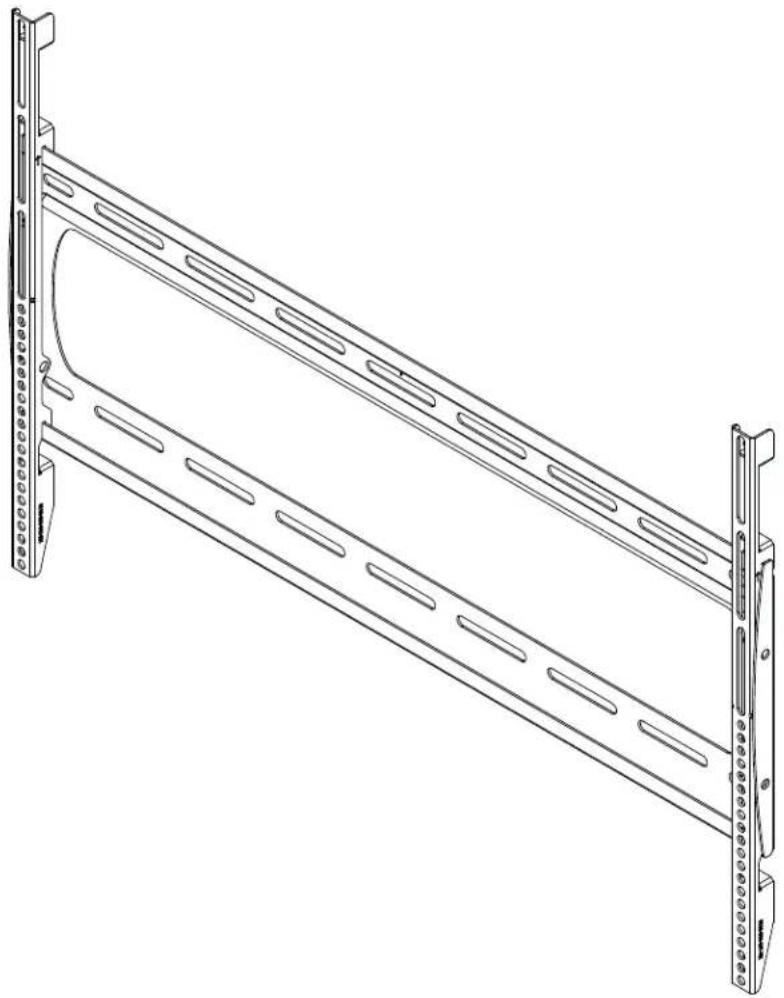
Universal Low Profile Flat Mount for 42" to 63" Flat Panels
Model: P4263F
NORTH AMERICA
3130 East Miraloma Avenue
Anaheim, CA 92806 USA
USA and Canada
Phone: 1-800-368-9700
Fax: 1-800-832-4888
Other Locations
Phone: (001)-714-632-7100
Fax: (001)-714-632-1044
EUROPE
Swallow House,
Shilton Industrial Estate,
Shilton, Coventry, England CV79JY
Phone: +44 (0) 2476 614700
Fax: +44 (0) 2476 614710
Contents
Weight Limit....2
Warning Statements....2
Installation Tools....3
Parts List....3
Mounting Hardware....4
Features....5
Installing the Wall Plate....6
Introduction. 6
Determining the Mounting Surface....6
Wood Stud Installation....6
Concrete Installation....8
Steel Stud Installation....9
Installing the Mounting Bracket....11
Selecting the Mounting Hardware....11
Universal Washer Installation....12
Universal Spacer Installation....12
Locking and Leveling Screw Installation....13
Lock-It™ Security Barrel Installation (Optional)....14
Attaching the Mounting Bracket to the Flat Panel....14
Attaching the Flat Panel to the Wall Plate....15
Mounting Bracket Adjustments....15
Leveling Screw Adjustment....15
Locking Screw Adjustment....15
Utilizing the Security Barrel....16
Technical Specifications. 16
Warranty. 17
Weight Limit
Maximum Flat Panel Weight: 175 lbs.
THE WALL STRUCTURE MUST BE CAPABLE OF SUPPORTING AT LEAST FIVE TIMES THE WEIGHT OF THE FLAT PANEL. IF NOT, THE WALL STRUCTURE MUST BE REINFORCED.
Warning Statements

PRIOR TO THE INSTALLATION OF THIS PRODUCT, THE INSTALLATION INSTRUCTIONS MUST BE READ AND COMPLETELY UNDERSTOOD. KEEP THESE INSTALLATION INSTRUCTIONS IN AN EASILY ACCESSIBLE LOCATION FOR FUTURE REFERENCE.

PROPER INSTALLATION PROCEDURE BY A QUALIFIED SERVICE TECHNICIAN MUST BE FOLLOWED, AS OUTLINED IN THESE INSTALLATION INSTRUCTIONS. FAILURE TO DO SO COULD RESULT IN PROPERTY DAMAGE, SERIOUS PERSONAL INJURY, OR EVEN DEATH.

SAFETY MEASURES MUST BE PRACTICED AT ALL TIMES DURING THE ASSEMBLY OF THIS PRODUCT. USE PROPER SAFETY EQUIPMENT AND TOOLS FOR THE ASSEMBLY PROCEDURE TO PREVENT PERSONAL INJURY.

PREMIER MOUNTS DOES NOT WARRANT AGAINST DAMAGE CAUSED BY THE USE OF ANY PREMIER MOUNTS PRODUCT FOR PURPOSES OTHER THAN THOSE FOR WHICH IT WAS DESIGNED OR DAMAGE CAUSED BY UNAUTHORIZED ATTACHMENTS OR MODIFICATIONS, AND IS NOT RESPONSIBLE FOR ANY DAMAGES, CLAIMS, DEMANDS, SUITS, ACTIONS OR CAUSES OF ACTION OF WHATEVER KIND RESULTING FROM, ARISING OUT OF OR IN ANY MANNER RELATING TO ANY SUCH USE, ATTACHMENTS OR MODIFICATIONS.
At least two qualified people should perform the assembly procedure. Personal injury and/or property damage can result from dropping or mishandling the flat panel.
If mounting to wall studs or ceiling studs, make sure that the mounting screws are anchored into the center of the wall studs or ceiling studs. Use of an edge-to-edge stud finder is recommended.
It is recommended that a maximum of 5/8" plaster board be used when mounting to wooden studs.
Be aware of the mounting environment. If drilling and/or cutting into the mounting surface, always make sure that there are no electrical wires in wall. Cutting or drilling into an electrical line may cause serious personal injury.
Make sure there are no water or natural gas lines inside the wall where the mount is to be located. Cutting or drilling into a water or gas line may cause severe property damage or personal injury.
This product is intended for indoor use only. Use of this product outdoors could lead to product failure and/or serious personal injury.
Do not install near sources of high heat. Do not install on a structure that is prone to vibration, movement or chance of impact.

Contact Premier Mounts with any questions:
(800) 368-9700
techsupport@mounts.com
Installation Tools
The following tools may be required, dependent upon your particular installation. These tools are not provided by Premier Mounts, but you can purchase them at your local hardware store.
 Electronic Stud Finder Electronic Stud Finder | 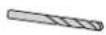 1/4 " Drill Bit for Wood Stud 1/4 " Drill Bit for Wood Stud | 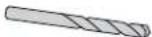 7/16 " Drill Bit for Steel Stud* 7/16 " Drill Bit for Steel Stud* | 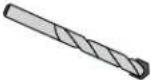 5/16 " Concrete Drill Bit** 5/16 " Concrete Drill Bit** |  Hand Held Drill Hand Held Drill | |
 Pencil Pencil |  Level Level |  Tape Measure Tape Measure |  Hammer** Hammer** | ||
 Protective Eyewear Protective Eyewear |  Socket Wrench Socket Wrench |  1/2 " Socket 1/2 " Socket |  M10 Socket* M10 Socket* |  Phillips Tip Screwdriver Phillips Tip Screwdriver | |
* Optional tools for steel stud installations. ** Optional tools for concrete installations.
Parts List
Your Premier Mounts product is shipped with all proper installation hardware and components. Make sure that none of these parts are missing and/or damaged before beginning installation. If there are parts missing and/or damaged, please stop the installation and contact Premier Mounts (800) 368-9700.
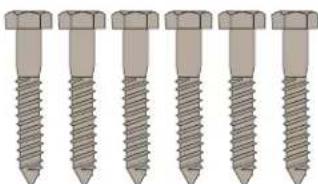
P4263F Universal Low Profile Flat Mount Assembly Components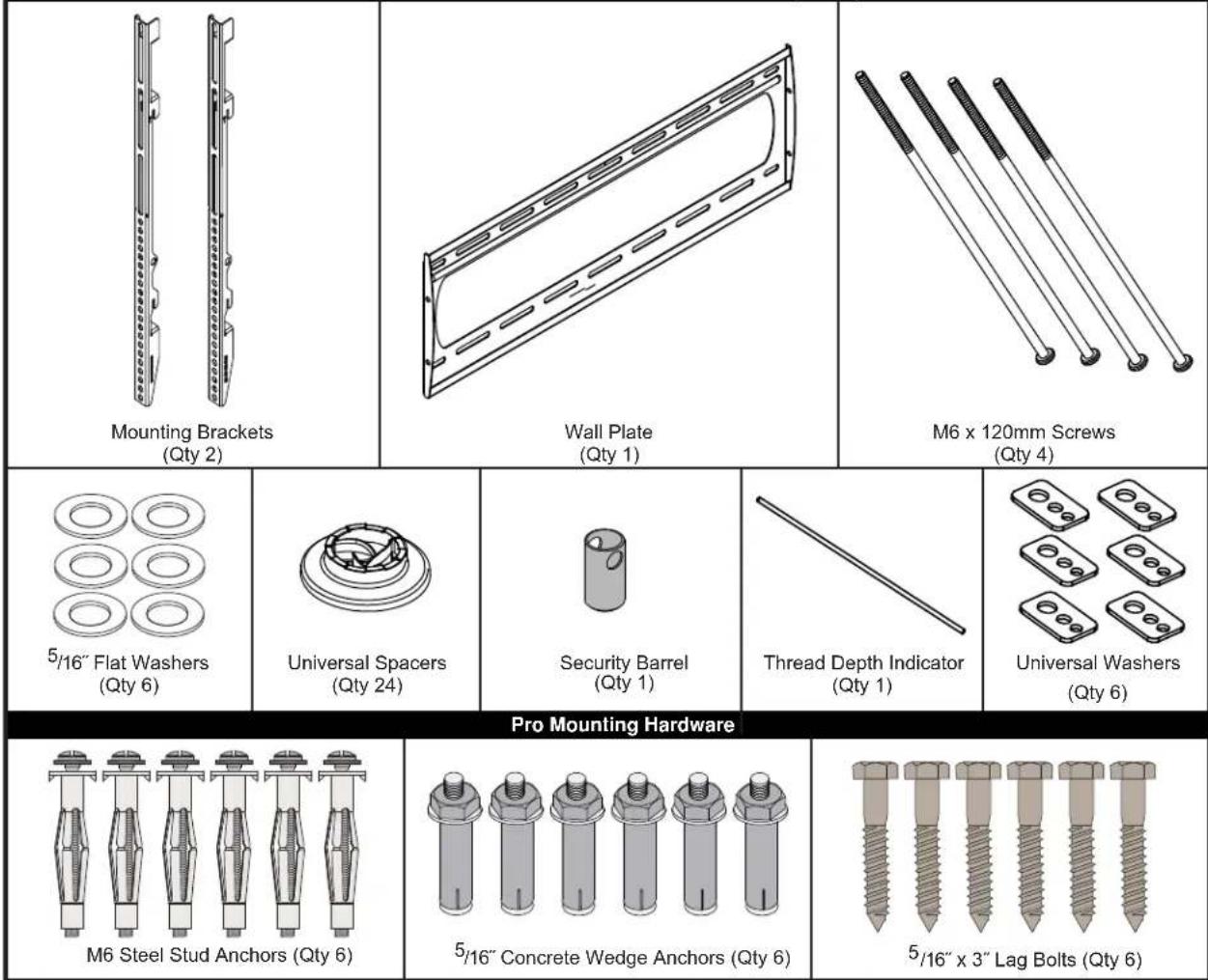
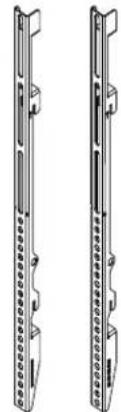
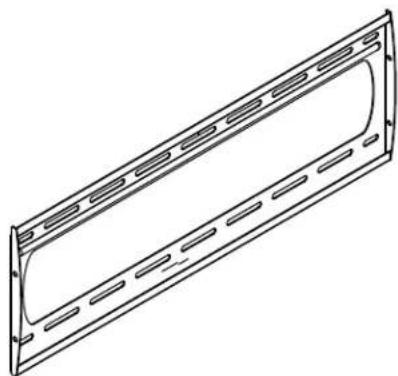


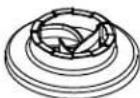


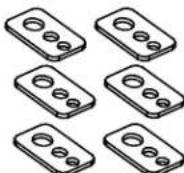
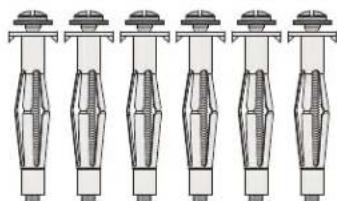

Parts List (cont'd)
| Mounting Hardware | |||
| M4 x 16mm Screw (Qty 6) |  | M8 x 16mm Screw (Qty 6) |  |
| M4 x 25mm Screw (Qty 6) | 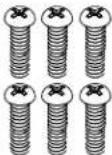 | M8 x 25mm Screw (Qty 6) | 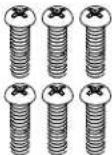 |
| M4 x 30mm Screw (Qty 6) |  | M8 x 30mm Screw (Qty 6) |  |
| M5 x 16mm Screw (Qty 6) |  | M8 x 45mm Screw (Qty 6) |  |
| M5 x 25mm Screw (Qty 6) | 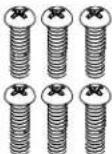 | M8 x 70mm Screw (Qty 4) |  |
| M5 x 30mm Screw (Qty 6) | 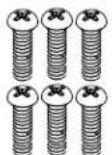 | ||
| M6 x 16mm Screw (Qty 6) |  | ||
| M6 x 25mm Screw (Qty 6) | 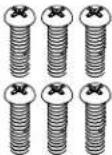 | ||
| M6 x 30mm Screw (Qty 6) |  | ||
| M6 x 45mm Screw (Qty 6) | 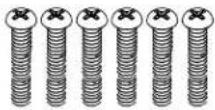 | ||
Features
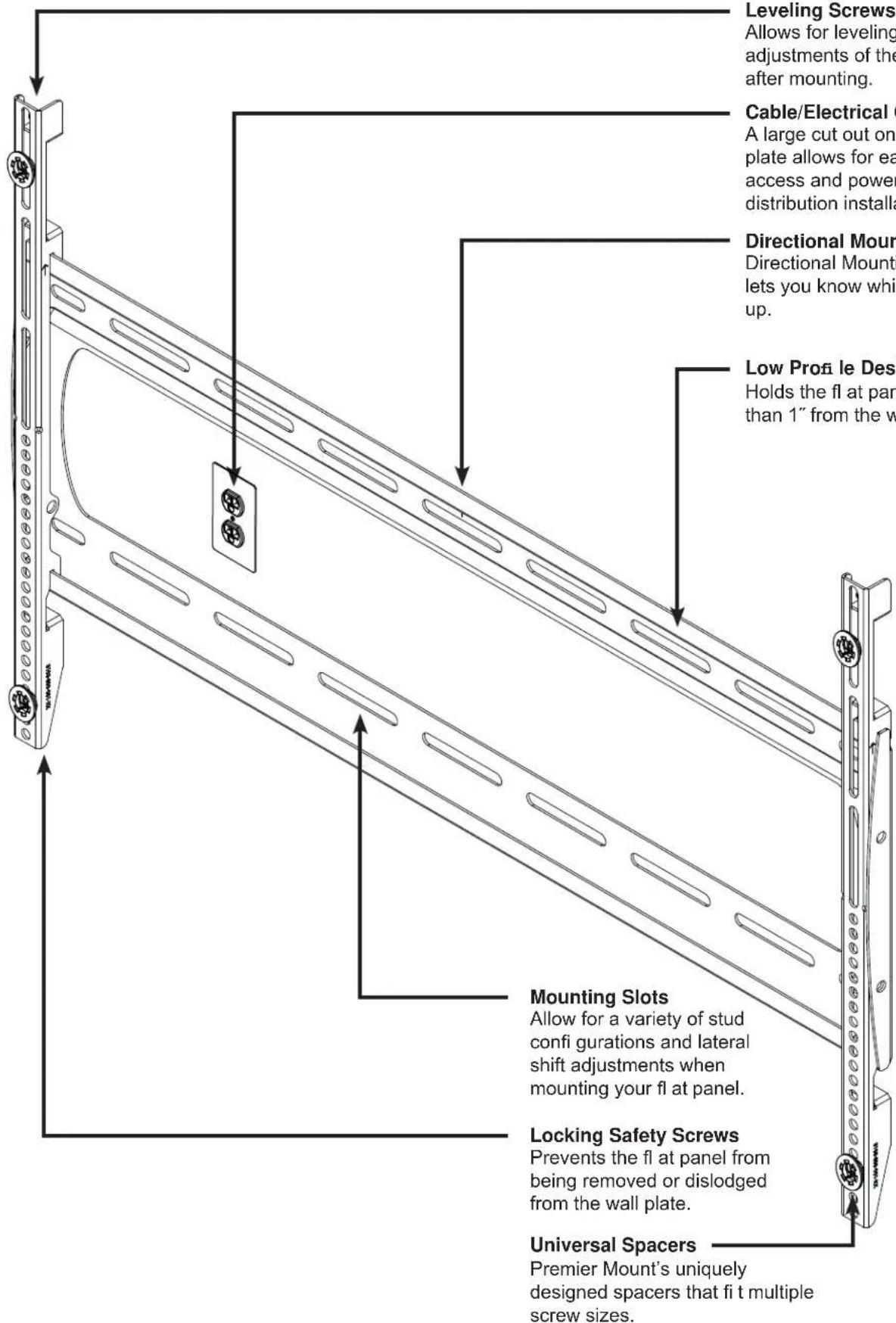
Installing the Wall Plate
Introduction

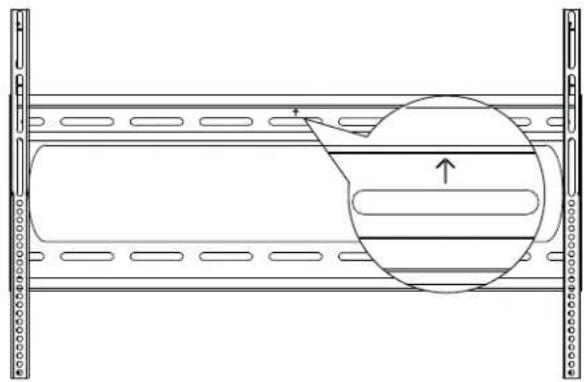
Directional Mounting Arrow
The Directional Mounting Arrow stamped into the top of the P4263F wall mount indicates which edge is the top.

Mounting Safety
Two people are recommended for the installation of this mount.
Determining the Mounting Surface
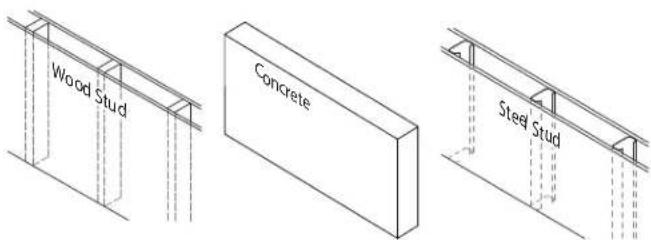
If you will be installing your P4263F mount to wood studs, proceed to the "Wood Stud Installation" section.
If you will be installing your P4263F mount to a concrete wall, proceed to the "Concrete Installation" section.
If you will be installing your P4263F mount to a steel frame, proceed to the "Steel Stud Installation" section.
Wood Stud Installation
Step 1

You must secure the wall plate to two (2) wall studs with a minimum of four (4) lag bolts (2 lag bolts for each stud found).
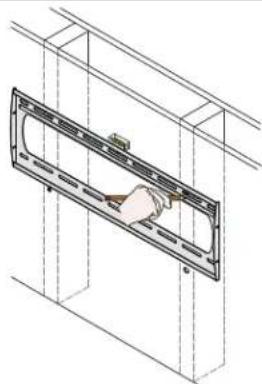
① Use a stud finder to determine the exact center of wall studs in the vicinity of the wall plate. ② Use a pencil to mark the exact center of each of the wall studs.

Step 2

Two people are recommended for this step; one person to level the wall plate and another person to mark the wall stud location.
1 Place the wall plate against the wall in the desired viewing location. ② Adjust the wall plate to align the mount slots in the wall plate with the center of the wall studs. ③ Level the wall plate. ④ Use a pencil to mark the upper right mounting location along the center of the wall stud.
Installing the Wall Plate (cont'd)
Step 3
Drill a "pilot hole" in the center of the upper right mark using a 1/4" drill bit and power drill.

Only use a 1/4" drill bit when drilling the pilot holes.

Step 4
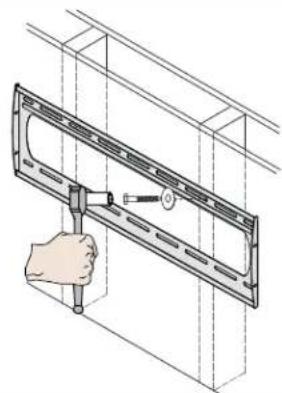
1. Place the wall plate against the wall and align it with the pilot hole. 2. Insert one (1) 5/16" x 3" lag bolt and one (1) 5/16" washer into the upper right mounting hole and tighten using a socket wrench and 1/2" socket.

Do not overtighten the lag bolt.
Step 5
1. Level the wall plate. 2. Use a pencil to mark the remaining three (3) mounting locations along the center of each wall stud.

Step 6

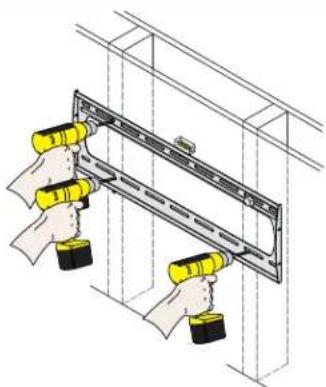
Two people are recommended for this step; one person to level the wall plate and another person to drill the pilot holes.
Drill a "pilot hole" in the center of each of the marks with a power drill and a 1/4" drill bit.

Only use a 1/4" drill bit when drilling the pilot holes.
Installing the Wall Plate (cont'd)
Step 7
1. Insert one (1) 5/16" x 3" lag bolt and one (1) 5/16" washer into each pilot hole. 2. Tighten all lag bolts using a socket wrench and 1/2" socket.

Do not overtighten the lag bolts when attaching the mount to the wall. Improper installation may result in personal injury or property damage.
Proceed to the "Installing the Mounting Bracket" section.

Concrete Installation

The supplied 5/16" concrete wedge anchors must be used for concrete installation.
You will need a 5/16" concrete drill bit, which is available at your closest hardware store.

Concrete Wedge Anchors

Example of 5/16" Concrete Drill Bit (Not Included)
Step 1

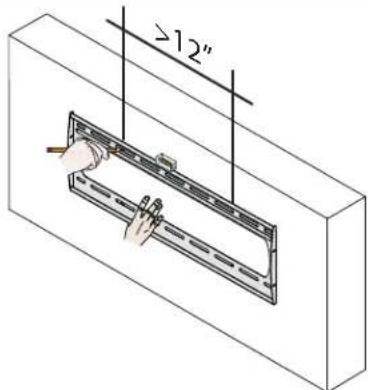
Two people are recommended for this step; one person to level the wall plate and another person to mark the mounting locations.
1. Place the wall plate against the wall in the desired viewing location. 2. Level the wall plate. 3. Use a pencil and mark 2 upper and 2 lower mounting locations where you will be drilling holes for the concrete wedge anchors. Each horizontal location cannot be closer than 12" apart. 4. Set the wall plate to one side in a safe location.
Step 2
Use a power drill and 5/16" concrete drill bit to drill a hole at each of the marks.

Installing the Wall Plate (cont'd)
Step 3
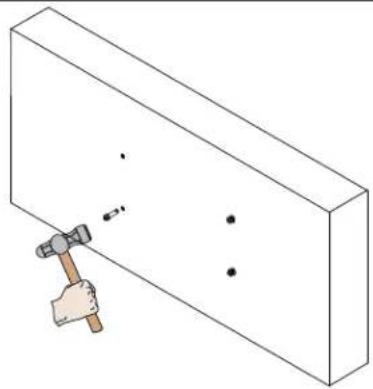
1. Insert a concrete wedge anchor into each hole.
If necessary, lightly tap each concrete wedge anchor into place with a hammer.
Remove the nuts and washers from all four (4) concrete wedge anchors.
Step 4
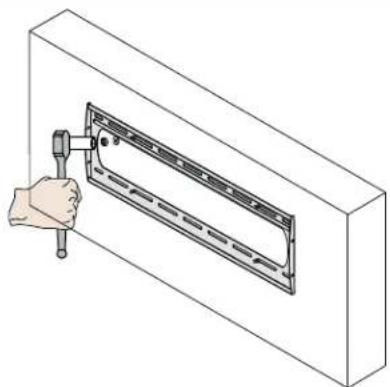
Place the wall plate against the wall over the threaded shafts of the concrete wedge anchors. Replace the washers which you removed from the concrete wedge anchors with the 5/16 washers shown in the parts list on Page 3. Attach the nuts and 5/16 washers to each of the concrete wedge anchors and tighten using a socket wrench and an M10 socket.

Do not overtighten the wedge anchor nuts.
Proceed to the "Installing the Mounting Bracket" section.
Steel Stud Installation

The supplied M6 steel stud anchors must be used to install your Premier Mounts' mount to steel studs. Do not use lag bolts or wood screws.
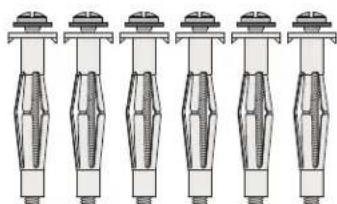
Steel Stud Anchor Screw Steel Stud Anchor Sleeve

Step 1
Identify the general location on the wall where you will be mounting your flat panel. Use a stud finder to determine the exact center of each steel stud in the vicinity of the mounting location. Use a pencil and mark the exact center of each steel stud.

Installing the Wall Plate (cont'd)
Step 2
Place the wall plate against the wall in the desired viewing location. Adjust the wall plate to match the locations of the steel studs. Level the wall plate. Use a pencil and mark 2 upper and 2 lower locations where you will be drilling holes for the steel stud anchors. Set the wall plate to one side in a safe location.

Step 3
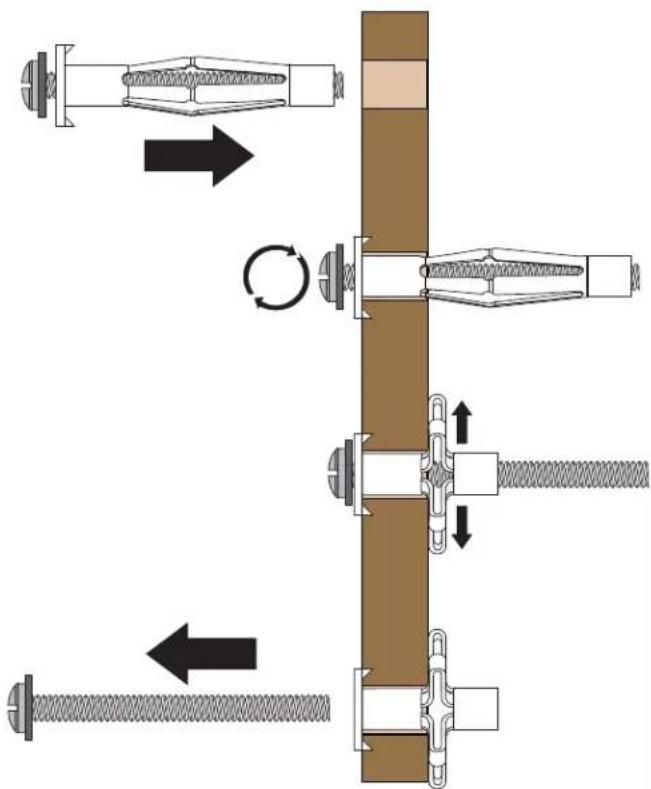
① Use a power drill and a 7/16" drill bit to drill a hole at each of the marks. ② Insert a steel stud anchor into each hole.
If necessary, lightly tap each steel stud anchor into place with a hammer.

Step 4
Use a Phillips screwdriver to tighten each steel stud anchor screw until the legs have completely compressed against the back of the steel stud.

The steel stud anchor screw will feel tight when you first begin to turn it until the legs begin to compress. The steel stud anchor screw will then turn easier for several turns. The steel stud anchor screw will again feel tight when the legs have completely compressed against the back of the drywall. Stop turning the steel stud anchor screw at that point.

Do not overtighten the steel stud anchor screw.
Remove the steel stud anchor screws and set them aside.

Steel stud anchors may come with small paper washers. You may leave them on the screw or discard them. These small paper washers do not replace standard 5/16" washers.
Installing the Wall Plate (cont'd)
Step 5
① Align the wall plate over the steel stud anchor sleeves. ② Insert a steel stud anchor screw and a 5/16" washer into each steel stud anchor sleeve. ③ Use a Phillips screwdriver and tighten each steel stud anchor screw until it is just snug.

Do not overtighten the steel stud anchor screws.

Do not use a power drill to tighten the steel stud anchor screws.
Proceed to the "Installing the Mounting Bracket" section.

Installing the Mounting Bracket
Selecting the Mounting Hardware
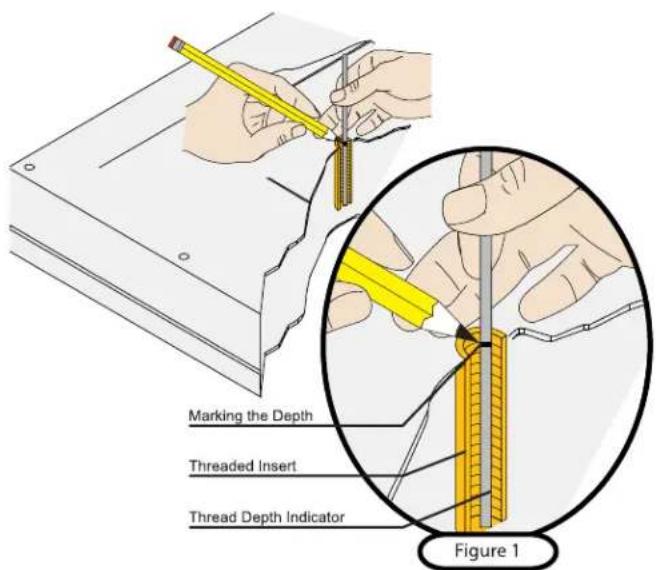
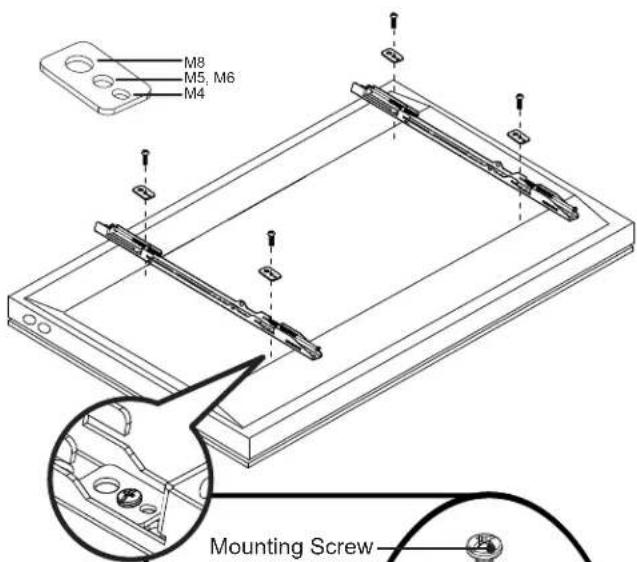
① Insert the Thread Depth Indicator into the thread inserts found on the bottom or top of the flat panel. ② Use a pencil to mark the depth of the thread insert on the Thread Depth Indicator, as shown in Figure 1. ③ Insert the Thread Depth Indicator into the remaining thread inserts to compare and verify their depth. ④ Locate the correct diameter screw for the thread insert.
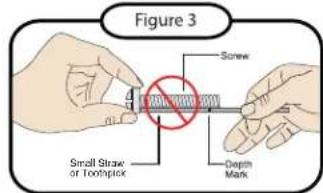
If the screw you selected is longer than the mark on the Thread Depth Indicator, as shown in Figure 2 and Figure 3, do not use this screw. The screw length must not bypass the mark.
⑤ Test each size of the screws provided.
The correct screws should thread easily into the mount point and not pull out when tension is applied.
Proceed to the "Universal Washer Installation" section.

Installing the Mounting Bracket (cont'd)
Universal Washer Installation
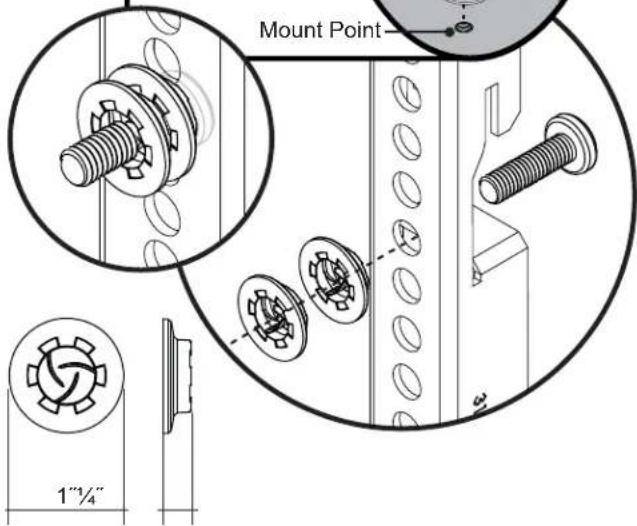
Premier Mounts' Universal Washers are designed to accommodate the various M4, M5, M6 and M8 hole sizes required by flat panels.

Do not place excessive pressure on the back of the flat panel, as this may damage your flat panel.

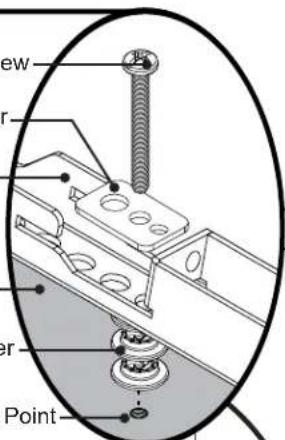
The Universal Washer must be installed between the head of the mounting screw and the mounting bracket as shown.

Does your flat panel have:
● Recessed mount points? Uneven mount points? A curved back? ● Any obstruction near the mount point?
If Yes, you must install Universal Spacers. Remove the mounting brackets, Universal Washers, and mounting screws from the back of the flat panel. Proceed to the "Universal Spacer Installation" section.
If No, skip to the "Leveling and Locking Screw Installation" section.
Universal Spacer Installation
Premier Mounts' Universal Spacers allow you to attach the mounting bracket to flat panels which have recessed or uneven mount points. Each Universal Spacer adds 1/4 inch to the distance between the mounting bracket and your flat panel.

The Universal Spacers must be stacked and oriented as shown.

The Universal Spacers must only be installed between the mounting bracket and your flat panel.
The Universal Spacers will fit M4, M5, M6 and M8 screw sizes.
Proceed to the "Locking and Leveling Screw Installation" section.
Universal Washer
Mounting Bracket
Flat Panel
Universal Spacer
Installing the Mounting Bracket (cont'd)
Locking and Leveling Screw Installation
Leveling Screw Installation

You must install the leveling screws before you attach the mounting bracket to the back of the flat panel. The leveling screws consist of two (2) M6 x 120mm screws.
Thread one (1) leveling screw into the top mounting hole on each of the mounting brackets. Make sure the leveling screw is securely threaded into the mounting tab before proceeding.

Do not thread the leveling screw any further once it is even with the mounting tab. Threading the leveling screw any further will prevent you from safely attaching the flat panel to the wall plate.
Locking Screw Installation

You must install the locking screws before you attach the mounting bracket to the back of the flat panel. The locking screws consist of two (2) M6 x 120mm screws.
Thread one (1) locking screw into the bottom mounting hole on each of the mounting brackets. Make sure the locking screw is securely threaded into the mounting tab before proceeding.

Do not thread the locking screw any further once it is even with the mounting tab. Threading the locking screw any further will prevent you from safely attaching the flat panel to the wall plate.
Proceed to the "Attaching the Mounting Bracket to the Flat Panel" section.

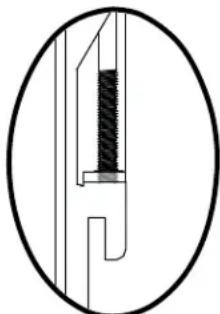
Leveling Screw Correctly Threaded
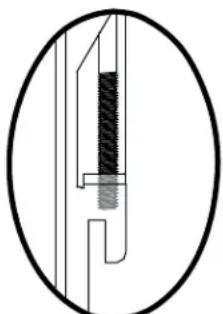
Leveling Screw Threaded Too Far
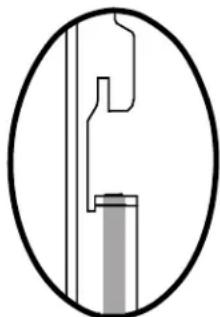
Locking Screw Correctly Threaded

Locking Screw Threaded Too Far
Lock-It™ Security Barrel Installation (Optional)

Optional security configurations include:
PCB-CSL1 (sold separately)
- Padlock (Combination or Keyed; commercially available)
Please read the following directions to install the security barrel:
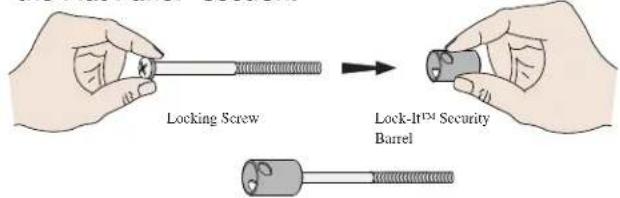
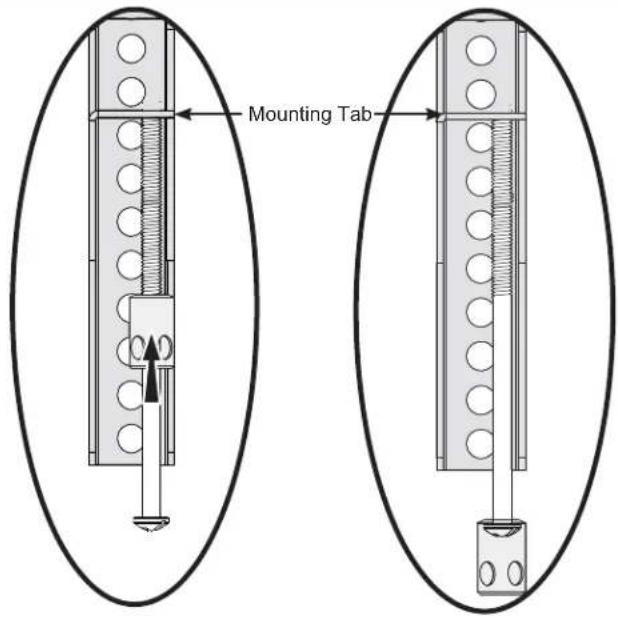
① Remove the locking screw from the mounting bracket. ② Place the locking screw into and through the security barrel (see illustration below). ③ Re-insert the locking screw and security barrel into the mounting bracket. ④ Tighten the locking screw and security barrel until seated in the mounting tab.

Do not thread the locking screw any further once it is even with the mounting tab (see illustration to the right). Threading the locking screw any further will prevent you from safely attaching the flat panel to the wall plate.

Do not overtighten the locking screw.
Proceed to the "Attaching the Mounting Bracket to the Flat Panel" section.
Attaching the Mounting Bracket to the Flat Panel
This section presumes that you have read and understood these sections:
- Selecting the Proper Mounting Hardware ● Universal Washer Installation ● Universal Spacer Installation
① Place your flat panel screen-side down on a soft, flat surface. ② Identify the number and location of the thread inserts on the back of your flat panel. ③ Align the holes on each mounting bracket with the thread inserts on the back of your flat panel. ④ Secure each mounting bracket to your flat panel by inserting a minimum of two (2) screws per bracket.

Do not overtighten the mounting hardware.
Proceed to the "Attaching the Flat Panel to the Wall Plate" section.

Attaching the Flat Panel to the Wall Plate

This section requires two people.

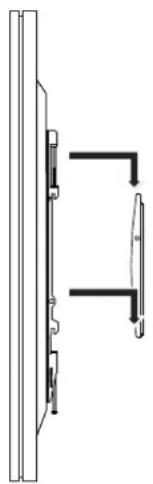
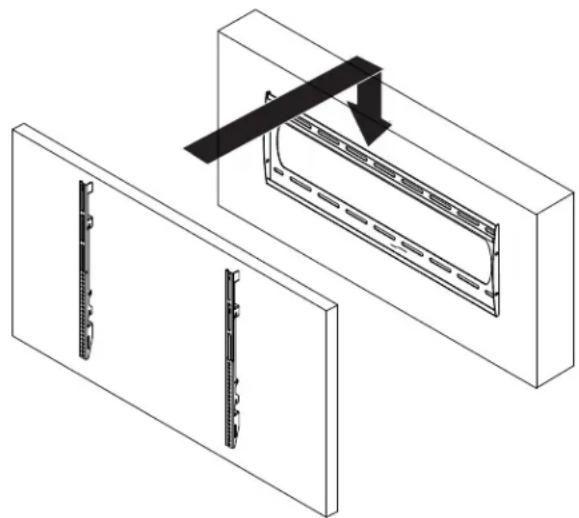
Do not release your flat panel until you are certain that top and bottom hooks of both mounting brackets are securely seated on the upper and lower mounting rails of the wall panel.
① Raise the flat panel past the top and bottom mounting rails on the wall panel. ② Slide the flat panel down slowly, keeping it close to the wall. ③ Engage the top and bottom mounting brackets to the rails of the wall plate.
Proceed to the "Mounting Bracket Adjustments" section.
Mounting Bracket Adjustments
Leveling Screw Adjustment
If your flat panel is tilted too far to one side, the leveling screws will allow you to compensate for this tilt by simply adjusting the screws with a screwdriver.
① Loosen both locking screws. ② Adjust the tilt of your flat panel. ③ Tighten both locking screws.

Caution!
It is possible to dislodge your flat panel while you level your flat panel. Use extreme caution until you tighten the locking screws.
Locking Screw Adjustment
After you have finished leveling your flat panel, be sure to tighten the two (2) M6 x 120mm locking screws.

Do not overtighten the locking screws.

Utilizing the Security Barrel
Your P4263F Mount includes one (1) Security Barrel which can provide additional theft deterrence for your flat panel.
PCB-CSL1 Security Cable -
① Thread the cable through the hole on the security barrel. ② Attach the PCB-CSL1 locking mechanism and secure it using the supplied key.
Padlock -
① Place the locking hook through the hole of the security barrel. ② Snap lock and locking hook together.

Technical Specifications
All measurements are in inches [millimeters].
![33.25 [845] 24.00 [610] 18.00 [457] 16.00 [406] 20.83 [529] 7.82 [199] 5.61 [143] 21.38 [543] 5.00 [127] 11.34 [288] φ .33 [8] 31.09 [790] 32.09 [815] 1.00 [25] φ .35 [9] .95 [24]](/content/2026/06/1183769/images/00d0ef7afa9e63295818187bc2fb2ad15ecc96ba2109717055422631a1f0d61c.jpg)
Warranty
PREMIER MOUNTS LIMITED LIFETIME WARRANTY
What and Who is Covered by this Limited Warranty and for How Long
Premier Mounts warrants this product to be free from defects in material and workmanship for the lifetime of the original owner of this product. The limited warranty is valid only for the original purchaser of the product.
What Premier Mounts Will Do
At the sole option of Premier Mounts, Premier Mounts will repair or replace any product or product part that is defective. If Premier Mounts chooses to replace a defective product or part, a replacement product or part will be shipped to you at no charge, but you must pay any labor costs.
What is Not Covered; Limitations
PREMIER MOUNTS DISCLAIMS ANY LIABILITY FOR DAMAGE TO MOUNTS, ADAPTERS, DISPLAYS, PROJECTORS, OTHER PROPERTY, OR PERSONAL INJURY RESULTING, IN WHOLE OR IN PART, FROM IMPROPER INSTALLATION, MODIFICATION, USE OR MISUSE OF ITS PRODUCTS.
PREMIER MOUNTS DISCLAIMS ALL OTHER WARRANTIES, EXPRESS OR IMPLIED, INCLUDING WARRANTIES OF MERCHANTABILITY AND FITNESS FOR A PARTICULAR PURPOSE. PREMIER MOUNTS IS NOT RESPONSIBLE FOR INCIDENTAL OR CONSEQUENTIAL DAMAGES, INCLUDING BUT NOT LIMITED TO, INABILITY TO USE ITS PRODUCTS OR LABOR COSTS FOR REMOVING AND REPLACING DEFECTIVE PRODUCTS OR PARTS. SOME STATES DO NOT ALLOW THE EXCLUSION OR LIMITATION OF INCIDENTAL OR CONSEQUENTIAL DAMAGES, SO THE ABOVE LIMITATION OR EXCLUSION MAY NOT APPLY TO YOU.
What Customers Must Do for Limited Warranty Service
If you discover a problem that you think may be covered by the warranty you MUST REPORT it in writing to the address below within thirty (30) days. Proof of purchase (an original sales receipt) from the original consumer purchaser must accompany all warranty claims. Warranty claims must also include a description of the problem, the purchaser's name, address, and telephone number. General inquiries can be addressed to Premier Mounts Customer Service at 1-800-368-9700. Warranty claims will not be accepted over the phone or by fax.
Premier Mounts
Attn: Warranty Claim
3130 East Miraloma Ave.
Anaheim, CA 92806
How State Law Applies
THIS WARRANTY GIVES YOU SPECIFIC LEGAL RIGHTS, AND YOU MAY ALSO HAVE OTHER RIGHTS WHICH VARY FROM STATE TO STATE.
Disclaimer
Premier Mounts intends to make this manual accurate and complete. However, Premier Mounts makes no claim that the information contained herein covers all details, conditions or variations, nor does it provide for every possible contingency in connection with the installation or use of this product. The information contained in this document is subject to change without notice or obligation of any kind. Premier Mounts makes no representation of warranty, expressed or implied, regarding the information contained herein. Premier Mounts assumes no responsibility for accuracy, completeness or sufficiency of the information contained in this document.
©Premier Mounts 2010


- NORTH AMERICA
- EUROPE
- CONTENTS
- WEIGHT LIMIT
- WARNING STATEMENTS
- INSTALLATION TOOLS
- PARTS LIST
- PARTS LIST (CONT'D)
- FEATURES
- INSTALLING THE WALL PLATE
- INTRODUCTION
- DIRECTIONAL MOUNTING ARROW
- MOUNTING SAFETY
- DETERMINING THE MOUNTING SURFACE
- WOOD STUD INSTALLATION
- STEP
- INSTALLING THE WALL PLATE (CONT'D)
- CONCRETE INSTALLATION
- STEEL STUD INSTALLATION
- INSTALLING THE MOUNTING BRACKET
- SELECTING THE MOUNTING HARDWARE
- INSTALLING THE MOUNTING BRACKET (CONT'D)
- UNIVERSAL WASHER INSTALLATION
- UNIVERSAL SPACER INSTALLATION
- LOCKING AND LEVELING SCREW INSTALLATION
- LEVELING SCREW INSTALLATION
- LOCKING SCREW INSTALLATION
- LOCK-IT™ SECURITY BARREL INSTALLATION (OPTIONAL)
- ATTACHING THE MOUNTING BRACKET TO THE FLAT PANEL
- ATTACHING THE FLAT PANEL TO THE WALL PLATE
- MOUNTING BRACKET ADJUSTMENTS
- LEVELING SCREW ADJUSTMENT
- CAUTION
- LOCKING SCREW ADJUSTMENT
- UTILIZING THE SECURITY BARREL
- PCB-CSL1 SECURITY CABLE
- TECHNICAL SPECIFICATIONS
- WARRANTY
- PREMIER MOUNTS LIMITED LIFETIME WARRANTY
- WHAT AND WHO IS COVERED BY THIS LIMITED WARRANTY AND FOR HOW LONG
- WHAT PREMIER MOUNTS WILL DO
- WHAT IS NOT COVERED; LIMITATIONS
- WHAT CUSTOMERS MUST DO FOR LIMITED WARRANTY SERVICE
- HOW STATE LAW APPLIES
- DISCLAIMER
Brand : Premier Mounts
Model : P4263F
Category : Wall mount