
EDC-18LC - Electronic Drying Cabinet Ruggard - Free user manual and instructions
Find the device manual for free EDC-18LC Ruggard in PDF.


| Product Type | Carrying Case |
| Brand | Ruggard |
| Model | EDC-18LC |
| Material | Nylon |
| Closure Type | Zipper |
| Dimensions (Exterior) | 8 x 5 x 2 in (20 x 13 x 5 cm) |
| Weight | 0.3 lb (136 g) |
| Color | Black |
| Internal Organization | Multiple pockets and dividers |
| Strap | Removable, adjustable shoulder strap |
| Handle | Top carrying handle |
| Recommended Use | Everyday carry for small electronics, tools, accessories |
| Care Instructions | Wipe clean with damp cloth; do not use abrasive cleaners |
| Maintenance | Keep zipper lubricated; avoid overfilling |
| Safety Precautions | Keep away from fire and sharp objects |
| Spare Parts Availability | Contact Ruggard customer service for replacement parts |
| Warranty | Limited lifetime warranty against defects |
| Country of Origin | China |
| Compliance | RoHS compliant |
Frequently Asked Questions - EDC-18LC Ruggard
User questions about EDC-18LC Ruggard
0 question about this device. Answer the ones you know or ask your own.
Ask a new question about this device
Download the instructions for your Electronic Drying Cabinet in PDF format for free! Find your manual EDC-18LC - Ruggard and take your electronic device back in hand. On this page are published all the documents necessary for the use of your device. EDC-18LC by Ruggard.
USER MANUAL EDC-18LC Ruggard
Electronic Dry Cabinet
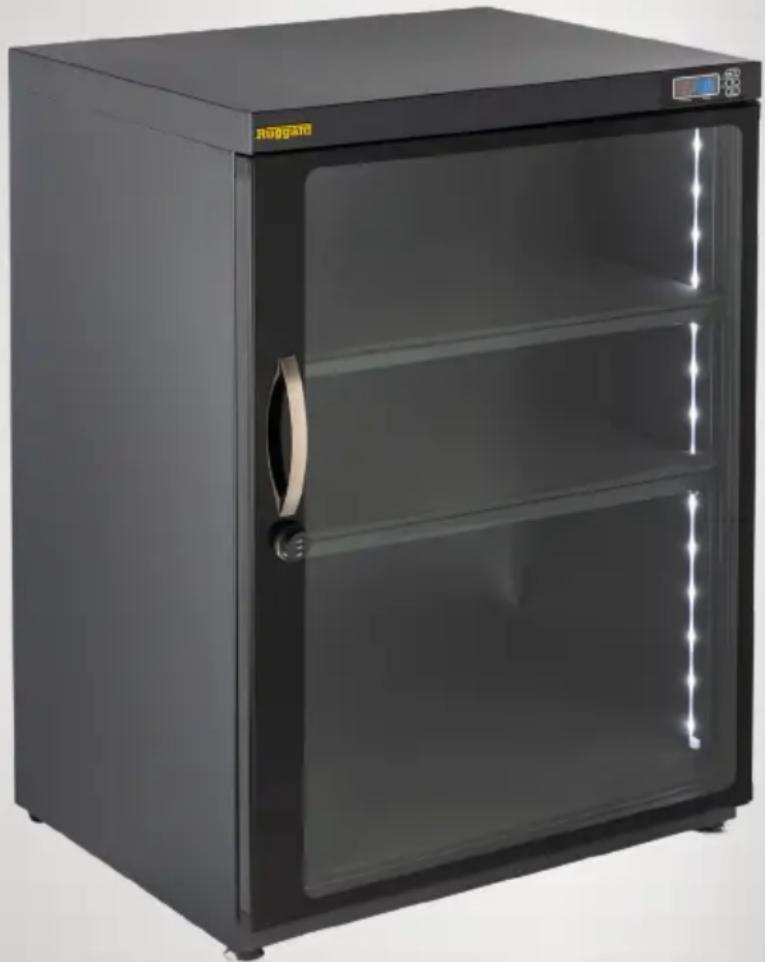
natural_image
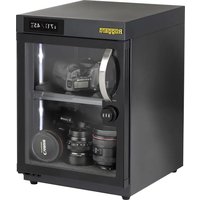
Exterior view of a black laboratory refrigerator with glass doors and a digital display (no visible text or symbols)Model EDC-230LC Shown
THANK YOU FOR CHOOSING RUGGARD
The Ruggard Electronic Dry Cabinet protects your lenses, photographic and optical equipment, mobile electronics, and other valuable accessories from excessive moisture. Using the cabinet's fast-acting TE Cooling Wafer, you can regulate the interior's relative humidity to help prevent fungus and corrosion from damaging your gear. The cabinet offers silent operation with no fan or compressor, and the unit is dripless, so there's no need for a water tray. The glass door and rubber seal provide extra protection against dust or airborne debris, keeping your gear working great for years.
OVERVIEW
- DC port
- Moisture sync
- LED bulbs
-
Front adjustable leveling feet (some models)
-
Base-foam lining
- Contoured lens-foam lining
- Adjustable sliding shelf
- Shelf brackets (2)
- Power switches ^1
Note: Features vary by model.

^1 Independent power switches for top and bottom zones (select models)
PRECAUTIONS
- Do not place any corrosive or flammable materials inside the cabinet.
- Keep this product away from direct sunlight, high temperatures, and windy environments.
- When storing food, medicine, or chemicals, make sure they are stored in a separate and sealed container.
- The weight limit for each shelf is 40 pounds (18.1 kg). Do not overload the shelves.
- This product is for indoor use only.
-
All images are for illustrative purposes only.
-
Pin
-
Handle ^2
-
Adjustable shelf
-
Foam lining
-
Shelving brackets (4)
-
Combination lock
-
Fixed shelf
Bracket Shelf models
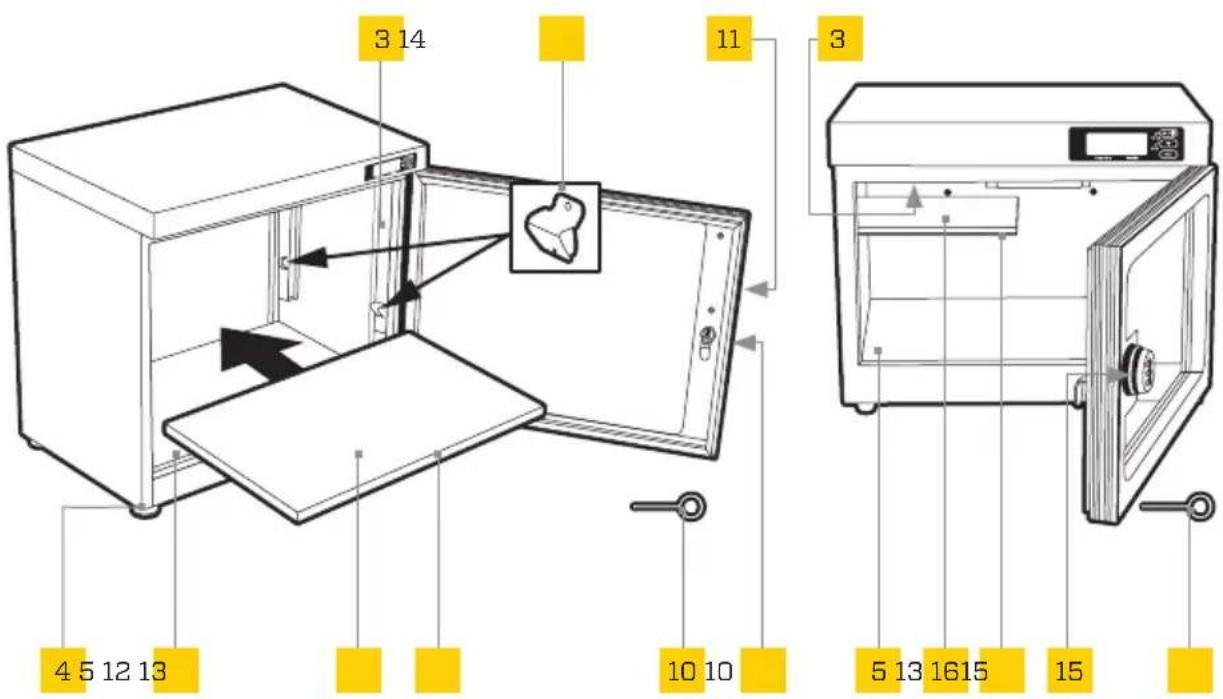
Fixed Shelf models
^2 For some models, the handle is attached to the inside of the unit for shipping. Use a Phillips screwdriver to unscrew and reposition the handle on the outside of the glass. Be careful not to overtighten.
USING THE COMBINATION LOCK (select models)
The cabinet comes with the default combination set to 000.
- With the door closed, select the default combination, and turn the lock counterclockwise to unlock it.

- To change the combination, insert the pin and lightly press it into the hole with one hand. Set the combination to the numbers of your choice with the other hand, and then remove the pin.

- Turn the lock clockwise and scramble the numbers to lock the door.
Important: Keep a record of your combination, and keep it in a safe and accessible place.
USING THE FINGERPRINT LOCK (select models)
The fingerprint lock keeps your photo and video equipment safe with the touch of a finger. You can easily store up to 20 fingerprints, and the lock offers automatic and manual locking modes.
Installing the Batteries
- Remove the lock's battery compartment cover and install three AAA batteries (not included). Install the two outside batteries first, and then the middle battery. Make sure to install the batteries in the correct orientation, following the guide on the inside of the battery compartment.

natural_image
Simple line drawing of a vertical pipe with a yellow oval object at the center (no text or symbols)- Replace the compartment cover, with the notches at the bottom, until it clicks shut.
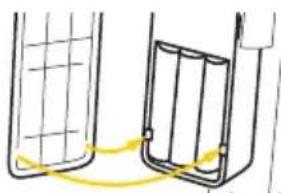
natural_image
Simple line drawing of two containers with a yellow curved arrow indicating rotation or movement (no text or symbols)Adding Fingerprints
Note: Make sure the key lock is in the vertical position, so the cabinet door lock engages properly.
- Remove the battery compartment cover and press and release the config. button. You'll hear a beep, and the fingerprint sensor will turn blue.
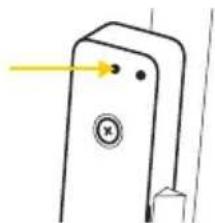
natural_image
Simple line drawing of a door with a keyhole and arrow pointing to the handle (no text or symbols)-
Place your finger onto the sensor until you hear a beep.
-
Repeat Step 2 five more times. The sensor will turn green when your fingerprint is accepted. If your fingerprint is not accepted, the sensor will beep and turn red. Continue to repeat the steps 1 to 3 until complete.
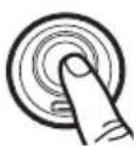
- After your fingerprint is stored, the sensor will turn blue again. You can add new fingerprints, while in this blue mode, repeating steps 1 to 3.
Note: The fingerprint sensor's blue light will turn off after six seconds if another fingerprint is not entered.
Deleting Fingerprints
Deleting fingerprints will delete all fingerprints stored in the memory. Press and hold the config. button for about four seconds, until you hear four beeps, and then release.
Auto and Manual Locking-Mode Selection
There are two modes for accessing the inside of the Dry Cabinet with Fingerprint Lock. In manual mode, your fingerprint both unlocks and locks the dry cabinet. In automatic mode, your finger unlocks the cabinet, but the unit automatically locks in about four seconds. When you first turn on the Dry Cabinet with Fingerprint Lock, it will be in auto mode. Warning! Switching modes will delete all stored fingerprints.
To change the mode, press and hold the config. button until you hear a series of four beeps and then two beeps.
Unlocking the Cabinet without a Fingerprint
There are two ways to unlock the cabinet if the batteries are depleted or a person's fingerprint is not stored.
Using the Keys
Insert the key into the key lock, turn clockwise, and open the door.
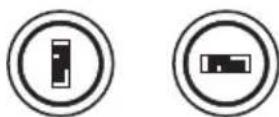
Locked Unlocked
Using the USB Adapter
-
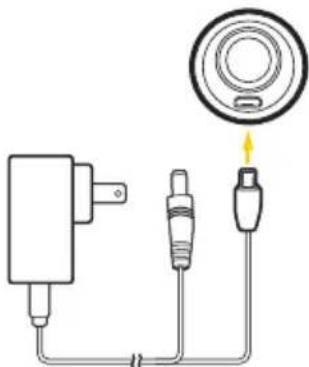
Insert the USB adapter into the fingerprint lock's USB port.
-
Connect the included power adapter to the USB adapter and a power source.
-
Place your finger on the fingerprint sensor for about one second, until the sensor turns green, and open the door.
natural_image
Pure electrical circuit lines without any symbolsLow Battery Warning
If the fingerprint lock has low battery power, it will beep six times. Replace all the AAA batteries immediately.
If the batteries die, see Unlocking the Cabinet without a Fingerprint.
CONTROL PANEL
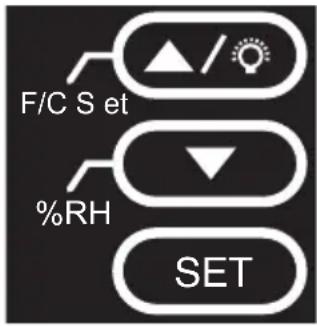
The illuminated digital display shows the cabinet's interior humidity and temperature settings.
[F/C]:Sethrenheit/Celsius set
button, value increase/Light (on/off)
[%] Relative humidity value decrease
[SET: Confirm setting


SETTING AND CHECKING HUMIDITY
The relative humidity setting regulates the entire cabinet interior. You can set the relative humidity percentage from 25% to 60%*, and it adjusts fully within 1 to 3 hours. The inside humidity can be decreased, but you cannot increase the humidity more than the surrounding environment. Keep the door closed to ensure optimal humidity levels.
- Press the [ ] button twice until the humidity display (blue) begins to flash.
- Use the [ ] and [ ] buttons to set the desired relative humidity value.
- Press the [ \$] button to confirm the settings.
Verify the target humidity by pressing the [%]rhion. The display will show the target value for two seconds before returning to the actual humidity level reading.
*The Electronic Dry Cabinet functions only within 25% to 60% relative humidity, even if you set the value outside that range.
Note: Do not place the rear of the cabinet directly against a wall or other surface. This may reduce the operational efficiency. Keep the door closed to prevent the humidity from increasing inside the cabinet.
SETTING TEMPERATURE DISPLAY
When the unit is initially turned on, the displayed temperature will be in degrees Celsius.
Press and hold the [] button for three seconds to change to Fahrenheit and vice versa.
Note: This unit does not control temperature.
SPECIFICATIONS
| EDC 18 EDC 30 EDC 50 EDC 80 | ||||
| Volume | 30 L 50 L 80 L | |||
| Power | 110 to 240 V, 50/60 Hz | 110 to 240 V, 50/60 Hz | 110 to 240 V, 50/60 Hz | 110 to 240 V, 50/60 Hz |
| Relative humidity | 60% to 35% ( ± 7%RH ) | 60% to 35% ( ± 7%RH ) | 60% to 35% ( ± 7%RH ) | 60% to 35% ( ± 7%RH ) |
| Zones | ||||
| Shelf load-bearing capacity | 4.4 lb. (2 kg) 17.6 lb. (8 kg) | 17.6 lb. (8 kg) | 33 lb. (15 kg) | |
| Lock type | Combination | Combination | Combination | Combination, Fingerprint |
| Finish | Black | Black | Black, Weathered Oak, Red Mahogany | Black, Weathered Oak, Red Mahogany |
| Dimensions(W × H × D) | 13.8 × 11.1 × 10.2 in.(35 × 28.2 × 26 cm) | 11.4 × 16.3 × 12.6 in.(29 × 41.3 × 32 cm) | 11.4 × 22.8 × 12.6 in.(29 × 57.8 × 32 cm) | 21.1 × 19.6 × 14.3 in.(53.7 × 49.8 × 36.2 cm) |
| Dimensions with feet(W × H × D) | 13.8 × 11.5 × 10.2 in.(35 × 29.2 × 26 cm) | 11.4 × 16.7 × 12.6 in.(29 × 42.3 × 32 cm) | 11.4 × 23.2 × 12.6 in.(29 × 59 × 32 cm) | 21.1 × 20.3 × 14.3 in.(53.7 × 51.6 × 36.2 cm) |
| Weight | 8.4 lb. (3.8 kg) | 14.3 lb. (6.5 kg) | 20 lb. (9.1 kg) | 29.5 lb. (13.4 kg) |
| EDC 125 | EDC 180 | EDC 230 | EDC 600 | |
| Volume | 125 L | 180 L | 230 L | 600 L |
| Power | 110 to 240 V, 50/60 Hz | 110 to 240 V, 50/60 Hz | 110 to 240 V, 50/60 Hz | 110 to 240 V, 50/60 Hz |
| Relative humidity | 60% to 35% ( ± 7%RH ) | 60% to 35% ( ± 7%RH ) | 60% to 35% ( ± 7%RH ) | 60% to 35% ( ± 7%RH ) |
| Zones | 12 | |||
| Shelf load-bearing capacity | 17.6 lb. (8 kg) | 17.6 lb. (8 kg) | 33 lb. (15 kg) | 44.1 lb. (20 kg) |
| Lock type | Combination | Combination | Combination | Combination |
| Finish | Black, Weathered Oak, Red Mahogany | Black | Black | Black |
| Dimensions (W × H × D) | 16.1 × 34.1 × 15.4 in.(41 × 86.5 × 39 cm) | 15 × 51.5 × 15.4 in.(38 × 130.8 × 39 cm) | 23.6 × 33.2 × 18.9 in.(60 × 84.3 × 48 cm) | 33.5 × 69.3 × 16.9 in.(85 × 176 × 43 cm) |
| Dimensions with feet (W × H × D) | 16.1 × 34.8 × 15.4 in.(41 × 88.3 × 39 cm) | 15 × 52 × 15.4 in.(38 × 132 × 39 cm) | 23.6 × 33.9 × 18.9 in.(60 × 86 × 48 cm) | 33.5 × 72.2 × 16.9 in.(85 × 183.5 × 43 cm) |
| Weight | 42.3 lb. (19.2 kg) | 58.4 lb. (26.5 kg) | 60.6 lb. (27.5 kg) | 158.7 lb. (72 kg) |
| EDC 850 | EDC 1280 | |
| Volume | L 1280 | L |
| Power | 110 to 240 V, 50/60 Hz | 110 to 240 V, 50/60 Hz |
| Relative humidity | 60% to 35% ( ± 7%RH) | 60% to 35% ( ± 7%RH) |
| Zones | 2 | |
| Shelf load-bearing capacity | 44.1 lb. (20 kg) | 44.1 lb. (20 kg) |
| Lock type | Combination | Combination |
| Finish | Black | Black |
| Dimensions(W × H × D) | 33.5 × 69.3 × 21.7 in.(85 × 176 × 55 cm) | 43.3 × 69.3 × 26.7 in.(110 × 176 × 67.7 cm) |
| Dimensions with feet(W × H × D) | 33.5 × 72.2 × 21.7 in.(85 × 183.5 × 55 cm) | 43.3 × 72.2 × 26.7 in.(110 × 183.5 × 67.7 cm) |
| Weight | 172 lb. (78 kg) | 253.5 lb. (115 kg) |
Size Comparison
| EDC 18 EDC 30 EDC 50 EDC 80 | |||
| EDC 125 EDC 180 EDC 230 EDC 600 | |||
EDC 850 EDC 1280
OPTIMAL RELATIVE HUMIDITY (RH) LEVELS
| Relative Humidity (RH) Level Recommended Items | |
| 50%-60% Books, antique documents, paper (fax, copy, print) | |
| 40%-50% | Camcorders, cameras, lenses, telescopes, microscopes, endoscopes, compact discs, film negatives, film transparency/slides, microfilm, disk drives, audio and video tapes |
| 35%-40% Metal and metal powder products, electrical equipment, semiconductors, capacitors, printed circuit boards, IC, batteries and other electronic equipment, precision measuring tools, spectrometers, optics, lenses | |
| 25%-30% | Pharmaceutical raw materials, spices, powder coating, adhesives, seeds, pollen, dry flour |
FIVE-YEAR LIMITED WARRANTY
This Ruggard product is warranted to the original purchaser to be free from defects in materials and workmanship under normal consumer use for a period of five (5) years from the original purchase date or thirty (30) days after replacement, whichever occurs later. The warranty provider's responsibility with respect to this limited warranty shall be limited solely to repair or replacement, at the provider's discretion, of any product that fails during normal use of this product in its intended manner and in its intended environment. Inoperability of the product or part(s) shall be determined by the warranty provider. If the product has been discontinued, the warranty provider reserves the right to replace it with a model of equivalent quality and function.
This warranty does not cover damage or defect caused by misuse, neglect, accident, alteration, abuse, improper installation or maintenance. EXCEPT AS PROVIDED HEREIN, THE WARRANTY PROVIDER MAKES NEITHER ANY EXPRESS WARRANTIES NOR ANY IMPLIED WARRANTIES, INCLUDING BUT NOT LIMITED TO ANY IMPLIED WARRANTY OF MERCHANTABILITY OR FITNESS FOR A PARTICULAR PURPOSE. This warranty provides you with specific legal rights, and you may also have additional rights that vary from state to state.
To obtain warranty coverage, contact the Ruggard Customer Service Department to obtain a return merchandise authorization (“RMA”) number, and return the defective product to Ruggard along with the RMA number and proof of purchase. Shipment of the defective product is at the purchaser’s own risk and expense.
For more information or to arrange service, visit www.ruggard.com or call Customer Service at 212-594-2853.
Product warranty provided by the Gradus Group. www.gradusgroup.com
Ruggard is a registered trademark of the Gradus Group. © 2024 Gradus Group LLC. All Rights Reserved.

RUGGARD® A Gradus Group Brand



- Electronic Dry Cabinet
- THANK YOU FOR CHOOSING RUGGARD
- OVERVIEW
- PRECAUTIONS
- USING THE COMBINATION LOCK (select models)
- USING THE FINGERPRINT LOCK (select models)
- Installing the Batteries
- Adding Fingerprints
- Deleting Fingerprints
- Auto and Manual Locking-Mode Selection
- Unlocking the Cabinet without a Fingerprint
- Using the Keys
- Using the USB Adapter
- Low Battery Warning
- CONTROL PANEL
- SETTING AND CHECKING HUMIDITY
- SETTING TEMPERATURE DISPLAY
- OPTIMAL RELATIVE HUMIDITY (RH) LEVELS
- FIVE-YEAR LIMITED WARRANTY
Brand : Ruggard
Model : EDC-18LC
Category : Electronic Drying Cabinet