
Q3 - Mixing console Radial Engineering - Free user manual and instructions
Find the device manual for free Q3 Radial Engineering in PDF.


| Product Type | 500 Series Module Equalizer (Coil EQ) |
| Dimensions | 171 x 51 x 229 mm (6.75 x 2 x 9 inches) |
| Weight | 0.7 kg (1.5 lbs) |
| Power Consumption | 25 mA (from 500 series rack) |
| Frequency Response | 20 Hz - 20 kHz, ±1 dB (EQ bypassed) |
| Dynamic Range | >112 dB |
| Noise (EQ Off) | < -90 dBu (600 Ω source) |
| Noise (EQ On) | < -87 dBu (600 Ω source) |
| Output Headroom | +27 dBu |
| Input Impedance | 12 kΩ balanced |
| Output Impedance | 440 Ω balanced |
| Maximum Gain | 7 dB (EQ bypassed, gain max) |
| THD+N | < 0.003% (0 dBu input, 1 kHz) |
| Intermodulation Distortion | < 0.002% (0 dBu input) |
| High Boost Control | 12-position rotary switch with 11 preset curves |
| Mid Cut Control | 12-position rotary switch with 11 preset curves |
| Bass Boost Control | 12-position rotary switch with 11 preset curves |
| Shift Switch | 2-position toggle: bold or gentle effect |
| High-Pass Filter | On/Off switch |
| Gain Control | Adjustable level (unity gain at 12 o'clock) |
| EQ In/Out Switch | Bypass with LED indicator |
| Omniport | Unbalanced 1/4" TRS input/output |
| Connectors (via rack) | XLR balanced I/O (rack dependent) |
| Warranty | 3 years, transferable |
| Cleaning | Use a dry cloth; no liquids |
| Safety | Do not hot-swap; turn off rack before inserting/removing |
| Repairability | No user-serviceable parts; contact authorized repair center |
Frequently Asked Questions - Q3 Radial Engineering
User questions about Q3 Radial Engineering
0 question about this device. Answer the ones you know or ask your own.
Ask a new question about this device
Download the instructions for your Mixing console in PDF format for free! Find your manual Q3 - Radial Engineering and take your electronic device back in hand. On this page are published all the documents necessary for the use of your device. Q3 by Radial Engineering.
USER MANUAL Q3 Radial Engineering
natural_image
Collection of black geometric shapes on white background, no text or symbols present
*▲□ ◆✿✿✿
[Non-Text]
*□◆※▼□▼※★◆▲※
Table of Contents ......Page
Feature set .... 1
Overview 2
Getting started 3
Using the coil EQ 4
Preset curves 6
Suggested settings 9
User settings records 12
Specifications.... 13
Block diagram 13
Warranty......Back cover
Thank you for joining the growing number of Radial 500 series module users. We are confident that you will find the Q3 Coil Equalizer to be a great addition to your recording studio setup. And although the Q3 is ‘plug and play’ easy to use, we recommend that you take a few minutes to read through this manual to familiarize yourself with the design and more importantly, the reasoning behind the way we created it.
If for some reason you do not find all of the answers to your quest, we suggest you log onto radialeng.com and peruse the Q3 Coil Equalizer FAQ section. This is where we post questions and answers from users like yourself along with the latest updates. If you do not find what you are looking for, feel free to send us an email at info@radialeng.com. We will do our very best to get an answer to you in short order.
Now reach out, close your eyes, turn the dials and listen. You are about to hear Nirvana! (without all of the grunge)

WARNING NOTICE TO USER!
Although preventative safety measures have been designed into Radial 500 series products we strictly advise against hot-swapping modules or plugging and unplugging them when the Workhorse or other 500 series rack is powered on. Hot swapping can cause connection sparks at the card-edge connector that could send damaging transients to other equipment. This also greatly reduces the life span of the card-edge contacts. Damage due to hot swapping is not covered under warranty. There are no user serviceable parts inside.
FEATURE SET
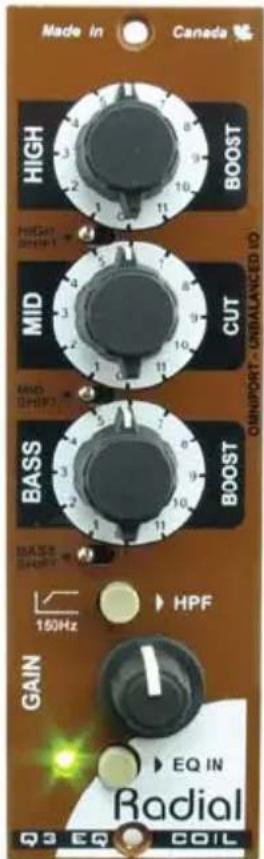
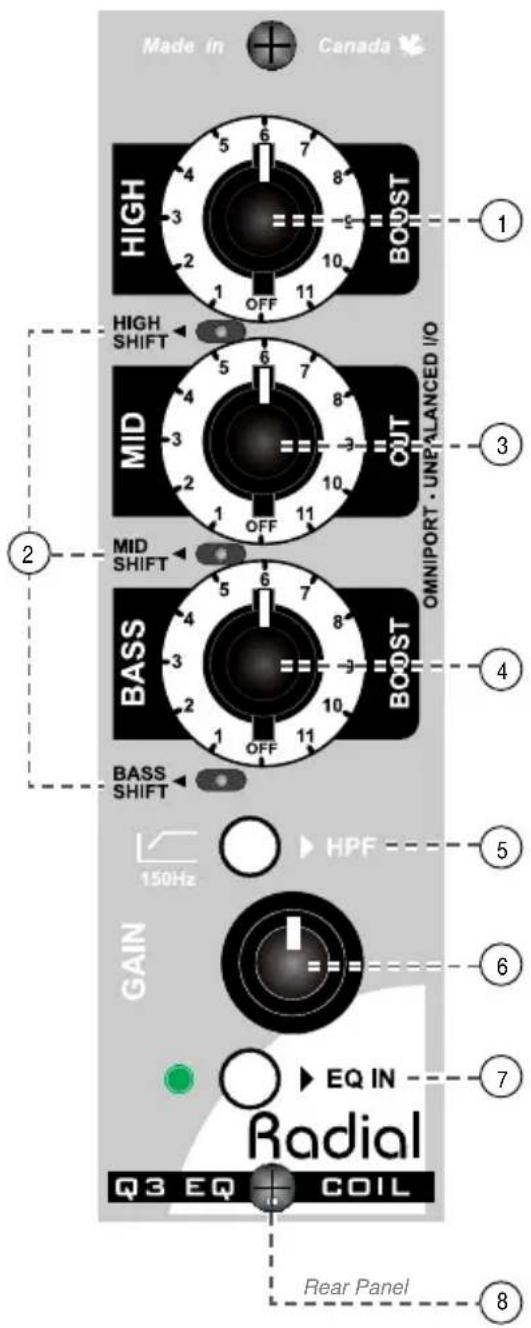
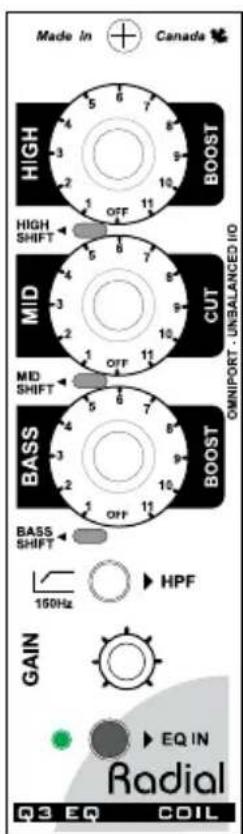
- HIGH BOOST - 12 position rotary switch features a wide variety of high-frequency preset curves designed to add clarity, shimmer and presence to the voice on instrument.
- SHIFT - This two position toggle switch changes the slope and amplitude of the preset curve. The SHIFT position offers an steeper EQ slope with increased amplitude creating a more pronounced effect.
- MID CUT - 12 position rotary switch presents an array of eleven preset curves, most of which are designed to cut mid frequencies where the human ear is most sensitive.
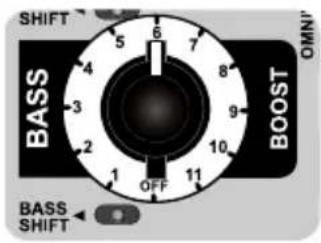
- BASS BOOST - 12 position rotary switch is outlined with eleven preset curves designed to boost bass and add warmth, body and punch to the audio track.
- HPF - High-pass fi Iter rolls off excessive low frequencies that can cause resonant feedback on a live stage or clutter up the bottom-end of a track when mixing.
- GAIN - Adjustable level control allows you to compensate for the EQ amplitude boost or cut and maintain unity gain through the Q3.
- EQ IN - This switch lets you compare the original program material with the effect introduced by the passive inductor coil EQ circuit. The LED indicator will illuminate when the EQ is engaged.
- OMNIPORT - Unbalanced 14 " TRS input and output receives a signal from an external device, processes it through the Q3 and outputs the signal at the Omniport.
OVERVIEW
The Radial Q3 is different... it does not follow tradition. The usual 3-knob EQ approach is to select a frequency band using some sort of rotary switch, then set the Q or width of the peak frequency and then adjust the amplitude of the effect to suit. To create truly usable audio curves, you really need to combine multiple frequency bands together and mix their effects. In other words, to recreate the type of curves we have conjured up inside the Q3, you would need at least two bands and 6 control knobs. This is ‘practically’ impossible in a small format module like the 500 series as the controls would be so tightly packed, they would be unusable.

To fit a coil EQ into the 500 series format, a completely different approach was needed. The Q3 changes convention by giving the user a mind-numbing selection of over 12,000 EQ possibilities using only three knobs and a few switches. Each 12 position switch is packed with 11 preset curves that have been carefully selected after exhaustive listening tests. These were evaluated on voice, bass, acoustic guitar, electric and on drums and compared using both dynamic and condenser microphones.
We then set about testing how each curve would sound in tandem. There is no doubt that while some curves will sound amazing on bass, the same curve may not suit mandolin. But with well over 12,000 combinations, you will surely find lots of very usable sounds.

line
| Condition | Peak Value | | --------------- | ---------- | | High Boost | 3.0 | | Mid Cut | -10.0 | | Bass Boost | 4.0 | | Composite Curve | -2.0 |The 3-knob user interface is so natural and easy to use, that you will be amazed at how quickly you will become accustomed to it. And once you get started, you will find favourites that will surely become cornerstones of your recording process.
GETTING STARTED
Making connections
Before making any connections, start by turning off your audio system and turning all volume levels down. This helps protect equipment from turn-on transients that could damage loudspeakers and other sensitive equipment. We recommend using a power bar with a switch as this makes it easy to turn on and off the 500 series rack, monitors and so on, using a single switch. Carefully plug the Q3 into your 500 series rack avoiding stress on the card edge connector. Screw the module in to ensure it does not accidentally become dislodged.
Connections between the Q3 and the recording or PA system are made at the rear panel of your 500 series rack. Most 500 series racks are equipped with XLR connectors. When you plug the Q3 module into your 500 series rack, it will automatically route the card-slot input and output XLR jacks to the module. With the Radial Workhorse 500 series rack the I/O is augmented with 14 TRS connectors, D-Subs and the Mix Buss signal to feed the Workhorse mixer section.
Start by setting up the controls as follows:
-
Set all HIGH, MID and BASS frequency band controls to the OFF position.
-
Make sure all three 'SHIFT' switches are pushed to the left (bold effect). This will help you to choose a preset curve that works best for the instrument at hand. Once selected the effect can be pulled back by toggling the SHIFT switch to the right.
-
Set the HIGH PASS FILTER to off (outward position).
-
Set the GAIN control to the 12 o'clock position.
-
Set the ON switch to bypass (EQ circuit out).
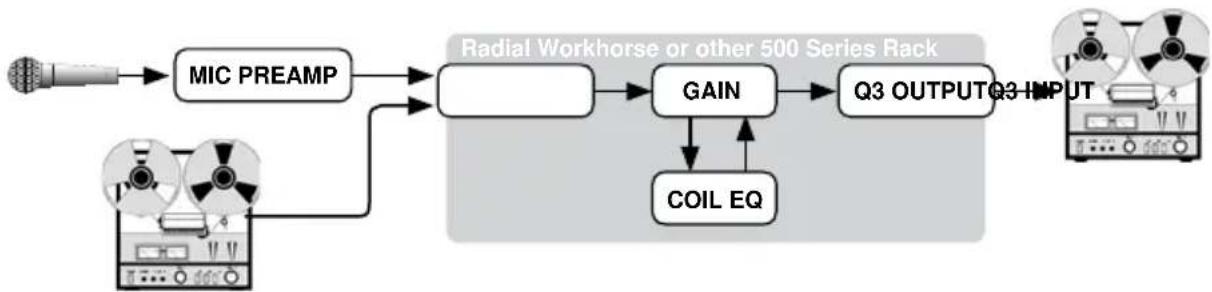
The Q3 is a line level device. In other words, it is designed to take the output from a mic preamplifier or pre-recorded track and process the signal before sending it along to a dynamic processor, effects device or back to the recorder.
flowchart
graph LR
    A["Speaker"] --> B["MIC PREAMP"]
    C["Coil Emitter"] --> D["GAIN"]
    D --> E["Q3 OUTPUT Q3 INPUT"]
    E --> F["Output"]
    B --> G["Radial Workhorse or other 500 Series Rack"]
    D --> H["COIL EQ"]
    H --> D
It is important to note that the GAIN control is always active. In other words, when you hit the bypass switch, you are actually bypassing the coil EQ circuits. This enables you to switch the EQ in and out to compare the effect at the same gain settings.
Connect the source to the Q3, connect the output from the Q3 to your recording system... turn it on. Listen. You should hear audio. If not, check your connections. To check the power going to the Q3, depress the EQ IN switch. The LED will illuminate if power is present in your 500 series rack. Now familiarize yourself with the GAIN control to check sound levels. If all is good, return it to the 12 o'clock start position.
Using the Coil EQ
The Q3 features three 12 position rotary controls that are designated as BASS, MID and HIGH. Each of these features on OFF position and 11 preset curves. Using a simple microphone and a set of headphones, start by familiarizing yourself with the various EQ curves in each band. As some of the EQ curves are very dramatic, using headphones will help to eliminate feedback from occurring.
Note that the HIGH and BASS bands are made up of mostly boost type presets while the MID band is made up of mostly cuts. This follows the way we humans like to 'hear' sound. Keep in mind, the Q3 is not intended to be a surgical tool, it is designed to enthral and excite.
When using subtractive curves, you will notice that the sound level will appear to drop. This is normal. Simply adjust the level by increasing the GAIN control to compensate. Be careful! The Q3 has lots of gain!

CAUTION!
One of the drawbacks to passive coil EQs is that there is no noise preventative circuitry between the induction coil circuit and the signal path. This means that when you switch coils, you can encounter clicks and pops. Always monitor at reduced levels while setting up the Q3. This will help avoid popping which in turn could damage more sensitive equipment.
Using the 'Shift Key'
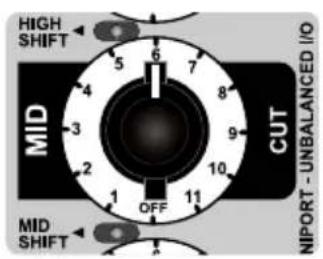
One of the cool features on the Q3 is the SHIFT switch. When set to the right, the effect of each curve is gentler. When moved to the left, it is bolder and more prevalent. This enables you to listen to various curves to determine if the general effect is going in the right direction and then lets you either add or subtract the effect, depending on your musical taste.

line
| Hz | E (dB) | | ------ | ------ | | 20 | -2.0 | | 50 | -4.0 | | 100 | -6.0 | | 200 | -7.0 | | 500 | -8.0 | | 1k | -9.0 | | 2k | -10.0 | | 5k | -12.0 | | 10k | -16.0 | | 20k | -14.0 | | 50k | -10.0 | | 100k | -6.0 | | 200k | -4.0 | | 500k | -2.0 | | 1k | 0.0 | | 2k | 2.0 | | 5k | 4.0 | | 10k | 6.0 | | 20k | 8.0 | | 50k | 10.0 | | 100k | 12.0 | | 200k | 14.0 | | 500k | 16.0 | | 1k | 18.0 | | 2k | 20.0 | | 5k | 22.0 | | 10k | 24.0 | | 20k | 26.0 | | 50k | 28.0 | | 1k | 30.0 | | 2k | 32.0 | | 5k | 34.0 | | 10k | 36.0 | | 20k | 38.0 | | 50k | 40.0 | | 1k | 42.0 | | 2k | 44.0 | | 5k | 46.0 | | 10k | 48.0 | | 20k | 50.0 | | 50k | 52.0 | | 1k | 54.0 | | 2k | 56.0 | | 5k | 58.0 | | 10k | 60.0 | | 20k | 62.0 | | 50k | 64.0 | | 1k | 66.0 | | 2k | 68.0 | | 5k | 70.0 | | 10k | 72.0 | | 20k | 74.0 | | 50k | 76.0 | | 1k | 78.0 | | 2k | 80.0 | | 5k | 82.0 | | 10k | 84.0 | | 20k | 86.0 | | 50k | 88.0 | | 1k | 90.0 | | 2k | 92.0 | | 5k | 94.0 | | 10k | 96.0 | | 20k | 98.0 | | 50k | 100.0 | | 1k | 102.0 | | 2k | 104.0 | | 5k | 106.0 | | 10k | 108.0 | | 20k | 110.0 | | 50k | 112.0 | | 1k | 114.0 | | 2k | 116.0 | | 5k | 118.0 | | 10k | 120.0 | | 20k | 122.0 | | 50k | 124.0 | | 1k | 126.0 | | 2k | 128.0 | | 5k | 130.0 | | 10k | 132.0 | | 20k | 134.0 | | 50k | 136.0 | | 1k | 138.0 | | 2k | 140.0 | | 5k | 142.0 | | 10k | 144.0 | | 20k | 146.0 | | 50k | 148.0 | | 1k | 150.0 | | 2k | 152.0 | | 5k | 154.0 | | 10k | 156.0 | | 20k | 158.0 | | 50k | 160.0 | | 1k | 162.0 | | 2k | 164.0 | | 5k | 166.0 | | 10k | 168.0 | | 20k | 170.0 | | 50k | 172.0 | | 1k | 174.0 | | 2k | 176.0 | | 5k | 178.0 | | 10k | 180.0 | | Note: The actual values may vary due to the random nature of the data generation process shown in the code above the code provided in the code.The dashed line represents the standard curve and the solid line represents the "shifted" curve.
Note: As the space between the 12 position rotary switches is very tight, the easiest way to move the shift switch is to use a pen or treaker. This is the downside to jamming all of this control into a 500 series format!
Using the High-Pass Filter
The Radial Q3 is equipped with a switch labelled HPF that stands for high-pass filter. What this switch does is exactly that... it allows the high frequencies to pass... therefore cutting out some of the lows. The HPF can be very effective when recording to eliminate excessive bottom-end. Some EQ settings can cause certain instruments to sound muddy and clutter up the recording. Keep in mind that bass frequencies contain a lot more energy than highs, so they affect dynamic range and distortion. High-pass filters are also a ‘God-send’ in live touring as cutting excessive bottom end eliminates resonance which is the primary cause of feedback. Simply press, listen and then take out to compare.
Using the Omniport
When the Q3 is used with a Radial Workhorse or one of our other 500 series power racks, the Omniport connection becomes available and in this case, it functions as an unbalanced input and output.

flowchart
graph TD
    A["External Device"] --> B["OMNIPORT I/O"]
    B --> C["COIL EQ"]
    C --> D["GAIN"]
    D --> E["Q3 OUTPUT Q3 INPUT"]
    E --> F["Radial Workhorse or other 500 Series Rack"]
    F --> G["External Device"]
    G --> B
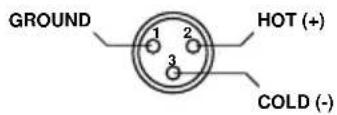
While the XLR and 14 " TRS jacks on the Workhorse are balanced, the Omniport connection is unbalanced making it easy to connect to the unbalanced insert patch point on a console. Note that the balanced XLR I/O should be left unconnected when using the Omniport function. The easiest way to connect to the Omniport would be to use a TRS-to-TRS cable. Simply make sure the wiring is configured as follows:
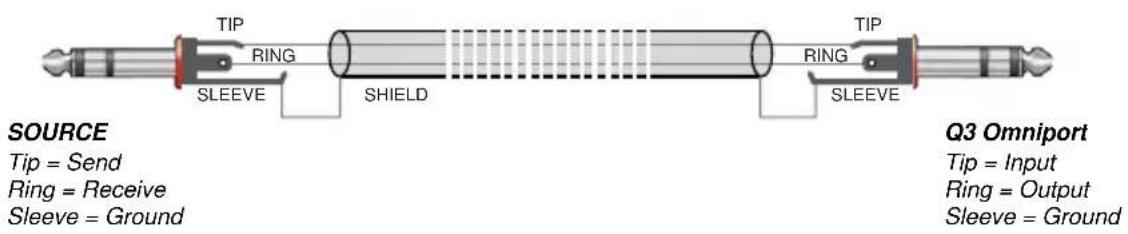
Q3 PRESET EQUALIZATION CURVES
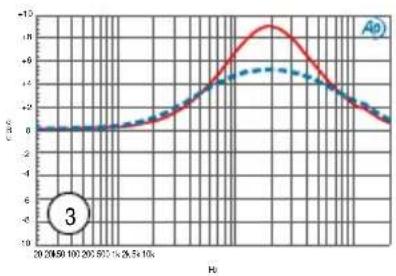
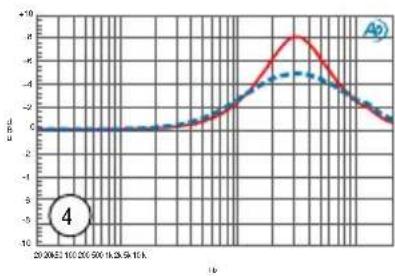
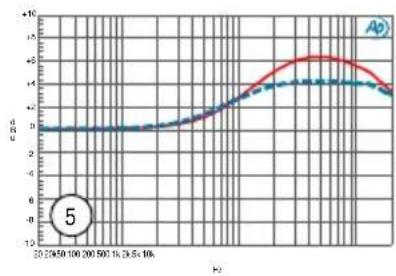
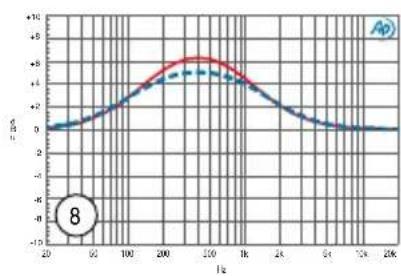
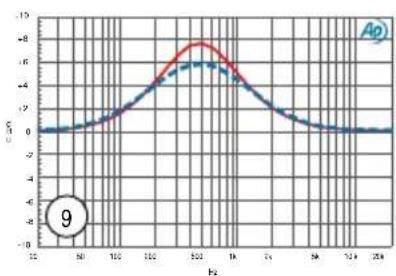
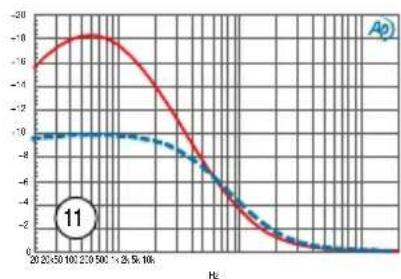
Although printing the preset curve data is somewhat superfluous, we have decided to include it in the manual so that you can get a 'visual' of what each individual preset curve looks like. DO NOT get caught looking at curves to make audio decisions. Use your ears! Once you get started, you will find that getting around the Q3 will be very natural and incredibly quick.
HIGH BOOST PRESETS


line
| Time (s) | Aβ (dB) | | -------- | ------- | | 0 | -2.0 | | 5 | -1.8 | | 10 | -1.5 | | 15 | -1.2 | | 20 | -1.0 | | 25 | -0.8 | | 30 | -0.6 | | 35 | -0.4 | | 40 | -0.2 | | 45 | 0.0 | | 50 | 0.2 | | 55 | 0.4 | | 60 | 0.6 | | 65 | 0.8 | | 70 | 1.0 | | 75 | 1.2 | | 80 | 1.4 | | 85 | 1.6 | | 90 | 1.8 | | 95 | 2.0 | | 100 | 2.2 |+3dB High Shelf

line
| Time (s) | Red Line (Aβ) | Blue Dashed Line (Aβ) | | -------- | ------------- | --------------------- | | 0 | 0 | 0 | | 5 | ~1 | ~0.5 | | 10 | ~8 | ~4 | | 15 | ~7 | ~5 | | 20 | ~5 | ~4.5 | | 25 | ~3 | ~3 | | 30 | ~1 | ~2 |+9db @ 4.8 KHz
line
| H | r (A0) | | ------- | ------ | | 20.0 | 0 | | 10.0 | 0 | | 5.0 | 0 | | 3.5 | 0 | | 2.5 | 0 | | 2.0 | 0 | | 1.5 | 0 | | 1.0 | 0 | | 0.5 | 0 | | 0.2 | 0 | | 0.1 | 0 | | 0.0 | 0 |+9db @ 2KHz
line
| x | y | | ------- | ----- | | 20.06.21 | 0 | | 20.12.26 | 0 | | 20.19.30 | 0 | | 20.26.34 | 0 | | 20.33.38 | 0 | | 20.40.42 | 0 | | 20.47.46 | 0 | | 20.54.50 | 0 | | 20.61.54 | 0 | | 20.68.58 | 0 | | 20.75.62 | 0 | | 20.82.66 | 0 | | 20.89.70 | 0 | | 20.96.74 | 0 | | 21.03.78 | 0 | | 21.10.82 | 0 | | 21.17.86 | 0 | | 21.24.90 | 0 | | 21.31.94 | 0 | | 21.38.98 | 0 | | 21.45.12 | 0 | | 21.52.16 | 0 | | 21.59.20 | 0 | | 21.66.24 | 0 | | 21.73.28 | 0 | | 21.80.32 | 0 | | 21.87.36 | 0 | | 21.94.40 | 0 | | 22.01.44 | 0 | | 22.08.48 | 0 | | 22.15.52 | 0 | | 22.22.56 | 0 | | 22.29.60 | 0 | | 22.36.64 | 0 | | 22.43.68 | 0 | | 22.50.72 | 0 | | 22.57.76 | 0 | | 22.64.80 | 0 | | 22.71.84 | 0 | | 22.78.88 | 0 | | 22.85.92 | 0 | | 22.92.96 | 0 | | 22.99.10 | 0 | | 23.06.14 | 0 | | 23.13.18 | 0 | | 23.20.22 | 0 | | 23.27.26 | 0 | | 23.34.30 | 0 | | 23.41.34 | 0 | | 23.48.38 | 0 | | 23.55.42 | 0 | | 23.62.46 | 0 | | 23.69.50 | 0 | | 23.76.54 | 0 | | 23.83.58 | 0 | | 23.90.62 | 0 | | 23.97.66 | 0 | | 24.04.70 | 0 | | 24.11.74 | 0 | | 24.18.78 | 0 | | 24.25.82 | 0 | | 24.32.86 | 0 | | 24.39.90 | 0 | | 24.46.94 | 0 | | 24.53.98 | 0 | | 24.60.12 | 0 | | 24.67.16 | 0 | | 24.74.20 | 0 | | 24.81.24 | 0 | | 24.88.28 | 0 | | 24.95.32 | 0 | | 25.02.36 | 0 | | 25.09 | 0 | | 25.16 | 0 | | 25.23 | 0 | | 25.30 | 0 | | 25.37 | 0 | | 25.44 | 0 | | 25.51 | 0 | | 25.58 | 0 | | 25.65 | 0 | | 25 | -1 |+8db @ 3.2 KHz
line
| x | y | | ---- | ----- | | 20 | 0 | | 50 | 0 | | 100 | 0 | | 150 | 0 | | 200 | 0 | | 250 | 0 | | 300 | 0 | | 350 | 0 | | 400 | 0 | | 450 | 0 | | 500 | 0 | | 550 | 0 | | 600 | 0 | | 650 | 0 | | 700 | 0 | | 750 | 0 | | 800 | 0 | | 850 | 0 | | 900 | 0 | | 950 | 0 | | 1000 | 0 | | 1050 | 0 | | 1100 | 0 | | 1150 | 0 | | 1200 | 0 | | 1250 | 0 | | 1300 | 0 | | 1350 | 0 | | 1400 | 0 | | 1450 | 0 | | 1500 | 0 | | 1550 | 0 | | 1600 | 0 | | 1650 | 0 | | 1700 | 0 | | 1750 | 0 | | 1800 | 0 | | 1850 | 0 | | 1900 | 0 | | 1950 | 0 | | 2000 | 0 | | 2050 | 0 | | 2100 | 0 | | 2150 | 0 | | 2200 | 0 | | 2250 | 0 | | 2300 | 0 | | 2350 | 0 | | 2400 | 0 | | 2450 | 0 | | 2500 | 0 | | 2550 | 0 | | 2600 | 0 | | 2650 | 0 | | 2700 | 0 | | 2750 | 0 | | 2800 | 0 | | 2850 | 0 | | 2900 | 0 | | 2950 | 0 | | 3000 | 0 | | 3050 | 0 | | 3100 | 0 | | 3150 | 0 | | 3200 | 0 | | 3250 | 0 | | 3300 | 0 | | 3350 | 0 | | 3400 | 0 | | 3450 | 0 | | 3500 | 0 | | 3550 | 0 | | 3600 | 0 | | 3650 | 0 | | 3700 | 0 | | 3750 | 0 | | 3800 | 0 | | 3850 | 0 | | 3900 | 0 | | 3950 | 0 | | 4000 | 0 | | 4050 | 0 | | 4100 | 0 | | 4150 | 0 | | 4200 | 0 | | 4250 | 0 | | 4300 | 0 | | 4350 | 0 | | 4400 | 0 | | 4450 | 0 | | 4500 | 0 | | 4550 | 0 | | 4600 | 0 | | 4650 | 0 | | 4700 | 0 | | 4750 | 0 | | 4800 | 0 | | 4850 | 0 | | 4900 | 0 | | 4950 | 0 | | 5000 | 0 | | Note: The actual values in the CSV data are not provided in the code. The code contains two values: 'a' and 'b'. The values are estimated based on the given code format. There is no additional data series in this case. The values are estimated based on the given code format. The numbers present in the code format are 'a' and 'b'.+6db @ 4.5 KHz

line
| Hz | A2 | | --- | ------ | | 0 | 0.0 | | 5 | 0.0 | | 10 | 0.0 | | 15 | 0.0 | | 20 | 0.0 | | 25 | 0.0 | | 30 | 0.0 | | 35 | 0.0 | | 40 | 0.0 | | 45 | 0.0 | | 50 | 0.0 | | 55 | 0.0 | | 60 | 0.0 | | 65 | 0.0 | | 70 | 0.0 | | 75 | 0.0 | | 80 | 0.0 | | 85 | 0.0 | | 90 | 0.0 | | 95 | 0.0 | | 100 | 0.0 | | 105 | 0.0 | | 110 | 0.0 | | 115 | 0.0 | | 120 | 0.0 | | 125 | 0.0 | | 130 | 0.0 | | 135 | 0.0 | | 140 | 0.0 | | 145 | 0.0 | | 150 | 0.0 | | 155 | 0.0 | | 160 | 0.0 | | 165 | 0.0 | | 170 | 0.0 | | 175 | 0.0 | | 180 | 0.0 | | 185 | 0.0 | | 190 | 0.0 | | 195 | 0.0 | | 200 | 0.0 | | 205 | 0.0 | | 210 | 0.0 | | 215 | 0.0 | | 220 | 0.0 | | 225 | 0.0 | | 230 | 0.0 | | 235 | 0.0 | | 240 | 0.0 | | 245 | 0.0 | | 250 | 0.0 | | 255 | 0.0 | | 260 | 0.0 | | 265 | 0.0 | | 270 | 0.0 | | 275 | 0.0 | | 280 | 0.0 | | 285 | 0.0 | | 290 | 0.0 | | 295 | 0.0 | | 300 | 0.0 | | 305 | 0.0 | | 310 | 0.0 | | 315 | 0.0 | | 320 | 0.0 | | 325 | 0.0 | | 330 | 0.0 | | 335 | 0.0 | | 340 | 0.0 | | 345 | 0.0 | | 350 | 0.0 | | 355 | 0.0 | | 360 | 0.0 | | 365 | 0.0 | | 370 | 0.0 | | 375 | 0.0 | | 380 | 0.0 | | 385 | 0.0 | | 390 | 0.0 | | 395 | 0.0 | | 400 | 0.0 | | 405 | -1.5 | | 410 | -1.4 | | 415 | -1.3 | | 420 | -1.2 | | 425 | -1.1 | | 430 | -1.1 | | 435 | -1.1 | | 440 | -1.1 | | 445 | -1.1 | | 450 | -1.1 | | 455 | -1.1 | | 460 | -1.1 | | 465 | -1.1 | | 470 | -1.1 | | 475 | -1.1 | | 480 | -1.1 | | 485 | -1.1 | | 490 | -1.1 | | 495 | -1.1 | | 500 | -1.1 | | 566 | -6.8 | | Note: The actual values for A2 are not provided in the code image, so they are estimated from the provided data source.+9db @ 7 KHz

line
| x | y | | ---- | ------ | | 2020 | 0 | | 19.5 | 0 | | 19.0 | 0 | | 18.5 | 0 | | 18.0 | 0 | | 17.5 | 0 | | 17.0 | 0 | | 16.5 | 0 | | 16.0 | 0 | | 15.5 | 0 | | 15.0 | 0 | | 14.5 | 0 | | 14.0 | 0 | | 13.5 | 0 | | 13.0 | 0 | | 12.5 | 0 | | 12.0 | 0 | | 11.5 | 0 | | 11.0 | 0 | | 10.5 | 0 | | 10.0 | 0 | | 9.5 | 0 | | 9.0 | 0 | | 8.5 | 0 | | 8.0 | 0 | | 7.5 | 0 | | 7.0 | 0 | | 6.5 | 0 | | 6.0 | 0 | | 5.5 | 0 | | 5.0 | 0 | | 4.5 | 0 | | 4.0 | 0 | | 3.5 | 0 | | 3.0 | 0 | | 2.5 | 0 | | 2.0 | 0 | | 1.5 | 0 | | 1.0 | 0 | | 0.5 | 0 | | 0.0 | 0 | | -0.5 | -1 | | -1.0 | -2 | | -1.5 | -3 | | -2.0 | -4 | | -2.5 | -5 | | -3.0 | -6 | | -3.5 | -7 | | -4.0 | -8 | | -4.5 | -9 | | -5.0 | -10 | | -5.5 | -11 | | -6.0 | -12 | | -6.5 | -13 | | -7.0 | -14 | | -7.5 | -13 | | -8.0 | -12 | | -8.5 | -11 | | -9.0 | -10 | | -9.5 | -9 | | -10.0| -8 | | -10.5| -7 | | -11.0| -6 | | -11.5| -5 | | -12.0| -4 | | -12.5| -3 | | -13.0| -2 | | -13.5| -1 | | -14.0| 0 | | -14.5| 1 | | -15.0| 2 | | -15.5| 3 | | -16.0| 4 | | -16.5| 5 | | -17.0| 6 | | -17.5| 7 | | -18.0| 8 | | -18.5| 9 | | -19.0| 10 | | -19.5| 11 | | -20.0| 12 | | -20.5| 13 | | -21.0| 14 | | -21.5| 13 | | -22.0| 12 | | -22.5| 11 | | -23.0| 10 | | -23.5| 9 | | -24.0| 8 | | -24.5| 7 | | -25.0| 6 | | -25.5| 5 | | -26.0| 4 | | -26.5| 3 | | -27.0| 2 | | -27.5| 1 | | -28.0| 0 | | -28.5| -1 | | -29.0| -2 | | -29.5| -3 | | -30.0| -4 | | -30.5| -5 | | -31.0| -6 | | -31.5| -7 | | -32.0| -8 | | -32.5| -9 | | -33.0| -10 | | -33.5| -11 | | -34.0| -12 | | -34.5| -13 | | -35.0| -14 | | | -35.5| -13 | | -36.0| -12 | | -36.5| -11 | | -37.0| -10 | | -37.5| -9 | | -38.0| -8 | | -38.5| -7 | | -39.0| -6 | | -39.5| -5 | | -40.0| -4 | | -40.5| -3 | | -41.0| -2 | | -41.5| -1 | | -42.0| 0 |+13db @ 7 KHz
line
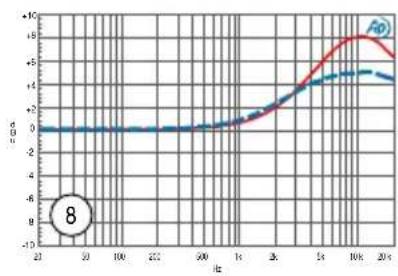
| x | y | | ---- | ----- | | 20 | 0 | | 50 | 0 | | 100 | 0 | | 200 | 0 | | 500 | 0 | | 1x | 0 | | 2x | 1 | | 5x | 3 | | 10x | 5 | | 20x | 4 |+8db @ 10 KHz
line
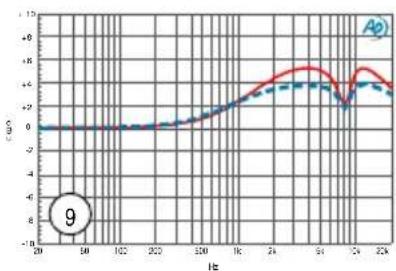
| Hz | Amplitude | | --- | --------- | | 20 | 0 | | 50 | 0 | | 100 | 0 | | 200 | 0 | | 300 | 1 | | 500 | 3 | | 1K | 4 | | 2K | 5 | | 5K | 6 | | 1K | 4 | | 2K | 5 | | 5K | 6 | | 10K | 5 | | 20K | 4 |+5db High Shelf with 8KHz Notch
line
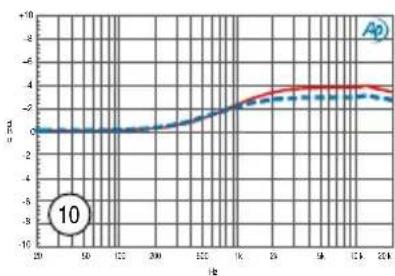
| lg | u_m | | --- | --- | | 20 | 0 | | 50 | 0 | | 100 | 0 | | 200 | 0 | | 1K | 2 | | 2K | 3 | | 5K | 3 | | 1K+ | 3 |+4db High Shelf

line
| Frequency (Hz) | Aβ (dB) | | -------------- | ------- | | 0 | 0 | | 1 | 0 | | 2 | 0 | | 3 | 0 | | 4 | 0 | | 5 | 0 | | 6 | 0 | | 7 | 0 | | 8 | 0 | | 9 | 0 | | 10 | 0 | | 11 | 0 |+7db @ 7 KHz
MID CUT PRESETS

line
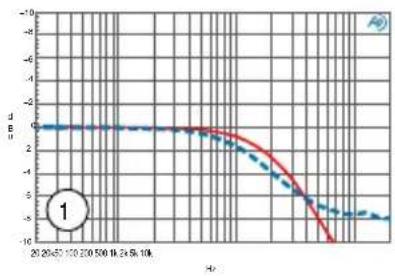
| x | y (red line) | y (blue dashed line) | | ---- | ------------ | --------------------- | | 20 | 0 | 0 | | 50 | -1 | -1 | | 100 | -3 | -3 | | 200 | -6 | -5 | | 500 | -9 | -7 | | 1000 | -12 | -8 |High Cut @ 2.4 KHz
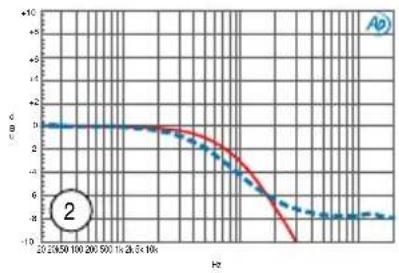
line
| Frequency (Hz) | Voltage (V dB) | | -------------- | -------------- | | 20 | 3.0 | | 50 | 2.8 | | 100 | 2.5 | | 200 | 2.0 | | 500 | 1.5 | | 1000 | 1.0 | | 2000 | 0.5 | | 5000 | 0.0 | | 10000 | -0.5 | | 20000 | -1.0 | | 50000 | -1.5 | | 100000 | -2.0 |High Cut @ 1 KHz

line
| Hz | A | | ---- | ----- | | 20 | 0.0 | | 50 | -2.0 | | 100 | -4.0 | | 200 | -6.0 | | 300 | -8.0 | | 1K | -6.0 | | 2K | -4.0 | | 5K | -2.0 | | 10K | 0.0 | | 20K | 0.0 |-16db @ 400 Hz

line
| x | y (solid red) | y (dashed blue) | | ---- | ------------- | --------------- | | 20 | 6 | 6 | | 50 | -12 | -4 | | 100 | -6 | -6 | | 200 | -12 | -6 | | 500 | -6 | -6 | | 1k | -12 | -6 | | 2k | -6 | -6 | | 5k | -12 | -6 | | 10k | -6 | -6 | | 20k | 6 | 6 |-11 db @ 800 Hz
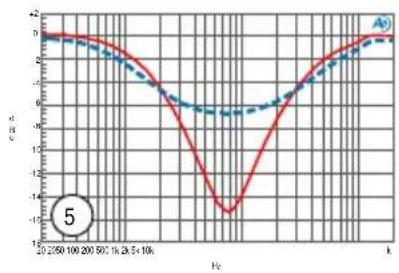
line
| Fz | A3 | | -------- | ------ | | 20.2650 | 9.0 | | 100 | 8.5 | | 50 | 7.0 | | 2.5×10^4 | 5.0 | | 1 | 0.0 | | 0 | -10.0 | | 0 | -15.0 | | 0 | -10.0 | | 0 | 0.0 | | 0 | 5.0 | | 0 | 10.0 | | 0 | 15.0 | | 0 | 20.0 | | 0 | 25.0 | | 0 | 30.0 | | 0 | 35.0 | | 0 | 40.0 | | 0 | 45.0 | | 0 | 50.0 | | 0 | 55.0 | | 0 | 60.0 | | 0 | 65.0 | | 0 | 70.0 | | 0 | 75.0 | | 0 | 80.0 | | 0 | 85.0 | | 0 | 90.0 | | 0 | 95.0 | | 0 | 100.0 | | 1 | 9.5 | | 2 | 9.0 | | 3 | 8.5 | | 4 | 8.0 | | 5 | 7.5 | | 6 | 7.0 | | 7 | 6.5 | | 8 | 6.0 | | 9 | 5.5 | | 10 | 5.0 | | 11 | 4.5 | | 12 | 4.0 | | 13 | 3.5 | | 14 | 3.0 | | 15 | 2.5 | | 16 | 2.0 | | 17 | 1.5 | | 18 | 1.0 | | 19 | 0.5 | | 20 | 0.0 | | 21 | -0.5 | | 22 | -1.0 | | 23 | -1.5 | | 24 | -2.0 | | 25 | -2.5 | | 26 | -3.0 | | 27 | -3.5 | | 28 | -4.0 | | 29 | -4.5 | | 30 | -5.0 | | 31 | -5.5 | | 32 | -6.0 | | 33 | -6.5 | | 34 | -7.0 | | 35 | -7.5 | | 36 | -8.0 | | 37 | -8.5 | | 38 | -9.0 | | 39 | -9.5 | | 40 | -10.0 | | 41 | -10.5 | | 42 | -11.0 | | 43 | -11.5 | | 44 | -12.0 | | 45 | -12.5 | | 46 | -13.0 | | 47 | -13.5 | | 48 | -14.0 | | 49 | -14.5 | | 50 | -15.0 | | 51 | -15.5 | | 52 | -16.0 | | 53 | -16.5 | | 54 | -17.0 | | 55 | -17.5 | | 56 | -18.0 | | 57 | -18.5 | | 58 | -19.0 | | 59 | -19.5 | | 60 | -20.0 | | 61 | -20.5 | | 62 | -21.0 | | 63 | -21.5 | | 64 | -22.0 | | 65 | -22.5 | | 66 | -23.0 | | 67 | -23.5 | | 68 | -24.0 | | 69 | -24.5 | | 70 | -25.0 | | 71 | -25.5 | | 72 | -26.0 | | 73 | -26.5 | | 74 | -27.0 | | 75 | -27.5 | | 76 | -28.0 | | 77 | -28.5 | | 78 | -29.0 | | 79 | -29.5 | | 80 | -30.0 | | 81 | -30.5 | | 82 | -31.0 | | 83 | -31.5 | | 84 | -32.0 | | 85 | -32.5 | | 86 | -33.0 | | 87 | -33.5 | | 88 | -34.0 | | 89 | -34.5 | | 90 | -35.0 | | 91 | -35.5 | | 92 | -36.0 | | 93 | -36.5 | | 94 | -37.0 | | 95 | -37.5 | | 96 | -38.0 | | 97 | -38.5 | | 98 | -39.0 | | 99 | -39.5 | | Note: The actual values may vary due to the random nature of the data generation process shown in the code [e.g., 'A3' and 'Fz'] are not explicitly provided in the code.-15 db @ 800 Hz
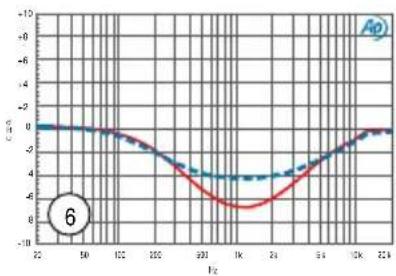
line
| Hz | A0 | | ---- | ------ | | 20 | 0.0 | | 50 | -1.0 | | 100 | -2.0 | | 200 | -3.0 | | 500 | -4.0 | | 1K | -5.0 | | 2K | -4.0 | | 5K | -3.0 | | 10K | -2.0 | | 20K | -1.0 |-7db @ 1.2 KHz
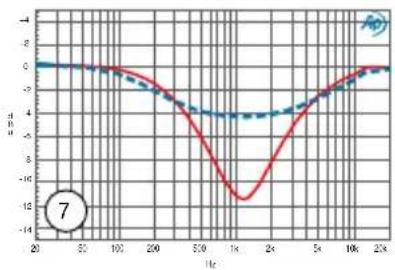
line
| Hz | R² (solid red) | R² (dashed blue) | |------|----------------|------------------| | 20 | 0 | 0 | | 50 | -1 | -1 | | 100 | -3 | -3 | | 200 | -6 | -5 | | 500 | -12 | -4 | | 1k | -14 | -4 | | 2k | -8 | -4 | | 5k | -3 | -3 | | 10k | 0 | -1 | | 20k | 0 | 0 |-11db @ 1.2 KHz
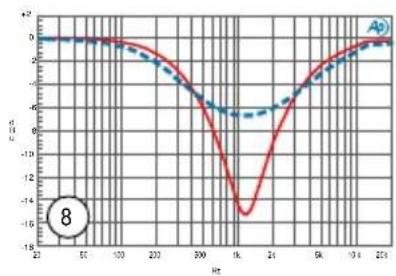
line
| Hz | A | | ---- | ----- | | 20 | 0.0 | | 50 | 0.0 | | 100 | -1.0 | | 200 | -3.0 | | 300 | -6.0 | | 1k | -14.0 | | 2k | -6.0 | | 5k | -3.0 | | 10k | 0.0 | | 20k | 0.0 |-15db @ 1.2 KHz
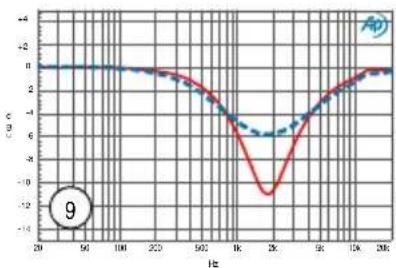
line
| Hz | Ap | | --- | ----- | | 20 | 8.0 | | 50 | 8.0 | | 100 | 8.0 | | 200 | 8.0 | | 500 | 6.0 | | 1K | 4.0 | | 2K | -12.0 | | 5K | 6.0 | | 10K | 8.0 | | 20K | 8.0 |-11db @ 1.8 KHz
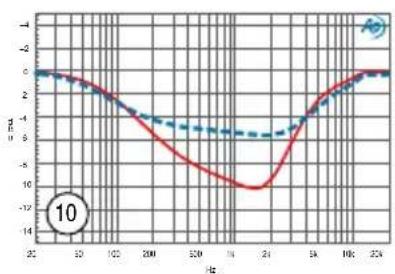
line
| Hz | u | | --- | ----- | | 20 | 0.0 | | 50 | -2.0 | | 100 | -4.0 | | 200 | -6.0 | | 500 | -8.0 | | 1K | -10.0 | | 2K | -12.0 | | 5K | -8.0 | | 10K | -4.0 | | 20K | 0.0 |-10db @ 1.5 KHz Shaped
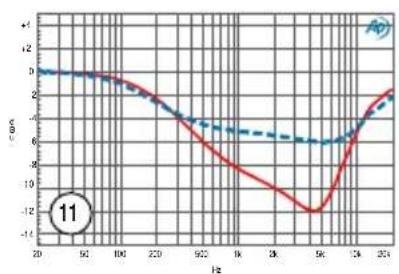
line
| Hz | σ_BW (solid red) | σ_BW (dashed blue) | | --- | ---------------- | ------------------ | | 20 | 0.0 | 0.0 | | 90 | 0.0 | 0.0 | | 160 | -2.0 | -1.0 | | 230 | -4.0 | -2.0 | | 300 | -8.0 | -3.0 | | 370 | -12.0 | -4.0 | | 440 | -6.0 | -5.0 | | 510 | 0.0 | -6.0 | | 580 | 2.0 | -7.0 | | 650 | 4.0 | -8.0 | | 720 | 6.0 | -9.0 | | 790 | 8.0 | -10.0 | | 860 | 10.0 | -11.0 | | 930 | 12.0 | -12.0 | | 1000| 14.0 | -13.0 | | 1600| -2.0 | -14.0 | | 2300| -4.0 | -15.0 | | 3000| -6.0 | -16.0 | | 3700| -8.0 | -17.0 | | 4400| -10.0 | -18.0 | | 5100| -12.0 | -19.0 | | 5800| -14.0 | -20.0 | | 6500| -16.0 | -21.0 | | 7200| -18.0 | -22.0 | | 7900| -20.0 | -23.0 | | 8600| -22.0 | -24.0 | | 9300| -24.0 | -25.0 | | 10000| -26.0 | -26.0 | | 16000| -28.0 | -27.0 | | 23000| -30.0 | -28.0 | | 30000| -32.0 | -29.0 | | 37000| -34.0 | -30.0 | | 44000| -36.0 | -31.0 | | 51000| -38.0 | -32.0 | | 58000| -40.0 | -33.0 | | 65000| -42.0 | -34.0 | | 72000| -44.0 | -35.0 | | 79000| -46.0 | -36.0 | | 86000| -48.0 | -37.0 | | 93000| -50.0 | -38.0 | | 10000 | -52.0 | -39.0 | | 1600 | -54.0 | -41.0 | | 230 | -56.0 | -43.0 | | 30 | -58. | -45. | | 37 | -6.0 | -47. | | 44 | -8.0 | -49. | | 51 | -12. | -51. | | 58 | -16. | -53. | | 65 | -22. | -55. | | 72 | -28. | -57. | | 79 | -34. | -59. | | 86 | -42. | -61. | | 93 | -52. | -63. | | 16 | -68. | -65. | | 23 | -84. | -67. | | 30 | -112. | -69. | | 37 | -148. | -71. | | 44 | -196. | -73. | | 51 | -254. | -75. | | 58 | -328. | -77. | | 65 | -414. | -79. | | 72 | -512. | -81. | | 79 | -624. | -83. | | 86 | -748. | -85. | | 93 | -916. | -87. | | 16 | -1214. | -89. | | 23 | -1512. | -91. | | 30 | -1824. | -93. | | 37 | -2248. | -95. | | 44 | -2896. | -97. | | 51 | -3768. | -99. | | 58 | -5744. |-101. | | 65 | -8192. |-103. | | 72 | -11964. |-105. | | 79 | -16248. |-107. | | 86 | -22776. |-109. | | 93 | -31488. |-111. | | 16 | -43776. |-113. | | 23 | -69484. |-115. | | 30 | -98768. |-117. | | 37 | -139848. |-119. | | 44 | -219976. |-121. | | 51 | -339996. |-123. | | 58 | -579996. |-125. | | 65 | -849996. |-127. | | 72 | -1239996. |-129. | | 79 | -1649996. |-131. | | 86 | -2279996. |-133. | | 93 | -3149996. |-135. | | 16 | -4599996. |-137. | | 23 | -6399996. |-139. | | 30 | -8299996. |-141. | | 37 | -11299996. |-143. | | 44 | -14399996. |-145. | | 51 | -18599996. |-147. | | 58 | -23899996. |-149. | | 65 | -31799996. |-151. | | 72 | -41799996. |-153. | | 79 | -52899996. |-155. | | 86 | -64999996. |-157. | | 93 | -77999996. |-159. | | 16 | -127999996 |-161. | | 23 | -188999996 |-163. | | 30 | -258999996 |-165. | | 37 | -338999996 |-167. | | 44 | -428999996 |-169. | | 51 | -528999996 |-171. | | 58 | -638999996 |-173. | | 65 | -748999996 |-175. | | 72 | -868999996 |-177. | | 79 | -1248999996 |-179. | | 86 | -1878999996 |-181. | | 93 | -2578999996 |-183. | | 16 | -3478999996 |-185. | | 23 | -4478999996 |-187. | | 30 | -5578999996 |-189. | | 37 | -7678999996 |-191. | | 44 | -1277899996 |-193. | | 51 | -1887899996 |-195. | | 58 | -2777899996 |-197. | | 65 | -3877899996 |-199. | | 72 | -5877899996 |-201. | | 79 | -8877899996 |-203. | | 86 | -1387789996 |-205. | | 93 | -2287789996 |-207. | | 16 | -3387789996 |-209. | | 23 | -4487789996 |-211. | | 30 | -5687789996 |-213. | | 37 --> 'A' (not labeled) for the last two values above the rest of the chart; the rest of the chart is not explicitly labeled as 'A'. The chart is divided into three sections based on the x-axis label 'A', with the y-axis labeled 'σ_BW'. The chart is divided into three sections based on the x-axis label 'B' and the y-axis label 'σ_BW'. The chart is divided into three sections based on the x-axis label 'C' and the y-axis label 'D'. The chart is divided into three sections based on the x-axis label 'E' and the y-axis label 'F'. The chart is divided into three sections based on the x-axis label 'G' and the y-axis label 'H'. The chart is divided into three sections based on the x-axis label 'I' and the y-axis label 'J'. The chart is divided into three sections based on the x-axis label 'K' and the y-axis label 'L'. The chart is divided into three sections based on the x-axis label 'M' and the y-axis label 'N'. The chart is divided into three sections based on the x-axis label 'O' and the y-axis label 'P'. The chart is divided into three sections based on the x-axis label 'Q' and the y-axis label 'R'. The chart is divided into three sections based on the x-axis label 'S' and the y-axis label 'T'. The chart is divided into three sections based on the x-axis label 'U' and the y-axis label 'V'. The chart is divided into three sections based on the x-axis label 'W' and the y-axis label 'X'. The chart is divided into three sections based on the x-axis label 'Y' and the y-axis label 'Z' (not labeled but implied by context). The chart is divided into three sections based on the x-axis label 'Z' (not labeled but implied by context). The chart is divided into three sections based on the x-axis label 'A' (not labeled but implied by context). The chart is divided into three sections based on the x-axis label 'B' (not labeled but implied by context). The chart is divided into three sections based on the x-axis label 'C' (not labeled but implied by context). The chart is divided into three sections based on the x-axis label 'D' (not labeled but implied by context). The chart is divided into three sections based on the x-axis label 'E' (not labeled but implied by context). The chart is divided into three sections based on the x-axis label 'F' (not labeled but implied by context). The chart is divided into three sections based on the x-axis label 'G' (not labeled but implied by context). The chart is divided into three sections based on the x-axis label 'H' (not labeled but implied by context). The chart is divided into three sections based on the x-axis label 'I' (not labeled but implied by context). The chart is divided into three sections based on the x-axis label 'J' (not labeled but implied by context). The chart is divided into three sections based on the x-axis label 'K' (not labeled but implied by context). The chart is divided into three sections based on the x-axis label 'L' (not labeled but implied by context). The chart is divided into three sections based on the x-axis label 'M' (not labeled but implied by context). The chart is divided into three sections based on the x-axis label 'N' (not labeled but implied by context). The chart is divided into three sections based on the x-axis label 'O' (not labeled but implied by context). The chart is divided into three sections based on the x-axis label 'P' (not labeled but implied by context). The chart is divided into three sections based on the x-axis label 'Q' (not labeled but implied by context). The chart is divided into three sections based on the x-axis label 'R' (not labeled but implied by context). The chart is divided into three sections based on the x-axis label 'S' (not labeled but implied by context). The chart is divided into three sections based on the x-axis label 'T' (not labeled but implied by context). The chart is divided into three sections based on the x-axis label 'U' (not labeled but implied by context). The chart is divided into three sections based on the x-axis label 'V' (not labeled but implied by context). The chart is divided into three sections based on the x-axis label 'W' (not labeled but implied by context). The chart is divided into three sections based on the x-axis label 'X' (not labeled but implied by context). The chart is divided into three sections based on the x-axis label 'Y' (not labeled but implied by context). The chart is divided into three sections based on the x-axis label 'Z' (not labeled but implied by context). The chart is divided into three sections based on the x-axis label 'A' (not labeled but implied by context). The chart is divided into three sections based on the x-axis label 'B' (not labeled but implied by context). The chart is divided into three sections based on the x-axis label 'C' (not specified) and then to be defined as '(A') (not specified) in this case.-12db @ 3.5 KHz Shaped
BASS BOOST PRESETS
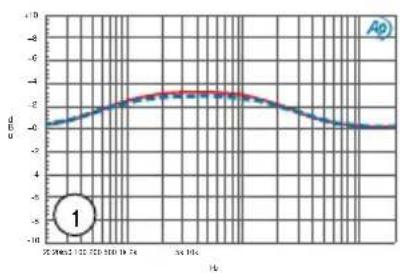
line
| Voltage (V) | Current (mA) | |-------------|--------------| | 0 | -6.0 | | 1 | -4.0 | | 2 | -2.0 | | 3 | -1.0 | | 4 | -0.5 | | 5 | -0.2 | | 6 | -0.1 | | 7 | -0.3 | | 8 | -0.5 | | 9 | -0.7 | | 10 | -0.8 |+3db @ 400Hz

line
| Hz | Amplitude (dBm²) | | -------- | ---------------- | | 2.5 | 0 | | 3.0 | 1 | | 3.5 | 2 | | 4.0 | 3 | | 4.5 | 4 | | 5.0 | 5 | | 5.5 | 4 | | 6.0 | 3 | | 6.5 | 2 | | 7.0 | 1 | | 7.5 | 0 |+6db @ 400 Hz

line
| Hz | A0 | | --- | --- | | 20 | -6.0 | | 40 | -7.0 | | 60 | -8.0 | | 80 | -9.0 | | 100 | -10.0 | | 120 | -10.5 | | 140 | -11.0 | | 160 | -11.5 | | 180 | -12.0 | | 200 | -12.5 | | 220 | -13.0 | | 240 | -13.5 | | 260 | -14.0 | | 280 | -14.5 | | 300 | -15.0 | | 320 | -15.5 | | 340 | -16.0 | | 360 | -16.5 | | 380 | -17.0 | | 400 | -17.5 | | 420 | -18.0 | | 440 | -18.5 | | 460 | -19.0 | | 480 | -19.5 | | 500 | -20.0 | | 520 | -20.5 | | 540 | -21.0 | | 560 | -21.5 | | 580 | -22.0 | | 600 | -22.5 | | 620 | -23.0 | | 640 | -23.5 | | 660 | -24.0 | | 680 | -24.5 | | 700 | -25.0 | | 720 | -25.5 | | 740 | -26.0 | | 760 | -26.5 | | 780 | -27.0 | | 800 | -27.5 | | 820 | -28.0 | | 840 | -28.5 | | 860 | -29.0 | | 880 | -29.5 | | 900 | -30.0 | | 920 | -30.5 | | 940 | -31.0 | | 960 | -31.5 | | 980 | -32.0 | | 1000 | -32.5 |+9db @ 100 Hz
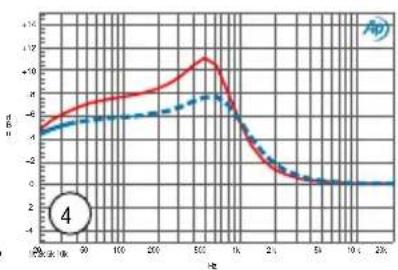
line
| 径向 (km) | 压力 (Pa) | | --------- | --------- | | 0 | 0 | | 50 | 8 | | 100 | 10 | | 200 | 12 | | 500 | 10 | | 1000 | 6 | | 2000 | 2 | | 5000 | 0 | | 10000 | 0 |+11db @ 500 Hz

line
| Hz | A0 | | --- | ------ | | 20 | 1.0 | | 50 | 2.0 | | 100 | 3.0 | | 200 | 4.0 | | 500 | 4.5 | | 1000| 4.0 | | 2000| 3.0 | | 5000| 2.0 | | 10000| 1.0 | | 20000| 0.5 |+6db @ 250 Hz
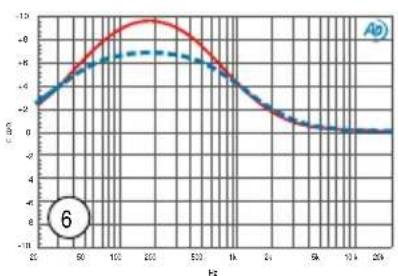
line
| kZ | V (dB) - Red Line | V (dB) - Blue Line | | --- | ----------------- | ------------------ | | 20 | -2.0 | -2.5 | | 50 | -1.0 | -3.0 | | 100 | -0.5 | -4.0 | | 200 | -0.8 | -5.0 | | 500 | -1.0 | -6.0 | | 1K | -1.5 | -7.0 | | 2K | -2.0 | -8.0 | | 5K | -2.5 | -9.0 | | 10K | -3.0 | -10.0 | | 20K | -3.5 | -11.0 |+9db @ 180 Hz

line
| H | A (mV) | | ---- | ------ | | 20 | -6 | | 50 | -4 | | 100 | -2 | | 200 | 15 | | 500 | -2 | | 1K | -4 | | 2K | -6 | | 5K | -8 | | 10K | -10 | | 20K | -12 |+15db @ 200 Hz
line
| l₂ | r₁ | | ---- | ------ | | 20 | 0.0 | | 92 | 1.0 | | 160 | 3.0 | | 230 | 4.5 | | 300 | 5.0 | | 370 | 4.5 | | 440 | 3.0 | | 510 | 1.0 | | 580 | 0.0 | | 650 | 0.0 | | 720 | 0.0 | | 790 | 0.0 | | 860 | 0.0 |+6db @ 350 Hz
line
| k | σ | | ---- | ----- | | 10 | 0.0 | | 50 | 0.5 | | 100 | 2.0 | | 150 | 4.0 | | 200 | 6.0 | | 250 | 4.0 | | 300 | 2.0 | | 350 | 0.5 | | 400 | 0.0 |+8db @ 500 Hz

line
| x | y | | ---- | ----- | | 0 | 0 | | 10 | -2 | | 20 | -4 | | 30 | -6 | | 40 | -8 | | 50 | -10 | | 60 | -8 | | 70 | -6 | | 80 | -4 | | 90 | -2 | | 100 | 0 |+9db @ 600 Hz
line
| Hz | Value | | -------- | ------ | | 20.25 | -16.0 | | 25.0 | -14.0 | | 30.0 | -12.0 | | 35.0 | -10.0 | | 40.0 | -8.0 | | 45.0 | -6.0 | | 50.0 | -4.0 | | 55.0 | -2.0 | | 60.0 | 0.0 |+18db @ 60 Hz
SUGGESTED SOUND SETTINGS

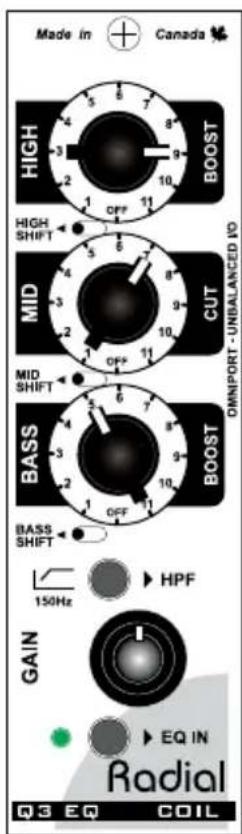
NAME: Jazzy Bass
Inst:
Fender Jazz
Bass
Pickups: Neck PU
HPF: Off
NAME: Marcus Funk
Inst:
Fender Jazz
Bass
Pickups: Both
HPF: On

NAME: Smooth Frettless
Inst:
Fender
Frettless
Jazz Bass
Pickups: Neck PU
HPF: On
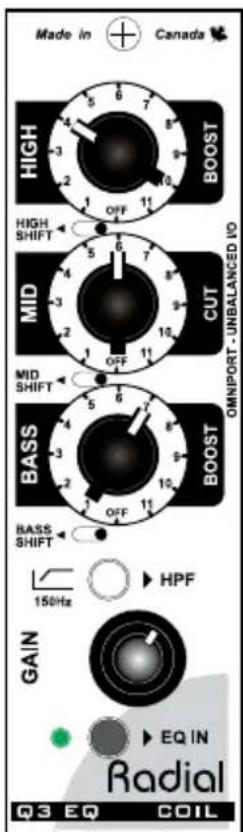
NAME: Bright Reggae
Inst:
Fender
Stratocaster
Pickups: Singlecoil Bridge & Middle PU
HPF: Off
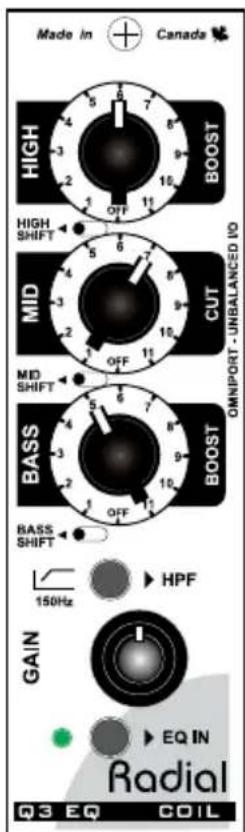
NAME: Quiet Momen
Inst:
Gibson
Les Paul
Pickups: Humbucker Neck PU
HPF: On
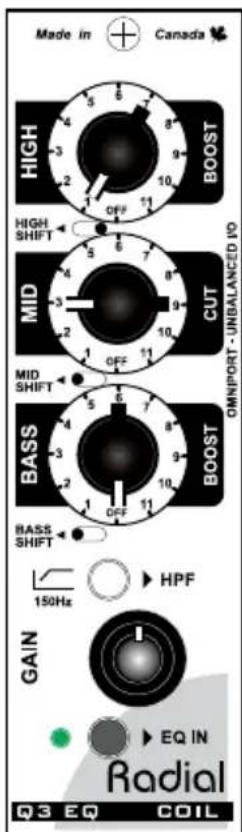
NAME: Finger Pickin'
Inst: Acoustic
Pickups: Magnetic in Soundhole
HPF: Off
SUGGESTED SOUND SETTINGS
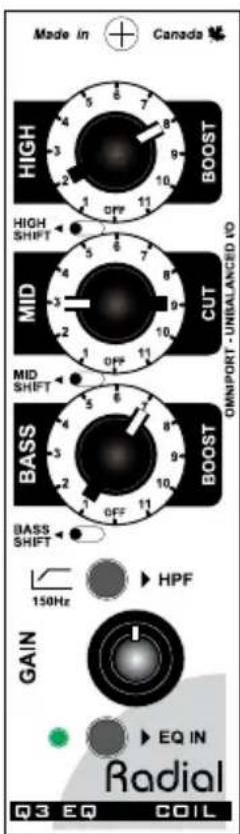
NAME: Strumming Sunday
Inst: Acoustic Guitar
Pickups: Piezo & Magnetic
HPF: On

NAME: Call Me Elvis
Mic:
Dynamic
Vocal
HPF: On
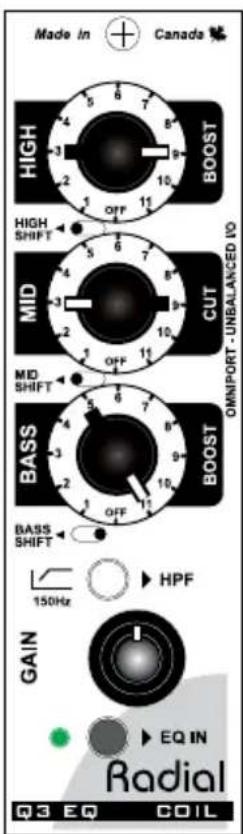
NAME: FM Radio
Mic:
Dynamic
Vocal
HPF: Off

NAME: Sticky Pop
Mic: Condenser Vocal
HPF: On
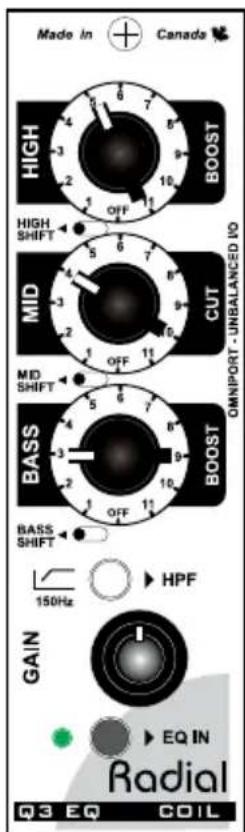
NAME: Fat Girl
Mic: Condenser Vocal
HPF: Off
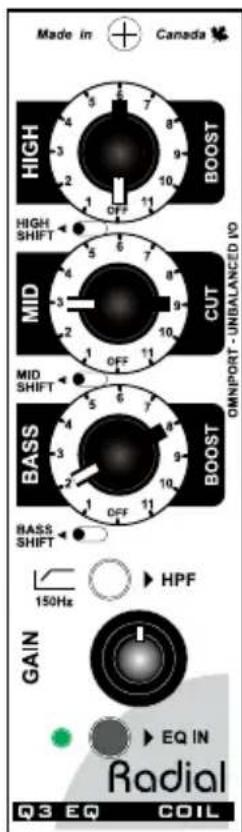
NAME: Open Kick
Inst: Kick Drum
HPF: Off
SUGGESTED SOUND SETTINGS
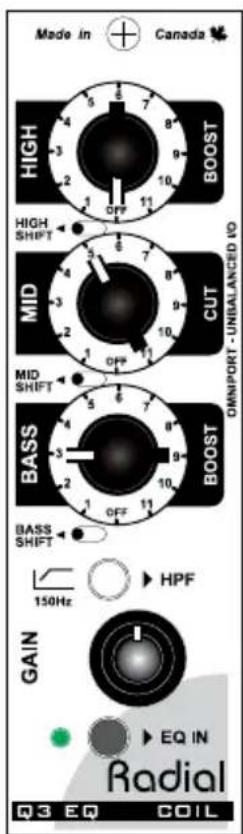
NAME: Stupid Bass
Inst: Kick Drum
HPF: Off

NAME: Slap Kick
Inst: Kick Drum
HPF: Off

NAME: In Your Face Snare
Inst:
Snare Drum
HPF: On
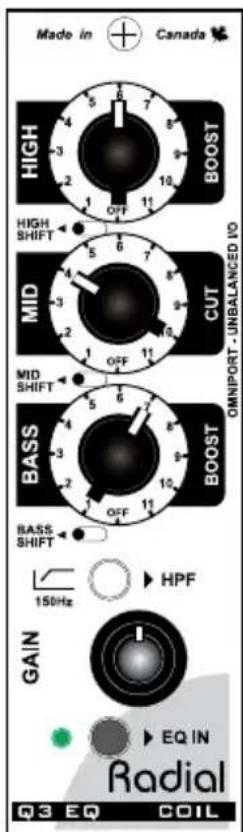
NAME: Big Chest Snare
Inst: Snare Drum
HPF: Off
USER SOUND SETTINGS
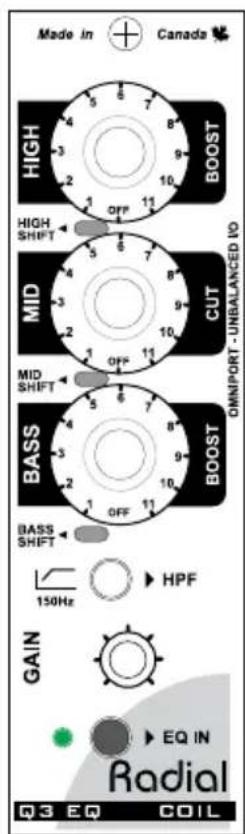
NAME:
Inst:
HPF:
GAIN:

NAME:
Inst:
HPF:
GAIN:
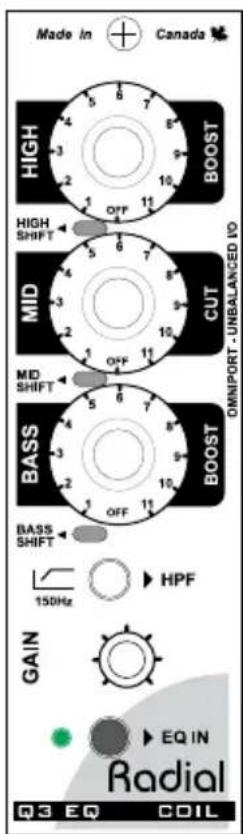
NAME:
Inst:
HPF:
GAIN:

NAME:
Inst:
HPF:
GAIN:
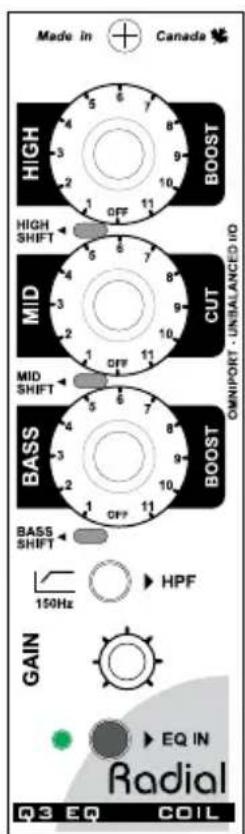
NAME:
Inst:
HPF:
GAIN:
NAME:
Inst:
HPF:
GAIN:
Q3 COIL EQUALIZER 500 MODULE SPECIFICATIONS\*
Circuit type .... Coil/Capacitor/Resistive Boost and Cut Filters
Frequency Response ...... 20Hz-20KHz +/- 1db in non EQ positions
Dynamic Range ....>112dB
Noise ....<-90dBu (600 ohm source impedance - filters Off)
Noise ....<-87dBu (600 ohm source impedance - filters On)
Output Headroom ....+27dBu
Clip Level - Input ....>+20dBu
Clip Level - Output ....+27dBu
THD+N ....<0.003% (0dbu input at 1 KHz)
Intermodulation Distortion .... <0.002% (0dbu input)
Input Impedance 12K balanced
Output Impedance 440 Ohms balanced
Equivalent Input Noise ...... -100dbu
Gain 7db (at maximum, EQ bypassed)
Omniport Function .... Unbalanced Input / Output (input = tip; output = ring)
Power Requirement 25mA
Shipping Dimensions: 171 x 51 x 229mm 0.7 kg (6.75" x 2 " x 9" 1.5 lbs.)
Warranty ....3 Years, transferable
CONNECTOR WIRING
XLR Connector
TS 1/4" Phone Connector

TRS 1/4" Phone Connector

BLOCK DIAGRAM\*

flowchart
graph LR
    A["1 2 3 XLR INPUT"] --> B["BALANCED INPUT"]
    B --> C["GAIN CONTROL"]
    C --> D["HIGH PASS FILTER"]
    D --> E["MID CUT FILTER"]
    E --> F["BOOST FILTERS"]
    F --> G["BALANCED OUTPUT"]
    G --> H["XLR OUTPUT"]
    H --> I["MIX BUSS"]
    I --> J["4.7K WORKHORSE MIX BUSS DRIVER"]
    J --> K["2 1 3 XLR OUTPUT"]
    L["TIP=IN RING=OUT OMNI PORT UNBAL I/O"] --> B
    M["MIDS BASS HIGHS"] --> N["1 2 3 4 5 6 7 8 9 10 11 1 2 3 4 5 6 7 8 9 10 11 1 2 3 4 5 6 7 8 9 10 11"]
    N --> O["OUTPUT"]
    O --> P["OUTPUT"]
* Subject to change without notice.
THREE YEAR TRANSFERABLE LIMITED WARRANTY
RADIAL ENGINEERING LTD. ("Radial") warrants this product to be free from defects in material and workmanship and will remedy any such defects free of charge according to the terms of this warranty. Radial will repair or replace (at its option) any defective component(s) of this product (excluding finish and wear and tear on components under normal use) for a period of three (3) years from the original date of purchase. In the event that a particular product is no longer available, Radial reserves the right to replace the product with a similar product of equal or greater value. In the unlikely event that a defect is uncovered, please call 604-942-1001 or email service@radialeng.com to obtain an RA number (Return Authorization number) before the 3 year warranty period expires. The product must be returned prepaid in the original shipping container (or equivalent) to Radial or to an authorized Radial repair centre and you must assume the risk of loss or damage. A copy of the original invoice showing date of purchase and the dealer name must accompany any request for work to be performed under this limited and transferable warranty. This warranty shall not apply if the product has been damaged due to abuse, misuse, misapplication, accident or as a result of service or modification by any other than an authorized Radial repair center.
THERE ARE NO EXPRESSED WARRANTIES OTHER THAN THOSE ON THE FACE HEREOF AND DESCRIBED ABOVE. NO WARRANTIES WHETHER EXPRESSED OR IMPLIED, INCLUDING BUT NOT LIMITED TO, ANY IMPLIED WARRANTIES OF MERCHANTABILITY OR FITNESS FOR A PARTICULAR PURPOSE SHALL EXTEND BEYOND THE RESPECTIVE WARRANTY PERIOD DESCRIBED ABOVE OF THREE YEARS. RADIAL SHALL NOT BE RESPONSIBLE OR LIABLE FOR ANY SPECIAL, INCIDENTAL OR CONSEQUENTIAL DAMAGES OR LOSS ARISING FROM THE USE OF THIS PRODUCT. THIS WARRANTY GIVES YOU SPECIFIC LEGAL RIGHTS, AND YOU MAY ALSO HAVE OTHER RIGHTS, WHICH MAY VARY DEPENDING ON WHERE YOU LIVE AND WHERE THE PRODUCT WAS PURCHASED.

This product is intended for professional use only. The user should be familiar and experienced with the 500 series rack and module format


Radial Engineering Ltd.
1588 Kebet Way, Port Coquitlam, British Columbia, V3C 5M5
tel: 604-942-1001 • fax: 604-942-1010 • email: info@radialeng.com

natural_image
Collection of abstract geometric shapes including semicircles, rectangles, and stars (no text or symbols)API, Lunchbox, Protocols and Neve are registered trademarks of their respective owners.
Reamp, Reamper, Reamping and Workhorse are trademarks of Radial Engineering Ltd.
Copyright 2012 Radial Engineering Ltd. All rights reserved.
Specifications and appearances subject to change without notice.
Radial® Q3™ 500 Module User Guide Rev1.0 Feb. 2012 - Part #: R870 1258 00 Printed in Canada

- Table of Contents ......Page
- WARNING NOTICE TO USER!
- FEATURE SET
- OVERVIEW
- GETTING STARTED
- Making connections
- Start by setting up the controls as follows:
- Using the Coil EQ
- CAUTION!
- Using the 'Shift Key'
- Using the High-Pass Filter
- Using the Omniport
- Q3 PRESET EQUALIZATION CURVES
- MID CUT PRESETS
- BASS BOOST PRESETS
- SUGGESTED SOUND SETTINGS
- USER SOUND SETTINGS
- Q3 COIL EQUALIZER 500 MODULE SPECIFICATIONS\*
- CONNECTOR WIRING
- BLOCK DIAGRAM\*
- THREE YEAR TRANSFERABLE LIMITED WARRANTY
Brand : Radial Engineering
Model : Q3
Category : Mixing console