
F012 - Lens TAMRON - Free user manual and instructions
Find the device manual for free F012 TAMRON in PDF.


| Product Type | Telephoto Zoom Lens |
| Focal Length | 70-200mm |
| Maximum Aperture | f/2.8 |
| Lens Mount | Canon EF, Nikon F (FX), Sony A |
| Format | Full Frame / APS-C |
| Minimum Focus Distance | 0.95 m (3.1 ft) |
| Filter Size | 77 mm |
| Dimensions (Diameter x Length) | Approx. 88 x 196.7 mm |
| Weight | Approx. 1500 g (3.3 lbs) |
| Autofocus Motor | Ultrasonic Silent Drive (USD) |
| Image Stabilization | VC (Vibration Compensation) with 5 stops |
| Special Elements/Coating | eBAND, Fluorine, and Moisture-Resistant Coating |
| Functions | Autofocus, Manual Focus, Focus Limiter, VC On/Off, Tripod Collar |
| Cleaning | Use a soft, dry cloth; lens cleaning solution for stubborn marks |
| Safety | Store in a dry place; avoid shock; use front and rear caps |
| Spare Parts | Lens caps, hood, tripod collar, lens case |
| General Information | Weather-sealed construction; compatible with teleconverters |
Frequently Asked Questions - F012 TAMRON
User questions about F012 TAMRON
0 question about this device. Answer the ones you know or ask your own.
Ask a new question about this device
Download the instructions for your Lens in PDF format for free! Find your manual F012 - TAMRON and take your electronic device back in hand. On this page are published all the documents necessary for the use of your device. F012 by TAMRON.
USER MANUAL F012 TAMRON
(for Sony *Models without the VC)
Model: F012
1
Nikon

* F004: This model is Built-in Motor
Canon
Sony
3

4
5
6
7
8
9


* The C€ Marking is a directive conformity mark of the European Community (EC).
* Das €-Zeichen entspricht der EC Norm.
* La marquage c€ est un marquage de conformité à la directive CEE (CE).
* La marca C€ es marca de conformidad según directiva de la Comunidad Europea (CE).
* Il marchio C€ attesta la conformita alla directtiva della Comunità Europea (CEE).
* CC 标志表示符合欧州共同体(EC)指标

The EEC Conformity Report applies to the Council Directive 98/336/EEC, 92/31/EEC, 93/68/EEC and is used by Tamron Co., Ltd., manufacturer of this product.
2

Thank you for purchasing the Tamron lens as the latest addition to your photographic equipment. Before using your new lens, please read the contents of this Owner's Manual thoroughly to familiarize yourself with your lens and the proper techniques for creating the highest quality images possible. With proper handling and care, your Tamron lens will give you many years of photographing beautiful and exciting pictures.

- Explains precautions that help to prevent problems.

- Explains things you should know in addition to basic operations.
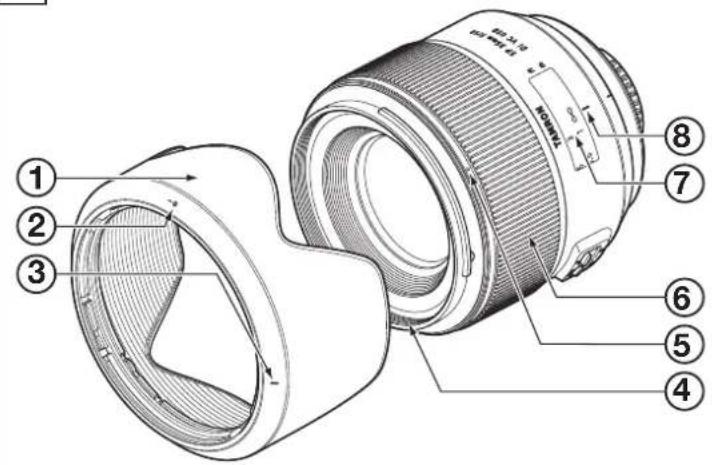
NOMENCLATURE (Refer to Fig. 1, if not specified)
① Lens hood ② Hood attaching alignment mark
③ Hood attaching indicator ④ Filter ring
⑤ Hood attaching bayonet ring ⑥ Focusing ring
⑦ Distance scale ⑧ Distance index
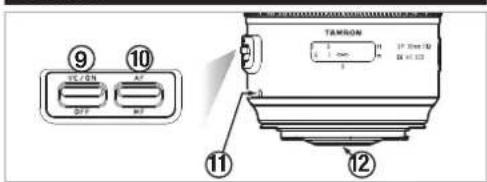
⑨ VC (Vibration Compensation) switch
⑪ Lens attachment mark ⑫ Lens mount/Lens mount contacts
SPECIFICATIONS
F012
Focal Length 35 mm
Maximum Aperture F/1.8
Angle of View 63°26'
Optical Construction 9/10
Minimum Object Distance 0.2 m (7.9")
Maximum Magnification Ratio 1:2.5
Filter Size φ
67 mm
Length/Overall Length 78.3 mm (3.1")/86.6 mm (3.4")*
Maximum Diameter φ 80.4 mm (3.2")
Weight
450 g (15.9 oz) *
Lens Hood
HF012

- * values are specifications of Nikon products. Length: Distance from the lens front extremity to the mount surface.
Overall length: Distance from the lens front extremity to the rear projection extremity.
Features and appearance of lenses listed in this owner's manual are subject to change without notice.
ATTACHING AND REMOVING THE LENS
■ How to mount the lens
Removing the rear cap of the lens. Align the Lens attachment mark ⑪ on the lens barrel with its counterpart on the camera mount and insert the lens.
Rotate the lens clockwise until it click-locks. For Nikon models, align the lens attachment mark with the dot on the camera and rotate the lens counter-clockwise until it click-locks.
■ How to detach the lens
Pressing the lens release button on the camera down, turn the lens counter-clockwise (in case of Nikon lens, clockwise), and lift the lens off the camera's lens mount.

- Ensure that the camera is turned off when attaching or removing the lens.

- For further details, please read the instruction manual of your camera.
FOCUSING (Autofocus) and using the full-time manual function
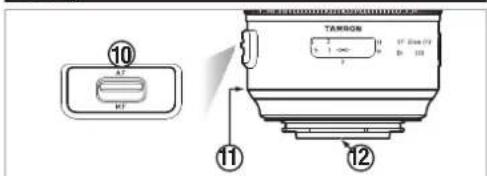
In case of a Nikon or Canon camera, switch the AF/MF switch ⑩ on the lens to AF (Fig. 3). In case of a Nikon camera with the focus mode selector dial, set the focus mode to S, C or A, and then set the AF/MF switch ⑩ on the lens to AF. Press the shutter button halfway down while viewing through the camera's viewfinder, the lens focuses automatically. An in-focus mark will light when lens focuses on the main subject sharply. Press the shutter button further to photograph.
In case of a Sony camera, switch the AF/MF switch ⑩ on the lens to AF (Fig. 3), and set the focus mode on the camera to Auto focus (AF). Press the shutter button halfway down while viewing through the camera's viewfinder, the lens focuses automatically. An in-focus mark will light when lens focuses on the main subject sharply. Press the shutter button further to photograph.
Using the full-time manual function
F012 is equipped with the full-time manual function.
The full-time manual function is a function that the focus can be fine-tuned by the manual focus without switching the AF/MF changing switch when taking a picture of auto focus.
• How to use the full-time manual function
First, set the focus mode to "AF".
You can adjust focus manually while turning the focus ring in the shutter button is pressed lightly.

- The distance scale ⑦ is marked for guidance purposes. The actual focal point may slightly differ from the distance marked on the focal length index.
- For further details, please read the instruction manual of your camera.
FOCUSING (Manual Focus) (Ref. Figs. 1, 2 & 4)
In case of a Nikon or Canon camera, switch the AF/MF switch ⑩ on the lens to MF (Fig. 4). Focus manually rotating the focusing ring ⑥ while viewing through the camera's viewfinder (Fig. 2). The main subject in the viewfinder will be sharp when the lens is focused correctly. In case of a Sony camera, switch the AF/MF switch ⑩ on the lens to MF (Fig. 4), and set the focus mode on the camera to Manual focus (MF). Focus manually rotating the focusing ring ⑥ while viewing through the camera's viewfinder (Fig. 2). The main subject in the viewfinder will be sharp when the lens is focused correctly.

- Even in the MF mode, when turning focusing ring ⑥ while pressing the shutter button halfway, the focus aid function lamp lights up when the picture is in focus.
- At infinity, make sure the image in the viewfinder appears sharp. The infinity position is made with certain allowances to insure proper focus under a variety of conditions.
- For further details, please read the instruction manual of your camera.
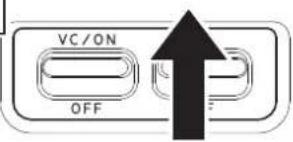
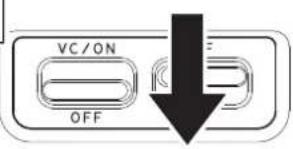
VC MECHANISM (Ref. Figs. 1, 5 & 6) (Mounted for Nikon and Canon models)
VC (Vibration Compensation) is a mechanism which reduces the image blur caused by hand-held shooting.
■How to use VC mechanism
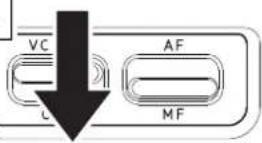
1) Set the VC switch ⑨ on.
*When VC is not used, set the switch off.
2) Press the shutter button halfway to verify the effect of the VC.
When the shutter button is pressed down halfway, it takes about 1 second for the VC to provide a stable image.
■The VC can be effective for hand-held shots under the following conditions.
- Dimly lit locations
- Scenes where flash photography is forbidden
- Situations where your footing is uncertain
• Taking panning shots of a moving subject
■The VC may not be able to give full effect in the following cases:
- When a photograph is taken from a fast moving vehicle
- Shooting during the excessive movement of the camera
- When taking photographs using a tripod
- Turn the VC switch OFF when taking pictures with the bulb setting or during long exposures. If the VC switch is ON, the VC mechanism may introduce errors.

- With the VC mechanism, there are occasions that the image in the viewfinder blurs right after the shutter button is pressed down halfway, but this is not a malfunction.
- When the VC is ON, the number of images recordable is reduced due to the power used from the camera.
- When the VC is ON, immediately after the shutter button is pushed halfway down and approximately 2 seconds after a finger releases the shutter button, the camera will "click". This sound is the VC's locking mechanism activating, not a malfunction.
- Turn the VC switch OFF when using tripod.

- When the lens is removed from the camera while VC is activating, the lens may make clicking sound when the lens is subjected to a Jolt. This is not a malfunction.
- The VC activates while the "release" button is pushed halfway down. (It is activated 2 seconds after the shutter button is released)
- VC can be used in AF or MF mode.
LENS HOOD (Ref. Figs. 1, 7 to 9)
A bayonet-type lens hood (referred to as "hood" below) is provided as standard equipment. We recommend shooting with the hood attached whenever possible as the lens hood eliminates stray light, which is harmful to the picture. However, please be aware of the precautions stated in the next section when your camera is equipped with a built-in flash.
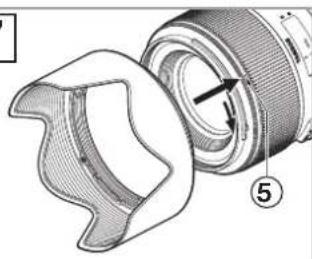
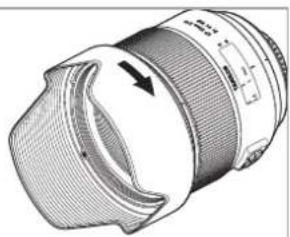
■ Attaching the Lens Hood (Ref. Figs. 7 & 8)
Align Hood attaching alignment mark ② on the hood with the corresponding index mark ⑤ or the top of the index line of the distance scale on the lens. Press the hood lightly onto the hood attaching bayonet ring (Fig.7) and then rotate it clockwise to secure (Fig.7). The lens hood will be secure when the mark is at the top (Fig.8). When attaching the lens hood, hold the focus and zoom control rings so that they are not rotated unintentionally.

- Pay particular attention to align the hood attaching indexes when using zoom lenses including wide-angle (e.i. 35mm or wider) settings.
Improper attachment of a hood on a wide-angle zoom lens may cause large shadowed areas in your pictures.
■ Stowing lens hood on the lens (Ref. Fig. 9)
1) Reverse the lens hood. Point the lens toward the opening, then align the hood attaching index ⑤ on the lens with the alignment on the hood attaching indicator ③.
2) Turn the hood clockwise until the alignment mark (●) is at the top to set it. (Fig. 9)
PRECAUTIONS IN SHOOTING
- The optical design for Di takes into consideration the various features of digital single reflex cameras. However, due to the configuration of the digital single reflex cameras, even when the autofocus accuracy is within specifications, the focal point may be a little forward or behind the optimum point when shooting with autofocus under some conditions.
- The Tamron lenses described here employ an internal focusing (IF) system. Because of the characteristics of this optical design, the angles of view at distances other than infinity are wider than that of the lenses applying an ordinary focusing system.
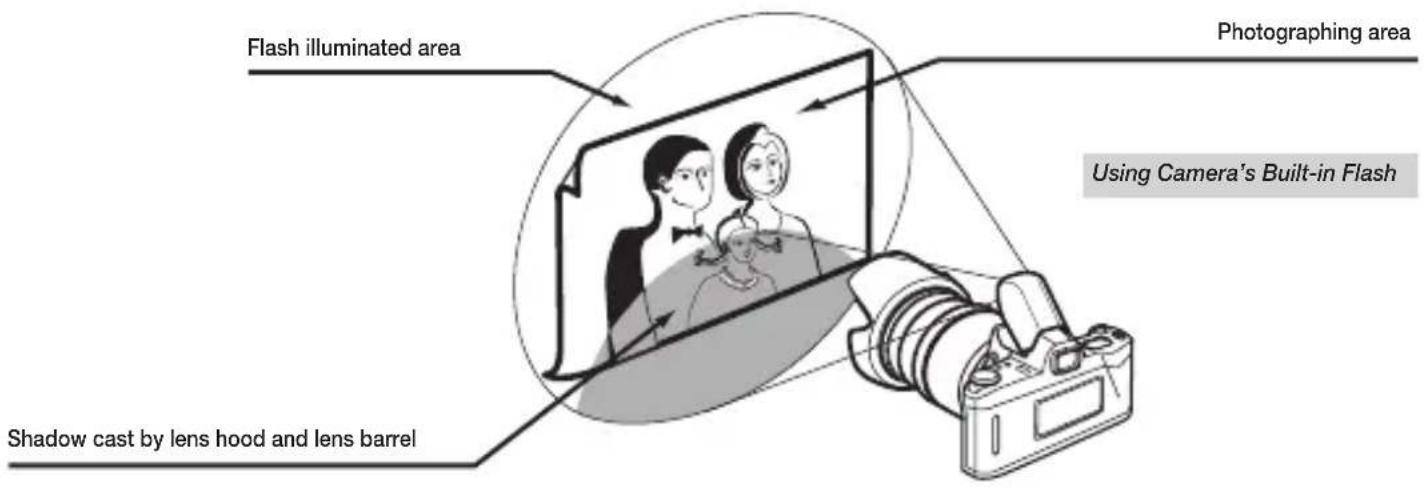
- When the built-in flash on the camera is used, adverse photographic phenomena such as corner illumination fall-off or vignetting at the bottom part of the image may be observed, especially in close-up range. This is due to the inherent limitation of the coverage of the built-in flash, and/or the relative position of the flash to the edge of the lens barrel or lens hood which causes shadows on the image. Always use the built-in flash with the hood removed. It is strongly recommended to use a suitable separate flash unit provided by the camera manufacturer for all flash photography, even when using the camera with the hood removed. For further details, please read the "built-in flash" article on the instruction manual of your camera.
- Certain camera models may indicate the maximum and minimum aperture values of the lens in approximate numbers. This is inherent to the design of the camera and not an indication of an error.
- Using with a mirrorless interchangeable-lens camera will not be guaranteed.
TO ENSURE LONG-TERM SATISFACTION
- Avoid touching the glass element surface. Use a photographic lens cloth or blower to remove dust from the lens element surface. When not using the lens, always place a lens cap on it for protection.
- Use a lens cleaning tissue or lint cloth with a drop of cleaning solution to remove fingerprints or dirt on the glass lens surface with a rotary motion from the center to the edge.
- Use a silicon cloth to clean your lens barrel only.
- Mildew is an enemy of your lens. Clean the lens after shooting near water or in any humid place. Store your lens in a clean, cool and dry place. When storing the lens in an lens case, store it with commercially available drying agent such as silicagel, and change the agent occasionally. If you find mildew on your lens, consult an authorized repair shop or nearby photographic store.
- Do not touch the lens-camera interface contacts since dust, dirt and/or stains may cause a contact failure between the lens and camera.
- When using your equipment [camera(s) and lens(es)] in an environment where the temperature changes from one extreme to the other, make sure to put your equipment temporarily in a case or a plastic bag for a length of time in order for the equipment to go through a gradual temperature shift. This will reduce potential equipment trouble.
Suggestions for Better Pictures with Tamron Zoom Lenses
How to Avoid Camera Shake
When using the lens in the telephoto focal range, please be careful with the camera shake. To reduce image blur, turn the VC (Vibration Compensation) switch on.
To reduce image blur without using the VC function, follow the steps below. To avoid camera shake, for the digital cameras, use an ISO setting of higher numbers and for the film cameras, use the film with high ISO numbers to obtain higher shutter speed. Using a tripod or monopod is also effective. When hand-holding the camera to take pictures, stand still, with legs slightly apart, hold your elbows in firmly against your chest, and hold the camera firmly against your face. If possible, lean against something to steady yourself or place the camera on something to secure the hold. Especially when hand-holding your camera, you will be steadier if you hold your breath, while you press the shutter button gently and firmly.
Using camera's built-in flash
When using the camera's built-in flash, please be aware that the lens hood or lens barrel may block the light to cause vignetting on the image. When using the camera's build-in flash, do not use a lens hood. Even without a lens hood, vignetting (arch shaped shadow) may appear if the light is blocked by the lens barrel, so it is advisable to use an optical flash unit (hot shoe or handle-mount type). The conditions; such as, the focal length and focusing distance cause the vignetting vary depending on the camera. It is recommended to test for vignetting at each focal length and focusing distance.
Cautions when Using Tamron Lenses
For safe operation be sure to carefully read the manual and the following cautions before using. After reading them, store them in a place where they can easily be reviewed whenever needed. In this manual, caution instructions are divided into the following two categories:

WARNING
This indicates instructions which if not heeded could lead to death or serious injury.

CAUTION
This indicates instructions which if not heeded could lead to bodily injury or physical damage.

WARNING
(1) Do not look directly at the sun through the lens. Doing so could result in blindness.
(2) Do not leave the lens within the reach of young children. The lens may fall and injure the child, and the strap may get wrapped around the child's neck, resulting in suffocation.

CAUTION
(1) Do not leave the lens in places exposed to direct sunlight. The light reflected off the lens may focus on a nearby object, and cause a fire. Place the lens cap on the lens whenever it is not in use.
(2) When mounting the lens on the camera, make sure the lens and camera are properly set and securely locked.
The lens may get stuck if it is not properly mounted, and if it is not securely locked, it may fall off, damaging the lens or camera or causing bodily injury.
(3) Do not modify or alter the lens.
Doing so may result in damage to the lens or camera.
(4) Mount the lens hood when taking photographs in order to eliminate harmful light rays.
* The hood cannot be mounted when certain filters are installed.
* Remove the hood if it causes shadows at the edges of the image when using a flash.
(5) Do not place excessive loads on the lens when it is mounted on the camera. Such loads may damage the mount section on the lens and the camera. Large lenses tend to place a strong load on the mount section. Always hold the lens when operating and moving the camera.
(6) The focus ring turns during the auto focus operation. Do not keep the focus ring from turning. Also, do not forcibly turn the focus ring by hand when in the auto focus mode.
Doing so may damage the lens or the interior of the camera.
(7) Do not use the lens except for the purpose of photographing.
- NOMENCLATURE (REFER TO FIG. 1, IF NOT SPECIFIED)
- SPECIFICATIONS
- ATTACHING AND REMOVING THE LENS
- HOW TO MOUNT THE LENS
- HOW TO DETACH THE LENS
- FOCUSING (AUTOFOCUS) AND USING THE FULL-TIME MANUAL FUNCTION
- USING THE FULL-TIME MANUAL FUNCTION
- FOCUSING (MANUAL FOCUS) (REF. FIGS. 1, 2 & 4)
- VC MECHANISM (REF. FIGS. 1, 5 & 6) (MOUNTED FOR NIKON AND CANON MODELS)
- HOW TO USE VC MECHANISM
- LENS HOOD (REF. FIGS. 1, 7 TO 9)
- ATTACHING THE LENS HOOD (REF. FIGS. 7 & 8)
- STOWING LENS HOOD ON THE LENS (REF. FIG. 9)
- PRECAUTIONS IN SHOOTING
- TO ENSURE LONG-TERM SATISFACTION
- SUGGESTIONS FOR BETTER PICTURES WITH TAMRON ZOOM LENSES
- HOW TO AVOID CAMERA SHAKE
- USING CAMERA'S BUILT-IN FLASH
- CAUTIONS WHEN USING TAMRON LENSES
- WARNING
- CAUTION
Brand : TAMRON
Model : F012
Category : Lens