
RR-41 - Microwave Orava - Free user manual and instructions
Find the device manual for free RR-41 Orava in PDF.


| Product Type | Microwave Oven |
| Brand | Orava |
| Model | RR-41 |
| Power Output | 700 W |
| Capacity | 20 L |
| Dimensions (W x D x H) | 45 x 35 x 25 cm |
| Weight | 10.5 kg |
| Power Supply | 230 V / 50 Hz |
| Power Consumption | 1050 W |
| Control Type | Mechanical dials |
| Timer Range | 0 - 30 minutes |
| Power Levels | 5 levels |
| Defrost Function | Yes, by weight or time |
| Turntable Diameter | 24.5 cm |
| Interior Light | Yes |
| Child Lock | Yes |
| Auto Shut-off | Yes, upon door opening or timer end |
| Material | Stainless steel cavity, plastic exterior |
| Cleaning | Wipe interior with damp cloth; mild detergent |
| Repairability | Contact authorized Orava service center |
Frequently Asked Questions - RR-41 Orava
User questions about RR-41 Orava
0 question about this device. Answer the ones you know or ask your own.
Ask a new question about this device
Download the instructions for your Microwave in PDF format for free! Find your manual RR-41 - Orava and take your electronic device back in hand. On this page are published all the documents necessary for the use of your device. RR-41 by Orava.
USER MANUAL RR-41 Orava
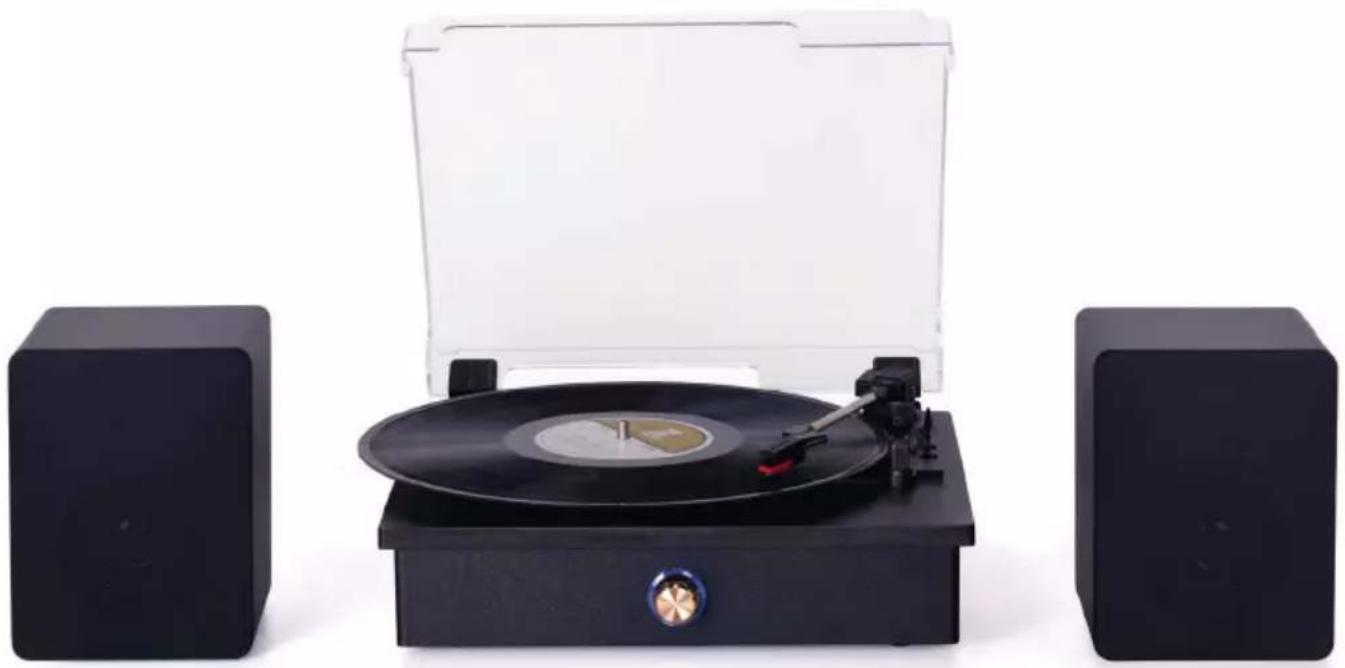
Bluetooth HiFi turntable player
natural_image
Black vinyl record with open lid and two black square speakers on either side (no visible text or symbols)Instruction manual
RR-41
EN
Intended use of the device
The device is designed exclusively for the playback of audio signals from boards and external sources and devices to the extent specified by technical and operating parameters and functions, safety and user instructions and external influences of the operating environment.
Orava electrical devices are manufactured in accordance with the knowledge of the current state of technology and recognized safety and technical rules. Nevertheless, incorrect and unprofessional use or use contrary to the intended purpose may create a risk of injury or endanger the life of the user or a third party, resp. damage to equipment and other property.
1. GENERAL SAFETY INSTRUCTIONS AND WARNINGS

Read all instructions before using the device!
- This document contains important safety instructions and warnings for safe, correct and economical operation of the electrical equipment. Its compliance helps the user avoid risks, increase reliability and product life.
- In this document, the general term product is used in text parts such as: electrical equipment - any device used for the production, conversion, transmission, distribution or use of electricity.
-
From the point of view of the purpose of using electricity, the concept of electrical equipment in the strict sense of the word will include the following categories:
-
household electric devices,
- information and communication equipment,
- consumer electronics,
- lighting equipment,
- electrical and electronic tools,
- toys and equipment for sporting and recreational purposes,
- medical devices (aids),
- monitoring and control devices,
- vending devices.
1.1 General safety instructions
- Before operating the unit, we recommend that you carefully read the instruction manual and operate the equipment in accordance with the instructions!
- The safety instructions and warnings in this manual do not cover all the possible conditions and situations that may arise when using the device. The user must understand that a factor that cannot be incorporated into any of the products is personal responsibility and caution. These factors must therefore be ensured by users serving this device.
- Failure to follow the safety instructions and warnings is forbidden by the manufacturer for any damage to health or property!
- Keep the instruction manual as close to the device as possible throughout its service life. Always keep the instruction manual together with the device for future use and use by new users.
- Use the device only for the intended purpose and in the manner specified by the manufacturer.
- The device is intended for home and similar indoor use without special focus.
- This device is intended, in addition to domestic use, for the following uses:
- in shops, offices and other similar work environments;
- in economic buildings;
- in hotels, motels and other residential environments;
- in bed and breakfast establishments.
- It is not a professional device for commercial use.
- Do not change the technical parameters and features of the device by unauthorized modification or modification of any part of the device.
- The manufacturer is not responsible for damages caused during transportation, misuse, damage or destruction of the equipment due to adverse weather conditions.
1.2 Safety of the operating environment
- Do not use the device in an industrial environment or outside environment!
-
Do not expose the device to:
-
sources of excessive heat or open flame,
- dripping or splashing water,
- vibration and excessive mechanical stress,
- insects, animals and plants,
-
aggressive and chemical substances.
-
The operating environment of the device must always be in accordance with the basic characteristics set out.
-
Features of the operating environment:
-
Ambient temperature: +5 ÷ +40 °C
- Humidity: 5 ÷ 85%
- Altitude: ≤ 2 000 m
- Occurrence of water: intermittent condensation of water or occurrence of water vapor
- Occurrence of foreign bodies: quantity and type of dust are insignificant
-
Protection degree: min. IP20 (device protected from touching dangerous parts by hand and non-waterproof)
-
This degree of protection is not indicated on the product and on the technical parameters in the operating instructions.
- If the protection class of the product is different from IPX0, this information is then displayed on the label of the device or in the technical data of the operating instructions.
- Other characteristics of the domestic operating environment (mechanical stress - vibrations and vibrations, occurrence of plant, animals, weather effects ...) are negligible in terms of effect on the correct and safe use of electrical equipment.
1.3 Electrical safety
- Before connecting the device to the power supply for the first time, make sure that the voltage on the device label corresponds to that of the household electrical socket.
- The electric device is designed to power from 1/N/PE \~ 230 V 50 Hz.
- The electrical safety of the device is guaranteed only if it is properly connected to the mains.
- Electrical protection class I equipment is equipped with a protection against electric shock by means of protective earthing of inanimate parts, which can become dangerous when the device is malfunctioning. Always connect such devices to properly installed mains sockets that are equipped with earthing conductors and have a properly grounded earthing conductor.
All electrical equipment is equipped with a three-wire power supply.
- Class II electrical equipment is protected against electric shock by double insulation or by enhanced insulation of hazardous live electrical parts. Device of protection class II it must not be equipped with means to connect protective earthing.
All electrical equipment is equipped with two-wire power supply.
- Class III electrical equipment is a device that is powered by a small safe voltage source (battery or accumulator) and does not present any danger to the user from electrical shock.
- In order to provide increased safety against the risk of electric shock due to the use of electrical devices by laypersons, it is recommended to install the power supply circuit for sockets with a rated current not exceeding 20 A RCD with a rated operating current not exceeding 30 mA.
To ensure the safety and correctness of the electrical installation, consult a qualified electrician.
- Only use a power cord with a plug (mains lead) supplied with the device and compatible with a wall socket. Using another cable may result in fire or electric shock.
- Always connect an electrical device to an easily accessible mains socket. In the event of an operating fault, the device must be switched off as soon as possible and disconnected from mains supply.
- The power cord and mains plug must always be easily accessible for safe disconnection of the electrical device from the power supply.
- Do not pull off the power cord by pulling the cable. Disconnect the power cord by pulling the plug behind the power cord plug.
- If you use an extension cord, make sure that the total rated power of all devices connected to the extension cord does not exceed the max. current load on the extension cable.
- If you need to use an extension cord or power supply block, make sure that the extension cord or power pack is plugged into a power socket, and not to another extension cord or power supply. The extension power cord or power supply block must be designed for grounded electrical plugs and connected to a properly grounded electrical socket.
- The power plug of the device must be compatible with the mains socket. Never use any adapters or modify the socket in any other way. Do not use inappropriate or damaged sockets!
- To avoid electrical shock, plug the power cables into properly grounded electrical sockets. If the device is equipped with a 3-pole plug, do not use adapters that do not have a grounding element or remove the grounding element from the plug or adapter.
- Do not bend, crush or otherwise expose the power cord of the device to mechanical stress or external heat sources. Damage to the power cord may result in electric shock.
- When the power cord is damaged, disconnect the device from the mains and do not use it again.
- If the power cord is damaged, it must be replaced by the manufacturer, its service department or a similarly qualified person to avoid the risk of electric shock.
- Regularly check and maintain the electrical device as well as the power cord and power socket. Disconnect the power plug regularly and clean it if necessary. Pollution by dust or other substances may cause disruption of the insulating state and consequently fire.
- Do not expose the device to water or moisture. The ingress of water into the device increases the risk of electric shock.
If the power cord is wet or the water has penetrated the water, disconnect it immediately from the mains. If the device is plugged into a mains socket and if possible, turn off the power circuit before attempting
unplug the power. If you are pulling wet wires from a live power source, be very careful.
- If the electrical equipment is installed (connecting) the protective covers are dismantled, the electrical parts must not be accessible to the user when the installation is finished.
1.4 Safety of persons
- This device is intended for use and operation by persons without electrotechnical qualification - lay people, according to the instructions specified by the manufacturer.
- Device operation includes activities such as switching on and off, user manipulation and setting of operating parameters, visual or auditory inspection of the equipment, and user cleaning and maintenance.
- This device can be used by children under the age of 8 and persons with reduced physical, sensory or mental capabilities or lack of experience or knowledge when supervised or instructed to use the device safely and understand the dangers involved.
• Children may not play with the device.
- Cleaning and maintenance for users may not be performed by children unattended.
- Always keep the device out of reach of children during use and operation. Be sure to download the device even for a freely accessible power cord.
- Always be careful when operating the electric device! Do not use an electric device if you are overly tired, under the influence of medication or narcotic drugs that reduce attention and focus.
- Inattention during operation may result in serious injury.
1.5 Cleaning, maintenance and repairs
- Observe the normal user cleaning and maintenance of the device in the recommended way. Do not use solvents or harsh cleaners for cleaning. Pollution and visible stains from finger contact, respectively. The hands can be cleaned using detergent detergents specially designed to clean household devices.
- If you do not use the device, clean it or disconnect the device from the power supply when the device is faulty.
- Electrical devices that are cleaned after use and are not intended to be completely or partly immersed in water or other liquid, protect against the effects of dripping and / or splashing water and before immersion.
- Electric household devices, like all other technical devices, are subject to the surrounding environment and natural wear. Since the legal framework of regular maintenance is not laid down for lay-in electrical household devices, the manufacturer recommends that the user have the device checked and cleaned at least once a year by a specialist workshop.
- By doing so, it is possible to achieve safety, operational reliability and increased service life.
-
Do not disassemble the electric device! The device works with a dangerous voltage. For this reason, always switch off the device and disconnect it from the mains supply during user maintenance. In the event of a fault, please have the repair serviced by an authorized service center.
• Before calling a service: -
Verify that you are unable to remedy the malfunction yourself according to the procedure described in the chapter „Remedy of operating faults“.
- Turn the device off and on to make sure the fault reappears.
-
If the malfunction of the device still persists after these operations, call the nearest specialist service center.
-
Never repair the electric device yourself!
- Unauthorized, unqualified and improper use of an electric device may result in electric shock or other serious injury.
- Only carry out the warranty or post-warranty repair of an electrical device to an authorized qualified person (*).
2. Special Safety Instructions. Read carefully!
Electrical equipment is designed and manufactured in such a way as to allow for safe operation and use by persons without a professional qualification. Despite all the measures taken by the manufacturer to ensure safe use, handling and use, it carries with it certain residual risks and associated potential hazards. To warn of possible hazards, the following symbols and their meanings have been used on the device and in the accompanying documentation:
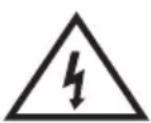
This symbol alerts users that the device is operating a dangerous electrical voltage. Do not remove protective covers on the device. Failure to observe the safety instructions during use and operation of the device may result in:
Danger of electric shock!
Danger of serious injury or life threatening!
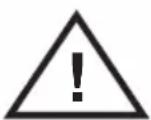
This symbol alerts users to the following: Risk of serious injury or life threatening when not following the safety instructions when using and operating the unit!
Danger of damage to equipment or other damage to property!

This symbol means that the product is made with a double insulation between hazardous live parts (parts with dangerous voltage from the mains) and parts that are accessible in normal use.
Transport/Carriage
- When transporting and using, for example, of the transport cart, be careful when moving, to avoid overturning the device.
- Transport / carry the equipment only after thorough inspection of the space and the routes, which must be unobstructed.
- Never carry the device while it is in operation. Do not carry the device while it is plugged into a wall socket.
- Transfer the device firmly by both hands to the bottom edge of the base or fixed parts of the body.
- Make sure that your hands and equipment are not damp or slippery when carrying. There is a risk of serious injury or life threatening!
There is a risk of damage to the device!
Unpacking/Package
- Unpack the equipment (and accessories if equipped) before putting it into service and remove all parts of the packaging material, labels and labels. Store the packaging in a safe place, especially out of the reach of children and unaccompanied persons, or dispose of them safely.
- Clean the device before commissioning as described in the „Commissioning“ section or „Cleaning and maintenance“.
- Never clean the device (and the remote control, if equipped) and the power cord with the plug in a way that could cause the cleaning liquid to drip into the device.
- Clean these parts with a slightly moistened cloth and wipe dry or let it dry.
- Only clean the device when the device is switched off and disconnected from the mains.
There is a risk of electric shock!
There is a risk of electrical short circuit!
Check/Commissioning
- We recommend performing both initial and subsequent regular device inspections.
- Never use the device if it is incomplete, damaged, or any part of it has been damaged during use.
- Do not use non-original and incomplete parts of the device and its accessories. There is a risk of serious injury!
There is a risk of damage to the equipment or other property damage!
- If the equipment has been transported and stored at low temperatures (eg in the winter) or excessive humidity, first leave it for about 1 - 2 hours
„Acclimatize“ at room temperature to remove any moisture in the electrical / electronic parts that arises when the ambient temperature changes. - Do not switch the device on or off by plugging in or pulling out the power cord from the AC socket.
- Always connect the device to the mains power supply when using it normally, then switch on the main switch.
- When you have finished using the device, turn off the main switch and then pull the cord out of the mains socket.
- Do not use the device if the main power switch does not work.
- The device is under dangerous voltage when the power supply is connected.
There is a risk of electric shock!
Location/Installation
- Only place the device on:
- Straight, firm and stable pads - for tables and furniture parts, suitable for the location of audio / video equipment.
- Always make sure that the place where you want to place the device has enough space, mechanical strength and load capacity.
- Do not install the equipment in the rooms (eg enclosed library cabinets, built-in cabinets and cabinets, etc.) for which there is insufficient room for space and ventilation.
- Leave enough free space around the device to ensure the required air circulation. It is recommended to keep min. 10 cm from all sides.
- Do not cover the device in part. Do not place any objects and / or decorative and other fabrics on the device, do not put and do not allow foreign bodies to enter the ventilation holes and holes in the housing covers.
- Do not cover the openings of the airflow covers. Air ventilation ensures reliable and safe operation of the device.
There is a risk of electric shock!
There is a danger of fire!
Warning!
- Do not expose the audio device (and the remote control if equipped) to:
- direct sunlight, heat generating equipment,
- vibration and mechanical stress,
- excessive dust,
- water and excess moisture,
- insect,
-
an aggressive external environment.
-
Do not set the audio device (and the remote control if equipped)
- to places where medical devices are used. Their function may be impaired.
- for unstable carts, stands or tables,
- to an uneven, unstable and dirty surface,
- on the close edge of tables, tables or parts of furniture,
- near containers with water or other liquids.
- Do not place containers of water or other liquids on shelves that are located above the device.
- Do not place any objects, especially naked flame objects, equipment, or shelves that are located above the device.
Warning!
- Place the device in a place where children cannot reach freely.
- Prevent children from handling the device. The device may overwhelm children and cause serious injury.
- Mechanical damage (eg cracking of the plastic covers) of the device can cause serious injury.
There is a risk of serious injury!
There is a risk of damage to equipment or other property damage!
- Do not place or use the device near water-containing containers. If the device falls into the water, do not remove it! First, pull the power cord plug out of the mains socket and then select the device from the water. In such cases, take the device for inspection to a specialist service to check that it is safe and working properly.
There is a risk of electric shock!
There is a risk of electrical short circuit!
- Do not expose the device and its accessories to strong vibrations and / or shocks. Prevent anything from dropping or hitting objects.
There is a risk of serious injury!
There is a risk of damage to equipment or other property damage!
- Do not use the device in potentially explosive environments in the presence of flammable substances and their vapors, fog or dust, and under atmospheric conditions, which, when ignited, simply spreads through the air.
- Do not use the device near sources of excessive heat and open flame.
There is a risk of explosion and / or fire!
Operation/Supervision Warning!
- Keep the device under supervision during use and operation!
• Make sure that the connection is safe and correct
all electrical cable connections. If the power cord is not securely connected to the device, be careful not to disconnect it from the device while the plug is connected to the power socket.
The free end of the power cord is under dangerous voltage. Do not insert any conductive objects into the terminal.
- During a severe storm, do not touch the device, the power cord, or antenna system. You could be struck by an electric current from an atmospheric shock. Unplug this apparatus during lightning storms or when unused for long periods of time.
- Unplug the device if children or incompetent persons are left unattended near the device.
Danger of serious injuries!
There is a risk of electric shock! There is a risk of fire!
- Do not tie the power cord and signal cables together. Do not wind the cables together.
The mains cord must remain accessible for safe disconnection of the device from the mains.
- Do not subject the power cord and signal cables to mechanical stress or damage.
- Do not let the power cord and signal cables hang freely and allow them to be freely accessible and accessible to children. Danger of serious injuries!
There is a risk of electric shock!
- The device contains parts of covers (ventilation grilles), which can become hot during normal operation.
Do not touch these parts of the device!
- Never leave the device freely accessible and do not store it with a freely accessible power cord. Children could pull the device by the power cord.
Danger of serious injuries!
- The unit is equipped to output an audio signal using headphones. Do not use headphones set at extreme sound pressure levels.
There is a risk of serious damage or loss of hearing!
Warning!
- If you are not going to use the unit for a long time, unplug the power cord from the AC socket.
Dust deposition and ambient humidity can damage the electrical insulation.
There is a risk of electric shock!
There is a risk of fire!
- Do not store the device with the power cord wrapped around its body.
Loosely „fold“ the power cord in the way it was folded in the original packaging from the manufacturer.
- Never overload the device above the limits set by the technical parameters!
- If you notice while using the device any non-standard manifestations (sounds, smell, smoke ...), switch off the device immediately and disconnect it from the mains. Have the device checked by a specialist garage.
Never underestimate the possible dangers and take extra care !!!
Producer:
ORAVA retail 1, a.s.
Seberíniho 2
821 03 Bratislava
Slovenská republika
Importer:
ORAVA retail 1. a.s.
Seberíniho 2
821 03 Bratislava
Slovenská republika
ORAVA distribution CZ, s.r.o.
Ostravská 494
739 25 Sviadnov
Česká republika
natural_image
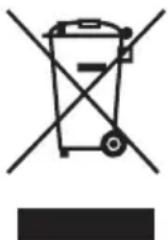
Symbol of a trash bin crossed with no text or numbers, representing waste sorting or disposal (no text present)DISPOSAL OF USED ELECTRICAL AND ELECTRONIC EQUIPMENT
The symbol on the product or on its packaging indicates that this product does not belong to household waste. It is necessary to take it to a collection point for electrical recycling and electronic equipment.
By ensuring proper disposal of this product, you will help prevent negative consequences to the environment and human health that would otherwise be caused by inappropriate disposal of this product. For more detailed information about recycling of this product, please contact your local authority, your household waste disposal service or the shop where you purchased the product.

This product meets all the essential requirements of the EU directives that apply to it.
DECLARATION OF CONFORMITY
Short text Declaration of Conformity:
ORAVA retail 1, a.s. hereby declares that the RR-41 complies with the essential requirements and other relevant conditions of Directive 2014/53/EU of the European Parliament and of the Council.
The full text of the Declaration of Conformity is available at: www.orava.eu
Parts description and controls
Top side
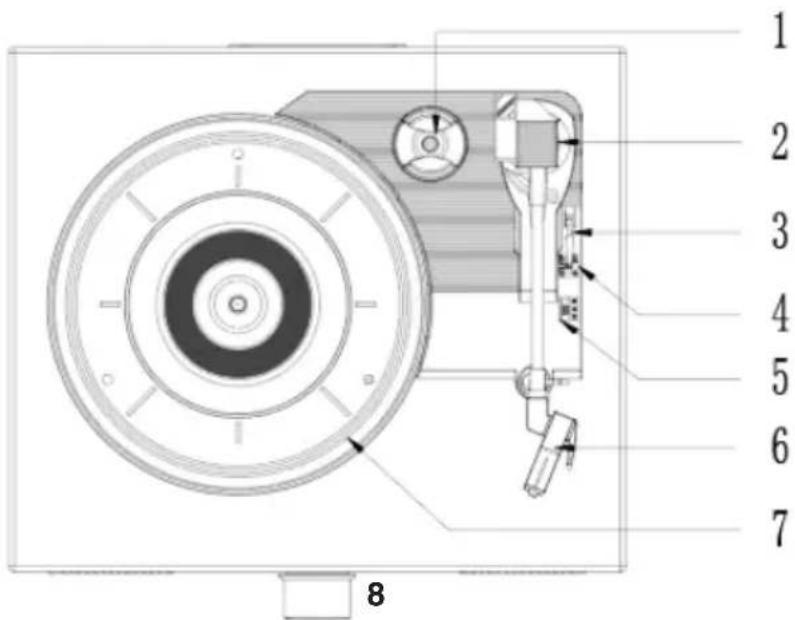
1 Central adapter for SP records at 45 rpm 2 Carrying arm
3 Pickup arm lift control
Lifting the pickup arm
4 Auto stop control
Default in Auto mode
5 Speed switch (33, 45, 78 rpm)
6 Ceramic carrying case with diamond needle
7 Turntable records
8 ON/OFF/VOLUME
Power switch/Volume control
9 Speakers
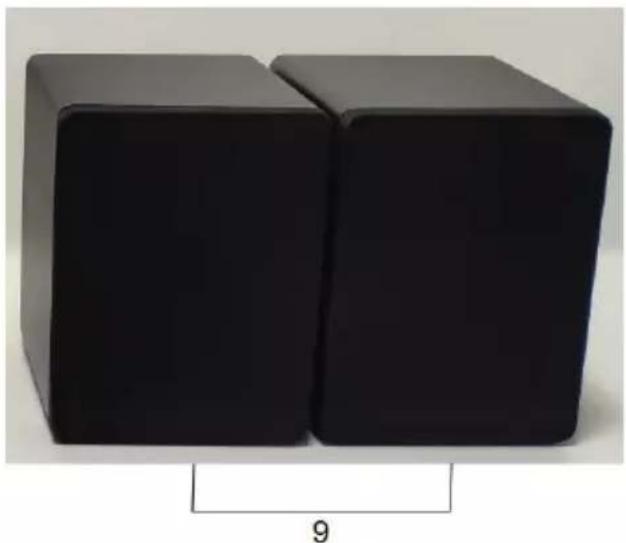
natural_image
Two black 3D cubes of varying sizes, one upright and one tilted, with a scale indicator labeled '9' (no text or symbols on the cubes themselves)Rear panel
SPR+ SPR- SPL- SPL+
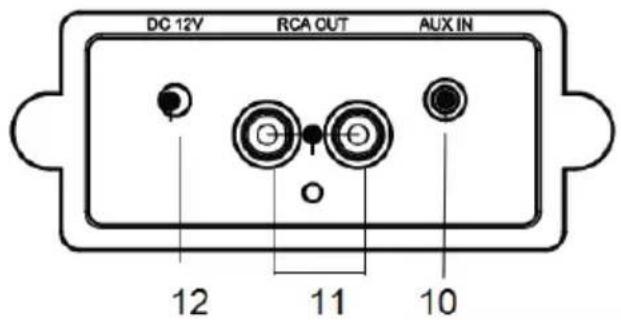
10 AUX IN connector
3.5 mm mini-connector for connecting an external audio device to input a signal from a connected audio device
11 RCA connectors RCA OUT
RCA connectors (L / R) for connection to an external amplifier to output an audio signal from this unit to a connected audio device
12 DC 12V
Power connector for connecting the AC adapter to connect power from an electrical socket
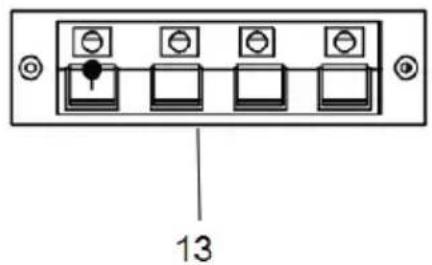
13 Speaker terminal connectors
Connectors for connecting the supplied external speakers
Connections
Connecting the AC adapter
Connect the supplied 12 V AC adapter to an easily accessible electrical socket with the specified voltage of 230 V/50 Hz.
Then connect the cable connector from the AC adapter to the DC 12 V connector on this unit.
If you notice a problem, unplug the AC adapter from the electrical socket immediately.
Connect the line output to another audio device
Connect the RCA OUT (L/R) connectors on the rear panel with a suitable RCA cable to the audio input connectors on another audio device. Then you will be able reproduce the sound from this unit with another connected device (eg HiFi amplifier speakers, etc.).
Observe the color resolution of the connectors on the devices and cable.
Connect the red connector to the red connector (right channel) and the white or black connector to the white or black connector (left channel).
Connect line output from another audio device
Use a suitable cable to connect the audio output connectors on another device (e.g. PC) to the 3.5 mm AUX IN mini-connector on the rear panel.
You will then be able to reproduce the sound from another device through the speakers of that device.
Preparation for use
1 Carefully remove the device from its packaging and remove any packing material.
2 Unwind the AC adapter cable and stretch it to its full length.
3 Place the device on a flat, stable surface with access to an electrical socket, out of direct sunlight and sources of excessive heat, dust, moisture, shock, and strong magnetic fields.
4 Remove the protective element from the turntable case by pulling it out.
5 Gently push the locking clip that was used to secure the carrying arm during transport to the right to release and unlock the carrying arm. If you are carrying the device, lock the carrying arm again with the clip.
6 Connect the AC adapter cable to the DC jack on the turntable and the AC adapter to an electrical socket.
PROTECT YOUR FURNITURE
This model is equipped with non-slip rubber “feet” that prevent the device from moving while manipulating the controls. These “legs” are made of non-slip rubber material with a special composition so as not to leave any marks or stains on the furniture. However, some types of petroleum-based furniture polishes, wood preservatives or cleaning sprays can soften the “feet”, which they can then leave on the furniture.
traces or particles of rubber. To avoid damaging your furniture, we recommend that you purchase small self-adhesive pads and apply these pads to the bottom of the rubber "feet" before placing the device on delicate wooden furniture.
Basic operations
1 Connect the supplied AC power cord cable to the DC 12 V jack on the back of the unit and the AC adapter itself to an electrical socket.
2 Turn ON/OF/VOLUME to the right to turn on the unit.
3 Select the desired audio source (Playing LP record/connecting an external device to the AUX IN jack/pairing with a Bluetooth device).
4 Turn VOLUME on the unit to adjust the volume.
5 Turn the ON/OF/VOLUME control all the way to the left to turn off the unit.
Turntable - playing classic records
This device has a full-fledged three-speed, belt-driven turntable. This allows you to play discs at 33, 45 and 78 rpm.
Notes on classic LP records Handling of records
- Hold the records only at the edges to prevent contamination of the surface. Do not touch the surface of the records and the grooves. Dirt and mechanical damage reduce the quality of reproduction.
- Do not stick anything on the surface of the record.
- Do not expose the hob to direct sunlight or heat sources such as air conditioners, or leave the hob in a parked car in the sun, as the temperature inside may rise considerably.
• After playback, place the record in their packaging. - Store recordss in a vertical position. They can be damaged when stored horizontally.
- Store recordss away from dusty environments and in places free from vibration and shock.
Sticker with description Grooves
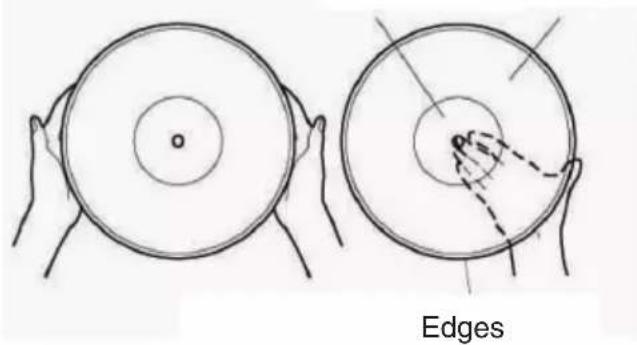
Cleaning
- Before playing, clean the disc with a soft, dry antistatic cleaning cloth.
Clean the record along the grooves.
- Do not use solvents such as petrol, thinner, or commercially available cleaners.
Replacing the pickup with a needle
The needle has an average life of about 250 hours in normal use. We recommend replacing the transmission as soon as you notice a deterioration in sound quality (distortion). Using a damaged needle may damage the recordss. At a maximum speed of 78 rpm, the needle wears faster.
Notifications!
- Do not bend the phonograph pick up.
- Do not touch the needle directly.
- Disconnect the device from the power supply before replacing the pickup.
- Keep the phonograph pickup out of the reach of children.
- Do not place the pick up near heat sources.
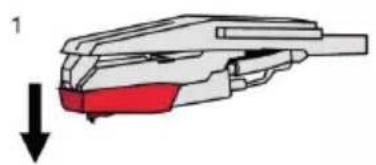
Taking phonograph pick up out of the gramophone
1 Gently push the top of the carrying case down in the direction of the arrow (1).
2 Gently pull the transfer forward in the direction of the arrow (2).
3 Remove the transfer by pulling it forward in the direction of the arrow (3).
natural_image
Diagram of a mechanical component with a red highlighted section and a downward arrow, no text or symbols present.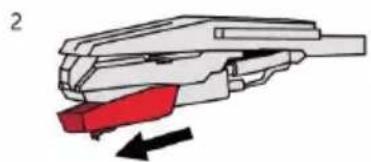
natural_image
Diagram of a mechanical tool with red and black components, no text or symbols present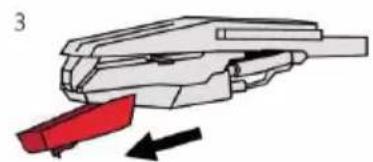
natural_image
Diagram of a mechanical component with red and black arrows indicating movement or force (no text or symbols)Insert a new pickup
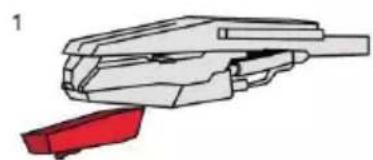
1 Grasp the front edge of the pickup and place it against the arm (1).
2 Slide the back side onto the arm head (2).
3 Push the front of the pickup in the direction of the arrow until it clicks into place (3).
Playing records
natural_image
Technical illustration of a mechanical component with a red clamped part (no text or symbols)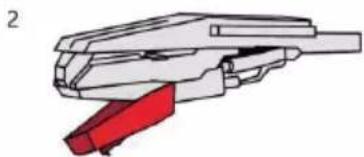
natural_image
Mechanical component diagram showing a red and white assembly with no visible text or symbols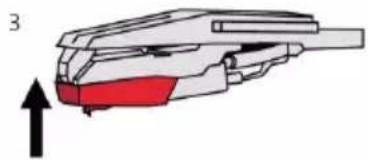
natural_image
Diagram of a mechanical component with red highlighted section and black upward arrow (no text or symbols)1 Turn ON/OF/VOLUME to the right to turn on the unit.
2 Be sure to remove the needle cover from the transfer case and release the transfer arm lock clip by gently sliding it to the right to secure the transfer arm to the transfer arm armrest.
3 Set the turntable speed switch to the appropriate speed - 33, 45 or 78 rpm.
To play an SP record (so-called single) recorded at 45 rpm, attach a 45 rpm adapter to the center mandrel of the turntable.
4 Place the records on the center mandrel on the records.
5 Using the arm lift control, lift the transfer arm off the armrest and gently move the transfer arm to the outer edge of the records by hand so that the needle is above the beginning of the grooves in the records.
The turntable turns on automatically and starts rotating.
6 Slowly lower the boom lift control to lower the carrying arm onto the records surface.
7 Adjust the ON/OFF/VOLUME control to the desired level.
8 When the carrying arm reaches the edge of the records, it automatically returns to the carrying arm support and the records rotation stops.
9 Turn ON/OF/VOLUME all the way to the left to turn off the system.
Note
To stop playback manually, use the boom lift control to lift the carrying arm off the surface of the disc and gently slide the carrying arm into the boom holder by hand.
Connect line audio output from another audio device
Use a suitable cable with a 3.5 mm mini-connector to connect the audio output connectors on another device (e.g. PC) to the AUX IN connector on the rear panel. You will then be able to reproduce sound from another device through the speakers of that device.
1 Turn ON/OF/VOLUME to the right to turn on the unit.
2 When the cable is connected to the AUX IN jack, the AUX audio source is automatically selected.
3 Start playback on the connected device and set the volume level to the appropriate level, then turn ON/OF/VOLUME to adjust the volume level on this unit.
Notes
- The audio cable is not included in the product packaging.
- Refer to the operating instructions of the connected device for playback.
Bluetooth
1 Turn on the Bluetooth interface on your Bluetooth device (phone, tablet, etc.). For details, refer to the operating instructions of the device.
2 Set the auto stop control to ON.
3 Place the carrying arm in the parked position.
The device switches to Bluetooth mode, beeps, and is ready to pair.
4 On a Bluetooth device (phone, etc.), search for available Bluetooth devices. For details, refer to the operating instructions of the device.
When RR-41 appears on the display of your Bluetooth device, select it and wait until the pairing confirmation is shown on the display of your Bluetooth device.
with RR-41 device. A confirmation beep sounds on this unit. The devices are paired.
5 After pairing, you can start playback on your Bluetooth device. Set the appropriate volume on it.
For details on playback controls, refer to the operating instructions of the device. The sound from the paired device will be reproduced by this device.
6 Set the appropriate volume level on the connected device, then turn the ON/OF/VOLUME control to adjust the volume level on this device.
7 When playback is finished, turn off this unit, stop playback on your Bluetooth device, and turn off the Bluetooth interface on it.
Note
After pairing the devices, it is not necessary to perform the pairing again. The devices will reconnect automatically the next time you turn on the Bluetooth audio source on this device and turn on the Bluetooth interface on your Bluetooth device.
Canceling the current Bluetooth pairing and pairing with a new device When this device is paired with a Bluetooth device and you want to cancel the pairing so that you can connect another device, turn off Bluetooth on the first
furnished. Search for this device on another device and pair the new device as described above.
Pairing with the old device is canceled and pairing with another Bluetooth device is performed.
Warning!
There may be a sound when playing via Bluetooth.
These outages are caused by interference, greater distance, obstacles, etc. This is not a malfunction of the unit.
More details
Wireless BLUETOOTH technology
BLUETOOTH wireless technology is a short-range technology that enables wireless data communication between digital devices such as PC and digital camera. Wireless BLUETOOTH technology works in a range of about 10 m.
The two devices are connected to each other, but some devices can be connected to more than one device at a time.
No cable is required for the connection, nor is it necessary to place the devices opposite each other as with infrared technology. You can use your devices, for example, when they are in your backpack or pocket.
The BLUETOOTH standard is an international standard supported and used by many companies around the world.
Maximum communication range
The maximum communication range may be shorter in the following conditions.
There are obstacles such as people, metal or a wall between this system and the BLUETOOTH device.
A LAN device is used near this system. A microwave oven is used near this system.
An electromagnetic radiation generating device is used near this system.
Interference from other devices
BLUETOOTH and wireless LAN (IEEE802.11b/g) devices use the same frequency, so if you use this system near a wireless LAN device, microwave interference may occur, which may result in poor communication speed, noise, or poor connection. In this case, do the following.
Use this system at least 10 m from a wireless LAN device.
If you use this system less than 10 m away from the wireless LAN device, turn off the wireless LAN device.
Interference from other devices
Microwaves emitted by BLUETOOTH devices may affect the operation of electronic medical devices. Turn off both the system and the BLUETOOTH device in the following places, as there is a risk of danger:
- near flammable gases, in hospitals, trains, airplanes or service stations.
- near automatic doors or fire alarms.
Notes
- To use the BLUETOOTH function, the connected BLUETOOTH device must have the same profile as this system.
- Even if the profiles are the same, the devices may work differently depending on their specifications.
- Due to the characteristics of wireless BLUETOOTH technology, the sound reproduced by this system is slightly delayed compared to the sound from the BLUETOOTH playback device during a telephone call or listening to music.
- This system supports security standards that comply with BLUETOOTH standards to ensure a secure connection when using BLUETOOTH wireless technology. However, depending on the settings, security may not be sufficient. Be careful when communicating using BLUETOOTH wireless technology.
• We are not responsible for information leakage during BLUETOOTH communication. - A device with BLUETOOTH function is required to comply with the BLUETOOTH standards specified by the Bluetooth SIG standard and authentication. Although the connected equipment complies with the BLUETOOTH standards, some devices may not be able to be connected or may not work properly depending on the functions or technical specifications of the equipment.
- Depending on the BLUETOOTH device connected to this system, the communication environment, or the operating environment, noise or outages may occur.
Maintenance
Use a soft cloth slightly moistened with a mild cleaning solution to clean the surface, panel, and controls. Do not use any type of abrasive pad, scouring powder, or solvent, such as thinner, petrol, or alcohol.
Troubleshooting
If you encounter a problem while the system is running, try resolving it using the report below before requesting a repair. If any problem persists, contact your nearest dealer.
Power supply
The device does not switch on.
→ Check that the AC adapter is properly connected to the wall socket (wall socket) and its connector to this unit.
Sound
There is no sound.
→ The connecting cable from the external device is not securely connected.
→ The connecting cable from the external device is damaged.
→ The volume is set to minimum.
Use the ON/OFF/VOLUME control to increase the volume.
→ Check that playback is not finished.
The sound is not good (noisy).
→ Check that the connecting cable from the external device is not near a transformer or motor, and that they are at least 3 meters away from the TV.
→ Move the TV away from audio equipment.
→ The cable end of the external device and the connectors are dirty.
Clean them with a cloth slightly moistened with alcohol.
Bluetooth
Bluetooth connection problems
The Bluetooth signal is interrupted.
→ The effective distance between this system and the unit is up to 10 m.
The signal will be interrupted if the distance between the Bluetooth device and this system is more than 10 m.
The Bluetooth device will find several other Bluetooth devices during the search: Wait for the search to complete and select "RR-41" to pair. When using the phone, do not hold the mobile device too close to the loudspeaker to avoid echo (feedback).
Technical specifications
Gramophone
Motor: servo motor for direct current (DC)
Drive system: belt
Speed: 33 rpm, 45 rpm and 78 rpm
Fluctuation and deviation: less than 0.35% (WTD)
Signal-to-noise ratio: more than 50 dB
Carrying case type: ceramic stereo carrying case with diamond needle
Amplifier
Channels: 2 audio channels
Output power: 2 x 10 W (supplied speakers)
Frequency range: F0 -20 KHz
Bluetooth
Bluetooth standard 5.0
Profile: A2DP (Advanced Audio Distribution Profile) profile for wireless music transfer in stereo quality
Band: 2.402 - 2.480 GHz
Generally
Connectors: 3.5 mm mini connector AUX IN (line input) DC 12 V power connector RCA connectors (L/R), audio output terminal speaker connectors
Power supply: AC adapter, AC voltage 230 V, 50 Hz device: DC voltage 12 V/1,000 mAh from the supplied AC adapter
Power consumption: 12 W
Dimensions (W x H x D): 32 x 13 x 29 cm
Weight (approx.): 3.5 kg
We reserve the right to make changes!
- Bluetooth HiFi turntable player
- Intended use of the device
- GENERAL SAFETY INSTRUCTIONS AND WARNINGS
- Read all instructions before using the device!
- General safety instructions
- Safety of the operating environment
- Electrical safety
- Safety of persons
- Cleaning, maintenance and repairs
- Special Safety Instructions. Read carefully!
- Transport/Carriage
- Unpacking/Package
- Check/Commissioning
- Location/Installation
- Warning!
- Operation/Supervision Warning!
- Producer:
- Importer:
- DISPOSAL OF USED ELECTRICAL AND ELECTRONIC EQUIPMENT
- DECLARATION OF CONFORMITY
- Parts description and controls
- Rear panel
- AUX IN connector
- RCA connectors RCA OUT
- DC 12V
- Speaker terminal connectors
- Connections
- Connecting the AC adapter
- Connect the line output to another audio device
- Connect line output from another audio device
- Preparation for use
- PROTECT YOUR FURNITURE
- Basic operations
- Turntable - playing classic records
- Notes on classic LP records Handling of records
- Sticker with description Grooves
- Cleaning
- Replacing the pickup with a needle
- Notifications!
- Taking phonograph pick up out of the gramophone
- Insert a new pickup
- Playing records
- Note
- Connect line audio output from another audio device
- Notes
- Bluetooth
- More details
- Wireless BLUETOOTH technology
- Maximum communication range
- Interference from other devices
- Maintenance
- Troubleshooting
- Power supply
- The device does not switch on.
- Sound
- There is no sound.
- The sound is not good (noisy).
- Bluetooth connection problems
- The Bluetooth signal is interrupted.
- Technical specifications
- Gramophone
- Amplifier
- Generally
Brand : Orava
Model : RR-41
Category : Microwave