
FSMNPFDLBKA - Exercise bike Fortis - Free user manual and instructions
Find the device manual for free FSMNPFDLBKA Fortis in PDF.


| Product Type | Exercise Bike |
| Brand | Fortis |
| Model | FSMNPFDLBKA |
| Dimensions (L x W x H) | Approx. 100 x 50 x 130 cm |
| Weight | Approx. 30 kg |
| Max User Weight | 120 kg |
| Power Source | Battery (2 x AAA) |
| Display | LCD: Time, Distance, Speed, Calories, Pulse |
| Resistance Type | Magnetic |
| Resistance Levels | 8 |
| Pedals | Adjustable straps |
| Seat Adjustment | Vertical and horizontal |
| Handlebars | Ergonomic with pulse sensors |
| Heart Rate Monitor | Hand grip sensors |
| Programs | 12 preset |
| Transport Wheels | Yes |
| Warranty | 2 years |
| Maintenance | Lubricate moving parts, tighten bolts regularly |
| Safety Features | Stable base with levelers |
| Spare Parts Availability | Through Fortis service |
Frequently Asked Questions - FSMNPFDLBKA Fortis
User questions about FSMNPFDLBKA Fortis
0 question about this device. Answer the ones you know or ask your own.
Ask a new question about this device
Download the instructions for your Exercise bike in PDF format for free! Find your manual FSMNPFDLBKA - Fortis and take your electronic device back in hand. On this page are published all the documents necessary for the use of your device. FSMNPFDLBKA by Fortis.
USER MANUAL FSMNPFDLBKA Fortis
UNDER DESK MINI PEDAL BIKE EXERCISER
FSMNPFDLBKA
SAFETY & WARNINGS
Important Safety Warnings
- Read all the instructions in this manual before using the product. Follow all warnings and operating instructions prior to use. Keep this manual for the entire life of the product.
- Do not allow children on or around the machine. Always keep children and pets away from the product.
- Keep hands, feet and loose articles away from moving parts.
- The owner is responsible for ensuring that all users of this product are properly informed as to how to use this product safely.
• This product is intended for domestic use only. - Do not store this product in a damp environment.
- Use this product indoors, preferably away from humidity and dust, on a flat, hard surface and in a space large enough to allow safe access and movement around the product.
- To protect flooring, always place a rug under the product. Wear athletic shoes to protect your feet while exercising.
- Do not wear loose or baggy clothing, since it may get caught in the machine. Take off all jewellery.
- If you feel any pain or if you become dizzy while exercising, stop immediately, rest and consult a physician.
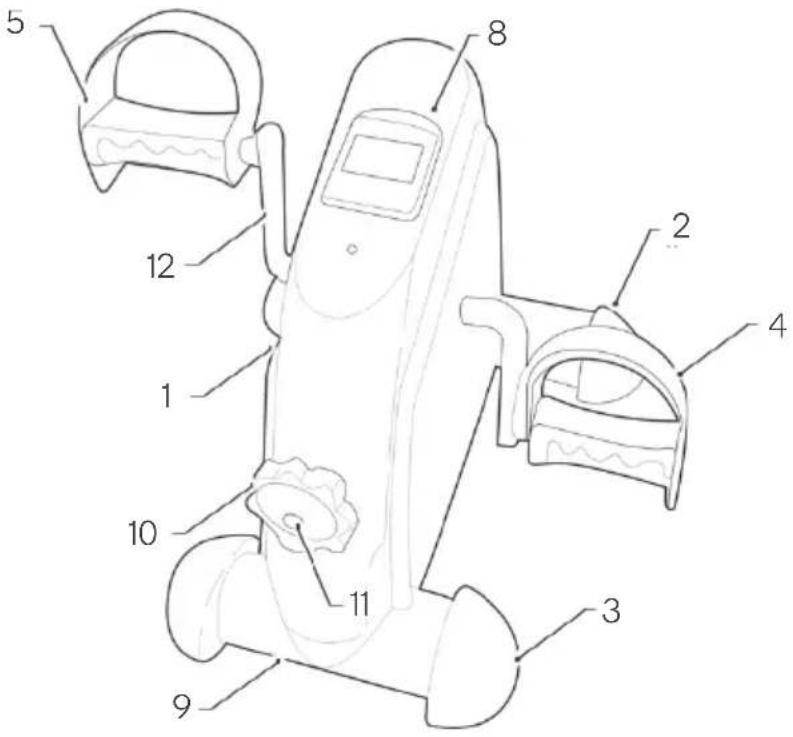
No. Description
1 Main body
2 Front stabiliser
3 Rear stabiliser
4 Right pedal
5 Left pedal
6 Hex bolt M8 (x4)
No. Description
7 Washer 016 (x4)
8 Display
9 Base reinforcement (x2)
10 Knob
11 Knob screw
12 Crank-arm
ASSEMBLY
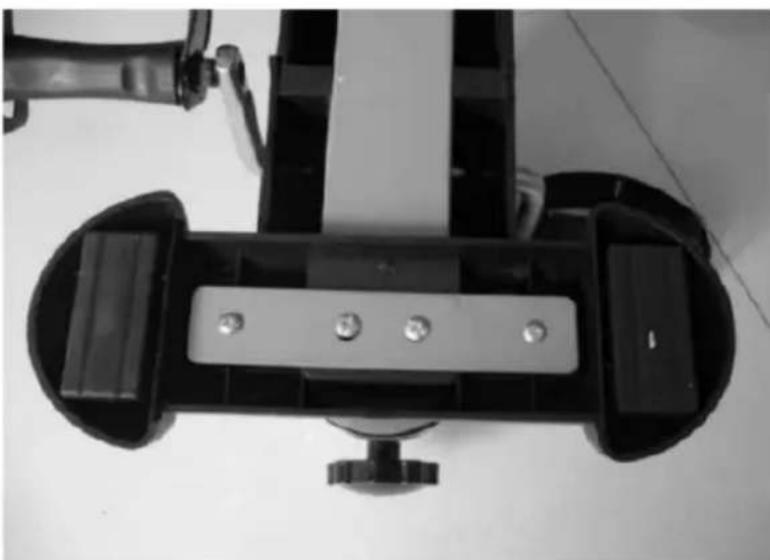
Step 1:
Attach the front stabiliser (2) to the main body (1) using x2 sets of hex bolts (6) and washers (7).

Step 2:
Attach the rear stabilisers (3) to the main body (1) using x2 sets of hex bolts (6) and washers (7).
Step 3:
Attach the pedals (4 & 5). The right pedal is marked R, connect it to the right end of the crank arm (12).
The right pedal should be threaded on clockwise. The left pedal is marked L, it should be threaded on anti-clockwise.

Installing and replacing the battery
Remove the display from the bike by disconnecting it from its. The battery compartment is situated behind the display. Install or replace a AAA battery. Replace the display.

FUNCTIONS
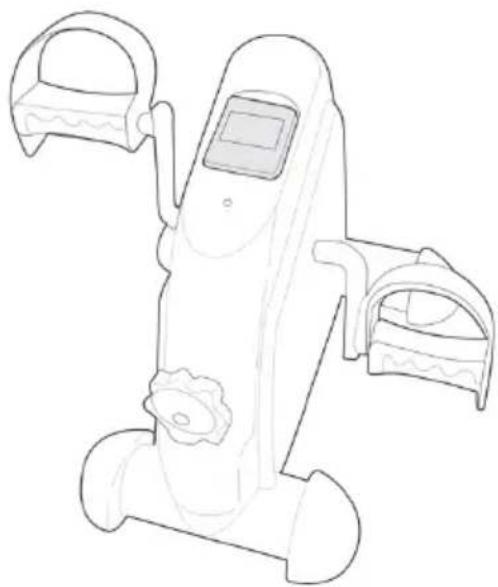
Press the red button to turn on the display. You can select the desired function by pressing the red button, see the right upper corner of the display for the functions.
- The function displayed change automatically after a couple of seconds so that during your session you can keep track of the time, distance, number of exercises and the total estimated calories. If you prefer one function, then press the red button till you have found the desired function and "SCAN" is not displayed.
- The display will automatically switch on when you start exercising or when you press the red button.
- The display will automatically turn itself off when a few minutes have passed and no movement has been detected.
| Function | Description |
| Time | Displays the time of the training sessions elapsed. |
| Distance | Counts the distance in meters. |
| Count | Accumulates the number of movements made by cycling (pressing down on the pedals) during the workout session. |
| Total Count | Accumulates the numbers of movements made by cycling (pressing down on the pedals) during different sessions. This total cannot be reset unless you replace the battery. |
CLEANING & CARE
• The product only requires minimal maintenance.
- Avoid contact with water.
- Clean with a slightly damp sponge. Dry with a clean dry cloth.
- Avoid prolonged exposure to the sun.
NOTES
Need more information?
We hope that this user guide has given you the assistance needed for a simple set-up.
For the most up-to-date guide for your product, as well as any additional assistance you may require, head online to help.kogan.com
kogan.com
Brand : Fortis
Model : FSMNPFDLBKA
Category : Exercise bike