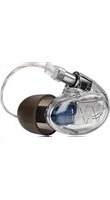
Pro X 20 - Earphones Westone - Free user manual and instructions
Find the device manual for free Pro X 20 Westone in PDF.


| Type of product | In-ear Monitors (Earphones) |
| Brand | Westone |
| Model | Pro X 20 |
| Warranty period | 2 years limited (external shell, internal components, cable); 90 days for accessories (carrying case, cleaning tool, adapters); tips not covered |
| Noise isolation | Approximately 25 dB when properly worn |
| Eartip types | Foam (compressible) and Silicone STAR tips |
| Cable | Detachable, with cable zipper for strain relief |
| Insertion method | Compress foam eartip, insert into ear canal, hold for 5-10 seconds to allow expansion; silicone tips require no compression |
| Cleaning | Use included wax removal loop to clear sound bore; wipe monitors after each use |
| Water resistance | Not waterproof; avoid moisture and submersion; allow to dry if exposed |
| Operating temperature | Avoid temperature extremes |
| Safety | Follow OSHA sound exposure guidelines; do not use while driving or operating machinery |
| Included accessories | Carrying case, cleaning tool, wax removal loop, adapters |
| Product registration | Online at westoneaudio.com/product-registration/ |
| Manufacturer contact | Westone Audio, 14301 FAA Blvd, Fort Worth, TX 76155, USA; 949-793-8136; customerservice@westoneaudio.com |
| Country of manufacture | USA |
| Weight (estimate per pair) | Approximately 12 g |
Frequently Asked Questions - Pro X 20 Westone
User questions about Pro X 20 Westone
0 question about this device. Answer the ones you know or ask your own.
Ask a new question about this device
Download the instructions for your Earphones in PDF format for free! Find your manual Pro X 20 - Westone and take your electronic device back in hand. On this page are published all the documents necessary for the use of your device. Pro X 20 by Westone.
USER MANUAL Pro X 20 Westone
Westone Audio values your satisfaction. If you have any questions, please contact us:
Westone Audio 14301 FAA Blvd, Fort Worth, TX 76155 949-793-8136 customerservice@westoneaudio.com
westoneaudio.com
WESTONE PRO X MANUAL - 0321 - A

OWNER'S MANUAL
Quick Insertion Guide:

IDENTIFY
EARPIECES
marked (R) for right
and (L) for left

ALIGN
EARPIECES
at the ear canal, with
cord facing forward &
slightly downward

INSERT EARTIP
into ear canal and
rotate earpiece
backwards &
into position
Detailed Insertion Instructions (refer to figures on cover page)
Before inserting the monitor, turn down the volume on your sound source and either drape the cord over your shoulders and down your back, or run the cord down in front. The monitors are marked (R) for the right ear, (L) for the left. If you have selected a foam eartip, compress the foam by rolling it between your fingers (fig. 1). If using a silicone STAR tip, the instructions are the same except there is no need to compress the tips. With the body of the monitor toward the back of your ear and the cord facing forward, insert the eartip into your ear canal before the foam expands back to its original shape (fig.2). If you have trouble inserting the monitor, reach over your head with your opposite hand and gently pull up and back on the top of your ear before inserting the eartip. This helps straighten your ear canal and may allow for easier insertion. The monitor cord should run over and behind your ear. Hold the monitor in place for 5 to 10 seconds to allow the foam to expand and conform to the shape of your ear canal (fig. 3).
Once the monitors and cords are comfortably in place, slide the cable zipper up to the base of your skull (not too snugly, as this may cause discomfort). This will limit cable movement and help ensure that your monitors stay in place during use.
ownership, and that the product was purchased from an authorized Westone Audio retailer. Once you receive your RMA number, package the product securely to prevent damage in transit, include the documentation, and send prepaid and insured through a trackable shipping carrier to:
Westone Audio, Attn: Lucid Audio, LLC, 14301 FAA Blvd., Fort Worth, TX 76155 USA
Westone Audio will be responsible for shipping to the consumer after warranty repair/ replacement only. The customer is responsible for all shipping/handling charges related to returning the product to Westone Audio.
International
The warranty on this product if it is sold to a consumer outside of the United States and Canada shall comply with applicable law. To obtain warranty service, contact the dealer from which you purchased or the distributor that supplied this product. Additional charges and limitations may apply. If purchased through an international location without a Westone Audio distributor, or an authorized Westone Audio retailer (but not through the local distributor or distributor's network) contact Westone Audio directly (see United States & Canada instructions above).
Limitation of Liability
Westone Audio disclaims any and all implied warranties, warranties of merchantability and fitness for a particular purpose to the maximum extent permissible by law. Westone Audio shall not be liable for any special, incidental or consequential damages caused by the use, misuse, or inability to use this product. If purchased under a government contract, those contract terms supersede terms stated herein. In some locations, implied warranties cannot be limited. Under certain conditions, these limitations or exclusions may therefore not apply to you. This warranty replaces all other warranties for this product.
Register Online Today
Complete your registration card online at: https://westoneaudio.com/product-registration/
Limited Product Warranty
Westone Audio warrants this product to be free of defects in material or workmanship for a period of two (2) years from the date of original retail purchase. This warranty is available only to the original purchaser, and only if purchased from an authorized Westone Audio distributor or reseller. If your product is found to be defective during the warranty period, Westone Audio will, at its sole option, either repair the product or replace the product with a new or factory reconditioned or substantially equivalent model. This limited warranty does not apply to loss, theft, or any defects attributable to damage beyond the reasonable control of Westone Audio including damage caused by abuse, misuse, misapplication or modifications performed by anyone other than Westone Audio. This warranty applies only to the external shell of the product, the internal components and cable. The carrying case, cleaning tool, any adapters and other included accessories are warranted for 90 days. Tips are not covered by the warranty.
Repair/Replacement Warranty
This Limited Warranty shall apply to any repair, replacement part or replacement product for the remainder of the original warranty period or for ninety (90) days, whichever period of time is greater. Any parts or product replaced under warranty will become the property of Westone Audio.
Requesting Warranty Support
If your product is not functioning properly, first ensure that the sound bore is not blocked by earwax and that the unit is completely dry. Performing these simple troubleshooting steps could solve the problem and eliminate the need for factory service. Valid warranty claims are generally processed through the point of purchase during the first thirty (30) days after retail purchase.
United States & Canada
If it is necessary to return your product to Westone Audio for warranty or post-warranty service, contact Westone Audio to request a return merchandise authorization (RMA) number. You may call 949-793-8136 or go to www.westoneaudio.com/support/returns to submit a Product Return Request Form. Please note you will be required to submit reasonable proof of purchase date,
Cable Removal

HOLD FIRMLY & REMOVE AT STRAIGHT ANGLE
Hold the earpiece and cable firmly with each hand (close to the connection) and remove the cable by pulling at a straight angle from the socket.
Do not pull from the wire!
Cable Replacement

CHECK
if the cable is for the left or right monitor

MATCH
the cable to appropriate monitor
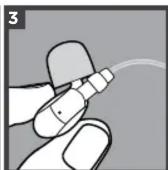
INSERT
the cable into the monitor by pushing directly into the socket
Pro X Care + Maintenance
Here are a few simple guidelines that can greatly increase your listening enjoyment and the lifespan of your Pro X monitors:
• Always store your monitors in the provided case.
- In case of poor sound quality due to earwax in the sound bore, use the included wax removal loop to carefully remove the earwax. Never use any other object to attempt to remove the earwax as this may result in damage to the monitors and will void the warranty.
- Do not use the cord to remove the monitors from your ears. This may cause damage to the cord and result in poor performance. Damage of this nature is not covered by the warranty.
- Do not expose your monitors to temperature extremes.
- Avoid strong impacts to your monitors.
- Wipe down your monitors after each use.
- Never immerse your monitors in water.
- You should use extreme caution or temporarily discontinue use in potentially hazardous situations.
- Don't use while operating a motorized vehicle as it may create a traffic hazard & is illegal in many areas.
Please Note: Moisture in your monitors can cause temporary performance issues. Do not insert your monitors if your ears are wet. Always dry your ears completely before inserting your monitors. Should you inadvertently allow water or perspiration into the monitors and they quit working, allow to dry completely before attempting to use again. Minor moisture build-up should dry out and not affect long-term performance. Extended exposure to moisture or submersion will result in permanent damage (not covered by the warranty).
Remember, personal hearing protection is your responsibility!
Please read this important information before using your Westone Audio Pro X monitors. If everything sounds muffled or you hear ringing or buzzing after using your monitors, your ears are trying to give you a warning! These are symptoms normally associated with a condition known as Temporary Threshold Shift and are an indication of conditions that could lead to permanent hearing loss.
While no two individuals' hearing sensitivity is exactly the same, there are established safety guidelines for sound levels versus time of exposure.
The chart (right) is based on OSHA's (Occupational Health and Safety Administration) exposure information for industry. Remember that these guidelines are based on average hearing sensitivity. Your sensitivity may be above or below these levels.
The use of any monitors offers benefits and risks. Westone Audio's Pro X monitors can lower ambient sound levels approximately 25dB when properly worn. However, the performance capabilities of the monitors can allow the user to negate the benefits of hearing protection from ambient sound. We want you listening for a lifetime!
| dB Level | MAXIMUM Exposure Time |
| 85 | 8hr |
| 90 | 4hr |
| 95 | 2hr |
| 100 | 1hr |
| 105 | 30mins |
| 110 | 15mins |
- Detailed Insertion Instructions (refer to figures on cover page)
- Westone Audio, Attn: Lucid Audio, LLC, 14301 FAA Blvd., Fort Worth, TX 76155 USA
- International
- Limitation of Liability
- Register Online Today
- Limited Product Warranty
- Repair/Replacement Warranty
- Requesting Warranty Support
- United States & Canada
- HOLD FIRMLY & REMOVE AT STRAIGHT ANGLE
- Pro X Care + Maintenance
- Remember, personal hearing protection is your responsibility!
Brand : Westone
Model : Pro X 20
Category : Earphones