Ambia - Kit mains-libres Tellur - Free user manual and instructions
Find the device manual for free Ambia Tellur in PDF.


| Product Type | True Wireless Stereo Earphones |
| Brand | Tellur |
| Model | Ambia |
| Connectivity | Bluetooth 5.0+EDR, BLE |
| Wireless Range | 10 m |
| Driver Size | 6.0 mm |
| Frequency Response | 20 Hz - 20 kHz |
| Impedance | 16 Ω |
| Sensitivity | 103 dB ± 3 dB at 1 kHz |
| Microphones | 4 x MEMS with Environmental Noise Cancellation (ENC) |
| Battery Life (Earphones) | Up to 3.5 hours |
| Battery Life (with Case) | Up to 25 hours |
| Standby Time | Up to 120 hours |
| Charging Time | Approx. 2 hours |
| Charging Port | USB Type-C |
| Water Resistance | IPX4 (sweat and water resistant) |
| Weight (each earbud) | 5 g |
| Weight (charging case) | 38 g |
| Dimensions (earbud) | 43 x 24.5 x 18 mm |
| Dimensions (charging case) | 72.6 x 32.6 x 28 mm |
| Color | Black |
| Special Features | Wearing detection, Tap control, Voice commands, Intelligent switching, Auto-connect, ENC |
| Package Contents | Earphones, charging case, USB cable, 3 pairs of eartips (S/M/L), user manual |
Frequently Asked Questions - Ambia Tellur
User questions about Ambia Tellur
0 question about this device. Answer the ones you know or ask your own.
Ask a new question about this device
Download the instructions for your Kit mains-libres in PDF format for free! Find your manual Ambia - Tellur and take your electronic device back in hand. On this page are published all the documents necessary for the use of your device. Ambia by Tellur.
USER MANUAL Ambia Tellur
natural_image
Black TELLUR earbuds with smooth grip and brand logo (no text or symbols on body)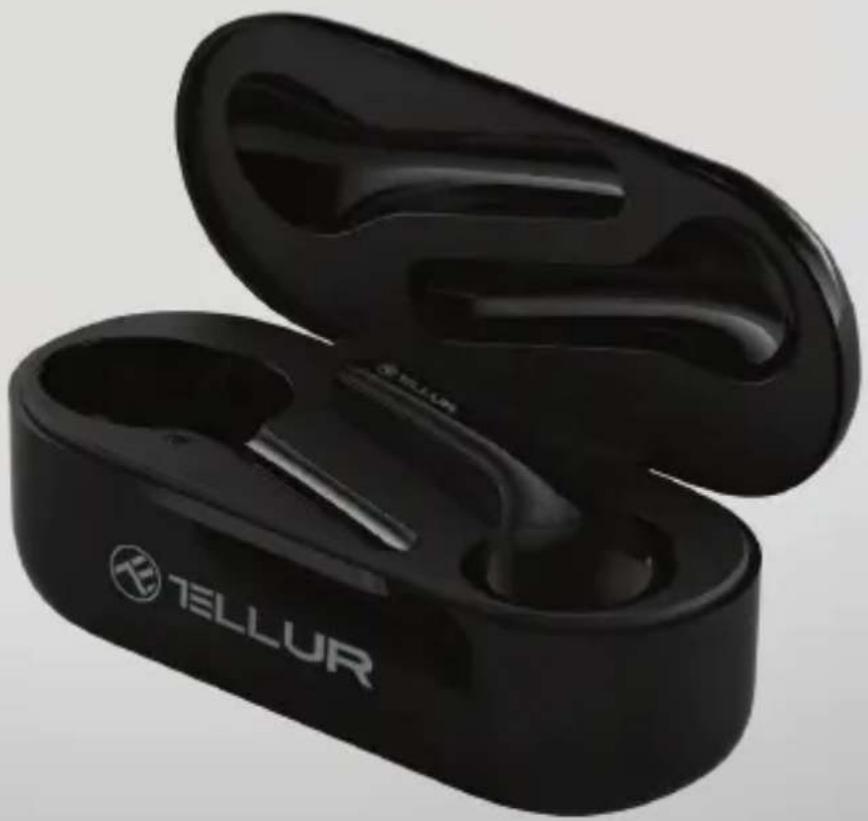
natural_image
Black TELLUR earbuds with open case, no visible text or symbols on bodyThis manual is available in more languages on www.tellur.com
Technical specifications:
Bluetooth version: 5.0+EDR, BLE
Wireless range: 10m
Audio type: True Wireless Stereo
Supported profiles: HSP, HFP, A2DP, AVRCP
ENC technology: Yes, 4-microphone call technology
Audio codecs supported: SBC, AAC
Speaker Size: 6.0mm
Frequency response: 20Hz - 20KHz
Impedance: 16Ω
Sensitivity: 103dB (3dB) @ 1 KHz,126mV
Rated power: 3mW
Microphone Type: 4 x MEMS
Sensitivity: 42dB ±3dB
SNR: 60dB
THD: less than 1% 94dB SPL @1kHz
Impedance: 200Ω
Sweat and water resistant: IPX4
Features: ENC technology, Voice commands, Wearing detection, Tap control, Intelligent Switching, Auto-connect
Music play time: Up to 3.5 hours and up to 25 hours including charging case
Standby time: Up to 120 hours
Charge time: Approx. 2 hours
Battery capacity: 500mAh/3.7V (charging box), 30mAh /3.7V (earphones)
Charging plug: Type-C
Dimensions: 43 x 24.5 x 18 mm
Charging case dimensions: 72.6 x 32.6 x 28 mm
Weight earphone: 5g
Weight charging case: 38g
Color: Black
Package includes: 1 x Ambia True Wireless Earphones
1 x Charging case
1 x USB to Type-C cable
3 x Set of eartips
1 x User manual
Operating temperature: -15°C to 45°C
Product Code: TLL511361
EAN: 5949120002691
Features
Environmental Noise Canceling technology (ENC)
Each earphone is equipped with 2 high-performance MEMS microphones with ENC technology for a better environmental noise cancelation when making hands-free calls (especially in rowdy environments: on the street, in coffee shops, restaurants, open plan offices etc.).
Wearing detection
Built-in infrared sensors let the earphones know when you are wearing them. You can remove either earphone to pause music automatically or you can put the earphone back in your ear to resume playback.
Voice commands
Voice commands allow you to answer/reject and incoming call and control your music without touching your smartphone or earphones.
Tap control
Built-in triaxial acceleration sensor allows tap control for music and hands-free calls.
Intelligent switch
The integrated Bluetooth chipset enables an automatic switch between the main earphone and the auxiliary one. This option allows you to use one earphone at a time and double your hands-free talk autonomy.
Automatic connection
After pairing the earphones with your device via Bluetooth, the earphones will reconnect automatically whenever you open the charging case.
Stunning sound
Equipped with superior dynamic drivers and a balanced audio equalization, Ambia earphones offer a stunning sound with a crisp treble, natural high notes and a deep, rich bass.
Fit & comfortable wear
Ergonomic in-ear design, light, soft and skin-friendly silicone with 3 pairs of replaceable ear tips (S, M, L) ensure a fit and comfortable wear.
Turning on
With the earphones inside the charging case, open the case and the earphones will power on automatically.
Note! Please make sure the earphones are charged for more than 10 minutes (in the charging case) before using them for the first time.
Connecting and disconnecting
1. Connect
1.1. With the earphones inside the charging case, open the charging case and press the button from the back of the case for 5 seconds, until the blue light starts flashing.
1.2. Turn on your mobile phone's Bluetooth, search for "Tellur Ambia" and connect it.
2. Automatic reconnection
If the earphones have already been paired with a mobile phone, open the charging case and the earphones will reconnect with the phone automatically (if the two devices are within Bluetooth range).
3. Disconnect
The earphones will automatically disconnect from your mobile phone when the charging case will be closed (with the earphones inside).
4. Automatically disconnect outside Bluetooth range
When the earphones and your mobile phone are out of the Bluetooth range (10 meters), the earphones will automatically disconnect from your phone. If you return to the signal connection range within 3 minutes, the earphones will reconnect automatically.
5. Connect with another phone
If you want to connect the earphones with another phone, please follow the steps described in the “Connect” section above (the earphones do not support simultaneous connection with two phones).
Tips:
-
If the automatic reconnection fails, please reestablish the Bluetooth connection manually or put the earphones back into the charging case for more than 15 seconds and open the charging case – the earphones should reconnect automatically.
-
Due to the characteristics of the Bluetooth earphones, the electromagnetic waves in your area may interfere with the connection, turning the earphones silent or disconnecting them.
With the earphones into the charging case:
- Open the charging case – the earphones will power on.
- Close the charging case – the earphones will power off.
Earphones functions
1. Music playing mode
1.1 With the earphones in music playing mode, double tap the right earphone to pause and resume playback.
1.2 When you remove an earbud from your ear while listening to music, the music will automatically pause.
1.3 To resume playback, put the earphone back in your ear.
1.4 When using only one earbud, double tap the earphone to play and pause music (please make sure the other earbud is into the charging case, with the case closed for more than 3 seconds).
2. Voice assistant
When the earphones are in music playing mode or in standby, double tap the left earphone to awake your voice assistant.
3. Hands-free call mode
Double-tap any earphone to answer and redouble-tap to hang up.
Tips:
Please activate the voice assistant on your mobile phone before using the earphones' voice assistant function.
Voice commands
Use these simple voice commands below to control your music and
hands-free calls:
| calls: | Action | Voice command |
| Answer call | “Accept call” | |
| Reject call | “Reject call” | |
| Play music | “Play music” | |
| Pause music | “Pause music” | |
| Next song | “Next song” | |
| Previous song | “Previous song” | |
| Volume up | “Volume up” | |
| Volume down | “Volume down” |
Restore to factory settings
1. Restore to factory settings
1.1 Put both earphones into the charging case and keep the cover open.
1.2 Press the button on the back of the charging case for 10 seconds until the red light start flashing. When the green light blinks twice, the factory settings are successfully restored.
2. Automatic restart
Keep the earphones inside the charging case for 15 seconds, then open the case and the earphones will be restarted automatically.
Please make sure that both earphones are connected successfully with your phone before getting them out of the charging case.
Charging
1. For the earphones
When the earphones are connected to the mobile phone, the status bar will display the earphones' battery autonomy (function supported by 80% of the mobile phones in the market).
2. Charging the earphones
2.1 Put the earphones into the charging case and the green light will flash, indicating that the earphones have entered charging state.
2.2 When the charging case is opened, if the light is flashing red, the battery is low; when the light turns green, the battery is charged.
2.3 If you press the button on the back of the charging case and the light flashes red, the battery is low; if the light is green, the battery is charged.
3. Charging the charging case
Using the supplied charging cable, plug the Type-C connector into the charging case and the USB-A connector into a power supply or a certified wall charger. When the light is red, the battery is charging. When the light turns green, the charging case is fully charged.
FAQ
Headset cannot be searched, or it disconnects during using
- Do not exceed the Bluetooth connection range.
-
Check the battery status of your earphones as well as the battery of the chargingcase.
-
Put the earphones into the charging case, close the case and open it after 15 seconds - the earphones will automatically connect with the phone.
-
If the above steps do not solve the issue, put the earphones into the charging case, keep the cover open and long press the button on the back of the charging case for 10 seconds. When the light flashes red and then flashes green, the factory settings have been successfully restored. Long press the button until the blue light flashes, search for “Tellur Ambia” and pair it again with your phone (for iPhone users, please delete the previous connection before pairing again).
Distorted sound
- Adjust the location of your phone and the earphones to avoid any interference from walls or your body.
- Put the earphones into the charging case, close the case and open it after 15 seconds - the earphones will automatically connect with the phone.
- If these steps do not solve the issue, restore the factory settings (as explained above).
Tips: Due to the characteristics of the Bluetooth earphones, the electromagnetic waves in your area may interfere with the connection, turning the earphones silent or disconnecting them. Please avoid using the earphones in such environments.
Tap control function does not work
To avoid accidental touch, the tap control function will only be available after 3 seconds from the moment you put the earphones into your ear.
When using only the left earbud, with the right earbud kept in the charging case, if you keep the charging case open, the two earbuds will remain connected and the tap function on the left earbud will awake the voice assistant. If you close the charging case, the left earbud will switch to “single ear mode” and the tap function will control music playback (play/pause).
When answering an incoming call by tapping the earphones, the soundis outputted through the earphones. When answering an incoming call by sliding the phone's screen, some mobile phones output the sound through the phone's speakers, others output the sound through the earphones.
Different mobile phones will behave differently based on the logical design of their system. All mobile phones will output the sound through the earphones when answering an incoming call by tapping the earphones. However, if you answer an incoming call by sliding the phone's screen, some mobile phones will output the sound through the phone's speakers due to different logic processing.
Declaration of conformity
We, ABN SYSTEMS INTERNATIONAL S.R.L., Bucharest, Sector 1, Marinarilor street, nr. 31, we declare on own responsibility that the products below:
Product description
Brand Product code
Ambia True Wireless Earphones, black Tellur TLL511361
Does not endanger life, health, work safety, does not have a negative impact on the environment and corresponds to the standards stated in the manufacturer's declaration of conformity.
The products are compliant with the following standards and / or other normative documents:
RED - 2014/53/EU
Applied standards:
ETSI EN 301 489-1 V2.2.0:2017
ETSI EN 301 489-17 V3.2.0:2017
EN 55032:2015
EN 55035:2017
EN 61000-3-2:2014
EN 61000-3-3:2013
ETSI EN 300 328 V2.1.1:2016
EN 62479:2010
EN 62368-1:2014+A11:2017
RoHS - 2011/65/EU
The product bears CE mark, applied in 2020.
Name: George Barbu
Function: General manager
Place and date: Bucharest, 22-05-2020
Signed:


Disposal and recycling information
The crossed-out wheeled-bin symbol on your
product, battery, literature or packaging reminds you that all electronic products and batteries must be taken to separate waste collection points at the end of their working lives; they must not be disposed of in the normal waste stream with household garbage. It is the responsibility of the user to dispose of the equipment using a designated collection point or service for separate recycling of waste electrical and electronic equipment (WEEE) and batteries according to local laws. Proper collection and recycling of your equipment helps ensure EEE waste is recycled in a manner that conserves valuable materials and protects human health and the environment, improper handling, accidental breakage, damage, and/or improper recycling at the end of its life may be harmful for health and environment.
- Technical specifications:
- Features
- Environmental Noise Canceling technology (ENC)
- Wearing detection
- Voice commands
- Tap control
- Intelligent switch
- Automatic connection
- Stunning sound
- Fit & comfortable wear
- Turning on
- Connecting and disconnecting
- Connect
- Automatic reconnection
- Disconnect
- Automatically disconnect outside Bluetooth range
- Connect with another phone
- Tips:
- Earphones functions
- Music playing mode
- Voice assistant
- Hands-free call mode
- Restore to factory settings
- Restore to factory settings
- Automatic restart
- Charging
- For the earphones
- Charging the earphones
- Charging the charging case
- FAQ
- Headset cannot be searched, or it disconnects during using
- Distorted sound
- Tap control function does not work
- When answering an incoming call by tapping the earphones, the soundis outputted through the earphones. When answering an incoming call by sliding the phone's screen, some mobile phones output the sound through the phone's speakers, others output the sound through the earphones.
- Declaration of conformity
- Product description
- Brand Product code
- Ambia True Wireless Earphones, black Tellur TLL511361
- RED - 2014/53/EU
- RoHS - 2011/65/EU
- Disposal and recycling information
Brand : Tellur
Model : Ambia
Category : Kit mains-libres