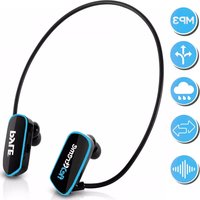
PSWP6 - Headphones Pyle - Free user manual and instructions
Find the device manual for free PSWP6 Pyle in PDF.


| Product Type | Waterproof MP3 Player with Headphones |
| Brand | Pyle |
| Model | PSWP6 |
| IP Rating | IPX8 (Waterproof for swimming) |
| Dimensions | 140 mm x 43 mm x 110 mm |
| Weight | 27 g |
| USB Interface | USB 2.0 (High Speed) |
| Battery Type | Lithium battery |
| Memory Capacity | 4 GB / 8 GB |
| Music Formats | MP3, WMA |
| File Systems | FAT16, FAT32 |
| MP3 Bit Rate | 8 Kbps – 320 Kbps |
| Earphone Output Power | 5 mW + 5 mW |
| Frequency Response | 20 Hz – 20 kHz |
| Signal-to-Noise Ratio | > 70 dB |
| Distortion | < 0.3% |
| Operating Temperature | 41 °F – 104 °F (5 °C – 40 °C) |
| Operating Time | Up to 10 hours |
| Earbuds Included | Swimming earbuds (3 sizes) and Land use earbuds (3 sizes) |
| Controls | Power ON/OFF, Play/Pause, Volume Up/Down, Next/Previous, Fast Forward/Backward, Shuffle Mode |
| Cleaning | Clean metallic contacts with eraser or toothbrush; dry before charging |
| Safety | Use smaller earbuds outdoors; do not use while driving; follow local laws |
Frequently Asked Questions - PSWP6 Pyle
User questions about PSWP6 Pyle
0 question about this device. Answer the ones you know or ask your own.
Ask a new question about this device
Download the instructions for your Headphones in PDF format for free! Find your manual PSWP6 - Pyle and take your electronic device back in hand. On this page are published all the documents necessary for the use of your device. PSWP6 by Pyle.
USER MANUAL PSWP6 Pyle
natural_image
Side profile line drawing of a human head and ear with a pink outline highlighting the ear area (no text or symbols)- For safety, please use the smaller size earplug than your normal size earplug when doing outdoor sport and make sure you can hear the outside sounds:
L size → M size M size S size
- For safety, please do not use the headset when you are driving a car, a motorcycle, ship, a bike, or walking on the street. Please follow the local laws and regulations.
About PSPWP6BK

Swimming earbuds Land use earbuds

Wearing
Please put swimming goggles against the connecting rod at the point near ear.

natural_image
Side-by-side line drawing showing a person's ear with earphones before and after a change, no text or symbols present.Note: When swimming, please do use the swimming waterproof earbuds. Please choose earbuds according to your wearing comfort.
Charging
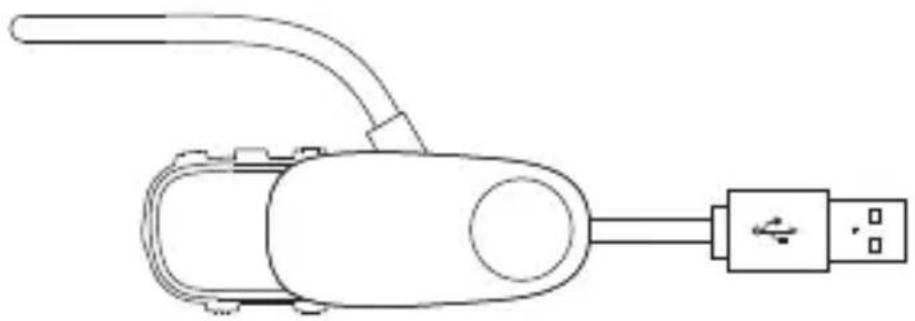
- Please connect the player to computer via the USB clip.
natural_image
Line drawing of a handheld device with USB port and connector (no text or symbols)- Be sure to dry the water on the main body before connecting a computer or charging. Clean the metallic contacts regularly to prevent the poor contact when for battery charging and data transferring.
Suggest cleaning by eraser or toothbrush

natural_image
Line drawing of a mechanical device with a blue diagonal line intersecting it (no text or symbols)Blow Off The Water Film

natural_image
Diagram of a handheld device with a bulb and arrow indicator (no text or symbols)The volume may comes down when swimming, it's because it forms a thin water film on the waterproof net or speaker film.

natural_image
Line drawing of a human head profile with a device emitting sound waves (no text or symbols)Take off the waterproof earbuds, blow off the water film.
natural_image
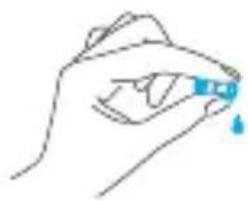
Line drawing of a hand holding a small object with a blue droplet, no text or symbols presentSqueeze the earbuds to let the water come out.
- Put the player in dry place for more than 10 hours air drying, the volume will be normal.
Precautions
- Do not use the player in an extreme environment. the player may not work on temperature over 104^ F or below -41^ F or in very dry environment.
- Do not impact the player with hard object. otherwise it would cause surface scratched, battery falling or other firmware damage
- Do not disconnect the player when it is formatting, uploading, downloading otherwise it would cause "program error" or "computer dis-recognition"
- Do not repair, dismantle or rebuild the player without permission from the manufacturer.
- Reduce the volume to avoid hearing damage.
• We are not responsible for any personal data losses or other indirect losses cause by improper operation, software, hardware, product maintenance or other accident.
Liston to Music

natural_image
Three gray rounded rectangles with black symbols: horizontal minus sign, play button, and plus sign (no text or labels)• Power ON/OFF
Click and hold 4 seconds
- Play/Pause Click once
• Volume up Click once • Fast Volume up Long press
• Volume down Click once • Fast Volume down Long press
Operating
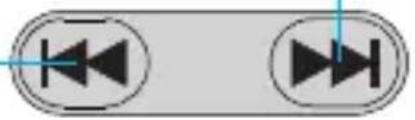
- Next Click once
• Fast forward Long press
• Previous Click once - Fast backward Long press
natural_image
Two identical circular buttons with black triangular icons, no text or symbols presentShuffle Play Mode ON:
When the player is on, press ▶II, then press ▶.
Shuffle Play Mode OFF:
When in Shuffle Play Mode. press ▶II then press◀ the player will be in normal play mode.
Note: MP3 player keys are multi-functional. The pressing modes contain Long Press and Press. Different operating modes stand for different functions.
Troubleshooting
No response after pressing;
Stop automatically while playing;
System power off automatically when starting.
- Please charge.
No sound from the player.
• Make sure the volume is not in "0" level.
- Damaged Mp3 files may cause some noise and failure in playing music.
- Please make sure the music file is complete.
Unable to download music.
- Check if the USB line is broken or not connected well.
- Check if the driver is installed appropriately.
- Check if there is blank memories inside.
Can not be read by computer
- Check if the USB wire is broken or not connected well.
- Check if the operation is incorrect.
- Check if the driver software is installed well.
Failure to play the compressed MP3
- Damaged Mp3 files may cause some noise and failure in playing music. Please make sure the file is completed.
Product Specification
- IP Rating: IPX8
- Dimensions: 140mm x 43mm x 110mm
- Weight:27g
• USB Interface: USB 2.0 (High speed) - Battery: Lithium battery
- Memory: 4GB/8GB
• Music format: MP3, WMA - File Format: FAT16, FAT32
- Mp3 bite rate: 8Kbps\~320Kbps
• Earphone output power: 5mW+5mW
• Frequency response: 20Hz-20KHz - S/N: >70dB
- Distortion: < 0.3%
- Operating environment: 41^ F - 104^ F
- Operating time: 10 hours
Packing List
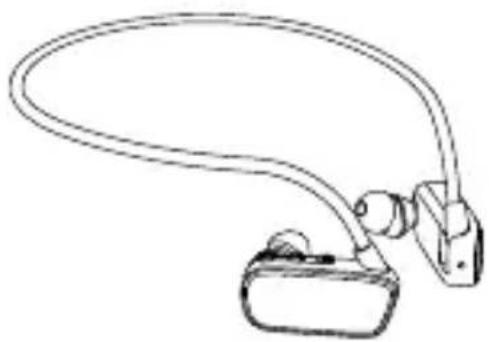
natural_image
Line drawing of a handheld device with curved arm and connector (no text or symbols)MP3 Player

natural_image
Simple line drawing of a USB cable connector with a connector pin (no text or symbols)USB Clip

L SIZE

M SIZE

S
SIZE
Swimming Earbuds

Manual

L SIZE

M SIZE

S
SIZE
Land Use Earbuds
fle>

natural_image
Pyle brand earband with black and teal color scheme (no text or symbols visible)
PSWP6BK
Waterproof MP3 Player with Headphones
USER MANUAL
PYLE
PyleUSA.com
natural_image
Pyle brand earband with black and teal color scheme (no text or symbols visible)PSWP6BK
Waterproof MP3 Player with Headphones USER MANUAL PYLE PyleUSA.com- About PSPWP6BK
- Wearing
- Charging
- Blow Off The Water Film
- Precautions
- Liston to Music
- Operating
- Troubleshooting
- Product Specification
- Packing List
- fle>  natural_image Pyle brand earband with black and teal color scheme (no text or symbols visible) PSWP6BK
Brand : Pyle
Model : PSWP6
Category : Headphones