
DVY21 - Webcam BENQ - Free user manual and instructions
Find the device manual for free DVY21 BENQ in PDF.


| Product Type | Webcam |
| Brand | BenQ |
| Model | DVY21 |
| Dimensions (mm) | 102 × 46 × 30 |
| Weight | 0.15 kg (0.33 lb) |
| Power Supply | USB 2.0, 5V, 500mA max |
| Power Consumption | 2.5W max |
| Image Sensor | High quality CMOS, 2.07 MP, 16:9 |
| Maximum Video Resolution | 1920 × 1080 at 30 fps |
| View Angle | 88° (D) / 87° (H) / 50° (V) |
| Focal Length | 3.24 mm |
| Focus Type | Fixed focus |
| Minimum Illumination | 0.5 Lux (F1.8, AGC ON) |
| Video Compression | H.264, H.265, MJPEG, YUY2 |
| Audio Input | Built-in directional microphones |
| Interface | USB 2.0 (Plug and Play) |
| Mounting Options | Flexible clip/base, tripod screw hole |
| Video Adjustments | Brightness, contrast, saturation, white balance, gain, anti-flicker, low light compensation |
| Backlight Compensation | On/Off |
| Operating Temperature | -10°C to 50°C (14°F to 122°F) |
| Storage Temperature | -10°C to 60°C (14°F to 140°F) |
| Cleaning Instructions | Use soft dry cloth; neutral detergent for lens; avoid strong cleaners |
| Safety Warning | Do not disassemble; avoid moisture; professional service only |
| Driver Requirement | No additional driver needed |
| Compatibility | Works with major video conferencing applications |
Frequently Asked Questions - DVY21 BENQ
User questions about DVY21 BENQ
0 question about this device. Answer the ones you know or ask your own.
Ask a new question about this device
Download the instructions for your Webcam in PDF format for free! Find your manual DVY21 - BENQ and take your electronic device back in hand. On this page are published all the documents necessary for the use of your device. DVY21 by BENQ.
USER MANUAL DVY21 BENQ
natural_image
Abstract grayscale pattern with concentric dotted lines and a curved band, no text or symbols present.Disclaimer
BenQ Corporation makes no representations or warranties, either expressed or implied, with respect to the contents of this document. BenQ Corporation reserves the right to revise this publication and to make changes from time to time in the contents thereof without obligation to notify any person of such revision or changes.
Copyright
Copyright 2020 BenQ Corporation. All rights reserved. No part of this publication may be reproduced, transmitted, transcribed, stored in a retrieval system or translated into any language or computer language, in any form or by any means, electronic, mechanical, magnetic, optical, chemical, manual or otherwise, without the prior written permission of BenQ Corporation.
Table of Contents
Important notices 4
Application instructions 4
Electric safety.... 4
Transport caution.... 4
Careful installation.... 4
Do not disassemble discretionarily 4
Installation instructions 5
Product interface....5
Using the product.... 5
Features 5
Advantages 6
Product information....7
Specifications 7
Dimensions 8
Maintenance and troubleshooting....9
Maintenance....9
Troubleshooting....9
Important notices
This manual briefly introduces the camera functions, installation, and operations. Please read carefully before application.
Application instructions
To prevent damages to this camera or any products connected to it, this product can only be used within the specified range:
I. Do not expose the camera to rain or moisture.
2. To prevent an electric shock, do not disassemble the camera; only qualified technicians can perform installation and maintenance.
3. Do not use under conditions that exceed the limited temperature, humidity or power supply specifications.
4. When cleaning the camera lens, please wipe it with a dry soft cloth. When the product is heavily soiled, please wipe it gently with a neutral detergent. Do not use strong or corrosive cleaning agents to avoid scratching the lens and affecting the image quality.
Electric safety
This product must be installed in strict compliance with local electrical safety standards.
Transport caution
Avoid heavy pressure, severe vibration, soaking damage to the product in transportation, storage, and installation.
Careful installation
The camera body is made of organic material, please do keep away from corrosive liquid, gas, or solid material.
Do not disassemble discretionarily
We are not responsible for any damage caused by unauthorized disassembling.
Installation instructions
Product interface
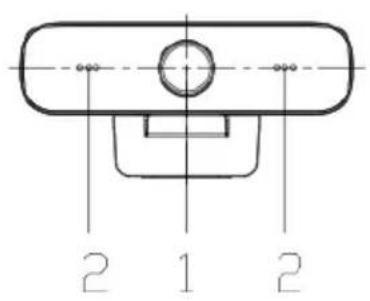

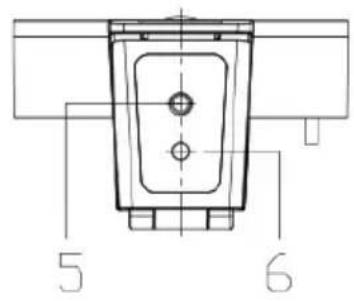
No.Name
| 1 | Lens (fixed focus) |
| 2 | Audio IN (built-in pickup) |
| 3 | USB 2.0 cable outlet hole (unpluggable): USB 2.0 port is available for plug and play. You can use USB 2.0 to play videos and charge the camera's battery. |
| 4 | Flexible clip/base |
| 5 | Screw hole for tripod |
| 6 | Mount and locate holes |
Using the product
- Fix the product to the top of the display; place it directly on the desktop or mount it on a tripod.
- Connect the USB cable with the computer, video conference devices, or other USB input devices.
- Open the video software, then select the video device to get the video output.
Features
DVY21 features perfect functions and excellent performance. It adopts advanced ISP processing algorithms so as to provide vivid images with evenly clear brightness, strong color layering, high resolution, and fantastic color rendition. Stable and reliable, it is easy and convenient to install and maintain.
I. USB 2.0: Easy to plug and play, support for power supply & software upgrades.
2. Lens optional: 87 degree wide angle lens with free distortion.
3. Built-in Mic: Inbuilt Microphone pick up for clear and natural stereo sound without external pickup equipment.
4. Multiple video encoding: Support H.264, H.265, MJPEG, YUV video encoding which enables the video to play more fluently.
Advantages
I. High-definition image: High quality CMOS sensor. Support compression of resolution up to 1920x1080 with frame up to 30fps. Provide clear, vivid HD image
2. Multiple installation: Free to choose installation location, the device is with a fixed clamp which enables it to be installed on the display or directly on the desk or tripod.
3. Wide application: Personal video platform, videoconferencing, cooperative office, etc.
4. Convenient application: Convenient and easy to use; no need to download driver or extra software.
Product information
Specifications
| Item | Specifications | |
| DVY21 | ||
| Camera Parameter | Image sensor High quality CMOS sensor | |
| Effective Pixels 2.07MP,16:9 | ||
| Video Resolution | USB Output:960x540/320x180/432x240/640x360/800x448/800x600/864x480/960x720/1024x576/1280x720/1600x896/1920x1080/272x144/368x208/384x216/480x272/624x352/912x512/424x240/640x480/320x240/160x120/P30 | |
| View Angle 88°(D) /87°(H)/ | 50°(V) | |
| Focal Length 3.24 mm | ||
| Minimum Illumination 0.5Lux (F1.8, AGC ON) | ||
| Focus Manual | ||
| AF Fixed | ||
| Backlight contrast On/Off | ||
| Exposure Auto/Manual | ||
| Video adjustments | Brightness, Definition, Saturation, Contrast, white balance, gain, anti-flicker, low brightness compensation adjustable | |
| SNR >50dB | ||
| Output Parameter | Video output USB2.0 (Power, upgrade support) | |
| Video compression MJPEG, YUY2, H.264, H.265 | ||
| Audio input | Directional mics | |
| Other Parameter | Input voltage | 5V |
| Input current | 500mA (max) | |
| Power | 2.5W (max) | |
| Store temperature | -10°C ~ 60°C | |
| Store humidity | 20°C ~ 95°C | |
| Working temperature | -10°C ~ 50°C | |
| Working humidity | 20°C ~ 80°C | |
| Dimensions (mm) | 102×46×30 | |
| Weight | 0.15 kg | |
Dimensions
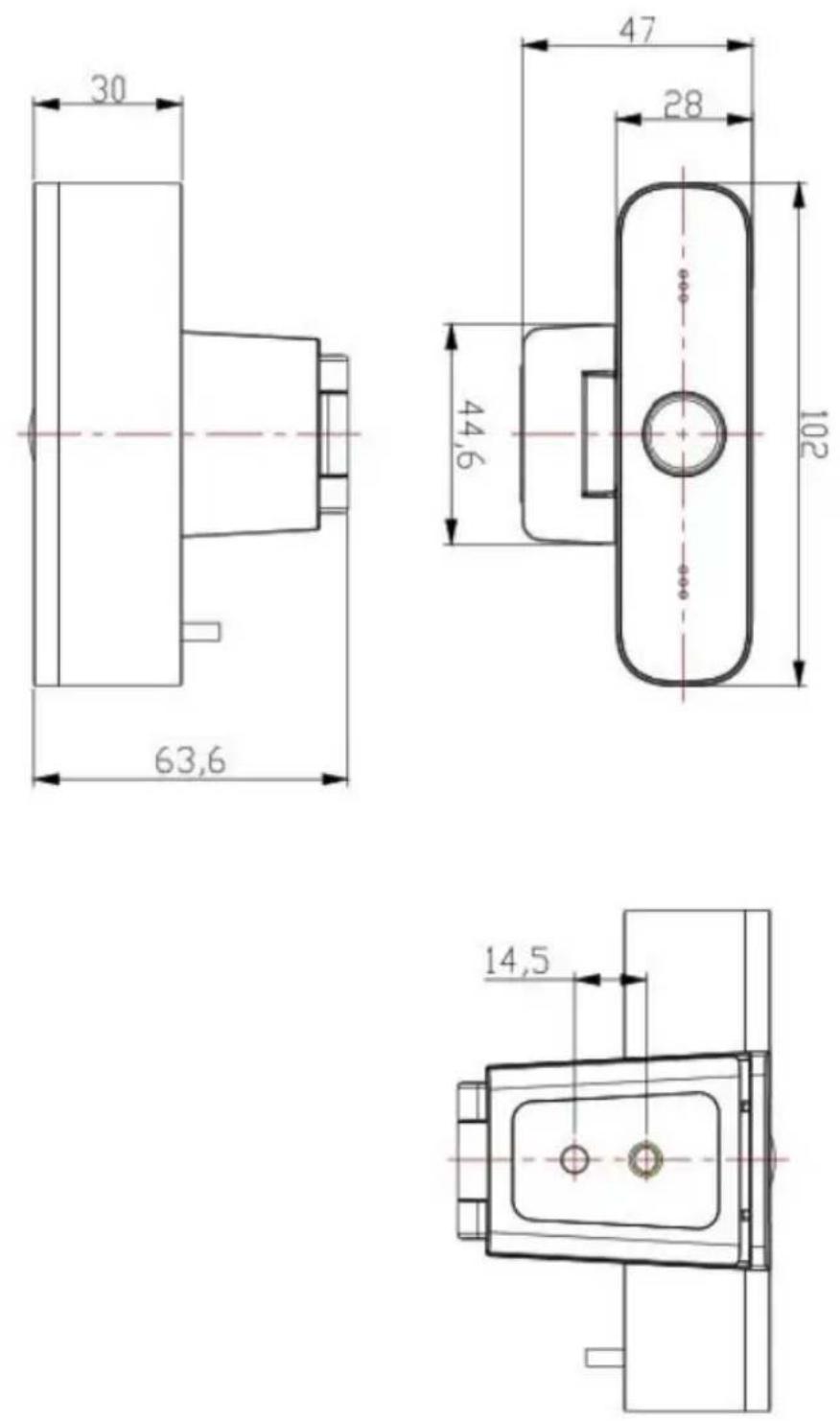
Unit: mm
Maintenance and troubleshooting
Maintenance
I. If camera is not used for a long time, please turn off power adapter switch and AC plug.
2. Use soft cloth or tissue to clean the camera cover.
3. Use soft cloth to clean the lens; use neuter cleanser if smeared. Do NOT use strong or corrosive cleanser that may scuff the lens and affect the image.
Troubleshooting
No video output & no image
I. Make sure the camera USB cable is connected properly.
2. Make sure the USB port is normal and the power indication light is on.
3. Disconnect the camera with computer and re-connect the USB cable.
4. Check if the video software has selected the right device.
- Disclaimer
- Copyright
- Table of Contents
- Important notices 4
- Installation instructions 5
- Product information....7
- Maintenance and troubleshooting....9
- Important notices
- Application instructions
- Electric safety
- Transport caution
- Careful installation
- Do not disassemble discretionarily
- Installation instructions
- Product interface
- No.Name
- Using the product
- Features
- Advantages
- Product information
- Specifications
- Dimensions
- Maintenance and troubleshooting
- Maintenance
- Troubleshooting
Brand : BENQ
Model : DVY21
Category : Webcam