VM-98-SHL - Camera battery Watson - Free user manual and instructions
Find the device manual for free VM-98-SHL Watson in PDF.


| Brand | Watson |
| Model | VM-98-SHL |
| Product Type | Camera Battery |
| Battery Chemistry | Lithium-ion |
| Capacity | 98 Wh / 6.8 Ah |
| Output Voltage | 14.4 V |
| Maximum Load | 150 W / 12 A |
| Average Runtime | Approx. 2.5 hours at 35 W |
| Mount Type | V-Mount (VM-98-SHL) or 3-stud mount (AM-98-SHL) |
| D-Tap Output | 12 V / 10 A (max) |
| USB Output | 5 V / 1 A (Standard-A) |
| Dimensions (H x W x D) | 6 x 3.7 x 1.5 in. (15.2 x 9.5 x 3.7 cm) |
| Weight | 1.5 lb. (711 g) |
| Battery Level Indicator | 5-segment LED with check button |
| Protection Features | Over-current, low voltage, overheating, short circuit (self-resetting fuse) |
| Operating Temperature | 14°F to 122°F (-10°C to 50°C), RH < 85% |
| Storage Temperature (Short-term) | -4°F to 122°F (-20°C to 50°C), RH 45-75% (up to 1 month) |
| Storage Temperature (Medium-term) | -4°F to 104°F (-20°C to 40°C), RH 45-75% (up to 3 months) |
| Storage Temperature (Long-term) | 23°F to 86°F (-5°C to 30°C), RH 45-75% (up to 1 year) |
| Charging Recommendation | Fully charge before first use; charge to 50% for long-term storage |
| Cleaning | Clean with a soft, dry cloth; keep terminals clean |
| Safety Precautions | Do not short-circuit, disassemble, or expose to fire/moisture; keep away from children |
| Spare Parts / Reparability | Battery is sealed; replace entire unit when performance declines |
| General Information | Includes D-tap and USB ports; suitable for professional cameras and accessories |
Frequently Asked Questions - VM-98-SHL Watson
User questions about VM-98-SHL Watson
0 question about this device. Answer the ones you know or ask your own.
Ask a new question about this device
Download the instructions for your Camera battery in PDF format for free! Find your manual VM-98-SHL - Watson and take your electronic device back in hand. On this page are published all the documents necessary for the use of your device. VM-98-SHL by Watson.
USER MANUAL VM-98-SHL Watson
High Load Slim Li-ion Battery with LED and 3-Stud or V-Mount
Thank you for choosing Watson Pro
Please read this user manual carefully, and keep it for reference before using the battery.
SAFETY INSTRUCTIONS
• Make sure the battery is fully charged before use.
- When not in use, remove the battery from its device. Some electronic equipment will draw current even when the switch is off.
- Do not short-circuit the terminals. This battery is protected with an internal self-resetting fuse, but short circuits may still cause severe damage to the battery.
- Do not attempt to open the battery case under any circumstances.
- Do not remove the battery from any equipment that is powered on. Always power off your equipment before removing the battery.
- Use the battery only under proper environmental conditions: 14°F to 122°F (-10°C to 50°C) and with a relative humidity (RH) less than 85%.
- Storage environment: short-term (one month) -4°F to 122°F (-20°C to 50°C) and RH 45% to 75%; medium-term (three months) -4°F to 104°F (-20°C to 40°C) and RH 45% to 75%; long-term (one year) 23°F to 86°F (-5°C to 30°C) and RH 45% to 75%.
- The battery may be warm during use or recharging. This is normal.
- The battery should be charged up to 50% for long-term storage. After 4 months of storage, the battery will require a recharge up to 50%.
- Keep the battery out of fire, heat, and high pressure.
- Do not expose the battery to rain or moisture.
- Do not drop the battery or expose it to strong shocks.
- Keep this unit away from water and any flammable gases or liquids.
- Clean the battery and terminals with a clean, soft, and dry cloth.
- When operation time has noticeably decreased, the battery may need to be replaced.
- Keep this product away from children.
• Store the battery in a cool, dry place.
• All images are for illustrative purposes only.
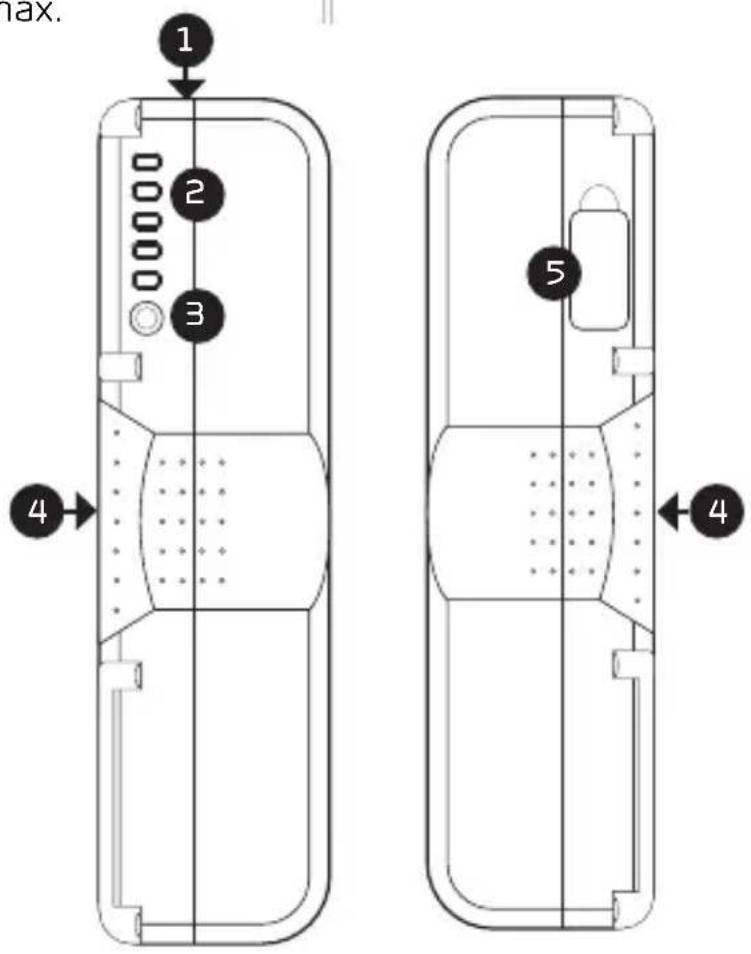
OVERVIEW
1 USB outport
Press the battery check button to start charging or to power your device.
2 Battery-level LED meter
Shows the remaining battery capacity. When the capacity reaches less than 9%, the bottom LED will flash.
3 Battery-level check button
4 V-Mount/3-stud mount interface
5 D-tap port
12 V, 10 A max.
PRODUCT FEATURES
- Five-segment battery-level indicators for real-time monitoring of remaining battery capacity.
• Built-in D-tap connector powers your camera accessories. - USB 2.0 Standard-A connector provides 5 V/1 A to power or charge USB devices.
• Built-in intelligent control circuit for protection against over-current, low voltage, overheating, and short circuits.
SPECIFICATIONS
| Mount Type | VM-98-SHL: V-MountAM-98-SHL: 3-stud mount |
| Chemistry Lithium-ion | |
| Capacity 98 Wh /6.8 Ah | |
| Output Voltage 14.4 V | |
| Maximum Load 150 W / 12 A | |
| Average Runtime Approx 2.5 hr. at 35 W | |
| Accessory Port | D-tapUSB Standard-A |
| D-Tap Output 12 V / 10 A (max) | |
| USB Output 5 V / 1 A | |
| Dimensions (H × W × D) | 6 × 3.7 × 1.5 in. (15.2 × 9.5 × 3.7 cm) |
| Weight 1.5 lb. (711 g) | |
Brand : Watson
Model : VM-98-SHL
Category : Camera battery