
Carpet Shark CRB3010 - Sweeper Mytee - Free user manual and instructions
Find the device manual for free Carpet Shark CRB3010 Mytee in PDF.


| Product Type | Carpet Sweeper |
| Brand | Mytee |
| Model | Carpet Shark CRB3010 |
| Power Source | Cordless Electric |
| Voltage | 20V |
| Battery Type | Lithium-Ion |
| Battery Runtime | Up to 45 minutes |
| Charging Time | 4-6 hours |
| Brush Type | Rotating roller brush |
| Brush Width | 12 inches |
| Dustbin Capacity | 0.8 liters |
| Noise Level | < 70 dB |
| Filtration | Washable foam filter |
| Weight (with battery) | 24 lbs (10.9 kg) |
| Dimensions (L x W x H) | 18" x 12" x 42" |
| Color | Black/Red |
| Warranty | 1 year limited |
| Included Accessories | Battery, charger, user manual |
| Recommended Use | Low pile carpet, area rugs |
| Cleaning Path | 12 inches |
Frequently Asked Questions - Carpet Shark CRB3010 Mytee
User questions about Carpet Shark CRB3010 Mytee
0 question about this device. Answer the ones you know or ask your own.
Ask a new question about this device
Download the instructions for your Sweeper in PDF format for free! Find your manual Carpet Shark CRB3010 - Mytee and take your electronic device back in hand. On this page are published all the documents necessary for the use of your device. Carpet Shark CRB3010 by Mytee.
USER MANUAL Carpet Shark CRB3010 Mytee
13655 Stowe Dr. Poway, CA 92064
P: (858) 679-1191
F: (858) 726-6005
www.mytee.com
Dear Customer:
Congratulations on the purchase of your new Carpet Shark™ Counter Rotating Brush. As technology continues to develop you can work confidently knowing that both Mytee and its employees are equally dedicated to developing with the industry and its advances.
Like any other piece of machinery or technology, the Carpet Shark™ also requires proper maintenance and care to keep the product working over extended use. Neglecting your machine, abusing it or not operating it properly can void its warranty and prevent the machine from performing to the quality and standard you'd expect out of the Mytee line.
If you have any warranty concerns or questions, please review this manual thoroughly or do not hesitate to contact your distributor. If there are questions regarding maintenance, replacement, or ordering parts please contact an authorized Mytee Service Center. To see an updated list please visit our website at http://www.mytee.com/support/service-centers.
Before using your Mytee product, please read this manual thoroughly.
Sincerely,
Mytee Customer Care Dept.
Important Safety Information......4
1 At a Glance.6....
1.1 - Technical Specifications 6....
1.2 - Included with the Carpet Shark™ 6....
1.3 - Carpet Shark™ Front View 7....
1.4 - Carpet Shark™ Rear View 8....
2 Machine Operation 9....
2.1 - Powering the Carpet Shark™ 9....
2.2 - Attaching Accessories 9....
2.3 - Switching Out Brushes 9....
2.4 - Operating the Carpet Shark™ 9....
2.5 - Storage 10....
3 Machine Maintenance 11....
3.1 - Adjusting the Belt Tensioner .11....
3.2 - Replacing the Drive Belts 11
Please read and understand this manual completely before operating this machine.
Grounding Instructions
This machine must be grounded. If it should malfunction or break down, grounding provides a path of least resistance for electrical shock. This machine is equipped with a cord having an equipment-grounding conductor and grounding plug. The plug must be plugged into an appropriate outlet that is properly installed in accordance with all local code and ordinances. Do not remove ground pin; if missing, replace plug before use.

DANGER
Improper installation of the equipment-grounding conductor can result in a risk of electric shock. Be sure to check with a qualified electrician or service person if you are in doubt as to whether the outlet is properly grounded. If the plug will not fit in the outlet do not modify the plug or the machine's cord, instead have a proper outlet installed by a qualified technician.
This machine is for use on a nominal 120-volt circuit and with a grounding plug similar to the one in Figure 1 below. If a proper outlet is not available, follow the illustrations of Figure 2 & 3 to install a temporary-grounding plug. This temporary work-around should be used only until a proper outlet (Figure 1) can be installed by a qualified electrician. When and if this type of adapter is employed, screw the adapter's extended tab into place with a metal screw. However, grounding adapters are not approved for use in Canada.
Again, be sure to check the grounding pin for damages and replace if necessary.
The Green, or Green-Yellow, wire in the cord is the grounding wire. When replacing a plug, this wire must be attached to only the grounding pin.
DO NOT use extension cords.
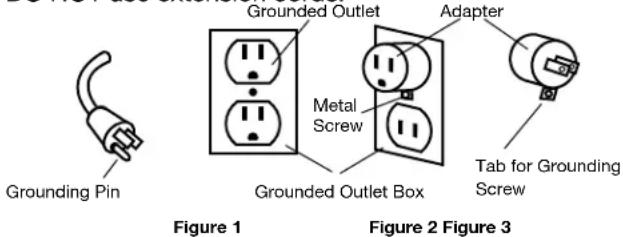
Please Note for America use only.
Parts and Service
Please contact Mytee service personnel or a Mytee authorized Service Center using Mytee original replacement parts and accessories if repairs need to be performed. When and if calling Mytee for support, please have your Model and Serial Number available for faster assistance.
Name Plate
The Model and Serial Number are located on the lower half of the back of the machine near the power plug and will be required for ordering replacement parts. You can use the space provided in this manual to note down both for future referencing.
Unpacking the Machine
When your new machine is delivered, please carefully inspect both the shipping carton and the machine for damages. If damage is evident, save both the shipping carton and machine so that the delivering carrier can inspect it. Contact the carrier immediately to file a freight claim if there has been any damage.
Caution and Warnings
Symbols
Mytee uses the symbols below to signal potentially dangerous conditions. Always read this information carefully and take the necessary steps to protect personnel and property.

DANGER
Is used to warn of immediate hazards that will cause severe personal injury or death.

WARNING
Is used to call attention to a situation that could cause severe personal injury.

Is used to call attention to a situation that could cause minor personal injury or damage to the machine or other property. When using an electrical appliance, basic precautions should always be followed, including the following: Read all instructions before using this machine. This product is intended for commercial use only.
To reduce the risk of fire, electrical shock, or injury:
-
Read all instructions before using equipment.
-
Use only as described in this manual. Use only manufacturer's recommended attachments.
Important Safety Information
- Always unplug power cord from electrical outlet before attempting any adjustments or repairs.
- Do not unplug by pulling on cord. To unplug, grasp the plug, not the cord.
- Do not pull or carry by cord. Do not close a door on cord or pull cord around sharp edges or corners.
- Do not run appliance over cord. Keep cord away from heated surfaces.
- Do not use with damaged cord or plug. If cord is damaged, repair immediately.
- Do not use outdoors or on wet surfaces and/or standing water.
- Always unplug or disconnect the appliance from power supply when not in use.
- Do not allow to be used as a toy. Close attention is necessary when used by or near children.
- Do not use in areas where flammable or combustible material may be present.
- Do not leave the unit exposed to harsh weather elements. Temperatures below freezing may damage components and void warranty.
- Use only the appropriate handles to move and lift unit. Do not use any other parts of this machine for this purpose.
- Keep hair, loose clothing, fingers, and all parts of the body away from all openings and moving parts.
- Use extra care when using on stairs.
- To reduce the risk of fire or electric shock, do not use this machine with a solid-state speed control device.
- The voltage and frequency indicated on the name plate must correspond to the wall receptacle supply voltage.
- When cleaning and servicing the machine, local or national regulations may apply to the safe disposal of liquids which may contain: chemicals, grease, oil, acid, alkalines, or other dangerous liquids.
- Do not leave operating unattended.
1 - At a Glance
1.1 - Technical Specifications
CRB3010 10" Carpet Shark™
| Drive System | Dual motors, belt-driven brushes |
| Dimensions | (With handle at full height) 9" x 11.75" x 39.75" |
| Weight | 39 lbs. |
| Amp Draw | 6 amps @ 115V 60Hz |
CRB3017 17" Carpet Shark™
| Drive System | Dual motors, belt-driven brushes |
| Dimensions | (With handle at full height) 9" x 17" x 47.5" |
| Weight | 48 lbs. |
| Amp Draw | 6 amps @ 115V 60Hz |
1.2 - Included with the Carpet Shark™

Set of 2 Renovator Attachments Used for collecting dirt, debris, and solid encapsulation compounds.

Splash Guard Used for preventing solution or dust from spraying from the brushes.
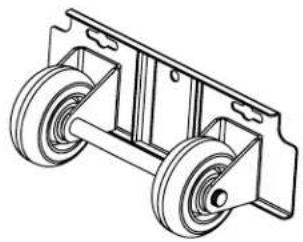
Wheel Attachment Used for transporting the machine. Also acts as rear splash guard.
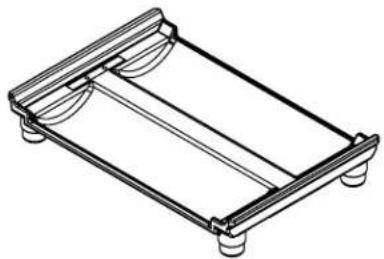
Storage Tray Magnetic tray used for protecting brushes while in storage.
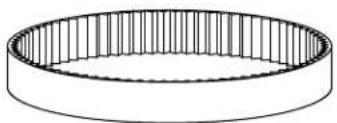
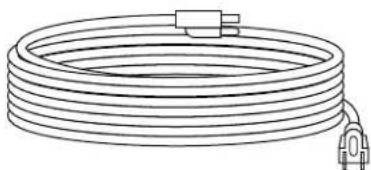
Replacement Drive Belt 25' Extension Cord
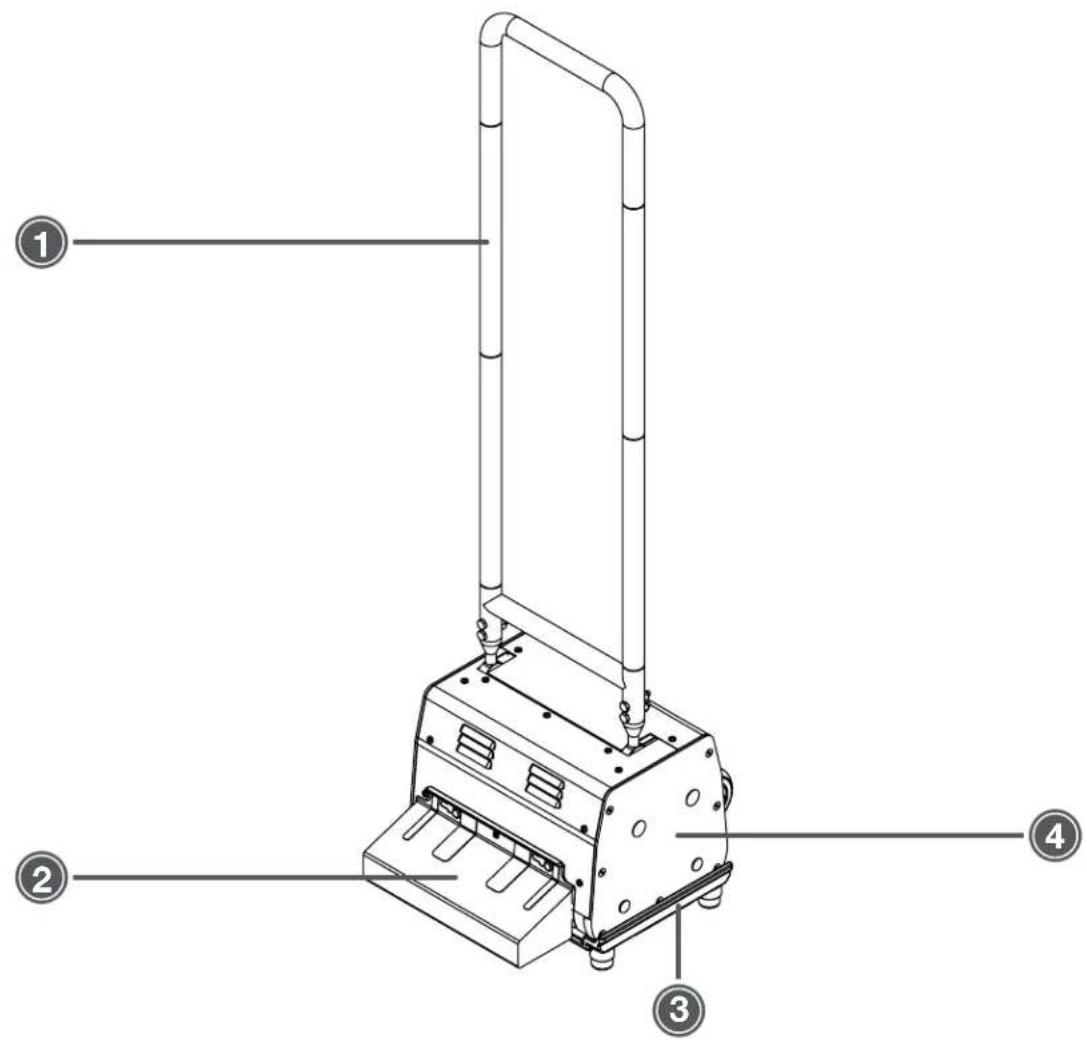
1.3 - Carpet Shark™ Front View
-
Push Handle
-
Storage Tray
-
Renovator Attachment (included)
-
Side Access Panel
1 - At a Glance
1.4 - Carpet Shark™ Rear View
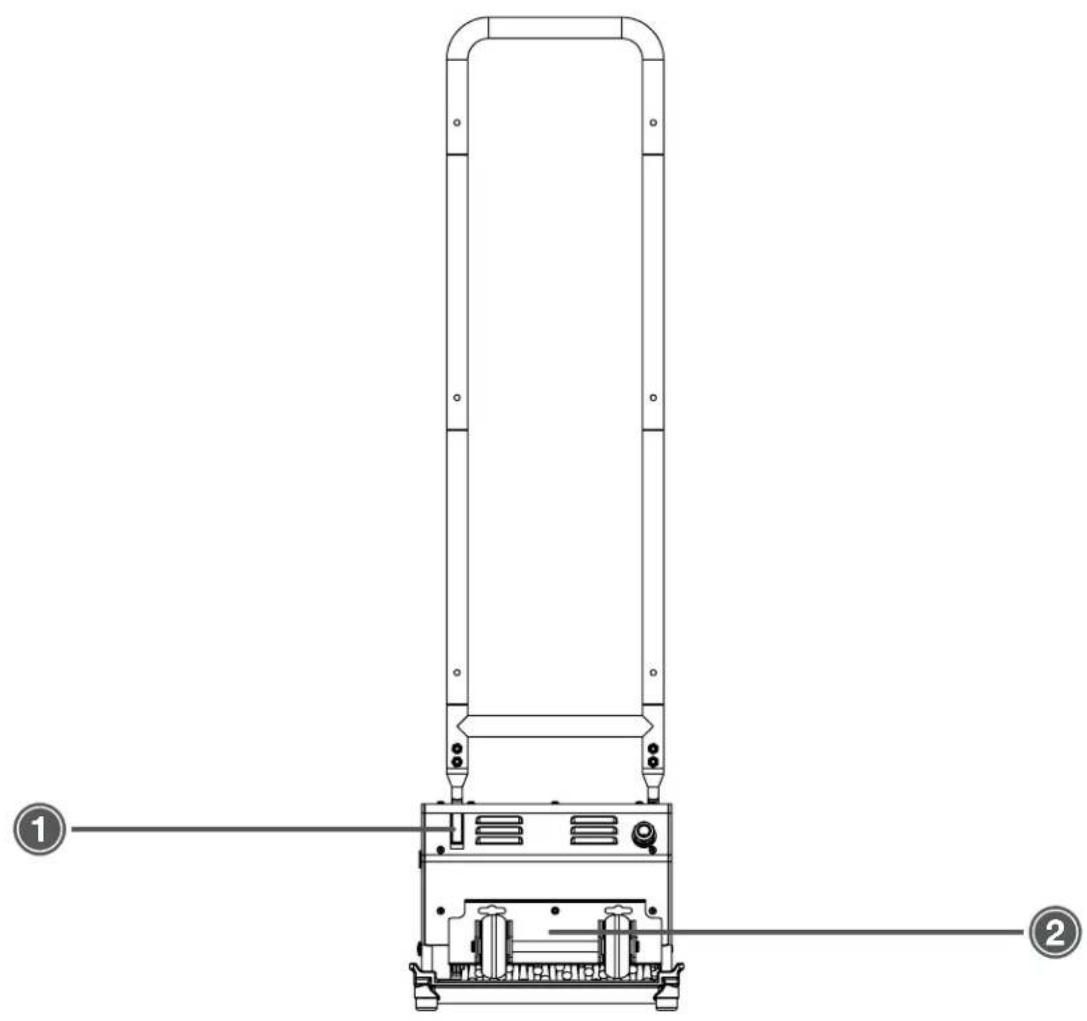
- Power Switch 2. Wheel Attachment (included)
2.1 - Powering the Carpet Shark™
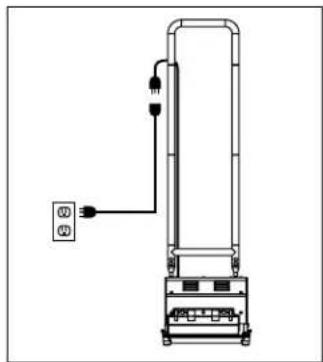
The Carpet Shark™ requires a 15 amp, 115V power outlet to operate.
Plug the female end of the lighted extension cord into the Carpet Shark's™ pigtail power cord and plug the male end of the extension cord into a wall outlet.
2.2 - Attaching Accessories

The Carpet Shark™ attachments can be connected to the front and back of the machine via the pegs. On the front, slide the attachment to the left to lock it in place. On the rear, slide it to the right.

To remove the attachment, push in on the push button, slide the attachment to the right, and lift off of the machine.
2.3 - Switching Out Brushes
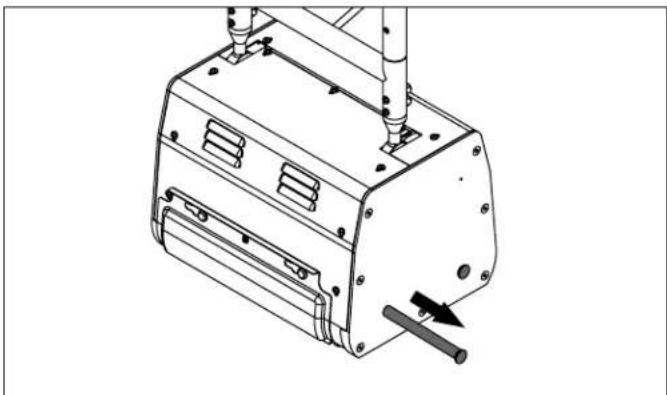
To remove a brush, slide out the brush axle from the side panel of the machine and take out the brush.
To install a brush, put the brush in place on the underside of the machine and slide the brush axle through until it is secured by the push pin on the opposite side of the machine.
2.4 - Operating the Carpet Shark™

To start the machine, press in the power switch on the rear of the machine and pull back the handle. With the handle at a comfortable height, move the Carpet Shark™ back and forth over the surface being cleaned.
2 - Machine Operation
2.5 - Storage
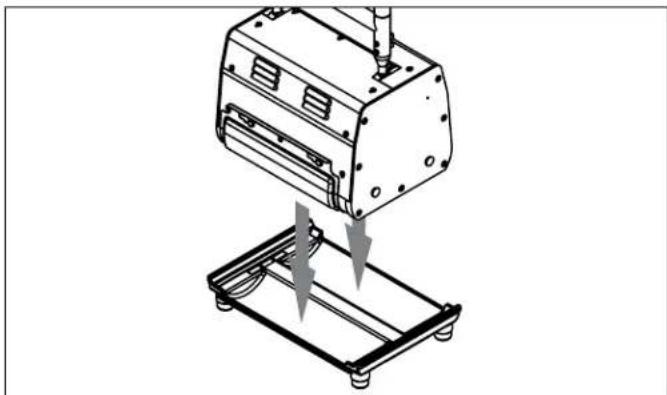
After use, make sure any attachments are emptied and cleaned, wipe down the machine, and make sure the brushes are free of debris. Place on the storage tray and store in a cool, dry place.
3 - Machine Maintenance
In order to keep the Carpet Shark™ running smoothly and reduce the risk of damage to the machine and subsequent downtime, Mytee recommends following the maintenance schedule below:
| Maintenance Item Daily Weekly Monthly | |||
| Inspect brushes for debris and wear. | X | ||
| Check power cable. | X | ||
| Clean machine with all-purpose cleaner and cloth. | X | ||
| Lubricate wheels with water resistant oil. | X | ||
| Inspect machine for loose hardware. | X | ||
| Check drive belts and tighten the tensioner if necessary. | X | ||
3.1 - Adjusting the Belt Tensioner
Required Tools:
• 1/8" Allen Wrench
• 7/16" Wrench
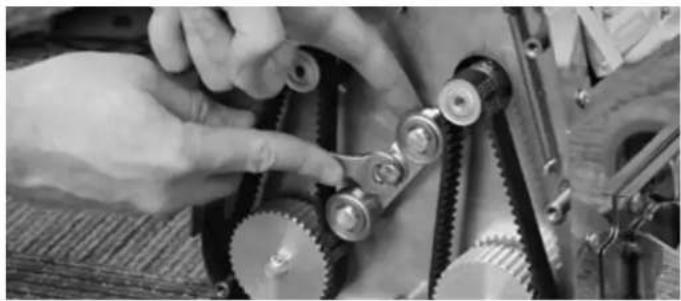
-
With a 1/8" Allen Wrench, remove the black side access panel on the side with the power switch.
-
Loosen the bolt on the tensioner with a 7/16" wrench.
-
Adjust the tensioner to apply more pressure on the belts. Do not overtighten. There should be just a little bit of slack.
-
Tighten the tensioner bolt and run the machine to make sure the belts don't slip.
-
Replace the black side access panel.
3.2 - Replacing the Drive Belts
Required Tools:
• 1/8" Allen Wrench
• 7/16" Wrench

- With a 1/8" Allen Wrench, remove the black side access panel on the side with the power switch.
- Loosen the bolt on the tensioner with a 7/16" wrench.
- Pull the belt out from the machine while turning the pully so the belt eventually rolls off the gear.
- Replace the belt by placing it on the top gear, placing the bottom of the belt on the bottom gear, and spinning the gear so the belt rolls onto it.
- Tighten the tensioner bolt and run the machine to make sure the belts don't slip.
- Replace the black side access panel.
NOTES

Mytee
Mytee, LLC
13655 Stowe Dr.
Poway, CA 92064
www.mytee.com
© 2022 Mytee, LLC
Printed in the USA
- DEAR CUSTOMER
- IMPORTANT SAFETY INFORMATION......4
- 1 AT A GLANCE.6
- 2 MACHINE OPERATION 9
- 3 MACHINE MAINTENANCE 11
- GROUNDING INSTRUCTIONS
- DANGER
- PARTS AND SERVICE
- NAME PLATE
- UNPACKING THE MACHINE
- CAUTION AND WARNINGS
- SYMBOLS
- WARNING
- TO REDUCE THE RISK OF FIRE, ELECTRICAL SHOCK, OR INJURY
- IMPORTANT SAFETY INFORMATION
- AT A GLANCE
- 1.1 - TECHNICAL SPECIFICATIONS
- 1.2 - INCLUDED WITH THE CARPET SHARK™
- 1.3 - CARPET SHARK™ FRONT VIEW
- 1.4 - CARPET SHARK™ REAR VIEW
- 2.1 - POWERING THE CARPET SHARK™
- 2.2 - ATTACHING ACCESSORIES
- 2.3 - SWITCHING OUT BRUSHES
- 2.4 - OPERATING THE CARPET SHARK™
- MACHINE OPERATION
- 2.5 - STORAGE
- MACHINE MAINTENANCE
- 3.1 - ADJUSTING THE BELT TENSIONER
- REQUIRED TOOLS
- 3.2 - REPLACING THE DRIVE BELTS
- NOTES
- MYTEE
Brand : Mytee
Model : Carpet Shark CRB3010
Category : Sweeper