
MiniVox Lite - Audio Anchor Audio - Free user manual and instructions
Find the device manual for free MiniVox Lite Anchor Audio in PDF.


| Product Type | Portable Public Address (PA) System |
| Brand | Anchor Audio |
| Model | MiniVox Lite |
| Rated Power Output | 30 watts |
| Max SPL @ Rated Power | 109 dB @ 1 meter |
| Frequency Response | 100 Hz - 15 kHz +/- 3dB |
| Speaker Type | 4.5 inch neodymium woofer |
| Battery Type | 10 'AA' alkaline (optional NiMH rechargeable via RC-30 kit) |
| Battery Life | Approximately 12 hours with fully charged NiMH batteries |
| Dimensions (HxWxD) | 5.5 x 5.5 x 6.5 inches (13.9 x 13.9 x 16.5 cm) |
| Weight | 3.0 lbs (1.36 kg) |
| Inputs | Line (3.5mm), Powered Mic (3.5mm), Mic (1/4" phone) |
| Output | Line out (3.5mm) |
| Wireless System | Optional UHF 16-channel diversity wireless (separate transmitter) |
| Warranty | Limited six-year warranty (online registration required) |
| Rechargeable Kit (Optional) | RC-30: 10 NiMH batteries and AC charger (AC-30) |
| Accessories Included | Handheld microphone (MIC-50 or similar) |
| Control | Power/Volume knob |
| Indicators | Red power LED, RX indicator lights for wireless |
| Battery Compartment | Removable battery pack for 10 AA batteries |
| Country of Manufacture | USA (Torrance, California) |
| Shipping Weight (with recharge kit) | 2.1 lbs (1.0 kg) |
Frequently Asked Questions - MiniVox Lite Anchor Audio
User questions about MiniVox Lite Anchor Audio
0 question about this device. Answer the ones you know or ask your own.
Ask a new question about this device
Download the instructions for your Audio in PDF format for free! Find your manual MiniVox Lite - Anchor Audio and take your electronic device back in hand. On this page are published all the documents necessary for the use of your device. MiniVox Lite by Anchor Audio.
USER MANUAL MiniVox Lite Anchor Audio
• make sure all cables are completely plugged in
No Sound When Using CD Input • check for output from source
• make sure all cables are completely plugged in
Distorted Sound • lower system volume control
- replace or recharge batteries
Shortened Battery Life • replace worn NiMH batteries
- 'Cycle' NiMH batteries
(see page 3)
Unit Turns Off & Back On During Use • batteries are low and need to be replaced
HAVING TROUBLE W/ YOUR WIRELESS SYSTEM? (Wireless Model Only)
No Sound (RX Indicator: ON) • microphone volume control is to low or off
- no mic plugged into belt-pack transmitter
No Sound (RX Indicator: OFF)
• transmitter power switch turned off
- low battery or no battery in transmitter
• sound system not turned on
• transmitter and receiver are not on the same channel
ANCHOR AUDIO CUSTOMER SERVICE
888/444-6077
310/784-2300
www.anchoraudio.com
MINIVOX LITE TECHNICAL SPECIFICATIONS
Rated Power Output
30 watts
Max SPL @ Rated Power
109 dB @ 1 meter
Frequency Response
100 Hz - 15 kHz +/- 3dB
Speaker Type
4.5 inch neodymium woofer
Battery Type 10 'AA' alkaline
Dimensions (HWD)
5.5 x 5.5 x 6.5" / 13.9 x 13.9 x 16.5 cm
Weight 3.0 lbs / 1.36 Kg
Line Out
line level, 3.5 mm
Inputs
Line
line level, 3.5 mm
Powered Mic
Lo-Z phantom power, 3.5 mm jack
Mic
Lo-Z, 1/4" phone
RC-30 - Recharge Kit (optional)
Battery Type
10 'AA' size, NiMH 2.5 AH
Charger
AC-30
AC-30 Input
120 VAC, 60Hz, 24 watts max
AC-30/220 Input
220 VAC, 50Hz, 10 watts max
Shipping Weight
2.1 lbs / 1.0 Kg

(Specifications subject to change without notice)

Anchor Audio, Inc.
Portable Sound Systems • Torrance, California
For Setup & Operation Videos Go To:
www.anchoraudio.com
natural_image
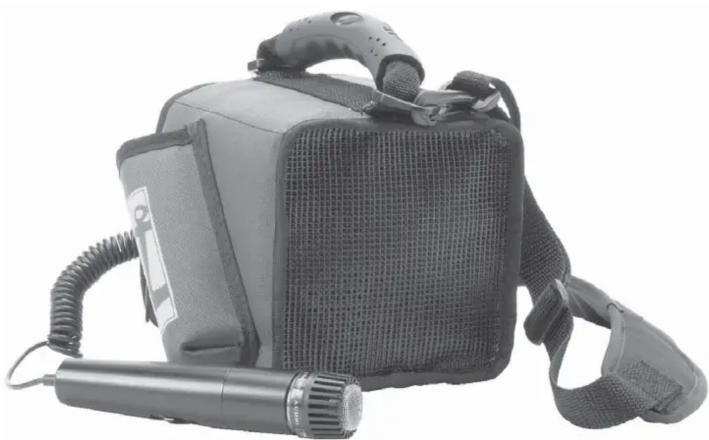
Black handheld device with mesh cover and microphone, no visible text or symbolsMiniVox Lite PA System
PORTABLE PUBLIC ADDRESS SOUND SYSTEM
OWNER'S MANUAL

CONTENTS
GETTING STARTED / SYSTEM INVENTORY 2
USING AN OUTBOARD CD/TAPE PLAYER 3
RECHARGEABLE BATTERY KIT 3
MINIVOX LITE ACCESSORIES 4
BATTERY INSTALLATION 5
BUILT-IN UHF WIRELESS RECEIVER 6
Thank you for choosing an Anchor Audio portable sound system. Our products incorporate state-of-the-art design and the finest quality of materials and workmanship. We're proud of our products and appreciate the confidence which you have shown by selecting an Anchor system.
I hope you'll take a few minutes to review this manual. We've incorporated several unique features into our products, and your knowledge of how to use them will enhance the performance and your enjoyment of the system.

Janet Jacobs — President
on behalf of all Anchor Employees
GETTING STARTED
Please check your new unit carefully for any damage which may have occurred during shipment. Each Anchor product is carefully inspected at the factory and packed in specially designed boxes for safe transport.
Notify the freight carrier immediately of any damage to the shipping box or product. Repack the unit in the original box and wait for inspection by the carrier's claim agent. Notify your dealer of the pending freight claim.
NOTE: All damage claims must be made with freight carrier!
Returning Systems For Service or Repair
For service or repair, please contact the dealer you purchased your system from or Anchor Audio Customer Service at (800) 262-4671 to obtain a RA (Return Authorization) number. All shipments to Anchor Audio must include an RA number and must be shipped prepaid. C.O.D. shipments will be refused and returned at your expense.
IMPORTANT: Save the shipping box & packing materials, they were specially designed to ship your unit!
Warranty Registration
Please go to our website (www.anchoraudio.com) and select "Warranty Registration". Completing this online registration form will activate your limited six-year warranty.
Waste electrical and electronic products must not be disposed of with household waste. Please recycle where facilities exist. Check with your Local Authority or Retailer for recycling advice.

- Unscrew battery cover on bottom of microphone
- Set the CHANNEL SELECTOR dial to match the channel setting of your receiver
- Replace the battery cover

CHANNEL SELECTION - BODY-PACK TRANSMITTER
- The channel selection dial is located on the side of the transmitter
- Set the CHANNEL selection dial to match the channel setting of the receiver

After you have set the transmitter channel (see above) you are ready to use your wireless microphone:
- Body-pack transmitter users must insert the mic plug into the transmitter jack marked MIC
-
Turn the transmitter power switch to ON (The red LED will flash when the mic is turned on. If the red LED stays on, the battery is low)
-
Turn the MiniVox Lite power switch to ON
- The RX indicators will light (one indicator at a time lights) when the wireless signal is being transmitted and received
CAUTION: Harmful feedback may occur when walking in front of a sound system or speaker with a wireless microphone. Always point microphone away from speakers!
REPLACE BATTERY - HANDHELD TRANSMITTER
- Unscrew battery cover on bottom of microphone
- Replace old batteries with 2 fresh 'AA' alkaline batteries
- Replace and tighten the battery cover


REPLACE BATTERY - BODY-PACK TRANSMITTER
- Slide open battery cover on front of transmitter
- Replace old batteries with 2 fresh 'AA' alkaline batteries
- Replace and tighten the battery cover


NOTE: Transmitter power must be OFF when changing batteries!
DIVERSITY WIRELESS BY ANCHOR AUDIO
Anchor Audio UHF wireless is a 16 channel, diversity wireless system that utilizes two independent antennae to receive signals. The diversity feature means the receiver will process the stronger of the two antenna signals, effectively minimizing dropouts and interference from other transmitting sources. The antennae are mounted internally so there are no obstructions or risk of damage.
CHANNEL SELECTION - BUILT-IN RECEIVER
Before you can use your UHF wireless system, you will need to select a wireless frequency, set the built-in receiver, and microphone transmitter, to that channel.
- Choose from any of the 16 available wireless channels
- Set the wireless channel selector knob "CHANNEL" to the channel/frequency you have chosen
UHF WIRELESS CHANNEL SELECTIONRX INDICATOR LIGHTS

NOTE: If you experience ongoing interference with your wireless system, the selected frequency may be incompatible w/ other systems in the area. Try different channels to find a clear frequency.
UHF WIRELESS ACCESSORIES
WH-6000: 16 channel wireless handheld microphone/transmitter
WB-6000: 16 channel wireless body-pack transmitter for hands free microphone (microphone not included - see below)
CM-60: Lightweight, low-profile collar microphone - works w/ the WB-6000 transmitter
EM-60T: UltraLite "Over-the-Ear" hands free microphone - works w/ the WB-6000 transmitter
LM-60: Lightweight, clip-on lapel microphone - works w/ the WB-6000 transmitter
HBM-TA4F: Ultra-lightweight headband microphone - works w/ the WB-6000 transmitter
USING AN OUTBOARD CD/TAPE PLAYER
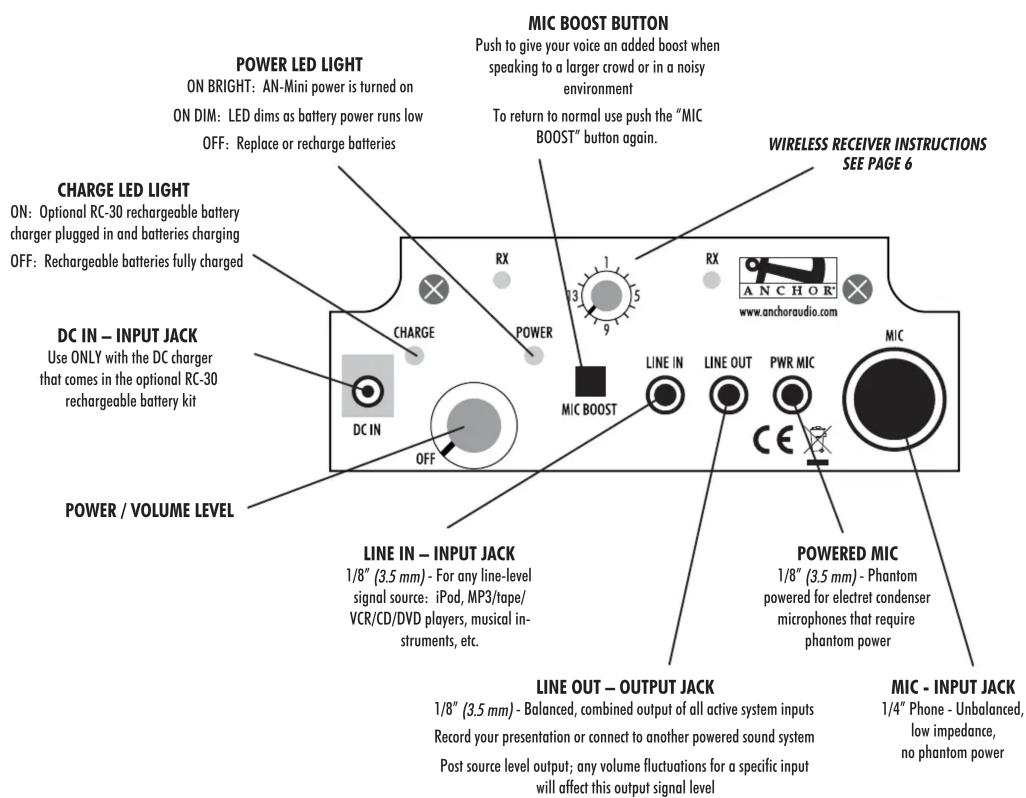
Use the LINE IN input jack to play pre-recorded material through the MiniVox Lite. The MiniVox Lite volume knob controls both the audio source and microphone levels when used simultaneously.
- Connect a mini-to-mini patch cable (3.5mm plugs) to the 'Line' or 'Headphone' output of your audio source
-
Connect the other end to the LINE IN input jack on the MiniVox Lite control panel
-
Adjust the volume setting of the audio source to the desired level
AUDIO SOURCE HEADPHONE / OUTPUT JACK

RECHARGEABLE BATTERY KIT (OPTIONAL ACCESSORY)
For applications where the MiniVox Lite PA system is used frequently, the RC-30 rechargeable battery kit is available. This kit includes 10 rechargeable NiMH batteries and an AC charging adapter. When fully charged the batteries provide approximately 12 hours of operation.
NOTE: New batteries must be charged for 6 hours prior to first use.
Using the RC-30 Recharge Kit
- Install the 10 rechargeable NiMH batteries into the MiniVox Lite (see page 4 - Battery Installation)
- Insert the charger plug into the Input Jack labeled DC IN on the MiniVox Lite control panel
- Plug the AC adapter into a power outlet for 4-6 hours to fully charge
Cycling the batteries
For extended battery life, we recommend you fully charge the batteries once each month during periods of infrequent use. Always fully recharge batteries before storing.
CAUTION: NEVER recharge other types of batteries. Doing so can result in battery explosion. Use only rechargeable Nickel-Metal Hydride (NiMH) batteries.
NOTE: Batteries Must Be Installed Before Use!
- Position the MiniVox Lite with the front/speaker facing toward your audience
- Connect a microphone to the one of the MIC jacks (1/4" MIC jack or 3.5 mm PWR MIC mini jack)
- Turn the MiniVox Lite Power/Volume Level knob on, the red POWER LED will light and remain lit during operation
- Set the microphone power switch to ON
- Adjust the volume with the Power/Volume Level knob
IMPORTANT: To avoid feedback, do not position a microphone in front of speaker.
PROBLEMS? Consult the troubleshooting section on the back page of this manual.
MINIVOX LITE PA SYSTEM
MiniVox Lite is a battery-operated handheld Public Address system that's easy to set-up & operate. Before using the MiniVox Lite, you'll need to install the batteries as described below right.
If your unit is equipped with an RC-30 rechargeable battery kit, you must charge the batteries completely before use (see page 3).
MINIVOX LITE ACCESSORIES
MIC-50 – Handheld Microphone
Handheld microphone w/ 6' coil cord & 1/4" connector.
MIC-90P – Handheld Microphone
Dynamic, balanced, low impedance microphone w/ unidirectional pick-up pattern & 1/4" connector. Comes w/ 20' cable, storage case & mic clip.
HBM-MINI – Headband Microphone
Ultra-lightweight headband microphone w/ 3.5 mm mini plug
RC-30 – Rechargeable Battery Kit
Includes 10 rechargeable "AA" batteries and AC adapter/charger.
NOTE: See page 6 for wireless microphones & UHF transmitters.
BATTERY INSTALLATION
- Remove the battery compartment cover located underneath the control back panel of the MiniVox Lite by pressing down the lock tabs of the battery compartment cover
- Slide out the battery pack from the MiniVox Lite battery compartment
-
Insert ten 'AA' size batteries (alkaline or RC-30 rechargeable batteries) into the battery pack Position the ten battery tubes into the battery pack by following the polarity labels on the battery pack
-
Slide-in the battery pack into the battery compartment Push the battery pack all the way in
-
Replace the battery compartment cover and push cover to lock tabs in place
- HAVING TROUBLE W/ YOUR WIRELESS SYSTEM? (Wireless Model Only)
- ANCHOR AUDIO CUSTOMER SERVICE
- MINIVOX LITE TECHNICAL SPECIFICATIONS
- Anchor Audio, Inc.
- MiniVox Lite PA System
- CONTENTS
- GETTING STARTED
- NOTE: All damage claims must be made with freight carrier!
- Returning Systems For Service or Repair
- IMPORTANT: Save the shipping box & packing materials, they were specially designed to ship your unit!
- Warranty Registration
- CHANNEL SELECTION - BODY-PACK TRANSMITTER
- REPLACE BATTERY - HANDHELD TRANSMITTER
- REPLACE BATTERY - BODY-PACK TRANSMITTER
- DIVERSITY WIRELESS BY ANCHOR AUDIO
- CHANNEL SELECTION - BUILT-IN RECEIVER
- UHF WIRELESS ACCESSORIES
- USING AN OUTBOARD CD/TAPE PLAYER
- RECHARGEABLE BATTERY KIT (OPTIONAL ACCESSORY)
- NOTE: New batteries must be charged for 6 hours prior to first use.
- Using the RC-30 Recharge Kit
- Cycling the batteries
- NOTE: Batteries Must Be Installed Before Use!
- MINIVOX LITE ACCESSORIES
- BATTERY INSTALLATION
Brand : Anchor Audio
Model : MiniVox Lite
Category : Audio