
EDC-FP90L - Hygrometer Ruggard - Free user manual and instructions
Find the device manual for free EDC-FP90L Ruggard in PDF.


| Product Type | Electronic Dry Cabinet with Fingerprint Lock |
| Model | EDC-FP90L |
| Volume Capacity | 90 L |
| Outer Dimensions (H x W x D) | 68 x 42.5 x 37 cm (6.8 x 16.7 x 14.6 in.) |
| Inner Dimensions (H x W x D) | 63 x 40 x 34 cm (4.8 x 15.7 x 13.4 in.) |
| Humidity Control Range | 25% to 60% RH (±3% RH) |
| Temperature Display | Celsius or Fahrenheit (switchable) |
| Lock Type | Fingerprint lock with up to 20 fingerprints; key lock backup |
| Power Supply | AC adapter (included); fingerprint lock also uses 3x AAA batteries (not included) |
| Humidity Adjustment Speed | 1 to 3 hours |
| Interior Features | 3 sliding shelves, contoured foam lining, flat foam lining, adjustable quick-mount rails, LED lights |
| Additional Accessories | 2 door keys, config. key, DC to Micro-USB adapter, 4 cabinet feet, power adapter |
| Intended Use | Storing photographic equipment, lenses, electronics, documents, and other moisture-sensitive items |
| Safety Features | Dripless operation, silent, no water tray required; keep away from children and flammable materials |
| Maintenance | Clean exterior with dry cloth; avoid direct sunlight and high temperatures |
| Warranty | One-year limited warranty against defects |
Frequently Asked Questions - EDC-FP90L Ruggard
User questions about EDC-FP90L Ruggard
0 question about this device. Answer the ones you know or ask your own.
Ask a new question about this device
Download the instructions for your Hygrometer in PDF format for free! Find your manual EDC-FP90L - Ruggard and take your electronic device back in hand. On this page are published all the documents necessary for the use of your device. EDC-FP90L by Ruggard.
USER MANUAL EDC-FP90L Ruggard
Electronic Dry Cabinet
with Fingerprint Lock (90 L)
USER MANUAL
natural_image
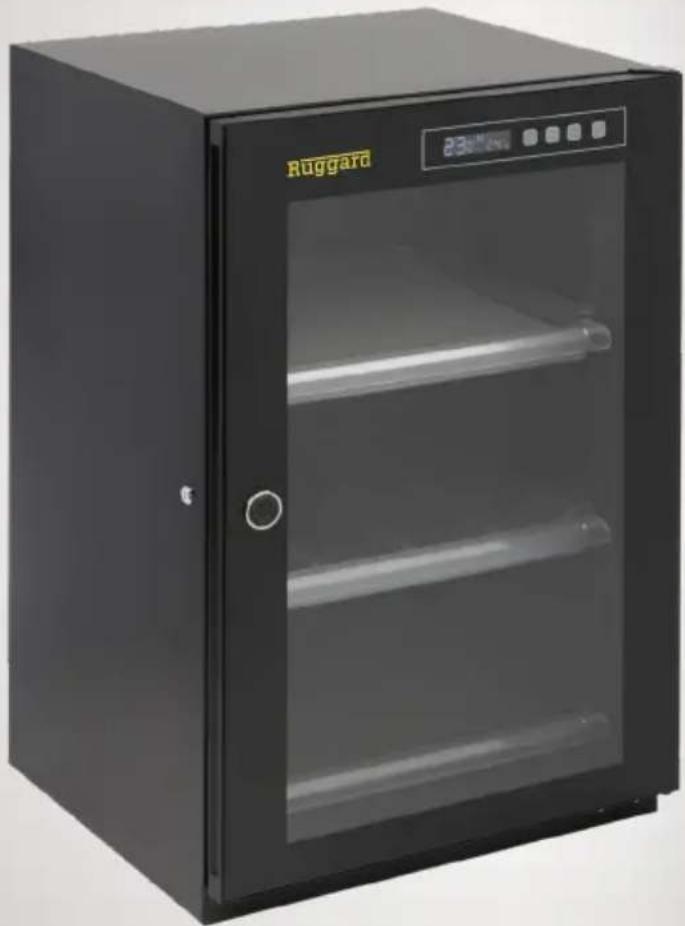
Black Ruggard oven with glass doors and control buttons (no visible text or symbols on the cabinet body)THANK YOU FOR CHOOSING RUGGARD
The Ruggard Electronic Dry Cabinet protects your lenses, photographic and optical equipment, mobile electronics, and other valuable accessories from excessive moisture. Using the cabinet's fast-acting TE Cooling Wafer, you can regulate the interior's relative humidity to help prevent fungus and corrosion from damaging your gear. A convenient fingerprint lock allows easy and safe access to your gear inside. The cabinet offers silent operation, and the unit is dripless, so there's no need for a water tray.
PRECAUTIONS
- Please read and follow these instructions, and keep this manual in a safe place.
- Do not place any corrosive or flammable materials inside the cabinet.
- Keep this product away from direct sunlight, high temperatures, and windy environments.
- When storing food, medicine, or chemicals, make sure they are stored in a separate and sealed container.
- Keep this product away from children.
- This product is for indoor use only.
- All images are for illustrative purposes only.
OVERVIEW
Important! Make sure to retrieve the power adapter, feet ( ×4 ), and keys from the bottom of the box.
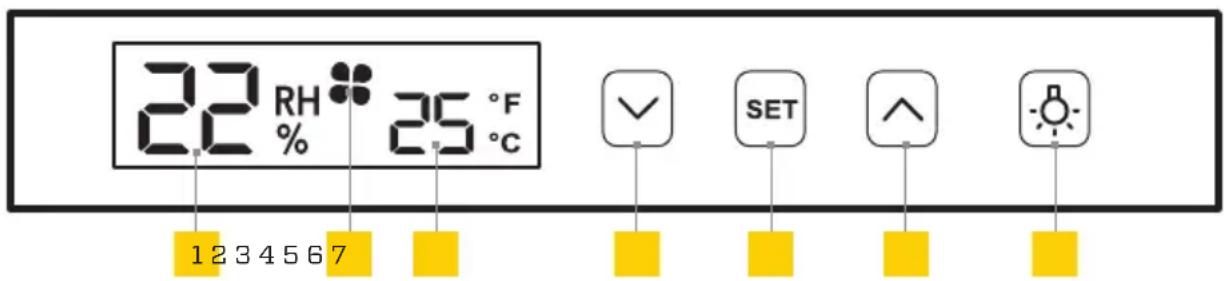
Control Panel
The illuminated digital display provides quick setting adjustments and offers an energy-saving auto-dimming function.
- Relative humidity
- Adjusting to new RH target
- Temperature
- Decrease RH value
- Adjust RH/confirm setting
- Increase RH value
- Light and display on / light off


Inside
- Sliding shelf (×3)
- Key lock
- Contoured foam lining
- Flat foam lining (×2)
- Adjustable, sliding quick-mount rails ( ×6 )
- LED lights
- Handle
- Battery compartment and cover
- Config. button
Front
- Control panel
- Fingerprint sensor
- Micro-USB port
Back
- DC port
- Moisture sync
Parts
- Door keys (×2)
- Config. key
- DC to Micro-USB adapter
Also included
- Power adapter
- Feet (×4)
ATTACHING THE CABINET FEET
-
Turn the dry cabinet on its side.
-
Screw in the four cabinet feet.
-
Flip the dry cabinet right side up.
OPENING THE CABINET FOR THE FIRST TIME
You can initially access the inside of the dry cabinet by using the included keys or supplied USB and power adapter.
Using the keys: Use the included keys to unlock and open the door.
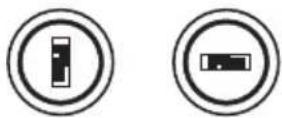
Locked Unlocked
Using the USB Adapter:
-
Insert the USB adapter into the fingerprint lock's USB port.
-
Connect the included power adapter to the USB adapter and a power source.
-
Place your finger on the fingerprint sensor for about one second, until the sensor turns green, and open the door.
INSTALLING THE BATTERIES
-
Remove the lock's battery compartment cover and install three AAA batteries (not included). Install the two outside batteries first and then the middle battery. Make sure to install the batteries with the correct orientation, following the guide on the inside of the battery compartment.
-
Replace the compartment cover until it clicks shut.

natural_image
Simple line drawing of a vertical object with a small yellow mark on the side (no text or symbols)THE FINGERPRINT LOCK
The fingerprint lock keeps your photo and video equipment safe with the touch of a finger. You can easily store up to 20 fingerprints, and the lock offers automatic and manual locking modes.

natural_image
Pure electrical circuit lines without any symbolsAdding Fingerprints
-
Use the config. key to press and release the config. button. You'll hear a beep, and the fingerprint sensor will turn blue.
-
Place your finger onto the sensor until you hear a beep.
- Repeat Step 2 five more times. The sensor will turn green when your fingerprint is accepted.
If your fingerprint is not accepted, the sensor will beep and turn red. Continue to repeat the steps until complete.
Note: Make sure the key lock is in the vertical position, so the cabinet door lock engages properly.

Locked Unlocked
Deleting Fingerprints
Deleting fingerprints will delete all fingerprints stored in the memory.
Use the config. key to press and hold the config. button for about four seconds, until you hear four beeps, and then release.
Auto and Manual Mode Selection
There are two modes for accessing the inside of the EDC-FP90L. In manual mode, your fingerprint unlocks and locks the dry cabinet. In automatic mode, your finger unlocks the cabinet, but the unit automatically locks in about four seconds. The EDC-FP90L's default setting is auto mode.
Warning! Switching modes will delete all stored fingerprints.
To change the mode, use the config. key to press and hold the config. button until you hear a series of four beeps and then two beeps.
Low Battery Warning
If the fingerprint lock has low battery power, it will beep six times. Replace all the AAA batteries immediately. If the batteries die, use the included USB adapter and power adapter with the lock's USB port, or use the included keys to manually unlock the door. See Opening the Cabinet for the First Time above.
Important: Keep the keys and USB adapter in a safe place so you can access the contents of the dry cabinet if the batteries fail.
SETTING AND CHECKING HUMIDITY
The relative humidity setting regulates the entire cabinet interior. You can set the relative humidity percentage from 60% to 25% ^* , and it adjusts within 1 to 3 hours. The inside humidity can be decreased, but you cannot increase the humidity more than the surrounding environment. Keep the door closed to ensure optimal humidity levels.
Important: Dry off any items to remove excess moisture before placing them inside the dry cabinet.
- Press the Sutton until the humidity display begins to flash.
- Use the ( ) and ( ) buttons to set the desired relative humidity value. If you set the RH value lower than the current target, a icon will appear in the display.
- Press the Shutton to confirm the settings.
You can verify the target humidity value by pressing and holding the SETton for approx. two seconds. The display will flash the target value and return to the actual humidity level reading.
*Relative humidity values programmed outside the 60% to 25% range will have no effect.
Note: Do not place the rear of the cabinet directly against a wall or other surface. This may reduce the operational efficiency. Keep the door closed to prevent the humidity increasing inside the cabinet.
SETTING FAHRENHEIT/CELSIUS
When turning on the unit for the first time, the temperature will be displayed in degrees Celsius.
This unit does not control temperature.
Press and hold the SButton for five seconds to switch between Celsius and Fahrenheit. Press the or arrow to confirm.
OPTIMAL RELATIVE HUMIDITY (RH) LEVELS
| Relative Humidity (RH) Level Recommended Items | |
| 50%-60% | e documents, paper (fax, copy, print) |
| 40%-50% | Camcorders, cameras, lenses, telescopes, microscopes, endoscopes, compact discs, film negatives, film transparencies/slides, microfilm, disk drives, audio and video tapes |
| 35%-40% | tal powder products, electrical equipment, semiconductors, capacitors, printed circuit boards, IC, batteries and other electronic equipment, precision measuring tools, spectrometers, optics, lenses |
| 25%-30% | Pharmaceutical raw materials, spices, powder coating, adhesives, seeds, pollen, dry flour |
SPECIFICATIONS
| Volume | |
| Voltage | |
| Power | |
| Fingerprint lock power | tteries (×3) not included |
| Relative humidity | (±3%RH) |
| Outer dimensions (H × W × D) | 6.8 × 16.7 × 14.6 in. (68 × 42.5 × 37 cm) |
| Inner dimensions (H × W × D) | 4.8 × 15.7 × 13.4 in. (63 × 40 × 34 cm) |
| Weight |
ONE-YEAR LIMITED WARRANTY
This Ruggard product is warranted to the original purchaser to be free from defects in materials and workmanship under normal consumer use for a period of one (1) year from the original purchase date or thirty (30) days after replacement, whichever occurs later. The warranty provider's responsibility with respect to this limited warranty shall be limited solely to repair or replacement, at the provider's discretion, of any product that fails during normal use of this product in its intended manner and in its intended environment. Inoperability of the product or part(s) shall be determined by the warranty provider. If the product has been discontinued, the warranty provider reserves the right to replace it with a model of equivalent quality and function.
This warranty does not cover damage or defect caused by misuse, neglect, accident, alteration, abuse, improper installation or maintenance. EXCEPT AS PROVIDED HEREIN, THE WARRANTY PROVIDER MAKES NEITHER ANY EXPRESS WARRANTIES NOR ANY IMPLIED WARRANTIES, INCLUDING BUT NOT LIMITED TO ANY IMPLIED WARRANTY OF MERCHANTABILITY OR FITNESS FOR A PARTICULAR PURPOSE. This warranty provides you with specific legal rights, and you may also have additional rights that vary from state to state.
To obtain warranty coverage, contact the Ruggard Customer Service Department to obtain a return merchandise authorization ("RMA") number, and return the defective product to Ruggard along with the RMA number and proof of purchase. Shipment of the defective product is at the purchaser's own risk and expense.
For more information or to arrange service, visit www.ruggard.com or call Customer Service at 212-594-2353.
Product warranty provided by the Gradus Group. www.gradusgroup.com
Ruggard is a registered trademark of the Gradus Group. © 2020 Gradus Group LLC. All Rights Reserved.

RUGGARD® A Gradus Group Brand
- Electronic Dry Cabinet
- THANK YOU FOR CHOOSING RUGGARD
- PRECAUTIONS
- OVERVIEW
- Control Panel
- Inside
- Front
- Back
- Parts
- Also included
- ATTACHING THE CABINET FEET
- OPENING THE CABINET FOR THE FIRST TIME
- Using the USB Adapter:
- INSTALLING THE BATTERIES
- THE FINGERPRINT LOCK
- Adding Fingerprints
- Deleting Fingerprints
- Auto and Manual Mode Selection
- Low Battery Warning
- SETTING AND CHECKING HUMIDITY
- SETTING FAHRENHEIT/CELSIUS
- ONE-YEAR LIMITED WARRANTY
Brand : Ruggard
Model : EDC-FP90L
Category : Hygrometer