SWHP12 - Headphones Sandstrøm - Free user manual and instructions
Find the device manual for free SWHP12 Sandstrøm in PDF.


| Product Type | Digital Wireless Stereo Headphones |
| Model | SWHP12 |
| Brand | Sandstrøm |
| Wireless Range | Up to 50 metres (open area) |
| Battery Type | 2 x AA Rechargeable NiMH (800mAh, 1.2V) |
| Charging Time (Initial) | 16 hours |
| Charging Time (Normal) | Approximately 5 hours |
| Operating Time | Up to 8 hours |
| Transmitter Power Supply | Mains adapter (included, Model: 25-030603E-09) |
| Audio Connections | RCA, 3.5mm, 6.3mm with included adapters |
| Frequency Band | Not specified |
| Auto Shut-off | Transmitter: after 4 minutes without audio; Headphones: after 15 minutes without signal |
| Included Accessories | Transmitter, 2x AA NiMH batteries, mains adapter, 3.5mm to 6.3mm adapter, RCA to 3.5mm cable, RCA to 3.5mm adapter cable, instruction manual |
| Care Instructions | Do not expose to liquids; clean with dry cloth |
| Safety Warning | Do not use while driving; avoid high volume for prolonged periods |
| Battery Disposal | Dispose according to local regulations; do not mix with household waste |
| Warranty | Not specified |
| Dimensions (Headphones) | Not specified |
| Weight (Headphones) | Not specified |
Frequently Asked Questions - SWHP12 Sandstrøm
User questions about SWHP12 Sandstrøm
0 question about this device. Answer the ones you know or ask your own.
Ask a new question about this device
Download the instructions for your Headphones in PDF format for free! Find your manual SWHP12 - Sandstrøm and take your electronic device back in hand. On this page are published all the documents necessary for the use of your device. SWHP12 by Sandstrøm.
USER MANUAL SWHP12 Sandstrøm
Digital Wireless Stereo Headphones
SWHP12

natural_image
Interior scene with a white armchair, wooden fire pit, and stacked books on a table (no visible text or symbols)
natural_image
Black hardcover headplate with ring handle against dark background (no text or symbols visible)
bar
| Category | Value | |---|---| | Category 1 | 100 | | Category 2 | 100 | | Category 3 | 100 | | Category 4 | 100 | | Category 5 | 100 | | Category 6 | 100 | | Category 7 | 100 | | Category 8 | 100 | | Category 9 | 100 | | Category 10 | 100 | | Category 11 | 100 | | Category 12 | 100 | | Category 13 | 100 | | Category 14 | 100 | | Category 15 | 100 | | Category 16 | 100 | | Category 17 | 100 | | Category 18 | 100 | | Category 19 | 100 | | Category 20 | 100 | | Category 21 | 100 | | Category 22 | 100 | | Category 23 | 100 | | Category 24 | 100 | | Category 25 | 100 | | Category 26 | 100 | | Category 27 | 100 | | Category 28 | 100 | | Category 29 | 100 | | Category 30 | 100 | | Category 31 | 100 | | Category 32 | 100 | | Category 33 | 100 | | Category 34 | 100 | | Category 35 | 100 | | Category 36 | 100 | | Category 37 | 100 | | Category 38 | 100 | | Category 39 | 100 | | Category 40 | 100 | | Category 41 | 100 | | Category 42 | 100 | | Category 43 | 100 | | Category 44 | 100 | | Category 45 | 100 | | Category 46 | 100 | | Category 47 | 100 | | Category 48 | 100 | | Category 49 | 100 | | Category 50 | 100 | | Category 51 | 100 | | Category 52 | 100 | | Category 53 | 100 | | Category 54 | 100 | | Category 55 | 100 | | Category 56 | 100 | | Category 57 | 100 | | Category 58 | 100 | | Category 59 | 100 | | Category 60 | 100 | | Category 61 | 100 | | Category 62 | 100 | | Category 63 | 100 | | Category 64 | 100 | | Category 65 | 100 | | Category 66 | 100 | | Category 67 | 100 | | Category 68 | 100 | | Category 69 | 100 | | Category 70 | 100 | | Category 71 | 100 | | Category 72 | 100 | | Category 73 | 100 | | Category 74 | 100 | | Category 75 | 100 | | Category 76 | 100 | | Category 77 | 100 | | Category 78 | 100 | | Category 79 | 100 | | Category 80 | 100 | | Category 81 | 100 | | Category 82 | 100 | | Category 83 | 100 | | Category 84 | 100 | | Category 85 | 100 | | Category 86 | 100 | | Category 87 | 100 | | Category 88 | 100 | | Category 89 | 100 | | Category 90 | 100 | | Category 91 | 100 | | Category 92 | 100 | | Category 93 | 100 | | Category 94 | 100 | | Category 95 | 100 | | Category 96 | 100 | | Category 97 | 100 | | Category 98 | 100 | | Category 99 | 100 | | Total (Total) |Thank you for purchasing your new Sandstrøm digital wireless stereo headphones.
Please check that you have all the items and familiarise yourself with this instruction manual.
Contents
Unpacking......4
Product Overview....5
Connections......6
Installing and Charging the Batteries....8
Operations....9
Pairing....10
Automatic Shut Off.... 10
Hints and Tips.... 11
Safety Warnings 12
Unpacking
Remove all packaging from the unit. Retain the packaging. If you dispose of it please do so according to any local regulations.
The following items are included:
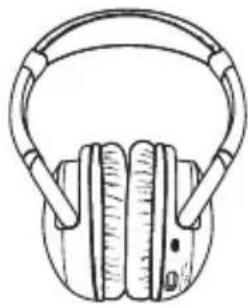
natural_image
Line drawing of a pair of headphones with earbuds (no text or symbols)Headphones
3.5mm to 6.3mm
Adapter x 1
P.N.: 41-03-35TO63PG-07

AA Rechargeable Batteries x 2 (NiMH 800mAh 1.2V)
P.N.: 79-01-12801A-13

Mains Adapter x 1
P.N.: 25-030603E-09

natural_image
Coiled black cable with two connectors, no visible text or symbolsRCA to 3.5mm Cable x 1 P.N.: 42-06-DS082T-06

RCA to 3.5mm Adapter Cable x 1
P.N.: 43-03-YCABLE-06
Instruction Manual P.N.: 95-08-DH1040E-02

If items are missing or damaged, please contact Partmaster(UK only). Tel: 0844 800 3456 for assistance.
Product Overview
Transmitter Front View

Transmitter Rear View

Headphones
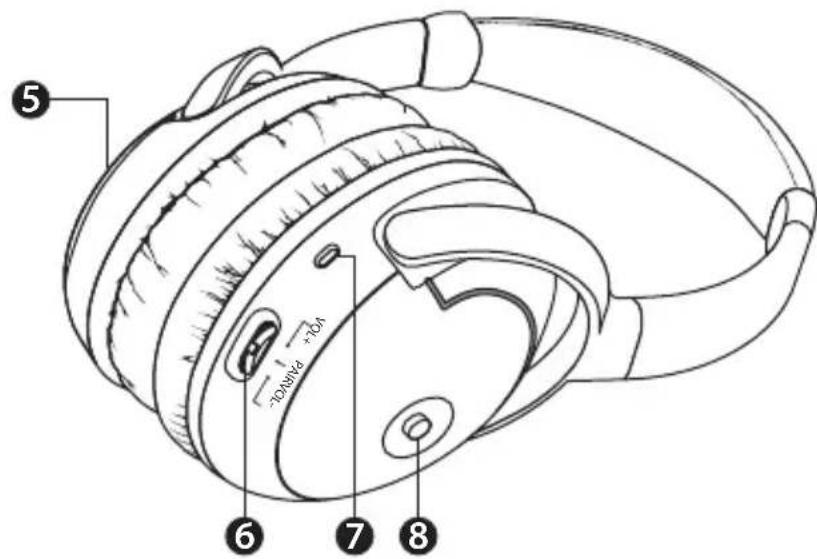
- Signal / Charge Indicator
- Pair Button
- Audio Input Sockets
- DC In Socket
- Battery Cover
-
Volume +/- Control
-
Switch this button to increase / decrease the volume
Pairing Button
• Press this button for pairing -
Power / Signal Indicator
-
On / Off Button
Connections

flowchart
graph TD
    A["Stereo System"] -->|3.5mm to 6.3mm Adapter (included)| B["Adapter"]
    A -->|3.5mm plug| C["Adapter"]
    A -->|red white| D["Transmitter"]
    A -->|A for RCA socket| D
    B -->|for 6.3mm socket| E["Main Adapter (included)"]
    C -->|for 3.5mm socket| E
    D -->|red white| E
    E -->|RCA Cable (not included)| D
    E -->|RCA to 3.5mm Cable (included)| D
- Connect the transmitter to your stereo system by using one of the following methods:
| A | Use a RCA cable (not included) to connect the transmitter's audio input sockets to the RCA sockets of your stereo system. |
| B | Use the RCA to 3.5mm adapter cable (included) to connect the transmitter's audio input sockets to the 3.5mm plug extended from your stereo system. |
| C | Use the RCA to 3.5mm cable (included) to connect the transmitter's audio input sockets to the 3.5mm socket of your stereo system. |
| D | Connect the 3.5mm to 6.3mm adapter (included) to the RCA to 3.5mm cable (included). Then connect it to the transmitter's audio input sockets and the 6.3mm socket of your stereo system. |
- Connect the mains adapter to the transmitters DC in socket and then to the mains socket.

- Choose a suitable place near your audio source (e.g. TV, stereo or home cinema system). Avoid placing the transmitter close to metal objects such as shelf bars, reinforced concrete walls, etc. as this can decrease the transmitter's range.
- Other wireless devices may interfere with the transmitted signal, please locate the transmitter at least 1 metre away from other transmitting devices.
- The transmitting signal is less effective through solid walls, please ensure a direct line of sight to the transmitter.
Installing and Charging the Batteries

flowchart
graph TD
    A["Headphones with power plug"] --> B["Battery with + and - indicators"]
    B --> C["Switch state with power plug"]
    C --> D["Heard with ear protection"]
    D --> E["Stable headset with ear"]
- Remove the battery cover and insert 2 x rechargeable AA batteries (included) into the battery compartment. Replace the battery cover.
- Switch off the headphone and place it into the transmitter contacts touching the charge pins. Red LED flashes when charging is activated. Charge the batteries for 16 hours before initial use.

- Please insert the batteries with the correct polarity.
- Only use the included rechargeable shortened sleeve NiMH batteries with your headphones. Other types of rechargeable batteries cannot be charged with this system.
- AA Alkaline batteries can be used to operate the headphones, but cannot be charged with this system.

- Please ensure the headphones are well placed on the transmitter so that the Signal Charger Indicator flashes red, showing charging is in progress.
- When the batteries are empty, it takes approximately 5 hours to fully charge the batteries.
- When the batteries are fully charged, the headphones can be used for up to 8 hours.
Operations
To start up this system and enjoy your music, please follow the steps below:
- Connect the transmitter with your audio source.
- Connect the mains adapter to the transmitter and then a mains socket. The LED on the transmitter will illuminates Red. Turn on your audio source.
- Turn on the headphones receiver by pressing the ON/OFF button. The LED will illuminate Red.
- If the LED on the headphones is OFF immediately, put the headphones back on the transmitter for recharging.
- When the audio link is established the LED illuminates Green and your music will now play through the headphones. The operation range of this wireless headphone is up to 50 metres (open area).
- The LED on the headphones will flash Red if the battery power is low.
- Turn OFF the headphones when you have finished listening to your music.

• Turn up the volume level of your audio source to at least 80%.
- Turn the volume level of your headphones to lower level before putting them on to prevent causing damage to your ears.
Pairing
If the LED on the headphones remains Red and the headphones do not work, start the Pairing process by pressing the Pair button for 3 seconds on the transmitter and the headphones simultaneously until the LED flashes green. The LED will stop flashing and illuminate solid green when the pairing process is finished.
Automatic Shut Off
To protect the transmitter and save power, the transmitter will automatically switch off after approximately 4 minutes if there is no audio signal, or the signal that it receives from the audio source is too weak. If however the signal returns to an acceptable level, then the transmitter will automatically switch back on.
The headphones receiver will automatically shut off if no signal is received from the transmitter after 15 minutes.
Hints and Tips
No Sound
- Ensure that the mains adapter is fully connected into the mains socket and that its cable is properly connected to the DC IN socket on the transmitter.
• Ensure that the headphones are switched ON. - The headphone's battery charge level may be too low. Recharge the batteries or replace them with fully charged batteries.
- Ensure that your TV set, Hi-Fi system or audio component is switched on and set to a channel that broadcasts an audio signal.
- Use the headphone's volume control to increase the sound level.
- Restart the pairing process. Press the "Pair" button on the transmitter and the headphones for 3 seconds. The process is finished when both LEDs illuminate Green.
Distortion
- The headphone's batteries charge level may be too low. Recharge the batteries or replace them with fully charged batteries.
- Ensure that the volume controls setting is correct.
• The headphones may be too far away from the transmitter. Move closer to it. - The audio signal input level is too low. Increase the volume from the audio source of Hi-Fi, CD, or TV, etc.
- Keep the transmitter at least 1 metre away from other Wi-Fi transmitter / router.
Safety Warnings
• For traffic safety, do not use earphones while driving or cycling.
- Avoid listening to sound at high levels for prolonged periods of time. This may be harmful to you and may cause hearing loss.
- The mains adapter is used as the disconnect device which shall remain readily operable.
- This unit shall not be exposed to dripping or splashing and no objects filled with liquids, such as vases, shall be placed on the apparatus.

Long-term exposure to loud music may cause hearing damage. It is best to avoid extreme volume when using earphones, especially for extended periods.
Handling The Batteries
- Improper or incorrect use of batteries may cause corrosion or battery leakage, which could cause fire, personal injury or damage to property.
• Use only the types of the batteries which are indicated in this manual. - When the batteries are exhausted, the unit will not function. Replace both batteries at the same time with new ones.
- Do not install new batteries with used ones and do not mix different types of batteries.
- Do not dispose of used batteries as domestic waste. Dispose of them in accordance with local regulations.
- Batteries shall not be exposed to excessive heat such as sunshine, fire or the like.
NOTE: If you require a replacement for any of the items listed below, please quote their corresponding part numbers:
| Replacement Part Part Number | |
| Transmitter DH104ET-01S-1 | |
| 3.5mm to 6.3mm Adapter 41-03-35TO63PG-07 | |
| AA Rechargeable Batteries 79-01-12801A-13 | |
| Mains Adapter 25-030603E-09 | |
| RCA to 3.5mm Cable 42-06-DS082T-06 | |
| RCA to 3.5mm Adapter Cable 43-03-YCABLE-06 |
DSG International Sourcing declares that the wireless headphones complies with the essential requirements and other relevant provisions of Directive 1999/5/EC.

Visit Partmaster.co.uk today for the easiest way to buy electrical spares and accessories. With over 1 million spares and accessories available we can deliver direct to your door the very next day. Visit
www.partmaster.co.uk or call 0844 800 3456 (UK customers only) Calls charged at National Rate.
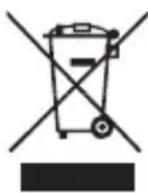
This symbol on the product or in the instructions means that your electrical and electronic equipment should be disposed at the end of its life separately from your household waste. There are separate collection systems for recycling in the EU. For more information, please contact the local authority or your retailer where you purchased the product.
Notes for battery disposal
The batteries used with this product contain chemicals that are harmful to the environment. To preserve our environment, dispose of used batteries according to your local laws or regulations. Do not dispose of batteries with normal household waste.
For more information, please contact the local authority or your retailer where you purchased the product.
DSG Retail Ltd • Maylands Avenue • Hemel Hempstead • Herts • HP2 7TG • England
(P.N. 95-08-DH1040E-02)

bar
| Category | Value | |---|---| | Category 1 | 100 | | Category 2 | 100 | | Category 3 | 100 | | Category 4 | 100 | | Category 5 | 100 | | Category 6 | 100 | | Category 7 | 100 | | Category 8 | 100 | | Category 9 | 100 | | Category 10 | 100 | | Category 11 | 100 | | Category 12 | 100 | | Category 13 | 100 | | Category 14 | 100 | | Category 15 | 100 | | Category 16 | 100 | | Category 17 | 100 | | Category 18 | 100 | | Category 19 | 100 | | Category 20 | 100 | | Category 21 | 100 | | Category 22 | 100 | | Category 23 | 100 | | Category 24 | 100 | | Category 25 | 100 | | Category 26 | 100 | | Category 27 | 100 | | Category 28 | 100 | | Category 29 | 100 | | Category 30 | 100 | | Category 31 | 100 | | Category 32 | 100 | | Category 33 | 100 | | Category 34 | 100 | | Category 35 | 100 | | Category 36 | 100 | | Category 37 | 100 | | Category 38 | 100 | | Category 39 | 100 | | Category 40 | 100 | | Category 41 | 100 | | Category 42 | 100 | | Category 43 | 100 | | Category 44 | 100 | | Category 45 | 100 | | Category 46 | 100 | | Category 47 | 100 | | Category 48 | 100 | | Category 49 | 100 | | Category 50 | 100 | | Category 51 | 100 | | Category 52 | 100 | | Category 53 | 100 | | Category 54 | 100 | | Category 55 | 100 | | Category 56 | 100 | | Category 57 | 100 | | Category 58 | 100 | | Category 59 | 100 | | Category 60 | 100 | | Category 61 | 100 | | Category 62 | 100 | | Category 63 | 100 | | Category 64 | 100 | | Category 65 | 100 | | Category 66 | 100 | | Category 67 | 100 | | Category 68 | 100 | | Category 69 | 100 | | Category 70 | 100 | | Category 71 | 100 | | Category 72 | 100 | | Category 73 | 100 | | Category 74 | 100 | | Category 75 | 100 | | Category 76 | 100 | | Category 77 | 100 | | Category 78 | 100 | | Category 79 | 100 | | Category 80 | 100 | | Category 81 | 100 | | Category 82 | 100 | | Category 83 | 100 | | Category 84 | 100 | | Category 85 | 100 | | Category 86 | 100 | | Category 87 | 100 | | Category 88 | 100 | | Category 89 | 100 | | Category 90 | 100 | | Category 91 | 100 | | Category 92 | 100 | | Category 93 | 100 | | Category 94 | 100 | | Category 95 | 100 | | Category 96 | 100 | | Category 97 | 100 | | Category 98 | 100 | | Category 99 | 100 | | Total (Total) |
bar
| Category | Value | |---|---| | Category 1 | 100 | | Category 2 | 100 | | Category 3 | 100 | | Category 4 | 100 | | Category 5 | 100 | | Category 6 | 100 | | Category 7 | 100 | | Category 8 | 100 | | Category 9 | 100 | | Category 10 | 100 | | Category 11 | 100 | | Category 12 | 100 | | Category 13 | 100 | | Category 14 | 100 | | Category 15 | 100 | | Category 16 | 100 | | Category 17 | 100 | | Category 18 | 100 | | Category 19 | 100 | | Category 20 | 100 | | Category 21 | 100 | | Category 22 | 100 | | Category 23 | 100 | | Category 24 | 100 | | Category 25 | 100 | | Category 26 | 100 | | Category 27 | 100 | | Category 28 | 100 | | Category 29 | 100 | | Category 30 | 100 | | Category 31 | 100 | | Category 32 | 100 | | Category 33 | 100 | | Category 34 | 100 | | Category 35 | 100 | | Category 36 | 100 | | Category 37 | 100 | | Category 38 | 100 | | Category 39 | 100 | | Category 40 | 100 | | Category 41 | 100 | | Category 42 | 100 | | Category 43 | 100 | | Category 44 | 100 | | Category 45 | 100 | | Category 46 | 100 | | Category 47 | 100 | | Category 48 | 100 | | Category 49 | 100 | | Category 50 | 100 | | Category 51 | 100 | | Category 52 | 100 | | Category 53 | 100 | | Category 54 | 100 | | Category 55 | 100 | | Category 56 | 100 | | Category 57 | 100 | | Category 58 | 100 | | Category 59 | 100 | | Category 60 | 100 | | Category 61 | 100 | | Category 62 | 100 | | Category 63 | 100 | | Category 64 | 100 | | Category 65 | 100 | | Category 66 | 100 | | Category 67 | 100 | | Category 68 | 100 | | Category 69 | 100 | | Category 70 | 100 | | Category 71 | 100 | | Category 72 | 100 | | Category 73 | 100 | | Category 74 | 100 | | Category 75 | 100 | | Category 76 | 100 | | Category 77 | 100 | | Category 78 | 100 | | Category 79 | 100 | | Category 80 | 100 | | Category 81 | 100 | | Category 82 | 100 | | Category 83 | 100 | | Category 84 | 100 | | Category 85 | 100 | | Category 86 | 100 | | Category 87 | 100 | | Category 88 | 100 | | Category 89 | 100 | | Category 90 | 100 | | Category 91 | 100 | | Category 92 | 100 | | Category 93 | 100 | | Category 94 | 100 | | Category 95 | 100 | | Category 96 | 100 | | Category 97 | 100 | | Category 98 | 100 | | Category 99 | 100 | | Total (Total) |Brand : Sandstrøm
Model : SWHP12
Category : Headphones