
OG-FIBER-T - AV Extender AJA - Free user manual and instructions
Find the device manual for free OG-FIBER-T AJA in PDF.


| Type de produit | AV Extender (1-Channel 3G-SDI to Single-Mode LC Fiber Transmitter) |
| Marque | AJA |
| Modèle | OG-FIBER-T |
| Format | openGear standard form factor (front slot and rear card, two slots required) |
| Dimensions (l x p x h) | Standard openGear card dimensions (not explicitly stated, but typical: 2.5 x 6.5 x 0.8 in) |
| Poids | Approx. 0.5 lb (0.23 kg) |
| Alimentation | Via openGear frame, 2.5 watts max per card |
| Entrées vidéo | 1 x 3G-SDI (SMPTE-259/292/424) with loop out |
| Sorties vidéo | 1 x 3G-SDI loop out, 1 x Single-Mode LC Fiber (SMPTE-297) |
| Formats vidéo supportés | 100 Mbps to 3 Gbps, format agnostic |
| Reclocking | Automatic for 270 Mbps, 1.483 Gbps, 1.485 Gbps, 2.966 Gbps, 2.970 Gbps |
| Longueur d'onde fibre | 1310 nm (nominal) |
| Puissance optique | -5 dBm (min), 0 dBm (max) |
| Rapport d'extinction | 7.5 dB (Typ) |
| Distance maximale (fibre monomode) | 10 km |
| Connecteurs | BNC (SDI), LC (Fiber) |
| LED indicateurs | Alimentation (vert), Signal présent (vert), Verrouillage SMPTE (vert) |
| Température de fonctionnement | 0 to 40°C (32 to 104°F) |
| Température de stockage | -40 to 60°C (-40 to 140°F) |
| Humidité relative | 10-90% non-condensing |
| Altitude | <3,000 m (<10,000 ft) |
| Sécurité laser | Class 1 Laser Product (EN 60825-1) |
| Compatibilité | DFR-8321 and OG3 openGear frames |
| Garantie | 5 ans internationale |
Frequently Asked Questions - OG-FIBER-T AJA
User questions about OG-FIBER-T AJA
0 question about this device. Answer the ones you know or ask your own.
Ask a new question about this device
Download the instructions for your AV Extender in PDF format for free! Find your manual OG-FIBER-T - AJA and take your electronic device back in hand. On this page are published all the documents necessary for the use of your device. OG-FIBER-T by AJA.
USER MANUAL OG-FIBER-T AJA
OG-Fiber-Series openGear Card

Installation and Operation Guide
Trademarks
AJA® and Because it matters. are registered trademarks of AJA Video Systems, Inc. for use with most AJA products. AJATM is a trademark of AJA Video Systems, Inc. for use with recorder, router, software and camera products. Because it matters. is a trademark of AJA Video Systems, Inc. for use with camera products.
CION ® , Corvid Ultra ® , Io ® , Ki Pro ® , KONA ® , KUMO ® , ROI ® and T-Tap ® are registered trademarks of AJA Video Systems, Inc.
AJA Control Room™, KiStor™, Science of the Beautiful™, TruScale™, TruZoom™, V2Analog™ and V2Digital™ are trademarks of AJA Video Systems, Inc.
AirPort, Apple, Apple logo, AppleShare, AppleTalk, FireWire, iPod, iPod touch, Mac, Macintosh and ProRes, are registered trademarks of Apple Inc. Final Cut Pro, QuickTime and QuickTime logo are trademarks of Apple Inc.
Avid, Avid DNxHD and Media Composer are registered trademarks of Avid Technology, Inc.
Adobe is a registered trademark of Adobe Systems Incorporated in the United States and/or other countries.
HDMI, the HDMI logo and High-Definition Multimedia Interface are trademarks or registered trademarks of HDMI Licensing, LLC.
DVI is a registered trademark of DDWG.
TASCAM is a registered trademark of TEAC Corporation.
Dolby and the double-D Dolby logo are registered trademarks of Dolby Laboratories Licensing Corporation.
openGear® Ross, ROSS, ROSS®, and MLE are registered trademarks of Ross Video.
Dashboard Control System™ is a trademark of Ross Video.
All other trademarks are the property of their respective holders.
Copyright
Copyright © 2017 AJA Video Systems, Inc. All rights reserved. All information in this manual is subject to change without notice. No part of the document may be reproduced or transmitted in any form, or by any means, electronic or mechanical, including photocopying or recording, without the express written permission of AJA Video Systems, Inc.
Contacting AJA Support
When calling for support, have all information at hand prior to calling. To contact AJA for sales or support, use any of the following methods:
Telephone +1.530.271.3190
FAX +1.530.271.3140
Web https://www.aja.com
Support Email support@aja.com
Sales Email sales@aja.com
Contents
Notices 2
Trademarks 2
Copyright 2
Contacting AJA Support 2
Chapter 1 - OG-FIBER-Series .....4
Card Overview 4
Features. 4
Block Diagram....5
Connectors....6
Indicators....6
openGear and AJA 7
Parts Supplied....7
Installation....7
Summary 7
Unpacking 8
Rear Fiber Card Installation. 8
Front Fiber Card Installation 8
Cabling 10
Appendix A – Specifications ..... 11
OG-FIBER-TR. 11
OG-FIBER-T 12
OG-FIBER-R 13
OG-FIBER-2T. 14
OG-FIBER-2R. 15
OG-FIBER-TR-MM 16
OG-FIBER-T-MM 17
OG-FIBER-R-MM 18
OG-FIBER-2T-MM. 19
OG-FIBER-2R-MM 20
Appendix B – Safety and Compliance ..... 21
Warranty Information 29
Limited Warranty. 29
Chapter 1 – OG-FIBER-Series
natural_image
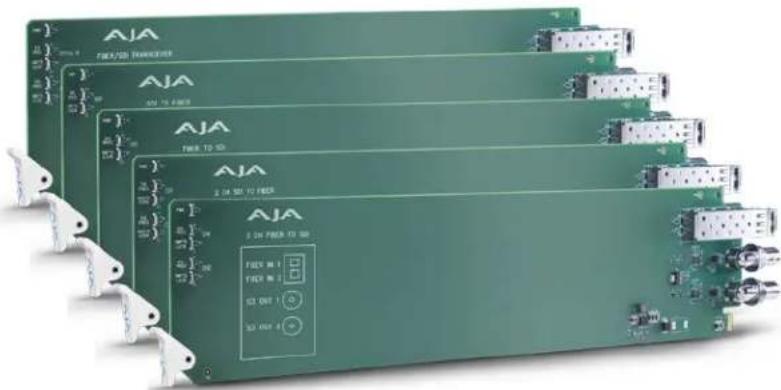
Exterior view of multiple green industrial electronic modules labeled AJA, with no visible text or symbols on the modules themselves.Card Overview
The OG-FIBER-Series cards are state-of-the-art, openGear-compatible, 3G-SDI to/from Fiber converter cards, enabling SDI signals to be extended up to 10km over standard Single-Mode fiber optic cable or 700 m (2296 ft) for OM4 and 300 m (984 ft) for OM3 for Multi-Mode fiber optic cable.
Ten AJA cards are available:
- OG-FIBER TR, 1-Channel 3G-SDI/LC Single-Mode LC Fiber Transceiver
- OG-FIBER-T, 1-Channel 3G-SDI to Single-Mode LC Fiber Transmitter
- OG-FIBER-R, 1-Channel Single-Mode LC Fiber to 3G-SDI Receiver
- OG-FIBER-2T, 2-Channel 3G-SDI to Single-Mode LC Fiber Transmitter
- OG-FIBER-2R, 2-Channel Single-Mode LC Fiber to 3G-SDI Receiver
- OG-FIBER-TR-MM, 1-Channel 3G-SDI/LC Multi-Mode LC Fiber Transceiver
- OG-FIBER-T-MM, 1-Channel 3G-SDI to Multi-Mode LC Fiber Transmitter
- OG-FIBER-R-MM, 1-Channel Multi-Mode LC Fiber to 3G-SDI Receiver
- OG-FIBER-2T-MM, 2-Channel 3G-SDI to Multi-Mode LC Fiber Transmitter
- OG-FIBER-2R-MM, 2-Channel Multi-Mode LC Fiber to 3G-SDI Receiver
The inputs are re-clocked with best-in-class input jitter tolerance. The two channel cards have completely independent paths, allowing different SDI rates to be carried on each channel.
The fiber connector is attached to the main card for added reliability and cost savings.
NOTE: In order to allow direct fiber connection to the card, and avoid problematic optical couplers, AJA Fiber openGear cards have the rear connectors attached to the front card. This means that the card cannot be removed from the frame with the SFP module, cables, and/or BNC retaining nuts installed.
Features
• Automatic detection and re-clocking of 270Mb, 1.5Gb, and 3Gb SDI data rates
- LC Fiber connectors
- Input Present and Input SMPTE Lock LEDs
- Hot-swap capable
- All SDI or fiber inputs are re-clocked, and SDI inputs are also equalized.
- ASI compatible
- Compatible with DFR-8321 and OG3 openGear frames
- Five-year international warranty with unlimited technical support
NOTE: OG-FIBER-Series cards do not communicate with the Dashboard Control System.
Block Diagram
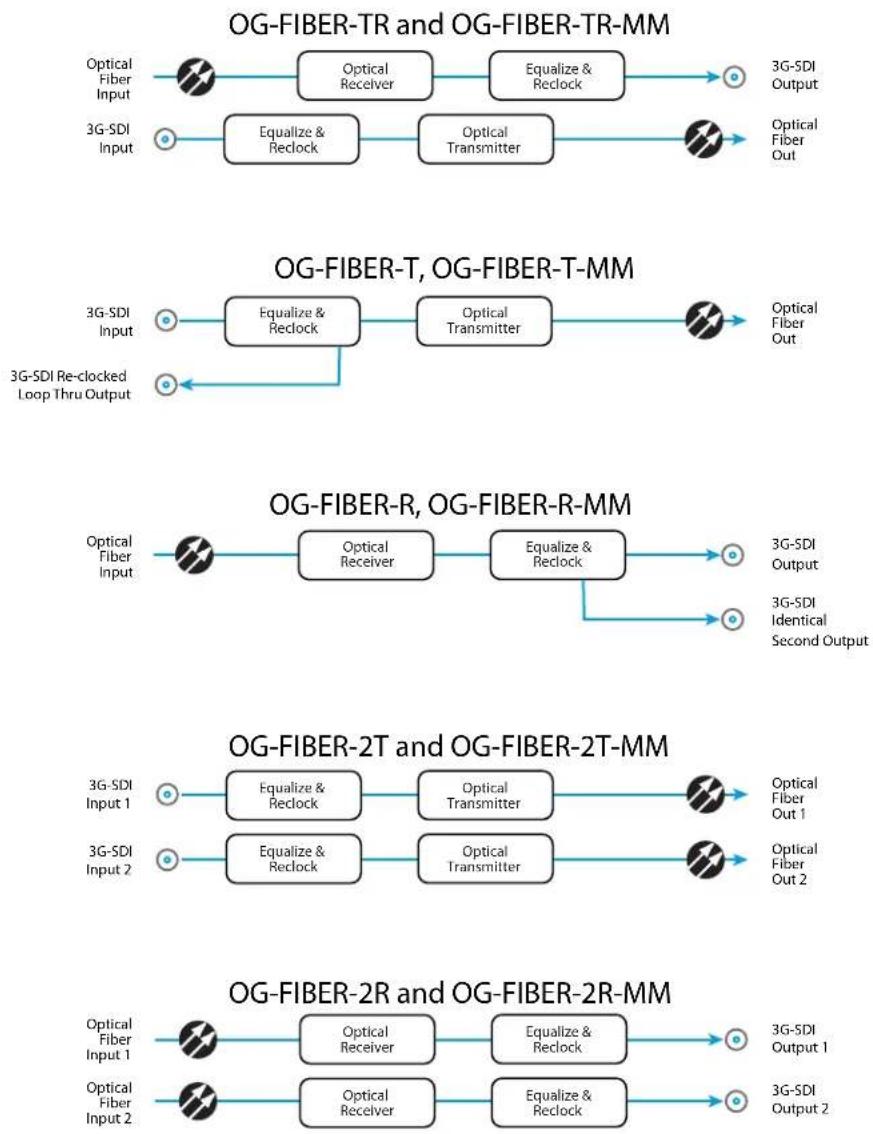
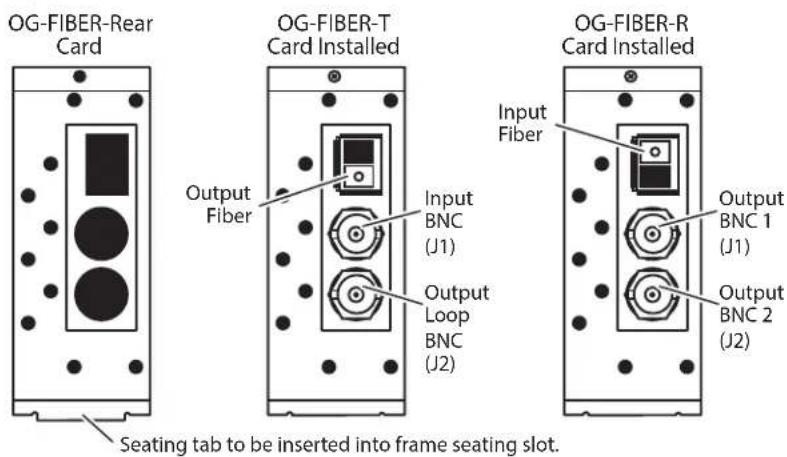
Figure 1. Rear View of Empty Rear Card and Installed Dual Channel Fiber Cards

NOTE: On the OG-Fiber-2T card, Output Fiber 2 is located above Output Fiber 1.
Figure 2. Rear View of Empty Rear Card and Installed Single Channel Fiber Cards
Indicators
LEDs on the front (near door) of each card indicate, from top to bottom:
2T and 2R Cards
• DC power detected (green)
- Input 1 signal present (green)
- Input 1 SMPTE locked (green)
- Input 2 signal present (green)
- Input 2 SMPTE locked (green)
TR Cards
- DC power detected (green)
• Optical input signal present (green)
• Optical input SMPTE locked (green)
• SDI input signal present (green)
• SDI input SMPTE locked (green)
Single Channel Cards
• DC power detected (green)
• Signal present (green)
- SMPTE locked (green)
openGear and AJA
openGear is an open-architecture, modular frame system designed by Ross Video and supported by a diverse range of terminal equipment manufacturers, including AJA. Ross Video manufactures the frames, power supplies and network cards for openGear.
AJA Video is a leading manufacturer of video interface technologies, converters, digital video recording solutions and professional cameras, bringing high-quality, cost-effective products to the professional, broadcast and post-production markets. AJA products, including openGear cards, are designed and manufactured at our facilities in Grass Valley, California.
Parts Supplied
Each OG-FIBER card is shipped with:
• OG-FIBER card in an ESD bag
- Fiber Rear Card
- SFP module in ESD bag
• BNC nuts and star washers
Installation


CLASS 1 LASER PRODUCT
Warning! Active fiber-optic cables emit radiation invisible to the human eye. Do not look directly at the end of an active fiber-optic cable or the fiber connector on an OG-FIBER-2T, OG-FIBER-2T-MM, OG-FIBER-TR, OG-FIBER-TR-MM, OG-FIBER-T, OG-FIBER-T-MM; these models are Class 1 Laser Products.
Summary
Installing an OG-FIBER card into a DFR-8321 or OG3 openGear frame consists of the following steps:
- Install a Rear Fiber Card into the frame.
- Ensure the SFP module is removed from the Front Fiber Card.
- Insert the Front Fiber card in the left (odd numbered) slot of the pair.
- Install BNC connector retaining nuts and washers.
- Insert the SFP module into the card from the rear of the frame.
- Connect the BNC and Fiber cabling.

ESD Susceptibility - Static discharge can cause serious damage to sensitive semiconductor devices. Avoid handling circuit boards in high static environments such as carpeted areas, and when wearing synthetic fiber clothing. Always exercise proper grounding precautions when working on circuit boards and related equipment.
Unpacking
Unpack each openGear product you received from the shipping container and ensure that all items are included. If any items are missing or damaged, contact your sales representative or AJA directly.
Rear Fiber Card Installation
- Power down the openGear frame.
- Ensure that the frame is properly installed.
- Locate the card frame slot on the rear of the openGear frame into which you wish to install the openGear card.
NOTE: An OG-FIBER card occupies two slots in the frame.
- Using a Phillips screwdriver, unscrew the top screw from the desired blank rear plate and remove the rear plate.
- Seat the bottom of the Rear Card in the seating slot at the base of the frame back plane (Figure 3).
Figure 3. Rear Card Inserted Into Frame Seating Slot

natural_image
Close-up of a metallic electronic component with a gold-colored circuit board and screw holes, mounted on a perforated metal frame (no visible text or symbols)- Align the top screw of the Rear Card with the screw hole on the top edge of the frame back plane.
- Ensure the Rear Card aligns with the desired card slot before tightening the screw.
- Using a Phillips screwdriver, fasten the Rear Card to the frame back plane. Do not over tighten.
- Ensure proper frame cooling and ventilation by having all rear frame slots covered with rear modules or blank metal plates if plates are not pre-installed.
Front Fiber Card Installation

Caution! The SFP module must be removed from an OG-FIBER card before inserting the card into or removing the card from an openGear frame.
-
If necessary, remove the SFP module from the Front Card by lifting the lever and pulling out the module.
-
If nuts and washers are pre-installed on the BNC connectors, they must be removed before inserting the card in the frame.
-
Open the openGear frame door as follows:
A. Gently pull the side door tabs towards the center of the door, releasing the door from the frame.
B. Using both hands, pull the door towards you. The door extender arms prevent the door from falling.
-
Locate the Rear Card you installed as described above. The interior slot number is dependent on the slot combinations into which you installed the Rear Card. This allows adequate spacing to avoid damaging the card, the cards installed in the neighboring slots, or both.
-
Hold the card by the edges and carefully align the card edges with the rails inside the frame. The slots are numbered starting from the left-most slot when facing the fame front.
NOTE: OG-FIBER cards are installed into the left (odd numbered) slot of the pair.
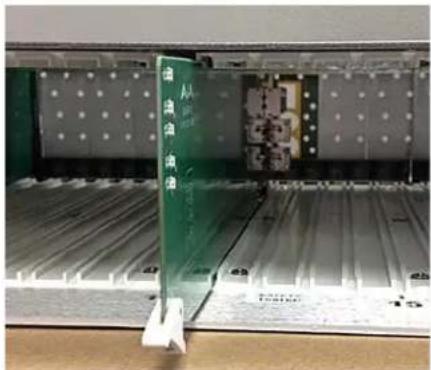
- Fully insert the card into the frame until the card is properly seated in the Rear Card. (Figure 4).
Figure 4. OG-FIBER Card Inserted Into Left Slot
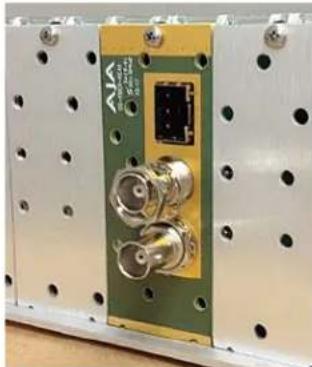
- Secure the card in the frame by the BNC connectors using the star washers and nuts provided (Figure 5).
Figure 5. BNC Star Washer and Nut Installation
natural_image
Close-up of a green electronic device with two coaxial connectors and a central connector, mounted on a white panel with perforated holes (no visible text or symbols)- Insert the SFP fiber module into the socket until it clicks and locks. The lever handle is on the left (Figure 6).
Figure 6. Fiber SFP Installation

natural_image
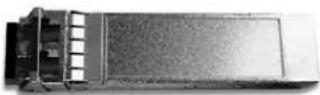
Close-up of a mechanical electronic component with connectors and mounting holes (no visible text or symbols)NOTE: The SFP module must match the card's capabilities for proper operation. Input and output triangles next to the fiber ports identify which are inputs and which are outputs.
Figure 7. An SFP Module
- Close the frame door as follows:
A. Slide the door into the frame.
B. Pull and release the door tabs to ensure the frame door is securely locked to the frame.
Cabling
Refer to Figure 1 on page 6 and Figure 2 on page 6 to identify the input and output signal connectors.
NOTE: Keep the protective rubber plug in the SFP module until the fiber cabling is actually connected to the module.
OG-FIBER-TR
Video Formats
• 100 Mbps - 3 Gbps, format agnostic
Video Input Digital
• 1-Channel independent 3G-SDI, SMPTE-259/292/424
• 1-Channel Single Mode LC Fiber connector, SMPTE-297
• Nominal Wavelength: 1310 nm
• Optical Sensitivity: -18dBm (min)
• Optical Power: -5dBm (min), 0dBm (max)
• Extinction Ratio: 7.5dB (Typ)
Video Output Digital
• 1-Channel independent 3G-SDI, SMPTE-259/292/424
• 1-Channel Single Mode LC Fiber connector, SMPTE-297
• Nominal Wavelength: 1310 nm
• Optical Sensitivity: -18dBm (min)
• Optical Power: -5dBm (min), 0dBm (max)
• Extinction Ratio: 7.5dB (Typ)
Reclocking
• 270 Mbps, 1.483 Gbps, 1.485 Gbps, 2.966 Gbps, 2.970 Gbps - Auto Select
- All other rates are passed through and not reclocked
Size (w x d x h)
- openGear standard form factor, front slot and rear card
- Two slots required for each card
Power
- openGear frame compatible, 2.5 watts max per card
Environment
- Safe Operating Temperature: 0 to 40 degrees C (32 to 104 degrees F)
- Safe Storage Temperature (Power OFF): -40 to 60 degrees C (-40 to 140 degrees F)
- Operating Relative Humidity: 10-90% noncondensing
- Operating Altitude: <3,000 meters (<10,000 feet)
Video Formats
• 100 Mbps - 3 Gbps, format agnostic
Video Input Digital
• 1-Channel independent 3G-SDI with SDI Loop out, SMPTE-259/292/424
Video Output Digital
• 1-Channel independent 3G-SDI Loop out, SMPTE-259/292/424
• 1-Channel Single Mode LC Fiber connector, SMPTE-297
• Nominal Wavelength: 1310 nm
• Optical Power: -5dBm (min), 0dBm (max)
• Extinction Ratio: 7.5dB (Typ)
Reclocking
• 270 Mbps, 1.483 Gbps, 1.485 Gbps, 2.966 Gbps, 2.970 Gbps - Auto Select
- All other rates are passed through and not reclocked
Size (w x d x h)
- openGear standard form factor, front slot and rear card
- Two slots required for each card
Power
- openGear frame compatible, 2.5 watts max per card
Environment
- Safe Operating Temperature: 0 to 40 degrees C (32 to 104 degrees F)
- Safe Storage Temperature (Power OFF): -40 to 60 degrees C (-40 to 140 degrees F)
- Operating Relative Humidity: 10-90% noncondensing
- Operating Altitude: <3,000 meters (<10,000 feet)
Video Formats
• 100 Mbps - 3 Gbps, format agnostic
Video Input Digital
• 1-Channel Single Mode LC Fiber connector, SMPTE-297
• Nominal Wavelength: 1260 - 1620 nm
• Optical Sensitivity: -18dBm (min)
Video Output Digital
• 1-Channel Dual matching 3G-SDI Outputs, SMPTE-259/292/424
Reclocking
• 270 Mbps, 1.483 Gbps, 1.485 Gbps, 2.966 Gbps, 2.970 Gbps - Auto Select
- All other rates are passed through and not reclocked
Size (w x d x h)
- openGear standard form factor, front slot and rear card
- Two slots required for each card
Power
- openGear frame compatible, 2.5 watts max per card
Environment
- Safe Operating Temperature: 0 to 40 degrees C (32 to 104 degrees F)
- Safe Storage Temperature (Power OFF): -40 to 60 degrees C (-40 to 140 degrees F)
- Operating Relative Humidity: 10-90% noncondensing
- Operating Altitude: <3,000 meters (<10,000 feet)
Video Formats
• 100 Mbps - 3 Gbps, format agnostic
Video Input Digital
• 2-Channel independent 3G-SDI Inputs, SMPTE-259/292/424
Video Output Digital
• 2-Channel independent Single Mode LC Fiber Outputs, SMPTE-297
• Nominal Wavelength: 1310 nm
• Optical Power: -5dBm (min), 0dBm (max)
• Extinction Ratio: 7.5dB (Typ)
Reclocking
• 270 Mbps, 1.483 Gbps, 1.485 Gbps, 2.966 Gbps, 2.970 Gbps - Auto Select
- All other rates are passed through and not reclocked
Size (w x d x h)
- openGear standard form factor, front slot and rear card
- Two slots required for each card
Power
- openGear frame compatible, 2.5 watts max per card
Environment
- Safe Operating Temperature: 0 to 40 degrees C (32 to 104 degrees F)
- Safe Storage Temperature (Power OFF): -40 to 60 degrees C (-40 to 140 degrees F)
- Operating Relative Humidity: 10-90% noncondensing
- Operating Altitude: <3,000 meters (<10,000 feet)
Video Formats
• 100 Mbps - 3 Gbps, format agnostic
Video Input Digital
• 2-Channel independent Single Mode LC Fiber Outputs, SMPTE-297
• Nominal Wavelength: 1260 - 1620 nm
• Optical Sensitivity: -18dBm (min)
Video Output Digital
• 2-Channel independent 3G-SDI Outputs, SMPTE-259/292/424
Reclocking
• 270 Mbps, 1.483 Gbps, 1.485 Gbps, 2.966 Gbps, 2.970 Gbps - Auto Select
- All other rates are passed through and not reclocked
Size (w x d x h)
- openGear standard form factor, front slot and rear card
- Two slots required for each card
Power
- openGear frame compatible, 2.5 watts max per card
Environment
- Safe Operating Temperature: 0 to 40 degrees C (32 to 104 degrees F)
- Safe Storage Temperature (Power OFF): -40 to 60 degrees C (-40 to 140 degrees F)
- Operating Relative Humidity: 10-90% noncondensing
- Operating Altitude: <3,000 meters (<10,000 feet)
OG-FIBER-TR-MM
Video Formats
• 100 Mbps - 3 Gbps, format agnostic
Video Input Digital
• 1-Channel independent 3G-SDI, SMPTE-259/292/424
• 1-Channel Multi-Mode LC Fiber connector, SMPTE-297
• Nominal Wavelength: 850 nm
• Optical Sensitivity: -15dBm (min)
• Optical Power: -7dBm (min), -2dBm (max)
• Extinction Ratio: 7.5dB (Typ)
Video Output Digital
• 1-Channel independent 3G-SDI, SMPTE-259/292/424
• 1-Channel Multi-Mode LC Fiber connector, SMPTE-297
• Nominal Wavelength: 850 nm
• Optical Sensitivity: -15dBm (min)
• Optical Power: -7dBm (min), -2dBm (max)
• Extinction Ratio: 7.5dB (Typ)
Reclocking
• 270 Mbps, 1.483 Gbps, 1.485 Gbps, 2.966 Gbps, 2.970 Gbps - Auto Select
- All other rates are passed through and not reclocked
Size (w x d x h)
- openGear standard form factor, front slot and rear card
- Two slots required for each card
Power
- openGear frame compatible, 2.5 watts max per card
Environment
- Safe Operating Temperature: 0 to 40 degrees C (32 to 104 degrees F)
- Safe Storage Temperature (Power OFF): -40 to 60 degrees C (-40 to 140 degrees F)
- Operating Relative Humidity: 10-90% noncondensing
- Operating Altitude: <3,000 meters (<10,000 feet)
Video Formats
• 100 Mbps - 3 Gbps, format agnostic
Video Input Digital
• 1-Channel independent 3G-SDI, SMPTE-259/292/424
Video Output Digital
• 1-Channel independent 3G-SDI Loop out, SMPTE-259/292/424
• 1-Channel Multi-Mode LC Fiber connector, SMPTE-297
• Nominal Wavelength: 850 nm
• Optical Power: -7dBm (min), -2dBm (max)
• Extinction Ratio: 7.5dB (Typ)
Reclocking
• 270 Mbps, 1.483 Gbps, 1.485 Gbps, 2.966 Gbps, 2.970 Gbps - Auto Select
- All other rates are passed through and not reclocked
Size (w x d x h)
- openGear standard form factor, front slot and rear card
- Two slots required for each card
Power
- openGear frame compatible, 2.5 watts max per card
Environment
- Safe Operating Temperature: 0 to 40 degrees C (32 to 104 degrees F)
- Safe Storage Temperature (Power OFF): -40 to 60 degrees C (-40 to 140 degrees F)
- Operating Relative Humidity: 10-90% noncondensing
- Operating Altitude: <3,000 meters (<10,000 feet)
Video Formats
• 100 Mbps - 3 Gbps, format agnostic
Video Input Digital
• 1-Channel independent 3G-SDI, SMPTE-259/292/424
• 1-Channel Multi-Mode LC Fiber connector, SMPTE-297
• Nominal Wavelength: 850 nm
• Optical Sensitivity: -15dBm (min)
Video Output Digital
• 1-Channel Dual matching 3G-SDI Outputs, SMPTE-259/292/424
Reclocking
• 270 Mbps, 1.483 Gbps, 1.485 Gbps, 2.966 Gbps, 2.970 Gbps - Auto Select
- All other rates are passed through and not reclocked
Size (w x d x h)
- openGear standard form factor, front slot and rear card
- Two slots required for each card
Power
- openGear frame compatible, 2.5 watts max per card
Environment
- Safe Operating Temperature: 0 to 40 degrees C (32 to 104 degrees F)
- Safe Storage Temperature (Power OFF): -40 to 60 degrees C (-40 to 140 degrees F)
- Operating Relative Humidity: 10-90% noncondensing
- Operating Altitude: <3,000 meters (<10,000 feet)
Video Formats
• 100 Mbps - 3 Gbps, format agnostic
Video Input Digital
• 2-Channel independent 3G-SDI Inputs, SMPTE-259/292/424
Video Output Digital
• 2-Channel independent Multi-Mode LC Fiber Outputs, SMPTE-297
• Nominal Wavelength: 850 nm
• Optical Power: -7dBm (min), -2dBm (max)
• Extinction Ratio: 7.5dB (Typ)
Reclocking
• 270 Mbps, 1.483 Gbps, 1.485 Gbps, 2.966 Gbps, 2.970 Gbps - Auto Select
- All other rates are passed through and not reclocked
Size (w x d x h)
- openGear standard form factor, front slot and rear card
- Two slots required for each card
Power
- openGear frame compatible, 2.5 watts max per card
Environment
- Safe Operating Temperature: 0 to 40 degrees C (32 to 104 degrees F)
- Safe Storage Temperature (Power OFF): -40 to 60 degrees C (-40 to 140 degrees F)
- Operating Relative Humidity: 10-90% noncondensing
- Operating Altitude: <3,000 meters (<10,000 feet)
Video Formats
• 100 Mbps - 3 Gbps, format agnostic
Video Input Digital
• 2-Channel independent Multi-Mode LC Fiber Outputs, SMPTE-297
• Nominal Wavelength: 850 nm
• Optical Sensitivity: -15dBm (min)
Video Output Digital
• 2-Channel independent 3G-SDI Outputs, SMPTE-259/292/424
Reclocking
• 270 Mbps, 1.483 Gbps, 1.485 Gbps, 2.966 Gbps, 2.970 Gbps - Auto Select
- All other rates are passed through and not reclocked
Size (w x d x h)
- openGear standard form factor, front slot and rear card
- Two slots required for each card
Power
- openGear frame compatible, 2.5 watts max per card
Environment
- Safe Operating Temperature: 0 to 40 degrees C (32 to 104 degrees F)
- Safe Storage Temperature (Power OFF): -40 to 60 degrees C (-40 to 140 degrees F)
- Operating Relative Humidity: 10-90% noncondensing
- Operating Altitude: <3,000 meters (<10,000 feet)
Appendix B – Safety and Compliance
Federal Communications Commission (FCC) Compliance Notices
Class A Interference Statement
This equipment has been tested and found to comply with the limits for a Class A digital device, pursuant to Part 15, Subpart B of the FCC Rules. These limits are designed to provide reasonable protection against harmful interference in a residential installation. This equipment generates, uses, and can radiate radio frequency energy and, if not installed and used in accordance with the instructions, may cause harmful interference to radio communications. However, there is no guarantee that interference will not occur in a particular installation. If this equipment does cause harmful interference to radio or television reception, which can be determined by turning the equipment off and on, the user is encouraged to try to correct the interference by one or more of the following measures:
- Reorient or relocate the receiving antenna.
- Increase the separation between the equipment and receiver.
- Connect the equipment into an outlet on a circuit different from that to which the receiver is connected.
- Consult the dealer or an experienced radio/TV technician for help.
FCC Caution
This device complies with Part 15 of the FCC Rules. Operation is subject to the following two conditions: (1) This device may not cause harmful interference, and (2) this device must accept any interference received, including interference that may cause undesired operation.
Canadian ICES Statement
Canadian Department of Communications Radio Interference Regulations
This digital apparatus does not exceed the Class A limits for radio-noise emissions from a digital apparatus as set out in the Radio Interference Regulations of the Canadian Department of Communications. This Class A digital apparatus complies with Canadian ICES-003.
European Union and European Free Trade Association (EFTA) Regulatory Compliance
This equipment may be operated in the countries that comprise the member countries of the European Union and the European Free Trade Association. These countries, listed in the following paragraph, are referred to as The European Community throughout this document:
AUSTRIA, BELGIUM, BULGARIA, CYPRUS, CZECH REPUBLIC, DENMARK, ESTONIA, FINLAND, FRANCE, GERMANY, GREECE, HUNGARY, IRELAND, ITALY, LATVIA, LITHUANIA, LUXEMBOURG, MALTA, NETHERLANDS, POLAND, PORTUGAL, ROMANIA, SLOVAKIA, SLOVENIA, SPAIN, SWEDEN, UNITED KINGDOM, ICELAND, LICHTENSTEIN, NORWAY, SWITZERLAND
Marking by this symbol indicates compliance with the Essential Requirements of the EMC Directive of the European Union 2004/108/EC.

This equipment meets the following conformance standards:
EN 60065: 2014 (T-Mark License),
IEC 60065: 2014 (CB Scheme Report/Certificate)
Additional licenses issued for specific countries available on request.
Emissions
EN 55032: 2012, CISPR 32: 2015,
EN 61000-3-2: 2014, EN 61000-3-3: 2013
Immunity
EN 55103-2: 2009, EN 61000-4-2:2009, EN 61000-4-3: 2006 + A1:2008 + A2:2010,
EN 61000-4-4: 2004 + A1:2010, EN 61000-4-5:2006, EN 61000-4-6:2009,
EN 61000-4-11:2004
Environments: E2, E3 and E4
The product is also licensed for additional country specific standards as required for the International Marketplace.
Laser
EN 60825-1: 2007 and EN 60825-2: 2004 +A2: 2010,
CDRH Compliant Class 1 (TUV Cert No. 50135086)
Also Licensed for Standards: FDA 21 CFR 1040.10 and 1040.11

Warning! This is a Class A product. In a domestic environment, this product may cause radio interference, in which case, the user may be required to take appropriate measures.
This symbol on the product or its packaging indicates that this product must not be disposed of with your other household waste. Instead, it is your responsibility to dispose of your waste equipment by handing it over to a designated collection point for the recycling of waste electrical and electronic equipment. The separate collection and recycling of your waste equipment at the time of disposal will help conserve natural resources and ensure that it is recycled in a manner that protects human health and the environment. For more information about where you can drop off your waste for recycling, please contact your local authority, or where you purchased your product.
Korea KCC Compliance Statement
Taiwan Compliance Statement
警告使用者:
This is a Class A product based on the standard of the Bureau of Standards, Metrology and Inspection (BSMI) CNS 13438, Class A. In a domestic environment this product may cause radio interference in which case the user may be required to take adequate measures.
Japanese Compliance Statement
This is a Class A product based on the standard of the VCCI Council (VCCI-32: 2016). If this equipment is used in a domestic environment, radio interference may occur, in which case, the user may be required to take corrective actions.
Chinese Compliance Statement
This product has been tested to the following Chinese standards: GB13837-2012, GB8898-2011, and GB17625.1-2012
This product meets the requirements of implementation rules for compulsory certification (REF NO. CNCA-01C-17:2014) under certificate number 2016010805841604.
Translated Warning and Caution Messages
The following caution statements, warning conventions, and warning messages apply to this product and manual.

Warning Symbol

Hazard Symbol

Caution Symbol
Before Operation Please Read These Instructions

Warning! Read and follow all warning notices and instructions marked on the product or included in the documentation.
Warning! Do not use this device near water and clean only with a dry cloth.
Warning! Do not block any ventilation openings. Install in accordance with the manufacturer's instructions.
Warning! Do not install near any heat sources such as radiators, heat registers, stoves, or other apparatus (including amplifiers) that produce heat.
Warning! Do not defeat the safety purpose of the polarized or grounding-type plug. A polarized plug has two blades with one wider than the other. A grounding type plug has two blades and a third grounding prong. The wide blade or the third prong are provided for your safety. If the provided plug does not fit into your outlet, consult an electrician for replacement of the obsolete outlet.
Warning! Since the Mains plug is used as the disconnection for the device, it must remain readily accessible and operable.
Warning! Protect the power cord from being walked on or pinched particularly at plugs, convenience receptacles, and the point where they exit from the device.
Warning! Unplug this device during lightning storms or when unused for long periods of time.
Warning! Refer all servicing to qualified service personnel. Servicing is required when the device has been damaged in any way, such as power-supply cord or plug is damaged, liquid has been spilled or objects have fallen into the device, the device has been exposed to rain or moisture, does not operate normally, or has been dropped.
Warning! Do not open the chassis. There are no user-serviceable parts inside. Opening the chassis will void the warranty unless performed by an AJA service center or licensed facility.
Warning! Disconnect the external AC power supply line cord(s) from the mains power before moving the unit.
Warning! Only use attachments and accessories specified and/or sold by the manufacturer.
Warning! Active fiber-optic cables emit radiation invisible to the human eye. Do not look directly at the end of an active fiber-optic cable or the fiber connector on an OG-FIBER-2T, OG-FIBER-TR, OG-FIBER-T, OG-FIBER-2T-MM, OG-FIBER-TR-MM, OG-FIBER-T-MM; these models are Class 1 Laser Products.

CLASS 1 LASER PRODUCT
Warranty Information
Limited Warranty
AJA Video Systems, Inc. (AJA Video) warrants that this product will be free from defects in materials and workmanship for a period of five years from the date of purchase. If a product proves to be defective during this warranty period, AJA Video, at its option, will either repair the defective product without charge for parts and labor, or will provide a replacement in exchange for the defective product.
In order to obtain service under this warranty, you the Customer, must notify AJA Video of the defect before the expiration of the warranty period and make suitable arrangements for the performance of service. The Customer shall be responsible for packaging and shipping the defective product to a designated service center nominated by AJA Video, with shipping charges prepaid. AJA Video shall pay for the return of the product to the Customer if the shipment is to a location within the country in which the AJA Video service center is located. Customer shall be responsible for paying all shipping charges, insurance, duties, taxes, and any other charges for products returned to any other locations.
This warranty shall not apply to any defect, failure or damage caused by improper use or improper or inadequate maintenance and care. AJA Video shall not be obligated to furnish service under this warranty a) to repair damage resulting from attempts by personnel other than AJA Video representatives to install, repair or service the product, b) to repair damage resulting from improper use or connection to incompatible equipment, c) to repair any damage or malfunction caused by the use of non-AJA Video parts or supplies, or d) to service a product that has been modified or integrated with other products when the effect of such a modification or integration increases the time or difficulty of servicing the product.
THIS WARRANTY IS GIVEN BY AJA VIDEO IN LIEU OF ANY OTHER WARRANTIES, EXPRESS OR IMPLIED. AJA VIDEO AND ITS VENDORS DISCLAIM ANY IMPLIED WARRANTIES OF MERCHANTABILITY OR FITNESS FOR A PARTICULAR PURPOSE. AJA VIDEO'S RESPONSIBILITY TO REPAIR OR REPLACE DEFECTIVE PRODUCTS IS THE WHOLE AND EXCLUSIVE REMEDY PROVIDED TO THE CUSTOMER FOR ANY INDIRECT, SPECIAL, INCIDENTAL OR CONSEQUENTIAL DAMAGES IRRESPECTIVE OF WHETHER AJA VIDEO OR THE VENDOR HAS ADVANCE NOTICE OF THE POSSIBILITY OF SUCH DAMAGES.

- OG-Fiber-Series openGear Card
- Installation and Operation Guide
- Trademarks
- Copyright
- Contacting AJA Support
- Contents
- Notices 2
- Chapter 1 - OG-FIBER-Series .....4
- Appendix A – Specifications ..... 11
- Appendix B – Safety and Compliance ..... 21
- Warranty Information 29
- Chapter 1 – OG-FIBER-Series
- Card Overview
- Ten AJA cards are available:
- Features
- Indicators
- 2T and 2R Cards
- TR Cards
- Single Channel Cards
- openGear and AJA
- Parts Supplied
- Installation
- Summary
- Unpacking
- Rear Fiber Card Installation
- Front Fiber Card Installation
- Cabling
- OG-FIBER-TR
- Video Formats
- Video Input Digital
- Video Output Digital
- Reclocking
- Size (w x d x h)
- Power
- Environment
- OG-FIBER-TR-MM
- Appendix B – Safety and Compliance
- Federal Communications Commission (FCC) Compliance Notices
- Class A Interference Statement
- FCC Caution
- Canadian ICES Statement
- European Union and European Free Trade Association (EFTA) Regulatory Compliance
- Korea KCC Compliance Statement
- Taiwan Compliance Statement
- 警告使用者:
- Japanese Compliance Statement
- Chinese Compliance Statement
- Translated Warning and Caution Messages
- Before Operation Please Read These Instructions
- Warranty Information
- Limited Warranty
Brand : AJA
Model : OG-FIBER-T
Category : AV Extender