
MLM 84 Flex55 - Flat Screen Mount Extron - Free user manual and instructions
Find the device manual for free MLM 84 Flex55 Extron in PDF.


| Product Type | Mounting Kit |
| Brand | Extron |
| Model | MLM 84 Flex55 |
| Category | Flat Panel Display Mount |
| Compatible Devices | Extron MLC Plus 84 EU modules, Flex55 modules |
| Installation Options | Surface mount box (SMB 213), standard 3-gang EU junction box, European raceway channel |
| Kit Contents | Mounting frame, mounting bracket, attachment screws, spacers, divider bar, module removal tool |
| Mounting Frame Capacity | One MLC Plus 84 EU module and one Flex55 full module, or three Flex55 full modules |
| Material | Metal (bracket, frame) |
| Color | Black (typical) |
| Mounting Type | Wall or surface mount |
| Compliance | Safety and regulatory standards per Extron guide |
| Maintenance | Clean with dry cloth; do not use liquids |
| Safety Notes | Ensure correct wiring before installing modules; use provided screws and follow instructions |
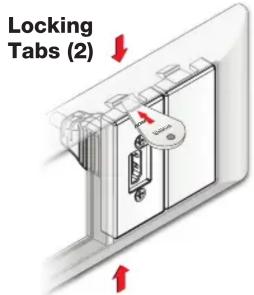
| Removal | Use included removal tool; for half modules, release tabs on top and bottom |
| Spare Parts | Contact Extron for replacement parts |
| Repairability | Not user-serviceable; contact Extron support |
| Included Screws | M3 screws (6 provided) |
Frequently Asked Questions - MLM 84 Flex55 Extron
User questions about MLM 84 Flex55 Extron
0 question about this device. Answer the ones you know or ask your own.
Ask a new question about this device
Download the instructions for your Flat Screen Mount in PDF format for free! Find your manual MLM 84 Flex55 - Extron and take your electronic device back in hand. On this page are published all the documents necessary for the use of your device. MLM 84 Flex55 by Extron.
USER MANUAL MLM 84 Flex55 Extron
MLM 84 Flex55 Mounting Kit • Installation Guide
Extron MLM 84 Flex55 Mounting Kits are designed to mount Extron MLC Plus 84 EU modules with other Flex55 modules. The kit can mount to an SMB 213 or standard 3-gang EU junction box. The mounting kits include a mounting frame, mounting bracket, attachment screws, spacers, divider bar, and a module removal tool. Each bracket opening holds one MLC Plus 84 EU module and one full module. Alternatively with the divider bar in place on the mounting frame, you can install three Flex55 full modules.
Kit Contents

NOTE: Some modules may be difficult to remove once installed. Make sure the wiring is correct before snapping in each module.
Installation into a Surface Mount Box or Wall Mount Junction Box
Removing the Bracket Divider
To allow for the installation of the wider MLC Plus 84 EU module, one of the bracket dividers (1) on the mounting bracket is designed to be cut away and removed.
Using a pair of metal snips, clip off the tabs attaching the divider and dispose of the divider when it is free (②).

Installation in a Surface Mount Box
Follow these steps to install the frame and modules in a surface mount box.
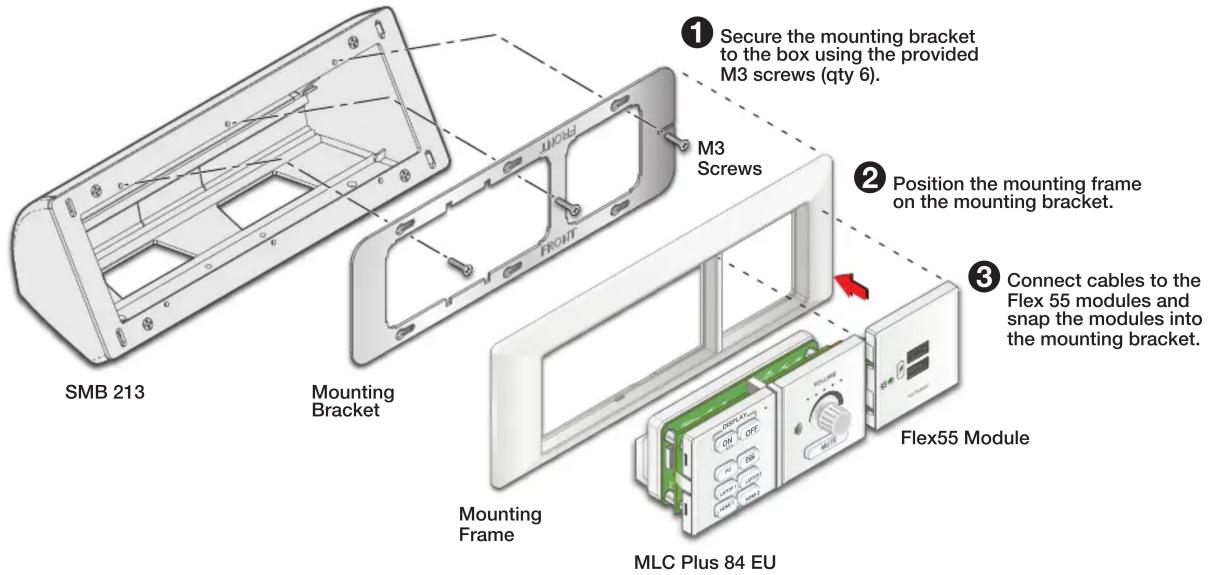
Installation in a European Raceway Channel
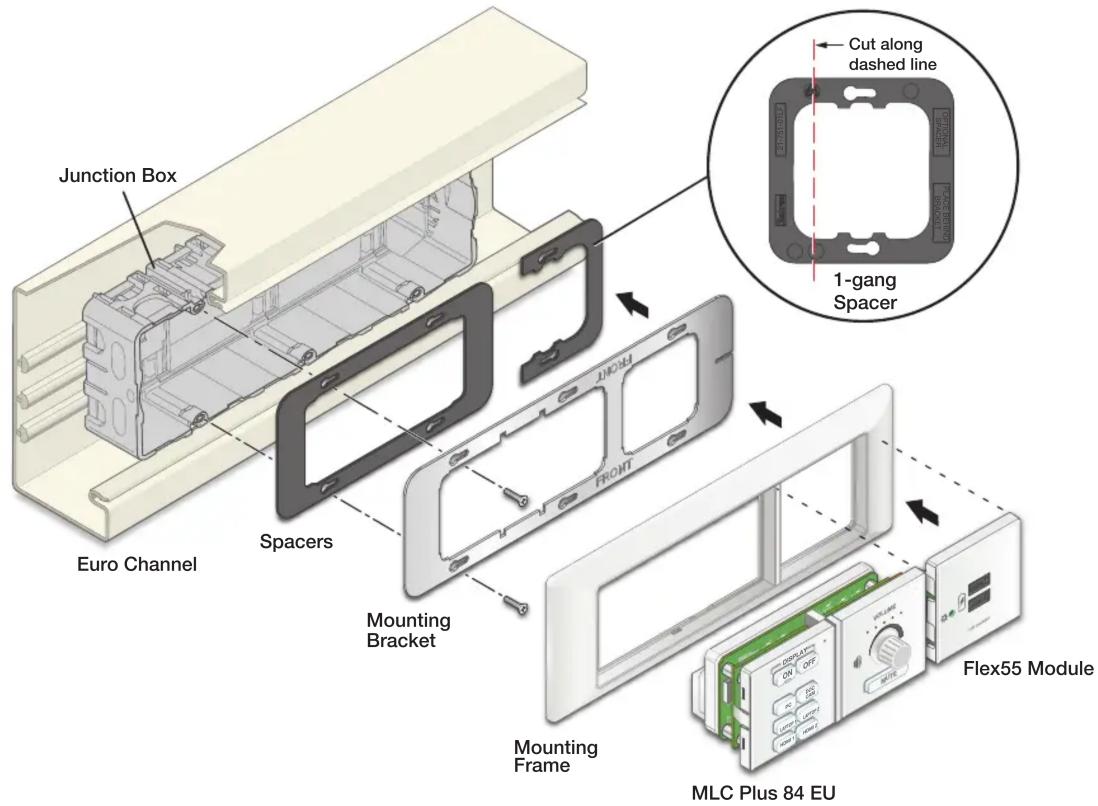
To install the frame and modules into a raceway, perform the following:
- Carefully cut off one side of the 1-gang spacer (see the inset illustration for the cutting location).
- Install the spacers and mounting bracket onto the junction box. Align the outer edges of the spacers with the mounting bracket and secure them using the six provided M3 screws (see figure below).
- Attach the mounting frame to the bracket.
- Install the MLC Plus 84 EU and the Flex55 module into the mounting frame.
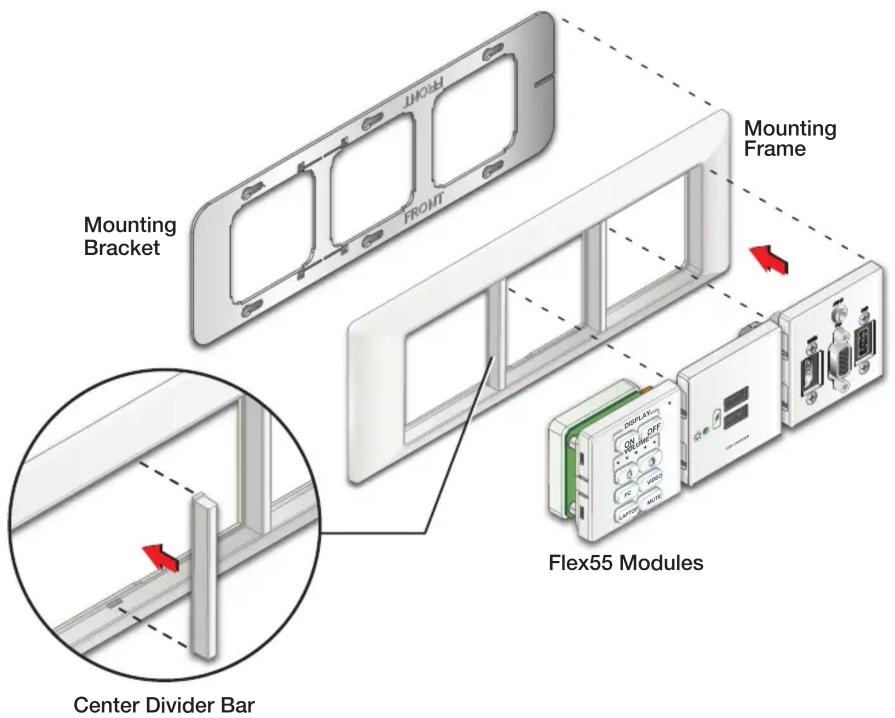
Installing Three Flex55 Modules in Frame
This frame can also be used to mount three single-gang Flex55 modules without the MLC Plus 84 EU module if desired.
NOTE: Do not cut the divider from the mounting bracket.
To install the three modules in the frame:
- Install the mounting bracket to the surface mount or wall box (see the instructions on the previous pages).
- Install the center divider bar in the open spot on the mounting frame (see the inset figure at right).
- Attach mounting frame to bracket.
- Install the Flex55 modules in the frame.
Removing the MLC Plus 84 EU or Flex55 Module
Follow these steps to remove an installed device.


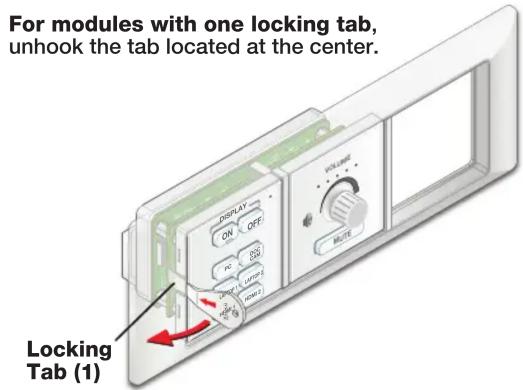
For half modules, the tabs are located on the top and bottom.
For information on safety guidelines, regulatory compliances, EMI/EMF compatibility, accessibility, and related topics, see the Extron Safety and Regulatory Compliance Guide on the Extron website.
- MLM 84 Flex55 Mounting Kit • Installation Guide
- Installation into a Surface Mount Box or Wall Mount Junction Box
- Removing the Bracket Divider
- Installation in a Surface Mount Box
- Installation in a European Raceway Channel
- Installing Three Flex55 Modules in Frame
- Removing the MLC Plus 84 EU or Flex55 Module
Brand : Extron
Model : MLM 84 Flex55
Category : Flat Screen Mount