
RM-MCL - Controller Sonifex - Free user manual and instructions
Find the device manual for free RM-MCL Sonifex in PDF.


| Product Type | Monitor Light Controller |
| Model | RM-MCL |
| Brand | Sonifex |
| Category | Studio Lighting Controller |
| Dimensions (WxDxH) | 48 cm x 10.8 cm x 4.3 cm (19" x 4.3" x 1.7") |
| Weight (Net) | 1.3 kg (2.9 lbs) |
| Power Supply | 85-264 VAC, 47-63 Hz (auto-ranging) |
| Power Consumption | Peak 10W, average 2W |
| Fuse Rating | 1A anti-surge, 20 x 5mm |
| Front Panel Controls | 3 illuminated buttons: Transmit (TX), Standby, Rehearse (REH) |
| Front Panel Indicators | Blue power LED, button LEDs (red/blue/white) with adjustable brightness |
| LED Brightness Adjustment | Press Standby button during power-on (1 sec LED test) to cycle through 3 levels |
| Rear Panel Connectors | 1x 15-pin D-sub female (remote I/O), 1x IEC mains input |
| Remote I/O Port Functions | 2 opto-isolated drivers (TX, REH), 2 open-collector tallies (TX, REH), 5 active-low inputs (TX, REH, Standby, DIM, CUT), +12VDC @ 200mA fused |
| Light Control Functions | TX: activate transmit light; REH: activate rehearsal light; Standby: initiates 2-minute countdown then switches to TX |
| Standby Countdown | 2 minutes; TX and REH flash alternately; can be cancelled by pressing Standby again |
| Compatible Studio Signs | Sonifex SignalLED range (twin signs supported) |
| Button Customization | TX, Standby, REH buttons can be replaced with different buttons |
| Audio Features | None (dedicated light controller only) |
| Operating Temperature Range | 0°C to 50°C |
| Safety Class | Class I (protective earth connection required) |
Frequently Asked Questions - RM-MCL Sonifex
User questions about RM-MCL Sonifex
0 question about this device. Answer the ones you know or ask your own.
Ask a new question about this device
Download the instructions for your Controller in PDF format for free! Find your manual RM-MCL - Sonifex and take your electronic device back in hand. On this page are published all the documents necessary for the use of your device. RM-MCL by Sonifex.
USER MANUAL RM-MCL Sonifex
Reference Monitor Controllers
RM-MC1L
Monitor Controller, Single Stereo Input & Output With Light Control
RM-MC4L
Monitor Controller, 4 Stereo Inputs, 1 Output With Light Control
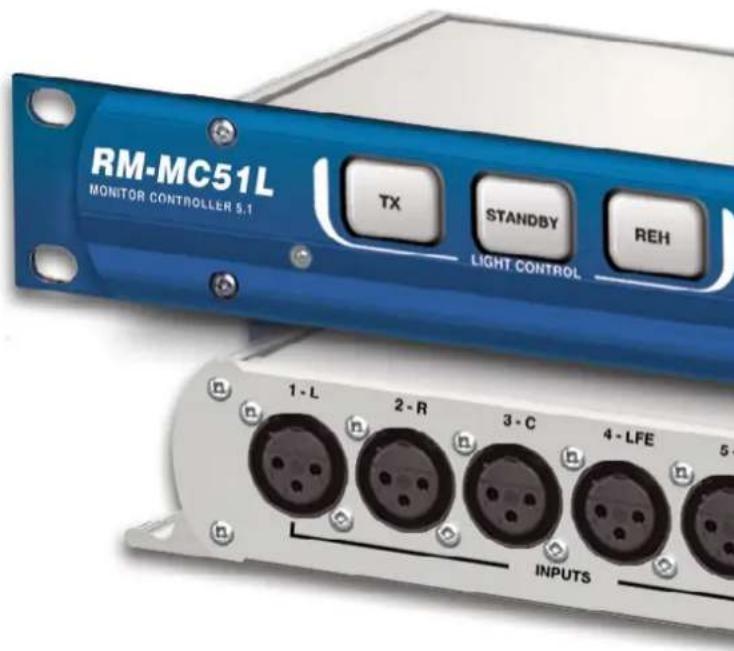
RM-MC51L
Monitor Controller, 5.1 Stereo Inputs & Outputs With Light Control
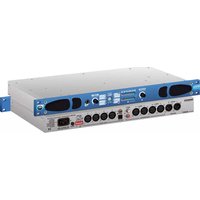
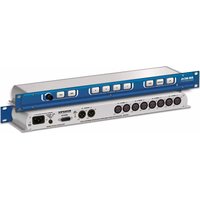
RM-MCL
Monitor Light Controller, 3 Button, TX-STANDBY-REH
Manufacturers of audio & video products for radio & TV broadcasters
SONIFEX
Reference Monitor Controllers Handbook
For the latest Sonifex handbook information please visit the Sonifex website at www.sonifex.co.uk
This handbook is for use with the following products:
RM-MC1L Monitor Controller, Single Stereo Input & Output With Light Control
RM-MC4L Monitor Controller, 4 Stereo Inputs, 1 Output With Light Control
RM-MC51L Monitor Controller, 5.1 Stereo Inputs & Outputs With Light Control
RM-MCL Monitor Light Controller, 3 Button, TX-STANDBY-REH
AW10925
Stock Code: 30-188
Revision 2.04, January 2020
©Sonifex Ltd, 2020
All Rights Reserved
Sonifex Ltd, 61, Station Road, Irthlingborough,
Northants, NN9 5QE, England.
Tel: +44 (0)1933 650 700
Fax: +44 (0)1933 650 726
Email: sales@sonifex.co.uk
Website: http://www.sonifex.co.uk
Information in this document is subject to change without notice and does not represent a
commitment on the part of the vendor. Sonifex Ltd shall not be liable for any loss or damage
whatsoever arising from the use of information or any error contained in this manual.
No part of this manual may be reproduced or transmitted in any form or by any means, electronic or mechanical, including photocopying, recording, information storage and retrieval systems, for any purpose other than the purchaser's personal use, without the express written permission of Sonifex Ltd. Unless otherwise noted, all names of companies, products and persons contained herein are part of a completely fictitious adaptation and are designed solely to document the use of Sonifex product.
Made in the UK by SONIFEX
Contents & Figures
Contents
Product Warranty - 2 Year i
Sonifex Warranty & Liability Terms & Conditions i
-
Definitions i
-
Warranty
Unpacking Your Product iii
Repairs & Returns iii
Safety & Installation of Mains Operated Equipment v
Voltage Setting Checks v
Fuse Rating
Power Cable & Connection v
WEEE Directive vi
RoHS Directive vi
Atmosphere
1 Reference Monitor Controllers Introduction 1
2 RM-MC1L Monitor Controller
Front Panel Controls & Indicators 3
Power LED 3
Light Control Buttons 3
DIM Button 3
Setting the Brightness of the Front Panel LEDs 4
CUT Button 4
Changing the Button Action From Latching to Momentary or Auto 4
Rear Panel Controls & Connectors 5
DIM Level Adjustment Potentiometer 5
Audio Inputs 5
Audio Outputs 5
Remote Port 5
Mains Power 6
3 RM-MC4L Monitor Controller
Front Panel Controls & Indicators 8
Input Select Buttons 8
Rear Panel Controls & Connectors 8
Audio Inputs 8
4 RM-MC51L Monitor Controller 9
Front Panel Controls & Indicators 10
Rear Panel Controls & Connectors 10
Audio Inputs 10
Audio Outputs 10
5 RM-MCL Monitor Controller 11
Front Panel Controls & Indicators 11
Light Control Buttons 11
Rear Panel Controls & Connectors 12
6 Technical Specification 13
Figures
Fig 2-1: RM-MC1L Block Diagram 2
Fig 2-2: RM-MC1L Monitor Controller, Single Stereo Input
& Output With Light Control 3
Fig 2-3: Rear View of RM-MC1L 5
Fig 2-4: GPIO Diagram 6
Fig 3-1: RM-MC4L Block Diagram 7
Fig 3-2: RM-MC4L Monitor Controller, 4 Stereo Inputs, 1 Stereo
Output With Light Control 8
Fig 3-3: Rear View of RM-MC4L 8
Fig 4-1: RM-MC51LBlock Diagram 9
Fig 4-2: RM-MC51L Monitor Controller, 5.1 Stereo Inputs
& Outputs With Light Control 10
Fig 4-3: Rear View of RM-MC51L 10
Fig 5-1: RM-MCL Block Diagram 11
Fig 5-2: RM-MCL Monitor Light Controller, 3 Button,
TX-STANDBY-REH 11
Fig 5-3: Rear View of RM-MC1L 12
Warranty Registration
SONIFEX
Register Online for an Extended 2 Year Warranty
As standard, Sonifex products are supplied with a 1 year back to base warranty.
If you register the product online, you can increase your product warranty to 2 years and we can also keep you informed of any product design improvements or modifications.
Product: ____ Serial No: ____
To register your product, please go online to www.sonifex.co.uk/register
Product Warranty - 2 Year Extended
As standard, Sonifex products are supplied with a 1 year back to base warranty. In order to register the date of purchase and so that we can keep you informed of any product design improvements or modifications, it is important to complete the warranty registration online. Additionally, if you register the product on the Sonifex website, you can increase your product warranty to 2 years. Go to the Sonifex website at: http://www.sonifex.co.uk/technical/register/index.asp to apply for your 2 year warranty.
Note: For your own records the product serial number is recorded on the CE certification page of this handbook.
Sonifex Warranty & Liability Terms & Conditions
1. Definitions
'the Company' means Sonifex Ltd and where relevant includes companies within the same group of companies as Sonifex Limited.
'the Goods' means the goods or any part thereof supplied by the Company and where relevant includes: work carried out by the Company on items supplied by the Purchaser; services supplied by the Company; and software supplied by the Company.
'the Purchaser' means the person or organisation who buys or has agreed to buy the Goods.
'the Price' means the Price of the Goods and any other charges incurred by the Company in the supply of the Goods.
'the Warranty Term' is the length of the product warranty which is usually 12 months from the date of despatch; except when the product has been registered at the Sonifex website when the Warranty Term is 24 months from the date of despatch.
'the Contract' means the quotation, these Conditions of Sale and any other document incorporated in a contract between the Company and the Purchaser.
This is the entire Contract between the parties relating to the subject matter hereof and may not be changed or terminated except in writing in accordance with the provisions of this Contract. A reference to the consent, acknowledgement, authority or agreement of the Company means in writing and only by a director of the Company.
2. Warranty
a. The Company agrees to repair or (at its discretion) replace Goods which are found to be defective (fair wear and tear excepted) and which are returned to the Company within the Warranty Term provided that each of the following are satisfied:
i. notification of any defect is given to the Company immediately upon its becoming apparent to the Purchaser;
ii. the Goods have only been operated under normal operating conditions and have only been subject to normal use (and in particular the Goods must have been correctly connected and must not have been subject to high voltage or to ionising radiation and must not have been used contrary to the Company's technical recommendations);
iii. the Goods are returned to the Company's premises at the Purchaser's expense;
iv. any Goods or parts of Goods replaced shall become the property of the Company;
v. no work whatsoever (other than normal and proper maintenance) has been carried out to the Goods or any part of the Goods without the Company's prior written consent;
Warranty
vi. the defect has not arisen from a design made, furnished or specified by the Purchaser;
vii. the Goods have been assembled or incorporated into other goods only in accordance with any instructions issued by the Company;
viii. the defect has not arisen from a design modified by the Purchaser;
ix. the defect has not arisen from an item manufactured by a person other than the Company. In respect of any item manufactured by a person other than the Company, the Purchaser shall only be entitled to the benefit of any warranty or guarantee provided by such manufacturer to the Company.
b. In respect of computer software supplied by the Company the Company does not warrant that the use of the software will be uninterrupted or error free.
c. The Company accepts liability:
(i) for death or personal injury to the extent that it results from the negligence of the Company, its employees (whilst in the course of their employment) or its agents (in the course of the agency);
(ii) for any breach by the Company of any statutory undertaking as to title, quiet possession and freedom from encumbrance.
d. Subject to conditions (a) and (c) from the time of despatch of the Goods from the Company's premises the Purchaser shall be responsible for any defect in the Goods or loss, damage, nuisance or interference whatsoever consequential economic or otherwise or wastage of material resulting from or caused by or to the Goods. In particular the Company shall not be liable for any loss of profits or other economic losses. The Company accordingly excludes all liability for the same.
e. At the request and expense of the Purchaser the Company will test the Goods to ascertain performance levels and provide a report of the results of that test. The report will be accurate at the time of the test, to the best of the belief and knowledge of the Company, and the Company accepts no liability in respect of its accuracy beyond that set out in Condition (a).
f. Subject to Condition (e) no representation, condition, warranty or other term, express or implied (by statute or otherwise) is given by the Company that the Goods are of any particular quality or standard or will enable the Purchaser to attain any particular performance or result, or will be suitable for any particular purpose or use under specific conditions or will provide any particular capacity, notwithstanding that the requirement for such performance, result or capacity or that such particular purpose or conditions may have been known (or ought to have been known) to the Company, its employees or agents.
g. (i) To the extent that the Company is held legally liable to the Purchaser for any single breach of contract, tort, representation or other act or default, the Company's liability for the same shall not exceed the price of the Goods.
(ii) The restriction of liability in Condition (g)(i) shall not apply to any liability accepted by the Seller in Condition (c).
h. Where the Goods are sold under a consumer transaction (as defined by the Consumer Transactions (Restrictions on Statements) Order 1976) the statutory rights of the Purchaser are not affected by these Conditions of Sale.
Unpacking Your Product
Each product is shipped in protective packaging and should be inspected for damage before use. If there is any transit damage take pictures of the product packaging and notify the carrier immediately with all the relevant
details of the shipment. Packing materials should be kept for inspection and also for if the product needs to be returned.
The product is shipped with the following equipment so please check to ensure that you have all of the items below. If anything is missing, please contact the supplier of your equipment immediately.
Item
Quantity
Product unit 1
IEC mains lead fitted with moulded mains plug 1
Handbook and warranty card 1
GSM stubby antenna 1
If you require a different power lead, please let us know when ordering the product.
Repairs & Returns
Please contact Sonifex or your supplier if you have any problems with your Sonifex product. Email technical.support@sonifex.co.uk for the repair/ upgrade/returns procedure, or for support & questions regarding the product operation.
CE Conformity
The products in this manual comply with the essential requirements of the relevant European health, safety and environmental protection legislation.
The technical justification file for this product is available at Sonifex Ltd.
The declaration of conformity can be found at: http://www.sonifex.co.uk/declarations
Safety & Installation of Mains Operated Equipment
There are no user serviceable parts inside the equipment. If you should ever need to look inside the unit, always disconnect the mains supply before removing the equipment covers. The cover is connected to earth by means of the fixing screws. It is essential to maintain this earth/ground connection to ensure a safe operating environment and provide electromagnetic shielding.
Voltage Setting Checks
Ensure that the machine operating voltage is correct for your mains power supply by checking the box in which your product was supplied. The voltage is shown on the box label. The available voltage settings are 115V, or 230V. Please note that all products are either switchable between 115V and 230V, or have a universal power supply.
Fuse Rating
The product is supplied with a single fuse in the live conducting path of the mains power input. For reasons of safety it is important that the correct rating and type of fuse is used. Incorrectly rated fuses could present a possible fire hazard, under equipment fault conditions. The active fuse is fitted on the outside rear panel of the unit.
Power Cable & Connection
An IEC power connector is supplied with the product which has a moulded plug attached.
The mains plug or IEC power connector is used as the disconnect device. The mains plug and IEC power connector shall remain readily operable to disconnect the apparatus in case of a fault or emergency.
The mains lead is automatically configured for the country that the product is being sent to, from one of:
CE Certification
Territory Voltage IEC Lead Type Image
| UK & Middle East 230V UK 3 pin to IEC lead | |
| Europe 230V | European Schuko round 2 pin to IEC lead |
| USA, Canada and South America | 115V 3 flat pin to IEC lead |
| Australia & New Zealand | 230V Australasian 3 flat pin to IEC lead |
Connect the equipment in accordance with the connection details and before applying power to the unit, check that the machine has the correct operating voltage for your mains power supply.
This apparatus is of a class I construction. It must be connected to a mains socket outlet with a protective earthing connection.
Important note: If there is an earth/ground terminal on the rear panel of the product then it must be connected to Earth.
WEEE Directive

The Waste Electrical and Electronic Equipment (WEEE) Directive was agreed on 13 February 2003, along with the related Directive 2002/95/EC on Restrictions of the use of certain Hazardous Substances in electrical and electronic
equipment (RoHS). The Waste Electrical and Electronic Equipment Directive (WEEE) aims to minimise the impacts of electrical and electronic equipment on the environment during their life times and when they become waste. All products manufactured by Sonifex Ltd have the WEEE directive label placed on the case. Sonifex Ltd will be happy to give you information about local organisations that can reprocess the product when it reaches its "end of use", or alternatively all products that have reached "end of use" can be returned to Sonifex and will be reprocessed correctly free of charge.
Atmosphere/Environment
This apparatus should be installed in an area that is not subject to excessive temperature variation (<0°C, >50°C), moisture, dust or vibration.
This apparatus shall not be exposed to dripping or splashing, and no objects filled with water, such as vases shall be placed on the apparatus.
1 Reference Monitor Controllers Introduction

The Reference Monitor Controllers are a range of 1U rack-mount audio production control units, for providing source selection, volume, DIM and CUT controls for external analogue
monitors, together with light controls for the Sonifex SignalLED range of studio signs, or similar.
Each of the products has a light control section. This section has 3 buttons: Transmit (TX), STANDBY and Rehearse (REH). The TX and REH buttons control opto-isolated outputs on the rear panel remote connector, and these provide a direct control interface to the Sonifex SignalLED illuminated studio sign, allowing twin signs to be controlled individually.
The Standby button initiates a 2 minute countdown where the TX and REH buttons and their associated remote outputs flash alternately. After the 2 minutes has elapsed, the TX output remains on.
The remote port also has open-collector tally outputs for Transmit (TX) and Rehearse (REH), as well as remote input control for the audio controls DIM and CUT, and the light controls TX, Standby and REH. There is also a +12VDC source at 200mA maximum.
The TX, STANDBY and REH buttons can optionally be replaced if you want to use different buttons for other applications.
There are four Monitor Controller products:
RM-MC1L Monitor Controller, Single Stereo Input & Output With Light Control
RM-MC4L Monitor Controller, 4 Stereo Inputs, 1 Output With Light Control
RM-MC51L Monitor Controller, 5.1 Stereo Inputs & Outputs With Light Control
RM-MCL Monitor Light Controller, 3 Button, TX-STANDBY-REH
2 RM-MC1L Monitor Controller
2 RM-MC1L Monitor Controller
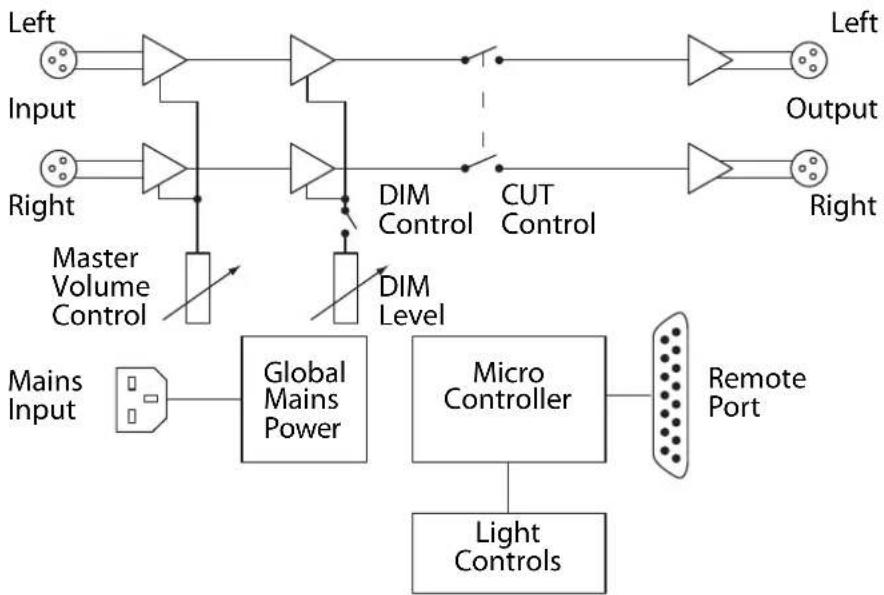
The RM-MC1L is a stereo unit with a single stereo balanced analogue input and output. Useful in a production environment, the unit allows you to control the audio level to external monitors and to DIM the audio, or CUT it completely with simple front panel controls, or remote external inputs. It has a master volume control that adjusts the attenuation on the output
channels from 0dB down to -86dB. A CUT control mutes the audio outputs when enabled, whilst a DIM control attenuates the audio output channels by a pre-set amount from -2dB to -23dB. All of the buttons on the front panel are illuminated by LEDs and the brightness can be changed to better suit the environment in which the unit is used.
flowchart
graph TD
    A["Input"] --> B["Master Volume Control"]
    C["Right"] --> D["Global Mains Power"]
    E["Left"] --> F["Output"]
    G["Mains Input"] --> H["Micro Controller"]
    I["Light Controls"] --> H
    H --> J["Remote Port"]
    B --> K["DIM Level"]
    D --> K
    K --> L["CUT Control"]
    L --> M["Output"]
    N["Direct Lines"] --> O["Diode"]
    P["Diode"] --> Q["Diode"]
    R["Diode"] --> S["Diode"]
    T["Diode"] --> U["Diode"]
    V["Diode"] --> W["Diode"]
Fig 2-1: RM-MC1L Block Diagram
Front Panel Controls & Indicators

Fig 2-2: RM-MC1L Monitor Controller, Single Stereo Input & Output With Light Control
Power LED
The power LED illuminates blue whilst power is present within the unit. If this indicator is not on, the most likely reason is simply the absence of mains power, but under fault conditions it may also indicate a ruptured mains fuse or a problem with the internal power supply module.
Light Control Buttons
The three light control buttons; Transmit (TX), Standby and Rehearse (REH) provide remote controls for the Sonifex SignalLED range of studio signs, or similar device. The optically isolated drivers and the open-collector tally outputs associated with the TX and REH buttons are activated whenever the button LEDs are illuminated.
The TX button can be pressed at any time, regardless of the state of the other two light controller buttons. If the REH button is active when TX is pressed, REH will be deactivated. If the Standby countdown is currently active when TX is pressed, the countdown is cancelled and both the Standby and REH buttons are deactivated.
The Standby button controls a 2 minute countdown where the TX and REH buttons and their associated remote outputs flash alternately. To start the 2 minute Standby countdown, which can only be initiated if the TX
control is currently inactive, simply press the Standby button. The button will illuminate white to show the countdown is active and the TX and REH buttons will flash red and blue respectively for 0.5 seconds each. After the 2 minutes has elapsed, the Standby and REH buttons and associated remote outputs are deactivated while the TX remains on.
The Standby countdown can be cancelled at any time during the 2 minutes by pressing the Standby button a second time. The TX button will be deactivated and the REH button will return to the state it was in prior to the countdown starting.
The REH button can also be pressed at any time, regardless of the state of the other two light controller buttons. If the TX button is active when REH is pressed, TX is deactivated. If the Standby countdown is currently active, the countdown is cancelled and both the TX and Standby buttons are deactivated.
DIM Button
The DIM button attenuates the audio level at the output by a pre-set amount from -2dB to -23dB. The attenuation is applied after any level adjustment made by the master volume control. The DIM level is set by adjusting the DIM Level potentiometer on the rear panel. The DIM
2 RM-MC1L Monitor Controller
button has a latching action by default * ; press to activate, press again to deactivate. When the DIM button is active it illuminates yellow. An 'active low' remote input is available for remotely controlling the DIM operation.
Setting the Brightness of the Front Panel LEDs
The DIM button is also used to set the brightness of the LEDs that illuminate all of the front panel buttons. When power is applied to the unit, all of the LEDs on the front panel are illuminated for 1 second. During this period, pressing the DIM button will adjust the LED brightness to one of the three available levels. Each time the button is pressed, the 1 second timeout period is restarted. When the required LED brightness level has been set, simply allow the unit to return to normal operation.
CUT Button
The CUT button mutes the audio at the output. The CUT button has a latching action by default * ; press to activate, press again to deactivate. When the CUT button is active it illuminates red. An 'active low' remote input is available for remotely controlling the CUT operation.
Changing the Button Action From Latching to Momentary or Auto \*
The standard mode for both DIM and CUT buttons is latching - press to activate, press again to deactivate. However if required, the mode can be changed to be either momentary or auto.
In momentary mode the button will only be active when the button is pressed, (or when the remote signal is active). When the button is released the button is inactive.
In auto mode if the button is pressed for between 50ms and 250ms it will latch. If the button is pressed in excess of 250ms and then released the button will act with momentary function.
To change the current mode of the buttons, the unit should be powered up whilst holding down the DIM and CUT buttons for 5 seconds. The DIM and CUT buttons should then start to flash to indicate the current mode i.e:
1 Flash = Auto Mode
2 Flashes = Latching Mode
3 Flashes = Momentary
To change the mode simply press the relevant button to change the number of flashes.
Once set, hold down the DIM and CUT buttons for 5 seconds again to confirm changes and exit this mode.
Rear Panel Controls & Connectors
XLR Audio Inputs XLR Audio Outputs Remotes Mains Power

Fig 2-3: Rear View of RM-MC1L
DIM Level Potentiometer Fuse
DIM Level Adjustment Potentiometer
The DIM level potentiometer sets the attenuation applied to audio output when the DIM button is active. Turn the potentiometer clockwise to decrease the DIM attenuation level and clockwise to increase it (altering the audio level by -2dB to -23dB).
Audio Inputs
The single stereo audio input is via two XLR-3 pin socket connectors with the following pin assignments:
Pin 1: Ground
Pin 2: Phase
Pin 3: Non-phase
Audio Outputs
The single stereo audio output is via two XLR-3 pin plug connectors with the following pin assignments:
Pin 1: Ground
Pin 2: Phase
Pin 3: Non-phase
Remote Port
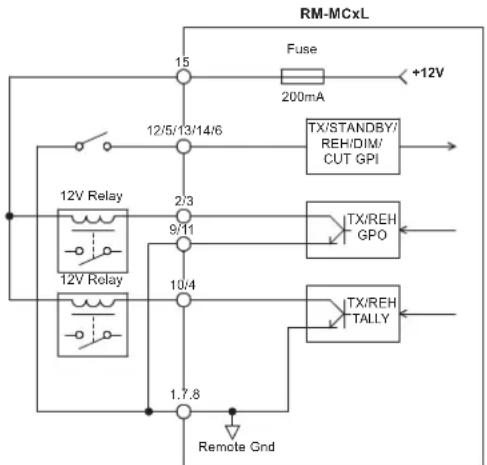
The Reference Monitor Controller's remote port has 2 optically isolated drivers for the Transmit (TX) and Rehearse (REH) controls that provide a direct control interface to the Sonifex SignalLED illuminated studio signs. To drive a SignalLED studio sign from these drivers, the Emitter connection would typically be connected to 0V and the collector connection would be connected to one of the active low signalling inputs.
The remote port also provides 2 open-collector tally outputs for Transmit and Rehearse, and 5 active low inputs to activate the Transmit, Rehearse, Standby, CUT and DIM controls.
The GPIO port connector is a 15-way female D-type with the following pin assignments:
2 RM-MC1L Monitor Controller
| Pin | Function | Description |
| 1 | Digital Ground 0V | |
| 2 | TX Output Collector | Collector of optically-isolated driver for TX |
| 3 | REH Output Collector | Collector of optically-isolated driver for REH |
| 4 | REH Output Tally | Open collector driver active when REH is active |
| 5 | STANDBY Remote Input | Active low input to trigger STANDBY |
| 6 | CUT Remote Input | Active low input to trigger CUT |
| 7 | Digital Ground 0V | |
| 8 | Digital Ground 0V | |
| 9 | TX Output Emitter | Emitter of optically-isolated driver for TX |
Using Internal 12V Supply
flowchart
graph TD
    A["12V Relay"] --> B["12/5/13/14/6"]
    B --> C["2/3"]
    C --> D["9/11"]
    D --> E["10/4"]
    E --> F["1.7.8"]
    F --> G["Remote Gnd"]
    H["Fuse"] --> I["+12V"]
    J["TX/STANDBY/ REH/DIM/ CUT GPI"] --> K
    L["TX/REH GPO"] --> M
    N["TX/REH TALLY"] --> O
    P["200mA"] --> Q
    R["12V Relay"] --> S
    T["Remote Gnd"] --> U
Fig 2-4: GPIO Diagram
| 10 TX Output Tally Open collector driver active when TX is active | |
| 11 REH Output Emitter Emitter of optically-isolated driver for REH | |
| 12 TX Remote Input Active low input to trigger TX | |
| 13 REH Remote Input Active low input to trigger REH | |
| 14 DIM Remote Input Active low input to trigger DIM | |
| 15 Fused Power +12VDC @ 200mA max |
Mains Power
Mains power is applied via a standard three-pin IEC male socket. Mains voltages between 85V and 264V AC at frequencies between 47 and 63Hz are accepted without adjustment.
A 1A, 5 x 20mm SB fuse is used. The Earth pin MUST be connected to ensure safety.
Using External Supply

flowchart
graph TD
    A["+"] --> B["Relay"]
    B --> C["9/11"]
    C --> D["10/4"]
    D --> E["12/5/13/14/6"]
    E --> F["15"]
    F --> G["Fuse 200mA"]
    G --> H["+12V"]
    I["Linking Grounds Only Required If Using Tally Outputs"] --> B
    J["Remote Gnd"] --> D
    K["TX/STANDBY/ REH/DIM/ CUT GPI"] --> L["->"]
    M["TX/REH GPO"] --> N["->"]
    O["TX/REH TALLY"] --> P["->"]
3 RM-MC4L Monitor Controller
The RM-MC4L has four stereo balanced analogue inputs with a single stereo balanced output. The RM-MC4L has the same master volume control, CUT,
DIM, light control functions, remote operation and adjustments as the RM-MC1L unit.

flowchart
graph TD
    A["Input 1"] --> B["Input Select"]
    C["Input 2"] --> B
    D["Input 3"] --> E["Input Select"]
    F["Input 4"] --> G["Input Select"]
    H["Mains Input"] --> I["Global Mains Power"]
    I --> J["Micro Controller"]
    J --> K["Remote Port"]
    L["Master Volume Control"] --> M["DIM Control"]
    N["DIM Level"] --> O["CUT Control"]
    P["Output"] --> Q["Left"]
    R["Right"] --> S["Right"]
    T["Light Controls"] --> U["Micro Controller"]
    V["Master Volume Control"] --> W["DIM Level"]
    X["Master Volume Control"] --> Y["DIM Control"]
Fig 3-1: RM-MC4L Block Diagram
3 RM-MC4L Monitor Controller
Front Panel Controls & Indicators

Fig 3-2: RM-MC4L Monitor Controller, 4 Stereo Inputs, 1 Stereo Output With Light Control
Input Select Buttons
The four input select buttons select which of the four stereo inputs is routed to the single stereo output. The currently selected input button illuminates green and the unit defaults to input 1 on power up.
For details of the other RM-MC4L Monitor Controller front panel controls and indicators, please refer to the RM-MC1L description.
Rear Panel Controls & Connectors

Fig 3-3: Rear View of RM-MC4L
Audio Inputs
The RM-MC4L has four stereo audio inputs via eight XLR-3 pin socket connectors with the following pin assignments:
Pin 1: Ground
Pin 2: Phase
Pin 3: Non-phase
8
For details of the other RM-MC4L Monitor Controller rear panel controls and connectors, please refer to the RM-MC1L description.
4 RM-MC51L Monitor Controller
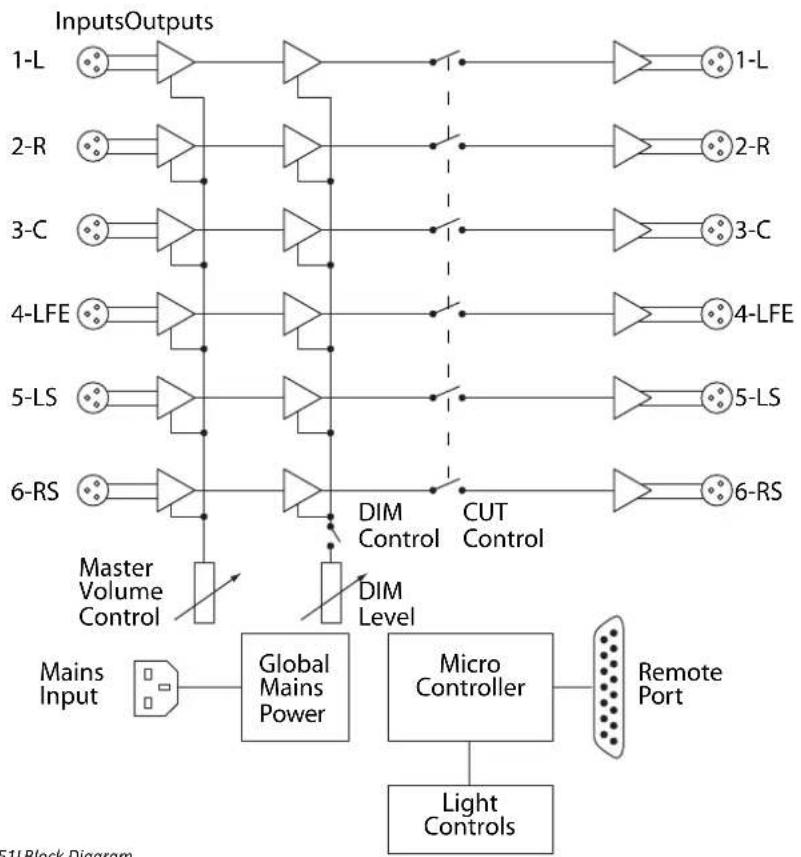
The RM-MC51L is a monitor controller for surround sound applications with 6 balanced analogue inputs and 6 balanced analogue outputs. It is used in situations where you need to adjust the volume, or CUT, or DIM all of the speakers in a 5.1 surround system. Alternatively, the unit can be used as a global volume control for 6 analogue outputs. The RM-MC51L has the same master volume control, CUT, DIM and light control functions and adjustments as the RM-MC1L unit.
flowchart
graph TD
    A["Inputs Outputs"] --> B["1-L"]
    A --> C["2-R"]
    A --> D["3-C"]
    A --> E["4-LFE"]
    A --> F["5-LS"]
    A --> G["6-RS"]
    H["Mains Input"] --> I["Global Mains Power"]
    I --> J["Micro Controller"]
    J --> K["Light Controls"]
    L["Master Volume Control"] --> M["DIM Level"]
    M --> N["CUT Control"]
    O["Remote Port"] --> P["1-L"]
    O --> Q["2-R"]
    O --> R["3-C"]
    O --> S["4-LFE"]
    O --> T["5-LS"]
    O --> U["6-RS"]
Fig 4-1: RM-MC51LBlock Diagram
4 RM-MC51L Monitor Controller
Front Panel Controls & Indicators

Fig 4-2: RM-MC51L Monitor Controller, 5.1 Stereo Inputs & Outputs With Light Control
For details of the RM-MC51L Monitor Controller front panel controls and indicators, please refer to the RM-MC1L description.
Rear Panel Controls & Connectors

Each audio input and output on the RM-MC51L is labeled with a channel number and a corresponding 5.1 channel surround sound channel name.
Audio Inputs
The RM-MC51L has six audio inputs via XLR-3 pin socket connectors with following pin assignments:
Pin 1: Ground
Pin 2: Phase
Pin 3: Non-phase
Audio Outputs
The six audio outputs are via XLR-3 pin plug connectors with the following pin assignments:
Pin 1: Ground
Pin 2: Phase
Pin 3: Non-phase
For details of the other RM-MC51L Monitor Controller rear panel controls and connectors, please refer to the RM-MC1L description.
5 RM-MCL Monitor Controller
The RM-MCL is a simple light controller for controlling a TX - STANDBY - REH light system in a production studio, as detailed in the RM-MC1L description. It has no audio inputs or outputs.

flowchart
graph LR
    A["Mains Input"] --> B["Global Mains Power"]
    B --> C["Micro Controller"]
    C --> D["Remote Port"]
    C --> E["Light Controls"]
Front Panel Controls & Indicators

Fig 5-2: RM-MCL Monitor Light Controller, 3 Button, TX-STANDBY-REH
Light Control Buttons
On the RM-MCL, the Standby button is used to set the brightness of the LEDs that illuminate all of the front panel buttons. When power is applied to the unit, all of the LEDs on the front panel are illuminated for 1 second. During this period, pressing the Standby button will adjust the LED brightness to one of the three available levels. Each time the button is
pressed, the 1 second timeout period is restarted. When the required LED brightness level has been set, simply allow the unit to return to normal operation.
For details of the other Light Control button functions on the RM-MCL Monitor Controller, please refer to the RM-MC1L description.
5 RM-MCL Monitor Controller
Rear Panel Controls & Connectors

Fig 5-3: Rear View of RM-MC1L
For details of the RM-MCL Monitor Controller rear panel connectors, please refer to the RM-MC1L description.
6 Technical Specification
Audio Specification
| Input Impedance: >20kΩ |
| Maximum Input Level: +25dBu |
| Output Impedance: <50 Ω |
| Maximum Output Level: +25dBu |
| Attenuation Range: >86dB |
| DIM Attenuation Range: Adjustable -3dB to -23dB via rear panel potentiometer |
| Common Mode Rejection:>66dB typical |
| Distortion: | <0.08% ref +8dBu |
| Crosstalk: <-80dB @ 1kHz input, ref 0dBu |
Front Panel Operation Controls
| Light Control (All units): Transmit (TX), Standby & Rehearse (REH) illuminated buttons |
| Channel Select (RM-MC4L):1, 2, 3 & 4 illuminated buttons |
| Audio Controls: DIM & CUT illuminated buttons (not on RM-MCL) |
| Volume Control: Rotary potentiometer for output attenuation on front panel (not on RM-MCL) |
Rear Panel Connections
| Audio Inputs (RM-MC1L): 2 x XLR 3-pin female (balanced) |
| Audio Inputs (RM-MC4L): 8 x XLR 3-pin female (balanced) |
| Audio Inputs (RM-MC51L):6 x XLR 3-pin female (balanced) |
| Audio Outputs (RM-MC1L & RM-MC4L):2 x XLR 3-pin male (balanced) |
| Audio Outputs (RM-MC51L):6 x XLR 3-pin male (balanced) |
| Remote I/O Port: | 15 way D-type socket |
| Mains Input: | Filtered 3-pin IEC male, continuously rated |
| 85-264VAC, 47-63Hz, fused | |
Power Consumption:
| RM-MC1L | Peak 10W, average 4W |
| RM-MC4L | Peak 10W, average 6W |
| RM-MC51L | Peak 10W, average 7W |
| RM-MCL | Peak 10W, average 2W |
| Fuse Rating: | Anti-surge fuse 1A, 20 x 5mm |
Equipment Type
| RM-MC1L: | Monitor controller, single stereo input and output with light control |
| RM-MC4L: | Monitor controller, 4 stereo inputs, 1 stereo output with light control |
| RM-MC51L: | Monitor controller, 5.1 stereo inputs and outputs with light control |
| RM-MCL: | Monitor light controller, 3 buttons, |
| TX-STANDBY-REH |
Physical Specification
| Dimensions (Raw): | 48cm (W) x 10.8cm (D) x 4.3cm (H) |
| 19" (W) x 4.3" (D) x 1.7" (H) (1U) | |
| Dimensions (Boxed): | 58.5cm (W) x 22.5cm (D) x 7cm (H) |
| 23" (W) x 8.9" (D) x 2.8" (H) | |
| Weight: | Nett: 1.3kg Gross: 1.9kg |
| Nett: 2.9lbs Gross: 4.2lbs |
Notes
Notes
SONIFEX
www.sonifex.co.uk
t:+44 (0)1933 650 700
f:+44 (0)1933 650 726
sales@sonifex.co.uk
- Reference Monitor Controllers
- Reference Monitor Controllers Handbook
- For the latest Sonifex handbook information please visit the Sonifex website at www.sonifex.co.uk
- Contents & Figures
- Contents
- Figures
- SONIFEX
- Register Online for an Extended 2 Year Warranty
- Product Warranty - 2 Year Extended
- Sonifex Warranty & Liability Terms & Conditions
- Definitions
- Warranty
- Warranty
- Unpacking Your Product
- Repairs & Returns
- CE Conformity
- Safety & Installation of Mains Operated Equipment
- Voltage Setting Checks
- Fuse Rating
- Power Cable & Connection
- CE Certification
- WEEE Directive
- Atmosphere/Environment
- Reference Monitor Controllers Introduction
- RM-MC1L Monitor Controller
- Front Panel Controls & Indicators
- Power LED
- Light Control Buttons
- DIM Button
- Setting the Brightness of the Front Panel LEDs
- CUT Button
- Changing the Button Action From Latching to Momentary or Auto \*
- Rear Panel Controls & Connectors
- DIM Level Adjustment Potentiometer
- Audio Inputs
- Audio Outputs
- Remote Port
- Mains Power
- RM-MC4L Monitor Controller
- Input Select Buttons
- RM-MC51L Monitor Controller
- RM-MCL Monitor Controller
- Technical Specification
Brand : Sonifex
Model : RM-MCL
Category : Controller