EC 2000 S - Coffee maker DELONGHI - Free user manual and instructions

Find the device manual for free EC 2000 S DELONGHI in PDF.
DELONGHI EC 2000 S - Coffee maker
📄 20 pages English EN Download 💬 AI Question 10 questions ⚙️ Specs
Notice DELONGHI EC 2000 S - page 2
Pick your language and provide your email: we'll send you a specifically translated version.
Product Type Super-automatic espresso machine
Brand DeLonghi
Model EC 2000 S
Dimensions (W x D x H) 280 x 340 x 420 mm
Weight 9.5 kg
Power Supply 220-240 V, 50/60 Hz
Power Consumption 1450 W
Water Tank Capacity 1.8 L
Bean Hopper Capacity 200 g
Pump Pressure 15 bar
Grinder Type Steel burr grinder, adjustable
Milk Frother Steam wand for cappuccino and latte
Brewing Options Single or double espresso, coffee with beans or pre-ground
Hot Water Function Yes, for tea or Americano
Controls Button panel with indicator lights
Drip Tray Removable, with float indicator
Auto Shut-Off After 30 minutes of inactivity
Descaling Program Automatic descaling cycle
Cleaning Removable brewing unit for easy cleaning
Safety Features Thermal fuse, overheat protection, automatic shut-off
Accessories Included Measuring scoop, water hardness test strip, cleaning tool
Warranty 2 years

Frequently Asked Questions - EC 2000 S DELONGHI

How do I descale the DeLonghi EC 2000 S?
To descale, fill the water tank with a mixture of water and DeLonghi descaling solution. Follow the automatic descaling program: press the descaling button and wait for the cycle to complete. Rinse thoroughly with fresh water afterward. For best results, descale every 2-3 months.
Why is my coffee not hot enough?
Ensure the machine is preheated. Run a small amount of water through the brew unit before making coffee. Also, pre-warm your cup by rinsing it with hot water. Check the temperature setting if available.
How do I clean the steam wand?
After each use, purge the steam wand by turning the steam knob for a few seconds. Use a damp cloth to wipe the wand. For deeper cleaning, remove the tip and soak it in warm water or descaling solution.
What should I do if the machine does not turn on?
Check the power cord and outlet. Ensure the plug is fully inserted. Press the main power switch. If it still doesn't turn on, the thermal fuse may have tripped; let the machine cool down and try again.
How do I adjust the grinder settings?
Open the bean hopper lid and locate the grinder adjustment knob. Turn it to select a finer or coarser grind. Fine grind is for espresso, coarse for filter coffee. Adjust while the grinder is running for best results.
Why is the machine leaking water?
Check that the water tank is properly seated. Ensure the drip tray is empty and correctly positioned. If leaking persists, the seals might be worn; contact DeLonghi support.
Can I use pre-ground coffee instead of beans?
Yes, use the pre-ground coffee funnel (usually found behind the bean hopper). Add the desired amount of ground coffee and select the pre-ground coffee button on the control panel.
How do I reset the machine after an error?
Turn off the machine and unplug it for 30 seconds. Plug it back in and turn on. If the error persists, consult the user manual for specific error codes.
What type of water should I use?
Use fresh, cold tap water. If your water is very hard, consider using filtered or bottled water to reduce scaling. Do not use carbonated or distilled water.
How do I clean the brewing unit?
Remove the brewing unit from the machine (refer to manual). Rinse it under running water without detergents. Use the provided cleaning tool to remove any coffee residues. Let it dry completely before reinstalling.

User questions about EC 2000 S DELONGHI

0 question about this device. Answer the ones you know or ask your own.

Ask a new question about this device

Your email remains private: it is only used to notify you if someone answers your question.

No questions yet. Be the first to ask one.

Download the instructions for your Coffee maker in PDF format for free! Find your manual EC 2000 S - DELONGHI and take your electronic device back in hand. On this page are published all the documents necessary for the use of your device. EC 2000 S by DELONGHI.

USER MANUAL EC 2000 S DELONGHI

Istruzioni per l'uso Owner's instructions Mode d'emploi Bedienungsanleitung Gebruiksaanwijzingen Instrucciones para el uso Instruções para o uso Οδηγίες χρήσης Инструкции по эксплуатации Kezelési utasítás Návod k použiti Instrukcja obsługi Bruksanvisning Bruksanvisning Brugsanvisning Käyttöohje

DELONGHI EC 2000 S - 1

ELECTRICAL CONNECTION (UK ONLY)

A) If your appliance comes fitted with a plug, it will incorporate a 13 Amp fuse. If it does not fit your socket, the plug should be cut off from the mains lead, and an appropriate plug fitted, as below. WARNING: Very carefully dispose of the cut off plug after removing the fuse: do not insert in a 13 Amp socket elsewhere in the house as this could cause a shock hazard. With alternative plugs not incorporating a fuse, the circuit must be protected by a 15 Amp fuse.

WARNING - THIS APPLIANCE MUST BE EARTHED IMPORTANT

The wires in the mains lead are coloured in accordance with the following code:

Green and yellow: Earth

Blue: Neutral

Brown: Live
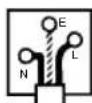
DELONGHI EC 2000 S - WARNING - THIS APPLIANCE MUST BE EARTHED IMPORTANT - 1

If the plug is a moulded-on type, the fuse cover must be re-fitted when changing the fuse using a 13 Amp Asta approved fuse to BS 1362. In the event of losing the fuse cover, the plug must NOT be used until a replacement fuse cover can be obtained from your nearest electrical dealer. The colour of the correct replacement fuse cover is that as marked on the base of the plug.

As the colours of the wires in the mains lead may not correspond with the coloured markings identifying the terminals in your plug, proceed as follows:

The green and yellow wire must be connected to the terminal in the plug marked with the letter E or the earth symbol ⚪coloured green or green and yellow.

The blue wire must be connected to the terminal marked with the letter N or coloured black.

The brown wire must be connected to the terminal marked with the letter L or coloured red.

72

Fig.1

NL

Illustration of hands operating a kitchen appliance with a yellow umbrella and blue arrow indicating rotation (no text or symbols).

Fig.2

4.3 FIRST USE

Fig.3

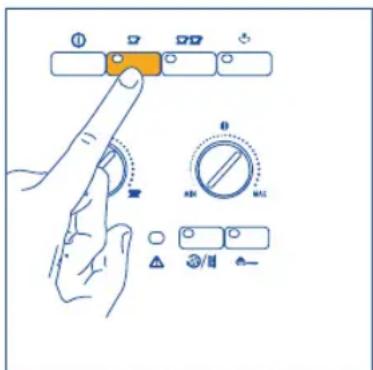
Diagram showing hand interacting with a control panel with orange indicator lights and various rotary controls labeled 0, 1, 2, 3, 4.

Fig.4

5 BREWING COFFEE (WITH COFFEE BEANS)

Fig.5

Line drawing of a hand pouring liquid from a bottle into a mug, with no text or symbols present.

Fig.6

Diagram showing hand operating a rotary knob with control buttons and indicator lights.

Fig.7

Diagram showing hand operating a rotary knob with control buttons and display indicators.

Fig.8

Fig.9

Line drawing of a coffee maker with two orange cups on a perforated base (no text or symbols).

Fig.10

Line drawing of a kitchen appliance with a hand holding an orange object, showing a blue downward arrow (no text or symbols).

Fig.11

Diagram showing hand press control on a device with labeled buttons and rotary dial indicator.

Fig.12

Fig.13

Diagram showing a hand pressing a button on a control panel with labeled buttons and icons.

Fig.14

765432100 765432100

Fig.15

Fig.17

Diagram of a kitchen appliance with a yellow keyboard and blue downward arrow indicating a component (no text or symbols).

Fig.16

7 MAKING ESPRESSO COFFEE WITH PRE-GROUND COFFEE (INSTEAD OF COFFEE BEANS)

8 DISPENSING HOT WATER

Fig.18
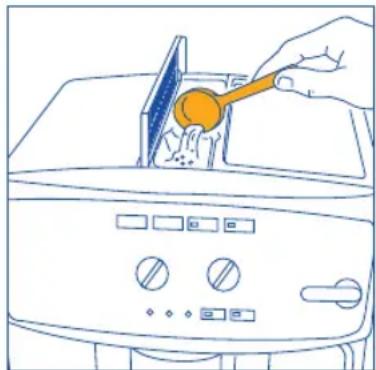
Line drawing of a kitchen appliance with a hand pouring liquid from a pan (no text or symbols).

Fig.19

Line drawing of a hand using a tool to clean or install a toaster oven (no text or symbols).

Fig.20

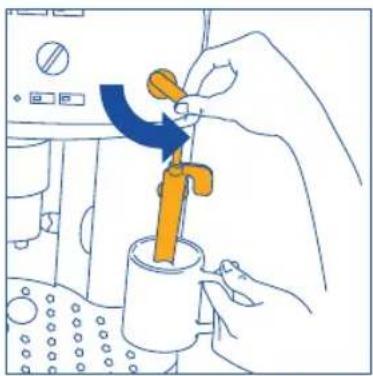
9 PREPARING CAPPUCCINO (USING THE STEAM)

Fig.21

Diagram showing various switch controls with icons and labels, including indicator lights, dials, and function buttons.

Fig.22

Illustration of a hand using a tool to adjust a yellow valve component in a kitchen setting (no text or symbols).

Fig.23

Line drawing of a hand pouring liquid into a container with a piping bag (no text or symbols).

Fig.24

Fig.25

Line drawing of a hand operating a coffee machine with a blue downward arrow indicating action (no text or symbols present).

Fig.26

Steam pipe Cappuccino nozzle

Fig.27

Line drawing of a hand using a lathe machine to press or brush into a perforated surface (no text or symbols)

Fig.28

10.2 CLEANING THE INFUSOR

Fig.29
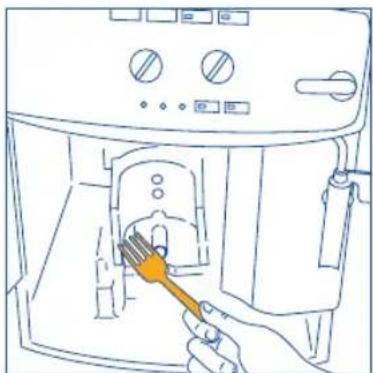
Line drawing of a hand using a tool to clean or store items inside a microwave oven (no text or symbols)

Fig.30

Line drawing of a kitchen appliance with a hand holding an orange tool (no text or symbols)

Fig.31

WRONG

Pure mechanical component diagram without any text, numbers, or symbols

CORRECT

Fig.32

Manual assistant
Powered by Anthropic
Waiting for your message
Product information

Brand : DELONGHI

Model : EC 2000 S

Category : Coffee maker