
TMA812 - Speaker stand Bogen - Free user manual and instructions
Find the device manual for free TMA812 Bogen in PDF.


| Product Type | Tilt Mount Adapter |
| Brand | Bogen |
| Model | TMA812 |
| Compatible Speakers | NEAR A8, A12 |
| Mounting Methods | Wall mount, Pole mount |
| Maximum Load Capacity (Wall Mount) | 300 lbs (with appropriate anchors) |
| Included Components | Stationary mounting bracket, adjustable mounting bracket, (2) pole adapters, (4) mounting chain hooks, (4) wing nuts, (4) #10 axle/adjust screws, (2) mounting chains, self-adhesive rubber disks, 8 ft. safety cable, thread locking compound, lock washer, safety tether link, adjustable wire clamp |
| Safety Features | Safety cable tether, lock washer, thread locking compound |
| Angle Adjustment | Yes, via adjustment wings and screws |
| Material | Metal |
| Recommended Use | Professional audio installation |
| Maintenance | Hand tighten only; use thread locking compound |
| Installation | Requires proper anchors (not included) for wall mount |
Frequently Asked Questions - TMA812 Bogen
User questions about TMA812 Bogen
0 question about this device. Answer the ones you know or ask your own.
Ask a new question about this device
Download the instructions for your Speaker stand in PDF format for free! Find your manual TMA812 - Bogen and take your electronic device back in hand. On this page are published all the documents necessary for the use of your device. TMA812 by Bogen.
USER MANUAL TMA812 Bogen
TMA812 Tilt Mount Adapter for NEAR A8 and A12 Loudspeakers
Installation Instruction Manual

natural_image
Technical line drawing of a mechanical assembly with ventilation grilles and clamps (no text or symbols)BOGEN®
COMMUNICATIONS, INC.
50 Spring Street, Ramsey, NJ 07446 USA
Tel. 201-934-8500 • Fax: 201-934-9832
www.bogen.com
TMA812 - Tilt Mount Adapter Components

STATIONARY MOUNTING BRACKET

natural_image
Technical line drawing of two metal bracket components (no text or symbols)(2) POLE ADAPTERS
natural_image
Technical line drawing of a metal bracket with mounting holes and two side brackets (no text or symbols)
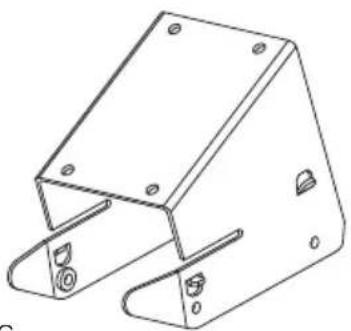
ADJUSTABLE
MOUNTING BRACKET
natural_image
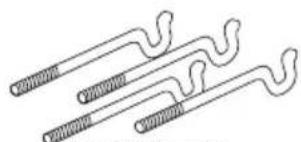
Pure line drawing of three wavy, coiled structures without any text or symbols(4) MOUNTING CHAIN HOOKS
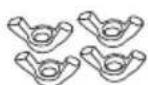
(4) MOUNTING CHAIN
HOOK WING NUTS

(4) #10 AXLE/ADJUST SCREWS
natural_image
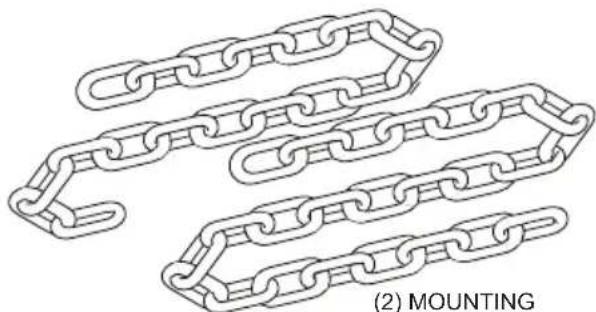
Line drawing of two interlinked chain links with no text or symbols(2) MOUNTING CHAINS

ITEMS INCLUDED WITH A8/A12 LOUDSPEAKER
(2) SELF ADHESIVE RUBBER DISKS


8 FT. SAFETY CABLE

natural_image
Pure diagram of a coiled wire or filament without any text, numbers, or symbolsTHREAD LOCKING COMPOUND

LOCK
WASHER

SAFETY TETHER LINK

ADJUSTABLE WIRE CLAMP
1A
WALL MOUNTING:
Attaching Stationary Mounting Bracket to a Wall or other Flat Surface
A) Using proper anchors* (not supplied), attach STATIONARY MOUNTING BRACKET to wall or flat surface.
B) Skip ahead to Section 3 to continue with Speaker Adjustable Mounting Attachment Installation.
*NOTE: WHEN MOUNTING TO WALL OR FLAT SURFACE, BE SURE THE USER SELECTED ATTACHMENT AREA AND THE ANCHORS ARE TOGETHER ABLE TO SAFELY SUPPORT AT LEAST 300 LBS.

1B
POLE MOUNTING:
Attaching Pole Adapters to the Stationary Mounting Bracket
A) Attach the 2 POLE ADAPTERS to the STATIONARY MOUNTING BRACKET using 4 (#6) mounting screws as shown here to create the MOUNTING BRACKET ASSEMBLY. Apply THREAD LOCKING COMPOUND to these screws.

2
Attaching the Mounting Bracket Assembly to a Pole
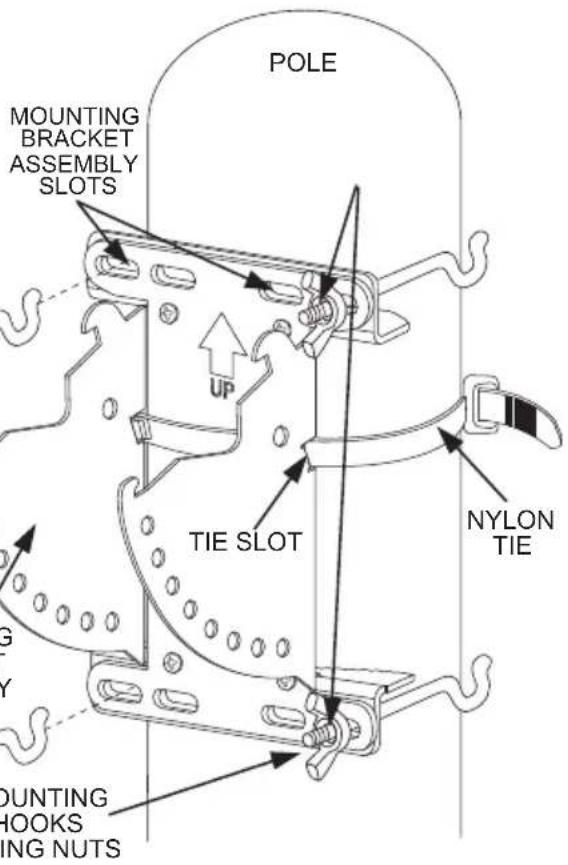
A) Thread NYLON TIE thru Tie Slots and around pole to TEMPORARILY hold the Mounting Bracket Assembly in place on pole.
B) Apply a bead of THREAD LOCKING COMPOUND onto each Hook. Insert (4) MOUNTING CHAIN HOOKS and attached WING NUTS through the most appropriate top & bottom Bracket Assembly slots.
THREAD LOCKING
COMPOUND
(On All Hook Threads)
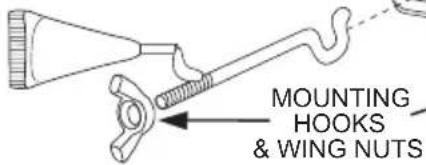

C) With Hooks fully extended, attach one end of MOUNTING CHAIN to one of the Top Mounting Hooks. Pull the Chain tight to Pole and then attach shortest link to corresponding Top Hook. (To keep chain from being jammed by the hook, place link on outside of the Hook.) Spin Wing Nuts down evenly, enough to keep the Assembly in place.
D) Repeat process for Bottom Hooks and Chains.
E) Hand tighten all Wing Nuts evenly, ensuring Mounting Bracket Assembly is difficult to rotate on the Pole. Then "tap" the chain sharply to remove any slack and fully re-tighten all Wing Nuts.
IMPORTANT: HAND TIGHTEN ONLY. EXCESS TIGHTENING MAY CAUSE HOOK ENDS TO SPREAD.
3
Attach A8/A12 Speaker and Speaker Mounting Bracket to the Adjustable Mounting Bracket
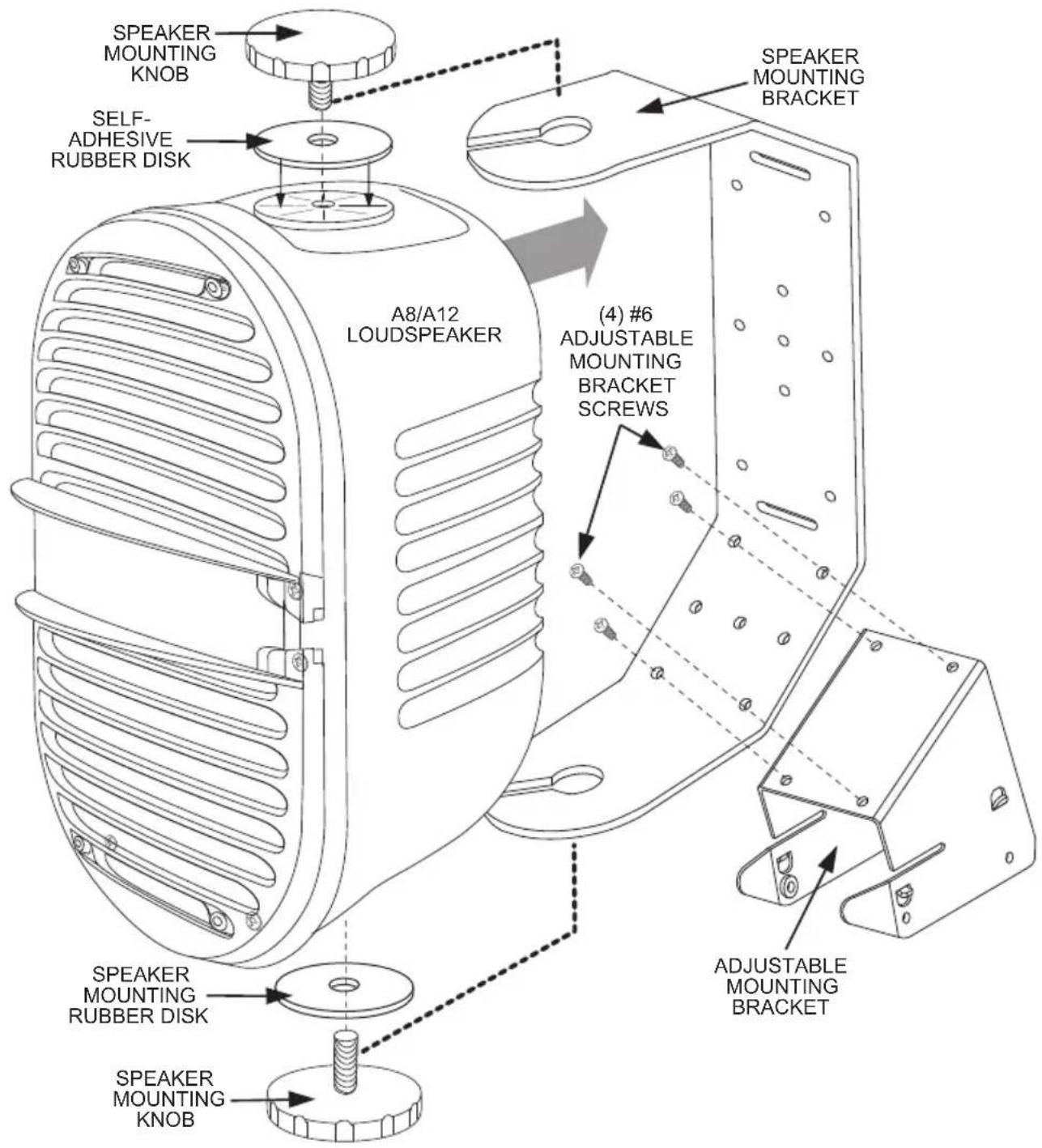
A) Attach ADJUSTABLE MOUNTING BRACKET to the A-Series SPEAKER MOUNTING BRACKET by using 4 (#6) Mounting Screws to create the SPEAKER MOUNTING ASSEMBLY. Apply THREAD LOCKING COMPOUND on each of the #6 screws.
B) Adhere the 2 Self-Adhesive Rubber Disks to the Speaker Cabinet as shown below. Partially screw into the speaker cabinet the 2 Speaker Mounting Knobs, then slide the A-Series Loudspeaker in through the slots of the Speaker Mounting Assembly and fully tighten the Mounting Knobs.
4
Attach Speaker Mounting Assembly to Stationary Mounting Bracket
A) Place Speaker Mounting Assembly on the Stationary Mounting Assembly by putting the FRONT TABS of Speaker Assembly into the two FRONT CATCH slots of the Mounting Assembly (see INSET 1).
B) With both Front Tabs hooked securely into both Front Catch slots, gently rotate Speaker Assembly back until both REAR TABS "snap" into both REAR CATCH slots (see INSET 2). When properly engaged, this will provide TEMPORARY support for the Speaker Assembly. DO NOT LEAVE SPEAKER IN THIS POSITION WITHOUT COMPLETING THE INSTALL PROCEDURES SHOWN WITHIN SECTION 5.
IMPORTANT: BE SURE THAT ALL TABS AND CATCH SLOTS ARE PROPERLY ENGAGED BEFORE LETTING GO OF THE SPEAKER ASSEMBLY. SERIOUS INJURY COULD RESULT WITH IMPROPER CONNECTIONS.

INSET 1
INSET 2
5
Speaker Assembly Angle Adjustment and Locking Procedure
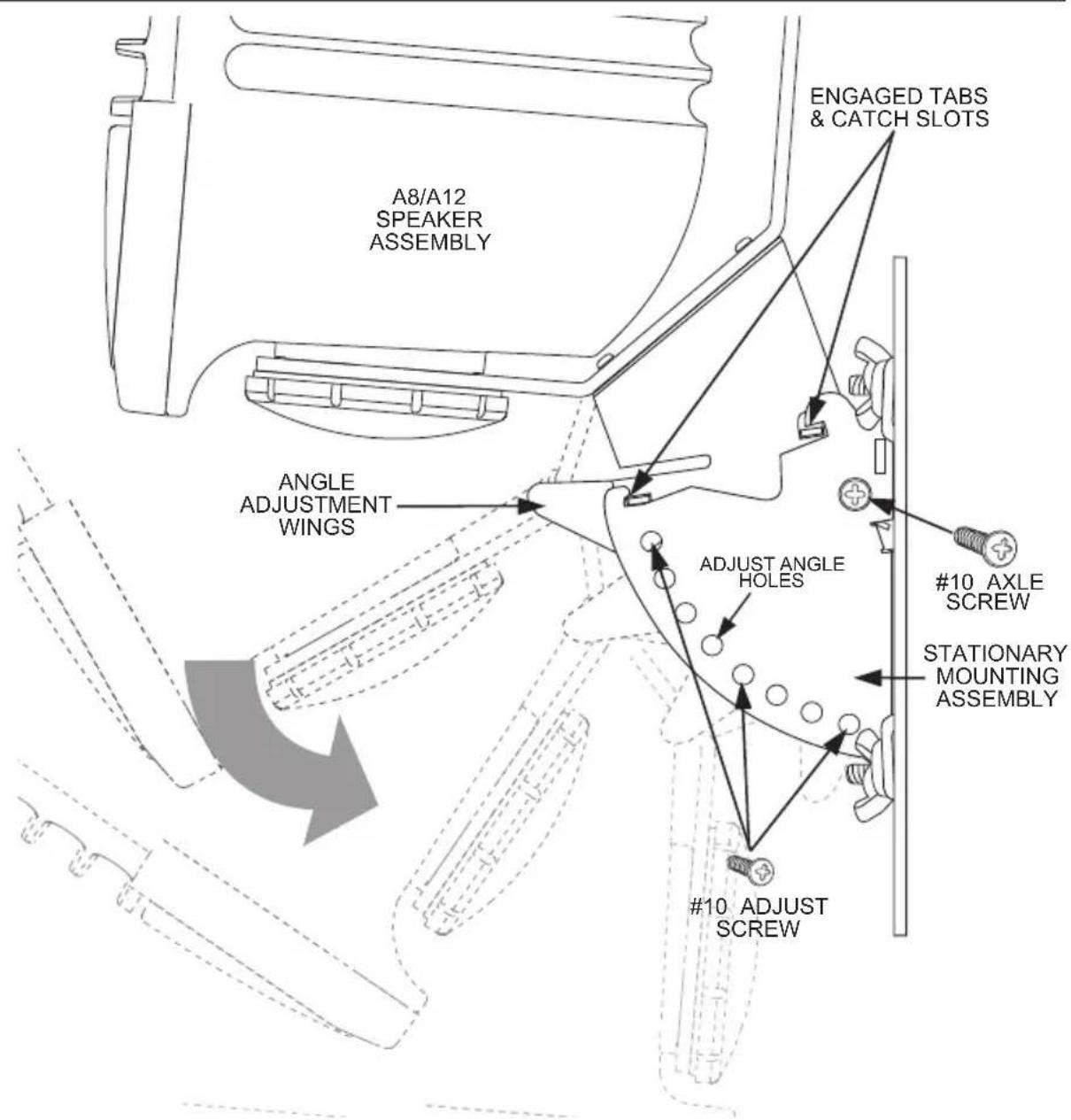
A) Add a drop of THREAD LOCKING COMPOUND to the 2 (#10) AXLE SCREWS and loosely insert them in both sides of Stationary Mounting Bracket and into the Speaker Assembly Bracket. This will provide safe retention of Speaker Assembly.
B) Pinch inward both sides of the ANGLE ADJUSTMENT WINGS on the Mounting Bracket to rotate the Speaker Assembly to desired angle. Front Tabs on each side will then engage ADJUST ANGLE HOLES on the Mounting Assembly.
C) Once angle is selected, apply Thread Locking Compound and insert 2 (#10) ADJUST SCREWS into Adjustment Angle Holes directly below the Tab/Holes selected.
D) Finally, tighten all four Screws SECURELY.
IMPORTANT: ALL FOUR (2 AXLE & 2 ADJUST) SCREWS MUST BE IN PLACE AND FULLY TIGHTENED FOR ASSEMBLY TO BE SAFELY SECURED.
6
Speaker Safety Cable and Tether Link Attachment Installation
A) Find the SAFETY ATTACHMENT POINT located on the rear of the A8/A12 Speaker. Using the (1/4"- 20 x 1/2") HEX SOCKET SAFETY BOLT and the LOCK WASHER, secure the SAFETY TETHER LINK into the Safety Attachment Point, vertically, as shown.

B) POLE MOUNT (TOP-DOWN VIEW)
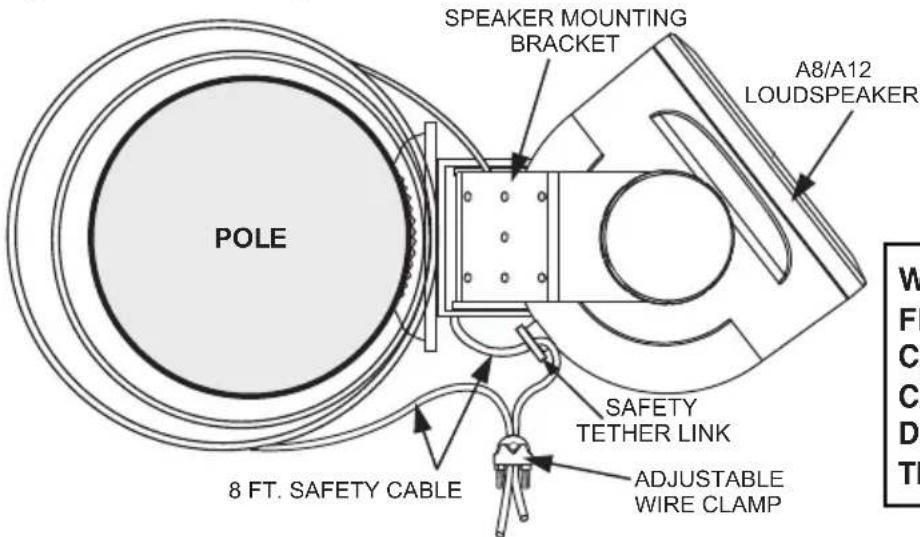
WHEN INSTALLATION IS FINISHED, THE SAFETY CABLE SHOULD BE TAUT. CABLE SLACK SHOWN IN DRAWING IS FOR ILLUSTRATIVE PURPOSES ONLY.
Take the 8 FT. SAFETY CABLE and loop it tightly around the Pole/Post 2-3 times. Proceed to feed one end of the Safety Cable in through the Speaker Mounting Bracket, then into the open hole of the Safety Tether Link. Pull the Cable taut, leaving very little slack, and secure the two Cable ends using the ADJUSTABLE WIRE CLAMP.
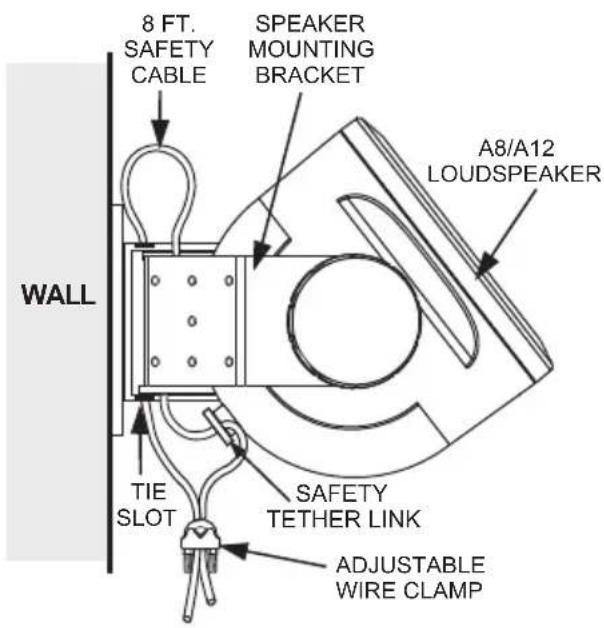
C) WALL MOUNT (TOP-DOWN VIEW)
Take the 8 FT. SAFETY CABLE and feed it through the Tie Slots (see figure A in Section 2 for Tie Slot location) of the mounted Stationary Mounting Bracket, then into the open hole of of the Safety Tether Link. Pull the Cable taut, leaving very little slack, and secure the Cable ends using the ADJUSTABLE WIRE CLAMP.
WHEN INSTALLATION IS FINISHED, THE SAFETY CABLE SHOULD BE TAUT. CABLE SLACK SHOWN IN DRAWING IS FOR ILLUSTRATIVE PURPOSES ONLY.
- TMA812 Tilt Mount Adapter for NEAR A8 and A12 Loudspeakers
- TMA812 - Tilt Mount Adapter Components
- ITEMS INCLUDED WITH A8/A12 LOUDSPEAKER
- 1A
- WALL MOUNTING:
- Attaching Stationary Mounting Bracket to a Wall or other Flat Surface
- 1B
- POLE MOUNTING:
- Attaching Pole Adapters to the Stationary Mounting Bracket
- 2
- Attaching the Mounting Bracket Assembly to a Pole
- 3
- Attach A8/A12 Speaker and Speaker Mounting Bracket to the Adjustable Mounting Bracket
- 4
- Attach Speaker Mounting Assembly to Stationary Mounting Bracket
- 5
- Speaker Assembly Angle Adjustment and Locking Procedure
- 6
- Speaker Safety Cable and Tether Link Attachment Installation
- C) WALL MOUNT (TOP-DOWN VIEW)
Brand : Bogen
Model : TMA812
Category : Speaker stand