
Mixer - Blender Morphor - Free user manual and instructions
Find the device manual for free Mixer Morphor in PDF.


| Product Type | Eurorack Mixer Module (5 Channel Amplifier) |
| Brand | Morphor |
| Model | Mixer |
| Module Width | 8 HP (40.3 mm) |
| Module Height | 3 U (128.5 mm) |
| Maximum Depth (incl. power cable) | 30 mm |
| Mass | 102 g |
| Power Supply | Eurorack standard +12V and -12V rails |
| Current Draw (+12V) | 12 mA |
| Current Draw (-12V) | 10 mA |
| Input Impedance | 50 kOhm |
| Output Impedance | 1 kOhm |
| Front Panel Material | 2 mm anodized aluminum |
| Number of Input Channels | 5 |
| Controls per Channel | Attenuator knob, mute switch |
| Master Controls | Gain knob (0–2x), master mute switch, clipping LED |
| Coupling Mode | DC-coupled (default), switchable to AC-coupled via rear switch |
| Input/Output Signals | AC or DC, up to ±5V |
| Warranty | 2 years limited (proof of purchase required) |
| Compliance | CE, EU directives 2014/30/EU, 2014/35/EU, etc. |
| Package Contents | Module, 16-to-16-pin power cable, 2 thumb screws, sticker |
| Safety & Maintenance | Do not expose to moisture, extreme temperatures; clean with dry cloth; use in dry room only |
| Repair & Support | Contact support@morphor.io, return in original packaging for warranty service |
Frequently Asked Questions - Mixer Morphor
User questions about Mixer Morphor
0 question about this device. Answer the ones you know or ask your own.
Ask a new question about this device
Download the instructions for your Blender in PDF format for free! Find your manual Mixer - Morphor and take your electronic device back in hand. On this page are published all the documents necessary for the use of your device. Mixer by Morphor.
USER MANUAL Mixer Morphor
Mixer 5 Channel Amplifier
Table of Contents
Table of Contents 1
Warranty 2
Package Contents 3
Safety Instructions 3
Conformity 3
Installation 4
Introduction 5
Module overview 5
Controls & Connections 6
Technical Specifications 7
Support 7
Module Revision History 7
Manual Version 7
Warranty
THIS PRODUCT IS COVERED BY MORPHOR'S LIMITED WARRANTY, FOR TWO YEARS FOLLOWING THE DATE OF PURCHASE (PROOF OF PURCHASE/INVOICE REQUIRED).
THIS WARRANTY COVERS ANY DEFECT IN THE MANUFACTURING OF THIS PRODUCT.
THIS WARRANTY DOES NOT COVER ANY DAMAGE OR MALFUNCTION CAUSED BY INCORRECT USE - SUCH AS, BUT NOT LIMITED TO: POWER CABLES CONNECTED BACKWARDS, WRONG POWER SUPPLY VOLTAGES, BACKWARDS OR REVERSED EURORACK BUS BOARD CABLE CONNECTION, EXCESSIVE VOLTAGE LEVELS, ABUSE OF THE PRODUCT, REMOVING KNOBS, CHANGING FACE PLATES, EXPOSURE TO EXTREME TEMPERATURE OR MOISTURE LEVELS, OR ANY OTHER CAUSES DETERMINED BY MORPHOR TO BE THE FAULT OF THE USER ARE NOT COVERED BY THIS WARRANTY, AND NORMAL SERVICE RATES WILL APPLY.
THE WARRANTY COVERS REPLACEMENT OR REPAIR, AS DECIDED BY MORPHOR. PLEASE CONTACT OUR CUSTOMER SERVICE (SUPPORT@MORPHOR.IO) FOR A RETURN AUTHORIZATION BEFORE SENDING THE MODULE. THE COST OF SENDING A MODULE BACK FOR SERVICING IS PAID FOR BY THE CUSTOMER. CHANGES AND/OR MODIFICATIONS TO THE MODULE NOT APPROVED BY MORPHOR COULD VOID THE USER'S AUTHORITY TO OPERATE THE EQUIPMENT.
THE INSTRUMENT IS TO BE SHIPPED IN THE ORIGINAL PACKAGING ONLY. ANY INSTRUMENT SHIPPED TO US FOR RETURN, EXCHANGE, WARRANTY REPAIR, UPDATE OR EXAMINATION HAS TO BE IN ITS ORIGINAL PACKAGING! ALL OTHER DELIVERIES WILL BE REJECTED. THEREFORE, MAKE SURE YOU KEEP THE ORIGINAL PACKAGING AND TECHNICAL DOCUMENTATION.
PLEASE FOLLOW THE INSTRUCTIONS FOR USE OF THE INSTRUMENT CAREFULLY BECAUSE THIS WILL GUARANTEE PROPER OPERATION OF THE INSTRUMENT. DUE TO THE FACT THAT THESE INSTRUCTIONS TOUCH ON PRODUCT LIABILITY, IT IS ABSOLUTELY IMPERATIVE THAT THEY BE READ CAREFULLY. ANY CLAIM FOR DEFECT WILL BE REJECTED IF ONE OR MORE OF THE ITEMS HAS NOT BEEN OBSERVED. DISREGARD OF THE INSTRUCTIONS CAN VOID THE TWO YEARS COVERED BY WARRANTY.
Package Contents
In the Morphor Mixer box you will find:
• The Morphor Mixer module itself
• A 16-to-16-pin Eurorack power cable (already plugged in)
- 2 high-quality thumb screws including washer
• An original Morphor brand sticker
If any of the above items is missing, please contact your dealer or send an email to support@morphor.io.
Safety Instructions
I. Never use the instrument in a humid or wet environment, nor near flammable goods. The instrument must never be operated outdoors but solely in dry rooms.
II. No liquids or conducting substances must get into the instrument. Should this be the case, the instrument is to be disconnected from mains power immediately and examined, cleaned and possibly repaired by a qualified technician.
III. Never expose the instrument to temperatures above +50°C or below -10°C. Before operation, the instrument should have a temperature of at least 10°C. Do not expose the instrument to direct sunlight. Do not install the instrument near heat sources like heaters, open fire places, central heating etc. Keep the top of the instrument clear in order to allow proper ventilation, otherwise the instrument could eventually overheat.
IV. Never place heavy objects on the instrument.
V. Transport the instrument carefully, never let it drop or fall over. Make sure that during transport and in use the instrument is supported properly and cannot drop, slip or fall over because people might get injured.
VI. The instrument may only be used for the purpose described in this operating manual. Due to safety reasons, the instrument must never be used for other purposes.
Conformity
This device meets the requirements of the following standards and/or directives: 2014/30/EU, 2014/35/EU, 2009/125/EC, 2011/65/EU, 2012/19/EU, EN 60065, EN 55032, EN 55035. Please refer to the online Declaration of Conformity for detailed information regarding compliance.

Installation
Before you start
Morphor modules are designed to be used with an Eurorack-compatible case and power supply. We recommend you to use a case with an adequate high-quality power supply. Before installing the module in your case, you must ensure your power supply has a free Eurorack standard PSU connector (2x8 pin header connector) and sufficient available capacity to power the module:
- Make a separate sum of the +12 V, -12 V and +5 V maximum current draws respectively for all your modules, including the new one. The maximum current draw is specified in the manufacturer's technical specifications for each module. You can use a tool like ModularGrid to help you calculate the total values for your case.
- Compare each of these sums to the specifications of your case's power supply.
- Proceed only with the installation if none of the total values exceeds the power supply's specifications. Otherwise you must remove some modules to free up some capacity or upgrade your power supply to allow more capacity in your case. If you do not adequately power your modules, it may result in damage to your modules or power supply. If you are unsure, please contact us before proceeding.
- Make sure your case has enough free space (HP) to fit the new module. To prevent screws or other debris from falling into the case and shorting any electrical contacts, do not leave gaps between adjacent modules, and cover all unused areas with blank panels. Similarly, do not use open frames or any other enclosure that exposes the backside of any module or the power distribution board.
Installing your module
Always turn off the power to the case and disconnect the power cable when installing or removing a module from your case to avoid injury or equipment damage.
The Morphor Mixer uses the -12 V and the +12 V rail of the power supply (using a standard Eurorack 2x5 pin connector). The red stripe of the included ribbon cable (-12 V side) must be oriented on the same side as the "RED -12 V" marking on the module and on your Eurorack power distribution board.
The module draws a maximum current of 12 mA from the +12 V rail and maximum 10 mA from the -12 V rail.

natural_image
Green printed circuit board with white letter 'M' and multiple electronic components (no readable text or symbols)Example rear side of a module

Introduction
The Morphor Mixer - 5 Channel Amplifier is a flexible mixer module that can find a home in every type of Eurorack setup. Each of the five channels feature an attenuator knob and mute switch to allow for instant playability, for example in live settings. Input signals can be AC or DC-coupled depending on your preferred setting.
The output stage also features an extra attenuation/gain stage that allows you to double the mixed signal. An additional master mute switch and clipping LED are nice-to-haves that complete this intuitive mixer module.
Happy morphing!
Module overview
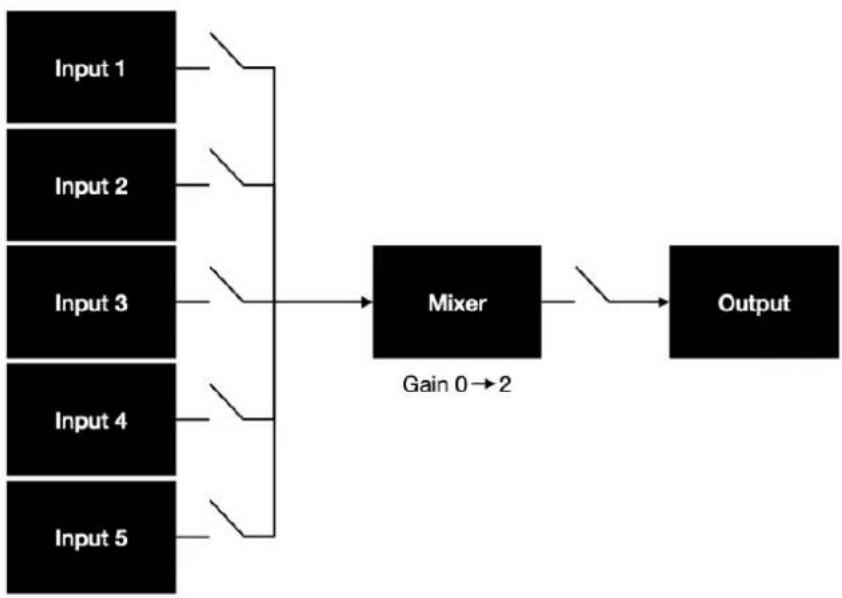
flowchart
graph LR
    A["Input 1"] --> D["Mixer"]
    B["Input 2"] --> D
    C["Input 3"] --> D
    E["Input 4"] --> D
    F["Input 5"] --> D
    D --> G["Output"]
    style D fill:#000,stroke:#000,color:#fff
    note right of D: Gain 0→2
Controls & Connections
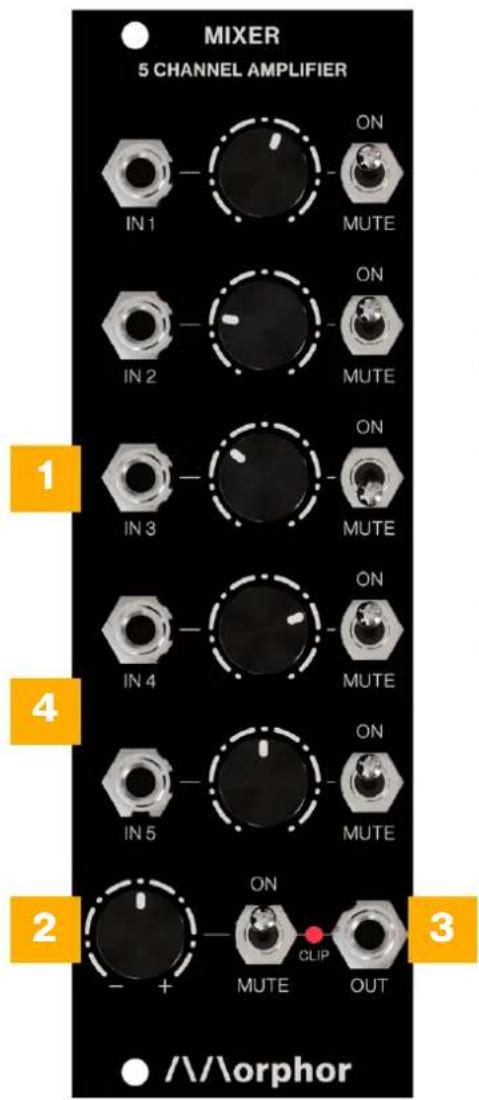
INPUT CHANNELS [1]
Five input channels are available to mix together. Each channel has a dedicated attenuator knob and a mute switch. This way you can balance and select your desired channels instantly.
GAIN[2]
Need some more power after mixing everything together? This knob allows you to boost your signal up to times two. Of course attenuation is also possible by turning to the left.
MIX OUTPUT [3]
Your mixed output is available here. An additional master mute switch is included for instant control over the complete mix. The clipping LED will brighten when your mixed signal gets too hot [-5V, 5V].
DC/AC SWITCH [4, BACKSIDE]
In the factory setting all input channels are DC-coupled, perfect for mixing all kinds of signals including CV. If you prefer to have the channels to be AC-coupled, feel free to change the position of the little switch on the backside of the module
Technical Specifications
| module width | 8 HP (40.3 mm) |
| module height | 3 U (128.5 mm) |
| module maximum depth (incl. power cable) | 30 mm |
| module mass | 102 g |
| maximum current draw | 12 mA @ +12 V10 mA @ -12 V |
| input impedances | 50 kOhm |
| output impedances | 1 kOhm |
| front panel | 2 mm anodized aluminum |
Support
To provide the best possible performance with the highest quality and reliability for music professionals, all Morphor's products are designed, manufactured and tested in-house with the highest possible standards. In case your module is not functioning as it should, make sure to check your Eurorack power supply and all connections first.
If the problem persists, contact your dealer or send an email to support@morphor.io. Please mention your serial number, which can be found on the module's rear side.
Module Revision History
Revision 1.0 - initial release
Manual Version
22/03/2023 - initial release
https://www.morphor.io

natural_image
Abstract geometric pattern with two white vertical lines on black background (no text or symbols)Designed & made in Belgium


Brand : Morphor
Model : Mixer
Category : Blender