
KX-T3716E - Phone accessory PANASONIC - Free user manual and instructions
Find the device manual for free KX-T3716E PANASONIC in PDF.


| Product Type | Cordless Phone Base Unit (Phone Accessory) |
| Brand | Panasonic |
| Model | KX-T3716E |
| Power Supply | AC adaptor (KX-A14BE and KX-A91E) and Battery Box for power failure protection |
| Power Consumption | Not specified (use AC adaptor rated for continuous connection) |
| Battery Type | Rechargeable battery (for portable handset) |
| Charging Time | Approximately 10 hours for initial charge |
| Battery Low Indicator | BATT LOW/PROG indicator flashes or beep tone every 15 seconds during conversation |
| Memory Dialing | Store up to 16-digit numbers, up to 10 memory stations (0-9) |
| Auto Dial | Press AUTO then station number |
| Channel Selection | Press CH to select a clear channel during interference |
| Operating Range | Depends on home construction, weather, and usage conditions; best with base unit in high central location |
| Antenna | Extend aerials fully during use for best reception |
| Mounting Options | Wall mountable with included Wall Mounting Adaptor, screws, and washers |
| Included Accessories | AC Adaptor, Battery Box, Wall Mounting Adaptor, Screws (2), Washers (2) |
| Display | Not specified (likely LED indicators) |
| Keypad | Dial buttons (0-9) also function as memory stations |
| Cleaning | Clean charge contacts with a soft cloth once a month |
| Safety Precautions | Keep base unit, telephone line cord, or AC adaptor cord away from electrical appliances to avoid interference |
| Repairability | Not specified; refer to operating instructions for details |
Frequently Asked Questions - KX-T3716E PANASONIC
User questions about KX-T3716E PANASONIC
0 question about this device. Answer the ones you know or ask your own.
Ask a new question about this device
Download the instructions for your Phone accessory in PDF format for free! Find your manual KX-T3716E - PANASONIC and take your electronic device back in hand. On this page are published all the documents necessary for the use of your device. KX-T3716E by PANASONIC.
USER MANUAL KX-T3716E PANASONIC
Quick Reference Guide
Please read the Operating Instructions for details.
—Keep this leaflet for your next use.
Check the enclosures:
□ AC Adaptor ....... one □ Screws ....... two
□ Battery Box ....... one □ Washers ....... two
□ Wall Mounting Adaptor .. one
How to Set Up the Unit
Connect the unit as shown.

The AC adaptor and the Battery Box must remain connected.
—Regarding installing the batteries into the Battery Box for power failure protection, see page 14 in the Operating Instructions.
CONNECTION OF POWER SUPPLY
This apparatus is intended for use when powered by KX-A14BE and KX-A91E. Other usage will invalidate any approval given to this apparatus.
How to Operate the Unit
Charge the portable handset battery before initial
use.

Place the portable handset on the base unit for about 10 hours.
Extend the aerials fully during use.

Making calls
1

Press TALK to get dial tone.
2

natural_image
Diagram of a multi-pin electrical connector panel (no text or symbols visible)Dial a phone number.
3

To hang up, press TALK or place the portable handset on the base unit.
Answering calls
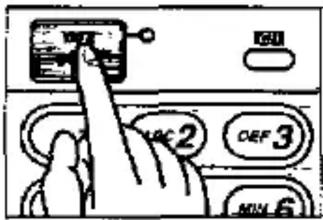
If the portable handset is off the base unit, press TALK.
OR
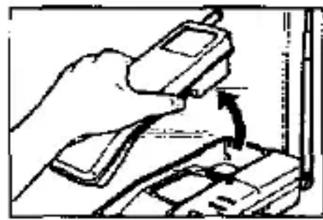
natural_image
Illustration of a hand using a handheld device to lift a small object (no text or symbols visible)If the portable handset is on the base unit, lift the portable handset.
Storing phone numbers in memory
The dialling buttons (0 to 9) function as memory stations for automatic dialling.
1
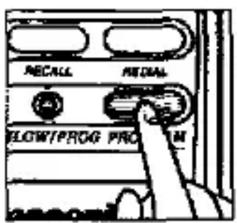
Press PROGRAM.
2

Enter a phone number up to 16 digits.
3

Press AUTO.
4
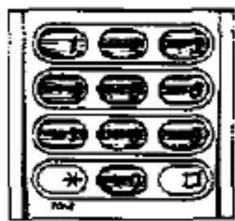
natural_image
Diagram of a device rear panel with multiple ports and indicators (no text or labels)Press one of the dialling buttons to select a memory station.
—To store other number, repeat step 1 to 4.
Dialling a stored number from memory
- Press TALK to get dial tone.
- Press AUTO.
- Press the station number where the phone number is stored. The stored number is dialled automatically.
Important information
Battery charge
Recharge is necessary when the BATT LOW/PROG indicator flashes or beep tone sounds every 15 seconds during a conversation.


—For maximum battery life, do not charge it after every telephone call. We recommend you charge it every few days. The battery works best if discharged enough before being recharged.
—Clean the charge contacts with a soft cloth once a month, or the battery may not charge properly.
Operating range and noise
Range of operation depends on the construction of your home, weather or usage conditions, because the cordless phone uses wireless radio waves.
For maximum range, it is best to place the base unit in a HIGH and CENTRAL location of the house, with no obstructions. Extend the aerials during use for best reception.

natural_image
Simple line drawing of a two-story house with a chimney and windows (no text or symbols)Electrical appliances might interfere with the telephone conversation. In this case, keep the base unit, telephone line cord or AC adaptor cord away from electrical appliances.

natural_image
Simple line drawing of a computer with monitor and keyboard, no text or symbols presentIf noise interferes with your conversation:

Press CH to select a clear channel.
—If noise will not decrease, approach the base unit.
- Quick Reference Guide
- Check the enclosures:
- How to Set Up the Unit
- CONNECTION OF POWER SUPPLY
- How to Operate the Unit
- Extend the aerials fully during use.
- Making calls
- Answering calls
- Storing phone numbers in memory
- Dialling a stored number from memory
- Important information
- Battery charge
- Operating range and noise
- If noise interferes with your conversation:
Brand : PANASONIC
Model : KX-T3716E
Category : Phone accessory