
1160 - Guitar amplifier SPL - Free user manual and instructions
Find the device manual for free 1160 SPL in PDF.


| Product Type | Guitar Amplifier |
| Model | 1160 |
| Brand | SPL |
| Power Output | 20 Watts RMS |
| Speaker Size | 8 inches |
| Impedance | 8 ohms |
| Inputs | 1x 1/4" instrument jack |
| Outputs | 1x 1/4" speaker out, 1x 1/8" headphone jack |
| Controls | Gain, Volume, Tone (Bass, Middle, Treble) |
| Additional Features | Aux input for external audio, built-in overdrive |
| Power Supply | AC 100-240V, 50/60Hz |
| Dimensions (W x H x D) | 300 x 250 x 150 mm |
| Weight | 3.0 kg |
| Construction | Solid-state amplifier with metal chassis |
| Cleaning Instructions | Wipe with dry cloth, avoid liquids and solvents |
| Safety Instructions | Do not expose to moisture or extreme temperatures; ensure proper ventilation |
| Spare Parts & Repairability | Contact SPL support for authorized service centers |
| General Information | Designed for practice and small performances |
Frequently Asked Questions - 1160 SPL
User questions about 1160 SPL
0 question about this device. Answer the ones you know or ask your own.
Ask a new question about this device
Download the instructions for your Guitar amplifier in PDF format for free! Find your manual 1160 - SPL and take your electronic device back in hand. On this page are published all the documents necessary for the use of your device. 1160 by SPL.
USER MANUAL 1160 SPL
In order to avoid health risks and equipment damage: Do not use this machine anywhere near water (wash basin, swimming pools, or the like). Only use the connections as described. Never allow any fluids to be spilled or sprayed on the machine or a foreign object through any of the machine's chassis openings.
Placement
Never cover or otherwise close off chassis openings to protect the unit from overheating. Never place the unit on a soft surface (carpet, sofa, etc.). Make sure to provide for a mounting space of 5 cm/2 inches to the sides and top of the unit when mounting the unit in racks or on cabinets. Placing the unit upon a guitar amplifier is obvious and intended: the height of the feet is sufficient to also place the Reducer above a handle.
Heat
The Reducer converts electrical energy into heat. It can get considerably hot if high energy levels have to be reduced. This is no reason for concern as long as you ensure to keep the max. input levels listed under “Specs” on page 2. Side and top panels are cooling surfaces. Only touch with caution! Keep all objects at a safe distance!
Hook Up
1
Select Impedance
2
Connect Amp & Cabinet
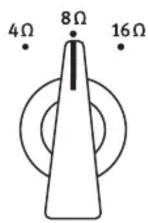
IMPORTANT: Before connecting an amp, select the appropriate impedance for it with the front panel Impedance Switch (refer to "Impedance Switch" on page 2). Never reduce impedance while playing!

The Reducer is a passive device and needs no electrical power. After the impedance is set, connect guitar amp and cabinet as shown below.
![graph TD A["Cabinet"] -->|USE SPEAKER CABLE| B["Guitar/Bass Amp"] B -->|INPUT FROM AMP| C["Output to Speaker Cabinet"] C --> D["Connect To Speaker Cabinet"] D --> E["Output to Speaker"] E --> F["Output to Speaker"] F --> G["Output to Speaker"] G --> H["Output to Speaker"] H --> I["Output to Speaker"…](/content/2026/06/1147833/images/acf83cb7dab7db99e6e57324b5441884ce7a47954da119113bf1928cc7c53ea7.jpg)
Input
Here you connect the amp's loudspeaker output. Connector variant and pin configurations follow industry standards: Unbalanced 1/4" jack (TS) connector with the signal at the tip and ground at the sleeve. As with any typical amp and cabinet cabling, it is critical to observe loudspeaker cable of a minimum 1.5 mm 2 cross section. Instrument or line cables can lead to amplifier damage! We recommend to use cables with a maximum length of 3 meters/10 feet for lossless signal transmission.
IMPORTANT WARNING ON CONNECTING GUITAR AMPS
Many guitar amps are not designed for sustained maximum level operation, and if run this way, it can lead to overloads and power amp damage. At high levels, amps can produce high frequency oscillations which can destroy output transformers. Moreover, this can cause audible unwanted output transformer distortion. Such problems are not a result of Reducer use, but reside within the guitar amp. Even in situations where you might wish to push the guitar amp to its limits in conjunction with the Reducer, you should always be sure to allow for ample power reserves to avoid endangering the amp itself! Therefore we strongly recommend that the guitar amp should never be run at over 70% of its maximal signal level!
Output
At the OUTPUT the amp signal appears as reduced with the front panel controls. It allows for the connection of a 4, 8 or 16 ohm cabinet. Reduction starts at 0 dB (unity gain) followed by two -3 dB and -5 dB switch settings. The variable values range from -7 dB to infinite. With this “volume control” between amp and cab, the guitar amp can be driven into saturation also at moderate listening levels.
Connector variant and connections follow industry standards: Unbalanced 1/4" jack connector with the signal at the tip and ground at the sleeve. As with any typical amp and cabinet cabling, it is critical to observe loudspeaker cable of a minimum 1.5mm 2 cross section. Instrument or line cables can lead to amplifier damage! We recommend to use cables with a maximum length of 3 meters/10 feet for lossless signal transmission.
Control Elements
Reduction Switch

With the REDUCTION SWITCH on the left side of the front panel you select the first reduction values: 0 dB (unity gain), -3 dB, and -5 dB. Selecting the VARIABLE switch position activates the central REDUCTION CONTROL for further, continuous reduction ranging from -7 dB to infinite (mute). IMPORTANT: The scaled values are only valid for 8 ohms operation. With 16 ohms, deviations of reduction values are small, with 4 ohms, the following values apply: Switch to -3 dB = ca. 5 dB reduction, switch to -5 dB = ca. 10 dB reduction. As a rule of thumb, reduction values are roughly doubled in 4 ohms operation. The control range of the Reduction Control at 4 ohms: 0 dB to ∞. Therefore, it does not continue seamlessly in fully right position after the -5 dB switch and must eventually be set accordingly.
Reduction Control
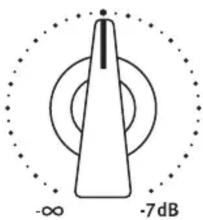
The central REDUCTION CONTROL is only active when the REDUCTION SWITCH is set to VARIABLE. Set fully left mutes the signal, turned fully right results in a power reduction of -7 dB. A 7 dB reduction can be compared approximately to the volume that results from a “half power” setting at guitar amps; usually this is still pretty loud in many situations.
Impedance Switch

With the IMPEDANCE SWITCH to the right you select the required impedance for your amplifier. Check the impedance of your amplifier at its speaker output.
IMPORTANT: Just as with any cabinet connection, selecting an impedance lower than needed can destroy the amplifier. Therefore, double check selection of the appropriate impedance before use. Never reduce impedance while playing!
Selecting a higher impedance than necessary does not harm any device. Whenever you may be in doubt about the required impedance for an amp, select the highest impedance (16 ohms) – you may lose power, bot not your amp.
Specs
Input Socket: 1/4" TS (Mono Jack)
Impedance 4, 8, or 16 Ohms switchable
Max. input load @4 Ohms: 90 W RMS/120 W Peak
@8 Ohms: 200 W RMS/260 W Peak
@16 Ohms: 16o W RMS/18o W Peak
Output Socket: 1/4" TS (Mono Jack)
Dimensions Height 68 mm, 85 mm with feet
Depth 190 mm, 208 mm with controls and sockets
Width 179 mm
Weight 1,8 kg/3.97 lbs
CE
The construction of the REDUCER, Model 1160, is in compliance with the standards and regulations of the European Cummunity.
Brand : SPL
Model : 1160
Category : Guitar amplifier