
29352 - Wi-Fi Antenna C2G - Free user manual and instructions
Find the device manual for free 29352 C2G in PDF.


| Product Type | Wi-Fi Antenna |
| Model | 29352 |
| Brand | C2G |
| Frequency Bands | 2.4 GHz / 5 GHz |
| Gain | 5 dBi |
| Connector Type | RP-SMA Male |
| Polarization | Vertical |
| Impedance | 50 Ohms |
| Dimensions (Height x Diameter) | 6.1 x 2.4 inches (15.5 x 6.1 cm) |
| Weight | 1.2 oz (34 g) |
| Operating Temperature | -20°C to 60°C (-4°F to 140°F) |
| Material | Plastic with metal base |
| Mounting | Magnetic base or adhesive |
| Cable Length | 4 ft (1.2 m) |
| Power Supply | Passive (no external power required) |
| Maintenance | Wipe with a dry, soft cloth |
| Safety | Keep away from water and extreme heat |
| Spare Parts | None (non-repairable) |
| Compatibility | Routers and access points with RP-SMA connectors |
| Warranty | Limited lifetime |
Frequently Asked Questions - 29352 C2G
User questions about 29352 C2G
0 question about this device. Answer the ones you know or ask your own.
Ask a new question about this device
Download the instructions for your Wi-Fi Antenna in PDF format for free! Find your manual 29352 - C2G and take your electronic device back in hand. On this page are published all the documents necessary for the use of your device. 29352 by C2G.
USER MANUAL 29352 C2G
Device Installation....6
Technical Specifications....7
Cables To Go One Year Warranty....8
Important Safety Information....9
INTRODUCTION
Thank you for purchasing the USB v1.1 Extender Kit. This solution is designed to conquer USB length limitations and put your USB 1.1 devices where you want them. This pocket-sized device extends the reach of a USB 1.1 signal up to 65 feet from the host computer so you can place your USB camera, printer, or any other USB device exactly where you want it! The USB v1.1 Extender Kit is powerful yet simple, with no drivers to install or special software required -- and it's compatible with any computer that supports USB. We recommend that you read this manual thoroughly and retain for future reference.
FEATURES
◆ Extends the reach of a USB 1.1 signal up to 65 feet
- Ideal for use with USB cameras, printers, web cams, keyboard/mouse extensions, and any other USB device
✿ Bus-powered so no external power source is required
❖ Uses standard Cat5/Cat5E/Cat6 patch cord (not included) for ease of use and flexibility
❖ Compliant with USB Specification 1.1
PACKAGE CONTENTS
USB v1.1 Extender-Receiver Unit
USB v1.1 Extender-Transmitter Unit
User Manual
DEVICE OVERVIEW
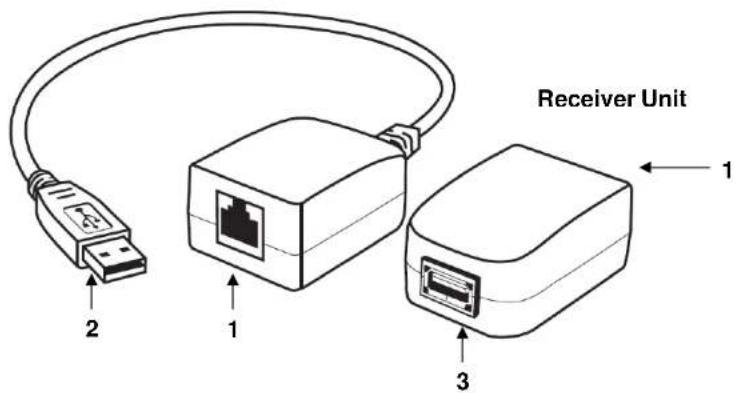
- RJ45 Ports
- Cable interface to bridge the base and remote unit
- USB Type A Male Connector
- Connects to your computer's USB port
- USB Type A Female Port
- Connects to your remote USB enabled device
Transmitter Unit
DEVICE INSTALLATION
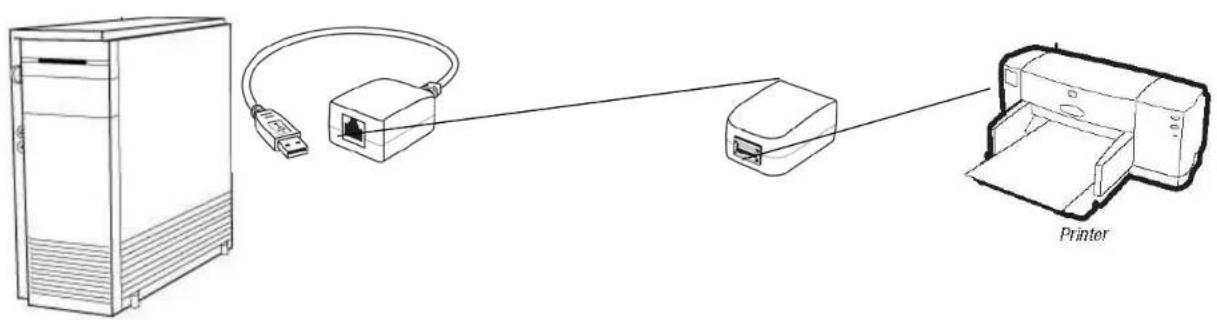
Step 1
Connect the USB 1.1 Extender Transmitter unit to your computer.
Step 2
Connect the USB 1.1 Extender Receiver unit to your USB device.
Step 3
Using a Cat5/Cat6 cable, connect the transmitter and receiver unit's RJ45 ports.
Your devices are now ready to use.
Note: We recommend using a solid 24AWG Cat5/Cat6 patch cable.
TECHNICAL SPECIFICATIONS
Product No. 29352
Complies USB Rev. V
er. 1.1
Connectors
USB Type A Male/
USB Type A Female
Power Mode Bus
USB Cable Length 12 in.
Housing Plastic
Product Dimension 2.25 x 1.5 x 1.0 in. (ea)
Product Weight .15 lb (both units)
CABLES TO GO™ ONE YEAR WARRANTY
At Cables To Go, we want you to be totally confident in your purchase. That is why we offer a one year warranty on this device. If you experience problems due to workmanship or material defect for the duration of this warranty, we will repair or replace this device. To request a Return Merchandise Authorization (RMA) number, contact customer service at 1-800-506-9606 or www.cablestogo.com.

Cables To Go
3555 Kettering Blvd.
Moraine, OH 45439
1-800-506-9607
www.cablestogo.com
IMPORTANT SAFETY INFORMATION
! Do not plug the unit in any outlet that does not have enough current to allow the device to function. Refer to the specifications in this manual for power level of the unit.
! Liquid:
If this unit or its corresponding power adapter has had liquid spilled on or in it, do not attempt to use the unit.
Do not attempt to use this product in an outdoor environment as elements such as rain, snow, hail, etc. can damage the product.
! In case of a storm, it is recommended that you unplug this device from the outlet.
! Avoid placing this product next to objects that produce heat such as portable heaters, space heaters, or heating ducts.
! THERE ARE NO USER SERVICEABLE PARTS
Do not attempt to open this product and expose the internal circuitry. If you feel that the product is defective, unplug the unit and refer to the warranty information section of this manual.
For more information on this product or to check for updated drivers, manuals or frequently asked questions please visit our website.
www.cablestogo.com
VER. 1.0.5.12.09


Brand : C2G
Model : 29352
Category : Wi-Fi Antenna