
Z2 Plus - Smartphone LENOVO - Free user manual and instructions
Find the device manual for free Z2 Plus LENOVO in PDF.


| Product Type | Smartphone |
| Brand | Lenovo |
| Model | Z2 Plus (Z2132) |
| SIM Card Type | Nano-SIM |
| Number of SIM Cards Supported | Up to 2 |
| Power Button | Yes |
| Volume Button | Yes |
| Screenshot Method | Press and hold Power + Volume Down |
| Operating Temperature Range | -10°C to 40°C (14°F to 104°F) |
| Battery Charging | Via USB cable and power adapter |
| Battery Type | Rechargeable lithium-ion |
| Charging Port | USB |
| SIM Eject Tool | Included |
| USB Cable | Included |
| Power Adapter | Included |
| Screenshot Viewer | Gallery app (Screenshots album) |
| Software Updates | Available at support.lenovo.com |
| Warranty Period (India) | 1 year hardware, 6 months charger/battery |
| Hearing Protection | Excessive sound pressure can cause hearing loss |
| Recycling Information | Lenovo encourages responsible recycling |
Frequently Asked Questions - Z2 Plus LENOVO
User questions about Z2 Plus LENOVO
0 question about this device. Answer the ones you know or ask your own.
Ask a new question about this device
Download the instructions for your Smartphone in PDF format for free! Find your manual Z2 Plus - LENOVO and take your electronic device back in hand. On this page are published all the documents necessary for the use of your device. Z2 Plus by LENOVO.
USER MANUAL Z2 Plus LENOVO
Front view
Note: Your phone may look a little bit different from the images in this guide. The images are for your reference only.

Back view
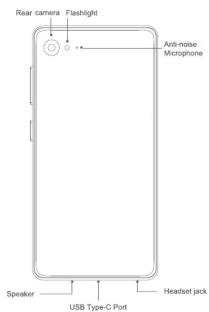
Getting started
Installing the Nano-SIM card
A Nano-SIM card provided by your carrier is required in order to use cellular services.
CAUTION: Use standard Nano-SIM cards only may save the card to demand the card slot.
-
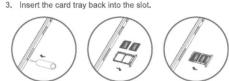
Insert the SIM eject tool that comes with your phone into the hole in the None SIM card tray
-
Pull out the card tray and position one or two Nano-SIM
cards with the gold contacts facing down into the tray.
Turning on or turning off your phone
| Turn on | Press and hold the Power button until the screen lights up. |
| Turn off | Press and hold the Power button for a few seconds, then tap Power off. |
| Restart | Press and hold the Power button for a few seconds, then tap Reboot.To force restart your phone, press and hold the Power button for about 10 seconds. |
Charging the battery
Charge the battery by one of the following methods:
- Connect your phone to a power outlet using the cable and USB power adapter that come with your phone.
- Connect your phone to a computer using the cable that comes with your phone.

□ Low battery power □ Charging □ Fully charged
Taking screenshots
Press and hold the Power button and the volume down button at the same time to take a screenshot.
To view the screenshots, open the Ga
To visit the screenshots, open the battery app and find the Screenshots album.
Downloading publications
To obtain the latest publications for your phone, go to
http://support.lenovo.com and follow the instructions on the screen.
Service and support information
The following information describes the technical support that
is available for your product, during the warranty period or throughout the life of your product. Refer to the /enovo / limited
throughout the line of your product, Refer to the Lenovo Limited Warranty for a full explanation of Lenovo warranty terms. See
"Lenovo Limited Warranty notice" later in this document for details on accessing the full warranty.
Online technical support
Online technical support is available during the lifetime of a
product at http://www.lenovo.co
Telephone technical support
where applicable, you can get help and information from the Customer Support Center by telephone. Before contacting
a Lenovo technical support representative, please have the following information available on a similar scope:
following information available: model and serial number, the exact wording of any error message, and a description of the
problem.
Your technical support representative might want to walk you through the problem while you are at your phone during the
through the problem while you are at your phone during the call.
Worldwide Lenovo Support telephone list
IMPORTANT: Telephone numbers are subject to change without notice. The most up to date telephone list for the Customer Support Center is
The most up-to-date telephone list for the customer support center is always available at http://support.lenovo.com/supportphonelist.
The Customer Support Center phone number is subject
to change. For the latest phone number, go to the e-support website. If the telephone number for your country or region is
Website: In the telephone number for your country of region is not listed, contact your Lenovo reseller or Lenovo marketing representative.
Warranty information
Lenovo Limited Warranty notice
Read the full Lenovo Limited Warranty at
http://support.lenovo.com/smartphone-IIw. You can view the full warranty in a number of languages from this Web site. If
you cannot view the full warranty either from the Web site or
from your phone, contact your local Lenovo office or reseller to obtain a printed version of the full warranty.
IMPORTANT: Lenovo phone products do not have International Warrant
SRI: G17041; Remove phone products do not have International Warranty Services.
Warranty period and type of warranty service
| Country or Region of Purchase | Warranty Period | Type of Warranty Service |
| India | Handset - 1 yearCharger - 6 monthsEarphone - 6 monthsEmbedded Battery (within the handset) – 1 yearor Removable Battery - 6 months | 4 |
Types of warranty service
-
Customer Replaceable Unit ("CRU") Service
-
On-site Service
-
Courier or Depot Service
-
Customer Can
-
Mail-in Service
-
Customer Two-Way Mail-in Service
-
Product Exchange Service
For a full explanation of the types of warranty service, refer to the full warranty.
© Copyright Lenovo 2016
Reduce|Rause|Recycle


Printed in China
Safety, regulatory & handling information
This section contains important safety, regulatory and handling information for your phone. Complete information, including recycling and environmental information, is provided in the Regulatory Notice.
Reading first — regulatory information
Be sure to read the Regulatory Notice for your country or region before using the wireless devices contained in your Mobile Phone. To obtain a PDF version of the Regulatory Notice, see the “Downloading publications” section.
Operating temperature
Use your phone only in the temperature range of -10^ (14°F) — 40^ (104°F) to avoid damage.
General battery notice
Batteries supplied by Lenovo for use with your phone have been tested for compatibility and should only be replaced with approved parts. Dispose of used batteries according to the instructions.
CAUTION:
- Risk of explosion if the battery is replaced with an incorrect type.
• Do not attempt to replace the internal rechargeable lithium battery. Contact I have support for factory replacement.
Charging
Lenovo is not responsible for the performance or safety of products not manufactured or approved by Lenovo. Use only Lenovo-approved ac adapters and batteries. Adapters shall be installed near the equipment and shall be easily accessible.
Preventing hearing damage
CAUTION: Excessive sound pressure from earphones and headphones can cause hearing loss.
Specific Absorption Rate information
Your mobile phone is a radio transmitter and receiver. It meets the government's requirements for exposure to radio waves. The exposure standard for mobile phones employs a unit of 1.6 W/kg, which is the Speculative Rate, or SAR. The India SAR limit for mobile phones is 1.6 W/kg averaged over 1 gram of tissue. Tests for SAR are conducted using standard operating positions with the phone transmitting at its peak power. The highest SAGR is 1.6 W/kg, frequency bands. The highest SAGR value for your phone when tested for use at the head and body is outlined as follows:
Position The highest SAR value Regulation
Head 0.71 W/kg India 1g SAR Limit Body-worn 1.49 W/kg (1.6 W/kg)
During use, the actual SAR values for this phone are usually well below the values stated above. This is because, for example, the performance of the SAGR is not necessarily higher than on the network, the operating power of your mobile phone is automatically decreased when full power is not needed for the call. The lower the power output of the phone, the lower its power output of the phone, is
To meet RF exposure guidelines during body-worn operation, the phone must be positioned at least 10mm away from your body.
[Non-Text]
[Non-Text]
[Non-Text]
[Non-Text]
[Non-Text]
[Non-Text]
Precautionary guidelines for mobile users
Mobile users are advised to take precautionary measures while
using a mobile handset as. 1. Keep distance. Held the cell phone away from body to the
-
Keep distance - Hold the cell phone away from body to the extent possible.
-
Use a headset (wired or Bluetooth) to keep the handset
away from your head.
- Do not press the phone handset against your head. Radio Frequency (RF) enemy is inversely proportional to the
square of the distance from the source -- being very close
increases energy absorption much more.
- Limit the length of mobile calls.
-
Use text as compared to voice wherever possible.
-
Use text as compared to voice wherever possible.
-
Put the cell phone on speaker mode
-
If the radio signal is weak, a mobile phone will increase
its transmission power. Find a strong signal and avoid
movement – Use your phone where reception is good.
- Metal & water are good conductors of radio waves so avoid using a mobile phone while wearing metal frame glasses.
using a music phone while wearing metal frames glasses or having wet hair.
- Let the call connect before putting the handset on your ear
or start speaking and listening – A mobile phone first makes
to an adequate level. More power is radiated during call
connecting time.
-
If you have a choice, use a landline (wired) phone, not a mobile phone.
-
When your phone is ON, don't carry it in chest/breast or
pants pocket. When a mobile phone is ON, it automatically
transmits at high power every one or two minutes to check
(poll) the network.
- Reduce mobile phone use by children as a younger person will likely have a longer lifetime exposure to radiation from
cell phones.
- People having active medical implants should preferably
keep the cell phone at least 15 cm away from the implant.
Environmental, recycling, and disposal
(1) 2017年1月1日星期五
General recycling statement
Lenovo encourages owners of information technology (IT) equipment to responsibly recycle their equipment when it is no
longer needed. Lenovo offers a variety of programs and
services to assist equipment owners in recycling their IT products. For information on recycling Lenovo products,
go to:http://www.lenovo.com/recycling
Important WEEE information
Important WEEE information

Recycling information for India
Recycling and disposal information for India is available at: http://www.legave.com/social/responsibility/ups/en/eustainability
/ptb_india.html
Restriction of Hazardous Substances Directive (RoHS)
European Union
Lenovo products sold in the European Union, on or after 3 January 2013 meet the requirements of Directive 2011/65/EU.
on the restriction of the use of certain hazardous substances in
electrical and electronic equipment ("RoHS recast" or "RoHS 2
For more information about Lenovo progress on RoHS, go to:
RoHS Communication.pdf
RoHS compliant as per E-Waste (Management & Handling) Rules, 2011
1
Lenovo
Z2 PLUS
Quick Start Guide
Market Name: Z2 Model: Z2132 SHENQI Technology Co., Ltd ("SHENQI")


- Getting started
- Installing the Nano-SIM card
- Turning on or turning off your phone
- Charging the battery
- Downloading publications
- Service and support information
- Online technical support
- product at http://www.lenovo.co
- Worldwide Lenovo Support telephone list
- Warranty information
- Lenovo Limited Warranty notice
- Types of warranty service
- Safety, regulatory & handling information
- Specific Absorption Rate information
- Precautionary guidelines for mobile users
- Environmental, recycling, and disposal
- Z2 PLUS
Brand : LENOVO
Model : Z2 Plus
Category : Smartphone