
FP1336 - Food processor BLACK & DECKER - Free user manual and instructions
Find the device manual for free FP1336 BLACK & DECKER in PDF.


| Product Type | Food Processor |
| Brand | Black & Decker |
| Model | FP1336 |
| Power | 350 Watts |
| Voltage | 120V / 60Hz |
| Bowl Capacity | 3 cups (0.7 L) |
| Bowl Material | Plastic (BPA-free) |
| Blade Material | Stainless Steel |
| Functions | Chop, Slice, Shred, Puree |
| Speed Settings | 2 Speeds + Pulse |
| Safety Lock | Yes (bowl must be locked) |
| Pulse Function | Yes |
| Cord Length | 2 ft (0.6 m) |
| Weight | 3.5 lbs (1.6 kg) |
| Dimensions (H x W x D) | 10.5 x 7.5 x 6.5 in (26.7 x 19 x 16.5 cm) |
| Dishwasher Safe Parts | Bowl, Lid, Blade (top rack) |
| Cleaning Base | Wipe with damp cloth |
| Included Accessories | Chopping blade, Slicing/Shredding disc |
| Warranty | 2-Year Limited |
| Non-Slip Feet | Yes |
Frequently Asked Questions - FP1336 BLACK & DECKER
User questions about FP1336 BLACK & DECKER
0 question about this device. Answer the ones you know or ask your own.
Ask a new question about this device
Download the instructions for your Food processor in PDF format for free! Find your manual FP1336 - BLACK & DECKER and take your electronic device back in hand. On this page are published all the documents necessary for the use of your device. FP1336 by BLACK & DECKER.
USER MANUAL FP1336 BLACK & DECKER
Accessories/Parts (USA)
For online customer service and to register your product, go to www.prodprotect.com/applica For US residents only.
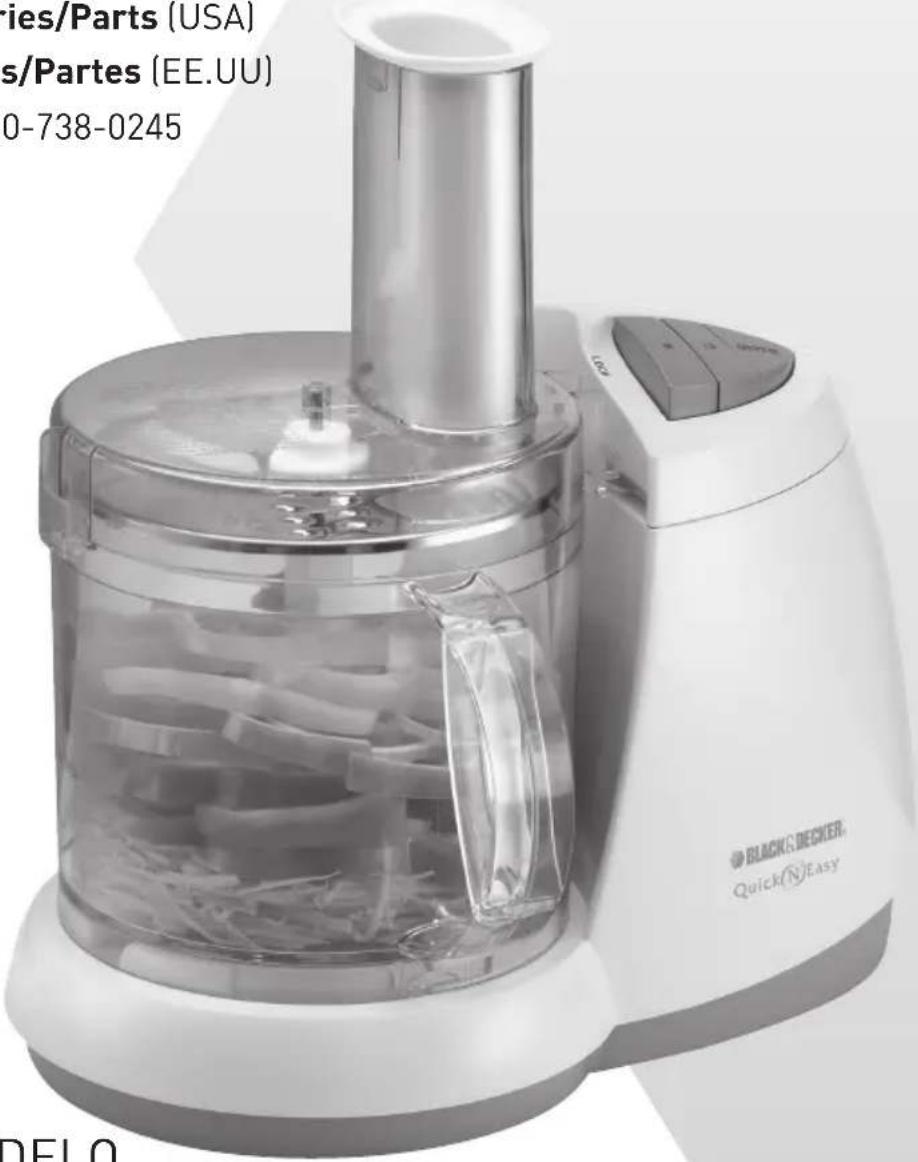
Please Read and Save this Use and Care Book
IMPORTANT SAFETY INSTRUCTIONS
When using electrical appliances, basic safety precautions should always be followed, including the following:
○ Read all instructions.
To protect against risk of electrical shock do not immerse cord, plugs or appliance in water or other liquid.
○ Close supervision is necessary when any appliance is used by or near children.
○ Unplug from outlet when not in use, before putting on or taking off parts and before cleaning.
○ Avoid contacting moving parts.
Do not operate any appliance with a damaged cord or plug or after the appliance malfunctions, or is dropped damaged in any manner. Return appliance to the nearest authorized service facility for examination, repair or electrical or mechanical adjustment. Or, call the appropriate toll-free number on the cover of this manual.
The use of attachments not recommended or sold by the manufacturer may cause fire, electric shock or injury.
○ Do not use outdoors.
○ Do not let cord hang over edge of table or counter.
Keep hands and utensils away from moving blades or discs while processing food to reduce the risk of severe injury to persons or damage to the food processor. A scraper may be used, but must be used only when the food processor is not running.
- Blades are sharp. Handle carefully.
To reduce the risk of injury, never place cutting blade or discs on base without first putting bowl properly in place.
○ Be certain cover is securely locked in place before operating appliance.
○ Never feed food by hand. Always use food pusher.
○ Do not attempt to defeat the cover interlock mechanism.
SAVE THESE INSTRUCTIONS.
This product is for household use only.
POLARIZED PLUG (120V Models Only)
This appliance has a polarized plug (one blade is wider than the other). To reduce the risk of electric shock, this plug is intended to fit into a polarized outlet only one way. If the plug does not fit fully into the outlet, reverse the plug. If it still does not fit, contact a qualified electrician. Do not attempt to modify the plug in any way.
TAMPER-RESISTANT SCREW
Warning: This appliance is equipped with a tamper-resistant screw to prevent removal of the outer cover. To reduce the risk of fire or electric shock, do not attempt to remove the outer cover. There are no user-serviceable parts inside. Repair should be done only by authorized service personnel.
ELECTRICAL CORD
a) A short power-supply cord (or detachable power-supply cord) is to be provided to reduce the risk resulting from becoming entangled in or tripping over a longer cord.
b) Longer detachable power-supply cords or extension cords are available and may be used if care is exercised in their use.
c) If a long detachable power-supply cord or extension cord is used,
1) The marked electrical rating of the detachable power-supply cord or extension cord should be at least as great as the electrical rating of the appliance,
2] If the appliance is of the grounded type, the extension cord should be a grounding-type 3-wire cord, and
3] The longer cord should be arranged so that it will not drape over the countertop or tabletop where it can be pulled on by children or tripped over.
Note: If the power supply cord is damaged, it should be replaced by qualified personnel or in Latin America by an authorized service center.
Product may vary slightly from what is illustrated.
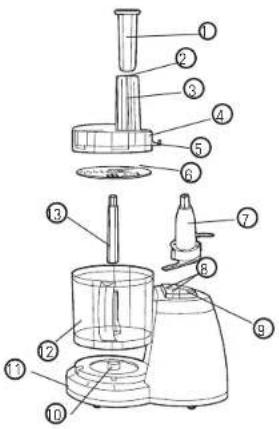
- Food pusher (Part # D905801930007879)
- Food fingers
- Food chute
- Cover (Part # D90581019200)
- Tab
- Slice and shredder disk (Part # D905810220007878)
- Chopping blade (Part # CN90580102)
- Hi and Lo speed control
- Off/Pulse control
- Center post
- Base
- 8-Cup (1892 ml) container (Part # D90580079200)
- Disk stem (Part # D905801020007878)
How to Use
This product is for household use only.
- Before first use, unpack the product and remove packing material. Handle sharp chopping blade and slice and shredder disk carefully.
- Please go to www.prodprotect.com/applica to register your warranty.
- Remove and save literature.
- Wash all parts except base.
Note: Do not attempt to chop ice in this food processor; it will damage container and dull chopping blade. This unit will not whip cream, beat egg whites to a desirable volume, grind coffee beans or spices with a high oil content, or slice or shred hard-cooked eggs, marshmallows, or soft cheeses.
CONTROLS
HI or LO — When these buttons are pressed, unit runs continuously until OFF button is pressed.
OFF — Processor should always be left in OFF position when unit is not in use. PULSE — PULSE position must be pressed and held for unit to operate. When released, unit will stop. Use PULSE for short processing tasks, such as chopping nuts, raw meats, or vegetables. This lets you check processed results and control the fineness.
Important: For your protection, this unit has an Interlock system. The processor won't operate unless container is properly locked onto base (see illustration on the base). The tab on cover must be correctly locked into the slot on base. Be sure cover is turned fully into slot toward LOCK/☐ until you hear it click into place. Do not attempt to operate unit without container and cover correctly locked in place. Be sure base is on a flat, dry, clean surface before you begin processing.
TO SLICE OR SHRED
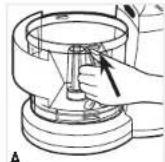
- Place container over center post in base with handle at left. Turn container towards base until it drops down into place. Snap container in towards base and be sure the locking tab locks into place (A).
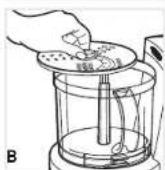
- To process directly into included container, place the disk stem onto the center post in the container, then grasp the slice and shredder disk by its hub with the (slice or shred) up and push it down onto the disk stem (B).
- Place food cover onto container so that its tab is facing down towards base. Twist food cover in toward base to LOCK/ 🔒 until you hear it click into place.
-
Plug cord into an electrical outlet.
-
Fill food chute with food and position the pusher over food.
- Select HI or LO speed, then press down lightly but firmly on food pusher. For pulse control push the PULSE button.
Note: Let processor do the work. Heavy pressure will not speed up operation - After processing food, press the control to OFF or release pulse control. Allow disk to stop rotating. Twist food chute/cover toward UNLOCK/ ^① to remove.
- Carefully pull slice and shredder disk off the stem, remove stem, unlock container by turning it away from its base, and lift container off.
TO USE THE CHOPPING BLADE
- Place container over center post in base with handle at the left. Turn container towards base until it drops down into place. Snap bowl in towards base and be sure locking tab locks into place.
- Grasp chopping blade by its center shaft and slide it down onto center post.
- Place food cover onto container so that its tab is facing base. Twist food cover in toward base to LOCK/ 🔑 until you hear it click into place.
- Plug cord into an electrical outlet.
- Place food into container.
- Press HI, LO or PULSE. When pulsing, hold pulse position for about 2-3 seconds. Check results and repeat for desired consistency. It is better to use several short operations rather than a single long one unless mixing ingredients that require longer processing times.
- After processing food, press control to OFF or release PULSE button. Allow chopping blade to stop rotating. Twist cover toward UNLOCK/ ^® to remove cover.
- Grasp blade by its shaft and remove. Unlock container by turning it away from its base, and lift it off. Empty the processed food.
FOOD PROCESSING TIPS
Liquids
• Hot liquids (not boiling) and hot foods can be processed in container.
- Be sure to process small amounts of liquids — 3 cups or less at a time. Larger amounts may leak from container.
Meat
- When using the chopping blade for processing meat, cut the meat into 1" (25.4mm) cubes. Do not put more than 10.5 ounces (300g) of meat into the container at a time.
Food Size, Preparation and Loading
- When using different foods in a recipe, process dry ingredients first and moist ingredients later. This reduces the number of times container must be washed and dried.
- You can use the disk in combination with the chopping blade. Just position chopping blade in bowl and press slice and shredder disk with desired side (slice or shred) down onto hub of chopping blade. Using the 2 parts together can eliminate having to pre-cut foods into cubes — perfect when shredding and chopping cheese such as parmesan to get a finer grated result.
Care and Cleaning
This product contains no user serviceable parts. Refer service to qualified service personnel.
Note: Do not attempt to sharpen the cutting edges of the blades or disks. They are permanently sharpened at the factory and will be ruined by attempted sharpening.
CLEANING
- Before cleaning, be sure unit is off and cord is unplugged.
- Whenever possible, rinse parts immediately after processing for easy cleanup.
- Wipe base and feet with a damp cloth and dry thoroughly. Stubborn spots can be removed by rubbing with a damp cloth and a mild, non-abrasive cleaner. Do not immerse base in liquid.
- All removable parts can be washed by hand or in a dishwasher. To remove food fingers, pull up on clip portion.
• If washing by hand, wash in sudsy water, rinse, and dry thoroughly. - If washing in a dishwasher, place removable parts on top rack only — not in or near utensil basket.
- Some staining of parts may occur. Use a paste of 2 tablespoons baking soda/1 tablespoon water. Then apply to stains and let stand overnight. Rinse and dry.
- Do not use rough scouring pads or cleansers on any plastic or metal parts.
- Do not allow blades, or disks to soak in water for long periods of time.
NEED HELP?
For service, repair or any questions regarding your appliance, call the appropriate 800 number on cover of this book. Please DO NOT return the product to the place of purchase. Also, please DO NOT mail product back to manufacturer, nor bring it to a service center. You may also want to consult the website listed on the cover of this manual.
Two-Year Limited Warranty
(Applies only in the United States and Canada)
What does it cover?
- Any defect in material or workmanship provided; however, Applica's liability will not exceed the purchase price of product.
For how long?
• Two years after date of purchase.
What will we do to help you?
- Provide you with a reasonably similar replacement product that is either new or factory refurbished.
How do you get service?
• Save your receipt as proof of date of sale.
- Visit the online service website at www.prodprotect.com/applica, or call toll-free 1-800-231-9786, for general warranty service.
• If you need parts or accessories, please call 1-800-738-0245.
What does your warranty not cover?
• Damage from commercial use
• Damage from misuse, abuse or neglect
• Products that have been modified in any way
• Products used or serviced outside the country of purchase
• Glass parts and other accessory items that are packed with the unit
• Shipping and handling costs associated with the replacement of the unit
- Consequential or incidental damages (Please note, however, that some states do not allow the exclusion or limitation of consequential or incidental damages, so this limitation may not apply to you.)
How does state law relate to this warranty?
- This warranty gives you specific legal rights. You may also have other rights that vary from state to state or province to province.
BLACK&DECKER is a registered trademark of The Black & Decker Corporation, Towson, Maryland, USA
Made in People's Republic of China Printed in People's Republic of Chir
servicente@servicenter.cl
Colombia
PLINARES
Avenida Quito # 88A-09
Bogotá, Colombia
San Jose, Costa Rica
Tel.: (506) 257-5716 / 223-0136
Ecuador
Col. Centro, Cuauhtemoc,
México, D.F.
Tel. 01 800 714 2503
Nicaragua
ServiTotal
City Market Nivel Plaza Local 153
Diagonal Hotel Melia,
Caracas.
Tel. (582) 324-0969
www.applicaservice.com
servicio@applicamail.com
Col. Chapultepec Morales, Mexico D.F
Deleg. Miguel Hidalgo
CP 11570
MEXICO
C.U.I.T No. 30-69729892-0
Importado por / Imported by:
APPLICA MANUFACTURING, S. DE R. L. DE C. V.
Presidente Mazarik No111, 1er Piso
Col. Chapultepec Morales, Mexico D.F
Deleg. Miguel Hidalgo
CP 11570
MEXICO
Applica Consumer Products, Inc.
Copyright © 2009 Applica Consumer Products, Inc.
2009/11-4-16E/S

Printed on recycled paper.
- Please Read and Save this Use and Care Book
- IMPORTANT SAFETY INSTRUCTIONS
- SAVE THESE INSTRUCTIONS.
- This product is for household use only.
- POLARIZED PLUG (120V Models Only)
- TAMPER-RESISTANT SCREW
- ELECTRICAL CORD
- How to Use
- CONTROLS
- TO SLICE OR SHRED
- TO USE THE CHOPPING BLADE
- FOOD PROCESSING TIPS
- Liquids
- Meat
- Food Size, Preparation and Loading
- Care and Cleaning
- CLEANING
- NEED HELP?
- Two-Year Limited Warranty
- (Applies only in the United States and Canada)
- What does it cover?
- For how long?
- What will we do to help you?
- How do you get service?
- What does your warranty not cover?
- How does state law relate to this warranty?
- Colombia
- Ecuador
- Nicaragua
- Importado por / Imported by:
Brand : BLACK & DECKER
Model : FP1336
Category : Food processor