
FGK-102 - Door/window sensor Fibaro - Free user manual and instructions
Find the device manual for free FGK-102 Fibaro in PDF.


| Product Type | Z-Wave Door/Window Sensor |
| Brand | Fibaro |
| Model | FGK-102 |
| Dimensions (Sensor Body) | 50 x 30 x 20 mm |
| Weight | 50 g (including battery) |
| Power Supply | 1 x ER14505 3.6V Lithium battery (1.2 Ah) |
| Battery Life | Up to 2 years (typical usage) |
| Operating Temperature | 0°C to 40°C |
| Radio Protocol | Z-Wave |
| Radio Frequency | 868.4 MHz (EU) / 908.4 MHz (US) |
| Range (Line of Sight) | Up to 80 m |
| Input | Magnetic reed switch (normally closed) |
| External Temperature Sensor | DS18B20 (1-Wire) |
| Tamper Protection | Built-in tilt sensor and tamper button |
| LED Indication | Yes (for inclusion/exclusion and status) |
| Mounting | Double-sided tape or screws |
| Water Resistance | Not specified (indoor use recommended) |
| Compatibility | Any Z-Wave certified controller (e.g., Home Center 2) |
| Maintenance | Replace battery when low; ensure magnet alignment |
| Security | Tamper alarm, secure Z-Wave inclusion |
| Warranty | 2 years (manufacturer) |
Frequently Asked Questions - FGK-102 Fibaro
User questions about FGK-102 Fibaro
0 question about this device. Answer the ones you know or ask your own.
Ask a new question about this device
Download the instructions for your Door/window sensor in PDF format for free! Find your manual FGK-102 - Fibaro and take your electronic device back in hand. On this page are published all the documents necessary for the use of your device. FGK-102 by Fibaro.
USER MANUAL FGK-102 Fibaro
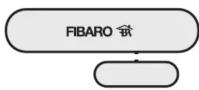
OPERATING MANUAL
DOOR / WINDOW SENSOR
FGK - 101 - 107 v2.1 - v2.3
The Fibaro Door / Window Sensor is a wireless, battery powered, Z-Wave compatible reed sensor. Each time its two parts, i.e. the sensor's body and a magnet separate, a radio signal is sent. In addition the Fibaro Door / Window Sensor supports one DS18B20 temperature sensor and has one potential free input.
The Fibaro Door / Window Sensor is designed for use with scenes in home automation systems, alarm and surveillance systems and everywhere else where information related to opening / closing of doors, windows, garage gates, etc. is needed.
Technical data:
| Power supply | single ER14250 (1/2AA) 3.6V battery |
| Inputs | single, potential-free |
| Supported temperature sensors | single, DS18B20 |
| Operating temperature | 0 - 40 °C |
| Radio protocol | Z-Wave |
| Radio frequency | 868,4 MHz EU;908,4 MHz US;921,4 MHz AU/NZ;869,2 MHz RU; |
| Range | up to 30m indoors, depending on building materials used and the building structure |
| Dimensions (L x W x H) | 76 x 17 x 19 mm |
Technical information:
- Controlled via. Fibaro System components or any other Z-Wave compatible controller
- Door/window opening detected through Sensor's body and a
magnet separation, - Quick installation - easily mounted on doors, windows, garage
gates, roller blinds, using double sided adhesive tape or screws
- Compatible with DS18B20 temperature sensors, - When connecting DS18B20 use single wire lead, no longer than 30
When connecting 2.5 meters are single inch at 100, no long meters.
- May be connected to a switch via potential-free IN input.

HINT Connections should be made specifically according to the diagrams presented in this manual. Incorrect connections may be hazardous or lead to device damage.
I General Information on the Fibaro System:
Fibaro is a system that does not require any additional conductors; it is based on the Z-Wave technology. Fibaro offers a wide array of advantages in comparison to other, similar systems. In general, radio-based systems establish a direct connection between the receiver and the transmitter. The radio signal is attenuated by every obstacle along its path (in the household e.g. walls, furniture, etc). In the worst case the radio system ceases to function. The advantage of the Fibaro System is the fact that the devices act not only as a signal receiver and transmitter, but also as a signal repeater. If a direct radio link between the transmitter and the receiver cannot be established, the connection will be carried out with the use of other devices participating in communication.
Fibaro is a bidirectional wireless system. This means the signal is not only sent to the receivers, but also the receivers send feedback confirming the reception of the signal. This also confirms the condition of receivers, which allows us to check whether or not a device has actually been switched on. The safety of transmission of the Fibaro System is comparable with a wire-linked bus system. Fibaro operates in the free band for data transmission. The frequency depends on the radio regulations in each individual country.
Each Fibaro network has its own unique network identification number (home ID), which is why two or more independent systems may be installed in a single building without any interference.
Although the Z-Wave technology is fairly new, it has already been accepted as an official standard, just like Wi-Fi. Numerous manufacturers from various fields offer solutions based on Z-Wave technology, compatible with one another. This makes the system fit for the future and allows for further development. For more information go to www.fibaro.com.
Fibaro establishes a dynamic network structure. From the moment of start-up, the location data of respective devices of the Fibaro System is updated automatically, in real time, by confirming their condition in the working mesh network.
II Sensor Installation:
- Connect Fibro Door/Window Sensor according to the
appropriate diagram (if necessary)
-
Place battery inside the Sensor's casing, 3. Include into the Z-Wave network
-
Install Fibaro DoorWindow Sensor observing diagram 4.
[EMPTY]
EXPLANATION OF CONDUCTOR MARKINGS:
TMP - Tamper button. Detects removal, tampering etc. Used also
as a service button, to include/exclude the device to/from the
Z-Wave network,
IN - Potential-free input, TR (TEMP. POWER) Power out for DR18R20 temperature
TF = (TEMP_POWER) - Power out for D310020 temperature sensor.
TD - (TEMP_DATA) - Signal terminal for DS18B20 temperature
sensor,

NOTE!
To ensure the most accurate position detecting
always install the magnet in relation to the Sensor's
body, as shown in diagram 4

NOTE!
Fibaro Door/Window Sensor has two TMP buttons inside and upside the closing
- inside and underside the casing.
During normal operation both TMP buttons must be secure. Do not use the sensor with opened casing
NOTE!
TMP button, located on the underside of the
device, has two functions: 4. gets a device into the loop mode (include to i
- Sets a device into the team in Evaludy from a 7 Wave network)
Exclude from a Z-wave network), 2 tamper button. After correct installation (fig. 5
- Tempor battery, first school mitochondr (e.g. 5 and 6), removing the whole sensor from its location
or opening its casing may release the TMP button
and trigger an alarm. If the TMP is to serve as a
tamper button, association for II-nd association
group must be configured (optionally, use the Parameter 13)
USING IN INPUT:

The Fibaro Door/Window Sensor has a one,
potential-free IN input. IN input status may be
modified through the Sensor itself or by sending GND signal to IN (diagram 3). If the DoorWindow
GND signal to IN (diagram 5). In the Door/Window Sensor will be used only as a binary sensor, do not
install the magnet.
anywhere where very precise temperature readouts
are necessary. If adequately protected, the
DS18B20 sensor may be installed in humid conditions, under water, sealed in concrete or placed
conditions, under water, sealed in concrete or placed under the floor.
ANTENNA ARRANGEMENT INSTRUCTIONS:

The antenna should be placed above the battery.
Never cut, shorten or bend the antenna. Its length is suited, ideally to the band at which the custom
sulted ideally to the band at which the system functions.

Metal surfaces in close vicinity (e.g. metal switch
boxes, metal door trims) may impair the reception
capability!
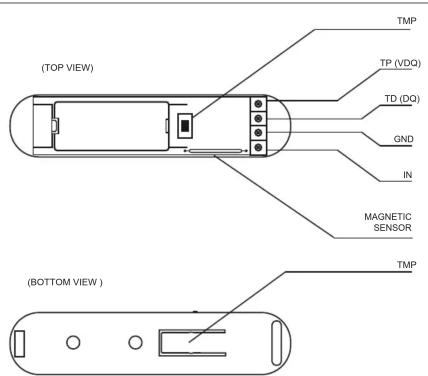
Diagram 1 - General

BELL-PUSH
Diagram 3 - Example connection - momentary switch
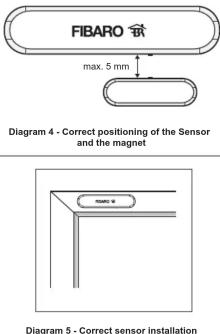
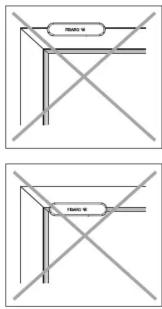
Diagram 6 - Incorrect sensor installation
GLOSSARY OF TERMS:
• INCLUSION - the device sends out a Node Info frame, which
makes it possible to add it to the Fibard System (Home Center 2),
- EXCLUSION - remove the device from the Fibaro System,
• ASSOCIATION - controlling other devices included in the Fibaro
System
• Multi Channel Association - controlling other multi-channel
devices included in the Fibaro System
III Fibaro Sensor Start-up
1. Installation of the Door/Window Sensor
STEP 1
Install the device observing the Figure 4 for correct positioning of the Sensor and the magnet. Close the Sensor's casing.
[Inclusion/Exclusion] of the Fibaro Door/Window Sensor [to/from] the Z-Wave network.
2023.1
The Fibaro module must be in range of the Home Center 2 controller, because the procedure of inclusion to the Fibaro System requires direct communication with the controller.
STEP 3
Locate TMP button, which allows for proper inclusion of device.
STEP 4
Set the Home Center 2 controller to the inclusion or exclusion mode (see: Home Center 2 controller instructions).
STEP 5
The Fibaro Door/Window Sensor is added to the network by quickly pressing the TMP button three times (the button is located on the underside of the device, inside its casing).
STEP 6
Correct inclusion of the device to the network will be signalled by the Home Center 2 (see: Home Center 2 controller operation instructions).
BATTERY USE:
The Fibaro Door/Window Sensor's battery life is up to 2 years, on default settings. Current battery level is displayed in the Home Center 2 configuration interface. If a battery icon turns red, it means the battery needs replacement. In order not to trigger an alarm when replacing the battery, ill-nd association group must be deleted and the Sensor's configuration must be changed to default, prior to the battery change.

NOTE!
Door/Window Sensor is equipped with a built-in LED. LED blinks each time Door/Window Sensor changes its state. LED blinking slowly = correct inclusion. LED blinking rapidly = inclusion error.

NOTE!
Every time any changes are made to the configuration of TP and TD lines (1-wire), i.e. when DS18B20 sensor is connected/disconnected, it is necessary to execute the procedure of exclusion and repeated inclusion of the sensor module to the Z-Wave network. The system will enter into the learning mode only after connected DS18B20 sensor has been detected (about 10 s).

NOTE!
Do not connect sensors other than DS18B20 to the 1-wire line (TP and TD terminals).

NOTE!
It is prohibited to connect the TP and TD lines to devices not compatible with the 1-wire protocol.
2. Resetting the Fibaro Door/Window Sensor
There is one way to reset the Fibaro DoonWindow Sensor. The procedure cleans its EPROM memory, including the main controller and Z-Wave network data.
To reset the Fibaro Door/Window Sensor please follow below instructions:
1) Take off the Sensor's cover and remove battery. Make sure the TMR button is intact.
2) Touch the Sensor's body with a magnet,
3) Insert the battery,
4) Remove the magnet from the Sensor's body,
5) Remove the battery
6) Re-install the battery
7) Reset will be confirmed by double LED blink.
[Non-Text]
NOTE!
Resetting the device memory doesn't remove it from the Z-Wave network's main controller memory. To be able to re-include the device into the Z-Wave network please exclude it first. Exclusion may be performed either before or after the reset procedure.
- Controlling the Fibaro Door/Window Sensor with the Home Center 2 Controller
The DoorWindow Sensor is a multichannel device. This means that it is equipped with an independent input circuit and a 1-wire bus allowing it to be connected to a DS18B20 temperature sensor. As a result, each device is represented by an independent icon in the System.

Fig. 1 - Door / Window Sensor icon in the Home Center controller

Fig. 2 - DS18B20 temperature sensor icon in the Home Center controller
Sensor used without a DS18B20 sensor, or used with a switch connected to IN input, will be represented by single icon. After the DS18B20 temperature sensor has been connected, temperature sensor icon will be displayed.

If a temperature sensor icon is not displayed despite the fact the sensor itself has been connected, or if the temperature readings are incorrect, inspect the connections on the 1-wire bus, in particular the connection between sensor outputs and the line, and the total length of the bus wire which should not exceed 30m.
IV Association
Association allows the Fibaro Door/Window Sensor to directly control another device in the Z-wave network, e.g. Dimmer, Switch (On-Off), Roller Shutter or trigger scenes (scene control is only possible via the Home Center 2 controller).

NOTE! Association allows for direct transmission of control commands between devices and takes place without the participation of the main controller. Owing to this mechanism the Door/Window Sensor may communicate with devices even if the main controller is completely destroyed, e.g. in the event of a fire.
The Fibaro Door/Window Sensor supports three association groups.
Group I is assigned to input IN1 (and the magnetic sensor). Sending BASIC SET or ALARM command frames.
Group II is assigned to TMP button. Once the button is released, ALARM GENERIC frame is sent to associated devices.
Group III reports on the condition of the device, only one device may be assigned to the group (main controller, by default).
The Fibaro Door/Window Sensor allows for control over 5 regular devices and 5 multichannel devices per group, out of which 1 field is reserved for the network controller.
In order to add an association (with the use of the Home Center 2
controller) go to device options by clicking this icon:
Select the device options tab. Next specify which devices will be associated, and to which association groups. Sending of configuration commands to associated devices might take up to a few hours, depending on previous devices settings and the number of devices within the network.

NOTE!
Any new association order given while any association commands are already being sent to devices, cancels previous one.
V Configuration
The Door / Window Sensor offers a wide range of advanced settings. The parameters listed below are available in the Fibaro configuration interface.
In order to configure the Fibaro Door / Window Sensor (using the Home Center 2 controller) go to the device options by clicking on

Next, select the device options tab
Device parameters:
Parameter no. 1
Input IN alarm cancellation delay. Additional delay after an alarm from input IN has ceased. The parameter allows user to specify additional time, after which the input IN alarm is cancelled once its violation has ceased.
Default value: 0
Available parameter settings: 0 – 65535 s
Parameter value: 2 [byte]
Parameter no. 2
Status change signaled by LED.
Default setting:
Available parameter settings: 0 LED turned Off
0 - LED turned On, 1 - LED turned On.
Parameter value: 1 [byte]
Parameter no. 3
Default value: 0 – INPUT_NC (Normal Close)
Available parameter settings: 0. INPUT, NC (Normal Close)
6 - INPUT_NO (Normal Close) 1 - INPUT_NO (Normal Open)
2 - INPUT_MONOSTABLE 3 - INPUT_RISTABLE
Parameter value: 1 [byte].
Parameter no. 5
Type of control frame transmitted for association group 1, activated via IN input. The parameter allows you to specify the type of an alarm frame or to force control frames transmission (BASIC_SET).
Default value: 255 - BASIC SET
Available parameter settings:
0 – ALARM GENERIC frame 1 – ALARM SMOKE frame
2 – ALARM CO frame 3 – ALARM CO2 frame
3 - ALARM CO2 frame 4 - ALARM HEAT frame
5 - ALARM WATER frame 255 - Control frame BASU
Parameter value: 1 [byte].
Parameter no. 7
Value of the parameter specifying the forced level of dimming/opening roller blinds when "switch on"/"open" commands are sent to devices from association group no.1.
In case of alarm frames an alarm priority is specified.
Default value: 255
Possible parameter settings: (1 - 99) and 255
Value of 255 makes it possible to activate a device. In case of the Dimmer module it means activating the device and setting it to the previously stored condition, e.g. when Dimmer is set to 30%, deactivated and then reactivated using 255 commend, it will be automatically set to the previous condition i.e. 30%.
Parameter value: 1 [byte].
Parameter no. 9
Deactivating transmission of the alarm cancelling frame or the control frame deactivating the device (Basic). It allows for disabling the function of deactivating the device and cancelling alarms for devices associated with IN input.
Default value: 0
Available parameter settings:
0 – for association group no. 1 information is sent 1 – for association group no. 1 information is not
1 = for association group no. 1 information is not sent
Parameter value: 1 [byte].

NOTE!
The parameter cancels alarms only. Information on alarm violation or activation commands for devices
alarm violation of activation commands from association groups are always sent
Parameter no. 12
Sensitivity to temperature changes. The maximum acceptable difference between the last reported temperature and the current temperature read from the sensor. If the temperatures differ by the set value or more, a report with the current temperature value is sent to the device assigned to association group no. 3.
Default value: 8 [0,5oC]
Available parameter settings: 0 - 255 [0oC to 16oC] [32oF - 60.8eF]
20,201
To set an appropriate parameter value use the following formula:
x = delta T x 16 - for Celsius
x = delta T x 80 / 9 - for Fahrenheit x = parameter value
delta T – maximum acceptable temperature gradient in Celsius or Fahrenheit
If the value is set to 0
- if the wake-up interval is set to 255 seconds, temperature report will be sent according to the interval.
- if the wake-up interval is set to over 255, temperature report will be sent each ca. 4 minutes.
Parameter value: 1 [byte].
Parameter no. 13
Sending an alarm or control frame (for IN input, depending on parameter no.5 value), and TMP button alarm frame. The frame is sent in "broadcast" mode, i.e. to all devices within range - information sent in this mode is not repeated by the mesh network.
Default value: 0
Available parameter settings:
0 – IN and TMP Broadcast mode inactive, 1 – IN broadcast mode active. TMP broad
1 – IN broadcast mode active, TMP broadcast mode inactive 2 – IN broadcast mode inactive, TMP broadcast mode active
3 – IN and TMP broadcast mode active
Parameter value: 1 [byte].

If the "t
is activated for a given channel, then transmission of information in "singlecost" mode, i.e. to devices
information in singlecast mode, i.e. to devices assigned to the association group, for this channel is
deactivated.
Parameter no. 14
Scene activation functionality.
Default value: 0
Available parameter settings:
0 - functionality deactivated 1 - functionality activated
,
The device offers the possibility of sending commands compatible with Command class scene activation. Information is sent to devices assigned to association group no. 3
Controllers such as the Home Center 2 are able to interpret such commands and based on these commands activate scenes, to which specific scene IDs have been assigned. The user may expand the functionality of a button connected to IN input by distinguishing the sequence of it being pushed. For example: double click would trigger the "goodnight" scene and triple click would trigger the "morning" scene. To fully use the possibilities offered by the parameter no.14 it is recommended to use a momentary or a toggle switch (parameter no.3).
Scene ID is determined in the following manner:
IN input:
Switch from "off" to "on" ID10 Switch from "on" to "off" ID11
Remaining IDs are recognized correctly if the value of parameter
no.3 was set to 2 Holding from ID12
Holding down ID1 Releasing ID13
Double click ID14
Triple click ID15
Parameter value: 1 [byte].

NOTE!
Scene activation functionality may shorten the battery life, even by 25%.
VI Additional Functionality
Alarm Frame Support.
The Fibaro System allows you to set the device's reaction to alarms (reaction to SENSOR_ALARM_REPORT frame). The Fibaro Door/Window Sensor sends alarm frames of different types, depending on parameter's no. 5 settings. The user should declare type of alarm frame for each connected sensor. For example, for a smoke detector connected to IN input the user should declare the type 1-ALARM SMOKE frame (value of 1 should be entered), to ensure the remaining Z-Wave network devices recognize the information on smoke detector alarm correctly.
VII Door / Window Sensor operation
The Fibaro DoorWindow Sensor may be operated using:
• Any System compatible controller (e.g. Home Center 2)
• Cellular phone (e.g. iPhone or phones from other manufacturers, with the proper control application)
• PC, with the use of an Internet brow
• Tablets (e.g. iPad) Using the TMP button, located inside the housing
VIII Procedure to be followed in case of interference
The Device does not react to a programmed transmitter
- Make sure the maximum range has not been exceeded and there are no obstacles along the signal path containing metal surfaces, e.g. metal cabinets, Ferro concrete ceiling, load bearing walls, etc. - Make sure the device is not in the learning mode.
IX Guarantee
-
The Guarantee is provided by FIBAR GROUP Sp. z o.o. (hereinafter "Manufacturer"), based in Poznan, ul. Lotnicza 1; 60-421 Poznan, entered in the register of the National Court Register kept by the District Court in Poznań, VIII Economic Department of the National Court Register, no. 370151, NIP 7811858097, REGON: 301595664.
-
The Manufacturer is responsible for equipment malfunction resulting from physical defects (manufacturing or material) of the Device for 12 months from the date of its purchasing.
-
During the Guarantee period, the Manufacturer shall remove any defects, free of charge, by repairing or replacing (at the sole discretion of the Manufacturer) any defective components of the Device with new or regenerated components, that are free of defects. When the repair impossible, the Manufacturer reserves the right to replace the device with a new or regenerated one, which shall be free of any defects and its condition shall not be worse than the original device owned by the Customer.
-
In special cases, when the device cannot be replaced with the device of the same type (e.g. the device is no longer available in the commercial offer), the Manufacturer may replace it with a different device having technical parameters similar to the faulty one. Such activity shall be considered as fulfilling the obligations of the Manufacturer. The Manufacturer shall not refund money paid for the device.
-
The holder of a valid guarantee shall submit a guarantee claim through the guarantee service. Remember: before you submit a guarantee claim, contact our technical support using telephone or e-mail. More than 50% of operational problems is resolved remotely, saving time and money spent to initiating guarantee procedure. If remote support is insufficient, the Customer shall fill the guarantee claim form (using our website - www.fibargroup.com) in order to obtain claim authorization.
When the guarantee claim form is submitted correctly, the Customer shall receive the claim confirmation with an unique number (Return Merchandise Authorization -RMA).
-
The claim may be also submitted by telephone. In this case, the call is recorded and the Customer shall be informed about it by a consultant before submitting the claim. Immediately after submitting the claim, the consultant shall provide the Customer with the claim number (RMA-number).
-
When the guarantee claim form is submitted correctly, a representative of the Authorised Guarantee Service (hereinafter as "AGS") shall contact the Customer.
-
Defects revealed within the guarantee period shall be removed not later than 30 days from the date of delivering the Device to AGS. The guarantee period shall be extended by the time in which the Device was kept by AGS.
-
The faulty device shall be provided by the Customer with complete standard equipment and documents proving its purchase.
-
Parts replaced under the guarantee are the property of the Manufacturer. The guarantee for all parts replaced in the guarantee process shall be equal to the guarantee period of the original device. The guarantee period of the replaced part shall not be extended.
-
Costs of delivering the faulty device shall be borne by the Customer. For unjustified service calls, the Service may charge the Customer with travel expenses and handling costs related to the case.
-
AGS shall not accept a complaint claim only when:
- the Device was misused or the manual was not observed, - the Device was provided by the Customer incomplete, without accessories or nameplate.
- it was determined that the fault was caused by other reasons than a material as manufacturing defect of the Devian.
• the guarantee document is not valid there is no proof of purchase,
-
The Manufacturer shall not be liable for damages to property caused by defective device. The Manufacturer shall not be liable for indirect, incidental, special, consequential or punitive damages, or for any damages, including, inter alia, loss of profits, savings, data, loss of benefits, claims by third parties and any property damage or personal injuries arising from or related to the use of the Device.
-
The guarantee shall not cover:
- mechanical damages (cracks, fractures, cuts, abrasions, physical deformations caused by impact, falling or dropping the device or other object, improper use or not observing the operating manual); - damages resulting from external causes, e.g.: flood, storm, fire, lightning, natural disasters, earthquakes, war, civil disturbance, force majeure, unforeseen accidents, theft, water damage, liquid leakage, battery spill, weather conditions, sunlight, sand, moisture, high or low temperature, air pollution:
• damages caused by malfunctioning software, attack of a computer virus, or by failure to update the software as recommended by the Manufacturer;
• damages resulting from: surges in the power and/or telecommunication network, improper connection to the grid in a manner inconsistent with the operating manual, or from connecting other devices not recommended by the Manufacturer.
- damages caused by operating or storing the device in extremely adverse conditions, i.e. high humidity, dust, too low (freezing) or too high ambient temperature. Detailed permissible conditions for operating the Device are defined in the operating manual;
- damages caused by using accessories not recommended by the Manufacturer
- damages caused by faulty electrical installation of the Customer, including the use of incorrect fuses;
• damages caused by Customers failure to provide maintenance and servicing activities defined in the operating manual;
- damages resulting from the use of spurious spare parts or accessories improper for given model, repairing and introducing alterations by unauthorized persons;
• defects caused by operating faulty Device or accessories.
-
The scope of the guarantee repairs shall not include periodic maintenance and inspections, in particular cleaning, adjustments, operational checks, correction of errors or parameter programming and other activities that should be performed by the user (Buyer). The guarantee shall not cover natural wear and tear of the Device and its components listed in the operating manual and in technical documentation as such elements have a defined operational life.
-
If a defect is not covered by the guarantee, the Manufacturer reserves the right to remove such defect at its sole discretion, repairing the damaged or destroyed parts or providing components necessary for repair or replacement.
-
This guarantee shall not exclude, limit or suspend the Customer rights when the provided product is inconsistent with the purchase agreement.

This Device may be used with all devices certified with Z-Wave certificate and should be compatible with such devices produced by other manufacturers.
Any device compatible with Z-Wave may be added to Elbaro system.
FIBARGROUP
FIBARO
In case of any technical questions contact customer service centre in your country.
www.fibargroup.com


- TECHNICAL INFORMATION
- I GENERAL INFORMATION ON THE FIBARO SYSTEM
- II SENSOR INSTALLATION
- USING IN INPUT
- ANTENNA ARRANGEMENT INSTRUCTIONS
- GLOSSARY OF TERMS
- III FIBARO SENSOR START-UP
- INSTALLATION OF THE DOOR/WINDOW SENSOR
- BATTERY USE
- RESETTING THE FIBARO DOOR/WINDOW SENSOR
- IV ASSOCIATION
- V CONFIGURATION
- DEVICE PARAMETERS
- PARAMETER NO. 1
- DEFAULT VALUE: 0
- PARAMETER NO. 2
- DEFAULT SETTING
- PARAMETER NO. 3
- PARAMETER NO. 5
- PARAMETER NO. 7
- DEFAULT VALUE: 255
- PARAMETER NO. 9
- PARAMETER NO. 12
- PARAMETER NO. 13
- PARAMETER NO. 14
- VI ADDITIONAL FUNCTIONALITY
- ALARM FRAME SUPPORT
- VII DOOR / WINDOW SENSOR OPERATION
- VIII PROCEDURE TO BE FOLLOWED IN CASE OF INTERFERENCE
- IX GUARANTEE
- FIBARGROUP
- FIBARO
Brand : Fibaro
Model : FGK-102
Category : Door/window sensor