AW-05CR1FHLU - Air conditioner Admiral - Free user manual and instructions
Find the device manual for free AW-05CR1FHLU Admiral in PDF.


| Product Type | Window Air Conditioner |
| Brand | Admiral |
| Model | AW-05CR1FHLU |
| Cooling Capacity (BTU/h) | 5,000 |
| Energy Efficiency Ratio (EER) | 11.0 |
| Power Supply | 115 V, 60 Hz, 4.5 A |
| Refrigerant | R-410A |
| Dimensions (W x H x D) | 18.9 x 12.4 x 14.5 in (480 x 315 x 368 mm) |
| Weight (Unit) | 44.1 lbs (20 kg) |
| Airflow (High) | 150 CFM |
| Noise Level (High/Low) | 52 / 48 dB |
| Modes | Cool, Fan, Energy Saver, Sleep |
| Fan Speeds | 2 (High, Low) |
| Thermostat Type | Electronic |
| Timer | 24-hour On/Off |
| Remote Control | Included |
| Filter Type | Washable mesh filter |
| Installation Type | Window mount (slide-out chassis) |
| Window Width Requirement | 23 to 36 in (584 to 914 mm) |
| Minimum Window Height | 13 in (330 mm) |
| Power Cord Length | 6 ft (1.8 m) |
| Certifications | UL Listed, Energy Star |
| Warranty | 1 year (parts and labor) |
Frequently Asked Questions - AW-05CR1FHLU Admiral
User questions about AW-05CR1FHLU Admiral
0 question about this device. Answer the ones you know or ask your own.
Ask a new question about this device
Download the instructions for your Air conditioner in PDF format for free! Find your manual AW-05CR1FHLU - Admiral and take your electronic device back in hand. On this page are published all the documents necessary for the use of your device. AW-05CR1FHLU by Admiral.
USER MANUAL AW-05CR1FHLU Admiral
ROOM AIR CONDITIONER
Use and Care Manual
Remote control
AW-05CR1FHLU
Mechanical control
AW-05CM1FLU
Thank you for purchasing an Admiral room air conditioner. Please read this "Use and Care Manual" carefully before installing and using this appliance. Keep this manual for future reference.
Introduction and Parts Identification 4-5
Electrical Specifications 6
Tips Before Installation 7
Installation Instructions 8-10
Operating Instructions 11-14
Care and Maintenance 15
Troubleshooting Guide 16
Warranty 17
ÍNDICE
Page
Introducción 18
AIR CONDITIONER SAFETY
What You Need to Know About Safety Instructions
Warning and Important Safety Instructions appearing in this manual are not meant to cover all possible conditions and situations that may occur. Common sense, caution, and care must be exercised when operating or cleaning tools and equipment.
Always contact your dealer, distributor, service agent, or manufacturer about problems or conditions you do not understand.

This is the safety alert symbol. It is used to alert you to potential personal injury hazards. Obey all safety messages that follow this symbol to avoid possible injury or death.

DANGER
DANGER indicates an imminently hazardous situation which, if not avoided, will result in death or serious injury.

WARNING
WARNING indicates a potentially hazardous situation which, if not avoided, could result in death or serious injury.

CAUTION
CAUTION indicated a potentially hazardous situation which, if not avoided, may result in minor or moderate injury.
CAUTION
CAUTION used without the safety alert symbol indicated a potentially hazardous situation which, if not avoided, may result in property damage.
IMPORTANT SAFETY INSTRUCTIONS

WARNING
To reduce the risk of fire, electrical shock, or injury when using your air conditioner, follow these basic precautions:
- Plug into a grounded 3-prong outlet.
- Do not remove ground prong.
-
Do not use an adapter.
-
Do not use an extension cord.
- Unplug air conditioning before servicing.
- Use two or more people to move and install air conditioner.
AIR CONDITIONER SAFETY
- The portable air conditioner should be connected to a 115 V, 60 Hz, 15- or 20-amp fused 3-prong grounded outlet.
- The use of a time-delay fuse or time-delay circuit breaker is recommended.
- All wiring must comply with local and national electrical codes and be installed by a qualified electrician. If you have any questions, contact a qualified electrician.
Electrical Requirements
! WARNING

ELECTRIC SHOCK HAZARD
• Plug into a grounded 3-prong outlet.
- Do not remove ground prong.
- Do not use an adapter.
- Do not use an extension cord.
- Failure to follow these instructions can result in death, fire, or electrical shock.
Power Supply Cord
NOTE: Your unit's device may differ from the one shown.
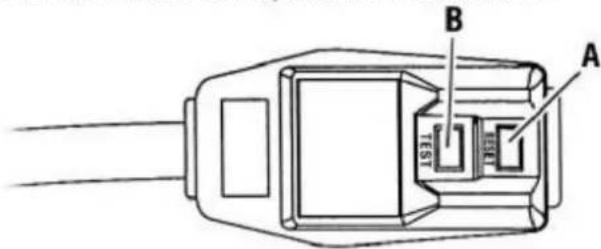
A Reset Button
B Test Button
This room air conditioner is equipped with a power supply cord required by UL. This power supply cord contains state-of-the-art electronics that sense leakage current. If the cord is crushed, the electronics detect leakage current and power will be disconnected in a fraction of a second.
To test your power supply cord:
- Plug power supply cord into a grounded 3-prong outlet.
- Press RESET.
- Press TEST (listen for click; Reset button will trip and pop out).
- Press and release RESET (listen for click; Reset button will latch and remain in). The power supply cord is ready for operation.
NOTES:
- The Reset button must be pushed in for proper operation.
- The power supply cord must be replaced if it fails to trip when the test button is pressed or fails to rest.
- Do not use the power supply cord as as an off/on switch. The power supply cord is designed as a protective device.
- A damaged power supply cord must be replaced with a new power supply cord obtained from the product manufacturer and must not be repaired.
- The power supply cord contains no use serviceable parts. Opening the tamper-resistant case voids all warranty and performance claims.
INSTALLATION INSTRUCTIONS
Unpack the Air Conditioner
WARNING
EXCESSIVE WEIGHT HAZARD
Use two or more people to move and install air conditioner.
Failure to do so can result in back or other injury.
Remove packaging materials
- Remove and properly dispose of packaging materials. Remove tape and glue residue from surfaces before turning on the air conditioner. Rub a small amount of liquid dish soap over the adhesive with your fingers. Wipe with warm water and dry.
- Do not use sharp instruments, rubbing alcohol, flammable fluids, or abrasive cleaners to remove tape or glue. These products can damage the surface of your air conditioner.
- Handle air conditioner with care.
Introduction And Parts Identification
Thank you for choosing this room air conditioner to cool your home. This Use and Care Manual provides information necessary for the proper care and maintenance of your new room air conditioner. If properly maintained, your air conditioner will give you many years of trouble free operation. To avoid installation difficulties, read instructions completely before starting. This manual contains information for the installation and operation of your room air conditioner.
Part Identification
▶ for mechanical control model
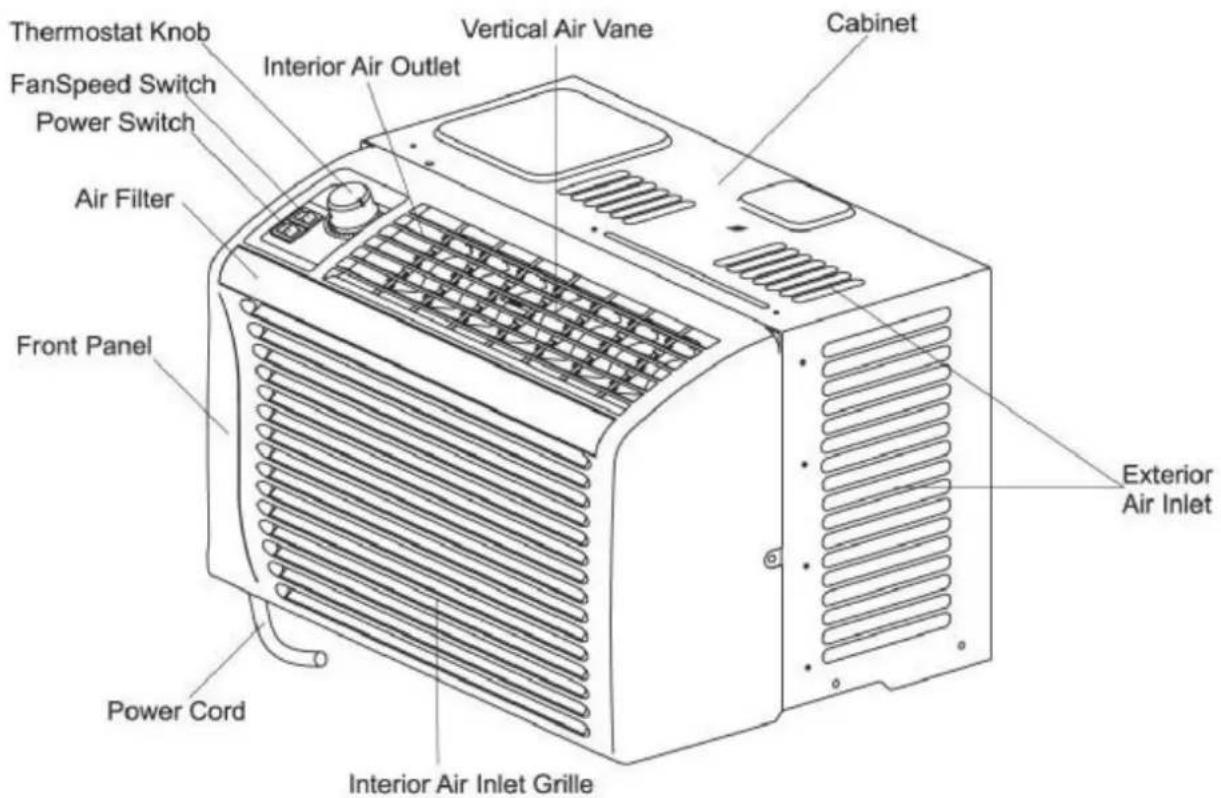
Note:
The figures in this manual are based on the external view of a standard model. Consequently, the shape may differ from that of the air conditioner you have selected.
Introduction And Parts Identification
Thank you for choosing this room air conditioner to cool your home. This Use and Care Manual provides information necessary for the proper care and maintenance of your new room air conditioner. If properly maintained, your air conditioner will give you many years of trouble free operation. To avoid installation difficulties, read instructions completely before starting. This manual contains information for the installation and operation of your room air conditioner.
Parts Identification
▶ Remote control model
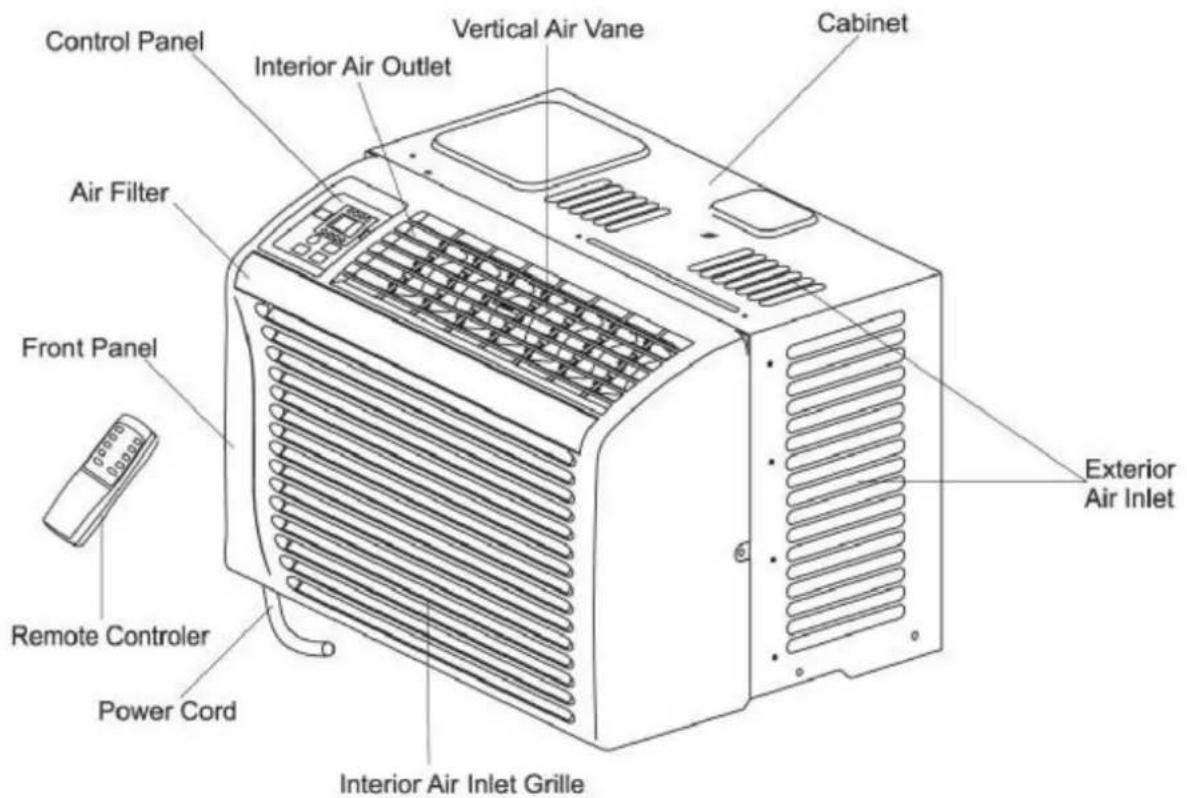
Note:
The figures in this manual are based on the external view of a standard model. Consequently, the shape may differ from that of the air conditioner you have selected.
Electrical Specifications
- All wiring must comply with local and national electrical codes and must be installed by a qualified electrician. If you have any questions regarding the following instructions, contact a qualified electrician.
- Check available power supply and resolve any wiring problems BEFORE installing and operating this unit.
- For your safety and protection. This unit is grounded through the power cord when plugged into a matching wall outlet. If you are not sure whether your wall outlet is properly grounded, please consult a qualified electrician.
- The wall outlet must match the plug on the service cord supplied with the unit. DO NOT use plug adapters or extension cord.
- The rating plate on the unit contains electrical and other technical data. The rating plate is located on the right side of the unit.
| RECEPTACLE AND FUSE TYPES | |
| COOLING CAPACITY | 5K |
| RATED VOLTS | 125 |
| AMPS | 15 |
| WALL OUTLET |  |
| FUSE SIZE | 15 |
| Time Delay Fuse (or circuit breaker) | Plug type |

Electric Shock Hazard
If the air conditioner has a serial plate rating up to and including 7.5 amps, the unit maybe on a fuse or circuit breaker with other devices. However, the maximum amps of all devices on that fuse or circuit breaker can not exceed the amps of the fuse of circuit breaker.
If the air conditioner has a serial plate rating greater than 7.5 amps, it must have its own fuse or circuit breaker, and no other device or unit should be operated on the fuse or circuit breaker.
To avoid the possibility of personal injury, disconnect power to the unit before installing or servicing.
Table 1
Tips before Installation
Your Room Air Conditioner unit is designed to be highly efficient and save energy. Follow these recommendations for greater efficiency.
- Select thermostat setting that suits your comfort needs and leave the thermostat at that chosen setting.
- The filter is very efficient in removing airborne particles. Keep air filter clean. Normally, filter should be cleaned once a month. More frequent cleaning may be necessary depending on outdoor and indoor air quality.
- Use drapes, curtains, or shades to keep direct sunlight from heating your room, but DO NOT obstruct the air conditioner. Allow three(3) inches around unit to circulate.
- Start your air conditioner before outdoor air becomes hot and uncomfortable. This avoids an initial period of discomfort while the unit is cooling off the room.
- When outdoor temperature is cool enough, use HI or LOW FAN ONLY. This circulates indoor air, providing some cooling comfort, and utilizes less electricity than when operating on a cooling setting.
Your Room Air Conditioner was designed for easy installation in a single or double-hung window. NOTE: This unit is NOT designed for vertical (slider type) windows.

CAUTION

To avoid installation/operating difficulties, read the instructions thoroughly.
NOTE: Save the shipping carton and packing materials for future storage or transport of the unit. Please check the contents of hardware kit against the corresponding model check list, prior to installation of the unit.
See lists below.
Installation Hardware

3/4"Screws (7)

Seal(1)

2/5"Screws (11)

Foam(1)

Top Channel(1) Channel Seal(1)
Tools Needed for Window Installation
Screw drivers: Both Philips and flat head
Power drill: 1/8 inch diameter drill bit
Pencil
Measuring tape
Scissors
Cutter
Carpenters level
Installation Instructions
CAUTION
Because the compressor is located on the controls side of the unit, this side will be heavier and more awkward to manipulate. Inadequate support on control side of the unit can result in personal injury and damage to your unit and property. Therefore, it is recommended to have someone assist you during the installation of this unit.
Select the Best Location
A. Your room air conditioner was designed to fit easily into a single or double hung window. However, since window designs vary, it may be necessary to make some modifications for safe and proper installation.
B. Make sure window and frame is structurally sound and free from dry and rotted wood.
C. For maximum efficiency, install the air conditioner on side of the house or building which favors more shade than sunlight. If the unit is in direct sunlight, it is advisable to provide an awning over the unit.
D. Provide sufficient clearance around the cabinet to allow for ample air circulation through the unit. The rear of the unit should be outdoors and neither in a garage nor inside of a building. Keep unit as far away as possible from obstacles and obstructions and at least 30" above the floor or ground (See right figure). Curtains and other objects within a room should be prevented from blocking the air flow.
E. Be certain the proper electrical outlet is within reach of the installation. Use only a single outlet circuit rated at 15 amps. All wiring should be in accordance with local and national electrical codes.
F. Your unit was designed to evaporate condensation under normal conditions. However, under extreme humidity conditions, excess condensation may cause base pan to overflow to the outside.
The unit should be installed where condensation run-off cannot drip on pedestrians or neighboring properties.
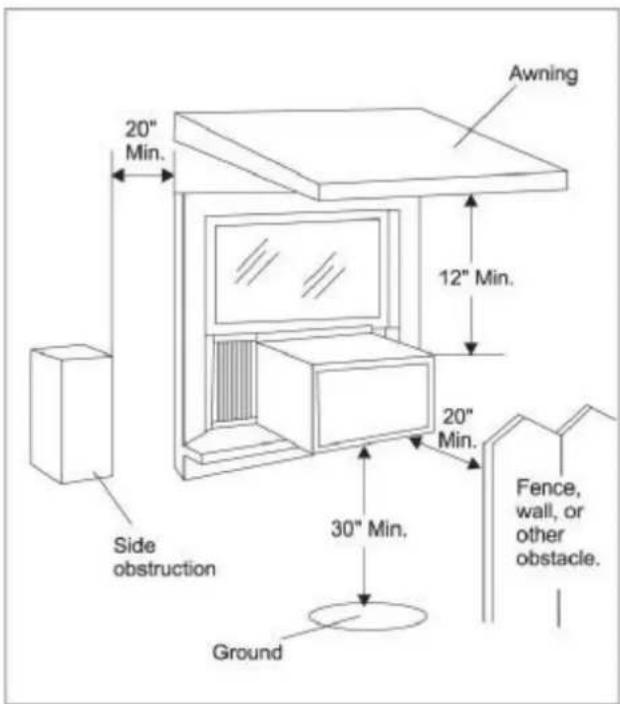
Fig.2
Window opening requirements
see table below
| Size\Model | AW-05CM1FLU AW-05CR1FHLU | |
| Cabinet size (W*H*D) | 17.7" *11.4" *13" | |
| Min. Window opening | 21" | |
| Max. Window opening | 35" | |
| Min. Window height | 14" |
Installation Instructions
Window installation step
- If your air conditioner cabinet 17.7" wide, it will fit window openings 21" to 35" in wide. Minimum opening height is 14" from bottom of sash to sill. See Fig. 1.
- Attach the channel seal to the channel bottom, and install the top channel to the air conditioner with screws, and insert the guides of the curtain frame into the guides of the unit, then fasten the curtains to the unit with screws. See Fig. 2.
If the guide of the curtain frame presents interference with the base pan, cut the guide to proper length.
- Cut the adhesive-backed seal strip the window width. Remove the backing from the seal strip and attach the seal strip to the underside of the bottom window. See Fig. 3.
- Measure the inside window sill width and find the center line as shown in Fig. 4.
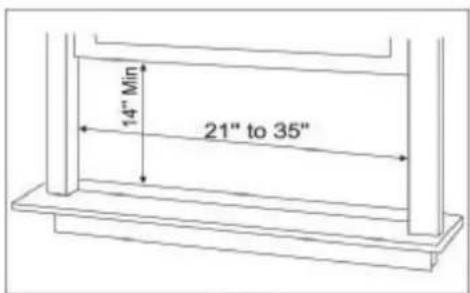
Fig. 1
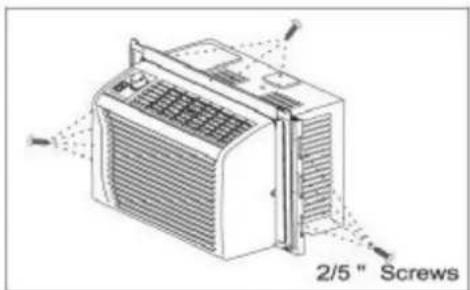
Fig. 2
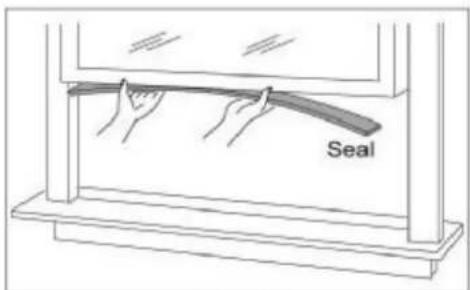
Fig. 3
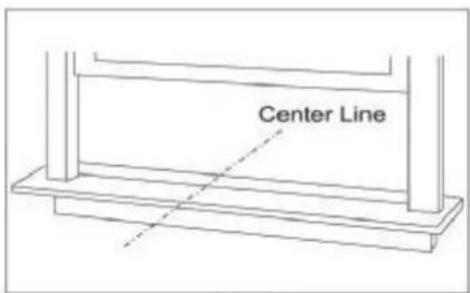
Fig. 4
Installation Instructions
- Install the L brackets on the outer sill with the short side of the bracket against the back of the inner sill. Install one L bracket 7.5" to each side of center line. See Fig. 5.
- Carefully lift the air conditioner and slide it into the open window. Make sure the bottom guide of the unit drops into the notches of the L brackets. When the air conditioner drops into the L brackets, the air conditioner will be centered in window opening as shown in Fig. 6.
While steadying the air conditioner, carefully bring the window sash down behind the top channel of the unit, as shown in Fig. 7.
Fix top channel to window sash with one 3/4" screw, and fix side curtain frames with four 3/4" screws as shown in Fig.6.
- If storm window presents interference, fasten a 2" wide wood strip to the inner window sill across the full width of the sill. The wood strip should be thick enough to raise the height of the window sill, so that the unit can be installed without interference from the storm window frame, as show in Fig. 8.
Top of wood strip should be approximately 3/4" higher than the storm window frame to help condensation to drain properly to the outside. Install a second wood strip (approximately 17" long by 11/2"wide and same thickness as first strip) in the center of the outer sill flush against the back of the inner sill.
Screw the L brackets into this strip, this will raise the L bracket as shown in Fig. 8.
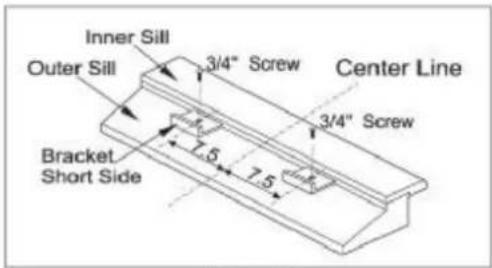
Fig. 5
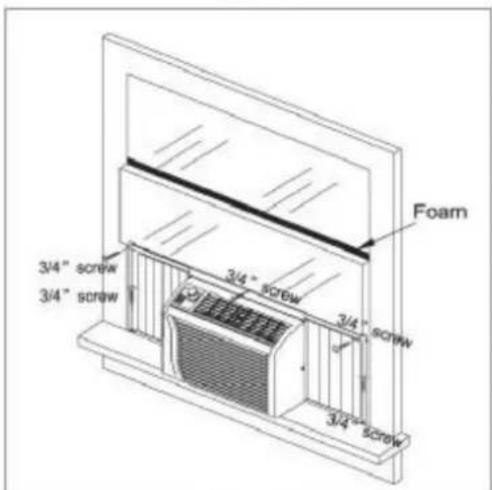
Fig. 6
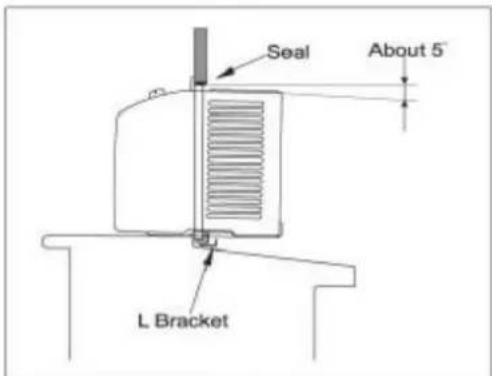
Fig.7
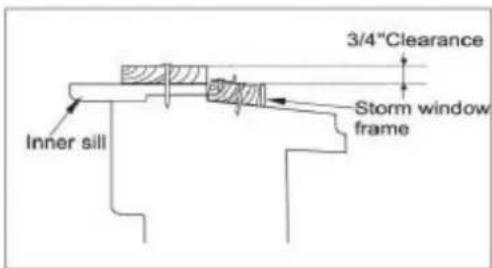
Fig.8
Operating Instructions
▶ Mechanical control model
Power
ON will star the air conditioner. OFF will completely shut-off the unit. See Fig.9.
Fan Only
Rotate the knob dial to the Fan Only mark, the unit will circulate the air without cooling. See Fig.9.
Cooler
Rotate the knob dial to the Cooler marks, the unit will circulate the air with cooling. To set desired cooling temperature, simply rotate the knob to the appropriate setting. The thermostat will automatically controls the cooling cycle of the air conditioner to maintain room temperature. However, the fan motor will continue to operate after the compressor is completed. See Fig.9.
Fan Speed
LOW will circulate the air at a minimum speed with cooling or not. Recommended for night-time use. HI will circulate the air at a maximum speed with cooling or not.
NOTE: After setting the mode, allow 3 minutes before switching to another mode.
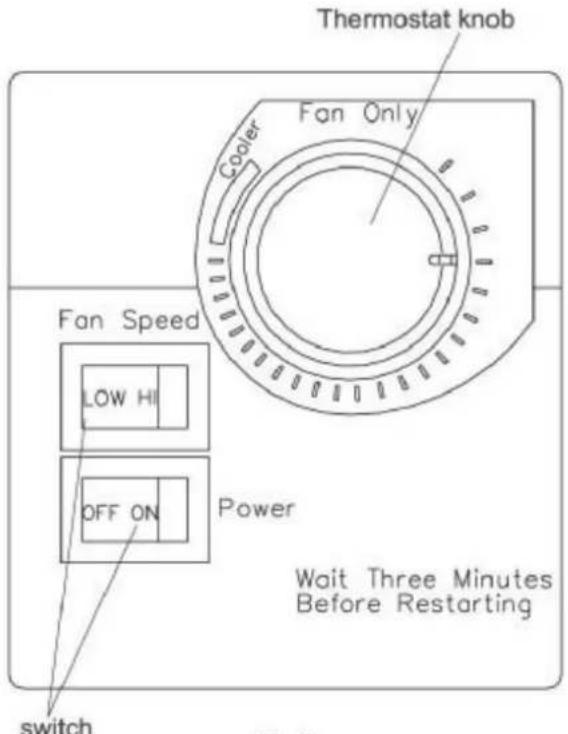
Fig.9
CAUTION
When using FAN control, turn slowly allowing unit to adjust. When using THERMOSTAT, be sure to allow 3 minutes before changing temperature. Adjusting too quickly may cause an overload resulting in a blown fuse.
Operating Instructions
▶ Control Panel
You can easily operate this air conditioner by press relevant button on the control panel as well as the remote control.
ON/OFF
The air conditioner will be started when it is energized or will be stopped when it is in operation, if you press this button.
MODE
Each time Mode button is pressed, the operation mode is changed in sequence:
COOLING→FAN ONLY→ENERGY SAVING→COOLING
NOTE: After setting the mode, allow 3 minutes before switching to another mode.
In the FAN ONLY Mode, Room Temperature display range is from 0°C (32°F) to 38°C (99°F).
Room Temperature below 0°C, the Temperature display L0. Room Temperature above 38°C, the Temperature display H1.
FAN SPEED
Used to select fan speed in sequence AUTO, LOW, MEDIUM and HIGH.
TIMER (this button is not available on the control panel) Used to set or cancel timer operation.
When the unit is in operation, you can set OFF TIMER. When the unit is off, you can set ON TIMER.Timer setting range is 0 to 24 hours.
If the OFF TIMER is set, the timer LED displays the remaining time to turn off the unit for only 12 seconds, then LED shifts to display set temperature. If you press TIMER button within the 12 seconds, OFF TIMER will be canceled. If the ON TIMER is set, the timer LED displays the remaining time to turn on the unit. If you want to cancel ON TIMER, press TIMER button.
▲ ▼
Used to set room temperature in COOLING mode or used to set time in TIMER mode.
If the two keys are pressed at the same time, the temperature LED display will alternate between °C and °F. But the mark of "°C" or "°F" you can not change. Usually, those models used 220V\~/50Hz marked with "°C", other models marked with "°F".
NOTE: Temperature setting range is from 19°C (66°F) to 31°C (88°F).
Control Panel
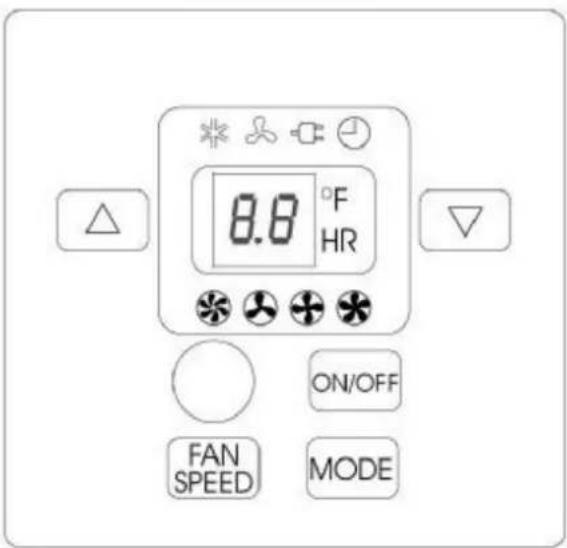
Indication symbols of LED on control panel :
* Cooling
Auto fan speed
8.8 F HR
Fan only
Low fan speed
Display set temp Display set timer
Energy-saving
Medium fan speed
Timer
High fan speed
Above LED lights on when the relevant mode is in used.
Operating Instructions
▶ Remote control
The remote control transmits signals to the system.
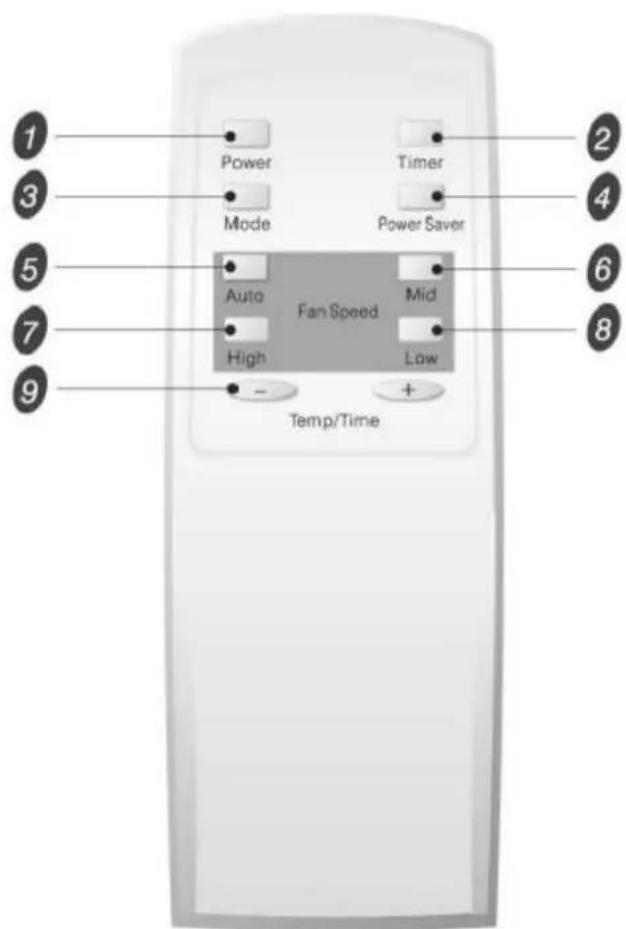
1 Power button
The appliance will be started when it is energized or will be stopped when it is in operation, if you press this button.
2 Timer button
Used to set or cancel timer operation.
3 Mode button
Used to select the operation mode.
4 Power Saver button
Used to select the Energy-saving mode.
5 Auto button
Used to select the Auto fan speed mode.
6 Mid button
Used to select the Mid fan speed mode.
7 High button
Used to select the high fan speed mode.
8 Low button
Used to select the Low fan speed mode.
9 - + buttons
Used to set room temperature in COOLING mode or used to set time in TIMER mode.
NOTE:1. Changing modes during operation, sometimes the unit does not response at once. Wait 3 minutes. 2. Wait 3 minutes before restarting the appliance.
Operating Instructions
▶ Remote control
How to Insert the Batteries
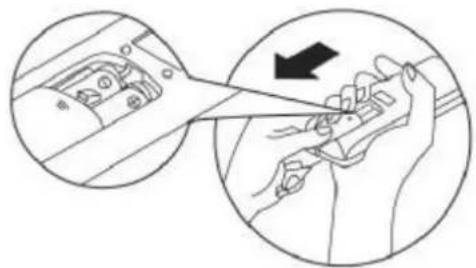
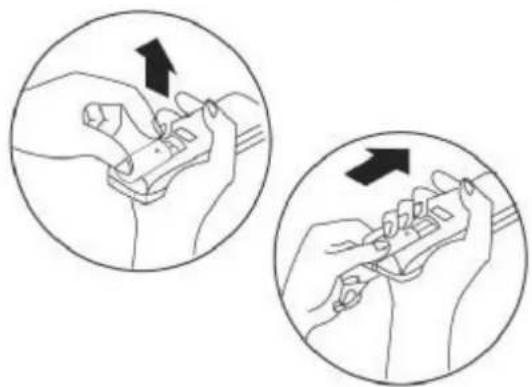
Remove the battery cover according to the arrow direction. Insert new batteries making sure that the (+) and (-) of battery are matched correctly. Reattach the cover by sliding it back into position.
Note:
- Use 2 LR6 AA(1.5volt) batteries. Do not use rechargeable batteries. Replace batteries with new ones of the same type when the display becomes dim.
- Do not mix old batteries with new ones .Dispose of one old batteries properly.
- If the replacement is done within 1 minute, the remote control will keep original presetting.
How to Use
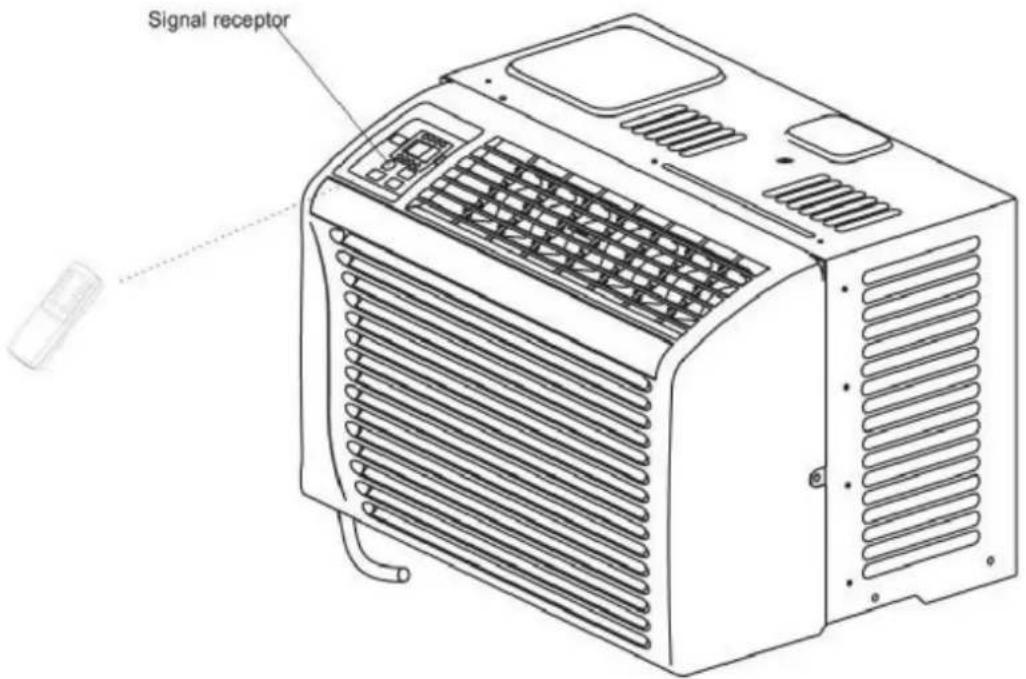
To operate the room air conditioner, aim the remote control to the signal receptor.
The remote control will operate the air conditioner at a distance of up to 23 feet when pointing at signal receptor of indoor unit.
Care and Maintenance
When servicing the air conditioner, be sure to turn the power switch to the OFF position and disconnect the power cord from the electrical outlet.
CAUTION
- DO NOT use gasoline, benzine, thinner or other chemicals on the air conditioner as these substances may cause damage to the paint finish and deformation of plastic parts.
- Never attempt to pour water directly on the front of the unit as this will cause deterioration of the electrical insulation.
Cleaning the Air Filter
If the air filter becomes clogged with dust, air-flow is obstructed and reduces efficiency. The air filter should be cleaned once a month. More frequent cleaning may be necessary depending on outdoor and indoor air quality.
Air Filter Removal
The air filter on the above models is located behind the Air Inlet Grille.
To remove the air filter, grasp the filter handle located on the up side of the Air Inlet Grille and slide the air filter to the up.
To reinstall the air filter, reverse the above procedure.
CAUTION
DO NOT forget to install the air filter. If the air conditioner is left to operate without the air filter, dust is not removed from the room and may cause your air conditioner to fail. When the air filter, air inlet grille and cabinet are dirty, wipe with lukewarm water (below 40°C). Use of mild detergent is recommended.
Cleaning of Air Filter
- Remove dust clogged in the filter by tapping it or vacuum clean it.
- Wash the filter well with lukewarm water below 40° C ( 104° F) while rubbing lightly. To get better results, wash it with soapy water or a neutral cleaning agent.
- Rinse the filter well using clean water then dry completely.
End-of-Season Care
- Operate the fan alone for half a day to dry out the inside of the unit.
- Turn off power and remove plug from wall socket.
- Clean filter.
- Store in a dry location.
Troubleshooting Guide
Frequently, a problem is minor and a service call may not be necessary, use this troubleshooting guide for a possible solution.
| PROBLEM | POSSIBLE CAUSE | SUGGESTED SOLUTION |
| Air conditioner will not operate | No power to the unit. | Check connection of power cord to power source.Check fuse or circuit breaker.Turn the power switch to ON. |
| Inefficient or no cooling | Dirty air filter.Inappropriate capacity for application.Blocked air flow.Power interruption, settings change too quickly, or compressor overload tripped. | Clean or replace air filter.Check with dealer to determine proper unit capacity for application.Remove obstruction from grille or outdoor louvers.Let fan run to restart compressor (in approximately 10 minutes). |
| Noisy unit | Loose parts.Inadequate support. | Tighten loose parts.Provide additional support to unit. |
| Odors | Formation of mold, mildew, or algae on wet surfaces. | Remove drain plug and drain base pan.Replace drain plug.Clean unit thoroughly. |
| Water dripping outside | Condensation run-off is normal during hot and humid weather | Add flexible tubing to redirect water flow. |
| Water dripping inside | Unit is not properly angled to allow water to drain outside. | Unit must be installed on an angle for proper condensation run-off. Check the unit and make adjustments. |
| Ice or frost build-up | Low outside temperature.Unit air filter is dirty. | When outdoor temperature is approximately 65°F or below, frost may form when unit is in cooling mode. Switch unit to FAN ONLY operation until frost melts.Remove and clean filter. |
NOTE:
If circuit breaker is tripped repeatedly, or fuse is blown more than once, contact a qualified technician.
1. One year full warranty
For one year from the date of purchase by the original owner, any part which fails in materials or workmanship under normal use, the part will be replaced. During this period, all parts and service will be provided free of charge, so long as the air conditioner has been installed and operated in accordance with the written instructions in this manual. This warranty includes in home service.
2. Limited second through third year warranty
For the second through the third year from date of original purchase, this warranty will provide a replacement compressor free of charge due to product failure. The customer will be responsible for the labor charges related to replacing the compressor in years two through three. The consumer is responsible for the service labor and possible freight charges for shipping the unit. Cost to move the air conditioner to the servicers' shop and back to the user's home may be required and are the user's responsibility.
3.What is not covered
- This warranty does not apply if damage occurs because of accident, improper handling or operation, shipping damage, abuse, misuse, unauthorized repairs made or attempted, commercial use of the product or any other use for which it was not intended.
- This warranty does not apply to damage to the product caused by accident, fire, floods, acts of war, terrorism, or acts of God.
- This warranty does not cover service trips to your home to educate you on the use of the product, or loss of food and drink due to spoilage.
- This warranty does not apply outside the continental United States.
- ALL WARRANTIES, EXPRESSED OR IMPLIED, LAST FOR 3 YEARS FROM THE DATE OF ORIGINAL PURCHASE. THIS WARRANTY DOES NOT COVER LIABILITY FOR INCIDENTAL OR CONSEQUENTIAL DAMAGES FOR ANY CAUSE WHATSOEVER.
- This warranty is to the original owner for products purchased for home use within the USA. Some state do not allow the exclusive or limitation of incidental damages. This warranty gives you specific rights, and you may also have other rights which may vary from state to state. To know what your legal rights are, consult your local or state consumers affairs office or your state's Attorney General.
Introducción
Fig. 1
Fig. 4
PRECAUCIÓN
• C cómo use
[NO TEXT]
[Non-Text]
[EMPTY]
[Non-Text]
[Non-Text]
The Ground Truth image displays a single, solid horizontal line. According to Rule 2 (UNDERSCORE & LINE RULES), this is a stylistic or background line, not a placeholder underscore. Therefore, the OCR result must ignore it and output nothing or only meaningful text. The provided OCR content is "____", which consists of four underscores. This is an incorrect interpretation of the line as a placeholder, violating the rule that stylistic lines must be ignored. The OCR has hallucinated underscores where none should exist based on the GT's visual context. Hence, the OCR result is inconsistent with the Ground Truth.
[Non-Text]
[NO TEXT]
[Non-Text]
The Ground Truth image displays a single, solid horizontal line. According to Rule 2 (UNDERSCORE & LINE RULES), if the GT contains lines used for stylistic emphasis or as background elements (like ruled paper), the OCR result must ignore them. The provided OCR content is "____", which consists of four underscores. This is incorrect because underscores are not equivalent to a solid line and are not permitted under the “Stylistic/Background Lines (Ignore)” rule. Outputting underscores for a stylistic line violates the rule and constitutes an error. Therefore, the OCR result is inconsistent with the Ground Truth.
[Non-Text]
[Non-Text]
[EMPTY]
[Non-Text]
[NO TEXT]
[Non-Text]
The Ground Truth image displays a single, solid horizontal line. According to Rule 2 (UNDERSCORE & LINE RULES), this is a stylistic or background line, not a placeholder underscore. Therefore, the OCR result must ignore it and output nothing or only meaningful text. The provided OCR content is "____", which consists of four underscores. This is an incorrect interpretation of the line as a placeholder, violating the rule that stylistic lines must be ignored. The OCR has hallucinated placeholder underscores where none should exist in the GT. Hence, the OCR result is inconsistent with the Ground Truth.
广力云智慧零售收银系统
[Non-Text]
[EMPTY]
[Non-Text]
[EMPTY]
[Non-Text]
[Non-Text]
The Ground Truth image displays a single, solid horizontal line. According to Rule 2 (UNDERSCORE & LINE RULES), this is a stylistic or background line, not a placeholder underscore. Therefore, the OCR result must ignore it and output nothing or only meaningful text. The provided OCR content is "____", which consists of four underscores. This is an incorrect interpretation of the line as a placeholder, violating the rule that stylistic lines must be ignored. The OCR has hallucinated underscores where none should exist based on the GT's visual context. Hence, the OCR result is inconsistent with the Ground Truth.
[Non-Text]
[NO TEXT]
[Non-Text]
The Ground Truth image displays a single, solid horizontal line. According to Rule 2 (UNDERSCORE & LINE RULES), if the GT contains lines used for stylistic emphasis or as background elements (like ruled paper), the OCR result must ignore them. The line in the GT is clearly a stylistic or background line, not a placeholder for text. Therefore, the OCR should not have output any underscores. Outputting `____` constitutes an error under Rule 2, as it hallucinates placeholder symbols where none are semantically intended. Hence, the OCR result is inconsistent with the Ground Truth.
(1) AD = BD = 1
[Non-Text]
The Ground Truth image displays a single, continuous horizontal line, which is a stylistic or background element (like a ruled paper line). According to Rule 2, such lines must be ignored by the OCR result. The provided OCR content is "____", which consists of underscores. Underscores are not equivalent to a solid line and are not permitted under the “Stylistic/Background Lines (Ignore)” rule. Outputting underscores for a stylistic line is incorrect because it misinterprets the line as a fill-in-the-blank placeholder. Since the OCR output incorrectly rendered a stylistic line as underscores (which should be ignored), this violates the rule. Therefore, the OCR result is inconsistent with the Ground Truth.
[Non-Text]
[NO TEXT]
[Non-Text]
[NO TEXT]
[Non-Text]
[EMPTY]
[Non-Text]
[Non-Text]
The Ground Truth image displays a single, solid horizontal line. According to Rule 2 (UNDERSCORE & LINE RULES), this is a stylistic or background line, not a placeholder underscore. Therefore, the OCR result must ignore it and output nothing or only meaningful text. The provided OCR content is "____", which consists of four underscores. This is an incorrect interpretation of the line as a placeholder, violating the rule that stylistic lines must be ignored. The OCR has hallucinated underscores where none should exist based on the GT's visual context. Hence, the OCR result is inconsistent with the Ground Truth.
[Non-Text]
[NO TEXT]
[Non-Text]
The Ground Truth image displays a single, solid horizontal line, which is a stylistic or background element (like a rule line on paper). According to Rule 2, such lines must be ignored by the OCR result. The provided OCR content is "____", which consists of underscores. Underscores are not equivalent to a solid line and are not permitted under the “Stylistic/Background Lines (Ignore)” rule. Outputting underscores for a stylistic line is incorrect because it misinterprets the line as a placeholder fill-in-the-blank area. Since the OCR output incorrectly rendered a stylistic line as underscores (which should be ignored), this violates the rule. Therefore, the OCR result is inconsistent with the Ground Truth.
[Non-Text]
[Non-Text]
[EMPTY]
[Non-Text]
[EMPTY]
[Non-Text]
(1) AD = BD = 1
The Ground Truth image displays a single, solid horizontal line. According to Rule 2 (UNDERSCORE & LINE RULES), this is a stylistic or background line, not a placeholder underscore. Therefore, the OCR result must ignore it and output nothing or only meaningful text. The provided OCR content is "____", which consists of four underscores. This is an incorrect interpretation of the line as a placeholder, violating the rule that stylistic lines must be ignored. The OCR has hallucinated placeholder underscores where none should exist in the GT. Hence, the OCR result is inconsistent with the Ground Truth.
[Non-Text]
[EMPTY]
[Non-Text]
The Ground Truth image displays a single, continuous horizontal line, which is a stylistic or background element (like a ruled paper line). According to Rule 2, such lines must be ignored by the OCR result. The provided OCR content is "____", which consists of underscores. Underscores are not equivalent to a solid line and are not permitted under the “Stylistic/Background Lines (Ignore)” rule. Outputting underscores for a stylistic line is incorrect because it misinterprets the line as a fill-in-the-blank placeholder. Since the OCR output incorrectly rendered a stylistic line as underscores (which should be ignored), this violates the rule. Therefore, the OCR result is inconsistent with the Ground Truth.
[Non-Text]
The Ground Truth image displays a single, solid horizontal line. According to Rule 2 (UNDERSCORE & LINE RULES), this is a stylistic or background line, not a placeholder underscore. Therefore, the OCR result must ignore it and output nothing or only meaningful text. The provided OCR content is "____", which consists of four underscores. This is an incorrect interpretation of the line as a placeholder, violating the rule that stylistic lines must be ignored. The OCR has hallucinated placeholder underscores where none should exist in the GT. Hence, the OCR result is inconsistent with the Ground Truth.
The Ground Truth image displays a single, solid horizontal line. According to Rule 2 (UNDERSCORE & LINE RULES), this is a stylistic or background line, not a placeholder underscore. Therefore, the OCR result must ignore it and output nothing or only meaningful text. The provided OCR content is "____", which consists of four underscores. This is an incorrect interpretation of the line as a placeholder, violating the rule that stylistic lines must be ignored. The OCR has hallucinated placeholder underscores where none exist in the GT. Hence, the OCR result is inconsistent with the Ground Truth.
[Non-Text]
[NO TEXT]
[Non-Text]
The Ground Truth image displays a single, solid horizontal line, which is a stylistic or background element (like a ruled paper line or separator), not a placeholder for text. According to Rule 2, such stylistic/background lines must be ignored by the OCR result. The OCR content provided is "", which consists of no characters. This correctly represents the line in the GT by ignoring it entirely. Since the OCR output includes no underscores for this line, this complies with the “Stylistic/Background Lines (Ignore)” rule. Therefore, the OCR result is consistent with the Ground Truth.
The Ground Truth image displays a single, solid horizontal line. According to Rule 2 (UNDERSCORE & LINE RULES), this is a stylistic or background line, not a placeholder underscore. Therefore, the OCR result must ignore it and output nothing or only meaningful text. The provided OCR content is "____", which consists of four underscores. This is an incorrect interpretation of the line as a placeholder, violating the rule that stylistic lines must be ignored. The OCR has hallucinated placeholder underscores where none should exist in the GT. Hence, the OCR result is inconsistent with the Ground Truth.
The Ground Truth image displays a single, solid horizontal line. According to Rule 2 (UNDERSCORE & LINE RULES), this is a stylistic or background line, not a placeholder underscore. Therefore, the OCR result must ignore it and output nothing or only meaningful text. The provided OCR content is "____", which consists of four underscores. This is an incorrect interpretation of the line as a placeholder, violating the rule that stylistic lines must be ignored. The OCR has hallucinated placeholder underscores where none should exist in the GT. Hence, the OCR result is inconsistent with the Ground Truth.
The Ground Truth image displays a single, solid horizontal line, which is a stylistic or background element (like a ruled paper line or separator), not a placeholder for text. According to Rule 2, such stylistic/background lines must be ignored by the OCR result. The OCR content provided is "", which consists of no characters. This correctly represents the absence of any textual content in the GT and correctly matches the visual line as a stylistic element. Therefore, the OCR output should not contain any underscores or line representations that constitute a formatting error. The OCR should have outputted nothing (or at most whitespace) since no actual text is present. Outputting nothing for a non-placeholder line follows the rule and constitutes an error. Therefore, the OCR result is consistent with the Ground Truth.
[Non-Text]
The Ground Truth image displays a single, continuous horizontal line, which is a stylistic or background element (like a ruled paper line). According to Rule 2, such lines must be ignored by the OCR result. The provided OCR content is "____", which consists of underscores. Underscores are not equivalent to a solid line and are not permitted under the “Stylistic/Background Lines (Ignore)” rule. Outputting underscores for a stylistic line is incorrect because it misinterprets the line as a fill-in-the-blank placeholder. Therefore, the OCR result is inconsistent with the Ground Truth.
[Non-Text]
The Ground Truth image displays a single, solid horizontal line. According to Rule 2 (UNDERSCORE & LINE RULES), this is a stylistic or background line, not a placeholder underscore. Therefore, the OCR result must ignore it and output nothing or only meaningful text. The provided OCR content is "____", which consists of four underscores. This is an incorrect interpretation of the line as a placeholder, violating the rule that stylistic lines must be ignored. The OCR has hallucinated placeholder underscores where none should exist in the GT. Therefore, the OCR result is inconsistent with the Ground Truth.
[Non-Text]

[NO TEXT]
[Non-Text]
[EMPTY]
[Non-Text]
[Non-Text]
The Ground Truth image displays a single, solid horizontal line. According to Rule 2 (UNDERSCORE & LINE RULES), this is a stylistic or background line, not a placeholder underscore. Therefore, the OCR result must ignore it and output nothing or only meaningful text. The provided OCR content is "____", which consists of four underscores. This is an incorrect interpretation of the line as a placeholder, violating the rule that stylistic lines must be ignored. The OCR has hallucinated underscores where none should exist based on the GT's visual context. Hence, the OCR result is inconsistent with the Ground Truth.
[Non-Text]
[NO TEXT]
[Non-Text]
The Ground Truth image displays a single, solid horizontal line, which is a stylistic or background element (like a rule line on paper). According to Rule 2, such lines must be ignored by the OCR result. The provided OCR content is "____", which consists of underscores. Underscores are not equivalent to a solid line and are not permitted under the “Stylistic/Background Lines (Ignore)” rule. Outputting underscores for a stylistic line is incorrect because it misinterprets the line as a placeholder fill-in-the-blank area. Since the OCR output incorrectly rendered a stylistic line as underscores (which should be ignored), this violates the rule. Therefore, the OCR result is inconsistent with the Ground Truth.
[Non-Text]
[Non-Text]
[EMPTY]
[Non-Text]
[EMPTY]
[Non-Text]
(1) AD = BD = 1
The Ground Truth image displays a single, solid horizontal line. According to Rule 2 (UNDERSCORE & LINE RULES), this is a stylistic or background line, not a placeholder underscore. Therefore, the OCR result must ignore it and output nothing or only meaningful text. The provided OCR content is "____", which consists of four underscores. This is an incorrect interpretation of the line as a placeholder, violating the rule that stylistic lines must be ignored. The OCR has hallucinated placeholder underscores where none should exist in the GT. Hence, the OCR result is inconsistent with the Ground Truth.
[Non-Text]
[EMPTY]
[Non-Text]
The Ground Truth image displays a single, continuous horizontal line, which is a stylistic or background element (like a ruled paper line). According to Rule 2, such lines must be ignored by the OCR result. The provided OCR content is "____", which consists of underscores. Underscores are not equivalent to a solid line and are not permitted under the “Stylistic/Background Lines (Ignore)” rule. Outputting underscores for a stylistic line is incorrect because it misinterprets the line as a fill-in-the-blank placeholder. Since the OCR output incorrectly rendered a stylistic line as underscores (which should be ignored), this violates the rule. Therefore, the OCR result is inconsistent with the Ground Truth.
[Non-Text]
The Ground Truth image displays a single, solid horizontal line. According to Rule 2 (UNDERSCORE & LINE RULES), this is a stylistic or background line, not a placeholder underscore. Therefore, the OCR result must ignore it and output nothing or only meaningful text. The provided OCR content is "____", which consists of four underscores. This is an incorrect interpretation of the line as a placeholder, violating the rule that stylistic lines must be ignored. The OCR has hallucinated placeholder underscores where none should exist in the GT. This adheres to the strict requirement to ignore such lines.
The Ground Truth image displays a single, solid horizontal line. According to Rule 2 (UNDERSCORE & LINE RULES), this is a stylistic or background line, not a placeholder underscore. Therefore, the OCR result must ignore it and output nothing or only meaningful text. The provided OCR content is "____", which consists of four underscores. This is an incorrect interpretation of the line as a placeholder, violating the rule that stylistic lines must be ignored. The OCR has hallucinated placeholder underscores where none should exist in the GT. Hence, the OCR result is inconsistent with the Ground Truth.
[Non-Text]
[NO TEXT]
[Non-Text]
The Ground Truth image displays a single, solid horizontal line, which is a stylistic or background element (like a ruled paper line or separator), not a placeholder for text. According to Rule 2, such stylistic/background lines must be ignored by the OCR result. The OCR content provided is "", which consists of no characters. This correctly represents the line in the GT by ignoring it entirely. Since the OCR output includes no underscores for this line, this complies with the “Stylistic/Background Lines (Ignore)” rule. Therefore, the OCR result is consistent with the Ground Truth.
The Ground Truth image displays a single, solid horizontal line. According to Rule 2 (UNDERSCORE & LINE RULES), this is a stylistic or background line, not a placeholder underscore. Therefore, the OCR result must ignore it and output nothing or only meaningful text. The provided OCR content is "____", which consists of four underscores. This is an incorrect interpretation of the line as a placeholder, violating the rule that stylistic lines must be ignored. The OCR has hallucinated placeholder underscores where none should exist in the GT. Hence, the OCR result is inconsistent with the Ground Truth.
The Ground Truth image displays a single, solid horizontal line. According to Rule 2 (UNDERSCORE & LINE RULES), this is a stylistic or background line, not a placeholder underscore. Therefore, the OCR result must ignore it and output nothing or only meaningful text. The provided OCR content is "____", which consists of four underscores. This is an incorrect interpretation of the line as a placeholder, violating the rule that stylistic lines must be ignored. The OCR has hallucinated placeholder underscores where none should exist in the GT. Hence, the OCR result is inconsistent with the Ground Truth.
The Ground Truth image displays a single, solid horizontal line, which is a stylistic or background element (like a ruled paper line or separator), not a placeholder for text. According to Rule 2, such stylistic/background lines must be ignored by the OCR result. The OCR content provided is "", which consists of no characters. This correctly represents the absence of any textual content in the GT and correctly matches the visual line as a stylistic element. Therefore, the OCR output should have been empty or omitted this line entirely.
[Non-Text]
The Ground Truth image displays a single, continuous horizontal line, which is a stylistic or background element (like a ruled paper line). According to Rule 2, such lines must be ignored by the OCR result. The provided OCR content is "____", which consists of underscores. Underscores are not equivalent to a solid line and are not permitted under the “Stylistic/Background Lines (Ignore)” rule. Outputting underscores for a stylistic line is incorrect because it misinterprets the line as a fill-in-the-blank placeholder. Therefore, the OCR result is inconsistent with the Ground Truth.
[Non-Text]
The Ground Truth image displays a single, solid horizontal line. According to Rule 2 (UNDERSCORE & LINE RULES), this is a stylistic or background line, not a placeholder underscore. Therefore, the OCR result must ignore it and output nothing or only meaningful text. The provided OCR content is "____", which consists of four underscores. This is an incorrect interpretation of the line as a placeholder, violating the rule that stylistic lines must be ignored. The OCR has hallucinated underscores where none should exist based on the GT's visual context. Hence, the OCR result is inconsistent with the Ground Truth.
[Non-Text]
Admiral®
©2006Admiral, Kelon Air Conditioner Co., Ltd., and Kelon USA, Inc. All rights reserved.
Kelon Air Conditioner Co., Ltd.
No.12 Qiaodong Road
Ronggui, Shunde, Guangdong China 528303
Kelon USA, Inc.
17005 Evergreen Place, Blag A
City of Industry, CA 91745
- ROOM AIR CONDITIONER
- USE AND CARE MANUAL
- MECHANICAL CONTROL
- ÍNDICE
- AIR CONDITIONER SAFETY
- WHAT YOU NEED TO KNOW ABOUT SAFETY INSTRUCTIONS
- DANGER
- WARNING
- CAUTION
- IMPORTANT SAFETY INSTRUCTIONS
- ELECTRICAL REQUIREMENTS
- ELECTRIC SHOCK HAZARD
- POWER SUPPLY CORD
- TO TEST YOUR POWER SUPPLY CORD
- NOTES
- INSTALLATION INSTRUCTIONS
- UNPACK THE AIR CONDITIONER
- EXCESSIVE WEIGHT HAZARD
- REMOVE PACKAGING MATERIALS
- INTRODUCTION AND PARTS IDENTIFICATION
- PART IDENTIFICATION
- FOR MECHANICAL CONTROL MODEL
- NOTE
- PARTS IDENTIFICATION
- REMOTE CONTROL MODEL
- ELECTRICAL SPECIFICATIONS
- TIPS BEFORE INSTALLATION
- INSTALLATION HARDWARE
- TOOLS NEEDED FOR WINDOW INSTALLATION
- SELECT THE BEST LOCATION
- WINDOW OPENING REQUIREMENTS
- WINDOW INSTALLATION STEP
- OPERATING INSTRUCTIONS
- MECHANICAL CONTROL MODEL
- POWER
- FAN ONLY
- COOLER
- FAN SPEED
- CONTROL PANEL
- ON/OFF
- MODE
- ▲ ▼
- INDICATION SYMBOLS OF LED ON CONTROL PANEL
- REMOTE CONTROL
- 1 POWER BUTTON
- 2 TIMER BUTTON
- 3 MODE BUTTON
- 4 POWER SAVER BUTTON
- 5 AUTO BUTTON
- 6 MID BUTTON
- 7 HIGH BUTTON
- 8 LOW BUTTON
- BUTTONS
- HOW TO INSERT THE BATTERIES
- HOW TO USE
- CARE AND MAINTENANCE
- CLEANING THE AIR FILTER
- AIR FILTER REMOVAL
- CLEANING OF AIR FILTER
- END-OF-SEASON CARE
- TROUBLESHOOTING GUIDE
- ONE YEAR FULL WARRANTY
- LIMITED SECOND THROUGH THIRD YEAR WARRANTY
- 3.WHAT IS NOT COVERED
- INTRODUCCIÓN
- PRECAUCIÓN
- C CÓMO USE
- ADMIRAL®
Brand : Admiral
Model : AW-05CR1FHLU
Category : Air conditioner