9950 - Paper shredder Deli - Free user manual and instructions
Find the device manual for free 9950 Deli in PDF.


| Product Type | Paper Shredder |
| Brand | Deli |
| Model | 9950 |
| Power Supply | AC 220V / 50Hz |
| Power Consumption | 220 W |
| Shred Type | Cross Cut |
| Shred Size | 2 x 6 mm |
| Shred Capacity (70g A4) | 6 sheets |
| Shred Speed | 2.0 m/min |
| Entrance Width | 220 mm |
| Waste Bin Volume | 14 L |
| Continuous Working Time | ≥10 min |
| Noise Level | ≤70 dB |
| Dimensions (WxDxH) | 340 x 256 x 540 mm |
| Net Weight | 10.2 kg |
| Safety Features | Overheat protection, auto reverse on jam |
| Maintenance | Clean exterior with damp cloth only; do not use solvents |
| Included Accessories | Shredder, instruction manual, guarantee card, passed certificate, 4 universal wheels |
Frequently Asked Questions - 9950 Deli
User questions about 9950 Deli
0 question about this device. Answer the ones you know or ask your own.
Ask a new question about this device
Download the instructions for your Paper shredder in PDF format for free! Find your manual 9950 - Deli and take your electronic device back in hand. On this page are published all the documents necessary for the use of your device. 9950 by Deli.
USER MANUAL 9950 Deli
natural_image
Line drawing of a portable electronic device with wheels and ventilation slots (no text or symbols)ARTICLE NO.:
9900 9910 9920 9930
9940 9950 9955
目录
CONTENT
使用时注意事项 …… 1
产品参数 2
装箱清单 2
产品外形结构及名称……3
使用说明……3
保养方法……4
常见故障分析及排除……4
Useage attention 5
Product Specifications 6
Packing List 6
Product Outlook & Names 7
Operating Procedures 7
Maintenance 8
Trouble Analysis & Troubleshooting 8
Thank you for purchasing paper shredder, the advanced functions and design of which mostly suit your office. We are confident that the shredder will make a major contribution to destroy used documents and ensure the confidentiality of sensitive materials.
To help you correctly use the shredder and prevent you and others from suffering hazards and property losses, please read this manual carefully.
Useage attention

Caution

Please the shredder in a steady place and do not overturn it.
※ Otherwise there is the possibility of breaking the machine.

Unauthorized disassembly rebuilding or service of the shredder is not allowed.
※ Otherwise there is the possibility of electric shock or injury.

Do not handle power plug by wet hands.
※ Otherwise there is the possibility of electric shock.

pull out the power from the socket of power supply when dumping paper scraps or moving the shredder, and also in case of long time unused.
※ Otherwise there is the possibility of fire or electric shock.

Do not sprinkle water to the shredder.
※ Otherwise there is the possibility of fire or electric shock.

Do not put the shredder beside any heating or cooling equipment or in a place wherehere is high temperature, excessive moist or lots of dust.
※ Otherwise there is the possibility of breaking the machine.

Never damage or process the power cable. Never put heavy objects on the electric line.
※ Otherwise there is the possible of fire or electric shock.

In case of abnormal conditions such as emission of smoke odor, please stop using the shredder.
※ Otherwise there is the possibility of fire or electric shock.

If the shredder and power cable have any breakage, please do not use it.
※ Otherwise there is the possibility of fire or electric shock.

Warning

Danger! Keep out of reach of children.
※ Blade inside machine. Protect yourself against injury.

Danger! Never touch the blade.
※ Blade inside machine. Protect yourself against injury.

Keep ties or sleeves away from paper-feeding opening to avoid pulling-in.
※ When accident happens, press "REV" button and then take it out.

Keep hair away from paper-feeding opening to avoid pulling -in.
※ When accident happens, press "REV" button and then take it out.

Keep clip, pins or staples away from paper-feeding opening to avoid pulling-in.
※ When accident happens, press "REV" button and then take it out.
Product Specifications
| Product No. | 9900 | 9910 | 9920 | 9930 | 9940 | 9950 | 9955 |
| Power | AC220V/50Hz | AC220V/50Hz | AC220V/50Hz | AC220V/50Hz | AC220V/50Hz | AC220V/50Hz | AC220V/50Hz |
| AC input (W) | 220 | 120 | 190 | 100 | 100 | 220 | 190 |
| CD Shred effect (mm) | 8 | ||||||
| Shred type | cross cut | cross cut | cross cut | cross cut | cross cut | cross cut | cross cut |
| Shred size (mm) | 2x6 | 2x6 | 3x15 | 3x15 | 3x15 | 2x6 | 3x15 |
| Shred capacity (70g A4) (sheet) | 6 | 7 | 6 | 8 | 8 | 6 | 6 |
| Shred speed (m/min) | 2.0 | 3.5 | 2.0 | 3.0 | 3.0 | 2.0 | 2.0 |
| Entrance width (mm) | 220 | 240 | 220 | 220 | 220 | 220 | 220 |
| CD Feeding width (mm) | 126 | ||||||
| Waste-bin volume (L) | 19 | 19 | 14 | 14 | 13 | 14 | 13 |
| Dimensions (mm) | 360x280x560 | 360x276x630 | 330x240x500 | 330x248x545 | 353x247x517 | 340x256x540 | 320x235x500 |
| Net weight (Kg) | 11.3 | 14 | 7 | 10.3 | 12 | 10.2 | 7 |
| Continuous working time(min) | ≥slant 10 | ≥slant 15 | ≥slant 5 | ≥slant 15 | ≥slant 15 | ≥slant 10 | ≥slant 5 |
| Noise (dB) | ≤slant 70 | ≤slant 70 | ≤slant 70 | ≤slant 70 | ≤slant 70 | ≤slant 70 | ≤slant 70 |
Packing List
| NAME | Shredder | instruction manual | guarantee card | passed certificate | universal wheel |
| Q'TY | 1 | 1 | 1 | 1 | 4 |
| REMARK |
Product Outlook & Names
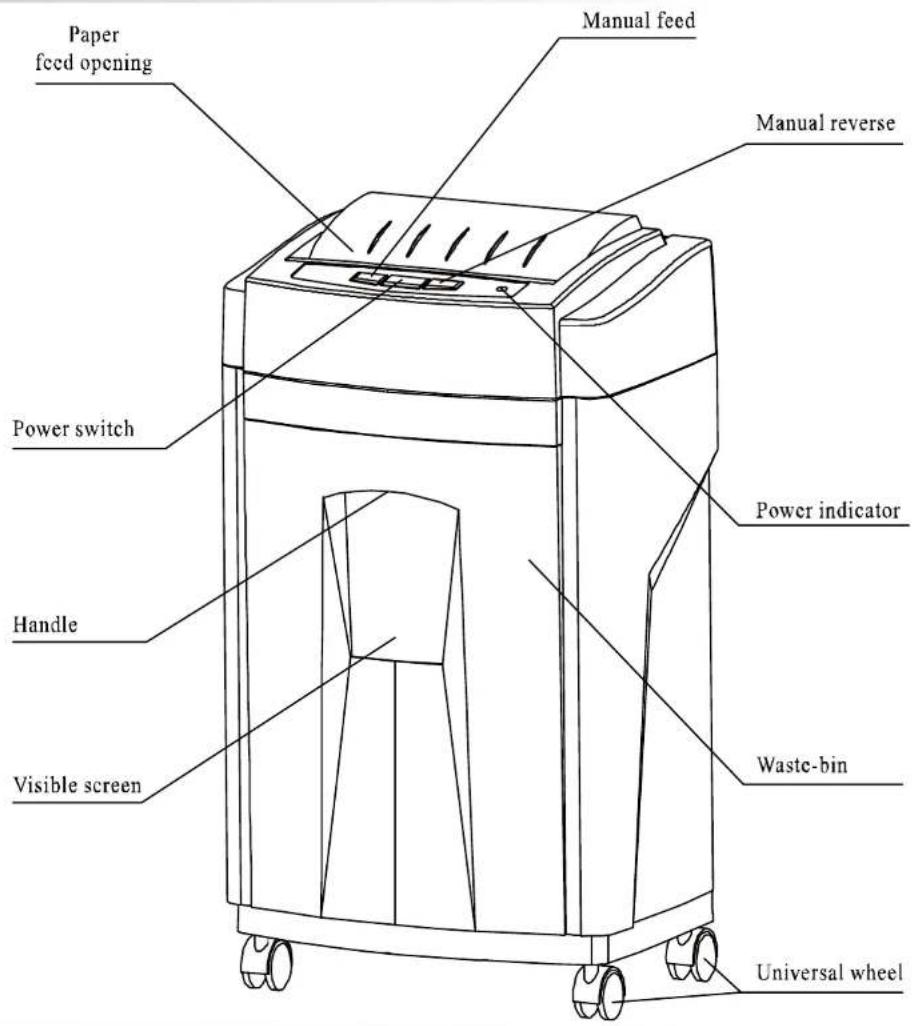
Operating Procedures
- Connect the power cable & plug.
- Press the press-button of the power switch, the indicator light will turn green, which means the machine is in standby mode. Then insert paper into the paper entrance vertically and the machine will start to shred automatically and resume standby mode afterwards.
- When you want to stop the operation of shredding paper, you can press "REV" button for sending out them.
- If paper blocked in case of overload, the indicator light will turn red, the motor will reverse automatically to send out the paper, and the machine will automatically stop. Take out the paper, and the light turns green. If the machine fails to unwind the PaPers, please press the "REV" button manually to pull out of the papers. When the jammed papers are too short to pull out by hands, please please press the "FW" button and "REV" button alternately to shred the jammed papers.
- When the inside temperature is too high after continuous working, there is an overheat protection for the motor to shut off automatically at this time. Let the shredder cool down for 30 minutes before operating again.
Maintenance
- Pull out the power plug from the socket of power supply before maintenance
- The maintenance by user is only limited to cleaning visible surface of the shredder.
- When cleaning the surface of the shredder, do not allow water to drop into the interior of the shredder.
Use cloth dipped with small amount of soap water to clean the exterior of the shredder. The cloth must be closely wrapped around hands during cleaning, so as to avoid the cloth to drop into the paper entrance, and it is prohibited to use organic solvents such as gasoline, benzenes solvents or dilution agent to do the cleaning. Decontamination powder must not be used too.
Trouble Analysis & Troubleshooting
| TROUBLE | TROUBLE ANALYSIS | TROUBLESHOOTING |
| SHREDDER NO RUNNING | plug disconnect, no power | connect the plug |
| lower voltage | provide the rated power | |
| if not put the waste-bin into the scheduled position, no power | push the waste-bin into scheduled position | |
| automatically stop running to prevent motor from over heating | wait for motor cooling down naturally | |
| paper is too transparence | fold paper or add thicker paper | |
| container fully loaded empty shredded | ||
| overload not relieve | reduce the number of paper and feed again | |
| TURN IN BLOCKED | jammed paper | select the " manual reverse" button to get the excessive paper out |
| CONSTANTLY RUNNING | particles at the paper feed opening | clean up |
| NOISE LOUD | floor is hollow or machine not located steadily | adjust location |
In case the above solutions are not able to remove any trouble of the shredder, please stop using it immediately, disconnect the power plug and switch off power supply. Contact the local service agency of our company for disassembly and service of the shredder.
得力集团有限公司
Zhejiang Province, China
电话(Tel): 0574-65278888
传真(Fax): 0574-65273660
Http://www.deli-stationery.com
MADE IN CHINA

Brand : Deli
Model : 9950
Category : Paper shredder