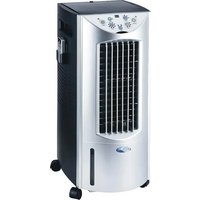
HAC-100S - Air conditioner Whynter - Free user manual and instructions
Find the device manual for free HAC-100S Whynter in PDF.


| Product Type | Evaporative Air Cooler with Heater, Humidifier, and Air Purifier |
| Model Number | HAC-100S |
| Voltage | 115 V AC, 60 Hz |
| Current | 13.04 A |
| Cooling Power Consumption | 60 W |
| Heating Power Consumption | 1500 W |
| Water Tank Capacity | 12 L (25 Pints) |
| Cooling Media | Honeycomb Filter (permanent) |
| Air Flow | 330 m³/hr |
| Recommended Room Size | 6 m² (approx. 65 sq ft) |
| Product Dimensions (L x W x H) | 12.6" x 15.5" x 28.7" |
| Net Weight | 21 lbs |
| Modes | Cool, Warm, Fan Only |
| Fan Speeds | 3 (Low, Med, High) + Sleep in Cool mode |
| Heater Levels | Low, High (in Warm mode) |
| Humidistat Control | Adjustable RH% from 30% to 70% (default 50%) |
| Timer | Up to 8 hours (1-hour increments) |
| Oscillation | Yes (vertical louvers swing left-right) |
| Remote Control | Yes (requires 2 AAA batteries, not included) |
| Filters | Active Carbon Filter (washable) and Honeycomb Filter (permanent) |
| Ice Compartment | Top compartment for adding ice to enhance cooling |
| Main Power Switch | Separate switch on left side near top |
| Mobility | 4 castors (wheels) |
| Water Level Indicator | Yes (visible on tank) |
| Safety Features | Automatic shut-off if water tank removed or empty; no extension cord use |
Frequently Asked Questions - HAC-100S Whynter
User questions about HAC-100S Whynter
0 question about this device. Answer the ones you know or ask your own.
Ask a new question about this device
Download the instructions for your Air conditioner in PDF format for free! Find your manual HAC-100S - Whynter and take your electronic device back in hand. On this page are published all the documents necessary for the use of your device. HAC-100S by Whynter.
USER MANUAL HAC-100S Whynter
WHYNTER ECO-MIST EVAPORATIVE AIR COOLER
User's Manual
Ideal for Homes and Offices Cooling Humidification Purification
MODEL NO.: HAC-100S


Energy Efficient, Environmentally Friendly, With Strong Airflow...
* Please read this user manual before operating and keep safe for future reference.
INDEX
Read all instructions carefully before setting up and operating this unit, and please keep this instruction manual for future reference. This manual is designed to provide you with important information needed to setup, operate, maintain, and troubleshoot your cooler. Failure to follow these instructions may damage and/or impair its operation and void the warranty.
SECTION:
PAGE
- INTRODUCTION....2
- RECOMMENDED USE 2
- WARNINGS & SAFETY RULES .... 3
- TECHNICAL SPECIFICATIONS 4
- ELECTRICAL WIRING DIAGRAM....4
- PARTS DESCRIPTION....4
- USE & OPERATION
Control Panel 5
Operation Instructions....6
Remote Control....10 - CLEANING & MAINTENANCE....11
- TROUBLESHOOTING GUIDE....13
- WARRANTY ....14
1. INTRODUCTION
Congratulations on your purchase of our Whynter EcoMist air cooler product that combines a room cooler, heater, humidifier and air cleaner. This means that it can be used all year round. To get the best functionality from your unit, please read these instructions carefully.
Whynter EcoMist air cooler can provide a cool moist stream of healthy, natural humidification. The air washer system uses water to filter dust, pollen and pollutants and trap them in the honeycomb filter and wash them away.
Whynter EcoMist air cooler can also be used as an energy-efficient, low cost and GREEN way to cool a large area in hot weather, by adding ice in the top compartment. The active carbon filter reduces dust, pollen and odors year round. All functions may be activated by the remote control.
For the best performance when using this product as an Evaporative Air Cooler with cooling effect, it should be filled with water, and ice if available. The unit should be positioned in a location that will create a 'flow through' air effect. The greatest cooling effect will be felt if the unit is operated in a partly opened doorway or window with the cooled air directed into the room. It is also important to have a door or window partly opened away from the air cooler, in order to create the 'flow through' effect. If this arrangement cannot be met, the evaporative cooling effect will be affected.

2. RECOMMENDED USE
This appliance is intended for use in a domestic, office or outdoor environment only. Any other use is not recommended by the manufacturer and may cause fire, electrical shocks or other injury to person or property. Any Commercial or Industrial use voids the Warranty.
3. WARNINGS & SAFETY RULES
READ AND SAVE THESE INSTRUCTIONS:
WARNING - This appliance is intended for use in a domestic, small office or outdoor environment only. Any other use is not recommended by the manufacturer and may cause fire, electrical shocks or other injury to person or property.
When using electrical appliances, basic safety precautions should always be followed:
- Your cooler should run on 115 Volt AC, 60 Hz current only.
- Check the household voltage to ensure it matches the appliance's rate specification.
• Before operating the product remove it from its packaging and check it is in good condition.
• DO NOT operate any product with a damaged cord or plug.
• DO NOT use an extension cord with this appliance. - DO NOT run power cord under carpeting, or cover with rugs or runners. Arrange the cord away from areas where it may be tripped over.
• Always unplug the product before refilling the water tank.
• Always unplug the appliance from the power source before servicing or removing the unit. - Disconnect the power supply before servicing or cleaning operation.
- Remove the power cord from the electrical receptacle by grasping and pulling on the power cord plug-end only, never from the cord.
- DO NOT use the product in areas where gasoline, paint or other flammable goods and objects are stored.
- When using the "Cool" setting, please check the water tank to ensure it is full. Operation of this unit on the "Cool" setting on an empty tank could result in damage to the water pump.
- DO NOT attempt repair or adjustment to any electrical or mechanical functions of the cooler, as this may void the warranty.
- Verify that the voltage power source matches the appliance electrical specifications. Improper voltage will burn out the blower/fan, oscillating and/or pump motor windings and will void the warranty.
• DO NOT cover the air inlet or outlet on the appliance as this may cause motor damage. - DO NOT insert or allow objects to enter any ventilation or exhaust opening as this may damage the product and could cause an electrical shock or fire.
• DO NOT operate with media removed as this will overload and damage the motor.
• DO NOT use this appliance with any solid-state speed control device.

• DO NOT leave the appliance operating unattended for any extended period of time.
- This appliance is not intended for use by persons (including children or elderly) with reduced physical, sensory or mental capabilities, or lack of experience and knowledge, unless they have been given supervision or instruction concerning use of the appliance by a person responsible for their safety.
- DO NOT let children play with any appliance packaging or plastic bags. Injury may result from such practice.
- If the unit is damaged or it malfunctions, do not continue to operate it. Refer to the troubleshooting section and/or please call customer service.
- Place the unit on the floor only.
- This product is not intended for use in wet or damp locations. Never locate the product where it may fall into a bathtub or other water container. DO NOT use in bathrooms. When it is not in use always store in a dry area.
NOTE: OPERATE THE UNIT WHEN THE WATER TANK IS FILLED WITH CLEAN WATER.
4. TECHNICAL SPECIFICATIONS
| Model No. | HAC-100S |
| Voltage | 115V |
| Frequency | 60Hz |
| Current | 13.04A |
| Wattage | 60W Cooling Mode |
| 1500W Heating Mode | |
| Water Tank Capacity | 12 Litre/ 25 Pint |
| Cooling Media | Honeycomb |
| Air Volume | 330m3/hr |
| Recommended Room Area | 6m2 |
| Product Dimension | 12.6"(L) x 15.5"(W) x 28.7"(H) |
| Net Weight | 21 lbs |
| Safety Approval |

Made in China
5. ELECTRICAL WIRING DIAGRAM
![graph TD A["PLUG"] --> B["L. N"] B --> C["PCB"] C --> D["COM"] D --> E["M"] E --> F["PUE"] F --> G["PTE"] G --> H["SWING"] H --> I["COOL"] I --> J["COOL"] J --> K["POWER SWITCH"] style A fill:#f9f,stroke:#333 style C fill:#ccf,stroke:#333 style D fill:#cfc,stroke:#333](/content/2026/06/1146283/images/ec213ed38af41320ed9c0ad9dfc01a4454326abf5ff11ae8073d66704a9bdf28.jpg)
6. PARTS DESCRIPTION


| 1 | Handle | 9 | Remote control storage position |
| 2 | Left side panel | 10 | Rear |
| 3 | Power cord | 11 | Top ice compartment |
| 4 | Castors | 12 | Air inlet |
| 5 | Top cover | 13 | Water tank |
| 6 | Control panel | 14 | Drain plug |
| 7 | Front | 15 | Main Power Switch |
| 8 | Air outlet | 16 | Water level indicator |
7. USE & OPERATION
CONTROL PANEL:

FUNCTION BUTTON:
POWER:
This unit is equipped with a separate Main Power Switch, located on left side near the top (part no. 15). Please make sure that this power switch is in the "on" position. If your Main Power Switch is not in the "on" position the unit will not run.
TIMER:
Every time the TIMER is pressed, 1 hour running time is added; the maximum timer setting is 8 hours.
MODE:
The unit offers 3 modes: COOL, WARM, FAN Only.
COOL mode: COOL LED indicator on
WARM mode: WARM LED indicator on
FAN only mode: no LED indicator
Air purifying function is on automatically whenever water is pumping.
The FAN only mode operates without any humidification or heat function and is the default setting. After you turn the unit on, press the "MODE" function to select humidification cool or humidification warm function.
"COOL" mode:
Press the MODE button until the "COOL" indicator light comes on. The unit will blow cool air and humidify.
Air Purifying mode:
Note the air purifying filtration system is working whenever water is being pumped through the system, in cool or warm mode.
"WARM" mode:
Press the MODE button until the "WARM" indicator light comes on. The unit will blow warm air and humidify.
SPEED:
Press this button to select your desired fan speed.
"COOL Mode": High - Med - Low - Sleep
"WARM Mode": High - Med - Low
OSCILLATE:
Press this button until the indicator light comes on and louvers will swing from left to right. Press this button to stop oscillation.
HEATING (WARM):
When the unit is set to "WARM" mode, the "HUM" indicator on HEATING button will come on, which indicates the unit blows warm air and humidity simultaneously.
Press the HEATING button to select "LOW" or "HIGH" level of warm air.
HUMIDITY:
The unit is defaulted RH (relative humidity %) is at 50%. To set your desired RH%, press HUMIDITY button. The RH% can be adjusted in the unit of 5%. The adjustable RH% ranges from 30% to 70%.
LED DISPLAY:
Display room temperature or the set RH%.
REMOTE CONTROL SENSOR:
Point your remote control to the sensor.
OPERATION INSTRUCTIONS:
ATTENTION: ENSURE WATER TANK IS FILLED WITH FRESH WATER BEFORE OPERATION.
USE AS AN EVAPORATIVE AIR COOLER:
- Turn OFF the Main Power Switch on the left side and unplug the unit from the wall power outlet.
- Fill the water tank with cold clean water to above the minimum line. For maximum cooling, add ice cubes to the top ice compartment. Make sure do not over fill, and close the top cover. Make sure that you have completely dry hands, before plugging the unit back into the wall power outlet. Switch on the unit.

- Press the POWER button on the front panel and select the COOL mode, the "COOL" indicator will light up. It is recommended to put the fan speed on "High" until the area is initially cooled, then switch to the desired fan speed.
- Press the HUMIDITY button to show the current RH% (Relative Humidity %), then press HUMIDITY button again to set your desired RH%. The RH% will be adjusted in unit of 5%. The RH% will appear on the LED display. The operation range for RH% is 30% to 70%. If you do not adjust the RH%, the unit is defaulted at 50%. Air purifying function is working when water is pumping.
- Press the SPEED button to select your desired fan speed.
- Press OSCILLATE to select your preferred air flow.
- Check water level in water tank during operation. Once water below minimum level, turn off the POWER button and Main Power Switch and refill the water tank with fresh cold water.
- If the unit will not be used for an extended period of time, turn off the Main Power Switch on the left side of the unit and empty the water tank.
WARMED COMFORT MIST HUMIDIFICATION:
- Turn the unit off at the Main Power Switch located on the left side of the unit and unplug the unit from the wall power outlet.
- Fill the Water Tank with clean water. DO NOT add ice cubes in the top ice compartment. Connect the unit to the power supply and turn on the Main Power Switch.
- Press the front panel Power button, the unit will operate in "FAN only mode".
- Press the MODE button to select WARM mode. The "WARM" indicator will light up. The "HUM" indicator under HEATING button will also light up as the unit gives warm air and humidity simultaneously.
- Press the HEATING button to select your desired warm air level; HIGH or LOW.
- Press the SPEED button to select your desired fan speed.
- Press OSCILLATE to select your preferred air flow direction.
- Check water level in water tank during operation. If the water level is below minimum level, turn off power button and Main Power Switch and refill the water tank with fresh water in the tank. Please refer to procedures to fill the water tank.
- If the unit will not be used for an extended period of time, turn off the Main Power Switch on the left side of the unit and empty the water tank.
NOTE:
This unit has a patented Automatic Humidistat Control function. You can set your desired RH% (Relative Humidity %) by pressing the HUMIDITY button. The adjustable range is from RH 30% to RH 70%. The RH% will be adjusted in unit of 5%. The defaulted RH% is 50%.
When the room RH (Relative Humidity) has been brought up to your set RH%, the unit will stop the humidifying function. When the room RH% drops below your set RH%, the unit will restart humidifying function automatically. The Air purifying function is in operation when water is pumping through the system.
Humidifying is suggested when the RH% is below 20% as such low humidity level can be uncomfortable. The recommended humidity level is 40% to 50%. This unit gives a cool, near invisible moisture output. It is normal not to see the mist.
TIMER OPERATION:
Timer can be used to switch the unit off after a selected number of hours.
- First, select the desired operating mode 'COOL', 'WARM', 'Fan only'.
- Press the TIMER button once and the unit will switch off after 1 hour. Press the button again to set the off time in 2 hours, again for 3 hours etc. The maximum timer setting is 8 hours.
• To cancel the Timer setting press TIMER button again until all the timer indicators light off.
- Press the OSCILLATE button to start the louvers moving from side to side. This will improve the distribution of the cooled or warmed air in the room. To stop the oscillation, press the OSCILLATE button again until indicator light off.
- You can change the air direction (up or down) by manually adjusting lever alongside the horizontal louvers.
HOW TO FILL THE WATER TANK:
Turn off the unit by pressing the POWER button and switching off the Main Power Switch. Remove the power plug from the wall power outlet with dry hands.
Try not to remove the water tank completely, if you need to, please refer to the water tank refitting section on how to reinsert the water tank.
Press the "unlock release" tab on the back of the unit by pulling up. You will hear it "unlock".
UNLOCK RELEASE
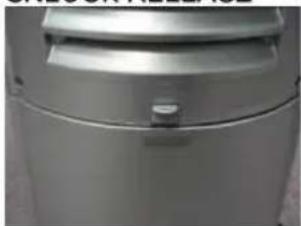

Using two hands: One hand holding the "unlock release" up, place your other hand below the bottom of the water tank, and GENTLY pull it out.
WATER TANK HALFWAY SLID OUT
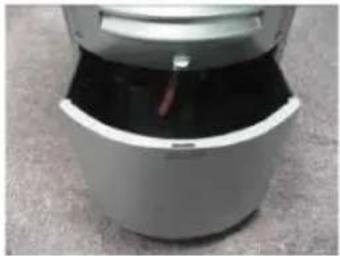
The water tank can be filled several different ways:
NOTE: Observe the minimum water level mark and maximum water level when filling the water tank.
- It is recommended to fill the water tank directly by pulling the tank half-way or one-third out and pour water into it.
- You can also open the top cover of the ice compartment; use a pitcher to pour water into the ice compartment, the water will draining down into the water tank. Please make sure you do not fill water above the max water level mark to avoid water overflowing.
- You can also remove the tank and fill directly from the kitchen sink. Please note it is a 25 pint/12 liter capacity water tank. Please be careful when transporting the water tank after it is filled with water.
- It is recommended that you use a large towel near the fill area as it is easy to spill water if you do not smoothly slide the tank back into place. It is recommended that you put a water proof mat under the unit if you have hardwood floors. Make sure that the floor is a level and hard surface and do not tilt or angled the unit.
- Once you put the water tank back in place, press firmly until you hear it lock in. If you do not hear the "click" sound and if the back of the tank is not flush, the unit will not operate.
- Make sure that your hands are dry before plugging the power plug into the wall outlet or serious harm or death from electrical shock may result.
WATER TANK REFITTING:
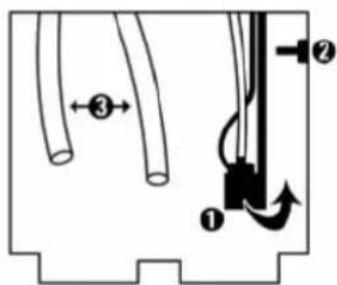
- When refitting the water tank, ensure that the pump ① is seated above the latch ② and that both pipes ③ are placed inside the water tank.
- If the pump ① is in the down position, swing it up and rest it on the hinged latch ②.
- The pump will lower into the water tank as you refit the water tank.
REMOTE CONTROL:
Remote Control & Remote Control Storage
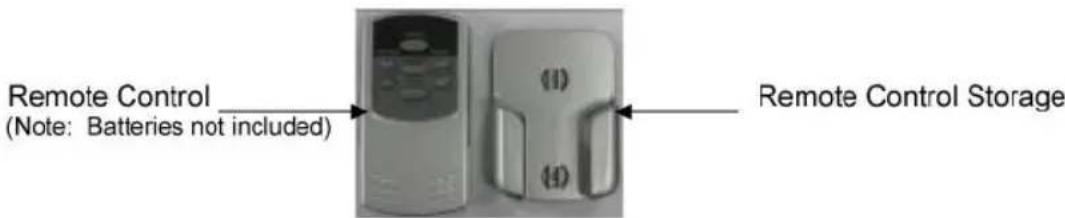
(After unpacking, press the button on the top of the unit to release the top cover. The remote control is stored there.)
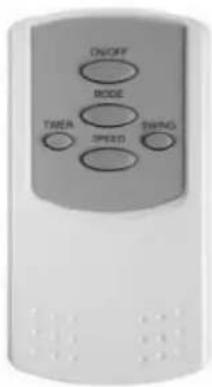
Operate with remote control after the unit is turned on. (The remote control requires two AAA batteries, not included)
ON/OFF: Power ON / OFF
SPEED: LOW / MEDIUM / HIGH
MODE: Control COOL or FAN only option
SWING: Control the motion of the vertical louvers
TIMER: Control timer function for automatic shut off
NOTE:
- Do not mix old and new batteries used in the remote control.
• Always point the remote control signal transmitter towards the unit when operating.
• Make sure that the signal path is not obstructed. - Remove the batteries if the unit is not going to be used for an extended period of time.

8. CLEANING & MAINTENANCE
- Before you clean the air cooler, switch the unit off, remove the plug from the power socket and wait until the unit has cooled down.
• Use a damp cloth to clean the unit housing. - Do not use detergents, abrasive cleaning liquids, chemical agents (Alcohol, Gasoline etc.), or excessive water to clean the appliance.
• Use a damp cloth to clean the interior of the Top Ice Compartment. - You should remove the water tank for a thorough cleaning before long term storage.
• Store in the original packaging in a dry, dust free area during off season usage
FILTERS:
ACTIVE CARBON FILTER (DUST FILTER):
- Always keep the Active Carbon Filter (Dust Filter) clean. You can wash the Active Carbon Filter (Dust Filter) whenever you feel necessary.
- The Active Carbon Filter (Dust Filter) is placed inside the Air inlet, you can open the Air inlet to clean the Active Carbon Filter (Dust Filter) or replace with a new one.

Dust filter behind "air inlet"
HONEYCOMB FILTER:
- Protected by the Active Carbon Filter (Dust Filter), the Honeycomb Filter can be used for up to two years.
- The honeycomb filter is a permanent filter and does not need to be replaced. If you live in an area that has water that is unusually hard or has a high mineral content you must use water additives to soften the water or just purified water. Commercial de-scaling, de-mineralizing, PH balancing, and water softening products are widely available. As these issues are highly regionalized, please consult a local water company or pool supply company on the best solution.
• Replacement of your Honeycomb filter:
If you have not used commercial water treatment additives and start to notice a decreased level of performance for your unit, you may need to clean or replace the filter. Residual pollutants are left as residue in the bottom of the tank. You should remove the water tank to clean it with a damp cloth once a week.
To remove the honeycomb filter you must turn off front panel power switch and the Main Power Switch, then unplug the unit from the wall outlet.

Maker sure that the unit is unplugged or serious harm from electrical shock can occur.
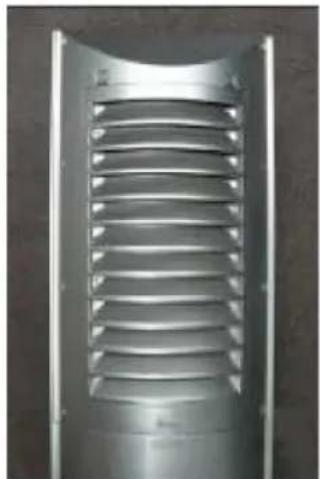
Back Panel
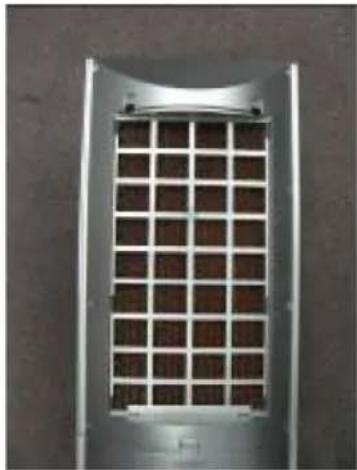
Honeycomb filter behind the back panel
Remove the 8 screws on the back of back panel with a Phillips type screw driver. Carefully remove the honeycomb filter. You can clean the filter in warm water with a good quality humidifier filter cleaner, or use one capful of liquid bleach or dish cleaning detergent in a large container that holds at least two gallons of water. DO NOT PUT FILTER IN DISWASHER!
Soak the filter overnight, and then thoroughly rinse with cool clean water.
If the filter still has scaling or mineral build up after cleaning and rinsing, you will need to replace the filter which can be ordered from Whynter customer service.
Place the cleaned filter back into the back panel and install the back panel back in place and insert the eight Phillips screws. Do not over tighten the screws.
9. TROUBLESHOOTING GUIDE
The following troubleshooting guide is intended to address the most common symptoms and is by no means exhaustive. If symptoms persist, call a qualified service provider. Only a certified electrician should complete any electrical work. Unplug and disconnect the appliance from the power source before attempting to troubleshoot any of the following symptoms.
| Problem | Possible Cause | Solution |
| Unit does not turn on | Water tank is not installed properly | Check water tank position |
| Main power switch that is located on left side near the top (part no. 15) is not on | Turn on the main power switch | |
| Humidity output minimal to none | Water does not reach minimum water level in water tank. | Turn off the unit. Follow instruction to fill the water tank with clean water. |
| Water pump is not in position. | Turn off the unit. Follow instruction to water tank refitting. | |
| Carbon filter or honey comb is dirty or has residue. | Clean or replace filter(s). | |
| Water color yellowish at initial use | Color fasts from honeycomb filter. | This is normal. After several uses, the water color will be clean. |
| Abnormal noise inside the product | Noise from the water pump when water is not filled to min water level. | Turn off the unit. Add water, and then turn on the product again. |
| Motor or fan problem | Turn off and unplug the product. Call customer service | |
| Unit not on level ground | Please the unit on flat and hard floor. | |
| Remote control not working | Signal path is obstructed | Clear signal path |
| No battery or low battery in the remote control | Replace battery | |
| Musty or unpleasant odor | Stale or stagnant water in water tank | Drain, flush and clean water tank |
| Honeycomb filter is mildewed or clogged | Clean honeycomb filter | |
| Honeycomb filter not completely wet before cooler is turned on | Turn on water before starting unit cooler is turned on |
10. ONE YEAR LIMITED WARRANTY
This WHYNTER SNO portable air cooler is warranted, to the original owner within the 48 continental states, for one year from the date of purchase against defects in material and workmanship under normal use and service. Should your Whynter portable air cooler prove defective within one year from the date of purchase, return the defective part or unit, freight prepaid (within two months of purchase; after two months to one year, customer will be responsible for freight cost to Whynter's service department), along with an explanation of the issue to Whynter's service department. Please ship the Whynter portable air cooler in its original packaging material to avoid damage in transit. Please retain original box and packaging material. Under this warranty, Whynter will repair or replace any parts found defective. This warranty is not transferable. After the expiration of the warranty, the cost of labor and parts will be the responsibility of the original owner of the unit.
THIS WARRANTY DOES NOT COVER:
- Acts of God, such as fire, flood, hurricanes, earthquakes and tornadoes.
- Damage, accidental or other wise, to the portable air cooler while in the possession of a consumer not caused by a defect in material or workmanship;
- Damage caused by consumer misuse, tampering, or failure to follow the care and special handling provisions in the instructions.
- Damage to the finish of the housing, case, or other appearance parts caused by wear.
1) Filters.
2) Damage caused by repairs or alterations of the unit by anyone other than authorized by the manufacturer.
3) Freight and Insurance cost for the warranty service.
To obtain service or information, contact Whynter Innovations Group via Email at service@whynter.com or call 866-WHYNTER.

- WHYNTER ECO-MIST EVAPORATIVE AIR COOLER
- INDEX
- SECTION
- PAGE
- INTRODUCTION
- RECOMMENDED USE
- WARNINGS & SAFETY RULES
- READ AND SAVE THESE INSTRUCTIONS
- TECHNICAL SPECIFICATIONS
- ELECTRICAL WIRING DIAGRAM
- PARTS DESCRIPTION
- USE & OPERATION
- CONTROL PANEL
- FUNCTION BUTTON
- POWER
- TIMER
- MODE
- SPEED
- OSCILLATE
- HEATING (WARM)
- HUMIDITY
- LED DISPLAY
- REMOTE CONTROL SENSOR
- OPERATION INSTRUCTIONS
- USE AS AN EVAPORATIVE AIR COOLER
- WARMED COMFORT MIST HUMIDIFICATION
- NOTE
- TIMER OPERATION
- HOW TO FILL THE WATER TANK
- UNLOCK RELEASE
- WATER TANK REFITTING
- REMOTE CONTROL
- REMOTE CONTROL & REMOTE CONTROL STORAGE
- CLEANING & MAINTENANCE
- FILTERS
- ACTIVE CARBON FILTER (DUST FILTER)
- HONEYCOMB FILTER
- TROUBLESHOOTING GUIDE
- ONE YEAR LIMITED WARRANTY
- THIS WARRANTY DOES NOT COVER
- TO OBTAIN SERVICE OR INFORMATION, CONTACT WHYNTER INNOVATIONS GROUP VIA EMAIL AT SERVICE@WHYNTER.COM OR CALL 866-WHYNTER
Brand : Whynter
Model : HAC-100S
Category : Air conditioner