
Hoffman G28 - Heating HP - Free user manual and instructions
Find the device manual for free Hoffman G28 HP in PDF.


| Brand | HP |
| Model | Hoffman G28 |
| Product Type | Air conditioner with heating capability |
| Cooling Capacity | Up to 6000 BTU/hr (depending on model) |
| Heating Capacity | 2000 W |
| Refrigerant | R134a or R407C (depending on model) |
| Voltage Options | 115V, 230V, or 460V (select models) |
| Frequency | 50/60 Hz |
| Dimensions (H x W x D) | 28.55 x 16.97 x 10.10-11.10 inches |
| Weight | 82-84 lbs (depending on model) |
| Enclosure Protection Rating | Type 12/4/4X/3R |
| Control Type | Thermostat or optional Remote Access Control with display |
| Communication Interfaces | USB (Modbus RTU), Ethernet (SNMP, EtherNet/IP, Modbus TCP) |
| Air Filter | Reusable aluminum washable filter |
| Condensate Management | Built-in drain tube |
| Compressor Protection | Phase monitor, overload, 6-minute restart delay |
| Operating Ambient Temperature Range | -40°F to 131°F (-40°C to 55°C) |
| Mounting | Surface mount or partial recess mount with gasket |
Frequently Asked Questions - Hoffman G28 HP
User questions about Hoffman G28 HP
0 question about this device. Answer the ones you know or ask your own.
Ask a new question about this device
Download the instructions for your Heating in PDF format for free! Find your manual Hoffman G28 - HP and take your electronic device back in hand. On this page are published all the documents necessary for the use of your device. Hoffman G28 by HP.
USER MANUAL Hoffman G28 HP
SPECTRACOOL
AIR CONDITIONER
G28 MODEL
INSTRUCTION MANUAL
DESIGN WITH CONFIDENCE
TABLE OF CONTENTS
RECEIVING THE AIR CONDITIONER....3
HANDLING AND TESTING THE AIR CONDITIONER 3
HOW TO READ MODEL NUMBERS 3
TECHNICAL INFORMATION 4
Sequence of Operation 4
Heating....4
Standard and Optional Component Operation 4
Thermostat 4
Remote Access Control (optional) 4
Head Pressure Control (optional) 4
Contactor (460V Units only)....4
Overload (460V Units only) 4
Phase Monitor 5
460V to 230V Transformer....5
115V/230V to 10V Transformer (optional)....5
115V/230V to 24V Transformer and Relay [optional]....5
Schematics and Wiring Diagrams for Thermostat Control 5
4000 BTU 1-Phase Schematic (actual unit options may vary)....5
6000 BTU 1-Phase Schematic (actual unit options may vary)....6
G28 Generic 3-Phase Schematic (actual unit options may vary) 6
4000 BTU 1-Phase Wire Diagram (actual unit options may vary)....7
6000 BTU 1-Phase Wire Diagram (actual unit options may vary) 8
G28 Generic 3-Phase Wire Diagram (actual unit options may vary)....9
DIMENSIONAL DRAWINGS....10
4000 BTU 115V With Thermostats .... 10
6000 and 4000 BTU 230V With Thermostats ....11
G28 Generic 460V With Thermostats....11
INSTALLATION INSTRUCTIONS....12
REMOTE ACCESS CONTROL (optional) 13
INTRODUCTION 13
ENERGIZING THE CONTROLLER....13
CONTROL STATUS INDICATION....13
DISPLAYING AND CHANGING PROGRAM VARIABLES....14
ALARM INPUT CONNECTION 15
ALARM CONDITION DISPLAY....15
AIR CONDITIONER UNIT COMMUNICATION FEATURES....15
USB COMMUNICATION....15
ETHERNET COMMUNICATION 15
USING THE PC INTERFACE TOOL....16
USB COMMUNICATION MODE....16
ETHERNET COMMUNICATION MODE 17
Remote Access Control Pin-out 18
Schematics and Wiring Diagrams for Remote Access Control....19
4000 BTU 1-Phase Schematic (actual unit options may vary)....19
6000 BTU 1-Phase Schematic (actual unit options may vary)....19
G28 Generic 3-Phase Schematic (actual unit options may vary)....20
4000 BTU 1-Phase Wire Diagram for Remote Access Control (actual unit options may vary)....21
6000 BTU 1-Phase Wire Diagram for Remote Access Control (actual unit options may vary)....22
G28 Generic 3-Phase Wire Diagram for Remote Access Control (actual unit options may vary)....23
DIMENSIONAL DRAWINGS 24
4000 BTU 115V With Remote Access Control....24
4000 and 6000 BTU 230V With Remote Access Control....24
INSTALLATION INSTRUCTIONS WITH REMOTE ACCESS CONTROL....25
MAINTENANCE 26
Compressor 26
Inlet Air Filter 26
How To Remove, Clean or Install a New Inlet Air Filter 26
Condenser and Evaporator Air Movers 27
Refrigerant Loss....27
Refrigerant Properties Chart (R 407c)....28
Refrigerant Properties Chart (R 134a)......28
Functional Data....29
4000/6000 BTU Unit Characteristics....30
SERVICE DATA....31
Components List 31
TROUBLE SHOOTING 32
Basic Air Conditioning Trouble Shooting Check List - Thermostat Version 32
Symptoms and Possible Causes - Thermostat Version....33
Basic Air Conditioning Trouble Shooting Check List - Remote Access Control Version 34
Symptoms and Possible Causes - Remote Access Control Version 36
WARRANTY 38
RETURN AND REPAIR POLICY 38
LIMITATION OF LIABILITY 39
RECEIVING THE AIR CONDITIONER
Inspect the air conditioner. Check for concealed damage that may have occurred during shipment. Look for dents, scratches, loose assemblies, evidence of oil, etc. Damage evident upon receipt should be noted on the freight bill. Damage should be brought to the attention of the delivering carrier -- NOT to Pentair Equipment Protection -- within 15 days of delivery. Save the carton and packing material and request an inspection. Then file a claim with the delivering carrier.
Pentair Equipment Protection cannot accept responsibility for freight damages; however, we will assist you in any way possible.
HANDLING AND TESTING THE AIR CONDITIONER
If the air conditioner has been in a horizontal position, be certain it is placed in an upright, vertical or mounting position for a minimum of five (5) minutes before operating.

CAUTION
Do not attempt to operate the air conditioner while it is horizontal or on its side, back or front. The refrigeration compressor is filled with lubricating oil. This will cause permanent damage to the air conditioner and also voids the warranty.
TEST FOR FUNCTIONALITY BEFORE MOUNTING THE AIR CONDITIONER TO THE ENCLOSURE.
Refer to the nameplate for proper electrical current requirements, and then wire the unit to a properly grounded power supply using copper conductors only. Power supply wiring should be restrained after field installation to ensure no contact with internal fan. Minimum circuit ampacity should be at least 125% of the amperage shown on the unit nameplate. No other equipment should be connected to this circuit to prevent overloading
Immediately after applying power, the evaporator blower (enclosure air) should start running. Operate the air conditioner with the compressor running for five (5) to ten (10) minutes. You will need to set the cooling thermostat or controller setpoint below the ambient temperature to operate the compressor.
Condenser air temperatures should be warmer than normal room temperatures within a few minutes after the condenser impellers start.
See Sequence of Operation on page 4 for specifics on how the unit operates when powered up.
HOW TO READ MODEL NUMBERS
| G28 06 4 6 G150 | |||
| 1 2 3 4 5 |
- Identifies the type/family of air conditioner and the approximate height (i.e. G28 = Global family about 28 inch high).
- This is the air conditioner's listed capacity in BTU/Hr. at rated conditions. (i.e. 06=6,000 BTU/Hr. at 131/131 F)
- 1 = 115 Volt, 2 = 230 Volt, 4 = 460 Volt.
- 6 = 50/60 Hz or 60 Hz only.
- Unique set of numbers for each air conditioner which identifies the accessories on a model.
TECHNICAL INFORMATION
The air conditioner comes standard with two internally mounted thermostats or remote access control. There are two modes of operation; heating and cooling. During heating and cooling modes the evaporator fan will be running.
HEATING
When the enclosure temperature is below the heating thermostat setpoint, power is applied to the heaters. When the enclosure temperature is 10 degrees above the setpoint the heater is powered off.
COOLING
When the enclosure temperature is above the cooling thermostat setpoint, power is applied through the thermostat. The compressor is then energized either directly or through a contactor if unit requires one. The condenser impellers will start immediately if the unit is not equipped with an optional head pressure control switch. If the unit is equipped with an optional head pressure control switch, the condenser impellers will start once the refrigerant pressure reaches the setting of the switch. Component specific information is listed below.
Operating the air conditioner below the minimum ambient temperature or above the maximum ambient temperatures indicated on the nameplate voids all warranties. DO NOT set the enclosure thermostat to a temperature lower than 70 F. Doing so can increase the likelihood of frost buildup on the evaporator coil.
The moisture that the enclosure air can contain is limited. If moisture flows from the drain tube continuously this can only mean that ambient air is entering the enclosure. Be aware that frequent opening of the enclosure's door admits humid air that the air conditioner must then dehumidify.
STANDARD AND OPTIONAL COMPONENT OPERATION
THERMOSTAT
The standard G28 air conditioner uses our standard 10-1061-16 thermostat. The thermostat setpoint equals the temperature that the air conditioner turns off. The thermostat has a 10 F differential from setpoint until it calls for cooling or heating. An example of operation is shown below.
FOR COOLING (75-100 F RANGE):
• Thermostat setpoint = 80 F
• Cooling turns on at 90 F
• Cooling turns off at 80 F
FOR HEATING (55-65 F RANGE):
• Thermostat setpoint = 55 F
• Heating turns on at 55 F
• Heating turns off at 65 F
NOTE: For testing purposes only, the thermostat stop screw may be removed (on units so equipped) to allow settings below 70 F. After testing, replace the stop screw and verify that the thermostat cannot be set below 70 F. Extended operation below 70 F can cause coil freeze ups resulting in reduced load and/or unit damage.
REMOTE ACCESS CONTROL (OPTIONAL)
See REMOTE ACCESS CONTROL (optional) on page 13
HEAD PRESSURE CONTROL (OPTIONAL)
Unit is set at the factory, no adjustment necessary.
At a saturated condenser temperature of 85 F (95 psig), the condenser fans will power off. At a saturated condenser temperature of 118 F (165 psig), the condenser fans will power on.
CONTACTOR (460V UNITS ONLY)
The contactor on this model uses a 230V coil.
OVERLOAD (460V UNITS ONLY)
Set overload reset setting to automatic "A" and trip point dial to 1.6A.
PHASE MONITOR
This product is equipped with Phase/Voltage Protection. Please verify correct phasing and voltage before operating. Note the fans may still operate if phasing is incorrect, but the compressor will not, so the unit will not cool. Illuminated light on Phase Monitor indicates phase is correct.
If the light is not illuminated, disconnect power from the unit and swap any two power leads at the terminal block. This should correct the phasing. The light should now illuminate when power is reapplied.
460V TO 230V TRANSFORMER
The 230V from this transformer powers the fans, contactor and optional transformers. 460V is only used to run the compressor.
115V/230V TO 10V TRANSFORMER (OPTIONAL)
This transformer powers the thermal display on thermostat controlled units only.
115V/230V TO 24V TRANSFORMER AND RELAY (OPTIONAL)
The transformer and relay are used to operate the condenser blower and compressor by using a customer supplied, remote mounted door switch. This is not a safety door switch, but rather, only helps to reduce condensation at the evaporator coil if the door is opened. The unit will remain electrified when the door switch is operated with the evaporator fan continuing to operate, and potentially, if temperatures are low enough, the heater may continue to operate on outdoor models.
SCHEMATICS AND WIRING DIAGRAMS FOR THERMOSTAT CONTROL 4000 BTU 1-PHASE SCHEMATIC (ACTUAL UNIT OPTIONS MAY VARY)

ELECTRICAL SCHEMATIC
89074302
6000 BTU 1-PHASE SCHEMATIC (ACTUAL UNIT OPTIONS MAY VARY)
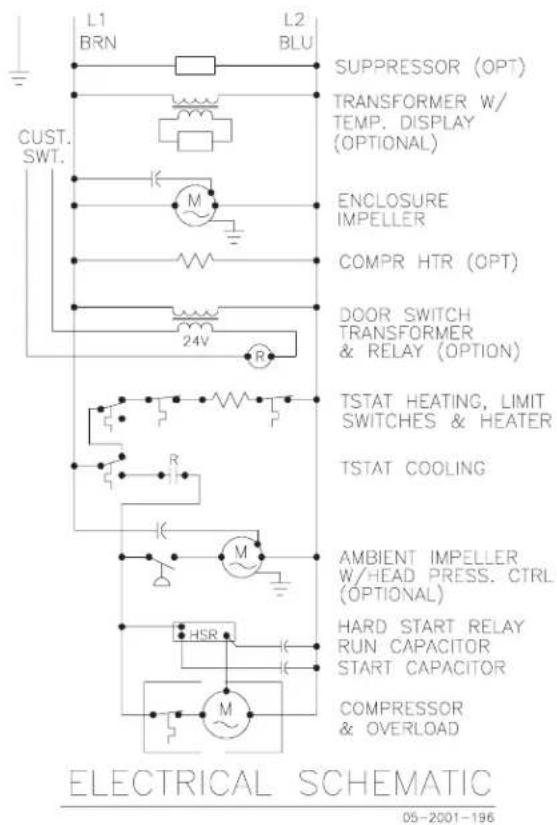
G28 GENERIC 3-PHASE SCHEMATIC (ACTUAL UNIT OPTIONS MAY VARY)

DASHED LINES REPRESENT OPTIONS
P/N 89098584
4000 BTU 1-PHASE WIRE DIAGRAM (ACTUAL UNIT OPTIONS MAY VARY)

89077284
6000 BTU 1-PHASE WIRE DIAGRAM (ACTUAL UNIT OPTIONS MAY VARY)
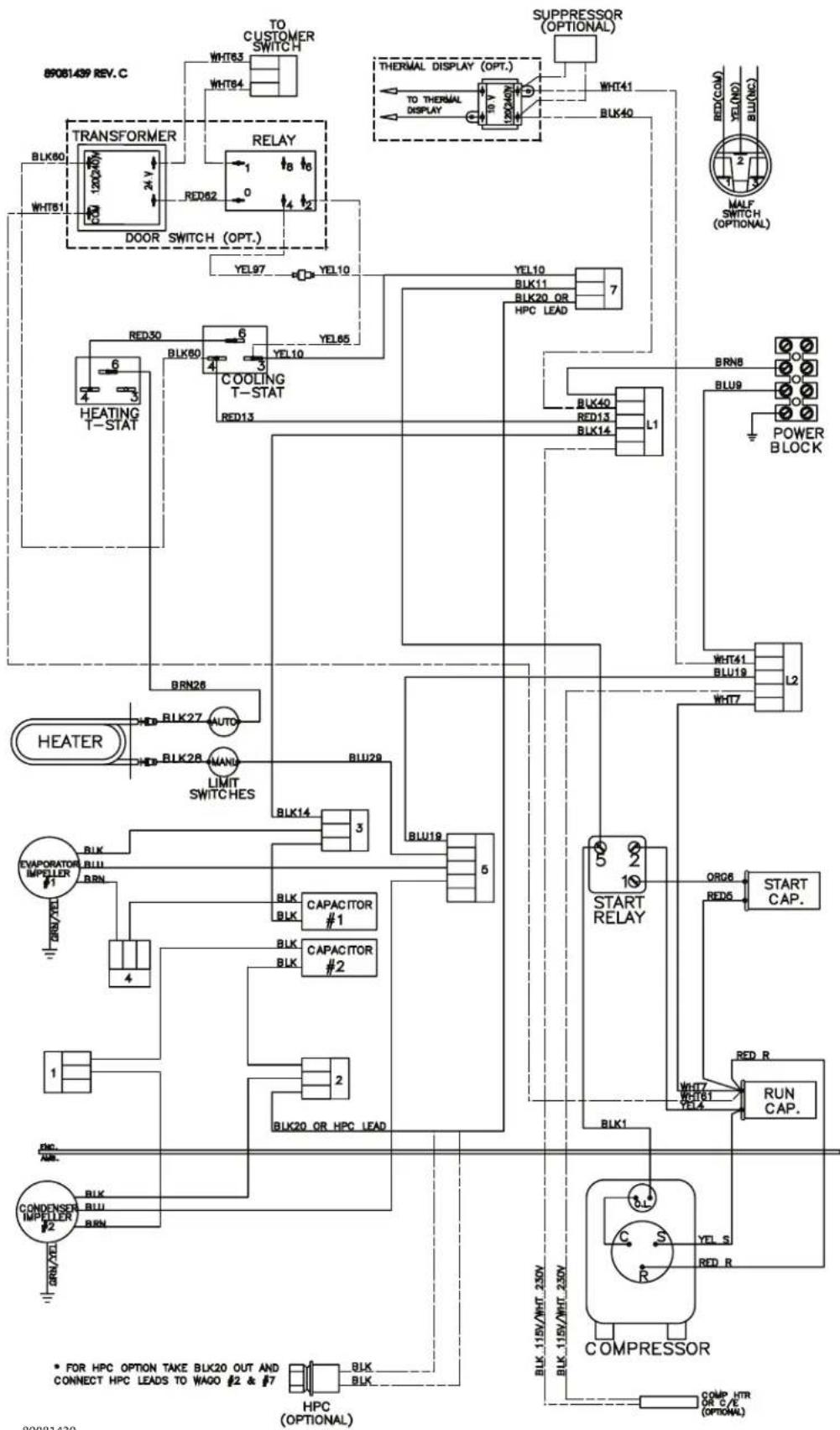
89081439
G28 GENERIC 3-PHASE WIRE DIAGRAM (ACTUAL UNIT OPTIONS MAY VARY)
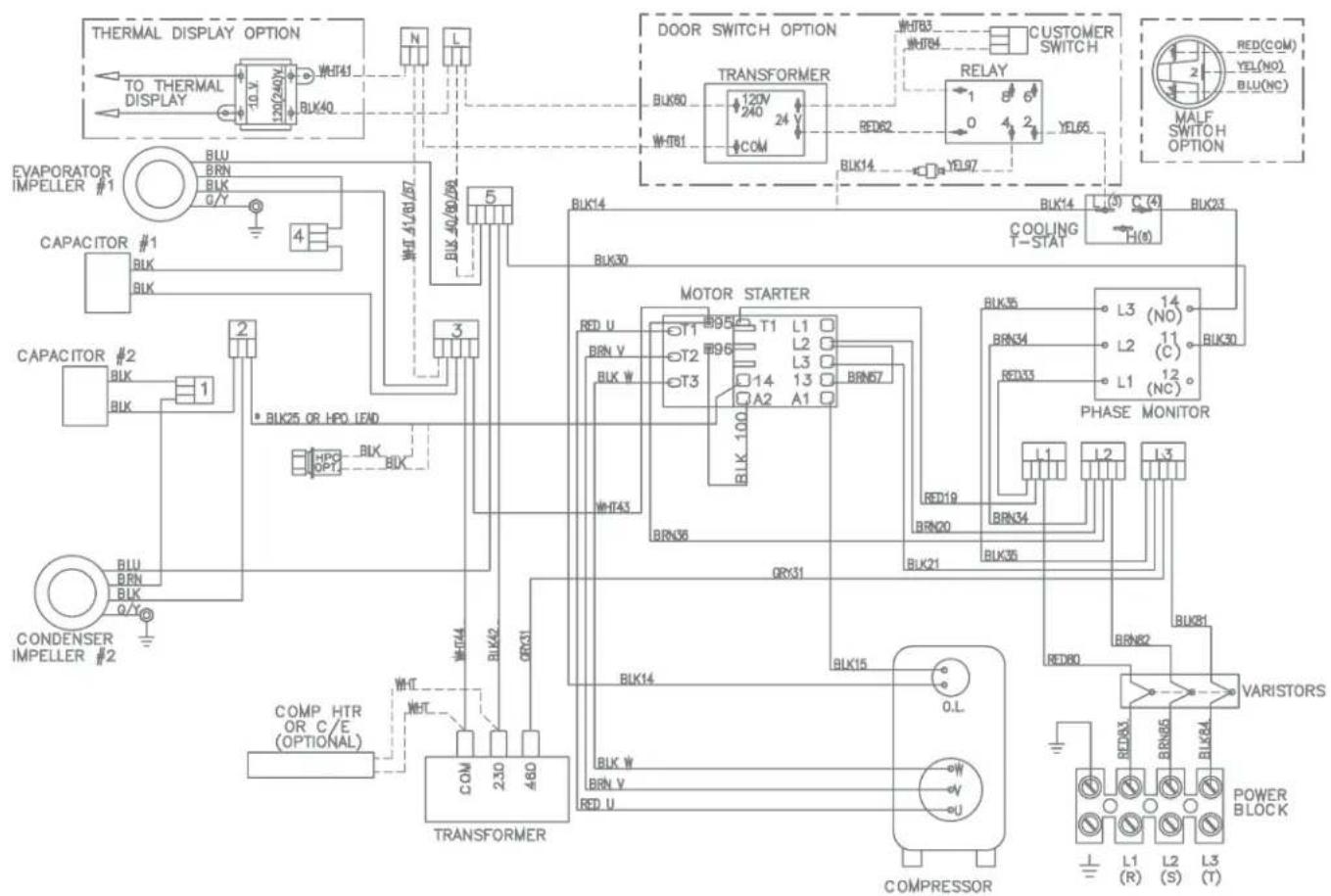
* FOR HEAD PRESSURE CONTROL (HPC) OPTION TAKE
BLK25 OUT AND CONNECT HPC LEADS TO WAGO #2
& MOTOR STARTER TERMINAL 14
DASHED LINES REPRESENT OPTIONS
P/N 89098666
DIMENSIONAL DRAWINGS
4000 BTU 115V WITH THERMOSTATS

NOTE:
1. APPROVE TO TYPE 3R/4/12.
2. MOUNTING GASKET SUPPLIED (NOT SHOWN).
6000 AND 4000 BTU 230V WITH THERMOSTATS
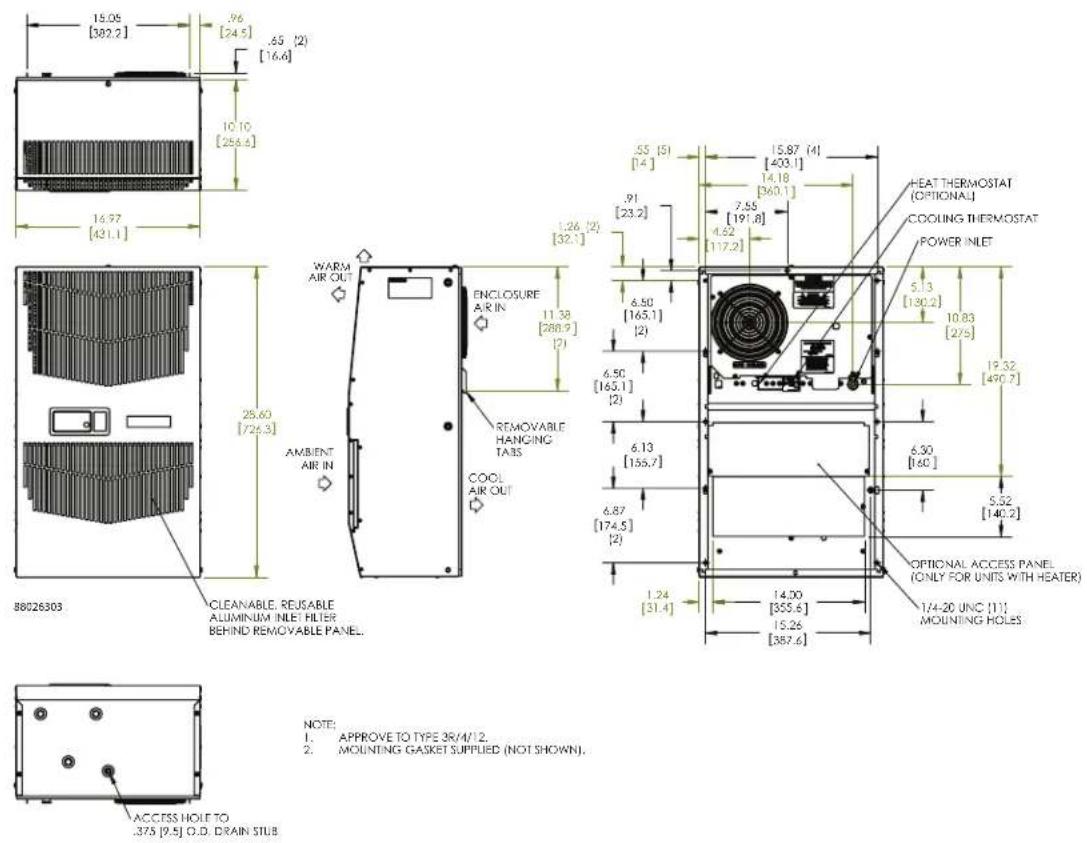
NOTE:
1. APPROVE TO TYPE 3R/M/12.
2. MOUNTING GASKET SUPPLIED (NOT SHOWN).
G28 GENERIC 460V WITH THERMOSTATS
![15.05 [362.2] 98 [25] .65 (2) [16.4] 10.18 [255.6] 17.01 [432.1]](/content/2026/06/1146212/images/ea1253f0973e05c3bf42429477ed7cebf419aafca965e63ef6674bad6921c249.jpg)
![28.59 [726.2] CLEANAR ALUMINUM BEIND RE 89059479](/content/2026/06/1146212/images/4c973c004254ca75534c80bc9bfb3aebf370d839089f83a27c65cabca18f4d46.jpg)
![WARM AIR OUT AMBIENT AIR IN ENCLOSURE AIR IN 11.38 [286.9] REMOVABLE HANGING TAIS COOL AIR OUT](/content/2026/06/1146212/images/1c7f904efee2663e0feb19cae629dc3369857ac9b3fe0b67f78722c930f7f15d.jpg)
![57 [12.5] 13.67 [403.1] 1.26 [39.1] .91 [23.2] 7.55 [191.8] 4.64 [117.7] COOLING TIERMOSTAT 5.50 [165.1] [2] 6.50 [65.1] [2] 6.50 [65.1] [2] 5.13 [130.2] 10.83 [276] 19.32 [490.7] POWER INLET 6.13 [155.7] 6.87 [74.5] [2] 6.30 [160] 5.92 [142.2] OPTIONAL ACCESS PANEL. ONLY FOR UNITS WITH HEAIR? 124 2…](/content/2026/06/1146212/images/d83e000d160718baf4be4bbf09183f309b51da4fee324a5d44303bc0640de1f1.jpg)
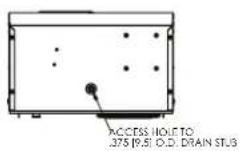
NOTE:
1. APPROVE TO TYPE 3R/4/12.
2. MOUNTING GASKET SUPPLIED (NOT SHOWN).
INSTALLATION INSTRUCTIONS
- Inspect the air conditioner and verify correct functionality before mounting the air conditioner. See HANDLING AND TESTING THE AIR CONDITIONER on page 3.
- Using the mounting gasket kit provided with the unit, install gaskets to the air conditioner, see Figure 1.
- Mount air conditioner on enclosure taking care not to damage the mounting gasket. The mounting gasket is the seal between the air conditioner and the enclosure. Avoid dragging the air conditioner on the enclosure with the mounting gasket attached as this could cause rips or tears in the gasket and risk losing the water tight seal.
- Allow unit to remain upright for a minimum of five (5) minutes before starting. CAUTION! Air conditioner must be in upright position during operation.
- Refer to the nameplate for electrical requirements. Wire the unit to a properly grounded power supply. For 3 phase units, once power is applied, verify that phase monitor light is illuminated which indicates correct electrical phasing. Electrical circuit should be fused with slow blow or HACR circuit breaker.
- Some air conditioners require a remote mounted thermostat. Wire the thermostat outputs to the appropriate terminals on the 24 VAC terminal strip by noting the locations on the correct wiring diagram.
- Set thermostat for required cabinet temperature. Refer to Sequence of Operation on page 4 for thermostat adjustment and operation.
![16.97 [431] φ 3[2 (11) [1,92] 7.55 [191,8] .55 [14](5) .28 [7,1](2) 1.21 (2) [32,3] 91 [23,21] 6.50 [165,1] 6.50 [165,1] (2) 28.50 [723,91] 10.1 [256,8] 15.31 [388,9] 13.47 [342,1] 10.50 [266,7] 5.30 [136,7] 15.00 [381] 6.13 [155,7] 6.30 [160] 6.87 [174,5] (2) 28100013 14.50 [368,3] 15.26 [387,6] 15…](/content/2026/06/1146212/images/0a65c438ffb6f087c82ed7c19a655279181f726b052487b7940d9f15d360abe0.jpg)
Surface Mount Partial Recess Mount
Figure 1
Cut-out Drawing
REMOTE ACCESS CONTROL (OPTIONAL)
INTRODUCTION
The Remote Access Control is a parametric controller for the complete management of air conditioners. All settings are pre-programmed at the factory. Cooling/heating set-points, cooling/heating differential and high /low temperature alarm set-points can be adjusted by the user. Alarms are outputted through a relay contact and also can be accessed through an Ethernet connection utilizing SNMP, EtherNet/IP and Modbus TCP. A USB connection is also provided and can be used to interface with the controller utilizing Modbus RTU.
The controller is wired and programmed at the factory to be energized when power is supplied to the air conditioner.
CONTROL STATUS INDICATION
The display has numerous symbols that indicate if the controller is heating, cooling, alarming, if the compressor is enabled, and if the ambient fan is enabled. The 3 alpha-numeric characters further describe alarms and show the cabinet temperature by default.
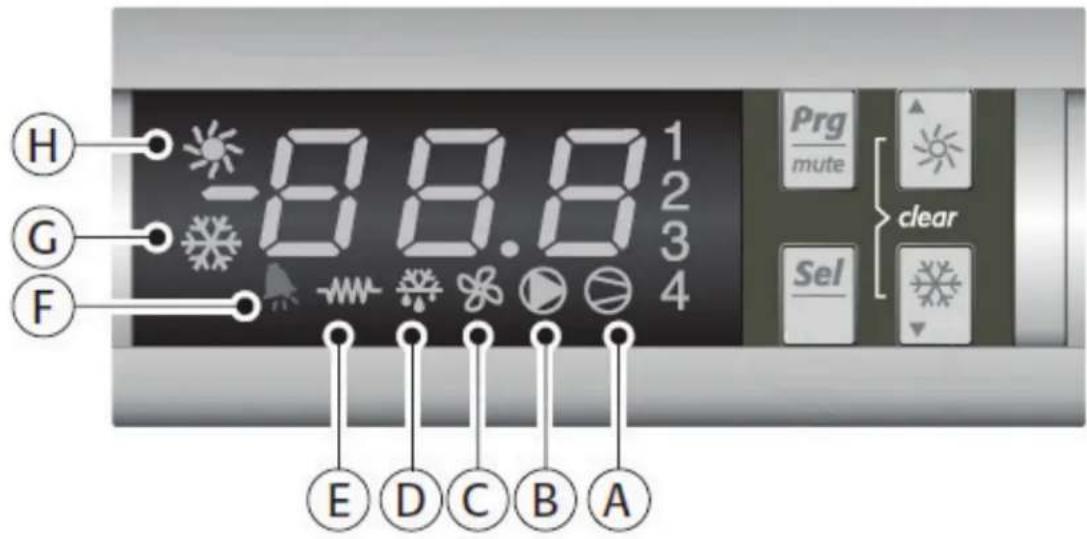
| SYMBOL COLOR | ICON ON ICON FLASHING | ||
| 1 AMBER Compressor On Start-up Request | |||
| 2,3,4 AMBER Not Used Not Used | |||
| A AMBER Compressor On Not Used | |||
| B | AMBER | Evaporator Fan On | Start-up Request |
| C AMBER Not Used Not Used | |||
| D AMBER Not Used Not Used | |||
| E | AMBER | Heater Active | Not Used |
| F | RED | Alarm Active | Not Used |
| G | AMBER | Controller Active | Not Used |
| H AMBER Not Used Not Used | |||
DISPLAYING AND CHANGING PROGRAM VARIABLES
Access: To view and/or change parameters, press and hold the Prg and Sel buttons for greater than 5 seconds. Press the up or down arrow buttons until "22" is displayed, then press Sel button. When "S-P" is displayed, press Sel.
Navigation: Press up or down arrows to display sub-menus then press Sel to select the desired sub-menu. In the sub-menu, use up or down arrows to display parameters for viewing or changing and press Sel. Use Prg button to back out of menu levels as desired.
Adjust: Use the up or down arrows to change the parameter value then push Sel to save that setting. If Sel is not pressed, the change to the value will not be saved. Navigate to and change other parameters as desired. When finished, push Prg to back out of the sub-menus to the main menu.
NOTE: The display will revert to normal temperature display mode if no buttons are pressed for 60 seconds.
| Parameter Default Value Range Description | ||
| r01 80 F 72 F to 120 F Cooling set-point | ||
| r02 7 F - Cooling differential | ||
| A04 50 F* 32 F to 60 F Heating set-point* | ||
| A05 7 F* - Heating differential* | ||
Cooling turns on at r01 + r02, and off at r01
Heating turns on at A04, and off at A04 + A05
*Functional only on units with heater option
ALARM PARAMETERS
| Parameter Default Value Description | ||
| P16 | 125 F | High Temperature Alarm |
| P19 | 40 F Low Temperature Alarm | |
DISPLAYING TEMPERATURE SENSOR #2
Sensor number 2, the air outlet or condenser coil sensor, can be viewed at any time by pressing the up or down arrow button on the front panel of the controller display. The display will revert to displaying temperature sensor number 1 (the AC inlet temperature) after 60 seconds. Both sensors can also be read through the Ethernet and USB connections.
COMPRESSOR RESTART TIME DELAY
A factory set 6 minute (360 second) restart delay exists to reduce residual back pressure before allowing the compressor to restart. The compressor will stay off for the entire restart duration after the compressor is disabled. A flashing "1" on the controller display will indicate the unit is in a compressor restart delay while calling for cooling.
ALARM OUTPUT CONTACT
The Remote Access Control has a normally open dry contact alarm output with a resistive load rating of 250 VAC at 3 amps. Two yellow 18 AWG wires located at the back of the air conditioner provide a connection to this output.
ALARM INPUT CONNECTION
The Remote Access Control can accept a dry contact/switch input via the two 18 AWG white wires located at the back of the air conditioner. This input is associated with the controller display alarm mnemonic TP (door open and/or smoke detected). [To use this feature, remove the splice connector connecting the two white wires and connect customer supplied enclosure door switch in its place.]
ALARM CONDITION DISPLAY
There are seven possible non-latching alarm conditions detectable by the controller and are indicated on the controller display. All alarms can also be accessed through the Ethernet and USB connections.
| Alarm Mnemonic | Description Cause Result | Alarm Relay | ||
| TP General | Alarm | Door open and/or smoke detected | Unit turns off for duration of alarm | Relay Contacts Close |
| LA | High Pressure Warning | MALF high pressure switch opens | No effect on function N/A | |
| E1 | Air Inlet Temperature Sensor Alarm | Sensor Failure | Unit turns off for duration of alarm | Relay Contacts Close |
| E2 | Air Outlet Temperature Sensor Alarm | Sensor Failure | Unit turns off for duration of alarm | Relay Contacts Close |
| Ht | High Temperature Alarm Default = 125 F | Cabinet over temperature Alarm clears at default setting -2 F | No effect on function R | Relay Contacts Close |
| Lt | Low Temperature Alarm Default = 40 F | Cabinet under temperature Alarm clears at default setting +27 F | No effect on function N/A | |
| A1 Frost Alarm | Evaporator coil frozen Alarm clears at 59 F | Compressor and Evaporator fan off for duration of alarm | Relay Contacts Close | |
AIR CONDITIONER UNIT COMMUNICATION FEATURES
Air conditioner units equipped with communication capabilities provide SNMP, EtherNet/IP and Modbus TCP protocols through Ethernet and Modbus RTU protocol via USB. Hoffman® Cooling has a PC Interface Tool available for download that can utilize either mode to communicate with the air conditioner unit.
USB COMMUNICATION
This communication mode allows direct connection of a PC to the air conditioner unit. The protocol supported is Modbus RTU. Use the PC Interface Tool to communicate with the air conditioner unit. A MINI-b USB connection is provided.
ETHERNET COMMUNICATION
This communication mode allows remote connection to the air conditioner unit using SNMP, EtherNet/IP and Modbus TCP protocols. Customers using their own software can download a MIB file for SNMP, EDS file or EtherNet_IP Object file for EtherNet/IP and Coil_Register file for Modbus TCP.
Note: ACU has a default IP Address of 192.168.1.2
Both Ethernet and USB communication modes allow the ability to:
- Read ACU inlet and outlet air temperatures
- Read and change Cooling Set-point and Cooling Differential
- Read and change Heating Set-point, Heating Differential
- Read and change High and Low Temperature Alarm Settings
- Read and change Gateway IP Address, Device IP Address, Subnet Mask, Trap IP Address and Community
- Read and change Unit Identification
- Read and change the state of IP addressing (static or dynamic)
- Read current Alarm Status
SOFTWARE AND CONFIGURATION FILE DOWNLOADS
The PC Interface Tool, MIB file, EDS file, EtherNet_IP Object file and Coil_Register file can be downloaded from www.hoffmanonline.com.
USING THE PC INTERFACE TOOL
The PC Interface Tool gives the user the ability to communicate with the air conditioner unit to read/write parameters using either Ethernet or USB connections.
USB COMMUNICATION MODE
NOTE: Before connecting unit to the PC, make note of the comm ports present. After the unit is connected to the PC, a new comm port will be added to the list. Use this new comm port.
• From Tools menu select Use Ethernet
- When Use Ethernet is unchecked, then Comm Port menu is enabled, Device IP and Community boxes are not shown, and USB communication can be used
• To set the comm port, choose Comm Port from the Tools menu and then select the comm port from the combo box
VIEWING AIR CONDITIONER UNIT VALUES
To view Air Conditioner Unit values
• Select the ACU Values tab
- Select the Enable Comm button (the PC Interface will now be communicating with unit)
• To stop communication select the Disable Comm button
CHANGING AIR CONDITIONER UNIT VALUES
To change ACU Values
• Select the Settings tab
- Select the value to change
• Make the change to the value
- Select the Change Setting button
• Change can be verified in ACU Values tab
VIEWING AND CHANGING ETHERNET INFORMATION
To view and change Ethernet Information
• Select Ethernet Info tab
To view Ethernet Information
- Click Read Ethernet Info button
To change to dynamically assigning IP Address Mode
• Check Use DHCP Server checkbox
• Enter Trap IP Address and Community
- Click Load Ethernet Info button
To change to statically assigning IP Address Mode
• Uncheck Use DHCP Server checkbox
• Enter Device IP Address, Subnet Mask, Gateway IP Address, Trap IP Address and Community
- Click Load Ethernet Info button
ETHERNET COMMUNICATION MODE
• From Tools menu select Use Ethernet
- When Use Ethernet is checked, Comm Port selection is disabled, Device IP and Community boxes are shown and Ethernet communication can be used.
- Enter unit's IP Address and Community string in Device IP and Community boxes at the bottom of the PC Interface Tool.
Each unit has two community strings. One is a Read/Write community string (defaulted to 'private') that can be changed by the customer (must be 4 to 8 characters long). The other is a Read-Only community string ('public') and cannot be changed.
VIEWING AIR CONDITIONER UNIT VALUES
To view Air Conditioner Unit values
• Select the ACU Values tab
- Select the Enable Comm button (the PC Interface will now be communicating with unit)
• To stop communication select the Disable Comm button
CHANGING AIR CONDITIONER UNIT VALUES
To change ACU Values
• Select the Settings tab
- Select the value to change
• Make the change to the value
• Select the Change Setting button
• Change can be verified in ACU Values tab
VIEWING AND CHANGING ETHERNET INFORMATION
To view and change Ethernet Information
• Select Ethernet Info tab
To view Ethernet Information
- Click Read Ethernet Info button
To change to dynamically assigning IP Address Mode
• Check Use DHCP Server checkbox
• Enter Trap IP Address and Community
- Click Load Ethernet Info button
To change to statically assigning IP Address Mode
• Uncheck Use DHCP Server checkbox
• Enter Device IP Address, Subnet Mask, Gateway IP Address, Trap IP Address and Community
- Click Load Ethernet Info button
ALARM LOG ACCESSIBLE WITH SNMP
• Using custom software with the provided MIB file gives the ability to view a log of the last 25 alarms
REMOTE ACCESS CONTROL PIN-OUT
| FUNCTION NAME PIN # WIRE # | ||||
| U1 OUTPUTS | COOL No1 1 ORG78 | |||
| C1/2 2 BLK | ||||
| HEAT No2 7 BRN76 | ||||
| C1/2 3 BLK | ||||
| ENCL MI No3 8 BLK77 | ||||
| C3/4 4 BLK | ||||
| NA No4 (na) 9 BLK | ||||
| C3/4 10 BLK | ||||
| ALARM RELAY OUTPUT | No5 | 12 | YEL39 | |
| C5 | 6 | YEL38 | ||
| NA | x | 5 | NA | |
| NA | x 11 | NA | ||
| U2 INPUTS | ALARM INPUT CONNECTION | ID1 | 8 WHT63 | |
| MALFUNCTION NC SWITCH | ID2 | 1 | BLU88 | |
| NA | ID3 (na) | 9 | BLU | |
| NA | ID4 (na) | 2 | BLU | |
| NA | ID5 (na) | 10 | BLU | |
| DIGITAL INPUT GROUND | ID GND | 3 | BLU | |
| NA | Y (na) 4 | NA | ||
| NA | GND (na) | 5 | NA | |
| T1, EVAP IN THERMISTOR | B1 | 13 RED | ||
| T2, EVAP OUT THERMISTOR | B2 | 12 RED | ||
| T1, T2 GND | GND | 6 | WHT | |
| NA | B3 | 11 NA | ||
| CONTROLLER POWER | G | 7 | BLK40 | |
| CONTROLLER POWER | G0 | 14 | WHT41 | |
| U3 DATA | POWER | 1 RED | ||
| GROUND | 2 BLACK | |||
| DIRECTION | 3 | GREEN | ||
| DATA | 4 | WHITE | ||
SCHEMATICS AND WIRING DIAGRAMS FOR REMOTE ACCESS CONTROL
4000 BTU 1-PHASE SCHEMATIC (ACTUAL UNIT OPTIONS MAY VARY)
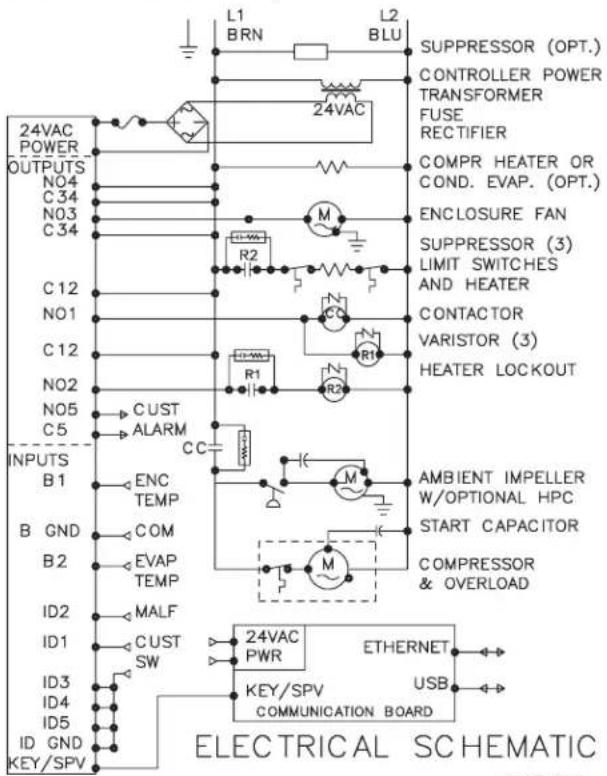
89084976
6000 BTU 1-PHASE SCHEMATIC (ACTUAL UNIT OPTIONS MAY VARY)

89084977
G28 GENERIC 3-PHASE SCHEMATIC (ACTUAL UNIT OPTIONS MAY VARY)
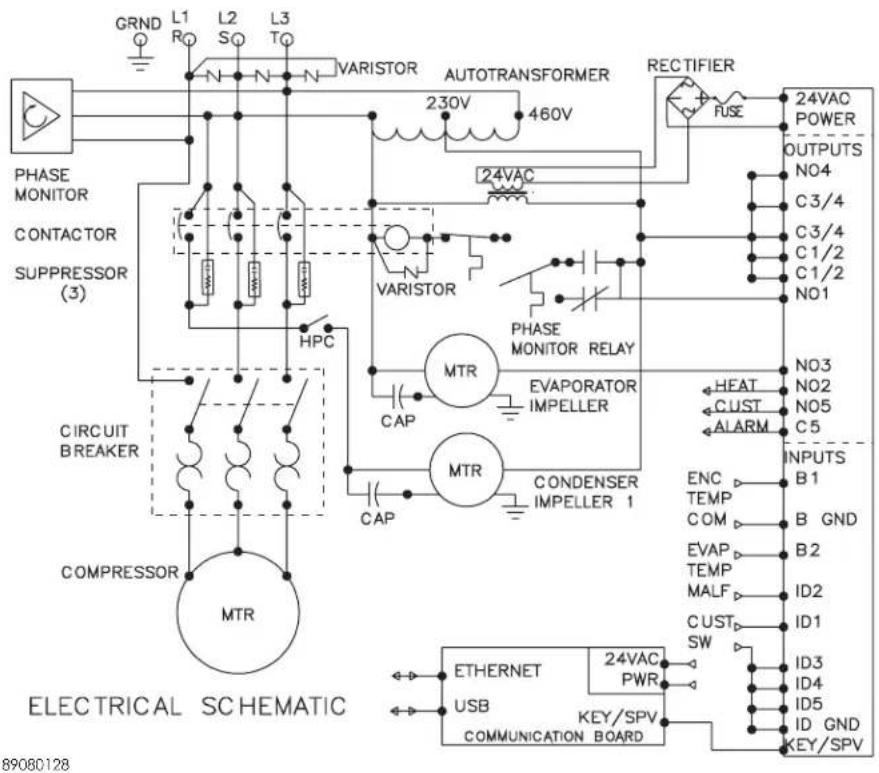
4000 BTU 1-PHASE WIRE DIAGRAM FOR REMOTE ACCESS CONTROL (ACTUAL UNIT OPTIONS MAY VARY)
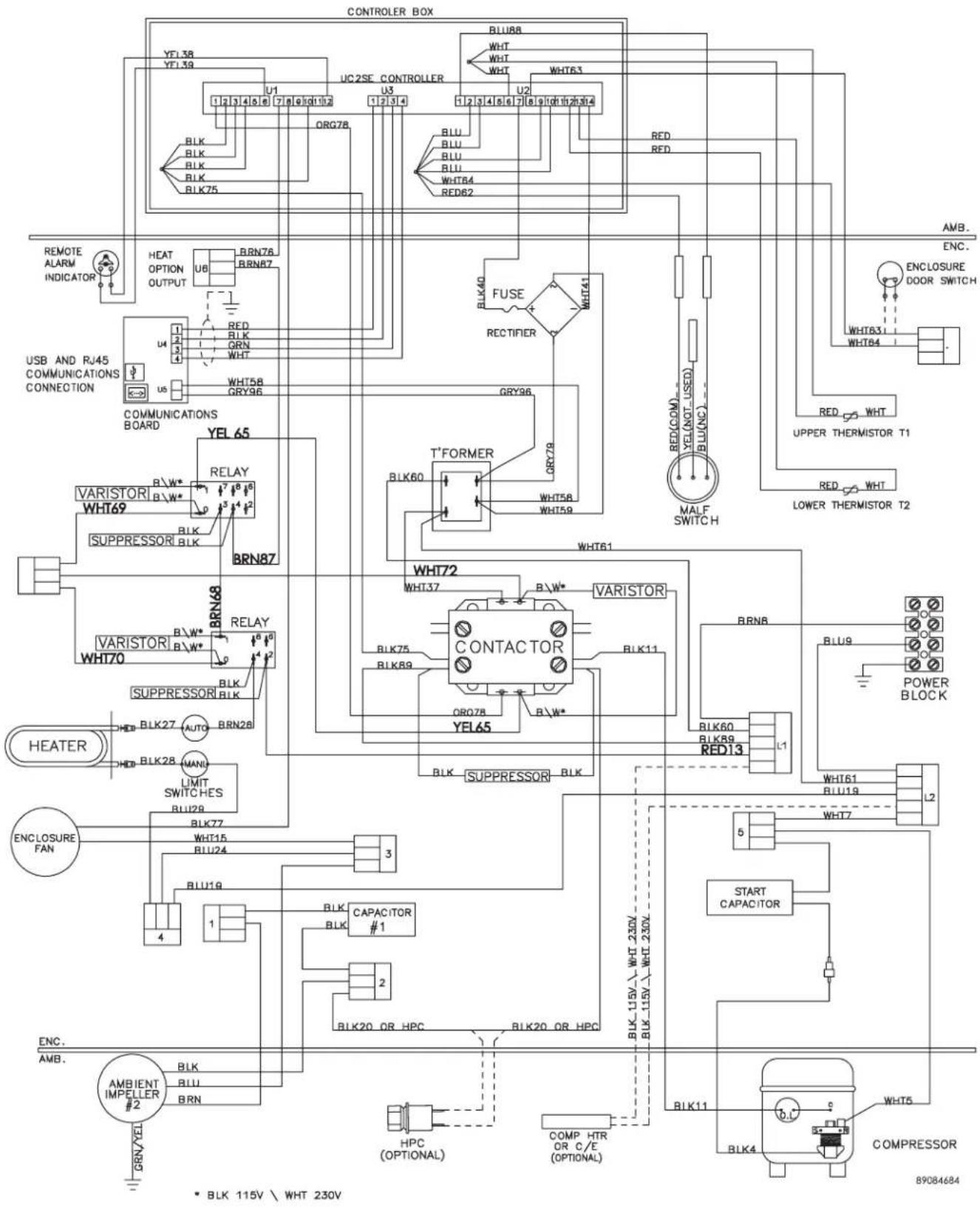
6000 BTU 1-PHASE WIRE DIAGRAM FOR REMOTE ACCESS CONTROL (ACTUAL UNIT OPTIONS MAY VARY)
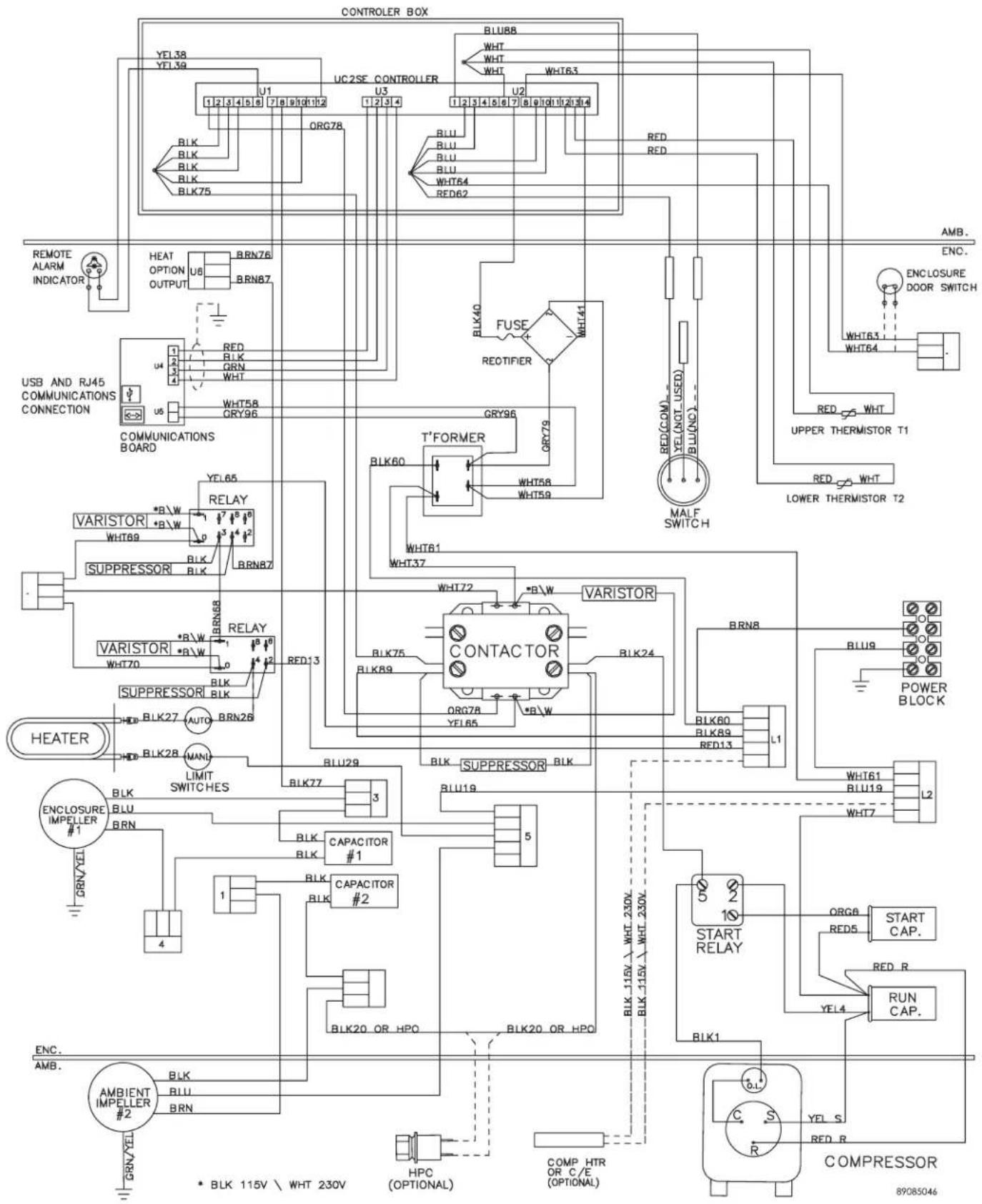
G28 GENERIC 3-PHASE WIRE DIAGRAM FOR REMOTE ACCESS CONTROL (ACTUAL UNIT OPTIONS MAY VARY)
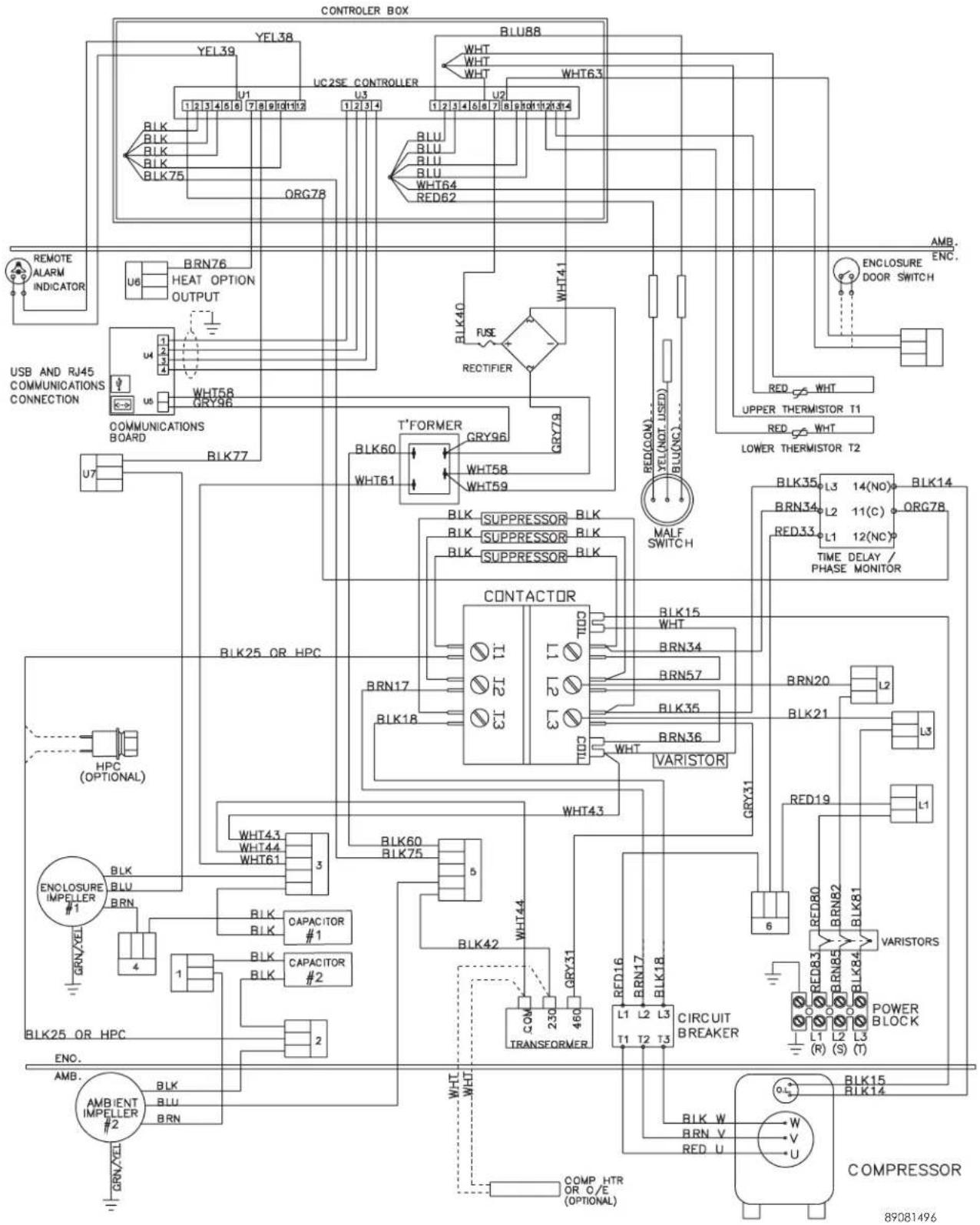
DIMENSIONAL DRAWINGS
4000 BTU 115V WITH REMOTE ACCESS CONTROL
![15.05 [382.2] 98 [25] 45 (2) [16.6] 11.18 [284.1] 17.01 [432.1] WARM AIR OUT ENCLOSURE AIR IN 11.38 [288.9] (2) 91 [23.2] 1.26 (2) [32.1] 15.87 (4) [403.1] 14.20 [360.6] 7.55 [191.8] 4.75 [20.7] ELECTRONIC CONTROLLER 28.59 [726.2] AMBIENT AIR IN REMOVABLE HANGING TABS COOL AIR OUT 89083017 CLEANABLE…](/content/2026/06/1146212/images/1c963ba4b7e5c4d3c66b36664561170d6e4e32c8e6ba6d1dbeda6bc3164b32f3.jpg)
4000 AND 6000 BTU 230V WITH REMOTE ACCESS CONTROL
![15.05 [382.2] 98 [25] 65 (2) [16.6] 10.18 [258.7] 17.01 [432.1] WARM AIR OUT 28.59 [726.2] AMBIENT AIR IN ECNLOSURE AIR IN 11.38 [288.9] (2) REMOVABLE HANGING TABS COOL AIR OUT ELECTRONIC CONTROLLER 89083018 CLEANABLE, REUSABLE ALUMINUM INLET FILTER 57 (5) [14.5] 15.87 (4) [403.1] 14.20 [360.6] 1.26…](/content/2026/06/1146212/images/b8b9f6696beb46330b3bb357feb8bddd4064633f15b0bdf4b555df119d9423e3.jpg)
INSTALLATION INSTRUCTIONS WITH REMOTE ACCESS CONTROL
- Inspect the air conditioner and verify correct functionality before mounting the air conditioner. See HANDLING AND TESTING THE AIR CONDITIONER on page 3.
- Using the mounting gasket kit provided with the unit, install gaskets to the air conditioner, see Figure 2.
- Mount air conditioner on enclosure taking care not to damage the mounting gasket. The mounting gasket is the seal between the air conditioner and the enclosure. Avoid dragging the air conditioner on the enclosure with the mounting gasket attached as this could cause rips or tears in the gasket and risk losing the water tight seal.
- Allow unit to remain upright for a minimum of five (5) minutes before starting. CAUTION! Air conditioner must be in upright position during operation.
- Refer to the nameplate for electrical requirements. Wire the unit to a properly grounded power supply. For 3 phase units, once power is applied, verify that phase monitor light is illuminated which indicates correct electrical phasing. Electrical circuit should be fused with slow blow or HACR circuit breaker.
- Set controller setpoints for required cabinet temperature. Refer to DISPLAYING AND CHANGING PROGRAM VARIABLES on page 14 for setpoint adjustment and operation.
![16.97 [431] Ø 312 (11) [7,92] 7.55 [191,8] .55 [14](5) .28 [7,1](2) 1.27 (2) [32,3] 10.75 [273,1] 10.11 [256,8] 15.31 [388,9] 91 [23,2] 6.50 [165,1] (2) 6.50 [165,1] (2) 28.50 [723,9] 13.47 [342,1] 10.50 [266,7] 5.38 [136,7] 15.00 [381] 6.13 [155,7] 6.30 [160] 6.87 [174,5] (2) 28100013 14.50 [368,3]…](/content/2026/06/1146212/images/4a971f7b37fcdb366943ab871547124b4baece539e512ddb89d0d91c070221f5.jpg)
Figure 2 Cut-out Drawing
MAINTENANCE
COMPRESSOR
The compressor requires no maintenance. It is hermetically sealed, properly lubricated at the factory and should provide years of satisfactory operating service.
Under no circumstances should the access fitting covers be loosened, removed or tampered with.
Breaking of seals on compressor access fittings during warranty period will void warranty on hermetic system.
Recharging ports are provided for the ease and convenience of reputable refrigeration repair service personnel for recharging the air conditioner.
INLET AIR FILTER
This air conditioner was designed with a dust resistant condenser coil. This allows it to be run filterless in most applications. The air conditioner is shipped with a filter in place for your convenience. For filterless operation, simply remove the filter. Should you decide the filter is necessary in your application, regular maintenance to clean this filter will assure normal operation of the air conditioner. The easily removable inlet air filter is located behind the front cover. If necessary filter maintenance is delayed or ignored, the maximum ambient temperatures under which the unit is designed to operate will be decreased.
If the compressor's operating temperature increases above designed conditions due to a dirty or clogged filter (or plugged condenser coil), the air conditioner's compressor will stop operating due to actuation of the thermal overload cut-out switch located on the compressor housing. As soon as the compressor temperature has dropped to within the switch's cut-in setting, the compressor will restart automatically. However the above condition will continue to take place until the filter or coil has been cleaned. It is recommended that power to the air conditioner be interrupted intentionally when abnormally high compressor operating temperature causes automatic shutdown of the unit. The above described shut-down is symptomatic of a clogged or dirty filter, thus causing a reduction in cooling air flow across the surface of the compressor and condenser coil.
HOW TO REMOVE, CLEAN OR INSTALL A NEW INLET AIR FILTER
RP aluminum washable air filters are designed to provide excellent filtering efficiency with a high dust holding capacity and a minimum amount of resistance to air flow. Because they are constructed entirely of aluminum they are lightweight and easy to service. To achieve maximum performance from your air handling equipment, air filters should be cleaned on a regular basis.
The inlet air filter is located behind the front access cover. To remove filter, push or pull to slide filter out from either side of the unit. The filter may now be cleaned or a new filter installed.
Cleaning Instructions:
- Flush the filter with warm water from the exhaust side to the intake side. DO NOT USE CAUSTICS.
- After flushing, allow filter to drain. Placing it with a corner down will assure complete drainage.
CONDENSER AND EVAPORATOR AIR MOVERS
Impeller motors require no maintenance. All bearings, shafts, etc. are lubricated during manufacturing for the life of the motor.
If one of the condenser impeller motors (ambient impellers) should fail, it is not necessary to remove the air conditioner from the cabinet or enclosure to replace the blower. The condenser blower is mounted on its own bulkhead and is easily accessible by removing the front cover.

CAUTION
Operation of the air conditioner in areas containing airborne caustics or chemicals can rapidly deteriorate filters, condenser coils, blowers and motors, etc. Contact Pentair Equipment Protection for special recommendations.
REFRIGERANT LOSS
Each air conditioner is thoroughly tested prior to leaving the factory to insure against refrigeration leaks. Shipping damage or microscopic leaks not found with sensitive electronic refrigerant leak detection equipment during manufacture may require repair or recharging of the system. This work should only be performed by qualified professionals, generally available through a local, reputable air conditioning repair or service company.
Should the refrigerant charge be lost, access ports on the suction and discharge sides of the compressor are provided for recharging and/or checking suction and discharge pressures.
Refer to the data on the nameplate which specifies the type of refrigerant and the charge size in ounces.
Before recharging, make sure there are no leaks and that the system has been properly evacuated into a deep vacuum.
REFRIGERANT PROPERTIES CHART (R 407C)
| °F °C | Bubble Point (PSIG) | Dew Point (PSIG) | °F °C | Bubble Point (PSIG) | Dew Point (PSIG) | |||
| -40 -40 2 | 9 4.5 60 15.6 1 | 7.7 96.8 | ||||||
| -35 -37.2 | 5.2 .7 65 18.3 1 | 28.7 106.7 | ||||||
| -30 -34.4 | 7.9 1.7 70 21.1 | 140.2 117.2 | ||||||
| -25 -31.7 | 10.7 4 75 23.9 | 52.5 128.4 | ||||||
| -20 -28.9 | 13.9 6.5 80 26.7 | 165.5 140.4 | ||||||
| -15 -26.1 | 17.3 9.3 85 29.4 | 179.2 153.1 | ||||||
| -10 -23.3 | 21.1 12.4 90 32 | 2 193.6 166.5 | ||||||
| -5 | -20.6 | 25.2 | 15.8 | 95 | 35 | 208.8 | 180.8 | |
| 0 | -17.8 | 29.6 | 19.5 | 100 | 37.8 | 224.9 | 195.8 | |
| 5 | -15 | 34.4 | 23.6 | 105 | 40.6 | 241.8 | 211.8 | |
| 10 | -12.2 | 39.6 | 28 | 110 | 43.3 | 259.6 | 228.7 | |
| 15 -9.4 45.2 | 32.7 115 | 46.1 278.2 246.5 | ||||||
| 20 -6.7 51.3 | 37.9 120 | 48.9 297.8 265.3 | ||||||
| 25 -3.9 57.8 | 43.6 125 | 51.7 318.3 285.2 | ||||||
| 30 -1.1 64.7 | 49.6 130 | 54.4 339.9 306.1 | ||||||
| 35 1.7 | 72.2 | 56.2 135 | 57.2 362.4 328.2 | |||||
| 40 | 4.4 | 80.2 | 63.2 | 140 | 60 | 386 | 351.4 | |
| 45 7.2 | 88.7 | 70.7 145 | 62.8 410.7 375.9 | |||||
| 50 10 97.8 | 78.8 150 | 65.6 436.5 401.7 | ||||||
| 55 | 12.8 | 107.5 | 87.5 | |||||
REFRIGERANT PROPERTIES CHART (R 134A)
| °F °C | Pressure (PSIG) | °F °C | Pressure (PSIG) | |||
| -40 -40 -14.7 | 60 15.6 58 | |||||
| -35 -37.2 | -12.3 | 65 | 18.3 64 | |||
| -30 -34.4 | -9.7 | 70 | 21.1 71.5 | |||
| -25 -31.7 | -6.8 | 75 | 23.9 78 | |||
| -20 -28.9 | -1 | 80 26.7 86.7 | ||||
| -15 -26.1 | 0 85 29.4 95 | |||||
| -10 -23.3 | 2 90 32.2 | 105 | ||||
| -5 -20.6 | 4 95 | 35 | 113.3 | |||
| 0 -17.8 | 7.5 100 | 37.8 | 125 | |||
| 5 | -15 | 9 | 105 | 40.6 | 135 | |
| 10 | -12.2 | 12 | 110 | 43.3 | 146.7 | |
| 15 -9.4 | 15 | 115 | 46.1 | 157.5 | ||
| 20 -6.7 | 18.5 120 | 48.9 | 170 | |||
| 25 -3.9 | 22 | 125 | 51.7 | 185 | ||
| 30 -1.1 | 26 | |||||
| 35 1.7 | 30 | |||||
| 40 4.4 | 35 | |||||
| 45 7.2 | 40 | |||||
| 50 10 45.5 | ||||||
| 55 | 12.8 | 51.5 | ||||
FUNCTIONAL DATA
| Unit | Evaporator. Air In(°F) | Amps(A) | Condenser Delta(°F) | Evaporator Delta(°F) |
| G280416GXXX | 65-80 6.1-8.9 16-24 11-23 | |||
| 80-100 6.4-9.4 18-31 11-29 | ||||
| G280426GXXX | 65-80 2.5-3.9 25-33 19-29 | |||
| 80-100 2.9-4.6 27-38 23-33 | ||||
| G280616GXXX | 65-80 5.6-7.4 24-33 24-33 | |||
| 80-100 6.4-9.1 27-38 27-37 | ||||
| G280626GXXX | 65-80 2.5-3.9 25-33 19-29 | |||
| 80-100 2.9-4.6 27-38 23-33 | ||||
| Unit | Evaporator. Air In(°F) | Amps(A) | Evap Pressure (PSIG) | Cond Pressure (PSIG) | Condenser Delta(°F) | Evaporator Delta(°F) |
| G280(4/6)46GXXX | 65-80 0.8 - 1 | .5 23 - 43 91 - | 161 19 - 29 17 - | 27 | ||
| 80-100 1.1 - 1 | .7 33 - 60 131 | - 227 23 - 33 21 | - 31 |
4000/6000 BTU UNIT CHARACTERISTICS
| Part Number | ||||||
| G280416GXXX G280426GXXX G280616GXXX G280626GXXX | G280446GXXX G280646GXXX | |||||
| Dimensional Data | ||||||
| Height 28.55/725.2mm | 28.55/725.1 mm 28.55/725.2mm | |||||
| Width 16.97/431.1mm | 16.97/431.1mm 16.97/431.1mm | |||||
| Depth 11.10/281.9mm | 10.10/256.6mm 10.10/256.6mm 10.10/256.6mm | |||||
| Unit Weight 82 lbs/37 kg | 84 lbs/38 kg 84 lbs/38 kg 84 lbs/38 kg | |||||
| Unit Protection Rating | Type 12/4/4X/3R Type 12/4/4X/3R Type 12/4/4X/3R | |||||
| Cooling Data | ||||||
| Refrigerant R134a | R407C | R407C | R134A | |||
| Refrigerant Charge | 12 oz. | 20 oz. | 20 oz. | 16 oz. | ||
| Cooling Capacity at 95 F Enclosure 95 F Ambient (BTU/Hr./W) | 3300/3410 | 4300/4600 | 5600/6000 | 4324/4655 | 5054/5685 | |
| Cooling Capacity at Max Conditions (BTU/ Hr./W) | 3700 | 4600/4900 | 6000/6400 | 4600/4900 | 5400/6000 | |
| Maximum Ambient Temp | 131 F / 55 C | 131 F/55 C | 131 F/55 C | |||
| Minimum Ambient Temp | -40 F / -40 C | -40 F/-40 C | -40 F/-40 C | |||
| Enclosure Airflow | 151/183 CFM | 189/221 CFM | 189/221 CFM | 189/221 CFM | 189/221 cfm | |
| External Airflow | 284/290 CFM | 291/300 CFM | 291/300 CFM | 291/300 CFM | 291/300 cfm | |
| Condensate Management | ||||||
| Heating Data | ||||||
| Capacity | 2000 W | 2000 W | 2000W | N/A | ||
| Electrical Data | ||||||
| Rated Voltage (50/60 Hz) | 115V | 230V | 115V | 230V | 400/460V 3 phase | |
| Rated Frequency | 50 / 60 Hz | 50/60 Hz | 50/60 Hz | |||
| Voltage Range | +/- 10% of rated | +/- 10% of rated | +/- 10% of rated | |||
| Cooling Amps at Max Conditions | 10.4/10.1 | 4.6/5.8 | 9.9/11.4 | 4.6/5.8 | 1.7/1.9 | 1.7/1.9 |
| Heating Amps | 16.3 | 9.2 | 18.2 | 9.2 | N/A | |
| Compressor RLA / LRA | 7.75 / 42 | 2.6/17.7 | 5.4/36.2 | 2.6/17.7 | 1.7/7.7 | |
| Evaporator Fan RLA* | .31 | .48 | .82 | .48 | .48 | |
| Condenser Fan RLA* | .93 | .53 | .93 | .53 | .53 | |
SERVICE DATA
COMPONENTS LIST
| Part Description | Part Number | |||||
| G280446GXXX | G280646GXXX G2 | 30416GXXX G280 | 426GXXX G2806 | 6GXXX G280626 | 6XXX | |
| 315 mA Fuse 89085115 | ||||||
| Bridge Rectifier 89087424 | ||||||
| Capacitor, Compressor, Run N/A | N/A N/A S-6173 | 52-6032-06 S-61 | 73 | |||
| Capacitor, Compressor, Start N/A | N/A 89112001 | 10-1032-08 10-10 | 32-08 10-1032-08 | |||
| Capacitor, Condenser Impeller | 52-6032-14 52 | -6032-14 52-6032 | -13 52-6032-14 52 | -6032-13 52-6032-14 | ||
| Capacitor, Evaporator Impeller | 52-6032-14 52 | -6032-14 N/A 52 | -6032-14 52-6032 | -15 52-6032-14 | ||
| Coil, Condenser | 89051206 | 89051206 | 89075089 | 89051206 | 89051206 | 89051206 |
| Coil, Evaporator | 28-6010-00 | 28-6010-00 | 89075090 | 28-6010-00 | 28-6010-00 | 28-6010-00 |
| Communication Board | 89082033 | |||||
| Communication Cable | 89080313 | |||||
| Compressor | 10-1026-95 | 10-1026-95 | 89111751 | 10-1026-123 | 10-1016-91 | 10-1026-123 |
| Contactor Compressor | 89098321 | 89098321 | N/A | N/A | N/A | N/A |
| Controller Wires with pins (24) | 89083091 | |||||
| Controller, Basic | 89075653 | |||||
| Filter Air, Reusable | 89096883 | 89096883 | 89096883 | 89096883 | 89096883 | 89096883 |
| Filter/Dryer | 52-6028-00 52 | -6028-00 52-6028 | -00 52-6028-00 52 | -6028-00 52-6028-00 | ||
| Head Pressure Control Switch | 89083016 | 89083016 | 89083016 | 89083015 | 89083015 | 89083015 |
| Heater, 2000 Watt | N/A | N/A | 10-1038-55 | 10-1038-54 | 10-1038-55 | 10-1038-54 |
| Impeller Condenser | 10-1091-124 | 10-1091-124 | 10-1091-123 | 10-1091-124 | 10-1091-123 | 10-1091-124 |
| Impeller Evaporator | 10-1091-122 | 10-1091-122 | 12-1012-01 | 10-1091-122 | 10-1091-121 | 10-1091-122 |
| Limit Switch (automatic) | N/A | N/A | 10-1033-01 | 10-1033-01 | 10-1033-01 | 10-1033-01 |
| Limit Switch (manual) | N/A | N/A | 10-1033-07 | 10-1033-07 | 10-1033-07 | 10-1033-07 |
| Overload, Compressor | 89098323 | 89098323 | N/A | N/A | N/A | N/A |
| Relay Phase Monitor | 89097986 | 89097986 | N/A | N/A | N/A | N/A |
| Relay, Compressor Start N/A N/A | 89115078 10-1042-13 | 10-1042-13 | 10-1042-13 | |||
| Thermal Expansion Valve | 10-1040-42 | 10-1040-42 | N/A | 89057143 | 89057143 | 89057143 |
| Thermal Overload, Compressor | 10-1007-77 | 10-1007-77 | 89114723 | MRA5742-114 | 10-1007-18 | MRA5742-114 |
| Thermostat SPDT, 55-100F | 10-1061-16 | 10-1061-16 | 10-1061-16 | 10-1061-16 | 10-1061-16 | 10-1061-16 |
| Transformer 460/230V 800VA | 10-1006-128 | 10-1006-128 | N/A | N/A | N/A | N/A |
TROUBLE SHOOTING
BASIC AIR CONDITIONING TROUBLE SHOOTING CHECK LIST - THERMOSTAT VERSION
- Check manufacturer's nameplate located on the unit for correct power supply.
- Turn on power to the unit. The evaporator (Enclosure or "COLD" air) impeller should come on. Is there airflow?
YES, proceed to step 3.
NO, possible problem:
» Open motor winding
» Stuck impeller motor
» Obstructed wheel
Repair or Replace defective part
- Check phase monitor indicator light, is it Illuminated?
YES, proceed to step 4.
NO, possible problem:
» Incorrect electrical phasing
De-energize unit and swap any two power leads to unit. If problem still persists, replace phase monitor. Refer to phase monitor section of this manual for additional information.
- Check thermostat setting and adjust thermostat to the lowest setting. This should turn the condenser impellers and the compressor on. Did condenser impellers and compressor come on when the thermostat was turned on?
YES, proceed to step 5.
NO, possible problem:
» Tripped customer door switch
» Defective thermostat

Replace part
- Are all impellers and the compressor running? If not the unit will not cool properly.
- Check condenser (Ambient or "HOT" air) impellers for airflow. Is there airflow?
YES, proceed to step 7.
NO, possible problem:
» Defective thermostat
» Open motor winding
» Stuck impeller motor
» Obstructed wheel
Repair or Replace defective part
- Carefully check the compressor for operation - motor should cause slight vibration, and the outer case of the compressor should be warm. Is the compressor showing signs of this?
YES, wait 5 minutes, then proceed to step 8.
NO, possible problem:
» Defective thermostat
» Defective overload
» Defective relay
Repair or Replace defective part
- Make sure the coils are clean. Then check evaporator "air in" and "air out" temperatures. If the temperatures are the same:
» Possible loss of refrigerant
» Possible bad valves in the compressor
Repair or Replace defective part
- To check for a bad thermostat, turn power to the unit off. Remove the upper access panel and place both thermostat wires onto one terminal (replace upper access panel for safety). This will activate the switch in the thermostat. Turn the power on and if all impellers and the compressor come on, the thermostat needs to be replaced.
SYMPTOMS AND POSSIBLE CAUSES - THERMOSTAT VERSION
| SYMPTOM POSSIBLE CAUSE | |
| Unit won't cool | Clogged fins on coil(s) |
| Dirty filter | |
| Impellers not running | |
| Compressor not running | |
| Compressor runs, but has bad valves | |
| Loss of refrigerant | |
| Compressor tries to start but won't run | Low line voltage at start. Should be +/-10% rated voltage. |
| Compressor motor stuck | |
| Bad contactor | |
| Bad overload switch | |
| Bad run/start capacitor | |
| Unit blows breakers | Undersized breaker/fuse or not time delayed |
| Short in system | |
| Getting water in enclosure | Drain plugged |
| Drain tube kinked | |
| Enclosure not sealed (allowing humidity in) | |
| Mounting gasket damaged | |
For additional technical support, contact Pentair Equipment Protection at 800-896-2665.
BASIC AIR CONDITIONING TROUBLE SHOOTING CHECK LIST - REMOTE ACCESS CONTROL VERSION
- Check manufacturer's nameplate located on the unit for correct power supply.
- Turn on power to the unit. The controller will display a start up sequence then revert to the normal temperature display mode. Is the correct enclosure temperature displayed?
Note: The temperature may be alternating with an alarm code.
YES, proceed to step 3.
NO, possible problem:
» Open controller fuse
» Controller in alarm condition. See ALARM CONDITION DISPLAY on page 15.
» Defective controller
» Defective thermistor - check by blowing warm air across the thermistor. If display temperature rises, thermistor is operable.
Replace part
- The cooling status indication (symbol G) should be on. Is the symbol on? If not, press and hold the lower right "snowflake" button for greater than five seconds. Is the cooling mode symbol now on?
YES, proceed to step 4.
NO, possible problem:
» Defective controller
Replace part
- The evaporator (Enclosure or "COLD" air) fan/impeller should turn on. Is there airflow?
YES, proceed to step 5.
NO, possible problem:
» Controller in alarm condition. See ALARM CONDITION DISPLAY on page 15.
» Open motor winding
» Stuck fan/impeller
» Obstructed blades/wheel
» Defective motor capacitor
Repair or Replace defective part
- Check phase monitor indicator light, is it Illuminated?
YES, proceed to step 6.
NO, possible problem:
» Incorrect electrical phasing
De-energize unit and swap any two power leads to unit. If problem still persists, replace phase monitor. Refer to phase monitor section of this manual for additional information.
- Start the cooling cycle by changing the cooling setpoint parameter (r01) to the low limit of 72 F (22 C). Symbol 1 should be displayed indicating a call for cooling. If symbol 1 is flashing, the unit is in Restart Time Delay mode. Within 6 minutes, symbol 1 should display without flashing. Is symbol 1 displayed without flashing?
YES, proceed to step 7.
NO, possible problem:
» Unit still in Recycle Time Delay mode
» Enclosure temperature below cooling setpoint temperature

Wait and/or heat enclosure thermistor T1
- The compressor and the condenser (Ambient or "HOT" air) impeller(s) should turn on. Is there adequate airflow?
YES, proceed to step 8.
NO, possible problem:
» Open motor winding(s)
» Stuck impeller(s)
» Obstructed wheel(s)
» Defective motor capacitor(s)

Repair or Replace defective part
- Carefully check the compressor for proper operation - motor should cause slight vibration and the outer case of the compressor should be warm. Is the compressor showing signs of this?
YES, wait 5 minutes, proceed to step 9.
NO, possible problem:
» Defective start or run capacitor
» Defective overload
» Defective start relay
» Defective contactor
» Defective compressor
Repair or Replace defective part
- Make sure the coils are clean then check the evaporator "air in" and "air out" temperatures. If the temperatures are the same:
» Possible loss of refrigerant
» Possible bad valves in compressor
Repair or Replace defective part
SYMPTOMS AND POSSIBLE CAUSES - REMOTE ACCESS CONTROL VERSION
| SYMPTOM POSSIBLE CAUSE | |
| Unit won't cool | Clogged fins on coil(s) |
| Dirty filter | |
| Impellers not running | |
| Compressor not running | |
| Compressor runs, but has bad valves | |
| Loss of refrigerant | |
| Compressor tries to start but won't run | Low line voltage at start. Should be +/-10% rated voltage. |
| Compressor motor stuck | |
| Bad contactor | |
| Bad overload switch | |
| Bad run/start capacitor | |
| Unit blows breakers | Undersized breaker/fuse or not time delayed |
| Short in system | |
| Getting water in enclosure | Drain plugged |
| Drain tube kinked | |
| Enclosure not sealed (allowing humidity in) | |
| Mounting gasket damaged | |
For additional technical support, contact Pentair Equipment Protection at 800-896-2665.
NOTES
WARRANTY
Pentair Equipment Protection warrants that the Goods manufactured by Pentair Equipment Protection will be free from defects in material and workmanship for a period of one (1) year from the date of shipment by Pentair Equipment Protection, subject to the following conditions and exclusions:
A. Conditions. All Goods must be installed and operated according to the following specifications:
- Maximum voltage variation no greater than plus or minus 10% of nameplate nominal rating;
- Maximum frequency variation no greater than plus or minus 3 Hz of nameplate nominal rating;
- Must not exceed minimum and maximum stated temperatures on the nameplate;
-
Must not exceed (BTU/Hr) rating, including any heat sink as indicated on the nameplate;
-
Refrigerant bearing Goods must not be restarted for a period of one (1) minute after intentional or accidental shut-off;
-
The filters (if applicable) must be cleaned regularly;
-
The Goods and any parts thereof must not be modified, unless prior written authorization is received from Pentair Equipment Protection; and
-
All Goods must be installed and grounded in accordance with all relevant electrical and safety codes, as well as the National Electric Code and OSHA rules and regulations.
-
All Goods must be installed in a stationery application, free of vibration.
A violation of any one of these conditions shall render the warranty hereunder void and of no effect.
B. Exclusions. This warranty shall be void if product is misapplied in any way or:
- Buyer specified product is inappropriate for system or environment in which it is operating.
- Goods are not installed in accordance with Pentair Equipment Protection specifications.
- Removal or modification of Pentair Equipment Protection label affixed to product without written Pentair Equipment Protection approval.
Pentair Equipment Protection must be notified of a claim in writing not later than fourteen (14) days from the date when Buyer has become aware of such occurrence, or where the defect is such that it may cause damage, immediately, such notice containing a description of how the defect manifests itself. Failure to provide such prompt notice to Pentair Equipment Protection shall result in forfeiture of Buyer's rights under this warranty.
In the event of a warranty claim, Buyer is to return defective goods to Pentair Equipment Protection in accordance with Pentair Equipment Protection Return Policy. Warranty period for repaired goods remains at 1 year from shipment of original goods. Pentair Equipment Protection sole obligation to Buyer under this warranty will be, at Pentair Equipment Protection option:
A. Repair or replace Pentair Equipment Protection products or parts found to be defective in material or workmanship.
B. Issue credit for the purchase price paid by Buyer relating to such defective Goods or part.
THIS WARRANTY CONSTITUTES THE ENTIRE WARRANTY WITH RESPECT TO THE GOODS AND IS IN LIEU OF ALL OTHER WARRANTIES, EXPRESSED OR IMPLIED, INCLUDING ANY IMPLIED WARRANTY OF MERCHANTABILITY AND IMPLIED WARRANTY OF FITNESS FOR A PARTICULAR PURPOSE.
RETURN AND REPAIR POLICY
Pentair Equipment Protection products that: (i) are made to order, (ii) have been modified by Buyer, (iii) have special finishes, or (iv) are determined by Pentair Equipment Protection to constitute “custom” products that cannot be returned to stock or resold to other Buyers, will not be accepted for return by Pentair Equipment Protection.
All returns require a Return Material Authorization number (RMA #), regardless of reason for return, whether it be for warranty or out of warranty repair. Returns without an RMA # will be refused by our Receiving Department. An RMA # is valid for 30 days.
A. An RMA # will be issued by our Product Return Department in Anoka, MN at 763-422-2211. Buyer should have following information available at time of RMA request:
- Complete Model Number, Serial Number and description of damaged unit being returned.
- Original Buyer Purchase Order number and date product was received by Buyer.
- Quantity to be returned and a brief description of failure for each unit, if different.
- Contact information of Buyer that must include: name of company, billing and shipping address, phone, number, fax number, freight carrier and the name and phone number of a Buyer contact who can elaborate on the claimed defect in detail.
- Buyer must provide a Repair Purchase Order number for both warranty and out of warranty repairs. The PO will not exceed 50% of a new unit. Buyer will be notified of repair charges that exceed approved PO amount.
B. All returns to Pentair Equipment Protection must be securely packed, using original cartons if possible. All returns must have the RMA number visible on the outside of the carton. Pentair Equipment Protection is not responsible for material damaged in transit. Any refrigerant-bearing Goods must be shipped upright for return.
C. Shipping cost for all non-warranty repairs is the responsibility of the sender and must be shipped prepaid. Shipping costs for all warranty related repairs will be covered by Pentair Equipment Protection provided the goods are returned using a Pentair Equipment Protection approved carrier. If after diagnoses the product is determined by Pentair Equipment Protection not be covered under warranty, Buyer will be responsible for all shipping charges and will be billed accordingly.
D. Non-warranty repairs are subject to a \$105 minimum analysis fee. If approval is not received within 30 days, material will be scrapped and all shipping expenses and corresponding analysis fees will be billed to Buyer.
E. At Buyer's request, Failure Analysis can be provided by Pentair Equipment Protection for warrantable goods at no charge. Failure analysis for non-warranty repairs are subject to a \$150 per hour Engineering charge plus any other incurred testing costs.
F. All returned merchandise must be sent to the following address: Pentair Equipment Protection, 2100 Hoffman Way, Anoka, MN 55303-1745.
G. Credit for accepted returns shall be at the original selling price or the current selling price, whichever is lower, less the restocking charge indicated as follows:
- Within 60 days of invoice date - 20% of applicable selling price.
- Within 61-120 days of invoice date - 30% of applicable selling price.
- Within 121-180 days of invoice date - 40% of applicable selling price.
- Beyond 180 days - subject to individual review by Pentair Equipment Protection.
If product being returned for credit requires repair or modification, the cost of any labor or material necessary to bring product into saleable condition will be deducted from credit. Buyer may not take credit against returns without prior written Pentair Equipment Protection approval.
LIMITATION OF LIABILITY
PENTAIR EQUIPMENT PROTECTION WILL NOT BE LIABLE UNDER ANY CIRCUMSTANCES FOR ANY INCIDENTAL, CONSEQUENTIAL OR SPECIAL DAMAGES, INCLUDING WITHOUT LIMITATION ANY LOST PROFITS OR LABOR COSTS, ARISING FROM THE SALE, USE OR INSTALLATION OF THE GOODS, FROM THE GOODS BEING INCORPORATED INTO OR BECOMING A COMPONENT OF ANOTHER PRODUCT, FROM ANY BREACH OF THIS AGREEMENT OR FROM ANY OTHER CAUSE WHATSOEVER, WHETHER BASED ON WARRANTY (EXPRESSED OR IMPLIED) OR OTHERWISE BASED ON CONTRACT, OR ON TORT OR OTHER THEORY OF LIABILITY, AND REGARDLESS OF ANY ADVICE OR REPRESENTATIONS THAT MAY HAVE BEEN RENDERED BY PENTAIR EQUIPMENT PROTECTION CONCERNING THE SALE, USE OR INSTALLATION OF THE GOODS.
Pentair Equipment Protection
2100 Hoffman Way
Minneapolis, MN 55303 USA

+1.763.422.2211

+1.763.576.3200
PentairProtect.com
- SPECTRACOOL
- TABLE OF CONTENTS
- RECEIVING THE AIR CONDITIONER
- HANDLING AND TESTING THE AIR CONDITIONER
- CAUTION
- HOW TO READ MODEL NUMBERS
- TECHNICAL INFORMATION
- HEATING
- COOLING
- STANDARD AND OPTIONAL COMPONENT OPERATION
- THERMOSTAT
- FOR COOLING (75-100 F RANGE)
- FOR HEATING (55-65 F RANGE)
- REMOTE ACCESS CONTROL (OPTIONAL)
- HEAD PRESSURE CONTROL (OPTIONAL)
- CONTACTOR (460V UNITS ONLY)
- OVERLOAD (460V UNITS ONLY)
- PHASE MONITOR
- 460V TO 230V TRANSFORMER
- 115V/230V TO 10V TRANSFORMER (OPTIONAL)
- 115V/230V TO 24V TRANSFORMER AND RELAY (OPTIONAL)
- 6000 BTU 1-PHASE SCHEMATIC (ACTUAL UNIT OPTIONS MAY VARY)
- G28 GENERIC 3-PHASE SCHEMATIC (ACTUAL UNIT OPTIONS MAY VARY)
- INSTALLATION INSTRUCTIONS
- INTRODUCTION
- CONTROL STATUS INDICATION
- DISPLAYING AND CHANGING PROGRAM VARIABLES
- DISPLAYING TEMPERATURE SENSOR #2
- COMPRESSOR RESTART TIME DELAY
- ALARM OUTPUT CONTACT
- ALARM INPUT CONNECTION
- ALARM CONDITION DISPLAY
- AIR CONDITIONER UNIT COMMUNICATION FEATURES
- USB COMMUNICATION
- ETHERNET COMMUNICATION
- SOFTWARE AND CONFIGURATION FILE DOWNLOADS
- USING THE PC INTERFACE TOOL
- USB COMMUNICATION MODE
- VIEWING AIR CONDITIONER UNIT VALUES
- CHANGING AIR CONDITIONER UNIT VALUES
- VIEWING AND CHANGING ETHERNET INFORMATION
- ETHERNET COMMUNICATION MODE
- ALARM LOG ACCESSIBLE WITH SNMP
- SCHEMATICS AND WIRING DIAGRAMS FOR REMOTE ACCESS CONTROL
- 4000 BTU 1-PHASE SCHEMATIC (ACTUAL UNIT OPTIONS MAY VARY)
- DIMENSIONAL DRAWINGS
- 4000 BTU 115V WITH REMOTE ACCESS CONTROL
- INSTALLATION INSTRUCTIONS WITH REMOTE ACCESS CONTROL
- MAINTENANCE
- COMPRESSOR
- INLET AIR FILTER
- HOW TO REMOVE, CLEAN OR INSTALL A NEW INLET AIR FILTER
- CLEANING INSTRUCTIONS
- CONDENSER AND EVAPORATOR AIR MOVERS
- REFRIGERANT LOSS
- SERVICE DATA
- TROUBLE SHOOTING
- BASIC AIR CONDITIONING TROUBLE SHOOTING CHECK LIST - THERMOSTAT VERSION
- BASIC AIR CONDITIONING TROUBLE SHOOTING CHECK LIST - REMOTE ACCESS CONTROL VERSION
- YES, PROCEED TO STEP 8
- YES, WAIT 5 MINUTES, PROCEED TO STEP 9
- NOTES
- WARRANTY
- RETURN AND REPAIR POLICY
- LIMITATION OF LIABILITY
Brand : HP
Model : Hoffman G28
Category : Heating