
ARC-126MD - Air conditioner Whynter - Free user manual and instructions
Find the device manual for free ARC-126MD Whynter in PDF.


| Product Type | Portable Air Conditioner with Dual Hose |
| Model | ARC-126MD |
| Cooling Capacity | 12,000 BTU |
| Coverage Area | 450 sq. ft. |
| Dehumidifying Capacity | 61 Pints per day |
| Fan Speeds | 3 speeds (High, Medium, Low) plus Auto |
| Operational Modes | Auto, Cool, Dry, Fan |
| Thermostat Control Range | 62°F - 88°F (17°C - 30°C) |
| Timer | 24-hour programmable (delay on/off) |
| Noise Level | < 55 dBA |
| Refrigerant | R-410A (CFC-free) |
| Air Flow (High Speed) | 497 m³/h (292 CFM) |
| Maximum Power Consumption | 1355W / 11.8A |
| Power Supply | 115V / 60Hz |
| EER | 8.9 |
| Unit Dimensions (W x D x H) | 18.5" x 18.75" x 30.25" |
| Net Weight | 72.75 lbs |
| Filters | 3M Antimicrobial High Air Flow Filter (replaceable) + Silvershield washable pre-filter |
| Hose Length | 59" extendable (max total 9') |
| Window Kit Range | Min 26.5" - Max 48" |
| Safety Features | LCDI plug, auto restart, 3-minute compressor delay |
| Self-Evaporating Function | Exhausts up to 98% condensation in humidity < 70% |
Frequently Asked Questions - ARC-126MD Whynter
User questions about ARC-126MD Whynter
0 question about this device. Answer the ones you know or ask your own.
Ask a new question about this device
Download the instructions for your Air conditioner in PDF format for free! Find your manual ARC-126MD - Whynter and take your electronic device back in hand. On this page are published all the documents necessary for the use of your device. ARC-126MD by Whynter.
USER MANUAL ARC-126MD Whynter
WHYNTER 12,000 BTU DUAL HOSE PORTABLE AIR CONDITIONER WITH 3M AND SILVERSHIELD FILTER
Model #: ARC-126MD
INSTRUCTION MANUAL

natural_image
White portable air conditioner unit with blue logo (no visible text or symbols)Congratulations on your new Whynter product. To ensure proper operation, please read this Instruction Manual carefully before using this product. Keep this manual in a safe place for future reference.
TABLE OF CONTENTS
PAGE
DISPOSAL INFORMATION 3
SAFETY PRECAUTIONS 4
INTRODUCTION / TECHNICAL DATA 5
PARTS IDENTIFICATION
6 - 7
CONTROL PANEL 8
INSTALLATION
9 - 11
OPERATION INSTRUCTIONS
12 - 13
REMOTE CONTROL 14
CARE AND MAINTENANCE 15
TROUBLESHOOTING
16 - 17
WARRANTY INFORMATION 18
Thank you for choosing the Whynter 12,000 BTU Portable Air Conditioner Dual Hose with 3M and Silvershield filter. Please follow the instructions provided in this user guide to obtain the very best performance from your portable air conditioner and take full advantage of the many features your portable air conditioner offers you. We trust that your Whynter air conditioner will provide the performance and reliability that we stand for.
Please keep this user manual in a safe place for future reference.

natural_image
Symbol of a trash bin with crossed lines indicating no waste, accompanied by a black rectangular block below (no text or labels)This symbol on the product or its packaging indicates that the appliance cannot be treated as normal domestic trash, but must be handed in at a collection point for recycling electric and electronic appliances. Your contribution to the correct disposal of this product protects the environment. Further information about the recycling of this product can be obtained from your local municipal authority.
| WARNING | TO REDUCE THE RISK OF FIRE, ELECTRICAL SHOCK, OR INJURY WHEN USING YOUR AIR CONDITIONER, FOLLOW THESE BASIC PRECAUTIONS: |
| Before the appliance is used, it must be properly positioned and installed as detailed in this manual.Do not under any circumstances cut or remove the third (ground) prong from the power cordMake sure this unit is connected to a correctly grounded power supply outlet. Do not use an extension cord or power stripThe power cord is UL listed. It has a built-in L.C.D.I. (leakage, current, detection, interruption) circuit breaker for added safety. If the power supply is interrupted, press the reset button to reconnect the unit to power sourceIt is recommended to use a separate circuit that its size should be 15 Amps for the air conditionerDo not use an excessively wet cloth, industrial solvents, oil-based products to clean this portable air conditionerTo avoid the risk of shock, the product should never be used in bathrooms, shower rooms, or in any other steamy or wet areasDo not store or use gasoline or other flammable vapors and liquids in the vicinity of this or any other appliancesDo not repair, disassemble and/or modify the unit by yourselfAlways turn off the portable air conditioner when cleaning the air filter, and transportingDo not turn this unit on and off by plugging and unplugging. Always use the ON/OFF switchTransport the unit in an upright position only, or leave it in an upright position for at least 4 hours before first useEnsure curtains or other objects are not obstructing the air inlet filtersDo not bend or crush the exhaust hose while in useAlways allow at least 20" of clearance around the unit for ventilation. Do not use this unit inside closets, cabinets and/or cramped spaces between furnitureThis unit is optimized to operate in an ambient temperature of 64^ - 90^ This unit must be installed in an area protected from the element, such as wind, rain, water spray or dripsThe unit should not be located next to ovens, grills or other sources of high heatAlways place the unit on even and hard and level surfaceDo not sit or place objects on the unitDo not allow children to climb, stand or hang on the appliance. The air conditioner could tip over and get damaged and/or seriously injure somebodyKeep fingers out of the air intakes and air outletsThe appliance is an electrical appliance. To avoid injury from electrical shock do not operate it with wet hands, while standing on a wet surface or while standing in water. Do not use it in outdoors or in wet conditionsWhen positioning or moving the appliance, ensure it is not turned upside down or greater than 45^ or more off levelThis appliance is designed for household, non-commercial use only. Any other use will void the warrantyDo not plug into the power outlet before set up is completedDo not operate this unit without the air filter(s)Do not use harsh chemicals to clean the filter(s). Dry thoroughly before inserting the filter(s) into the unitDo not add extra length to the exhaust hose by more than a total length of 9'. This will reduce the cooling efficiency of the portable air conditionerAt the end of each season, all water must be drained from the unit and filter(s) must be cleaned before storage | |
THE MANUFACTURER DISCLAIMS ANY RESPONSIBILITY IF THE ABOVE INSTRUCTIONS ARE NOT FOLLOWED.
HOW IT WORKS
The Whynter compact CFC-free, lead-free, and energy efficient 12,000 BTU portable air conditioner, helps you stay cool while working with better environmental standards and reducing energy consumption.
This high output portable air conditioner, specially designed to be mobile, can be easily setup in almost any indoor location and is most commonly used in data closets / server rooms, bedrooms, classrooms and garages / workshops.
This Whynter ARC-126MD portable air conditioner features an ECO-FRIENDLY CFC-free GREEN R-410A refrigerant and lead-free RoHS compliant components.
Operationally, a dual hose portable air conditioner has two main advantages over a single hose unit. A dual hose portable air conditioner will cool a room faster and will help minimize negative air pressure situation in the room. If the outside temperature is much higher or more humid than the room, the intake hose can be detached and the unit will function as a single hose unit.
| TECHNICAL DATA | |
| Model: ARC-126MD | |
| Operational Modes: Auto, Air conditioner, Fan or Dehumidifier | |
| Cooling Capacity: 12000 BTU | |
| Coverage Area: 450 sq. ft. | |
| Dehumidifying Capacity: 61 Pts / day | |
| Fan Speed: 3 Fan Speeds | |
| Filters: | 3M Filter and Silvershield washable pre-filter |
| Thermostat Control Range: | 62° - 88°F |
| Timer: 24 hour programmable timer | |
| Noise Level: <55 dBA | |
| Extendable Hose: | 59" |
| Window Kit Length: | Minimum: 26.5"Maximum: 48" |
| Refrigerant: R-410A | |
| Air Flow (at high speed): | 497 m3/h / 292 CFM |
| Maximum Power Consumption: | 1355W / 11.8A |
| Power Supply: | 115 V / 60Hz |
| EER: | 8.9 |
| Unit Dimensions: | 18.5" W x 18.75" D x 30.25" H |
| Package Dimensions: | 20.75" W x 20.75" D x 35" H |
| Net Weight: | 72.75 lbs |
| Gross Weight: | 81.5 lbs |
FRONT VIEW
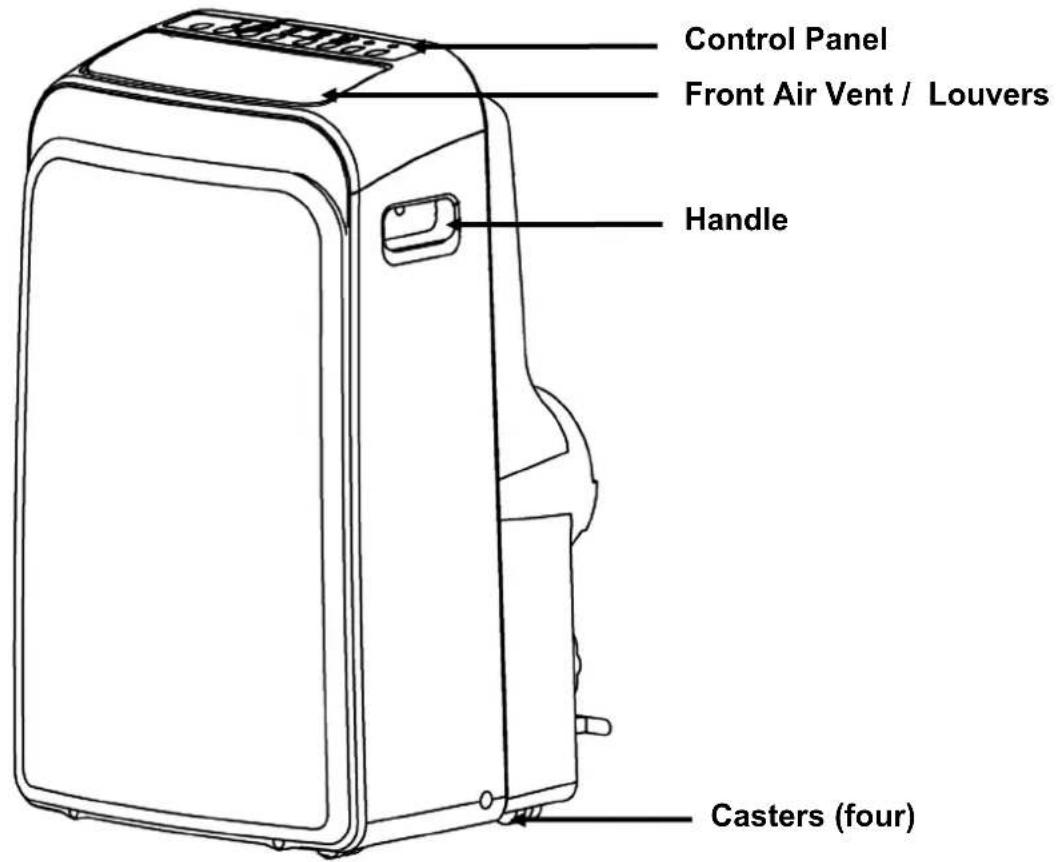
BACK VIEW

PARTS IDENTIFICATION
| ACCESSORY IMAGE | ACCESSORY DESCRIPTION | QUANTITY |
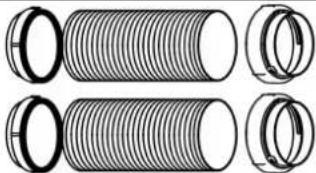 | Exhaust hoseIntake hoseWindow and Round Adaptors | 2 sets |
 | Window sliders and Clear plastic plug (plug is in the upper corner of the plastic bag that holds the user manual) | 1 set |
 | Foam seal 3 pieces | |
 | Remote control and Batteries 1 set | |
| Drain hose 1 piece | ||
 | 3M Filter (pre-installed on unit) 1 piece | |
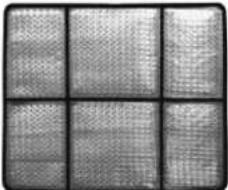 | Silvershield pre-filter (pre-installed on unit) | 1 piece |
Operating Conditions
| Mode Room Temperature | |
| Cool Higher than | 64°F |
| Dry Higher than | 60°F |
Leakage-Current Detection and Interruption (LCDI)

Your portable air conditioner is supplied with a Leakage-Current Detection and Interruption (LCDI) plug. This plug reduces the risk of fire due to arcing faults in the power supply cord. Please follow the instructions below to ensure that LCDI plug works properly.
- Plug the power cord to a grounded wall outlet. Do not plug to a power strip or extension cord.
- Press the TEST button on the plug. This should trip the plug and cut the power to the air conditioner. If the plug does not trip and the unit comes on, please contact technical support.
- Press the RESET button to start the air conditioner.
- Do NOT use the TEST and RESET buttons to turn the air conditioner on and off.
CONTROL PANEL


SWING
TIMER
MODE


FAN
SLEEP

| Power ButtonPress to turn the air conditioner on and off |  | Sleep ButtonPress to activate Sleep mode | [KST6] | SLEEP |
| Fan Speed ButtonPress to change fan speedControls the 3 fan speeds: HI, MED, LOW and AUTO. The fan speed indicator lights illuminates to show the set fan speed. When the AUTO speed is selected, none of the fan speed indicator illuminates. | FAN | Mode ButtonPress to change modeControls the 4 function modes: COOL, AUTO, FAN, and DRY. | ||
| Timer ButtonPress to program Timer DelayedSwitch ON or OFF function | TIMER | Swing ButtonTo adjust the air flow direction | SWING | |
| Up (+) and Down (-) ButtonsAdjusts set temperature (1°C/ 2°F increments) or timer hours (0 – 24 hours).This unit is capable of displaying set temperature in Fahrenheit or in Celsius. To convert from one to the other, press and hold the Up and Down buttons for 3 seconds. |  | LED DisplayIn Cool mode: shows set temperature in °C or °F and AUTO timer setting.In DRY and FAN only modes: shows room temperature.Error Codes:E1 - Room temperature sensor error- Unplug unit and restart in 5 minutesE2 - Evaporator sensor error- Unplug unit and restart in 5 minutesE3 - Condenser sensor error- Unplug unit and restart in 5 minutesE4 - Display panel sensor error- Unplug unit and restart in 5 minutesP1 - Water reservoir full- Drain water from the unit |  | |
WARNING: NEVER OPERATE THE AIR CONDITIONER WITHOUT THE AIR FILTER
AIR FILTERS
• Silvershield Pre-filter
This portable air conditioner is equipped with a Silvershield pre-filter, which removes large particles such as dust, pet hair and dander. This pre-filter can be removed for cleaning by pulling the filter frame back and out. This pre-filter washable and does not need to be replaced.

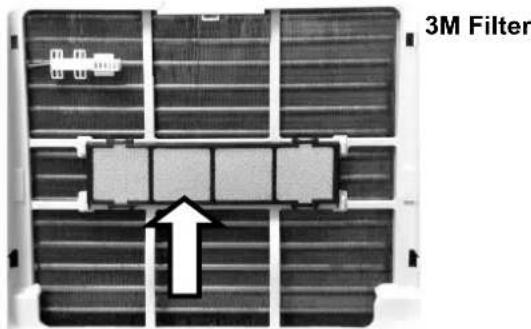
- 3M ^TM Antimicrobial High Air Flow Filter
This portable air conditioner comes with the 3M ^™ Antimicrobial High Air Flow Filter which is designed to remove particles such as dust, pet hair and dander, antimicrobial agent helps inhibit the growth of mold and mildew, and the micro-structured electrostatically charged filtration media traps and retains particles. The 3M Filter is pre-installed.
Note: The 3M Filter should be replaced every 2-3 months depending on usage. Please contact info@whynter.com for retail sales information.
WATER DRAINAGE
The dehumidifying capacity of this unit is 61 pints per day. The patented self-evaporating function of the ARC-126MD unit fully exhausts all condensation automatically in most environments when humidity is less than 70%. Areas with more than 70% humidity, the self-evaporating function can still exhaust about 98% of the moisture and the remaining 2% of moisture will be collected in the water tank of the air conditioner.
When the water reservoir reaches its maximum level, the unit will beep 8 times and the digital display will show P1. When the unit displays P1, all operation modes will be disabled temporarily, while the fan continuously running. The P1 code will disappear when the water is completely drained.
• Manual drainage (Fig. 1a)
Carefully move the unit to a drain location, remove the bottom drain plug and let the water drain. Replace the drain plug and plug in unit to resume operation.
• Continuous drainage (Fig. 1b)
Remove the upper drain plug from the back of the unit and install the drain hose. Place the open end of the hose to a drain area. This method is recommended if uninterrupted operation is desired.


LOCATION
The air conditioner should be placed on a hard and level surface strong enough to support the unit. The unit has casters and it should only be rolled on smooth, flat surfaces. Use caution when rolling on carpet surfaces. Do not attempt to roll the unit over objects. Never place any obstacles around the air inlet or outlet and allow at least 20 inch of clearance for efficient air-conditioning.
EXHAUST AND INTAKE HOSE INSTALLATION
When you use this air conditioner unit, hot air must be exhausted out of the room to complete the air exchange of the condenser. When the unit is operating in DRY or FAN only mode, installation of the exhaust hose is optional.
- Pull out about 6" of one end of the exhaust and intake hose.
- Install the window and round exhaust connectors on both exhaust and intake hoses by turning counter-clockwise. See Fig. 1
- Push in and hook the round exhaust connectors into the holes seat at the back of the unit. Fig. 2
- Only extend the both hoses to the necessary length. We do not recommend extending more than 9' long. If you are interested in purchasing an additional 5' exhaust and intake hose, please contact info@whynter.com for retail sales information.
Note: To remove the hose(s) from the unit, the easiest way is to remove take out the hose(s) and leave the connectors in place.

natural_image
Two cylindrical pipes with helical ends and curved arrows indicating rotation (no text or symbols)
WINDOW KIT INSTALLATION
When you use this air conditioner unit, hot air must be exhausted out of the room to complete the air exchange of the condenser. When the unit is operating in fan-only mode, installation of the exhaust hose is optional.
Your window kit has been designed to fit most standard vertical and horizontal windows.
However, it may be necessary for you to modify the installation procedures for your window. Please refer to Fig. 3a and Fig. 3b for minimum and maximum window openings. If your window opening is less than the mentioned minimum length of the window slider kit, cut the slide bar with holes to fit window opening. Never cut out the holes on the window slide bar.
NOTE: When using the window kit on a window or sliding door it will cause the window or sliding door not to be properly closed and locked. Additional security measurements maybe needed.
The window slide bars can be fixed with the clear plastic bolt. Fig. 4.

WINDOW KIT INSTALLATION IN A DOUBLE-HUNG WINDOW
- Open window or sliding door for approximately 5"
- Cut the foam seal (adhesive type) to the proper length and attach it to the bottom of the window. Fig. 5a.
- Adjust the length of the window bars to the same length and width of the opening of the window. Cut the window piece if necessary to fit the length of your window. Fig. 5b.
- Close the window on the window slide bars. For long term installation, you may screw the window kit into your window frame. Fig. 5c.
- Cut the foam seal to the length and seal the open gap between the top window sash and outer window sash. Shown in Fig. 5d.

WINDOW KIT INSTALLATION IN A SLIDING WINDOW/DOOR
- Open window or sliding door for approximately 5"
- Cut the foam seal (adhesive type) to the proper length and attach it to the bottom of the door / window. Fig. 6a.
- Adjust the length of the window bars to the same length and width of the opening of the window. Cut the window piece if necessary to fit the length of your window. Fig. 6b.
- Close the door/ window on the window slide bars. For long term installation, you may screw the window kit into your window frame. Fig. 6c.
- Cut the foam seal to the length and seal the open gap between the top window sash and outer window sash. Show in Fig. 6d.

OPERATION INSTRUCTIONS
BEFORE USING YOUR APPLIANCE
- Remove the exterior and interior packing
- Before connecting the appliance to the power source, let it stand upright for approximately 4 hours. This will reduce the possibility of a malfunction in the cooling system from handling during transportation
SWITCHING ON/OFF THE AIR CONDITIONER
The appliance can be switched ON or OFF by pressing the POWER button on the control panel or the ON/OFF button on the remote control
COOLING MODE
In this mode, the air conditioner cools and dehumidifies the room. To activate this function mode, press the MODE button until the COOL indicator light comes on. When the cooling mode is set, the compressor will start in approximately 3 minutes. In cooling mode, hot air is exhausted from the outdoor exhaust port and the exhaust hose must be connected to exhaust out the hot air.
The temperature setting range of this air conditioner is from 62^ F / 17^ C to 88^ F / 30^ C. To set the temperature, press the + or - buttons. This air conditioner has a 5^ F temperature cushion which if the set temperature is within 5^ F of the ambient temperature, the unit runs on fan only mode. This saves energy and prolongs the life of the compressor of the air conditioner.
To set the fan speed, press the FAN button. In cooling mode, the difference in noise level between the 3 fan speeds is not very noticeable when the compressor is on. Try setting the unit to Fan only mode, you should be able to hear the difference between high and low fan speed settings.
A dual hose portable air conditioner will cool a room faster and will help minimize negative air pressure situation in the room. If the outside temperature is much higher or more humid than the room, the intake hose can be covered with the included cover and it will function like a single hose unit.
In this mode, the air conditioner only dehumidifies the room, the compressor will activate intermittently depending on the ambient temperature and the fan speed is set to LOW. To activate this function mode, press the MODE button until the DRY indicator light comes on. Please note that when switching function mode, there will be an approximately 3 minute transition time. In dehumidifying mode, do not connect the exhaust hose and let the warm air return to the room. If room temperature is higher than 77^ , the fan speed can be adjusted. If room temperature is lower than 77^ , the fan speed is set at Low.
NOTE: When using the Dehumidifying mode, the exhaust and intake hoses should not be vented to the outside. If the warm air is exhausted to the outside, cooling may occur. Additionally, you must manually drain the water from the unit.
AUTOMATIC MODE
When you set the air conditioner in AUTO mode, it will automatically select cooling or fan only operation depending on the temperature of the room. The fan speed is automatically selected and cannot be changed. To operate the unit in Auto mode when the unit is on, press the MODE button until the AUTO indicator light comes on.
FAN ONLY MODE
In this mode, only the fan of the air conditioner runs and circulates the air in the room. To activate this function mode, press the MODE button until the FAN ✗dicator light comes on. In this function mode, the temperature cannot be set. Subsequently, set the desired fan speed by pressing the FAN button. Fan Only mode does not require the use of both exhaust and intake hoses.
TIMER (DELAYED SWITCH ON / OFF) FUNCTION
This function mode enables a delayed switch ON or delayed switch OFF of the air conditioner. The time (hours) delay can be set, enabled and disabled.
SETTING SWITCH OFF TIMER
With the air conditioner operating in any function mode, press the TIMER button. The TIMER OFF light will come on. Then set the desired time delay OFF hours by pressing the UP and DOW N buttons. The time increments are at 0.5 hour to up to 10 hours, followed by 1 hour increment up to 24 hours. When the delay time set has elapsed, the air conditioner switches off. To cancel the delayed switch off function, turn off the air conditioner or adjust the time setting to 0.0.
SETTING DELAYED SWITCH ON TIMER
With the air conditioner is off, press the TIMER button. The TIMER ON light will come on. Then set the desired time delay ON hours by pressing the UP and DOW N buttons. The time increments are at 0.5 hour to up to 10 hours, followed by 1 hour increment up to 24 hours. When the delay time set has elapsed, the air conditioner switches on. To cancel the delayed switch on function, turn on the air conditioner or adjust the time setting to 0.0.
SLEEP MODE
In this mode, the air conditioner gradually increases the set temperature in cooling mode, decreases the noise level and conserves energy. In Sleep and cooling mode, the set temperature is increased by 1^ C/2°F in the first 30 minutes. The temperature will then increase by another 1^ C/2°F after an additional 30 minutes. This new temperature will remain the same for 7 hours. To activate this function mode, press the SLEEP button until the SLEEP indicator light comes on.
AUTO RESTART
In the event of a power outage, the air conditioner restarts at the previously set function mode and settings when power is restored.
CONTROLLING THE AIR FLOW DIRECTION
The louvers can be controlled to Auto-Swing or in a fixed direction. To control the air flow direction by Auto-Swing, press the SWING button. To set the louvers in a fixed angle or direction, press SWING button while on Auto-Swing mode when desired angle is chosen.
NOISE LEVEL
Portable air conditioners may make sounds that are not familiar to you. The sounds listed below are normal. Noise reflecting off hard surfaces such as a floor or wall can make the sounds seem louder than they actually are.
• The compressor may make a pulsating or high-pitched sound
• Water running from the evaporator to the water tank may make a splashing sound
• Refrigerant flowing may make a gurgling sound
• Fan sound may come from front and back air vents
COMPRESSOR LOCK OUT
This portable air conditioner is optimized to operate in an ambient temperature of 64^ F – 90^ F. The compressor circuit has an automatic 3 minute time delayed start if the unit is turned off and on quickly. This prevents over-heating of the compressor and possible circuit breaker tripping.
The portable air conditioner can be switched on by the remote control. To transmit signals from the remote control to the air conditioner, point the front part of the remote handset towards the control panel on the air conditioner. Reception of the signal is confirmed by a beep. The maximum signal transmission distance is approximately 8 meters / 26 feet.
NOTE:
- Other appliances in the same room controlled by a remote control (TV, radio, stereo, etc.), may cause interferences
- Electronic and fluorescent lamps may interfere with the signal transmissions between the remote control and the air conditioner
- Remove the batteries if the remote control is not used for long periods

natural_image
Diagram of a battery pack layout showing top, front, and side views with no text or symbolsINSTALLING BATTERIES
To insert the batteries, open the flap on the back of the remote control by sliding if off. Strictly adhere to the polarity signs on the bottom of the battery housing, close the flap once the batteries have been inserted.
- Only use two dry LR03 AAA 1.5V Batteries (included) in the remote control
• Always change both batteries at the same time
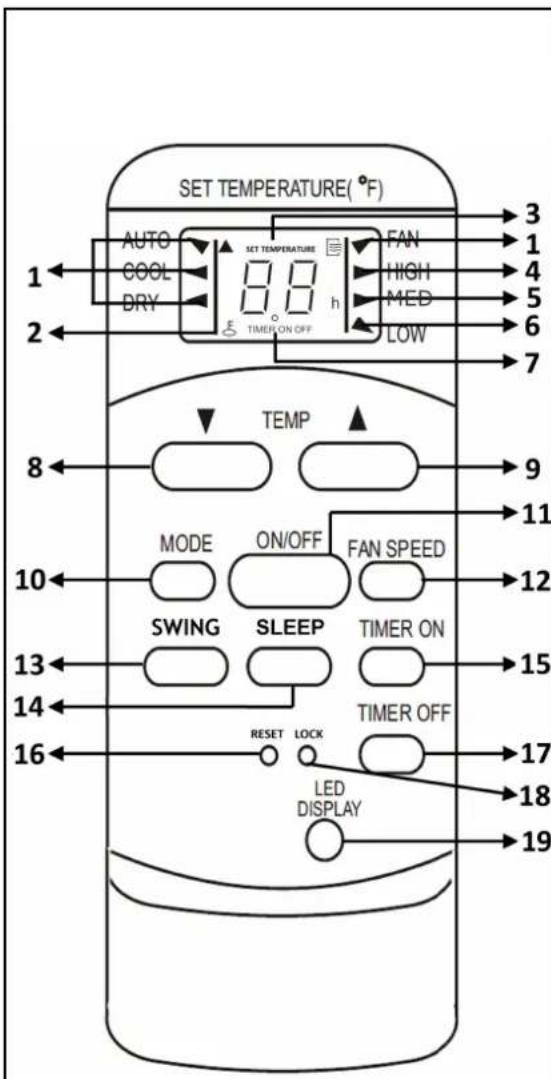
| INDICATOR FUNCTION | |
| 1 – Mode Indicator | Displays the current selected mode(Auto, Cool, Dry, or Fan) |
| 2 – Lock Indicator | Indicates current setting is locked and cannot be changed |
| 3 – Temperature Display | Displays set temperature |
| 4 – Fan (High) | Displays the selected high fan speed |
| 5 – Fan (Medium) | Displays the selected medium fan speed |
| 6 – Fan (Low) | Displays the selected low fan speed |
| 7 – Timer Indicator | Indicates Timer mode activated |
| BUTTONS FUNCTION | |
| 8 – Down Button | Decreases set temperature/time |
| 9 – Up Button | Increases set temperature/time |
| 10 – Mode Button | Controls the 4 function modes: Auto, Cool, Dry, & Fan |
| 11 – On/Off Button | Turns the unit On and Off |
| 12 – Fan Speed Button | Controls the fan speeds: High, Medium, Low or Auto |
| 13 – Swing Button | Starts or stops louver movement and set louver angle. |
| 14 – Sleep Button | Enables Sleep mode |
| 15 – Timer On Button | Enables the On timer & set timer hours |
| 16 – Reset Button | Cancels all settings |
| 17 – Timer Off Button | Enables the Off timer & set timer hours |
| 18 – Lock Button | Locks and Unlocks current setting |
| 19 – LED Display Button | Turns on and off the display light |
Fig. 7a
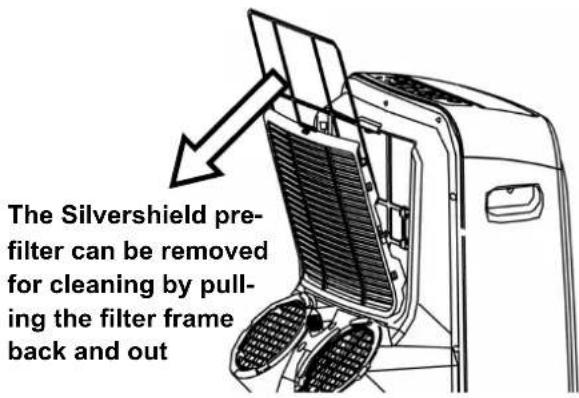
Fig. 7b
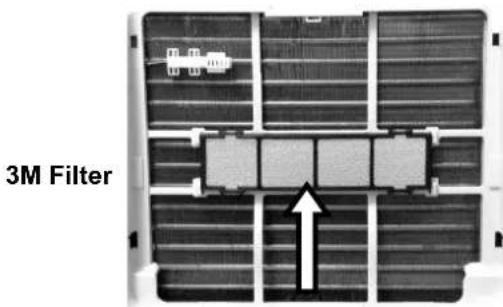
Fig. 7c
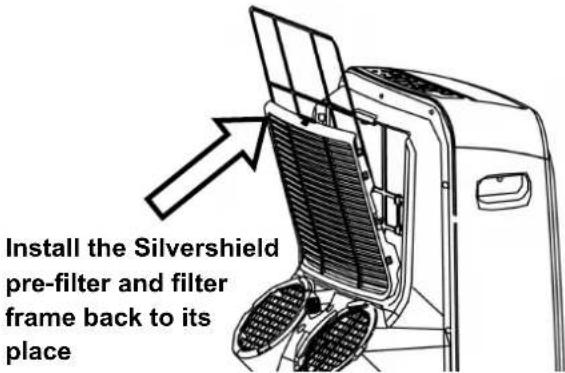
Fig. 7d
IMPORTANT:
- Switch off the air conditioner and disconnect the plug from the power outlet
- Drain water by removing the drain plug
- Always transport the air conditioner in an upright position only
CLEANING THE AIR FILTERS
- To ensure the air intake is filtered properly and to assure that your air conditioner runs efficiently, it is recommended to clean the air filters at least once every two weeks
- This unit has two air filters; the Silvershield pre-filter, 3M filter
- Switch off the air conditioner and remove the Silvershield pre-filter and 3M filter from the unit (Fig. 7a and Fig. 7b)
- Use a vacuum cleaner or tap lightly to remove loose dust and dirt from the filters. Then rinse them thoroughly under warm or cold running water (no hotter than 100F.)
- Dry thoroughly before re-inserting the filters. (Fig. 7c)
NOTE: Silvershield pre-filter is washable and does not need to be replaced. The 3M should be replaced every 2-3 months depending on usage. Please contact info@whynter.com for retail sales information
WARNING! Never operate the air conditioner without the filter in place
CLEANING THE AIR CONDITIONER
- Always switch off the air conditioner and disconnect the plug from the power supply outlet before cleaning the air conditioner
- Use a soft damp cloth to wipe the body of the unit.
- Never use harsh chemicals, oil-based products, detergents, chemically treated cloths or other cleaning solutions. These could possibly damage the body of the air conditioner
END OF SEASON STORAGE
- Switch off the air conditioner and disconnect the power plug from the power supply outlet before cleaning the air conditioner
- To remove the hose(s) from the unit, the easiest way is to remove take out the hose(s) and leave the connectors in place.
- Clean the air filters
- Drain the condensed water completely
- On a warm day, turn on the Fan only mode for half a day so that the inside can dry out completely
- Remove the batteries from the remote controller
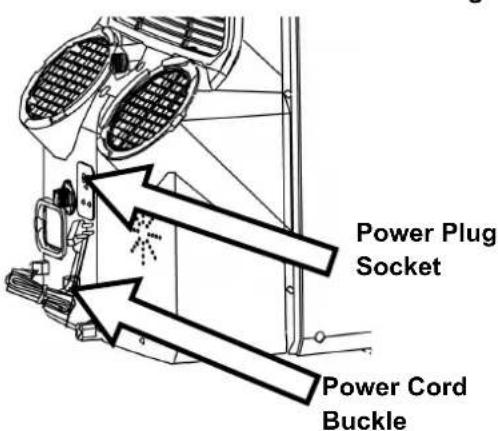
- Wrap the cord using the Power Cord Buckle and insert the plug into the Power Plug Socket. (Fig. 7d)
- It is recommended that the air conditioner be put back into its original carton for storage
Many common portable air conditioner problems are easily resolved. Try the troubleshooting suggestions below to see if the problems can be resolved before having to contact the service department.
| Problem Possible Causes Solutions | ||
| The portable air conditioner does not turn on | Power failure / outageThe automatic switch, line fuse, or breaker has been trippedThe power supply voltage is too lowThe power cord is damagedThe L.C.D.I. power plug for the unit is trippedThe internal water reservoir is full and 'P1" appears on display | Restore the power supplyFlip the switch / change the fuse / turn the breaker back on. Also note that you may have too many appliances drawing power on one circuit, you may need to move the other appliances to another circuitMove the unit onto another circuit with the correct voltageCall for service. Only authorized personnel should replace damaged power cord or power plugPress the Reset button on the L.C.D.I. power plugDrain water from the air conditionerPossible loose internal connection.Please contact Whynter for service |
| The unit turns on but the compressor does not turn on (the fan runs but the unit is not cooling) | The room temperature is outside of the operational tolerances of the unitThe Cooling mode is not onThe compressor has not turned on yet because of its time delayThe set temperature is too highThe internal water reservoir is full and 'P1" appears on display | This unit is designed to work in ambient temperatures of 63°F to 90°FPress the MODE button until the COOL light is shown on the displayGive the compressor 3 minutes to turn on after the Cooling mode has been selectedSet the air conditioner to a lower temperature. It is recommended to set the temperature to at least 5°F of the ambient temperatureEither manually drain the water by removing the drain plug or allow the unit to exhaust the water itself by running the fan only mode. Then cooling will resumePossible loose internal connection.Please contact Whynter for service |
| The air coming out of the unit is not very cold, or the airflow volume is weak | The filters are dirty or obstructedThe air intake or exhaust is obstructedThe unit is set in DRY or FAN modeThe unit is set to low fan speed | Clean the air filtersMake sure there is at least 20" of clearance from the air intake. Make the length of the exhaust hose is as short as possibleSet the unit to the cooling modeSet the unit to a higher fan speed |
| Problem Possible | Causes Solutions | |
| The unit has worked for a long time, but the room is not cold enough | ·Windows or doors are open·There are too many people in the room·There is direct sunshine into the room·The room is a kitchen or with many heat-producing appliances·There is a server in the room·The room is too large | ·Close all windows and doors·You may need additional cooling or another air conditioner·Close curtains or blinds and try to minimize the amount of direct sunlight into the room·You may need additional cooling or another air conditioner |
| The unit is very noisy | ·The unit is not level·The surface underneath the unit is uneven·Low power voltage | ·Make sure the unit is on hard, level and stable surface·Move the unit to a location with a level and hard floor·Make sure the wall outlet and support the required power consumption of the air conditioner and do not use an extension cord |
| The unit leaks water | ·The unit is tilted or not leveled·The water tank is full | ·Make use the unit is leveled·Drain water from the drain plug at the back of the air conditioner |
| Fan speed cannot be changed | ·Fan speed differences are not very noticeable | ·The fan speed difference is not very noticeable when the compressor is on. Try setting the unit to Fan only mode, you should be able to hear the difference between high and low fan speed settings. |
ONE YEAR LIMITED WARRANTY &
THREE YEAR WARRANTY ON COMPRESSOR
This Whynter portable air conditioner is warranted, to the original owner within the 48 continental states, for one year from the date of purchase against defects in material and workmanship under normal use and service. Should your Whynter portable air conditioner prove defective within one year from the date of purchase, return the defective part or unit, freight prepaid (within two months of purchase; after two months to one year, customer will be responsible for freight cost to Whynter's service department), along with an explanation of the claim to Whynter LLC. Please package the portable air conditioner carefully in its original packaging material to avoid damage in transit. Please retain the original box and packaging material. Under this warranty, Whynter will repair or replace any parts found defective. This warranty is not transferable. After the expiration of the warranty, the cost of labor and parts will be the responsibility of the original owner of the unit.
THIS WARRANTY DOES NOT COVER:
- Acts of God, such as fire, flood, hurricanes, earthquakes and tornadoes.
- Damage, accidental or otherwise, to the Whynter portable air conditioner while in the possession of a consumer not caused by a defect in material or workmanship;
- Damage caused by consumer misuse, tampering, or failure to follow the care and special handling provisions in the instructions.
- Damage to the finish of the case, or other appearance parts caused by wear.
- Damage caused by repairs or alterations to the product by anyone other than authorized by the manufacturer.
- Freight and Insurance cost for the warranty service.
DISCLAIMER OF IMPLIED WARRANTIES; LIMITATION OF REMEDIES CUSTOMER'S SOLE AND EXCLUSIVE RÉMEDY UNDER THIS LIMITED WARRANTY SHALL BE PRODUCT REPAIR OR REPLACEMENT AS PROVIDED HEREIN. CLAIMS BASED ON IMPLIED WARRANTIES, INCLUDING WARRANTIES OF MERCHANTABILITY OR FITNESS FOR A PARTICULAR PURPOSE, ARE LIMITED TO ONE YEAR OR THE SHORTEST PERIOD ALLOWED BY LAW, BUT NOT LESS THAN ONE YEAR. WHYNTER SHALL NOT BE LIABLE FOR CONSEQUENTIAL OR INCIDENTAL DAMAGES SUCH AS PROPERTY DAMAGE AND INCIDENTAL EXPENSES RESULTING FROM ANY BREACH OF THIS WRITTEN LIMITED WARRANTY OR ANY IMPLIED WARRANTY. SOME STATES AND PROVINCES DO NOT ALLOW THE EXCLUSION OR LIMITATION OF INCIDENTAL OR CONSE- QUENTIAL DAMAGES, OR LIMITATIONS ON THE DURATION OF IMPLIED WARRANTIES, SO THESE LIMITATIONS OR EXCLUSIONS MAY NOT APPLY TO YOU. THIS WRITTEN WARRANTY GIVES YOU SPECIFIC LEGAL RIGHTS. YOU MAY ALSO HAVE OTHER RIGHTS THAT VARY FROM STATE TO STATE.
To obtain service or information, contact
Whynter LLC via email at service@whynter.com or call
866-WHYNTER.
Product contents and specifications may change without notice.
Copyright © 2015 Whynter LLC
WWW.WHYNTER.COM
- WHYNTER 12,000 BTU DUAL HOSE PORTABLE AIR CONDITIONER WITH 3M AND SILVERSHIELD FILTER
- INSTRUCTION MANUAL
- TABLE OF CONTENTS
- HOW IT WORKS
- PARTS IDENTIFICATION
- Operating Conditions
- Leakage-Current Detection and Interruption (LCDI)
- CONTROL PANEL
- WARNING: NEVER OPERATE THE AIR CONDITIONER WITHOUT THE AIR FILTER
- AIR FILTERS
- • Silvershield Pre-filter
- - 3M TM Antimicrobial High Air Flow Filter
- WATER DRAINAGE
- • Manual drainage (Fig. 1a)
- • Continuous drainage (Fig. 1b)
- LOCATION
- EXHAUST AND INTAKE HOSE INSTALLATION
- WINDOW KIT INSTALLATION
- WINDOW KIT INSTALLATION IN A DOUBLE-HUNG WINDOW
- WINDOW KIT INSTALLATION IN A SLIDING WINDOW/DOOR
- OPERATION INSTRUCTIONS
- BEFORE USING YOUR APPLIANCE
- SWITCHING ON/OFF THE AIR CONDITIONER
- COOLING MODE
- AUTOMATIC MODE
- FAN ONLY MODE
- TIMER (DELAYED SWITCH ON / OFF) FUNCTION
- SETTING SWITCH OFF TIMER
- SETTING DELAYED SWITCH ON TIMER
- SLEEP MODE
- AUTO RESTART
- CONTROLLING THE AIR FLOW DIRECTION
- NOISE LEVEL
- COMPRESSOR LOCK OUT
- NOTE:
- INSTALLING BATTERIES
- IMPORTANT:
- CLEANING THE AIR FILTERS
- CLEANING THE AIR CONDITIONER
- END OF SEASON STORAGE
- ONE YEAR LIMITED WARRANTY &
- THREE YEAR WARRANTY ON COMPRESSOR
- THIS WARRANTY DOES NOT COVER:
Brand : Whynter
Model : ARC-126MD
Category : Air conditioner