
CJI 150 - Car kit COBRA - Free user manual and instructions
Find the device manual for free CJI 150 COBRA in PDF.


| Type of product | Radar/Laser detector |
| Brand | Cobra |
| Model | CJI 150 |
| Radar bands detected | X, K, Ka, Ku, Laser |
| VG-2 detection | Yes |
| Safety alerts | Red light camera, speed camera, accident zone |
| Audio alerts | Voice and tone alerts |
| Display | Digital LED display |
| Power source | 12V DC cigarette lighter adapter |
| Dimensions (H x W x D) | 1.2 x 3.5 x 5.5 inches |
| Weight | 6.5 ounces |
| Mounting type | Windshield suction cup mount |
| Cable length | 5 feet coiled |
| Operating temperature | -20°C to 85°C |
| Maintenance | Clean with soft, dry cloth |
| Safety | CE and FCC certified |
| Spare parts | Mounting bracket, suction cups, power cord available |
| Repairability | Professional service recommended |
Frequently Asked Questions - CJI 150 COBRA
User questions about CJI 150 COBRA
0 question about this device. Answer the ones you know or ask your own.
Ask a new question about this device
Download the instructions for your Car kit in PDF format for free! Find your manual CJI 150 - COBRA and take your electronic device back in hand. On this page are published all the documents necessary for the use of your device. CJI 150 by COBRA.
USER MANUAL CJI 150 COBRA
The Cobra line of quality products includes:
CB Radios
microTALK® Radios
Radar/Laser Detectors
Safety Alert® Traffic Warning Systems
HighGear® Accessories
CobraMarine® VHF Radios
Power Inverters
Accessories
For more information or to
order any of our products,
please visit our website:
www.cobra.com
S Cobra® CJI 150
Jump Starter/PowerPack Operating Instructions
Introduction
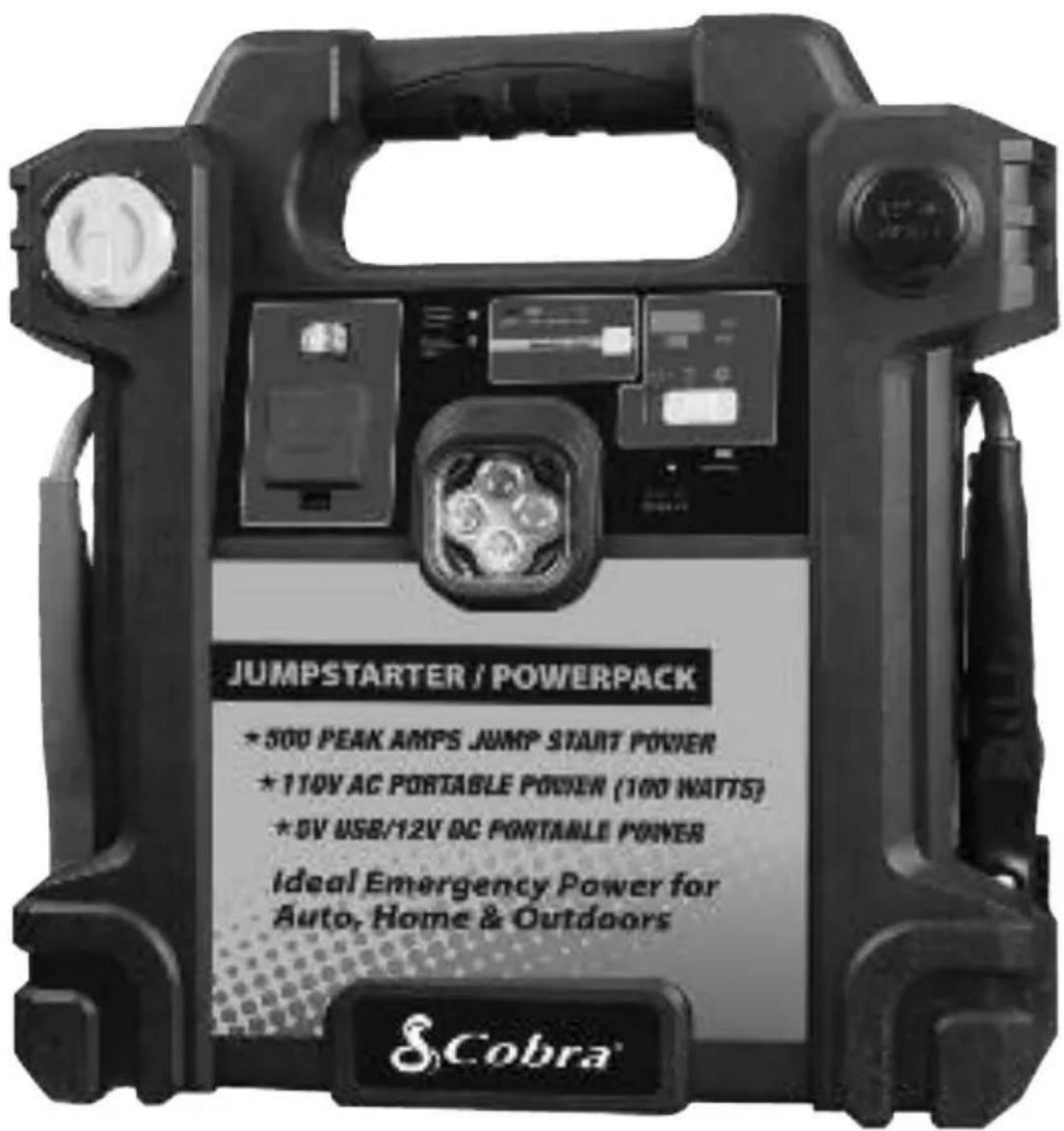
Thank you for purchasing the Cobra CJI 150 jump starter/power pack. Properly used, this Cobra product will give you many years of reliable service.
Easy-to-use and designed for reliable service, the 100W Mobile power pack can run many AC appliances and 12V DC appliance whenever you need power for work or play, at home or on the road.
Important: Please be sure to read and save the entire manual before using your mobile power pack. Any misoperation or misusing may damage the equipment or create hazardous conditions for the user. Please keep this manual for future reference.
What's Included with Your CJI 150
- Power pack with jump start cables
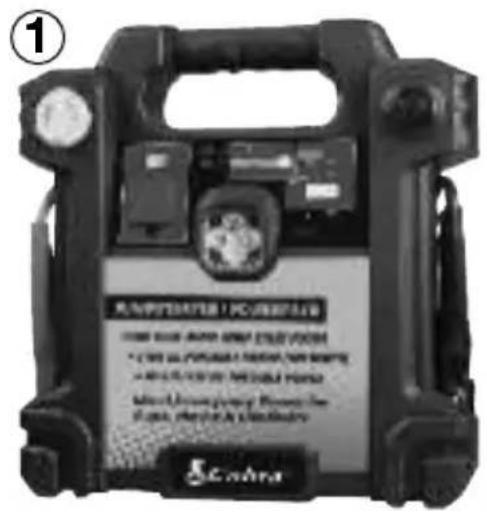
- 120V AC charging adapter
- Owner's operating instructions
Introduction
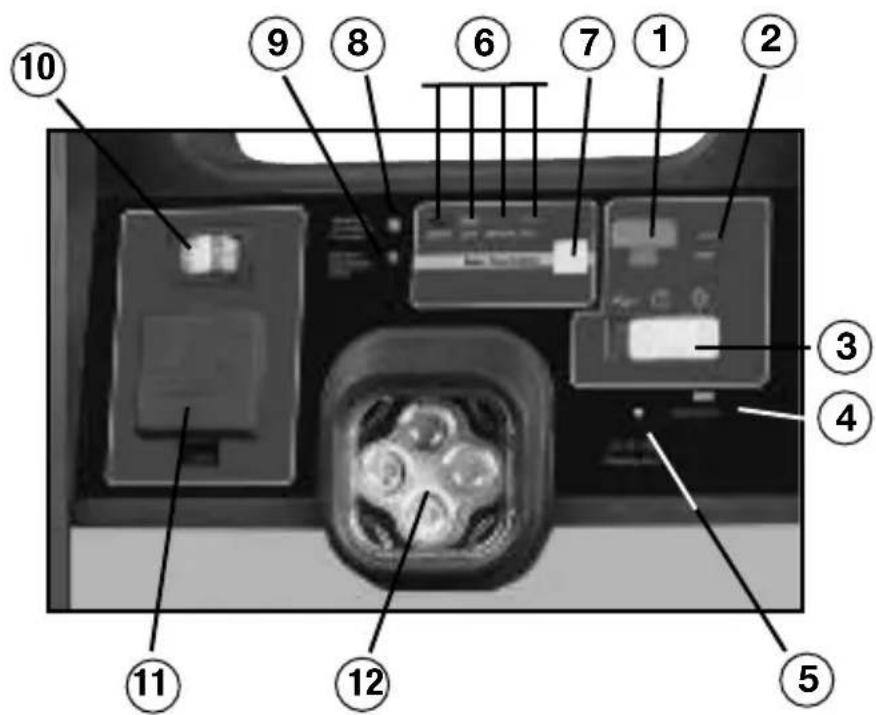
Buttons, Switches & Indicators
- USB power port
- USB power indicator
- USB/LED power switch
- Charging indicator
- Charging jack
- Battery level indicators
- Battery level button
-
Battery connection indicator
-
Reverse polarity indicator
-
120V AC power switch
-
120V AC socket / cover
-
LED work lights
-
12V DC socket / cover
-
Jump start power switch
-
Positive battery clamp (red)
-
Negative battery clamp (black)
-
Carry handle
-
Fuse
Note: See page 6 - 7 for more information on features.

Introduction
Customer Assistance
Should you encounter any problems with this product, or not understand its many features, please refer to this owner's manual. If you require further assistance after reading this manual, Cobra Electronics offers the following customer assistance services:
For Assistance in the U.S.A.
Automated Help Desk English only.
24 hours a day, 7 days a week 773-889-3087 (phone).
Customer Assistance Operators English and Spanish.
8:00 a.m. to 5:30 p.m. Central Time, Monday through Friday
(except holidays) 773-889-3087 (phone).
Questions English and Spanish.
Faxes can be received at 773-622-2269 (fax).
Technical Assistance English only.
www.cobra.com (on-line: Frequently Asked Questions).
English and Spanish. productinfo@cobra.com (e-mail).
For Assistance Outside the U.S.A.
Contact Your Local Dealer
©2009 Cobra Electronics Corporation
6500 West Cortland Street
Chicago, Illinois 60707 USA
www.cobra.com
Notes
How to Use Your
Cobra CJI 150
Introduction....A1
Our thanks to you
What's included
Buttons, Switches & Indicators ....A2
Customer Assistance....A3
Conventions ......2
Safety Information ....3
Controls and Indicators......6
Operation 8
AC appliances....8
Some devices you can power up....9
Operating AC appliances....9
Low battery shut down....9
Overloads & high temperature protection....9
High surge appliances....9
Problem appliances ....10
12V DC appliances ....10
Operating DC appliances....10
USB devices....10
Jump starting a vehicle's engine....11
Recharging the power pack battery....12
Applications & Troubleshooting ....13
Specifications 16
Product service....17
Warranty Information 18
Features of This Product
• 100W AC output for operating household appliances
• 12 Volt DC power outlet for DC accessories & appliances
• LED super bright emergency light
- 5V USB port to power up or charge cellphones, PDAs or consumer electronic devices
- 500 peak Amps of instant starting power to start vehicles
- Rechargeable internal battery
• LED display indicates the battery capacity
- Reverse polarity connection indication & alarm
- On/off safety switch
• Heavy duty cables and clamps
Introduction
Important: Please be sure to read and save the entire manual before using your mobile power pack. Any misoperation or misusing may damage the equipment or create hazardous conditions for the user. Please keep this manual for future reference.
The following conventions are used in this manual:
| 4A | WARNING Warnings identify conditions that could result in personal injury or loss of life. |
| CD | CAUTION Cautions identify conditions or practices that could result in damage to the unit or to other equipment. |
NOTE: These notes describe an important action item or an item that you must pay attention to.
Abbreviations and Acronyms:
| A Ampere |
| AC Alternating Current |
| Ah Amp-hours |
| DC Direct Current |
| LED light-emitting diode |
| mA milli-Ampere |
| V Volt |
| W Watt |
Introduction
Important Safety Instructions
4 WARNING: Charge unit fully prior to use.
Keep unit clear of fire and water. The 100W mobile power pack is not intended for use in connection with life support systems or other medical equipment or devices.
4 WARNING: Shock hazard.
Keep away from children. The power pack generates the same potentially lethal AC power as a normal household wall outlet. Do not insert foreign objects into the AC outlet, the DC power pack socket, the jump start cable port, or the ventilation hole, do not expose this product to water, rain, snow, condensation, or spray. Do not open the power pack. Have a qualified technician perform any service work.
4 WARNING: Explosion hazard
Do not use this product where there are flammable fumes or gases, such as in the bilge of a gasoline-powered boat, or near propane tanks. Do not use this product in an enclosure containing automotive-type lead-acid batteries. These batteries, unlike the sealed AGM battery in power pack, vent explosive hydrogen gas which can be ignited by sparks from electrical connections. When working on electrical equipment, always ensure someone is nearby to help you in an emergency.
4 WARNING: Heated surface
Ensure at least 2" (5cm) air space is maintained on all sides of the power pack. During operation, keep away from materials that may be affected by high temperatures such as blankets, pillows and sleeping bags.
4 WARNING: Fire hazard
Never allow jump start cables' red and black clamps to touch each other or another common metal conductor. This could cause damage to the unit and/or create a sparking/explosion hazard. Always disconnect the jump start cables from the unit after use and clip the plastic guard over the jump start cable port.
Jump start cable clamps must be connected positive to positive (red clamp to battery “+”) and negative to negative (black clamp to battery “-” or engine ground). A reverse polarity connection (positive to negative) may cause damage to the unit and/or create a sparking/explosion hazard.
Introduction
4 WARNING: Fire hazard
The jump start feature is designed for short term operation only- less than 5 seconds. Operating the jump start feature for more than 5 seconds may cause damage to the unit. Allow the power pack to cool down for at least 3 minutes after each jump start.
4 WARNING: Risk of explosion, fire or burns
The battery terminals exposed at the jump start cable port have enough energy present to cause a spark, creating an explosion hazard, or to cause burns if a metal object contacts both terminals. Always clip the plastic guard over the port when not in use.
CAUTION: Equipment damage
Do not expose the power pack to temperatures over 104° F( 40° C) or under 14° F(- 10° C).
Precautions when working with batteries
⚠ WARNING: Explosion and fire hazard
- Follow all instructions published by the battery manufacturer and the manufacturer of the equipment in which the battery is installed.
- Make sure the area around the battery is well-ventilated.
- Never smoke or allow a spark or flame in vicinity of the engine or batteries.
- Be careful not to drop a metal object on the battery or allow a metal tool to simultaneously touch the positive and negative cable ends or battery terminals. It might spark or short-circuit the battery or other electrical parts and cause an explosion.
- Remove personal metal items such as rings, bracelets, necklaces, and watches when working with batteries. Batteries produce a short-circuit current high enough to weld a ring or other similar objects to metal, causing a severe burn.
- If you need to remove a battery, always remove the negative terminal from the battery first. Make sure all accessories are off so you don't cause an arc.
Introduction
- Someone should be within range of your voice, or close enough to come to your aid when you work near batteries.
- Have plenty of fresh water, soap and a supply of baking soda on hand in the area of the batteries in case of contact with battery acid. Baking soda neutralizes lead acid battery electrolyte.
- The product is supplied with a rechargeable, sealed lead acid battery. This battery is self contained and not easily replaceable. Batteries must be disposed of properly when they no longer hold a charge. Proper charging practices will increase the life of the batteries. For information on battery recycling call toll free 800-822-8837.
Introduction
Controls and Indicators:
- USB power port Provides 5 volts output for consumer electronics devices.
- USB power indicator illuminates when USB port is in use.
- USB/LED power switch If the switch is flipped left, the USB port can provide power. Flipped right, the white LED lamps illuminate. Center position, the USB port and LED lamps are off.
- Charging indicator 2-color LED indicator. When the battery is being charged, this LED indicator lights red, when the battery is fully charged, the LED indicator lights green.
- Charging jack Charge the battery in the unit by inserting the connector from the AC charging adapter into this jack.
- Battery level indicators:
| Battery Value Display Mode |
| U<12.2V Only red LED indicator lights. |
| 12.2V<U<12.4V Red and yellow LED light. |
| 12.4V<U<12.6V Red, yellow and one green LED light. |
| U>12.6V Red, yellow and two green LED all light. |
Note: It is recommended that you should check the battery voltage every 30 minutes during charging.
- Battery level button When pressed, indicates the battery charge level.
- Battery connection Green LED indicates connection to a battery indicator is correct.
Introduction
- Reverse polarity Red LED indicates jump start connection to battery indicator is incorrect.
- 120V AC power When this switch is on, the 120V AC is available at switch the 120V AC socket.
- 120V AC socket Power outlet for AC accessories.
- LED lights Four white LED lights for emergency use.
- 12V DC socket Easy-access output port to charge 12V accessories.
Note: The unit contains 15A fuse for over current protection.
Note: It is recommended that you use the unit to power 12V accessories less than 8A.
- Jump start power Turn this switch after connecting to vehicle to switch jump start battery.
- Red battery clamp Positive connector for jump starts.
- Black battery clamp Negative connector for jump starts.
Note: Be sure that the jump start switch is in off position prior to connecting clamps to vehicle's battery. Attach clamps properly to battery (red to positive post, and black to negative chassis ground) before turning jump start switch to on.
- Portable handle For convenient handling of unit.
- AC charging adapter: Input voltage: 120V AC Output voltage: 13.5V DC Input current: 0.3A
Note: It is recommended that you charge the interior battery using the AC charging adapter, which offers charge protection.
Operation
CAUTION: Read all operating instructions before operating the power pack. The power pack is not intended for use as a UPS (Uninterruptible Power Supply). The unit should be operated only in locations that meet the following requirements:
Dry Don't allow water or other liquids to drop or splash on the unit.
Cool Ambient air temperature should be between -10° and 40° C ( 14° and 104° F) – the cooler the better within this range.
Ventilated Leave at least 2" (5 cm) clearance around the unit for air flow. Ensure that the ventilation openings are not obstructed.
Safe Do not operate the unit in the same compartment as batteries or in any compartment capable of storing flammable liquids like gasoline.
Protect from Do not operate the unit where it will be exposed to battery battery gases gases. These gases are very corrosive and prolonged exposure will damage the power pack
AC appliances
The power pack has one grounded AC power outlet for use with AC appliance. You can either plug the appliance directly into the AC outlet or you can use an AC power bar to increase the number of outlets available.
However, for continuous operations, the combined loads must be less than 80W. The less wattage used, the longer the power pack will operate before recharging is required.
Operating range:
- 80 watts or less for continuous operation
• 100 watts for 5-minute operation
Some appliance may be difficult or impossible to operate from the power pack. They may have high surge requirements or may be incompatible with the output waveform of the power pack. See “High Surge Appliances” and “Trouble Appliances” (page 10).
NOTE: To determine required wattage for a device, look up required Amps a device is rated. This Amperage is found on device I.D. tag in back of the unit. Multiply Amps X Volts = Watts.
Operation
Some devices you can power up:
- 13" TV (80W)
• Video Game System (20W) - Weather Radio (10W)
Operating AC appliances
- Check battery status to ensure the battery is fully charged.
- Open the AC Outlet cover.
- Turn the AC socket switch ON.
- Plug the AC appliance into AC outlets.
- Turn the AC appliance ON.
- Recharge the power pack immediately after use. See "recharging the power pack battery" (page 12).
Low battery shut down
Unit will automatically shutdown when the battery reaches 10.0V DC. You must turn off the AC power switch and charge the battery.
Overload and high temperature protection
In the event of an overload (>100W) or overheating, the power pack automatically shuts down power to the AC outlets. If, after a while the audible warning is ignored and a manual reset is not performed, the unit will do a complete shutdown automatically.
High surge appliances
The wattage rating of AC appliance is the average power used by the appliance. Appliances such as televisions, computer monitors and appliances with motors consume much more power than their average rating when they are first switched on.
Although power pack can supply momentary surge power up to 400W, some appliances may exceed the capabilities of the power pack and trigger the inverter's safety overload shutdown circuit.
Operation
Problem appliances
The output of the power pack inverter is non-sinusoidal. Some equipment may be damaged by the inverter's modified sine wave output (non-sinusoidal).
Some appliance, including the types listed below, may be damaged if they are connected to the inverter.
- Electronics that modulate RF (radio frequency) signals on the AC line will not work and may be damaged.
- Speed controllers found in some fans, power tools, kitchen appliance, and other loads may be damaged.
- Some chargers for small rechargeable batteries can be damaged.
- Metal halide arc (MHI) lights can be damaged.
Note: If you are unsure about powering any device with the power pack, contact the manufacturer of the device to determine whether it is compatible with the modified sine wave output.
12V DC appliances
The power pack can operate one 12V DC auto, RV, marine, or other portable DC appliance that draws 10 amps or less from its DC socket. The combined load must not exceed 120 W, The less combined wattage used, the longer the power pack will operate before recharging is required.
Operating DC appliances:
- Check battery status to ensure the battery is fully charged.
- Open the DC socket.
- Plug the DC appliance into the DC socket.
- Turn the DC appliance ON.
- Recharge the power pack immediately after use.
USB Devices
The power pack can charge or power one USB-chargeable device through its USB port. Compatible devices include most MP3 players, PDAs, digital cameras, and camcorders that have internal batteries which can be charged via the USB port of a desktop/laptop computer.
USB-chargeable devices usually include a special USB cable (not supplied) that attaches one end to the USB port and the other end to the device.
Operation
Jump starting a vehicle's engine
You can use the power pack to jump start a vehicle (or boat engine) that has a 12V starting battery using the jump start cables supplied with the unit.
WARNING: Fire Hazard
A reverse polarity connection may cause damage to the unit and/or create a sparking/explosion hazard. Never allow cables' red and black clamps to touch each other or another common metal conductor. The connection of the cables to the vehicle's battery terminals must be positive to positive (red clamp to battery "+" and negative to negative (black clamp to battery "-" or vehicle chassis).
NOTE: Carefully follow these instructions for jump starting your vehicle as they may be different from the instructions supplied with other jump start products or cables.
To jump start a vehicle:
- Turn off the vehicle and all accessories.
- Place the unit on a flat and stable surface near the battery which need to be boosted. Ensure that the unit's jump start power switch is "OFF".
- Connect the red positive (+) clamp of the cables to the positive (+) terminal of the engine battery.
- Connect the black negative (-) clamp of the cables to the engine block, cylinder head, or other stationary heavy metal part of the motor. If the red "Reverse Polarity" LED illuminates, then reverse polarity has been detected. Correct polarity must be established before proceeding. Disconnect the jump starting clamps from the vehicle's battery and repeat steps (3) and (4).
- Switch on the jump start power switch. Before starting the engine, make sure the jumpstarter pack and the cables are clear of the metal parts and other moving things.
- Crank the engine for 5 seconds or until it starts, whichever is first.
4 WARNING: Fire hazard
Do not try to start the engine for more than 5 seconds. The jump start feature is designed for short term operation only. Operating the jump starting feature for more than 5 seconds may cause damage to the unit. Allow the unit to cool down for at least 3 minutes after each start attempt.
Operation
To jump start a vehicle continued:
- Switch off the jump start power switch.
- Remove the red positive (+) clamp and then the black negative (-) clamp.
Recharging the power pack battery

CAUTION: Do not operate AC or DC appliance while the power pack is being charged.
Charging with the AC charging adapter
Using the AC charging adapter is the simplest method for recharging the battery. While charging from an AC source, the charging status LED indicator will light red. When the battery has reached capacity, the indicator will light green. Charging when the battery is fully discharged takes around 23 hours.
NOTE: Recharge the 100W mobile power pack as soon as possible after each use. When not used the power pack, it should be recharged every 3 months!
To recharge with AC charger:
- Turn the rotary switch to the "OFF" position.
- Plug AC charging adapter into charging jack on the front of the unit.
- Plug AC charging adapter into 120V AC electrical outlet.
- Continually charge until the battery is fully charged; for about 23 hours.

CAUTION: The 23-hour charging time for the unit assumes that there is 120V at the AC wall outlet. If the voltage is less than 120V AC, it may take more than 23 hours to fully recharging. Once fully charged, the charging current automatically reduces to a floating charge mode, and the unit may be left permanently connected to the AC charger.
Applications & Troubleshooting
Applications
| AC Appliance Watts Required Hours* | ||
| Cordless Phone (Stand-by) 5 16 | ||
| Weather Radio 8 10 | ||
| Portable Stereo 10 7 | ||
| Florescent Work Light 14 4 | ||
| Fan 20 4 | ||
| Laptop Computer 25 3 | ||
| Incandescent Lamp Work Light 40 | 1.5 | |
| 13" Color Television | 60 | 1.25 |
| DC Appliance | Watts Required Hours* | |
| Cellular Phone | 6 14 | |
| Portable CD Player | 10 9 | |
| Portable Cooler | 30 3 | |
* All run times are estimates
Troubleshooting
Buzzing in audio systems and radios
Some inexpensive stereo systems and AM-FM radios have inadequate internal power supply filtering and "buzz" slightly when powered by the power pack. Generally, the only solution is an audio product with a higher quality filter.
Television interference
The power pack is shielded to minimize its interference with TV signals. However, with weak TV signals interference may be visible in the form of lines scrolling across the screen. The following should minimize or eliminate the problem:
- Increase the distance between the inverter and the TV, antenna and cables.
- Adjust the orientation of the inverter television, antenna and cables.
- Maximize TV signal strength by using a better antenna and use shielded antenna cable where possible.
WARNING: Electric shock hazard
Do not remove the cover of the unit or disassemble. The unit does not contain any internal user-serviceable parts and attempting to service the unit yourself could result in electrical shock or burn.
Troubleshooting
| Problem Cause Solution | ||
| The power pack can not jump start vehicle | The battery in the power pack is not fully charged | Charge it for at 23 hours |
| The engine start capacity exceeds the power pack jump start capacity. | ||
| The power pack's battery has been damaged | Replace the power pack's battery (consult service technician). | |
| The charging status LED indicator does not light. | No AC power at the AC wall outlet. | Ensure power is available at the AC wall outlet. |
| AC charging adapter is faulty. | Replace 120V AC charger | |
| The charging status LED indicator still lights red and has not charged to steady after 50 hours of charging. | The AC charger's output is too low. | Replace the AC charger |
| The AC appliance does not operate; audible alarm is not sounding. | AC appliance rated more than 80W, the safety overload has tripped. | Use AC appliance with a power rating less than 80W. |
| AC appliance rated less than 80W, high starting surge has tripped the safety overload. | AC appliance may exceed the power pack's surge capability. Use an AC appliance with a starting surge within the power pack surge rating. | |
| Battery has discharged to 10V | Recharge the battery. | |
| Inverter has overheated due to poor ventilation or excessively warm environmental condition. | Allow the power pack to cool for 15 minutes or more. Clear blocked fan opening or remove objects covering the unit, then restart the power pack. Move to a cooler environment. | |
| Run time for appliance is less than expected. | Internal battery is not fully charged, | Recharge using the AC charger, until the charging status LED indicator light green. |
| AC appliance power consumption is higher than expected. | Check AC appliance power or wattage rating (or current draw for 12V DC appliance). |
Specifications
12 DC Power:
Internal battery (Capacity/Type) 7Ah/12V sealed lead-acid battery
DC power socket (maximum continuous load) 8A
DC fuse 15A
AC Power:
Output power
• Continuous AC output power 80W
- Five minute AC output power 100W
• AC output surge capacity 400W
Output voltage 104V-125V
Output frequency 58Hz-62Hz
Output wave form Modified sine wave
No load current draw <0.5A
Input voltage range 10.5V-15.5VDC
Low battery shutdown 10.0±0.3VDC
Low battery shutdown resume 12.0±0.3VDC
High battery voltage shutdown 15.5V±0.3VDC
Over temperature shutdown Yes
Overload shutdown Yes
Operating temperature range 14°F\~104°F (-10°C\~40°C)
Storage temperature range -4°F\~158°F (-20°C\~70°C)
Internal battery charging controller system:
| AC charging bulk charging current | 300mA |
| Peak charging voltage (nominal) | 14.2V±0.2V |
| Charging restart voltage (nominal) | 12.9V±0.2V |
Physical Specifications:
Jumpstarter cables (size/length) 8.37mm 2 /(460±19.5)mm
Dimensions H*W*D 13" H x 12" W x 4.5" D
(330.2mm x 309mm x 114.3mm)
Weight 9 lbs., 3.7 oz. (4.3g)
Product Service
For any questions about operating this new Cobra product, or if parts are missing...PLEASE CALL COBRA FIRST...do not return this product to the store. See customer assistance on page A3.
If your product should require factory service, please call Cobra first before sending your unit. This will ensure the fastest turn-around time on your repair. You may be asked to send your jumpstarter/power pack to the Cobra factory.
It will be necessary to furnish the following to have the product serviced and returned.
- For warranty repair include some form of proof-of-purchase, such as a mechanical reproduction or carbon copy of a sales receipt. If you send the original receipt, it cannot be returned.
- Send the entire product.
- Enclose a description of what is happening with the jump starter/power pack. Include a typed or clearly printed name and address of where the unit is to be returned.
- Pack unit securely to prevent damage in transit. If possible, use the original packing material.
- Ship prepaid and insured by way of a traceable carrier such as United Parcel Service (UPS) or Priority Mail to avoid loss in transit to:
Cobra Factory Service Cobra Electronics Corporation 6500 West Cortland Street Chicago, Illinois 60707 USA.
- If the jumpstarter/power pack is in warranty, upon receipt of your unit, it will either be repaired or exchanged depending on the model. Please allow approximately three to four weeks before contacting Cobra for status. If the unit is out of warranty, a letter will automatically be sent informing you of the repair charge or replacement charge.
If you have any questions, please call 773-889-3087 for assistance.
Warranty and Trademark Acknowledgement
For Products Purchased in the U.S.A.
Cobra Electronics Corporation warrants that its Cobra jump starter/power pack, and the component parts thereof, will be free of defects in workmanship and materials for a period of one year from the date of first consumer purchase. This warranty may be enforced by the first consumer purchaser, provided that the product is utilized within the U.S.A.
Cobra will, without charge, repair or replace, at its option, defective jump starter/power pack products or component parts upon delivery to the Cobra Factory Service department, accompanied by proof of the date of first consumer purchase, such as a duplicated copy of a sales receipt.
You must pay any initial shipping charges required to ship the product for warranty service, but the return charges will be at Cobra's expense, if the product is repaired or replaced under warranty. This warranty gives you specific legal rights, and you may also have other rights which may vary from state to state.
Exclusions: This limited warranty does not apply:
- To any product damaged by accident.
- In the event of misuse or abuse of the product or as a result of unauthorized alterations or repairs.
- If the serial number has been altered, defaced, or removed.
- If the owner of the product resides outside the U.S.A.
All implied warranties, including warranties of merchantability and fitness for a particular purpose are limited in duration to the length of this warranty. Cobra shall not be liable for any incidental, consequential or other damages; including, without limitation, to damages resulting from loss of use or cost of installation.
Some states do not allow limitations on how long an implied warranty lasts and/or do not allow the exclusion or limitation of incidental or consequential damages, so the above limitations may not apply to you.
For Products Purchased Outside the U.S.A.
Please contact your local dealer for warranty information.
Trademark Acknowledgement
Cobra ® , Nothing Comes Close to a Cobra ® and the snake design are registered trademarks of Cobra Electronics Corporation, USA.
Cobra Electronics Corporation™ is a trademark of Cobra Electronics Corporation, USA.
- THE COBRA LINE OF QUALITY PRODUCTS INCLUDES
- S COBRA® CJI 150
- JUMP STARTER/POWERPACK OPERATING INSTRUCTIONS
- INTRODUCTION
- WHAT'S INCLUDED WITH YOUR CJI 150
- BUTTONS, SWITCHES & INDICATORS
- CUSTOMER ASSISTANCE
- FOR ASSISTANCE IN THE U.S.A
- CUSTOMER ASSISTANCE OPERATORS ENGLISH AND SPANISH
- QUESTIONS ENGLISH AND SPANISH
- TECHNICAL ASSISTANCE ENGLISH ONLY
- FOR ASSISTANCE OUTSIDE THE U.S.A
- NOTES
- HOW TO USE YOUR
- COBRA CJI 150
- INTRODUCTION....A1
- OPERATION 8
- APPLICATIONS & TROUBLESHOOTING ....13
- SPECIFICATIONS 16
- PRODUCT SERVICE....17
- WARRANTY INFORMATION 18
- FEATURES OF THIS PRODUCT
- THE FOLLOWING CONVENTIONS ARE USED IN THIS MANUAL
- ABBREVIATIONS AND ACRONYMS
- IMPORTANT SAFETY INSTRUCTIONS
- 4 WARNING: CHARGE UNIT FULLY PRIOR TO USE
- 4 WARNING: SHOCK HAZARD
- 4 WARNING: EXPLOSION HAZARD
- 4 WARNING: HEATED SURFACE
- 4 WARNING: FIRE HAZARD
- 4 WARNING: RISK OF EXPLOSION, FIRE OR BURNS
- CAUTION: EQUIPMENT DAMAGE
- PRECAUTIONS WHEN WORKING WITH BATTERIES
- ⚠ WARNING: EXPLOSION AND FIRE HAZARD
- CONTROLS AND INDICATORS
- OPERATION
- AC APPLIANCES
- OPERATING RANGE
- SOME DEVICES YOU CAN POWER UP
- OPERATING AC APPLIANCES
- LOW BATTERY SHUT DOWN
- OVERLOAD AND HIGH TEMPERATURE PROTECTION
- HIGH SURGE APPLIANCES
- PROBLEM APPLIANCES
- 12V DC APPLIANCES
- OPERATING DC APPLIANCES
- USB DEVICES
- JUMP STARTING A VEHICLE'S ENGINE
- WARNING: FIRE HAZARD
- TO JUMP START A VEHICLE
- TO JUMP START A VEHICLE CONTINUED
- RECHARGING THE POWER PACK BATTERY
- CHARGING WITH THE AC CHARGING ADAPTER
- TO RECHARGE WITH AC CHARGER
- APPLICATIONS & TROUBLESHOOTING
- TROUBLESHOOTING
- BUZZING IN AUDIO SYSTEMS AND RADIOS
- TELEVISION INTERFERENCE
- WARNING: ELECTRIC SHOCK HAZARD
- SPECIFICATIONS
- 12 DC POWER
- AC POWER
- INTERNAL BATTERY CHARGING CONTROLLER SYSTEM
- PHYSICAL SPECIFICATIONS
- PRODUCT SERVICE
- WARRANTY AND TRADEMARK ACKNOWLEDGEMENT
- FOR PRODUCTS PURCHASED IN THE U.S.A
- FOR PRODUCTS PURCHASED OUTSIDE THE U.S.A
- TRADEMARK ACKNOWLEDGEMENT
Brand : COBRA
Model : CJI 150
Category : Car kit