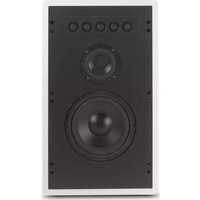
WS350 - Loudspeaker MCINTOSH - Free user manual and instructions
Find the device manual for free WS350 MCINTOSH in PDF.


| Product Type | In-Wall Loudspeaker System |
| Brand | McIntosh |
| Model | WS350 |
| Driver Complement | 8" Woofer, 4" Midrange, Five 1" Dome Tweeters |
| Impedance | 4 ohms (Nominal) |
| Frequency Response | 60Hz - 20kHz ±2dB (Anechoic) |
| Sensitivity | 85dB (2.8V/1m) |
| Power Handling | 200 Watts Maximum |
| Crossover Frequencies | 300Hz and 1.5kHz |
| Dimensions (H x W x D) | 23.5" x 14" x 3.65" (59.7 x 35.5 x 9.3 cm) |
| Weight (Net) | 25 lb (11.3 kg) |
| Weight (Shipping) | 32 lb (14.5 kg) |
| Finish | White Primer Coat |
| Required Wall Depth | At least 3.75" including wallboard |
| Wall Thickness Compatibility | 3/8" to 1" |
| Included Accessories | Baffle, Baffle Box, Frame, Frame Gaskets, Grille, Grille Fasteners, Cutout Template, Painting Mask, Clamping Pieces, Screws, Airtight Electrical Connector |
| Optional Accessories | RK320 Rough-In Bracket |
| Installation Tools Required | Phillips Screwdriver, Tape Measure, Drywall Saw, Stud Finder, Pencil, Bubble Level, Cable Ties |
| Maintenance | Use painting mask for grille; avoid over-tightening screws to prevent wallboard damage |
Frequently Asked Questions - WS350 MCINTOSH
User questions about WS350 MCINTOSH
0 question about this device. Answer the ones you know or ask your own.
Ask a new question about this device
Download the instructions for your Loudspeaker in PDF format for free! Find your manual WS350 - MCINTOSH and take your electronic device back in hand. On this page are published all the documents necessary for the use of your device. WS350 by MCINTOSH.
USER MANUAL WS350 MCINTOSH
In-Wall Loudspeaker Systems
WS320WS350

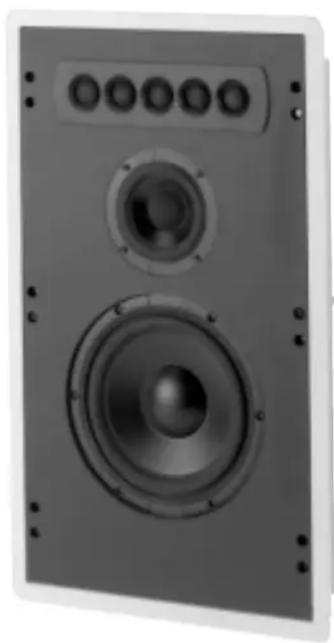
WS320
WS350
Installing the Loudspeaker
The WS320 and WS350 In-Wall Loudspeaker Systems require at least 3-3/4 inch of wall depth, including the wallboard. They can be mounted into a wall surface with a thickness between 3/8 inch and 1 inch.
Tools and Fasteners Required:
Phillips Screwdriver Tape Measure
Drywall Saw or Knife Stud Finder
Pencil Bubble Level
Cable Ties
Parts Included:
Loudspeaker Baffle (1) Baffle Box (1)
Frame (1) Frame Gaskets (2)
Grille (1) Grille Fasteners (10)
Cutout Template (1) Painting Mask (1)
Clamping Pieces (2) Baffle Washers #8 (6)
Airtight Electrical Connector (1)
Frame Screws #10-24 x 3 inch (6)
Baffle Screws #10-24x 1-1/2 inch (6)
Optional Part:
RK320 Rough-In Bracket (designed to provide a cutout and mounting frame for installation during new construction).
Use of Paint Mask
Set the Paint Mask between the baffle and grille to paint the grille and frame without getting paint on the baffle and Loudspeaker Elements.
Installing the Frame
The Frame Assembly consists of the frame and two clamping pieces, held together with six 3 inch screws. These screws are fully extended to allow pushing the clamping pieces toward each other so the whole assembly fits into the cutout.
Note: If the optional RK320 Rough-In Bracket has already been installed, go directly to step 3.
- Hold the supplied cutout template against the wall and align it using the bubble level. Tape the aligned template to the wall and trace the opening on the wall.
- Cut out and remove the piece of wallboard. Pull enough Loudspeaker Cable to be able to connect it to the Loudspeaker Baffle while the baffle is still out of the wall.
-
Install the two “L” Shaped self adhesive Frame Gaskets to the rear of the frame so that it will be between the frame and the wall. Insert the right side of the assembly into the hole and push it to the right. This will give enough room to insert the left side of the assembly into the wall. Center the assembly in the opening.
-
Push the right side Clamping Piece up against the backside of the wallboard. Tighten the now protruding center screw enough to gently hold the frame in place. Repeat on the other side of the frame.
- Use the bubble level to assure the frame is correctly positioned, and then tighten all the screws until the frame is securely attached to the wallboard.
Note: To avoid crushing the wallboard, do not over tighten the screws. If the mounting position places the frame near a stud, remove the clamping piece and secure the frame directly to the stud, through the provided holes.
Installing the Baffle Box
Before setting the Baffle Box into the frame, run the Loudspeaker Wire through the supplied Airtight Electrical Connector and tighten the connector onto the Loudspeaker Cable. Be sure to pull enough wire through the connector to allow connection to the crossover network on the back of the Loudspeaker Baffle while it is still out of the wall. Set the Baffle Box into the frame.
Note: The Baffle Box may be positioned with the Airtight Electrical Connector either at the top or bottom.
Connecting the Loudspeaker
The McIntosh WS320 and WS350 In-Wall Loudspeaker Systems utilize Binding Posts for Loudspeaker Cable Connections.
- Connect a Loudspeaker Cable from the black or negative Loudspeaker Binding Post on the back of the Loudspeaker Baffle to the negative or common output terminal of one channel of the amplifier.
- Connect a Loudspeaker Cable from the red or positive Loudspeaker Binding Post on the back of the Loudspeaker Baffle to the positive or 4 ohm output terminal of the same channel of the amplifier.
Note: Be sure to tighten the Loudspeaker and Amplifier Binding Posts after connecting.
Installing the Loudspeaker Baffle
Place the Loudspeaker Baffle into the frame/box assembly and screw it into place using the six supplied screws. Hold the baffle in place until at least two screws are properly secured.
Note: Secure excess Loudspeaker Cable away from woofer cone with cable ties.
Installing the Grille
Press onto each Loudspeaker Grille the supplied Rubber Grille Fasteners, with three per side, two on the top and bottom edges of the grille. Press the perforated metal grille into the gap between the baffle and frame. Press all around the edge until the grille sits flush with the frame.

Please Take A Moment
The serial number, purchase date and McIntosh dealer name are important to you for possible insurance claim or future service. The spaces below have been provided for you to record that information:
Serial Number: ____
Purchase Date: ____
Dealer Name: ____
WS320 Performance Specifications
Driver Complement
8 inch Woofer
1 inch Dome Tweeter
Impedance
4 ohm Nominal
Frequency Response
60Hz - 20kHz ± 2dB (Anechoic Response)
Sensitivity
86dB (2.8V/1m)
Crossover Frequency
1.5kHz
Power Handling
200 Watts Maximum
Dimensions
23.5 inches (59.7cm) Height, 14 inches (35.5cm) Width, 3.65 inches (9.3cm) Depth
Finish
White Primer Coat
Weight (each)
22 pounds (10kg) net, 29 pounds (13.2kg) in shipping car- ton
Technical Assistance
If at any time you have questions about your McIntosh product, contact your McIntosh dealer who is familiar with your McIntosh equipment and any other brands that may be part of your system. If you or your dealer wish additional help concerning a suspected problem, you can receive technical assistance for all McIntosh products at: McIntosh Laboratory, Inc.
2 Chambers Street
Binghamton, New York 13903
Phone: 607-723-1545
Fax: 607-723-3636
WS350 Performance Specifications
Driver Complement
8 inch Woofer
4 inch Midrange
Five 1 inch Dome Tweeters
Impedance
4 ohm Nominal
Frequency Response
60Hz - 20kHz ± 2dB (Anechoic Response)
Sensitivity
85dB (2.8V/1m)
Crossover Frequencys
300Hz and 1.5kHz
Power Handling
200 Watts Maximum
Dimensions
23.5 inches (59.7cm) Height, 14 inches (35.5cm) Width, 3.65 inches (9.3cm) Depth
Finish
White Primer Coat
Weight (each)
25 pounds (11.3kg) net, 32 pounds (14.5kg) in shipping carton
McIntosh®
McIntosh Laboratory, Inc.
2 Chambers Street
Binghamton, NY 13903
- IN-WALL LOUDSPEAKER SYSTEMS
- INSTALLING THE LOUDSPEAKER
- TOOLS AND FASTENERS REQUIRED
- PARTS INCLUDED
- OPTIONAL PART
- USE OF PAINT MASK
- INSTALLING THE FRAME
- INSTALLING THE BAFFLE BOX
- CONNECTING THE LOUDSPEAKER
- INSTALLING THE LOUDSPEAKER BAFFLE
- INSTALLING THE GRILLE
- PLEASE TAKE A MOMENT
- WS320 PERFORMANCE SPECIFICATIONS
- TECHNICAL ASSISTANCE
- WS350 PERFORMANCE SPECIFICATIONS
Brand : MCINTOSH
Model : WS350
Category : Loudspeaker