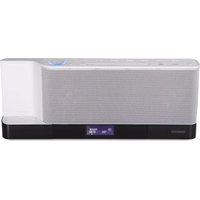
CLX-70-W - Docking Station KENWOOD - Free user manual and instructions
Find the device manual for free CLX-70-W KENWOOD in PDF.


| Product Type | Docking Station |
| Brand | Kenwood |
| Model | CLX-70-W |
| Dimensions (approx) | 200 x 150 x 50 mm |
| Weight (approx) | 0.5 kg |
| Power Supply | DC 5V, 2A (USB or AC adapter) |
| Compatible Devices | Smartphones, tablets, MP3 players |
| Charging Function | Yes, charges connected devices |
| Audio Output | 3.5 mm headphone jack, built-in speakers |
| Audio Playback | Supports music streaming from connected device |
| Indicator Lights | Power and charging status LEDs |
| Cable Length | 1.2 m (USB cable included) |
| Material | Plastic and rubber base |
| Operating Temperature | 0°C to 40°C |
| Storage Temperature | -20°C to 60°C |
| Cleaning | Wipe with a soft, dry cloth |
| Safety Warnings | Do not expose to liquids; keep away from heat sources |
| Spare Parts Availability | Contact Kenwood support for replacement cables or adapters |
| Reparability | No user-serviceable parts; refer to qualified service |
Frequently Asked Questions - CLX-70-W KENWOOD
User questions about CLX-70-W KENWOOD
0 question about this device. Answer the ones you know or ask your own.
Ask a new question about this device
Download the instructions for your Docking Station in PDF format for free! Find your manual CLX-70-W - KENWOOD and take your electronic device back in hand. On this page are published all the documents necessary for the use of your device. CLX-70-W by KENWOOD.
USER MANUAL CLX-70-W KENWOOD
Declaration of Conformity with regard to the EMC Directive 2004/108/EC
Manufacturer:
Kenwood Corporation
2967-3 Ishikawa-machi, Hachioji-shi, Tokyo, 192-8525 Japan
EU Representative's:
Kenwood Electronics Europe BV
Amsterdamseweg 37, 1422 AC UITHOORN, The Netherlands
Made for

iPod

iPhone

dts
Envelo | Speaker


MP3 WMA

Before applying power
Caution : Read this page carefully to ensure safe operation.
Units are designed for operation as follows.
Australia AC 240 V only
Europe AC 230 V only
Safety precautions
WARNING : TO PREVENT FIRE OR ELECTRIC SHOCK, DO NOT EXPOSE THIS APPLIANCE TO RAIN OR MOISTURE.
| CAUTION: TO REDUCE THE RISK OF ELECTRIC SHOCK,DO NOT REMOVE COVER (OR BACK). NO USER-SERVICEABLE PARTS INSIDE. REFER SERVICING TOQUALIFIED SERVICE PERSONNEL. | |
| THE LIGHTNING FLASH WITH ARROWHEAD SYMBOL, WITHIN AN EQUILATERAL TRIANGLE, IS INTENDED TO ALERT THE USER TO THE PRESENCE OF UNINSULATED "DANGEROUS VOLTAGE" WITHIN THE PRODUCT'S ENCLOSURE THAT MAY BE OF SUFFICIENT MAGNITUDE TO CONSTITUTE A RISK OF ELECTRIC SHOCK TO PERSONS. | |
| THE EXCLAMATION POINT WITHIN AN EQUI-LATERAL TRIANGLE IS INTENDED TO ALERT THE USER TO THE PRESENCE OF IMPORTANT OPERATING AND MAINTENANCE (SERVICING) INSTRUCTIONS IN THE LITERATURE ACCOMPANYING THE APPLIANCE. | |
The marking of products using lasers

The marking this product has been classified as Class 1. It means that there is no danger of hazardous radiation outside the product.
Location: Back panel
IMPORTANT SAFETY INSTRUCTIONS
Caution: Read this page carefully to ensure safe operation.
Read These Instructions
– All the safety and operating instructions should be read before the product is operated.
Keep These Instructions
– The safety and operating instructions should be retained for future reference.
Heed All Warnings
– All warnings on the product and in the operating instructions should be adhered to.
Follow All Instructions
– All operating and use instructions should be followed.
1. Clean only with dry cloth
- Unplug this product from the wall outlet before cleaning. Do not use liquid cleaners or aerosol cleaners. Use a damp cloth for cleaning.
2. Attachments
- Only use attachments/accessories specified by the manufacturer.
3. Do not use this apparatus near water
- This product shall not be exposed to dripping and splashing – for example, near a bath tub, wash bowl, kitchen sink, or laundry tub; in a wet basement; or near a swimming pool; and the like. Do not place an object containing liquid, such as a flower vase, on the appliance.
4. Accessories
- Use only with the cart, stand, tripod, bracket, or table specified by the manufacturer, or sold with the apparatus. When a cart is used, use caution when moving the cart/apparatus combination to avoid injury from tip-over.

5. Ventilation
- Slots and openings in the cabinet are provided for ventilation and to ensure reliable operation of the product and to protect it from overheating. Do not block any ventilation openings. Install in accordance with the manufacturer's instructions. The openings should never be blocked by placing the product on a bed, sofa, rug, or other similar surface. This product should not be placed in a built-in installation such as a bookcase or rack unless proper ventilation is provided or the manufacturer's instructions have been adhered to.
6. Power Sources
- This product should be operated only from the type of power source indicated on the product. If you are not sure of the type of power supply to your home, consult your product dealer or local power company.
7. CAUTION – Polarization
- Do not defeat the safety purpose of the polarized or grounding-type plug. A polarized plug has two blades with one wider than the other. A grounding type plug has two blades and a third grounding prong. The wide blade or the third prong are provided for your safety. If the provided plug does not fit into your outlet, consult an electrician for replacement of the obsolete outlet.
8. Power Cord Protection
- Protect the power cord from being walked on or pinched particularly at plugs, convenience receptacles, and the point where they exit from the apparatus.
9. Lightning
– Unplug this apparatus during lightning storms or when unused for long periods of time.
10. Overloading
- Do not overload wall outlets, extension cords, or integral convenience receptacles as this can result in a risk of fi re or electric shock.
11. Object and Liquid Entry
- Never push objects of any kind into this product through openings as they may touch dangerous voltage points or short-out parts that could result in a fire or electric shock. Never spill liquid of any kind on the product.
12. Servicing
- Do not attempt to service this product yourself as opening or removing covers may expose you to dangerous voltage or other hazards. Refer all servicing to qualified service personnel.
13. Damage Requiring Service
– Refer all servicing to qualified service personnel. Servicing is required when the apparatus has been damaged in any way, such as power-supply cord or plug is damaged, liquid has been spilled or objects have fallen into the apparatus, the apparatus has been exposed to rain or moisture, does not operate normally, or has been dropped.
14. Replacement Parts
- When replacement parts are required, be sure the service technician has used replacement parts specified by the manufacturer or have the same characteristics as the original part. Unauthorized substitutions may result in fire, electric shock, or other hazards.
15. Safety Check
– Upon completion of any service or repairs to this product, ask the service technician to perform safety checks to determine that the product is in proper operating condition.
16. Heat
- Do not install near any heat sources such as radiators, heat registers, stoves, or other apparatus (including amplifiers) that produce heat. Do not place a flaming object, such as a candle or lantern, or near the product.
17. Power Lines
- An outside antenna system should not be located in the vicinity of overhead power lines or other electric light or power circuits, or where it can fall into such power lines or circuits. When installing an outside antenna system, extreme care should be taken to keep from touching such power lines or circuits as contact with them might be fatal.
Notes:
Item 7 is not required except for grounded or polarized equipment.
Contents
Caution : Read the pages marked ⚠️ carefully to ensure safe operation.
Before applying power ......2
Safety precautions 2
IMPORTANT SAFETY INSTRUCTIONS ......2
Before use ....4
Connections 6
About MP3 and WMA 8
About USB device 9
Supported iPod/iPhone ......9
Handling discs....9
About SD card 9
Usable D.AUDIO 9
Component names and functions .....10
Basic function ......12
Switching the system on 12
Switching the system to standby mode ....12
Volume control 12
Sound control 12
Headphones....12
Using the CD/USB device/SD card ....13
Preparation....13
Playing a CD/ audio fi le 14
Programming tracks/fi les 14
Random play 14
Repeat play....15
Changing the display information.... 15
Recording on a USB device or SD card (For CD only) 15
Program recording (For CD only) 15
Using the radio 16
Tuning in radio stations 16
Auto preset 16
Manual preset 16
Tuning to a preset radio station ....16
Using Radio Data System 17
Changing the Radio Data System display information....17
Tuning by Program Type (PTY search) 17
Using the AUX ......17
Playing an external component....17
Using the iPod/iPhone ....18
Playing an iPod/iPhone 18
Repeat play....18
Random play 18
Using the D.AUDIO 18
Playback of Digital Audio Player ....18
System setup ......19
Adjusting the display brightness (BACKLIGHT)..... 19
Adjusting the display contrast (CONTRAST)....19
Setting Auto Power Save (A.P.S.) 19
Clock/timer operation ......20
Clock setting 20
Timer setting 20
To activate/deactivate the timer 21
Sleep timer setting 21
In case of diffi culty ......22
General information ......23
Specifications 24
Unpacking
Unpack the unit carefully and make sure that all accessories are present.
FM indoor antenna .....(1)
AM loop antenna .....(1)
Remote control unit with a built-in button battery ....(1)
AC adapter (AC-18335A) .....(1)
Power cord (For Europe) .....(1)
Power cord (For Australia) .....(1)
If any accessories are missing, or if the unit is damaged of falls to operate, notify your dealer immediately. If your unit was shipped to you directly, notify your shipper immediately. Kenwood recommends that you retain the original carton and packing materials in case you need to move or ship the unit in the future.
Keep this manual handy for future reference.
How to read this manual
Most of the functions are designed to be able to operate from the remote control unit.
Preparing the remote control unit
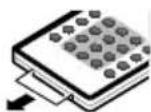
Pull the battery sheet out from the remote control unit to the direction of the arrow.
Operation
When the power cord is plugged in, STANDBY indicator is lit. The power turns ON by pressing ⏻ button on the remote control unit pointing at the remote sensor. When the power comes on, press the button you want to operate.
Remote sensor


- The supplied battery may have shorter live than ordinary battery due to use during operation checks.
- When the remote-controllable distance gets shorter than before, replace the battery with a new one.
- Placing the remote sensor in direct sunlight, or in direct light from a high frequency fluorescent lamp may cause a malfunction.
In such a case, change the location of the system installation to prevent malfunction.
Changing the battery of the remote control unit
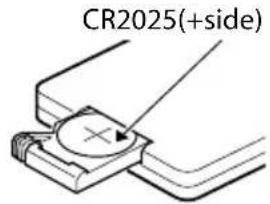
Use a commercially available button battery (CR2025).
1 Insert something narrow like a paperclip into the hole 1 and pull out the battery tray.
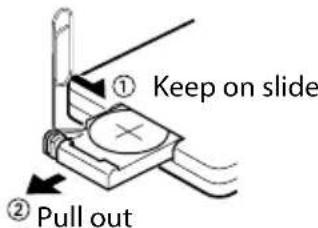
2 Replace the old battery with a new one.

CAUTION
- Lithium battery. Danger of explosion if the battery is incorrectly replaced. Replace only with the same or equivalent type.
- The battery pack or batteries shall not be exposed to excessive heat such sunshine, fire or the like.
- Keep battery out of reach of children and in original package until ready to use. Dispose of used batteries promptly. If swallowed contact physician immediately.
![FM indoor antenna AM loop antenna Sub WOOFER PRE OUT AUX IN L R DC IN 18V--- Connect a subwoofer (SW-40HT (separately available), etc.) to the [SUB WOOFER PRE OUT] terminal on the rear of the main unit. Connect the audio output of the VCR, etc. to the [AUX IN] terminals on the rear of the main unit. To AC wall outlet • Insert the plug firmly all the way into the AC wall outlet. ③ ①](/content/2026/06/1145909/images/37c8036aa6c7a263aeacfa0aa87b05f876452a80ef78c8b86f319fa7dc87bb00.jpg)
⚠️ Power cord
Two types of power cords are provided. Select the one designed for the country in which this unit is used.
⚠️ AC adapter
Use the AC adapter (AC-18335A) provided with this product.
CAUTION
The power in this equipment will not be completely cut off from the wall outlet when the standby switch is turned off. Install the equipment so that the wall outlet is easily accessible and, in case of emergency, immediately unplug the power plug from the wall outlet.
Mains plug is used as the disconnect device, It shall remain readily operable and should not be obstructed during intended use.
CAUTION
Be sure to adhere to the following, or proper ventilation will be blocked causing damage or fire hazard (Main unit and AC adapter).
- Do not place a cloth on the system or place it on a carpet or cushion.
- Do not use the system in a poorly ventilated place.
- Do not place any objects impairing heat radiation onto the top of the unit.
- Leave some space around the unit (from the largest outside dimension including projection) equal to or greater than, shown below.
Top panel : 50 cm /Side panel : 15 cm Back panel : 15 cm
Connecting the FM antenna
1 Connect the lead to the [FM 75Ω] terminal.
2 Find the location that gives the best reception.
3 Secure the antenna as high up as possible.
- The antenna supplied with the system is a basic antenna for indoor use. For stable signal reception, the use of an outdoor antenna (commercially available) is recommended. Disconnect the indoor antenna first before connecting an outdoor antenna.
CAUTION
- Since antenna installation necessitates skill and experience, always consult your dealer before installation. The antenna should be placed at a distance from the power distribution wires. Otherwise, an electric shock accident may occur if the antenna falls down.
Connecting the AM antenna
1 Connect the AM antenna cord to the [AM] and [ 12 GND] terminals.

flowchart
graph TD
    A["Hand gesture"] --> B["Adder"]
    B --> C["Device with lever"]
2 Setup the antenna in the position and the direction to be able to receive AM broadcast.

flowchart
graph LR
    A["Device State"] --> B["Intermediate State"]
    B --> C["Computer State with Rotation"]
- The antenna supplied with the system is for indoor use. Place it as far away as possible from the system, your TV set, the speaker cords, AC adapter and the power cord, and point it in the direction that provides the best reception.
Connecting the iPod dock adapter
1 Insert the Dock adapter into unit.

natural_image
Diagram of a device with a lid and internal component, no text or symbols present2 Connect your iPod/iPhone.

natural_image
Illustration of a device with an iPod icon and a small electronic device inserted into a base (no text or symbols)To remove Dock adapter
- Insert a thin object such as the tip of a flat-blade screwdriver into the slit on the dock adapter and lift it to remove.

natural_image
Diagram of a mechanical component with a tool inserted, showing internal structure and an arrow indicating direction (no text or symbols)
- Connect an iPod dock adapter, which is provided with your iPod/iPhone or commercially available in iPod dealers, to the iPod dock of this unit. Note that the iPod adapter is not provided with this unit.
• See page 9 for the supported iPod/iPhone models.
The playable MP3/WMA fi le (hereafter called Audio fi le) and the media format have the following limitation. The Audio fi le, which is not conforming to the specification, may not play normally.
playable Audio fi le
playable MP3 fi le
- File formats: MPEG 1/2 Audio Layer 3 file
- Extension: .mp3
- Transfer bit rate: 8 kbps – 320 kbps
- Sampling frequency: 48/44.1/32/24/22.05/16/12/11.025/8 kHz
playable WMA fi le
- File format: Windows Media™ Audio compliant
- Extension: .wma
- Transfer bit rate: 32 kbps – 320 kbps
• Sampling frequency: 48/44.1/32 kHz - Files created using functions in Windows Media™ Player 9 or later cannot be played.
- WMA Professional
- WMA Lossless
- WMA Voice

- Do not attach the extensions to files other than the Audio file. If the extension is attached, the file, which is not the Audio file, will play and outputs a loud noise, causing damage to the speaker.
- The files with copy protection cannot be played.
- Audio files cannot be played depending on the encoding software setting, USB device type, and/or recording conditions.
- The unit may not be compatible with upgrade of compression format standard and additional specifications.
- Audio files encoded using VBR (Variable Bit Rate) may use bit rates that fall outside the supported range. Audio files with bit rates outside the supported range cannot be played.
playable storage media
- CD-ROM, CD-R, CD-RW
• USB device (USB version 1.1/2.0)
• SD, SDHC, mimi SD, micro SD/SDHC card

- CD-RW discs which are quick formatted by the writing software cannot be used.
- When recording to the maximum CD-R/RW media capacity at once, the writing software is set to "Disc at once".
- For details on the available USB devices, refer to
(page 9). - For details on the available SD/SDHC card, refer to
(page 9).
playable CD-R/RW format
• ISO 9660 Level 1/2
• Joliet
playable fi le format of USB device/ SD card
• FAT 16/32
The maximum number of characters for display
- File/Folder name: 30/9 characters
- MP3 ID3 TAG/ WMA Contents property: 30 characters WMA Contents property (album name): 14 characters (The information which can be displayed with this unit: title, artist name, and album name)

- File/Folder name is the number of the characters including the extensions.
- This unit can display the following versions of MP3 ID3 TAG: version 1.0/ 1.1/ 2.2/ 2.3/ 2.4
- A character that cannot be displayed with this unit is displayed incorrectly or substituted by “-”.
Limitation of structure for the file and the folder
• Maximum number of folders: 255 (including root folder)
• Maximum number of files per folder: 999 (including the number of folders)
Playing order of the audio fi le
- Audio files are played in the order the files are written. You can specify the order of playback by numbering files in a folder and writing them by folder.
Example

flowchart
graph TD
    A["CD (1)"] --> B["1"]
    A --> C["2"]
    A --> D["3"]
    A --> E["4"]
    A --> F["5"]
    A --> G["..."]
    B --> H["Folder"]
    C --> I["Audio file"]
    D --> J["Folder"]
    E --> K["Audio file"]
    F --> L["Folder"]
    G --> M["Audio file"]
- Playing order
Playing order after ⬆① play:
→ ⌘②, ⌘③, ⌘④, ⌘⑤...
Notes on use of the USB device
This unit can play audio fi les stored in the fl ash memory and digital audio player that have a USB port (these devices are referred to as USB devices in this document).
The following restrictions are placed on the types and usage of available USB devices:
Available USB devices
• USB devices belonging to the USB mass storage class.
- USB devices whose maximum current consumption is 500 mA or less.

- USB Mass Storage Class: USB devices that the PC can recognize as an external storage without using any special driver or application software.
- Contact the sales agent as to whether your USB device conforms to the USB mass storage class specs.
- Using an unsupported USB device can result in abnormal playback or display of the audio file. Even if you use the USB device conforming to the above specs, audio files cannot be played normally depending on the type or condition of the USB device.
Supported iPod/iPhone
Made for
- iPod nano (6th generation)
- iPod nano (5th generation)
- iPod nano (4th generation)
- iPod nano (3rd generation)
- iPod nano (2nd generation)
- iPod classic
- iPod touch (4th generation)
- iPod touch (3rd generation)
- iPod touch (2nd generation)
- iPod touch (1st generation)
- iPhone 4
- iPhone 3GS
- iPhone 3G
- iPhone

- Be sure to update the software of your iPod/iPhone to the latest version.
- The iPod/iPhone cannot be connected together with its accessories such as the cover or case. Be sure to remove any accessories before connecting the iPod/iPhone.
- When the iPod/iPhone is detached from the iPod dock, the TV Out setting of the iPod/iPhone may sometimes be set to On. Check this setting if the iPod/iPhone cannot display video.
Handling discs
Handling precautions
Hold a CD taking care not to touch the played surface. (The side without the printed label is the playback side.)
Discs playable on the system
This system can play back a CD, CD-ROM, CD-R, CD-RW or the audio part of a CD-EXTRA disc.
Notes on CD-ROM/CD-R/CD-RW discs
If the CD-ROM, CD-R or CD-RW disc in use has a printable label surface, the disc may be unable to be taken out of the system due to sticking of the label surface. To prevent malfunction of the system, do not use such a disc.
Cautions on CD discs
Always use a CD carrying the marking.
A disc without this marking may be unable to be played back correctly.
The disc rotates at a high speed during playback. Never use a cracked, chipped or greatly warped disc. Otherwise, damage or malfunction of the player may result.
Also, do not use a disc with a non-circular shape as this may result in malfunction.
About SD card
Available SD card
• SD, SDHC, mimi SD, micro SD/SDHC card
• An SD card of 512 MB to 32 GB can be used.
SD card (Write protect switch)
The SD card a switch for inhibiting data write in it. Set the switch to "LOCK" when you want to protect the written data. Set the switch to the unlock position before starting recording.


- A special adapter is required for using a mini SD/micro SD card.
• A multimedia card (MMC) cannot be used.
Usable D.AUDIO
To control a Kenwood digital audio player from the main unit or remote control unit, the Kenwood digital audio player connection cable is necessary.
Usable Kenwood digital audio player models
| HDD audio player Memory audio player/recorder |
| HD20GA7 MGR-E8/MGR-A7/M2GD55/M1GD55/M1GC7/M2GC7 |

1 1
button
To switch the system on or to standby mode.
[STANDBY] indicator
Red lighting: Ordinary standby mode
Orange lighting: Timer standby mode
2 2
Source buttons
TUNER/CD/USB/SD/iPod/D.AUDIO/AUX tton
To select the source you want, or to turn the system on to the selected source.
When you select TUNER source, press TUNER button to select the desired waveband FM or AM.
3 3
▶/II button
To start or interrupt playback for CD, audio file, iPod, iPhone and D.AUDIO.
STOP ■ button
To stop playback for CD, audio file and D.AUDIO.
4 5
◀◀/▶◀buttons
To search forward/backward to next/previous track for CD.
To skip tracks for CD.
To search forward/backward or to skip to the next/previous fi les for audio fi les and iPod, iPhone.
To tune to higher/lower radio frequency or search radio stations for TUNER.
5 P.M
MODE button
To program tracks/fi les for CD and audio fi le.
STEREO/MONO button
To switch between stereo mode and mono mode (on FM band only) for TUNER.
6
MULTI CONTROL ▲/▼/ ◀ /▶ buttons
Press to select a setting item.
ENTER button
Press to enter the selected item.
7 RA
NDOM button
To playback in random order for CD, audio file and iPod, iPhone.
8 RE
PEAT button
To repeat one track/fi le or all tracks/fi les for CD, audio fi le and iPod, iPhone.
9 dig
it 0 - 9 buttons
To select a track/fi le number for CD and audio fi le. To select a preset radio station for TUNER.
10 D-
BASS button
To switch on/off bass enhancement.
11 SO
UND button
To select the desired DTS Envelo Speaker for the 3D surround effect: DTS Envelo ON:1, ON:2 or OFF.
12 EQ
button
To select the desired sound effect: POP, CLASSIC, ROCK, JAZZ, GAME or FLAT (off).
13
DISPLAY button
To change the time display for CD.
To change the information display for audio files.
To change the display for Radio Data System.
To change the display for clock.
14
BACKLIGHT/CONTRAST button
To switch the display backlight and illumination on and off.
To adjust the display contrast.
15
CLEAR/PTY button
To delete the track/fi le number entered during track. To carry out PTY search.
16
TIMER ON/OFF button
To switch the timer on/off.
17
TIMER SET button
To set the clock.
To set the timer.
To set the A.P.S.
18
FOLDER/P.CALL ▲/▼ buttons
To select an album (folder) of audio files and iPod, iPhone.
To select a preset radio station for TUNER.
19
MUTE button
To interrupt and resume sound reproduction.
20 4
VOLUME ▲/▼ buttons
To increase or decrease the volume.
21
SLEEP button
To select the sleep time.
22
CD ▶ USB O.T.E.button
To record from CD to a USB device.
CD ▶ SD O.T.E.button
To record from CD to a SD card.
6
[▲] button
To eject the disc.
7
Disc slot
8
PHONES jack
9
D.AUDIO input terminal
10
USB connector
11
SD card slot
12
Remote sensor
13
Display
14
iPod/iPhone applied part connector
Standby mode
While the STANDBY indicator is lit, a small amount of power is supplied to the system to back up the memory. This is called standby mode. Under the condition, the system can be turned ON by the remote control unit.
Switching the system on
Press TUNER, CD, USB, SD, D.AUDIO, iPod, AUX button.
The [STANDBY] LED will go out.
The system will switch to the last selected source or the selected source.
Switching the system to standby mode
Press button.
[STANDBY] indicator is lit.
Volume control
Press VOLUME ▲ button to increase, or press VOLUME ▼ to decrease the volume level.
"VOL XX" is displayed. Adjust in the range from 0 (MIN.) to 40 (MAX.).
To switch off the volume temporarily
Press MUTE button.
Playback continues without sound, and "MUTE" is displayed.

- To restore the volume, press MUTE button again or adjust the volume.
Sound control
The sound control system feature enables you to enjoy special sound effects; 3D surround effect, preset equalizer settings and bass enhancement, providing the best music reproduction.
To switch on DTS Envelo Speaker settings
Press SOUND button to select DTS Envelo Speaker for the 3D surround effect: DTS Envelo ON:1, ON:2 or OFF.
When an effect other than OFF is selected, the "DTS" appears on the display.
To switch on preset equalizer settings
Press EQ button to select the desired sound effect: POP, CLASSIC, ROCK, JAZZ, GAME or FLAT (off).
When an effect other than FLAT is selected, the "EQ" icon appears on the display.
To switch on the bass enhancement
Press D-BASS button to adjust the enhancement level: D-BASS 1 to 10 or OFF.
The "EQ" icon appears on the display.

- Pressing [D-BASS] cancels the equalizer settings (EQ).
- Pressing [EQ] cancels the low frequency enhancement (D-BASS) and DTS Envelo Speaker effect (SOUND).
- The DTS Envelo Speaker effect is cancelled when headphones are connected.
Headphones
To listen to your stereo with headphones (separately available), use the 3.5 mm phones jack on the main unit.
Connecting headphones mutes the sound from the speakers.
CAUTION
- Excessive sound pressure from earphones or headphones can cause hearing loss.
Preparation
Inserting a disc
1 Press CD button.
2 Insert a disc into the disc slot with the label side facing forward.

natural_image
Diagram of a device with a circular component and a play button, no text or symbols presentFor a CD, the total playtime and total number of tracks will appear in the display.
For an audio fi le-CD, the total album number and total fi le number will appear on the display.
Removing a disc
1 Press [▲] button. "EJECT" is displayed and the disc is ejected.
Inserting a USB device
1 Press the button to select standby mode.
2 Insert a USB device to the USB connector on the front panel.
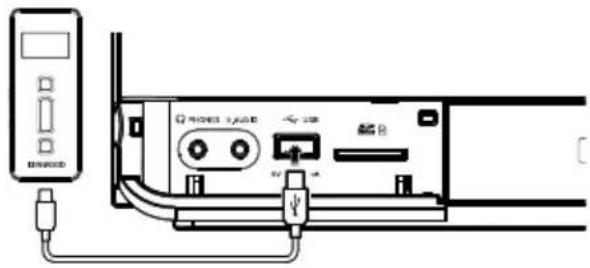
3 Press USB button.
"USB" is displayed. The total album number and total fi le number will appear on the display.
Removing the USB device
1 Press the button to select standby mode.
2 Remove the USB device.
Inserting an SD card
1 Press the button to select standby mode.
2 Insert the SD card into the SD card slot until it clicks.


Insert the SD card so that the label side faces up and the side with a cut comes on the right.
3 Press SD button.
The total album number and total file number will appear on the display.
Removing the SD card
1 Press the button to select standby mode.
2 Remove the SD card.

- To ensure good system performance; wait until the unit completely reads the disc/USB device/SD card before proceeding.
- If the disc compartment is not loaded with a disc, "NO DISC" is displayed.
- If the disc is unreadable or there is no playable audio file in the USB device/SD card, "NO DATA" is displayed.
- For audio files, reading time may exceed 10 seconds due to the large number of songs compiled into one disc/USB device/SD card.
- The icon "MP3" appears only when an MP3-file is played. The icon "WMA" appears only when an WMA-file is played.
Playing a CD/ audio fi le
Press ▶/II button to start playback.
The track/fi le number and elapsed playing time of the current track/fi le appear on the display.
Basic operations
| Operation type Operation | |
| To stop playback Press STOP ■ button. | |
| To interrupt playback | Press ▶/■ button.Press again to resume playback. |
| To search for a particular passage during playback | Press and hold ◀◀◀ or ▶▶▶I button for more than 2 seconds.Press the ▶/■ button when the desired passage is located. |
| To select a track/ file | Press ◀◀◀ or ▶▶▶I button in play or pause mode. |
| To select a folder (For audio file only) | Press FOLDER/P.CALL ▲ or ▼ button in play or pause mode. |

- For audio file; "DIR:xxx TRK:xxx" appears on the display. "DIR:xxx" indicates album number and "TRK:xxx" indicates the file number.
- The digit buttons, 0–9 on the remote control unit can also be used to select a track/file.
Press the digit buttons as shown below:
| CD Audio file | ||
| To select track/file 2 | 2 and ENTER | 2 and ENTER |
| To select track/file 23 | 2 and 3 | 2, 3 and ENTER |
| To select file 120 — | 1, 2 and 0 | |
If the ENTER button is not pressed, the search for the selected track/file will start in 5 seconds.
Programming tracks/files
Programming tracks/files of a CD/audio file is possible when playback is stopped. Up to 30 tracks can be stored in the memory in any order.
1 In stop mode, press P.MODE button to enter program setting.
The icon "PGM" and "P-01 T--"/ "P-01 T--" appears on the display.
"T--" indicates track number of the CD.
"T--" indicates file number of the audio file.
"P-01" indicates program number.
The icon "PGM" starts flashing.
2 Press MULTI CONTROL ▲ or ▼ button, or digit buttons 0–9 to select the desired track/file.
3 Press ENTER button to store the selected track/file.
The track/fi le number returns to "T--"/"T--..." and the next program number appears on the display.
4 Repeat steps 2 to 3 to select and store other desired tracks/files in this way.
The icon "PGM" appears on the display.
5 Press ▶/Ⅱ button to play the programmed tracks/files.

- "PGM FULL" appears on the display, if you attempt to program more than 30 tracks/files.
• Audio files can only be programmed within the same source. - Now enter the new track/file number with either method below.
- Press the MULTI CONTROL ▲ or ▼ button to select the desired track/file.
- Press the CLEAR button to clear the track/file number programmed. Select the new track/file number using digit buttons "0" to "9" on the remote control unit.
- If you press REPEAT button during programmed playback, the current track or all programmed tracks/files is/are played repeatedly.
The icon "REP." or "REP. ALL" and the icon "PGM" appear on the display.
To clear the program
Press P.MODE button.
The icon "PGM" disappears from the display.

- "P" represents PROGRAM.
- The function of program setting cannot be used in PLAY/PAUSE mode.
Random play
You can play all the tracks/files in random order.
1 During playing, pause or stop mode, press RANDOM button to enable random play mode. The icon "RDM" appears on the display.
2 To exit random mode, press RANDOM button again.
The icon "RDM" disappears from the display.
Repeat play
You can play the current track/fi le/album or the whole disc/audio fi le repeatedly.
Press REPEAT button in play or pause mode.
Every time the button is pressed, the repeat play changes in the following order:
For CD :
| Repeat mode Icon | |
| Repeat a single track "REP." | |
| Repeat all the tracks *1 | "REP. ALL" |
| Repeat off — | |
For audio fi le :
| Repeat mode Icon | |
| Repeat a single file "REP." | |
| Repeat one album *2 | "REP. ALB." |
| Repeat all the files *1 | "REP. ALL" |
| Repeat off — | |

• *1 All tracks/files are repeated continuously.
• * This function cannot be used in program mode.
Changing the display information
Press DISPLAY button in play or pause mode.
Every time the button is pressed, the display changes in the following order:
For CD :
| Information Icon | |
| Status display — | |
| The current track elapsed time. — | |
| The current track remaining time. "REMAIN" | |
| The whole disc elapsed time. "TOTAL" | |
| The whole disc remaining time. | "TOTAL REMAIN" |
| The whole CD time. | — |
For audio fi le :
| Information Icon | |
| Status display — | |
| Album name and file name. | — |
| Tag information (Track, album title and artist name). | — |
| Album number and track number. | — |
Recording on a USB device or SD card (For CD only)
Records songs in the CD to the USB device or SD card in MP3 format.
1 Insert a USB device to the USB connector or SD card on the front panel.
2 To record all the tracks: Stop playback. To record a single track: Play the track to be recorded.
3 Press CD ▶ USB O.T.E. or CD ▶ SD O.T.E. button to begin recording.
When you stop the recording
Press ■ stop button.

• During recording, it is not possible to listen to another source.
- The recorded music files and folders accommodating them are numbered automatically. These number can later be modified.
- Numbers assigned to folders: AL_A01...AL_A99...AL_Z99
- Numbers assigned to music files: A01_001.mp3, A01_002.mp3.../A99_001.mp3.../Z99_001.mp3...
- Example

flowchart
graph TD
    A["CD-1"] --> B["KWD"]
    C["CD-2"] --> D["Al_A01"]
    E["CD-2"] --> F["Al_A02"]
    B --> G["A01_001.mp3"]
    D --> H["A02_001.mp3"]
    style A fill:#fff,stroke:#000
    style C fill:#fff,stroke:#000
    style E fill:#fff,stroke:#000
• Music is encoded according to specification below.
- Format: MP3
- Transfer bit rate: 192 kbps
– Sampling frequency: 44.1 kHz
• Recordable USB device or SD card
- USB standard: USB 1.1/2.0
- SD, SDHC, mimi SD, micro SD/SDHC card
- An SD card of 512 MB to 32 GB can be used.
- File system: FAT 16/32
Program recording (For CD only)
Desired CD tracks can be programmed in the desired sequence and recorded onto a USB device or SD card.
1 Insert a USB device to the USB connector or SD card on the front panel.
2 Program the desired sequence of CD tracks. See page 14 for programming procedure.
3 Press CD ▶ USB O.T.E. or CD ▶ SD O.T.E. button to begin recording.
Tuning in radio stations
1 Press TUNER button to select the desired waveband: FM or AM.
2 Press and hold ◀◀◀ or ▶▶▶ button to tune in to the desired frequency.

- To tune to a weak station, briefly press I◀◀ or ▶▶▶I button repeatedly until the display shows the desired frequency or when the best reception has been obtained.
STEREO/MONO
Press the STEREO/MONO button to select mono or stereo mode.
When stereo mode is selected, the icon "STEREO" appears on the display (if current station is FM stereo).

- You are able to select stereo or mono mode in FM band only.
Auto preset
Radio stations can be preset automatically in preset channels.
1 Press TUNER button to select the desired waveband: FM or AM.
2 Press MEMORY/REPEAT button for more than 2 seconds.
The receivable radio stations are preset automatically.
When the Auto preset operation has completed, the unit enters the condition in which preset station P01 is tuned.
Manual preset
You can store up to 30 for FM and 10 for AM radio stations in the memory. When a preset radio stations selected, the preset number appears on the display.
1 Press TUNER button to select the desired waveband: FM or AM.
2 Press |◀◀ or ▶▶| button to tune in to the desired frequency.
3 Press MEMORY/REPEAT button so that "P --" appears on the display.
4 If you want to store the radio station to another preset number, press FOLDER/P.CALL ▲ or ▼, or digit buttons 0–9 to select the desired preset number.
5 Press ENTER button again to store the radio station.
6 Repeat steps 2 to 5 to store other preset radio stations.

- During preset, if no button is pressed within 20 seconds, the system will exit preset mode automatically.
Tuning to a preset radio station
Press FOLDER/P.CALL ▲ or ▼, or digit buttons 0–9 to select the desired preset number.
The preset number and radio frequency appear on the display.

- Press the digit buttons as shown below:
FM AM
To select 1 1 and ENTER 1 and ENTER
To select 2 2 and ENTER 2 and ENTER
To select 10 1, 0 and ENTER 1, 0 and ENTER
Using Radio Data System
Radio Data System is a system that transmits useful information (in the form of digital data) for FM broadcasts along with the broadcast signal. Tuners and receivers designed for Radio Data System reception can extract the information from the broadcast signal for use with various functions, such as automatic display of the station name.
Radio Data System functions
PTY (Program TYpe Identifi cation) Search:
Automatically tunes to a station that is currently broadcasting the specified program type (genre).
PS (Program Service Name) Display:
Automatically displays the station name transmitted by the Radio Data System station.
Radio Text function:
Displays the radio text data transmitted by some Radio Data System stations when you press the DISPLAY button. There is "NO TEXT" display if no text data is transmitted.

- Some functions and function names may differ in certain countries and areas.
Changing the Radio Data System display information
While receiving a Radio Data System station, pressing the DISPLAY button changes the contents of the display.
Every time the button is pressed, the display changes in the following order:
Information
| PS (Program Service name) display |
| PTY (Program Type) display |
| RT (Radio Text) display |
| Frequency display and preset number display |
Tuning by Program Type (PTY search)
This function lets you set the tuner to automatically search for stations which are currently broadcasting the type of program (genre) you want to listen to.
1 Press TUNER button to select FM.
2 Press PTY button.
If the current station is with Radio Data System, the program type of the station is displayed.
3 Press FOLDER/P.CALL ▲ or ▼ button to select your desired program type.
Program type table
| Program Type Name Display | |
| News "NEWS" | |
| Current Affairs "AFFAIRS" | |
| Information "INFO" | |
| Sport "SPORT" | |
| Education "EDUCATE" | |
| Drama "DRAMA" | |
| Culture | "CULTURE" |
| Science | "SCIENCE" |
| Varied Speech "VARIED" | |
| Pop Music | "POP M" |
| Rock Music | "ROCK M" |
| Easy Music | "EASY M" |
| Light Classical Music | "LIGHT M" |
| Serious Classical Music "CLASSICS" | |
| Other Music | "OTHER M" |
| Weather | "WEATHER" |
| Finance | "FINANCE" |
| Children's Program | "CHILDREN" |
| Social Affairs | "SOCIAL" |
| Religion | "RELIGION" |
| Phone In | "PHONE IN" |
| Travel | "TRAVEL" |
| Leisure | "LEISURE" |
| Jazz Music | "JAZZ" |
| Country Music | "COUNTRY" |
| National Music | "NATION M" |
| Oldies Music | "OLDIES" |
| Folk Music | "FOLK M" |
| Documentary | "DOCUMENT" |
4 Press PTY button to start searching.

- Under certain receiving conditions, it may take more than 1 minute to complete the search.
- If the desired program type cannot be found, "NO PROGRAM" is displayed, then after several seconds the display returns to the original display.
Using the AUX
Playing an external component
An external component can be connected to AUX IN of this unit and played back.
1 Connect an external component.
Connect an external component to the [AUX IN] connector on the rear of this unit.
2 Press AUX button.
3 Start playing the connected external component.
Using the D.AUDIO Using the iPod
Inserting an iPod/iPhone
1 Connect a iPod/iPhone to the iPod applied part.
2 Press iPod button.
The icon "iPod" appears on the display.
Playing an iPod/iPhone
Press ▶/II button to start playback.
Basic operations
| Operation type Operation | |
| Call to iPod/iPhone menu display | Press ◀ button. Call to iPod/iPhone menu display.Press to ▲ or ▼ button enter the selected iPod/iPhone menu item and press ENTER button.. |
| To interrupt playback | Press ▶/□ button.Press again to resume playback. |
| To search for a particular passage during playback | Press and hold I◀◀ or ▶▶I button.Release to resume the playback. |
| To select a song Press I◀◀ or ▶▶I button. | |
| To select a album *1 | Press FOLDER/P.CALL ▲ or ▼ button. |

• *1 The operation varies depending on the model of iPod/iPhone
| Model other than iPod touch/iPhone | iPod touch/iPhone |
| The operation is available when one of the following items is selected. | The album is switched to the next album found by following the alphabetical order of track names.— Example Track-A1......Album-ATrack-B1......Album-BTrack-B2......Album-BTrack-C1......Album-C |
| Browse item Selection | |
| Artists, Composers All Albums | |
| Albums, Compilations All Songs | |
| Genres All Artists |
Repeat play
You can play the current song or the all songs repeatedly.
Press REPEAT button.
Each press switches the selection of iPod/iPhone play mode.
Random play
You can play all the album in random order.
Press RANDOM button.
Each press switches the selection of iPod/iPhone play mode.

- The displayed icon may not match the actual operation with certain iPod/iPhone models.
Playback of Digital Audio Player
Kenwood digital audio player can be connected to play audio files in it.
1 Connect an the player.
Connect a Kenwood digital audio player to the [D.AUDIO] connector using an optional cable or adapter. Also read the instruction manual for the connected component.
Kenwood digital audio player

2 Press D.AUDIO button.
3 Turn the connected player ON and start playing it.
Basic operations
| Operation type Operation | |
| To stop playback Press STOP ■ button. | |
| To interrupt playback | Press ▶/■ button.Press again to resume playback. |
| To search for a particular passage during playback | Press and hold I◀◀ or ▶▶I button for more than 2 seconds. |
| To select a track/ file | Press I◀◀ or ▶▶I button in play or pause mode. |
| To select a folder | Press FOLDER/P.CALL ▲ or ▼ button in play or pause mode. |

- Some control operations may be unavailable depending on the connected player.
Adjusting the display brightness (BACKLIGHT)
The brightness of the display backlight can be adjusted and how the display backlight and illuminations of this unit are lit can be selected.
1 Press BACKLIGHT/CONTRAST button.
2 Press MULTI CONTROL ◀ or ▶ button to select "BACKLIGHT" and press ENTER button.
3 Press MULTI CONTROL ◀ or ▶ button to select the backlight setting and press ENTER button to store the setting.
Setting Function
| BACKLIGHT: 1 Both the display backlight and illuminations are turned on. |
| BACKLIGHT: 2 The display backlight is turned on and the illuminations are turned off. |
| BACKLIGHT: 3 The display backlight is turned off and the illuminations are turned on. |
| BACKLIGHT: 4 Both the display backlight and illuminations are turned off. |
When the setting completes, "COMPLETE" is displayed and the unit exits the setup mode automatically.
Adjusting the display contrast (CONTRAST)
The contrast of the display can be adjusted.
1 Press BACKLIGHT/CONTRAST button.
2 Press MULTI CONTROL ◀ or ▶ button to select "CONTRAST" and press ENTER button.
3 Press MULTI CONTROL ◀ or ▶ button to adjust the contrast setting and press ENTER button to store the setting.
Setting Function
| 1 □ |
| 2 □□ |
| 3 □□□ Adjusting for 5 steps |
| 4 □□□□ |
| 5 □□□□□ |
When the setting completes, "COMPLETE" is displayed and the unit exits the setup mode automatically.
Setting Auto Power Save (A.P.S.)
A.P.S. stands for Auto Power Save, which is the function that switches this unit OFF when it has not been controlled for more than 30 minutes while its power is ON and the CD and other inputs are in stop mode.
1 Press TIMER SET button.
2 Press MULTI CONTROL ◀ or ▶ button to select "A.P.S." and press ENTER button.
3 Press MULTI CONTROL ◀ or ▶ button to select the A.P.S. setting and press ENTER button to store the setting.
Setting Function
| A.P.S. ON A.P.S. mode is ON. |
| A.P.S. OFF A.P.S. mode is OFF. |
When the setting completes, "COMPLETE" is displayed and the unit exits the setup mode automatically.
When the A.P.S. is ON...
A.P.S. is activated when this unit is in either condition below.
- When the input source is TUNER, AUX, D.AUDIO or iPod, the volume level is 0 and no button has been pressed for 30 minutes.
- When the input source is CD, USB or SD, the CD player or USB device or SD is in stop mode and no button has been pressed for 30 minutes.

- When the A.P.S. is activated, the display shows flashing "A.P.S." from about one minute before this unit is switched OFF.
Clock setting
1 Press TIMER SET button.
2 Press MULTI CONTROL ◀ or ▶ button to select "CLOCK" and press ENTER button.
"CLOCK SETTING" appears on the display.
3 Press ENTER button.
The hour indication will start flashing.
4 Press MULTI CONTROL ▲ or ▼ button to set the hours and press ENTER button.
The minute indication starts flashing.
5 Press MULTI CONTROL ▲ or ▼ button to set the minutes and press ENTER button.
When the setting completes, "COMPLETE" is displayed and the unit exits the setup mode automatically.

- The clock setting will be erased when the power cord is disconnected or a power failure occurred.
- The MULTI CONTROL ◀ or ▶ button can be used to move across the setting items.
Timer setting
The system can switch on to CD, USB, SD, TUNER or iPod automatically at a preset time, serving as an alarm to wake you up.
Important!
Before setting the timer, ensure that the clock is set correctly.
1 Press TIMER SET button.
2 Press MULTI CONTROL ◀ or ▶ button to select "TIMER" and press ENTER button.
3 Set the time to start playback.
The icon "ON" starts flashing.
Press MULTI CONTROL ▲ or ▼ button to set timer start hours and press ENTER button to store the setting. Repeat the same procedure to set the minutes.
The icon "OFF" starts flashing.
4 Repeat the step 3 to set the time to stop the timer (off time).
The icon "TIMER" fl ashes and the source display appears.
5 Press MULTI CONTROL ▲ or ▼ button to select the desired source and press ENTER button to store the setting.
The source switches as follows :
"CD" → "USB" → "SD" → "iPod" → "TU FM" → "TU AM" → ...
When a radio source (FM/AM) is selected, select the preset station number after the above.
6 Press MULTI CONTROL ▲ or ▼ button to set volume level and press ENTER button to store the setting.
7 Press MULTI CONTROL ◀ or ▶ button to select the play mode and press ENTER button to store the setting.
Play mode Function
| PLAY The playback begins at the level set with VOLUME. |
| AI PLAY The volume is increased gradually until the level set with VOLUME. |
When the setting completes, "COMPLETE" is displayed and the unit exits the setup mode automatically.
The icon "TIMER" appears on the display.
The timer is now set.
8 Switch the system to standby mode.
The STANDBY/TIMER indicators also light orange.

- When reached the preset timer, the selected source will play or switch to standby mode after the timer has been activated.
- The MULTI CONTROL ◀ or ▶ button can be used to move across the setting items.
To activate/deactivate the timer
Press TIMER ON/OFF button.
If activated, the icon "TIMER" appears on the display.

- The timer off will not be activated if the starting and stopping time are the same.
Sleep timer setting
If the sleep timer is activated, the system will switch to standby mode after the selected time has expired.
Each press of the SLEEP button decreases the timer period by 10 minutes. The sleep timer can be set up to 90 minutes.
The icon "SLEEP" appears on the display.
The display will change to sleep time display and change as follows:
9 0 min → 8 0 min → 7 0 min → 6 0 min → 5 0 min → 4 0 min → 3 0 min → 2 0 min → 1 0 min → OFF → ...
While sleep mode is in active:
To deactivate the sleep timer
Press SLEEP button or press button to turn the power off.

- If timer off and the sleep off are all activated, the system will switch to standby mode by the earlier timer set.
Resetting the Microcomputer
The microcomputer may malfunction (unit cannot be operated, or shows an erroneous display) if the power cord is unplugged while the power is ON, or due to some other external factor. If this happens, execute the following procedure to reset the microcomputer and return the unit to its normal operating condition.
When the power is off (standby mode), press the [AUX] and [◀◀] buttons on the main unit until "FACTORY RESET" is appears.
Unplug the AC cord and plug it back in if "RESET FINISHED" appears.
- Please note that resetting the microcomputer will clear the contents of the memory and return the unit to the state it was in when it left the factory.
Check that following guide for problem resolution.
General
No sound.
→ Plug in AC cord securely.
→ Set the VOLUME control to proper sound level.
→ Make sure the source is set to the source you want to operate.
→ Pull out the headphones plug from the headphones jack.
The system does not operate by pressing any buttons.
→ Unplug the AC cord and plug it back in.
This unit is turned OFF spontaneously.
→ A.P.S. is set to ON. Set it to OFF.
CD player operation
"NO DISC" is displayed.
→ Insert a disc correctly (label side facing forward).
→ Clean the disc.
→ Use a new or readable disc.
→ Wait until the moisture condensation at the lens has cleared.
Disc cannot be ejected.
→ Press and hold [▲] button until "EJECT" appears.
USB operation
"NO USB" is displayed.
→ Press ⏻ button again after press ⏻ button.
→ Insert the USB device properly.
"NOT SUPPORT" is displayed.
→ Press ⏻ button again after press ⏻ button.
Cannot play.
→ Check if the USB mass storage class-compatible digital audio player is turned ON.
iPod/iPhone operation
"NO iPod" is displayed.
→ Insert the iPod/iPhone properly.
Does not function properly.
→ Disconnect the iPod/iPhone and connect it again.
→ Check the software version of the iPod/iPhone. If it is not the latest one, update it.
SD operation
"NO SD" is displayed.
→ Press ⏻ button again after press ⏻ button.
→ Insert the SD card properly.
"NOT SUPPORT" is displayed.
→ Press ⏻ button again after press ⏻ button.
Cannot play.
→ Insert an SD card containing music files.
D.AUDIO operation
Kenwood digital audio player cannot be controlled from the main unit or remote control unit.
→ Connect using the connection cable (separately available).
→ Check if a compatible model is connected.
Radio reception
Noise in radio.
→ Tune to a correct frequency.
→ Adjust the direction of the FM antenna.
→ Adjust the position and direction of the AM antenna.
→ Increase the distance between the system and TV or VCR.
Remote control unit
Does not function properly.
→ Replace the batteries.
→ Remove the obstacles.
→ Move closer to the system when using the remote control and make sure that you are pointing at unit's remote sensor.
Maintenance
Cleaning the cabinet
- Use a soft cloth slightly moistened with a mild detergent solution. Do not use a solution containing alcohol, spirits, ammonia or abrasive.
Cleaning discs
- When a disc becomes dirty, clean it with a cleaning cloth, wipe the disc from the center out. Do not wipe in circular motion.
- Do not use solvents such as benzene, thinner commercially available cleaners, or antistatic spray intended for analogue records.
Caution on condensation
Condensation (of dew) may occur inside the unit when there is a great difference in temperature between this unit and the outside. This unit may not function properly if condensation occurs. In this case, leave the unit for a few hours and restart the operation after the condensation has dried up.
Be specially cautious against condensation in the following circumstances:
When this unit is carried from one place to another across a large difference in temperature, when the humidity in the room where this unit is installed increases, etc.
Copyright information
Materials recorded from broadcasting, CDs, discs or other recorded materials (music tapes, karaoke tapes, etc.) are protected by the copy right just like the verses and melodies of songs.
The copyright law prescribes that the permission from the copyright owners is required to sell, distribute, transfer or lend the materials recorded from the above recorded materials or to use them on a commercial basis (including background music in shops, etc.).
Information on Disposal of Old Electrical and Electronic Equipment and Batteries (applicable for EU countries that have adopted separate waste collection systems)

Products and batteries with the symbol (crossed-out wheeled bin) cannot be disposed as household waste.
Old electrical and electronic equipment and batteries should be recycled at a facility capable of handling these items and their waste byproducts.
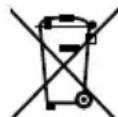
Contact your local authority for details in locating a recycle facility nearest to you.
Proper recycling and waste disposal will help conserve resources whilst preventing detrimental effects on our health and the environment.
Notice: The sign "Pb" below the symbol for batteries indicates that this battery contains lead.
- Windows Media is a trademark of Microsoft Corporation registered in the U.S. and other countries.
• SDHC logo is a trademark of SD-3C,LLC. - "Made for iPod," and "Made for iPhone" mean that an electronic accessory has been designed to connect specifically to iPod, or iPhone, respectively, and has been certified by the developer to meet Apple performance standards. Apple is not responsible for the operation of this device or its compliance with safety and regulatory standards. Please note that the use of this accessory with iPod, or iPhone may affect wireless performance.
- iPhone, iPod, iPod classic, iPod nano, and iPod touch are trademarks of Apple Inc., registered in the U.S. and other countries.
- Manufactured under license from DTS Licensing Limited. DTS is a registered trademark & the DTS Logos and Symbol are trademarks of DTS, Inc. © 1996-2009 DTS, Inc. All Rights Reserved.
Other system names and product names are generally trademarks or registered trademarks of their developers. However, note that the text in this manual does not use the ™ and ® markings to them.
Amplifi er section
Rated output power
20 W + 20 W (1 kHz, 10% T.H.D., at 8 Ω)
D.AUDIO/ AUX (Sensitivity/ Impedance) .... 500 mV/10 kΩ
SUBWOOFER PREOUT (Level/ Impedance) ......2 V/10 kΩ
Tuner section
FM tuner section
Tuning frequency range 87.5 MHz \~ 108.0 MHz
AM tuner section
Tuning frequency range ....531 kHz \~ 1,602 kHz
CD player section
Laser......Semiconductorlaser
Laser power class ....Class 1 (IEC)
Over sampling ....8 fs (352.8 kHz)
D/A conversion 1 Bit
USB interface
USB standard ....USB 1.1/2.0
Maximum supply current ....500 mA
File system ...... FAT 16/32
SD card interface
Format .... SD memory card
Usable SD cards
SD/SDHC, miniSD, microSD/SDHC card
File system ...... FAT 16/32
Speakers
Enclosure ...... Bass-refl ex type
Speaker configuration
Full range 70 mm, cone type
General
Provided AC adapter ......DC 18 V (AC 230 - 240 V, 50 Hz)
Power consumption (Incl. AC adapter) 30 W
Power consumption in standby mode 1 W
Dimensions W: 465 mm
H:188 mm
D:105 mm
Weight (net) 2.7 kg
Notes:
- Kenwood follows a policy of continuous advancements in development. For this reason specifications may be changed without notice.
- Sufficient performance may not be exhibited at extremely cold locations (where water freezes).
Memory back up function
Please note that the following items will be deleted from the unit's memory if the power cord is disconnected from the AC outlet.
- Input selector settings
- Volume level
• Sound control (preset equalizer, bass enhancement) - Tuner setting
For your records
Record the serial number, found on the back of the unit, in the spaces designated on the warranty card, and in the space provided below. Refer to the model and serial numbers whenever you call upon your dealer for information or service on this product.
Model Serial Number

- Manufacturer:
- EU Representative's:
- Before applying power
- Safety precautions
- The marking of products using lasers
- IMPORTANT SAFETY INSTRUCTIONS
- Read These Instructions
- Keep These Instructions
- Heed All Warnings
- Follow All Instructions
- Clean only with dry cloth
- Attachments
- Do not use this apparatus near water
- Accessories
- Ventilation
- Power Sources
- CAUTION – Polarization
- Power Cord Protection
- Lightning
- Overloading
- Object and Liquid Entry
- Servicing
- Damage Requiring Service
- Replacement Parts
- Safety Check
- Heat
- Power Lines
- Notes:
- Contents
- Unpacking
- How to read this manual
- Preparing the remote control unit
- Operation
- Changing the battery of the remote control unit
- CAUTION
- ⚠️ Power cord
- ⚠️ AC adapter
- Be sure to adhere to the following, or proper ventilation will be blocked causing damage or fire hazard (Main unit and AC adapter).
- Connecting the FM antenna
- Connecting the AM antenna
- Connecting the iPod dock adapter
- To remove Dock adapter
- playable Audio fi le
- playable MP3 fi le
- playable WMA fi le
- playable storage media
- playable CD-R/RW format
- playable fi le format of USB device/ SD card
- The maximum number of characters for display
- Limitation of structure for the file and the folder
- Playing order of the audio fi le
- - Playing order
- Notes on use of the USB device
- Available USB devices
- Supported iPod/iPhone
- Made for
- Handling discs
- Handling precautions
- Discs playable on the system
- Notes on CD-ROM/CD-R/CD-RW discs
- Cautions on CD discs
- About SD card
- Available SD card
- SD card (Write protect switch)
- Usable D.AUDIO
- [STANDBY] indicator
- TUNER/CD/USB/SD/iPod/D.AUDIO/AUX tton
- STOP ■ button
- STEREO/MONO button
- ENTER button
- Standby mode
- Switching the system on
- Switching the system to standby mode
- Volume control
- To switch off the volume temporarily
- Sound control
- To switch on DTS Envelo Speaker settings
- To switch on preset equalizer settings
- To switch on the bass enhancement
- Headphones
- Preparation
- Inserting a disc
- Removing a disc
- Inserting a USB device
- Removing the USB device
- Inserting an SD card
- Removing the SD card
- Playing a CD/ audio fi le
- Press ▶/II button to start playback.
- Programming tracks/files
- To clear the program
- Press P.MODE button.
- Random play
- Repeat play
- Changing the display information
- Recording on a USB device or SD card (For CD only)
- When you stop the recording
- Program recording (For CD only)
- Tuning in radio stations
- STEREO/MONO
- Auto preset
- Manual preset
- Tuning to a preset radio station
- Using Radio Data System
- Radio Data System functions
- PTY (Program TYpe Identifi cation) Search:
- PS (Program Service Name) Display:
- Radio Text function:
- Changing the Radio Data System display information
- Tuning by Program Type (PTY search)
- Press PTY button to start searching.
- Using the AUX
- Playing an external component
- Using the D.AUDIO Using the iPod
- Inserting an iPod/iPhone
- Playing an iPod/iPhone
- Playback of Digital Audio Player
- Adjusting the display brightness (BACKLIGHT)
- Adjusting the display contrast (CONTRAST)
- Setting Auto Power Save (A.P.S.)
- When the A.P.S. is ON...
- Clock setting
- Timer setting
- Important!
- Switch the system to standby mode.
- To activate/deactivate the timer
- Press TIMER ON/OFF button.
- Sleep timer setting
- While sleep mode is in active:
- To deactivate the sleep timer
- Resetting the Microcomputer
- When the power is off (standby mode), press the [AUX] and [◀◀] buttons on the main unit until "FACTORY RESET" is appears.
- Unplug the AC cord and plug it back in if "RESET FINISHED" appears.
- General
- No sound.
- The system does not operate by pressing any buttons.
- This unit is turned OFF spontaneously.
- CD player operation
- "NO DISC" is displayed.
- Disc cannot be ejected.
- USB operation
- "NO USB" is displayed.
- "NOT SUPPORT" is displayed.
- Cannot play.
- iPod/iPhone operation
- "NO iPod" is displayed.
- Does not function properly.
- SD operation
- "NO SD" is displayed.
- D.AUDIO operation
- Kenwood digital audio player cannot be controlled from the main unit or remote control unit.
- Radio reception
- Noise in radio.
- Remote control unit
- Maintenance
- Cleaning the cabinet
- Cleaning discs
- Caution on condensation
- Copyright information
- Information on Disposal of Old Electrical and Electronic Equipment and Batteries (applicable for EU countries that have adopted separate waste collection systems)
- Amplifi er section
- Tuner section
- CD player section
- USB interface
- SD card interface
- Speakers
- Memory back up function
- For your records
Brand : KENWOOD
Model : CLX-70-W
Category : Docking Station