IC-18A - Heating Cecilware - Free user manual and instructions
Find the device manual for free IC-18A Cecilware in PDF.


| Product Type | Induction Cooker (Heating) |
| Brand | Cecilware |
| Model | IC-18A |
| Voltage | 120V ~ 60Hz |
| Power Consumption (Max) | 1,800 watts |
| Dimensions (W x D x H) | 12.91" x 16.73" x 4.33" (32.8 x 42.5 x 11 cm) |
| Ceramic Plate Size | Approx. 10.75" x 10.75" (27.3 x 27.3 cm) |
| Weight | Not specified (approx. 8-10 lbs) |
| Suitable Pan Diameter | 4.75" to 10.25" (12 cm to 26 cm) |
| Required Pan Material | Magnetic bottom: iron, cast iron, stainless steel, enamelware |
| Control Type | Rotary knob (power level 1-9) and function keys (Heat, Warm) |
| Functions | Heat (1-9 power levels), Warm (temperature hold: 140°F, 180°F, 285°F, 360°F, 430°F) |
| Safety Devices | Over Time Protector (2 hrs), Automatic Safety Shut-Off (60s without pan), Material Compatibility Detector, Small Object Detector (<2"), Overheating Protection Device |
| Indication Lights | Power On, Heating Indicator, Heat Function, Warm Function |
| Cleaning | Ceramic plate: damp cloth or mild non-abrasive cleaner. Body: soft cloth or mild cleaner. |
| Accessories Included | Wall stopper (2 steel bullets) for rear mounting |
| Ventilation Requirements | Place on horizontal surface, at least 4" (10 cm) from walls/objects |
| Electrical Circuit Requirement | Dedicated circuit: 120V, 60Hz, 15A |
| Warranty / Contact | Cecilware Corporation, Long Island City, NY. Tech Support: Tech.Support@cecilware.com |
| Reparability | Part numbers listed for ceramic plate, control knob, gasket, control panel, PCB assemblies, heating coil, fan, etc. |
Frequently Asked Questions - IC-18A Cecilware
User questions about IC-18A Cecilware
0 question about this device. Answer the ones you know or ask your own.
Ask a new question about this device
Download the instructions for your Heating in PDF format for free! Find your manual IC-18A - Cecilware and take your electronic device back in hand. On this page are published all the documents necessary for the use of your device. IC-18A by Cecilware.
USER MANUAL IC-18A Cecilware
Long Island City, NY 11105
Tel: 800.935.2211, 718.932.1414
Fax: 718.932.7860
Technical Support
Tech.Support@cecilware.com
Customer Service:
CustomerService@cecilware.com
www.cecilware.com
READ ALL INSTRUCTIONS BEFORE OPERATING
- Use a dedicated electrical circuit.
IC-18A: 120V
IC-22A: 208V
IC-25A: 240V
-
DO NOT block the air-intake panel. Blocking may overheat the unit.
-
Use pans 4.75" (12cm) or larger in diameter. We recommend that pans be less than 10" (26cm) in diameter. Please refer to the next page for a list of suitable and unsuitable pans.
-
DO NOT touch the hot surface of the ceramic plate. NOTE: The induction cooker itself does not produce any heat during cooking; however, the heat from the pan will leave the ceramic surface hot!
-
DO NOT cook empty pots or pans. Heating an empty pan will automatically activate the Over Heating Protection Device and the unit will shut off.
-
Place the induction cooker on a horizontal surface and at least 4" (10cm) away from the wall and other objects for proper ventilation.
-
DO NOT place any objects or tools in the air-intake panel. Doing so may cause an electrical shock.
-
To protect against an electrical shock, DO NOT immerse the unit, the cord or the plug in or near water or other liquids.
-
Close supervision is necessary when the induction cooker is used near children.
-
DO NOT operate the induction cooker if it has been damaged in any manner or if the unit malfunctions. Return the unit to the nearest authorized service facility for examination or repair.
-
The use of any accessories not recommended by the manufacturer may cause injuries.
-
Keep the power cord away from heat.
-
DO NOT place the induction cooker in, on or near open flames, electric burners, heated ovens or other high temperature surroundings.
-
DO NOT heat any sealed cans on the induction cooker. A heated can may explode.
-
DO NOT move the induction cooker while cooking or when the pan is hot.
-
After the induction cooker has cooled down, unplug the cord and clean as follows: CERAMIC PLATE: wipe with a damp cloth or use a mild, non-abrasive cleaning solution. BODY: wipe the control panel with a soft cloth or use a mild cleaner.
-
DO NOT use induction cooker for other than intended use.
-
Unplug when not in use.
-
When storing, DO NOT place any objects on top of the induction cooker.
-
When using an induction cooker keep your pacemaker 2 feet (approx. 60cm) from the heating areas.
SUITABLE POTS & PANS, - FOR INDUCTION HEATING PLATES
- Iron
- Cast iron
- Stainless steel*****
- Enamelware
*****All pots and pans must have a magnetic bottom.*****
All pots and pans must have a flat bottom.
All pots and pans should have a diameter between 4.75" (12 cm) and 10.25" (26 cm).
UNSUITABLE POTS & PANS, - FOR INDUCTION HEATING PLATES
- Pot with diameter below 2" (5 cm)
- Stainless steel pans with aluminum bottom
- Pottery
- Glass pans
- Aluminum pans
- Bronze pans
- Copper pots
- Pans with feet
SAFETY DEVICES
Overtime Detector
If the pan is left on the induction cooker for more than 2 hours, or if the user does not operate any functions for more than 2 hours, the cooker will automatically shutoff.
Automatic Safety Shut-Off
If the induction cooker is left on for more than 60 seconds without a pan or with an incompatible pan, the unit will automatically shutoff.
Material Compatibility Detector
If the pan's material or its dimensions are not suitable for this induction cooker, the “Heating Indicator Light” will not turn on. The induction cooker will shutoff automatically after 60 seconds.
Small Object Detector
The induction cooker will not recognize any objects smaller than 2" (5 cm) in diameter. For best results, use pans that are between 4.75" (12 cm) and 10.25" (26 cm) in diameter.
Over Heating Protection Device
If the pan's temperature becomes too high, and the temperature remains too high for 60 seconds, the unit will shut off automatically. There will be a short warning sound after the unit shutsoff.
HOW DOES YOUR INDUCTION HOB WORK?
A high frequency (20-35KHz) induction coil located underneath the ceramic top plate heats the cooking pan by magnetic friction. The heat is produced directly within the pan. It's controlled by an electronic circuit to offer superior performance and functions. During cooking, no energy is lost between the hob and the food. When you switch it off, the cooking is stopped immediately.
PRECAUTION BEFORE USING YOUR INDUCTION HOB
- The glass top is made of strong, hard, and non-porous properties. But, in case of breakage, even if it's only slightly cracked, disconnect the appliance from the electrical socket immediately and contact the after-sales service.
- The appliance is equipped with a Small Object Detector. It's recommended not to place small metal kitchen utensils such as pan lids, knives, or other metal objects on the induction-heating zone. If the inductor is switched on, there is a risk of them becoming hot.
- When using your induction hob, don't place any magnetic sensitive objects on the glass top, such as credit cards, cassettes, etc.
- Scientific tests have shown that the induction hob presents no danger for anyone using a pacemaker. Please keep a 2' distance from the unit while the induction hob is in use.
- To prevent from overheating, do not place aluminum foil or iron plate on the top plate.
- Put the appliance on a horizontal surface but keep away from wall or articles at least 2" - 4".
- To prevent an electric shock, do not put articles like iron wire or tools into the air entrance or outlet.
- Immediate clean up is recommended when water is left on the top plate.
- Plug power cord into 120V, 60Hz, 15A (IC-18A); 208V, 60Hz, 11A (IC-22A); 240V, 60Hz, 11A (IC-25A) dedicated electrical circuit.
- Turn power on by pressing the power on/off button.
- Rotate the power control knob clockwise. The power level LED will display from level 1 (Min.) to level 9 (Max.). If you turn past 9 it will start at 1 again. The same applies if you turn back past 1.
- Put a suitable pan in center of the top plate, and rotate power control knob to desired power level.
- Heating Indicator Light indicates if the pan is suitable or not. If the Heating Indicator Light is on, then the pan is heating. If the Heating Indicator Light is off, it means the power is on, but no pan or suitable pan is on top plate.
- This unit is equipped with an Over Heating Protection Device, which stops power temporarily when top plate temperature reaches 482^ F (+/- 10%). The power will start again automatically when the temperature of the top plate is reduced below 482^ F (+/- 10%). By heating an empty pan, maximum temperature will be reached very quickly. The Heating Indicator Light will flash to indicate the over heating protection function is on.
Temperature Hold function: By pressing the “Warm” function key, the Temperature Hold function will start working. The LED indicates the temperature will hold at 140^ F (+/- 5%), push “Warm” function key again, the LED indicates the temperature will hold at 180^ F. When the “Warm” function key is pushed each time, the holding temperature will change as follows: 140^ F -> 180^ F -> 285^ F -> 360^ F -> 430^ F -> 140^ F ->.
- With the Temperature Hold function working, the "Warm" indicator light will start flashing. It means the temperature has not yet arrived at the set temperature. When the pan's temperature arrives the set temperature, the "Warm" indicator light will stay on.
- To change Temperature Hold function to "Heat" function: Push "Heat" function key, and the function will go back to "Heat" again. Then the rotary control knob will be activated again.
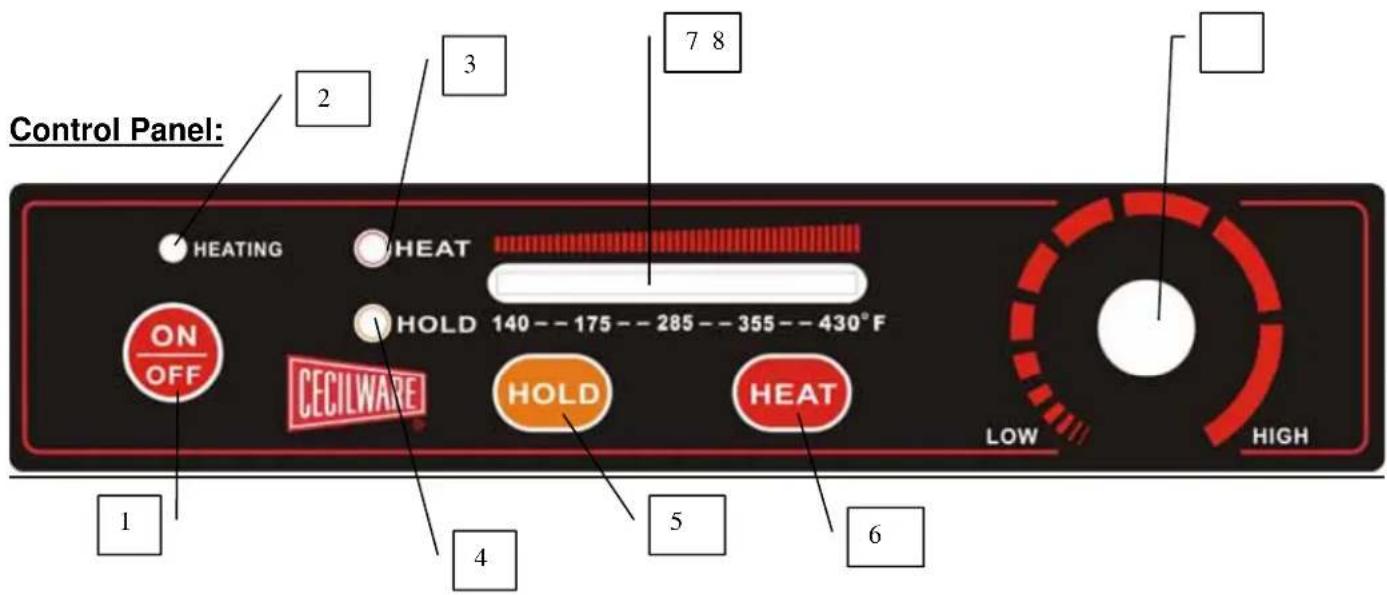
- Power On/ Off Key
- "Heating" Indicator Light
- "Heat" Function Indicator Light
- "Warm"(Hold Temperature) Function Indicator Light
- "Warm"(Hold Temperature) Function Key
- "Heat" Function Key
- Power Level / Holding Temperature Display LED Lights
- Power Regulator Rotary Knob

- Induction Heating Zone
- Ceramic Top Plate
- Bottom Chassis
- Rotary Control Knob (Power Regulator)
- Induction Heating Indicator Light
- Heat Function Indicator Light
- "Warm" Function Indicator Light
- Air-Intake
- Air-Outlet
- Foot Stand
Installation of the "Wall Stopper"
-
Find 2 steel bullets in the box. It's the accessory for this induction cooking plate.
-
Screw these 2 steel bullets into the rear side of top case and affix it tightly.
-
The “Wall Stopper” functions as a “Stand-off”, allows the exhaust fan, built into the unit, to operate properly. Improper mounting or removal of this piece will cause the unit to operate improperly and possibly overheat.

natural_image
Line drawing of a square electrical heating device with a circular vent and control panel (no text or symbols)SPECIFICATION:
| Model No. | IC-18A | IC-22A | IC-25A |
| Voltage | 120V ~ 60Hz | 208V ~ 60Hz 240V ~ 60Hz | |
| Vitro-Ceramic Glass Plate | Approx. 10.75" x 10.75" | ||
| Electrical Power Consumption | Max. 1,800 watt | Max. 2,200 watt | Max. 2,500 watt |
| Safety Device | Over Time Protector (2Hrs.) | ||
| Automatic Safety Shut-Off | |||
| Material Compatibility Detector | |||
| Small Object Detector | |||
| Overheating Protection Device | |||
| Dimension | 12.91" (32.8cm) x 16.73" (42.5 cm) x 4.33" (11 cm) | ||

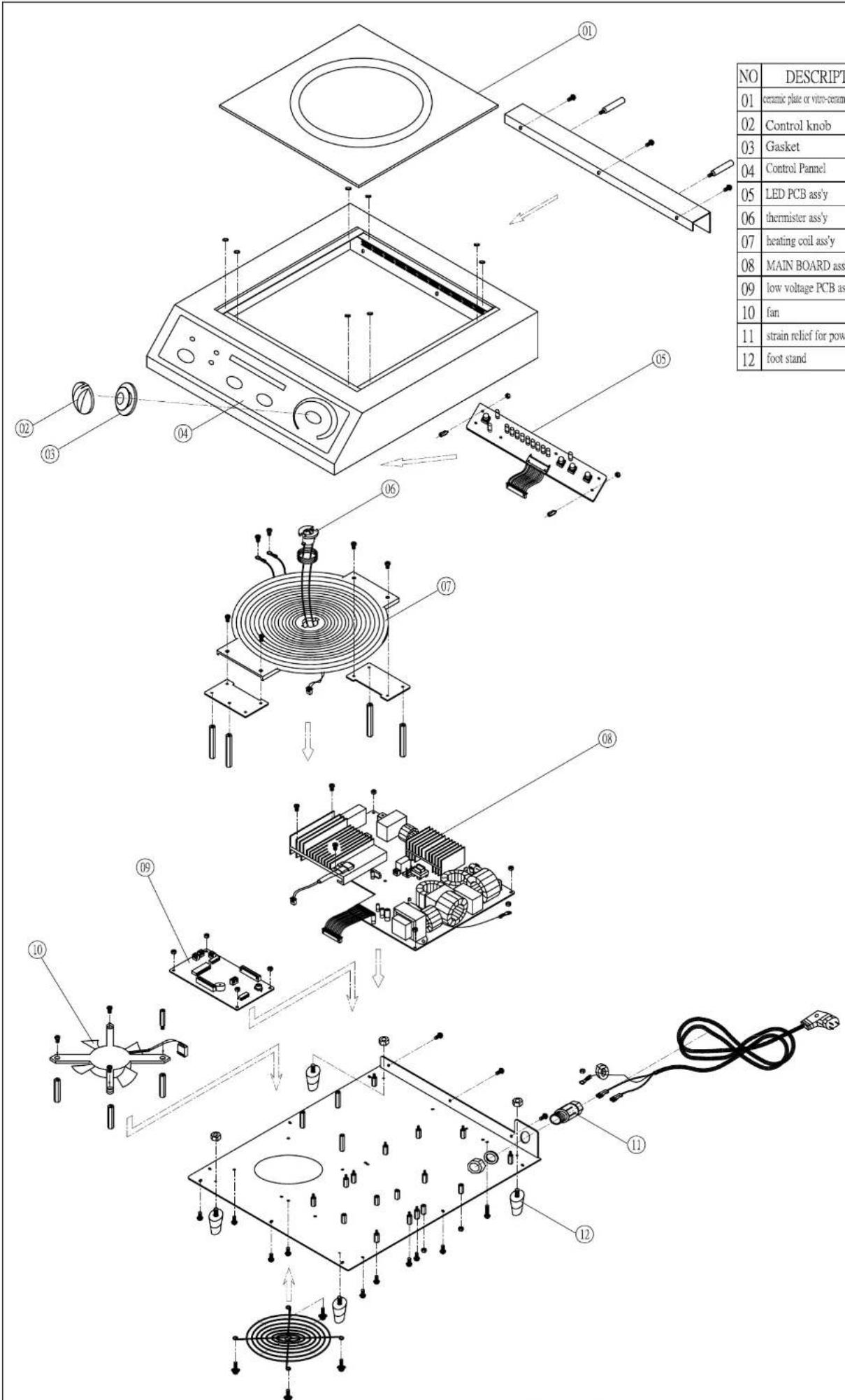
IC-18A Exploded View. 120V/1.8KW

| NO | DESCRIPTION | Q'TY | Cecilware Part NO. |
| 01 | ceramic plate or vitre-ceramic glass plate | 1 | 09032 |
| 02 | Control knob | 1 | 09008 |
| 03 | Gasket | 1 | 09034 |
| 04 | Control Pannel | 1 | 09009 |
| 05 | LED PCB ass'y | 1 | 09044 |
| 06 | thermister ass'y | 1 | 09049 |
| 07 | heating coil ass'y | 1 | 09003 |
| 08 | MAIN BOARD ass'y | 1 | 09043 |
| 09 | low voltage PCB ass'y | 1 | 09046 |
| 10 | fan | 1 | 09005 |
| 11 | strain relief for power cord | 1 | 09011 |
| 12 | foot stand | 4 | 09015 |
IC-22A Exploded View. 208V/2.2KW
| NO | DESCRIPTION | Q'TY | Cecilware Part NO. |
| 01 | ceramic plate or vitre-ceramic glass plate | 1 | 09032 |
| 02 | Control knob | 1 | 09008 |
| 03 | Gasket | 1 | 09034 |
| 04 | Control Pannel | 1 | 09009 |
| 05 | LED PCB ass'y | 1 | 09044 |
| 06 | thermister ass'y | 1 | 09049 |
| 07 | heating coil ass'y | 1 | 09003 |
| 08 | MAIN BOARD ass'y | 1 | 09041 |
| 09 | low voltage PCB ass'y | 1 | 09046 |
| 10 | fan | 1 | 09005 |
| 11 | strain relief for power cord | 1 | 09011 |
| 12 | foot stand | 4 | 09015 |
IC-25A Exploded View. 240V/2.5KW
TROUBLE SHOOTING
- If your induction range seems to be working improperly, it doesn't necessarily mean it's faulty. In all cases, check the following points:
| Problem | Resolution |
| No indicator light when power "on" Cable/terminal block is loose | |
| Broken circuit or blown fuse | |
| Power supply stopped | |
| Heating indicator does not light-up, Unsuitable cooking pan | |
| Appliance fails to heat up Pan isn't located in the center properly | |
| Pan is smaller than 2" | |
| Over-heating protection is activated | |
| Appliance suddenly stops heating during operation | High temperature |
| Air entrance or outlet blocked | |
| Over-heating protection activated | |
- If you fail to identify the problem, contact the after-sales service without delay.

Cecilware Corporation
43-05 20th Avenue
Long Island City, NY 11105
Tel: 800.935.2211, 718.932.1414
Fax: 718.932.7860
Technical Support
Tech.Support@cecilware.com
Customer Service:
Customer.Service@cecilware.com
www.cecilware.com
- READ ALL INSTRUCTIONS BEFORE OPERATING
- SUITABLE POTS & PANS, - FOR INDUCTION HEATING PLATES
- UNSUITABLE POTS & PANS, - FOR INDUCTION HEATING PLATES
- SAFETY DEVICES
- Overtime Detector
- Automatic Safety Shut-Off
- Material Compatibility Detector
- Small Object Detector
- Over Heating Protection Device
- HOW DOES YOUR INDUCTION HOB WORK?
- PRECAUTION BEFORE USING YOUR INDUCTION HOB
- TROUBLE SHOOTING
- Cecilware Corporation
Brand : Cecilware
Model : IC-18A
Category : Heating