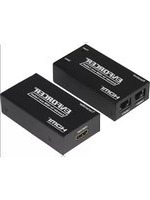
MVE-AH010Q - Audio-Video Accessories Seco-Larm - Free user manual and instructions
Find the device manual for free MVE-AH010Q Seco-Larm in PDF.


| Product Type | HDMI Extender over Cat5e/6 |
| Model | MVE-AH010Q |
| Brand | Seco-Larm |
| Category | Audio-Video Accessories |
| Dimensions | 3-3/16" x 1-3/4" x 7/8" (81 x 45 x 22 mm) |
| Weight | 8.7 oz (246 g) |
| Power Supply | 5VDC @ 1A (2.1mm plug) |
| Current Draw (Receiver) | 400mA @ 5VDC |
| Operating Temperature | 23°F to 95°F (-5°C to 35°C) |
| Operating Humidity | 5% to 90% RH (no condensation) |
| Max Range (1080p via Cat6) | 197 ft (60 m) |
| Max Range (1080p via Cat5e) | 98 ft (30 m) |
| Supported Resolutions | 480i, 480p, 576i, 576p, 720p, 1080i, 1080p |
| Video Formats | HDMI, HDCP 1.2 |
| Audio Formats | Dolby TrueHD, DTS-HD Master Audio |
| Input Video Signal | 0.5~1.0 Vp-p |
| Video Amplifier Bandwidth | 6.75 Gbps |
| Wiring Standard | T568-B |
| Features | Plug and play, zero signal loss |
| Package Contents | 1x Transmitter (MVE-AH010Q-TQ), 1x Receiver (MVE-AH010Q-RQ), 1x 5VDC Power Adapter, 1x Manual |
| Warranty | 1 year limited |
Frequently Asked Questions - MVE-AH010Q Seco-Larm
User questions about MVE-AH010Q Seco-Larm
0 question about this device. Answer the ones you know or ask your own.
Ask a new question about this device
Download the instructions for your Audio-Video Accessories in PDF format for free! Find your manual MVE-AH010Q - Seco-Larm and take your electronic device back in hand. On this page are published all the documents necessary for the use of your device. MVE-AH010Q by Seco-Larm.
USER MANUAL MVE-AH010Q Seco-Larm
- Extend HDMI over two Cat5e/6 cables
• Supports resolutions from 480i to 1080p with zero signal loss
• Transmits up to 197ft (60m) at 1080p over two Cat6 cables - Plug and play operation – comes as a complete set
Introduction:
The ENFORCER HDMI Extender over Cat5e/6 extends the range of HDMI by using a transmitter and an active receiver to send video and audio over two Cat5e/6 cables. HDMI Formats as high as 1080p can be transmitted up to 197ft (60m) between the two units with zero signal loss.
Features:
- Signal Strength –Transmitter ensures that the signal strength will remain strong over the length of the cable.
- Distance – The HDMI Extender over Cat5e/6 is capable of providing a clear HDMI signal up to 197ft (60m).
- Formats Supported – The HDMI Extender over Cat5e/6 supports both progressive and interlaced formats: 1080p/1080i/720p/576p/576i/480p/480i.
- Plug and Play – The HDMI Extender over Cat5e/6 comes as a complete set consisting of a transmitter, receiver, and power supply. No adjustments or settings must be made, the unit is ready to use right out of the box.
- Zero Signal Loss – Integrated circuits in the transmitter and receiver clean, buffer and amplify the HDMI signal to prevent signal loss and ensure a clear signal regardless of the length of the cable.
Specifications:
| Input video signal | 0.5~1.0 Vp-p | |
| Input DDC signal | 5Vp-p (TTL) | |
| Maximum single link range | 1080p | |
| Video formats supported | High-speed HDMI, HDCP 1.2 | |
| Audio formats supported | Dolby TrueHD, DTS-HD Master Audio | |
| Output video | HDMI | |
| Resolutions supported | 1080p/1080i/720p/576p/576/i/480p/480i | |
| Range – 1080p | Cat6: 197' (60m); Cat5e: 98' (30m) | |
| Video amplifier bandwidth | 6.75Gbps | |
| Cat5e/6 Wiring standard | T568-B | |
| Operating voltage | 5VDC | |
| Power supply | 5VDC@1A (2.1mm plug) | |
| Current draw | Transmitter | N/A |
| Receiver | 400mA@5VDC | |
| Operating temperature | 23°~95° F (-5°~35° C) | |
| Operating humidity | 5~90% RH (no condensation) | |
| Dimensions | 33/16"x13/4"x7/8" (81x45x22mm) | |
| Weight | 8.7-oz (246g) | |
Parts List:
1 x Transmitter (MVE-AH010Q-TQ)
1 x 5VDC Power adapter
1 x Receiver (MVE-AH010Q-RQ)
1 x Manual
Overview:

flowchart
graph TD
    A["Cat5e/6 Ports"] --> B["Left"]
    B --> C["Cat5e/6-1"]
    B --> D["Cat5e/6-2"]
    C --> E["Back"]
    D --> E
    E --> F["5VDC Power input"]
    F --> G["5VDC"]
    G --> H["Top"]
    H --> I["Receiver"]
    I --> J["ENFORCER® Extender for HDMI over Cat5e/6"]
    J --> K["Power"]
    J --> L["Status"]
    M["Right"] --> N["HDMI Output"]
    O["Status LEDs"] --> P["HDMI Output"]
    Q["(Receiver shown)"] --> R["HDMI™"]
Two Cat5e/6 cables are required. Please use T568-B wiring standard.
Installation:
- Determine the locations where the HDMI to Cat5e/6 units will be placed as well as how much Cat5e/6 cable will be necessary.
- Connect the HDMI to cable to both the transmitter and source device.
- Connect the HDMI cable to both the receiver and display.
- Connect the Cat5e/6 cables to both the receiver and transmitter units. Make sure to connect the cables to their respective ports, i.e. Cat5e/6-1 connected to Cat5e/6-1, and Cat5e/6-2 connected to Cat5e/6-2.
Note: For best results, use Cat6 cable.
Note: For best results, use solid core cable. Stranded core cable is not recommended. - Connect the 5VDC adapter to the receiver unit.
- Switch on the HDMI source device and display to verify that the system is functioning properly.
Sample Application:

flowchart
graph LR
    A["HDMI Source"] --> B["HDMI Cable"]
    B --> C["Transmitter"]
    C --> D["Use T568B UTP wiring standard"]
    D --> E["Used via HDMI Cable"]
    E --> F["Received"]
    G["Included 5VDC Power Adapter"] --> H["Device"]
    I["HDMI Display"] --> J["HDMI Cable"]
    J --> K["Receiver"]
    style A fill:#f9f,stroke:#333
    style K fill:#f9f,stroke:#333
Troubleshooting:
HDMI Device does not function correctly
- Reduce the resolution of the source device
- Turn off deep color
• Use T568B wiring standard - Make sure the Cat5e/6 cables are connected to the correct ports, and not to opposite ports
- Use solid core cable instead of stranded core cable
• Make sure the HDMI input device is turned on
• Make sure the HDMI output device is turned on - Test the Cat5e/6 cable between the receiver and transmitter to make sure it is operational
Also Available from SECO-LARM®:
 | Wireless Extender for HDMI | HDMI Matrix |
 |  | |
| HDMI Switch | HDMI Splitter | High-Speed HDMI Cables |
 |  |  |
HDMI, the HDMI Logo and High-Definition Multimedia Interface are trademarks or registered trademarks of HDMI Licensing LLC in the United States and other countries.
WARRANTY: This SECO-LARM product is warranted against defects in material and workmanship while used in normal service for a period of one (1) year from the date of sale to the original consumer customer. SECO-LARM's obligation is limited to the repair or replacement of any defective part if the unit is returned, transportation prepaid, to SECO-LARM. This Warranty is void if damage is caused by or attributed to acts of God, physical or electrical misuse or abuse, neglect, repair or alteration, improper or abnormal usage, or faulty installation, or if for any other reason SECO-LARM determines that such equipment is not operating properly as a result of causes other than defects in material and workmanship. The sole obligation of SECO-LARM and the purchaser's exclusive remedy, shall be limited to the replacement or repair only, at SECO-LARM's option. In no event shall SECO-LARM be liable for any special, collateral, incidental, or consequential personal or property damage of any kind to the purchaser or anyone else.
NOTICE: The information and specifications printed in this manual are current at the time of publication. However, the SECO-LARM policy is one of continual development and improvement. For this reason, SECO-LARM reserves the right to change specifications without notice. SECO-LARM is also not responsible for misprints or typographical errors. Copyright © 2013 SECO-LARM U.S.A., Inc. All rights reserved. This material may not be reproduced or copied, in whole or in part, without the written permission of SECO-LARM.
SECO-LARM® U.S.A., Inc.
16842 Millikan Avenue, Irvine, CA 92606
Tel: (949) 261-2999 | (800) 662-0800
Website: www.seco-larm.com
Email: sales@seco-larm.com
PICSN6
MiMVE-AH010Q_1310.docx
Brand : Seco-Larm
Model : MVE-AH010Q
Category : Audio-Video Accessories