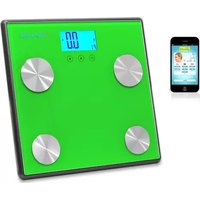
PHLSCBT4GN - Headphones Pyle - Free user manual and instructions
Find the device manual for free PHLSCBT4GN Pyle in PDF.


| Product Type | Bluetooth 4.0 Body Fat Scale |
| Brand | Pyle |
| Model | PHLSCBT4GN |
| Weight Capacity | 4.4 – 330.7 lbs (2 – 150 kg) |
| Division | 0.22 lbs (0.1 kg) |
| Units | kg / lb / st (switchable) |
| Power Source | 4 x 1.5V AAA batteries (included) |
| Display | LCD screen |
| Bluetooth | Bluetooth 4.0 compatible, auto-pairs with Pyle Health app |
| Measurement Technology | BIA (Bioelectrical Impedance Analysis) |
| Body Metrics Measured | Weight, body fat %, hydration %, muscle %, bone %, BMI |
| Memory | Stores up to 10 user profiles (P0-P9) |
| Auto Features | Auto zero, auto off, auto on when stepped on |
| Indicators | Low battery, overload (Errr), measurement error (Err2) |
| Platform Material | Tempered glass |
| Electrodes | Stainless steel (bare foot contact required) |
| Recommended Use Time | Same time daily, preferably 19:00-21:00 |
| Care and Cleaning | Clean electrodes with alcohol; use glass cleaner for platform; avoid soaps and water submersion |
| Safety Precautions | Not for people with pacemakers; avoid jumping or stomping; place on flat, clean surface |
| Intended Use | Home use only; not for professional medical diagnosis |
Frequently Asked Questions - PHLSCBT4GN Pyle
User questions about PHLSCBT4GN Pyle
0 question about this device. Answer the ones you know or ask your own.
Ask a new question about this device
Download the instructions for your Headphones in PDF format for free! Find your manual PHLSCBT4GN - Pyle and take your electronic device back in hand. On this page are published all the documents necessary for the use of your device. PHLSCBT4GN by Pyle.
USER MANUAL PHLSCBT4GN Pyle
Bluetooth 4.0 Digital Weight and Personal Health Scale
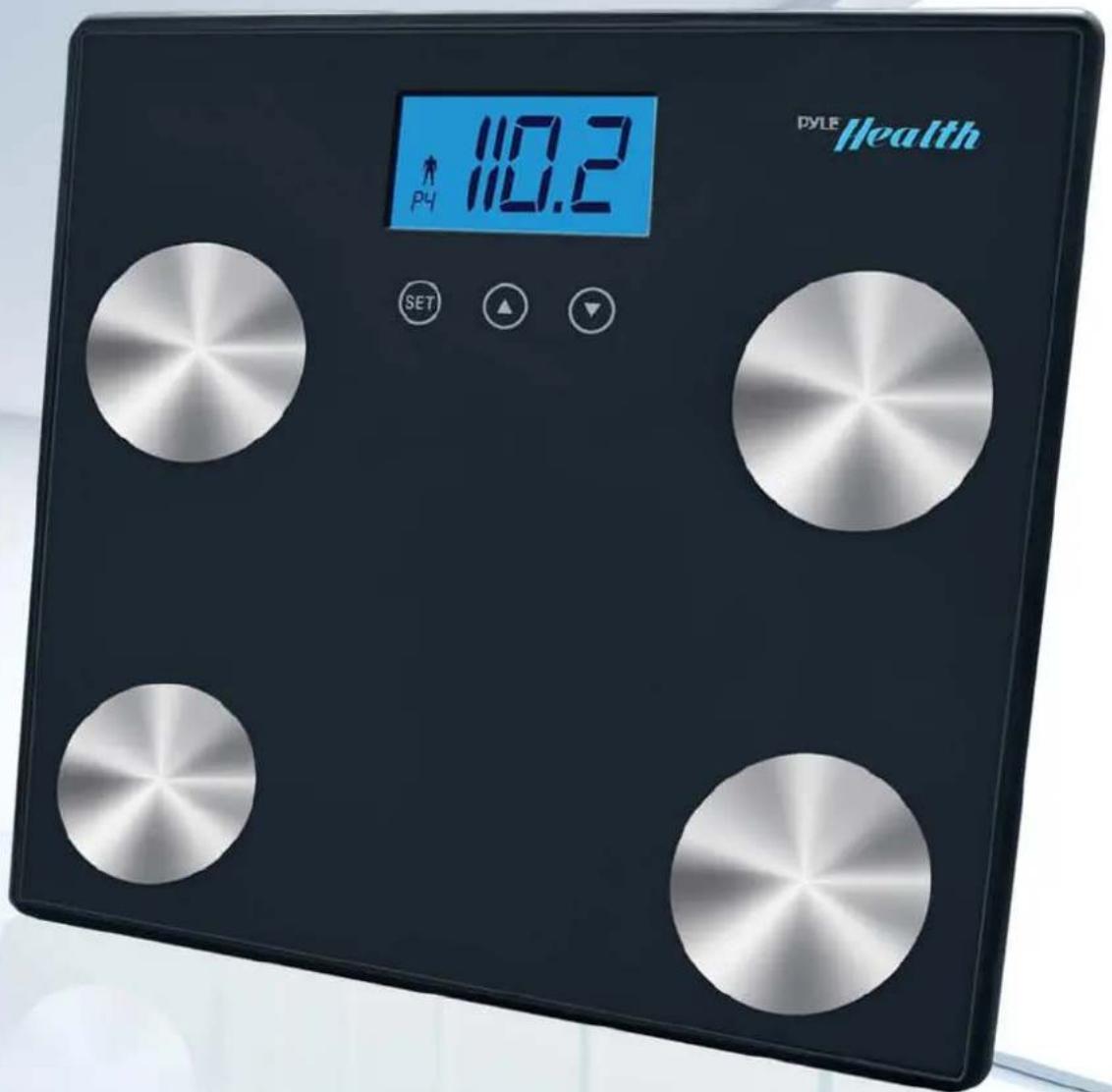
Thank you for choosing this Bluetooth 4.0 Electronic Body Fat and Hydration Scale. To ensure proper operation and to maintain the lifespan and the utmost accuracy of the scale, please read this manual carefully before use.
Read this Instruction Manual carefully and keep it for future reference.
Key features
This unit automatically pairs with the Pyle Health app. There is no need to pair with your Bluetooth device.
- Bluetooth 4.0 compatible
This product adopts advanced BIA (Bioelectrical Impedance Analysis) technology to measure body fat, hydration, muscle and bone percentage by sending a safe low-tension electric current through the body and the difference of electrical conductive property of body fat from other tissues is analyzed and processed by the CPU to get the body component percentage, then the results are displayed on the LCD screen to offer you reference.
It also displays BMI parameter, and other reference data.
- High precision strain gauge sensor system ensures more accurate weighing results.
- Tempered glass platform of high quality and modern design makes the scale safe and fashionable.
◆ Memory function stores up to 10 persons' information, offering you more convenience in daily use.
◆ Capacity:4.4 lbs – 330.7 lbs
Division: 0.22 lbs
◆ Auto zero & Auto off
◆ Low battery and over load indication
◆ Freely switch between three different units: kg/lb/st
◆ Powered by 4X1.5V AAA batteries (Included)
- To change units from Kg. to lbs. please look underneath the scale and you will find a plastic button that changes units
◆ About Buttons

SET key: Power on, menu select and confirm
▲Key: Up
▼Key: Down
LCD Display

Preparations before use
- Find the two lithium cell in the packet and the battery holder at the back of the scale, open the cover, install the battery into the holder and cover it back.

natural_image
Pure electrical circuit lines without any symbols- Place the scale on hard and flat surface. Clean floor is best.
Setup Procedures
Installation
Prior to first use, Download and install "Pyle Health" application to your iOS device.
(Bluetooth 4.0 capabilities, e.g. iPhone 4S, iPhone 5, NewiPad and iPadMini)
QUICK START GUIDE
Bluetooth connection:
- You do not need to search and pair for this scale prior to using it. It will automatically pair with the Pyle Health app.
- iOS device (Turn Bluetooth "On" under the "Settings" menu on the iOS device)
- Open "Pyle Health" application, and then press the Weight icon on the Measure screen.
- When the measurement is complete, the weight, body fat, hydration, muscle and bone percentage will display on the scale & save on the iOS application screen.

After, check the measurement history on the History screen or chart screen in the iOS application.
For Weight only
- Step on the scale gently and it will activate itself. When the screen shows "0.0kg" after the full display, you can press the scale back key to switch within different units(kg/lb/st)

- Step on the scale gently, position your feet evenly near the center and keep your body still and erect until the scale stabilizes your weight. The scale will automatically turn off when it is not in use for an extended period of time.
For weight, body fat, hydration, muscle and bone percentage:
Press the "SET" key for a few seconds to set your personal data. Press "▲" or "▼" key to select a number from P0 to P9 as your personal code. When the code number flashes on the screen and you reach your target number, please press "SET" to confirm.

- Press “▲” or “▼” to choose “♂” Male or “♀” Female, when the gender symbol flashes on the screen and then press “SET” to confirm.

- Press “▲” or “▼” to reach your target age (10-80), when "age" and the number flash on the screen and then press "SET" to confirm.

- Press “▲” or “▼” to reach your target height (100-240cm) when the number and "cm" flash on the screen and then press “SET” to confirm.

- You must cycle through the user numbers P0 P1 P2 until you get to your user number and only then will it display readings other than weight.
Step on the scale gently and keep your bare feet in touch with the electrodes. Stand still and erect to get your weight measured and your body fat, hydration, muscle and bone percentage will be displayed respectively on the screen within seconds. These results will be repeated for two times and the scale will be automatically turn off if not in use.

other
| Category | Value | |---|---| | P2 | 50.9 kg | | Healthy | 24.4 kg (at %) | | Healthy | 60.4 kg (at %) | | Healthy | 34.2 kg | | Healthy | 116.4 kg (Kcal) | | Healthy | 17.6 gm | | Healthy | 4.2 kg |- The personal data will be stored once you set it. Just confirm your code when you use the scale again and your other information will be shown too. There is no need to program them again.
Body Fat Ranges for Standard Adults
| Age | Female | |||
| Body fat percentage | ||||
| Underfat | Healthy | Overfat | Obese | |
| 12-20 | <18% | 18-28% | 28-33% | >33% |
| 21-42 | <20% | 20-30% | 30-35% | >35% |
| 43-65 | <21% | 21-31% | 31-36% | >36% |
| 66-100 | <22% | 22-32% | 32-37% | >37% |
| Age | Male | |||
| Body fat percentage | ||||
| Underfat | Healthy | Overfat | Obese | |
| 12-20 | <15% | 15-21% | 21-26% | >26% |
| 21-42 | <17% | 17-23% | 23-28% | >28% |
| 43-65 | <18% | 18-24% | 24-29% | >29% |
| 66-100 | <19% | 19-25% | 25-30% | >30% |
2.5 Body hydration rate normal/ parameter
The comparison sheet of hydration measured and hydration standard level
| Age | Male | Female | Corresponding denotation | |
| <=30 | 66.0-60.5% | 66.0-59.9% | Optimal Hydration | Weight scope of hydration: 37.8-66.0%Hydration Increment: 0.1% |
| 60.4-57.1% | 59.8-56.4% | Slight Dehydration | ||
| 57.0-53.6% | 56.3-53.0% | Moderate Dehydration | ||
| 53.5-50.2% | 52.9-48.6% | Dehydration | ||
| 50.1-37.8% | 48.5-37.8% | Severe Dehydration | ||
| >30 | 66.0-59.1% | 66.0-55.0% | Optimal Hydration | |
| 59.0-55.7% | 54.9-51.6% | Slight Dehydration | ||
| 55.6-52.3% | 51.5-48.1% | Moderate Dehydration | ||
| 52.2-48.8% | 48.0-44.7% | Dehydration | ||
| 48.7-37.8% | 44.6-37.8% | Severe Dehydration |
Because of differences in geographic areas and locations, the body fat percentage standards and percentage standards can vary. This sheet is for
reference only.
Please remember your personal P number. You do not need to reprogram the personal P number the next time you use scale. You can use the personal key you have already stored. You must cycle through the user numbers P0 P1 P2 until you get to your user number and only then will it display readings other than weight.
Caution
- People with pacemakers should NOT use this product.
- People with metal implants will be unable to obtain accurate readings.
- To ensure accuracy, we suggest using the scale at the same time every night (19:00-21:00).
- The "Errr" on scale display indicates overload. "Err2" display indicates fat percentage measurement error.
- If body fat percentage is less than 5%, indicator displays "FATL" If more than 50% indicator displays "FATH" If impedance measuring makes an error, indicate Err2 display "Err2".
- The "ERR" display on iOS application screen indicates the measurement error.

INSTALLING THE BATTERIES
- Use 4 x AAA batteries.
- When changing the batteries, please open the battery cover on the back. Put 4 x AAA batteries in the battery case (Ensure proper polarity), then close the battery cover tight.
Note
- The scale should be placed on a flat, clean surface before use.
- Do not place scale on wet, severely hot, or extremely cold surfaces.
- Do not jump or stomp on scale. Do not attempt to disassemble the scale.
- Do not wear shoes when standing on the scale to avoid wearing out the glass and electrodes.
- Never submerge the unit in water. Use alcohol to clean the electrodes and glass cleaner to keep them shiny, applied to a cloth first; avoid soaps.
- For home use only. Not for professional use. Body fat percentage and hydration percentage is reference only. You should consult a doctor when you undertake any diet or exercise program.
- Check the battery if the scale malfunctions. If necessary, install a new battery. For other problems, please contact your local dealer or contact Pyle for repair
PYLE®
Health
1600 63rd St
Brooklyn, NY, 11204
718.535.1800 - 888.318.PYLE
www.PyleAudio.com
- Bluetooth 4.0 Digital Weight and Personal Health Scale
- Key features
- ◆ About Buttons
- LCD Display
- Preparations before use
- Setup Procedures
- Installation
- QUICK START GUIDE
- Bluetooth connection:
- For Weight only
- For weight, body fat, hydration, muscle and bone percentage:
- Body hydration rate normal/ parameter
- Caution
- INSTALLING THE BATTERIES
- Note
- Health
Brand : Pyle
Model : PHLSCBT4GN
Category : Headphones