KCH110ST - Refrigerator KELVINATOR - Free user manual and instructions
Find the device manual for free KCH110ST KELVINATOR in PDF.


| Product Type | Island Range Hood |
| Model | KCH110ST |
| Installation Type | Ceiling-mounted, telescopic chimney |
| Electrical Connection | Class I, requires earth cable; 3-wire (L, N, E) |
| Voltage (North America) | 120 V AC (typical) |
| Frequency | 60 Hz |
| Minimum Distance from Cooking Surface | 65 cm |
| Operation Modes | Ducting (exhaust outside), Filtering (recirculation), External motor |
| Fan Speeds | 3 speeds + Intensive speed (15 min timer) |
| Controls | Push buttons for speed, light, timer; digital display (on some models) |
| Lighting | Halogen lamps (replaceable), designed for cooking illumination |
| Timer | Automatic shut-off timer, adjustable up to 15 minutes |
| Anti-grease Filters | Aluminum panels, washable in dishwasher every 2 months |
| Charcoal Filters | Active carbon, non-washable, replace every 4 months |
| Maintenance | Clean fan and surfaces with denatured alcohol or mild detergent |
| Safety Features | Overheat protection (motor cuts off if temperature too high) |
| Disposal | Compliant with WEEE directive (2002/96/EC), do not dispose as household waste |
Frequently Asked Questions - KCH110ST KELVINATOR
User questions about KCH110ST KELVINATOR
0 question about this device. Answer the ones you know or ask your own.
Ask a new question about this device
Download the instructions for your Refrigerator in PDF format for free! Find your manual KCH110ST - KELVINATOR and take your electronic device back in hand. On this page are published all the documents necessary for the use of your device. KCH110ST by KELVINATOR.
USER MANUAL KCH110ST KELVINATOR
Island Hood
KCH110ST/KCH900IS
User and Installation Instruction

Fig.1
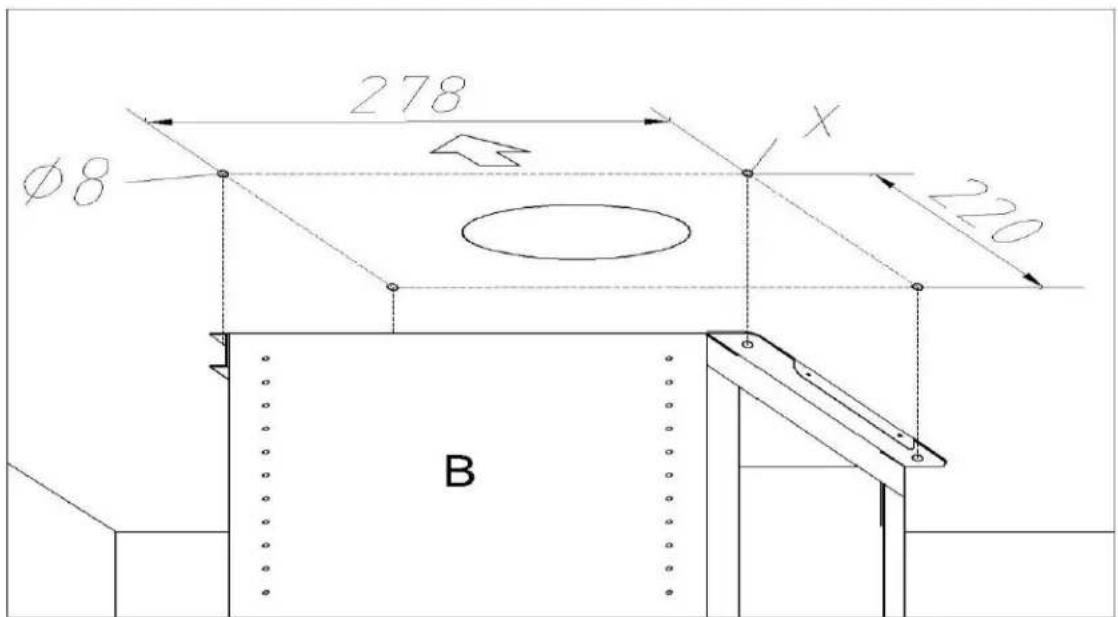
Fig.2
natural_image
Technical line drawing of a structural frame with labeled component 'B' (no text or symbols beyond label)Fig.3
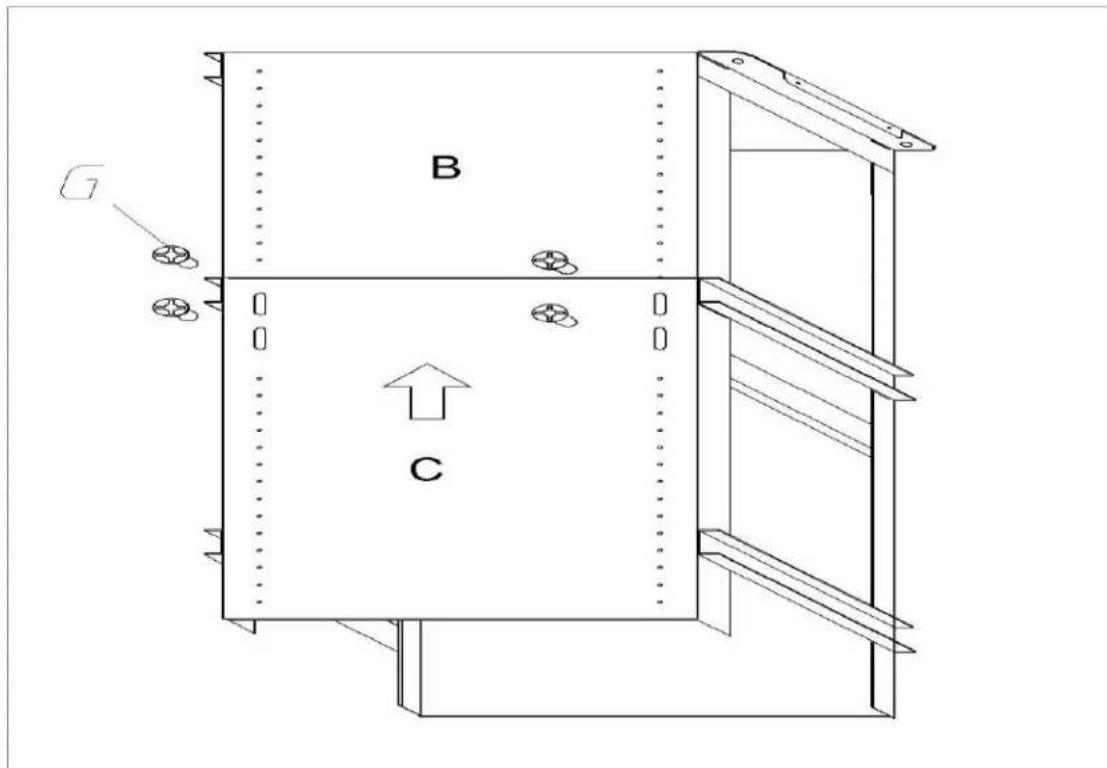
Fig.4
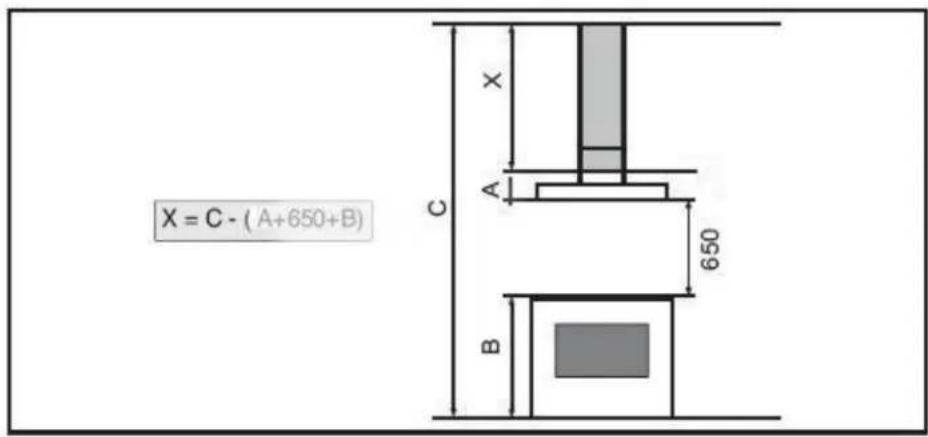
Fig.5
natural_image
Technical line drawing of a mechanical assembly with labeled components (no text or symbols beyond labels)Fig.6
natural_image
Technical line drawing of a mechanical or electrical component with no visible text, numbers, or symbols.Fig.7
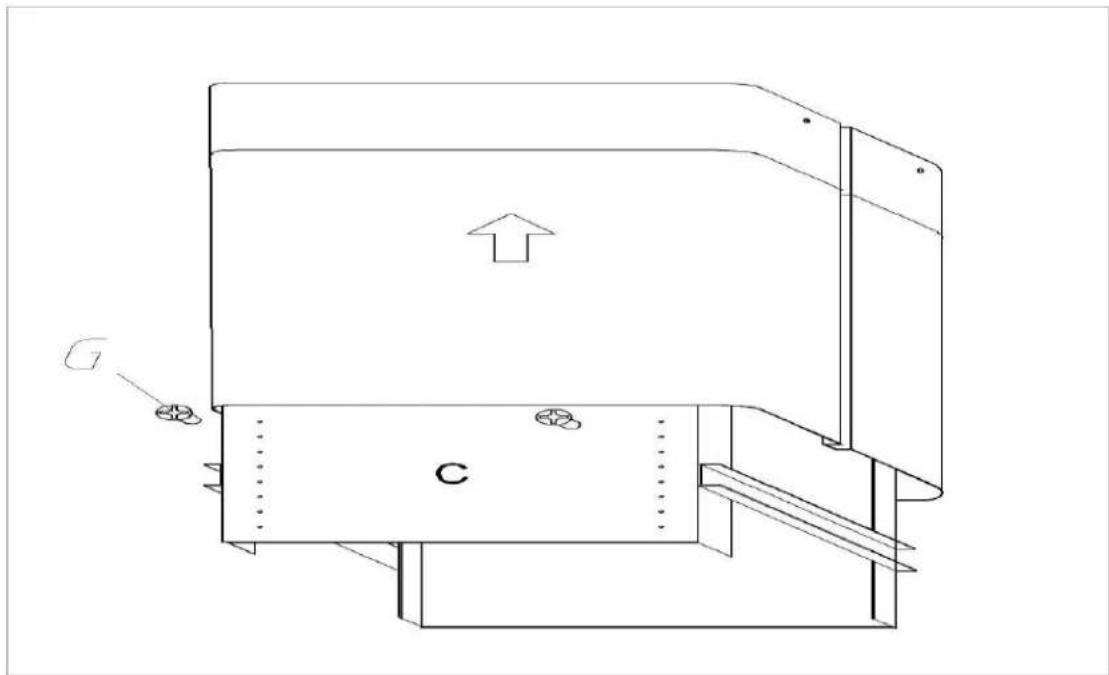
Fig.8
natural_image
Technical line drawing of a mechanical assembly with labeled components (no text or symbols present)Fig.9
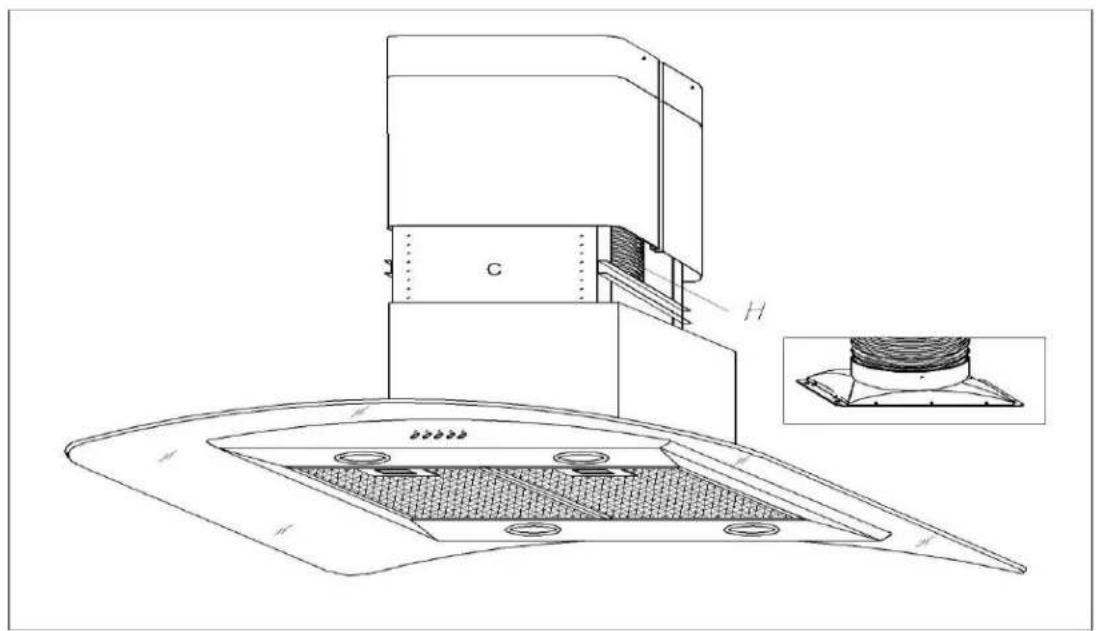
Fig.10
natural_image
Technical line drawing of a kitchen or oven structure with a downward arrow indicating a component (no text or symbols present)Fig.11
natural_image
Line drawing of a hand holding a flatboard with a curved cable inside, next to an open panel (no text or symbols)Fig.12
natural_image
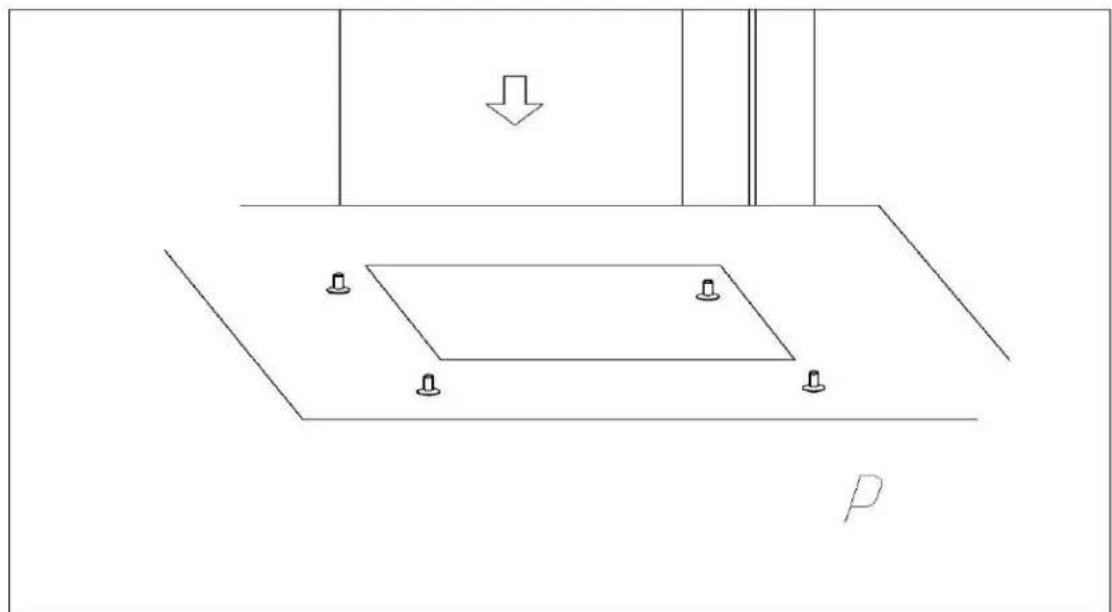
Pure technical diagram showing a mechanical assembly with mounting holes and a downward arrow, no text or symbols present.Fig.13
natural_image
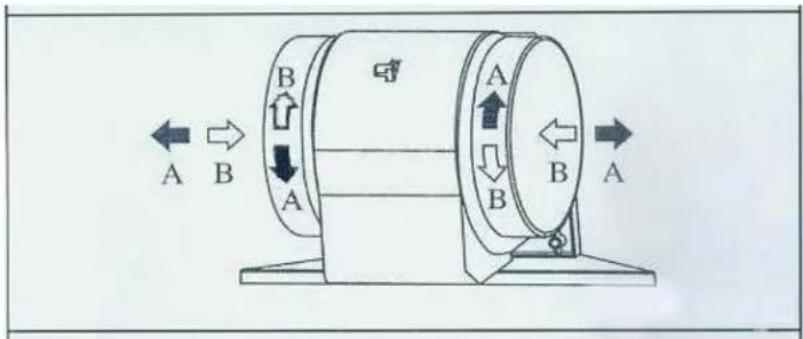
Illustration of a hand holding a circular object with a screwdriver, showing mechanical components (no text or symbols)Fig. 15
flowchart
graph TD
    A1["Clock"] --> A2["A"]
    B1["I"] --> B2["B"]
    C1["II"] --> C2["C"]
    D1["III"] --> D2["D"]
    E1["Sun"] --> E2["E"]
Fig.16
flowchart
graph TD
    A["Input A"] --> I["I"]
    I --> B["B"]
    B --> C["C"]
    C --> D["D"]
    D --> E["E"]
    F["Input F"] --> S["S"]
    S --> B["B"]
    S --> C["C"]
    S --> D["D"]
    S --> E["E"]
Fig. 17
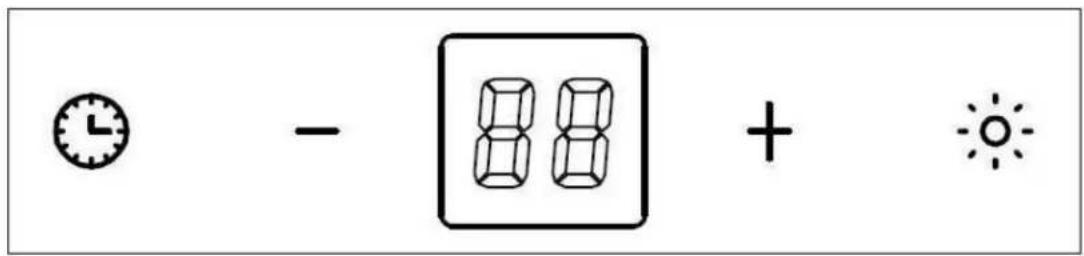
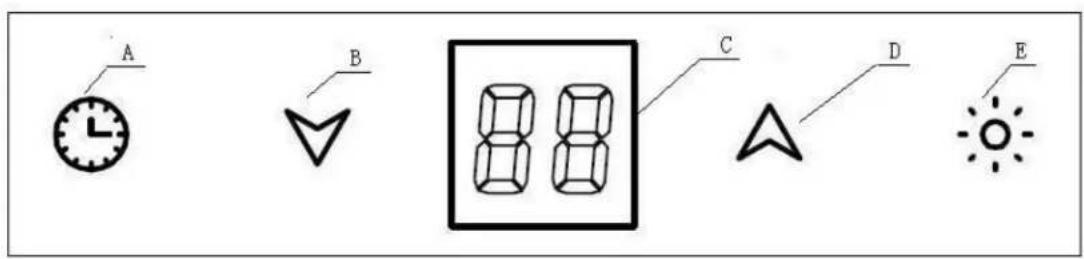
Fig. 18
GENERAL
Carefully read the following important information regarding installation safety and maintenance. Keep this information booklet accessible for further consultations.
The appliance has been designed for use in the ducting version (air exhaust to the outside – Fig.1B), filtering version (air circulation on the inside – Fig.1A) or with external motor (Fig.1C).
SAFETY PRECAUTION
- Take care when the cooker hood is operating simultaneously with an open fireplace or burner that depend on the air in the environment and are supplied by other than electrical energy, as the cooker hood removes the air from the environment which a burner or fireplace need for combustion. The negative pressure in the environment must not exceed
4Pa (4x10⁻⁵ bar). Provide adequate ventilation in the environment for a safe operation of the cooker hood. Follow the local laws applicable for external air evacuation.
Before connecting the model to the electricity network:
- control the data plate (positioned inside the appliance) to ascertain that the voltage and power correspond to the network and the socket is suitable. If in doubt ask a qualified electrician.
2. WARNING!
In certain circumstances electrical appliances may be a danger hazard.
A) Do not check the status of the filters while the cooker hood is operating
B) Do not touch bulbs or adjacent areas, during or straight after prolonged use of the lighting installation.
C) Flambè cooking is prohibited underneath the cooker hood
D) Avoid free flame, as it is damaging for the filters and a fire hazard
E) Constantly check food frying to avoid that the overheated oil may become a fire hazard
F) Disconnect the electrical plug prior to any maintenance.
G) This appliance is not intended for use by young children or infirm persons without supervision
H) Young children should be supervised to ensure they do not play with the appliance
I) There shall be adequate ventilation of the room when the range hood is used at the same time as appliances burning gas or other fuels
J) There is a risk of fire if cleaning is not carried out in accordance with the instructions
INSTALLATION INSTRUCTIONS
Assembly and electrical connections must be carried out by specialised personnel.
• Electric Connection
The appliance has been manufactured as a class I, therefore earth cable is necessary.
The connection to the mains is carried out as follows:
| IEC227 | North America | |
| L=live | Brown | Black |
| N=neutral | Blue | White |
| E=earth | Green/Yellow | Green |
If not provided, connect a plug for the electrical load indicated on the description label. Where a plug is provided,
the cooker hood must be installed in order that the plug is easily accessible.
An omnipolar switch with a minimum opening of 3mm
between contacts, in line with the electrical load and local standards, must be placed between the appliance and the network in the case of direct connection to the electrical network.
- The minimum distance between the support surfaces of the cooking pots on the cooker top and the lowest part of the cooker hood must be at least 65 cm. If a connection tube composed of two parts is used, the
upper part must be placed outside the lower part. Do not connect the cooker hood exhaust to the same conductor used to circulate hot air or for evacuating fumes from other appliances generated by other than an electrical source. Before proceeding with the assembly operations, remove the anti-grease filter(s) (Fig.11) so that the unit is easier to handle. In the case of
assembly of the appliance in the suction version prepare the hole for evacuation of the air.
- Hood assembly
Remove the structure from the packaging and separate the upper part from the lower part.
- Please attention that the arrow is positioned on the same side as the appliance controls. Make 4, ∅8 holes in the ceiling and drive in 3 screws without completely tightening them(Fig2). Pay attention not to insert the screw into the hole marked with an X on the hole template (the screws and expansion plugs must be suitable for the type of wall).
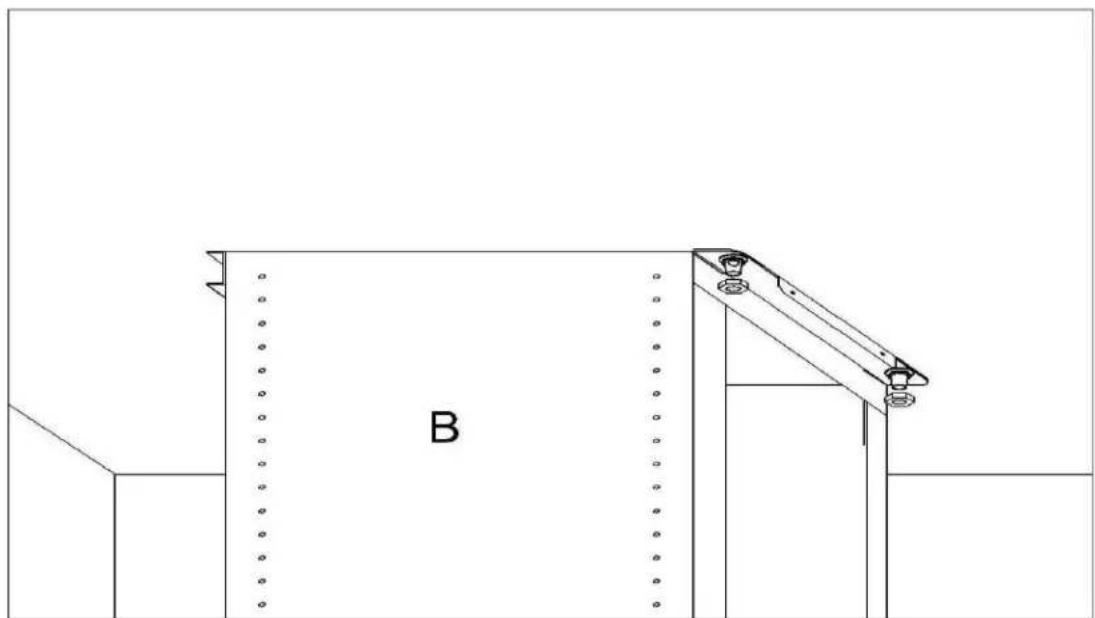
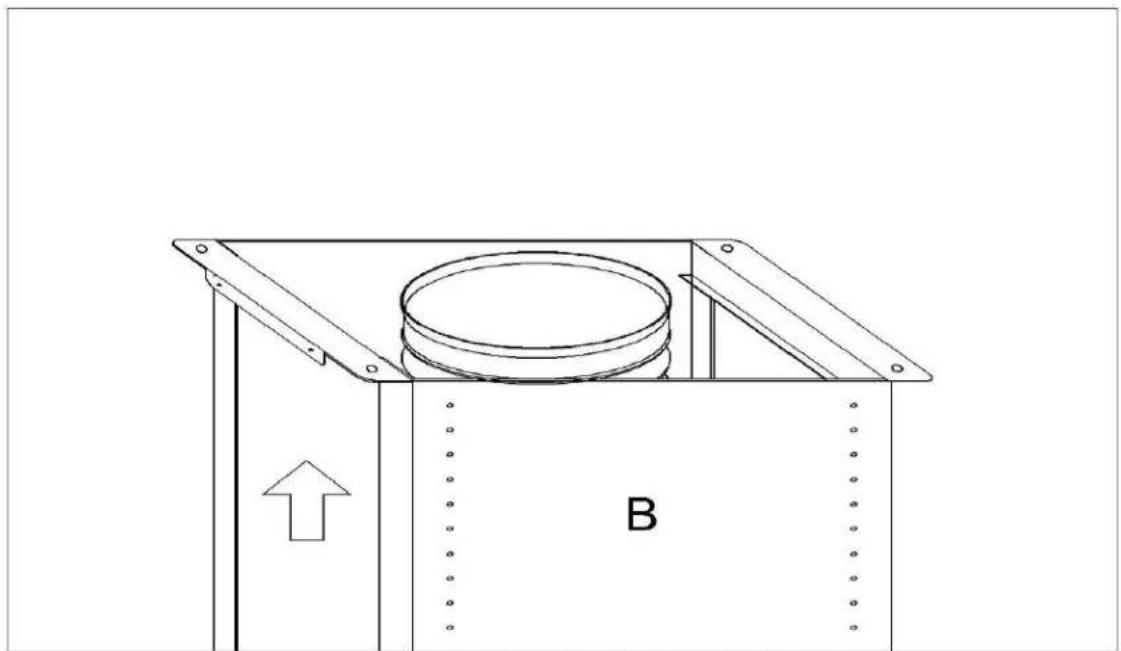
- Take the upper part of the structure B and insert the 3 slots onto the 3 screws that are not completely tightened. (Fig3)
Rotate slightly to fit.
Drive in the fourth screw X and tighten the remaining 3 to allow definitive blocking of the upper part of structure B.
- Take the lower part of the telescopic structure C and insert it into the upper structure B.
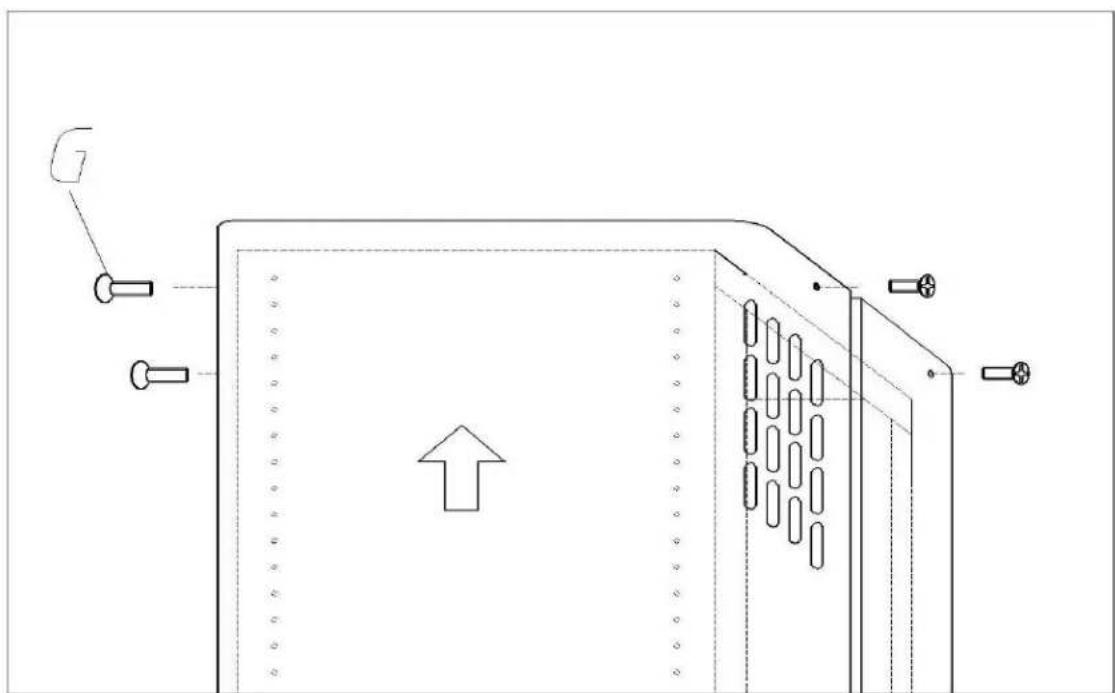
- Adjust the height (Fig.5) by referring to the amounts indicated in and block it using the 8 unit screws G that are supplied (Fig.4)
- Suction version: fix the flexible pipe to the prepared air evacuation hole (Fig.6).
- Take the upper chimney piece and fix it with 4 unit screws G. (Fig.7)
- Take the lower chimney and fix it with 2 unit screws G, drive in hood to
avoid it down. (Fig.8)
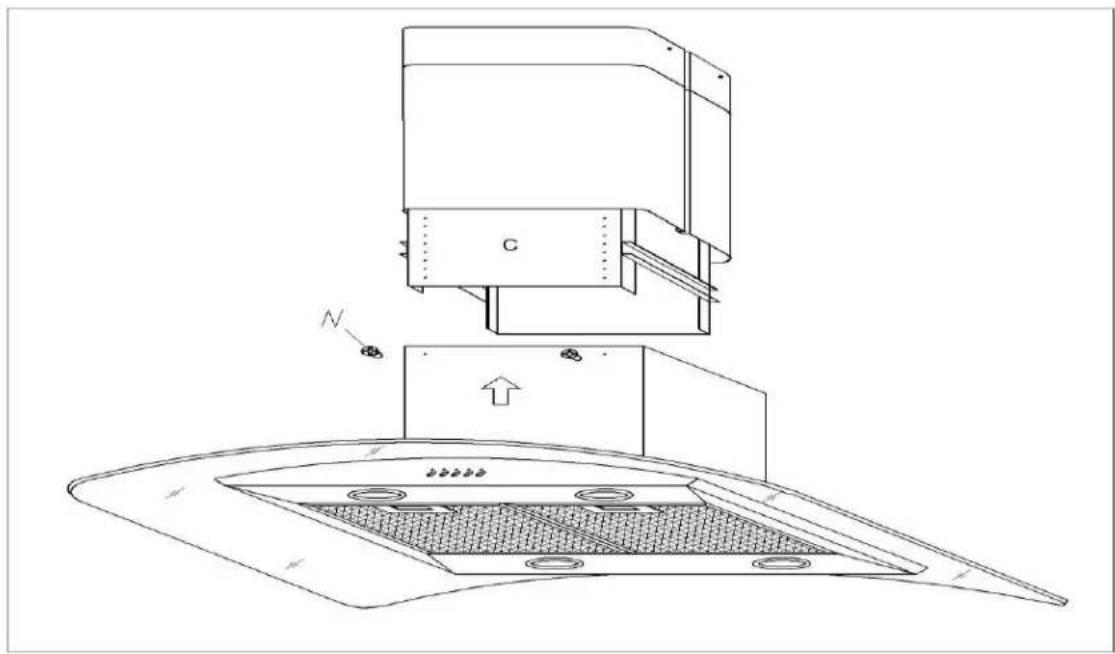
- Insert the suction unit inside the structure and set in 4 mounting hole, drive in 4 unit screw N (Fig.9).
- Fix the air evacuation pipe H (not supplied) onto the connection flange (Fig.10)
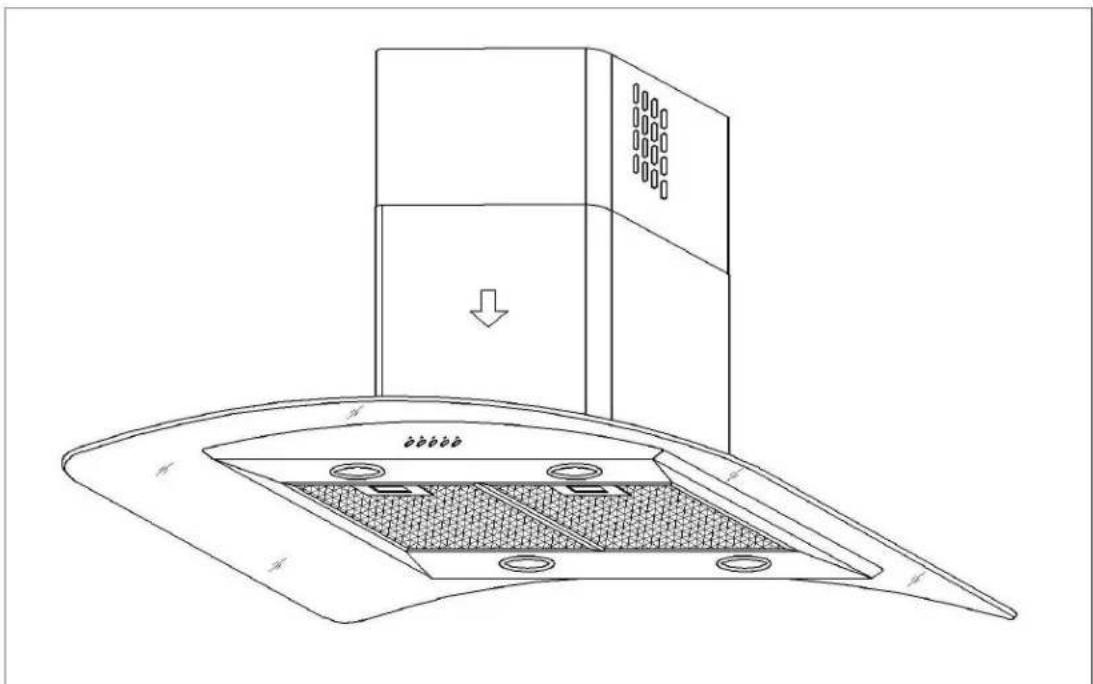
- Unscrew the 2 screws G. and rest the lower chimney piece above the cooker hood (Fig.11).
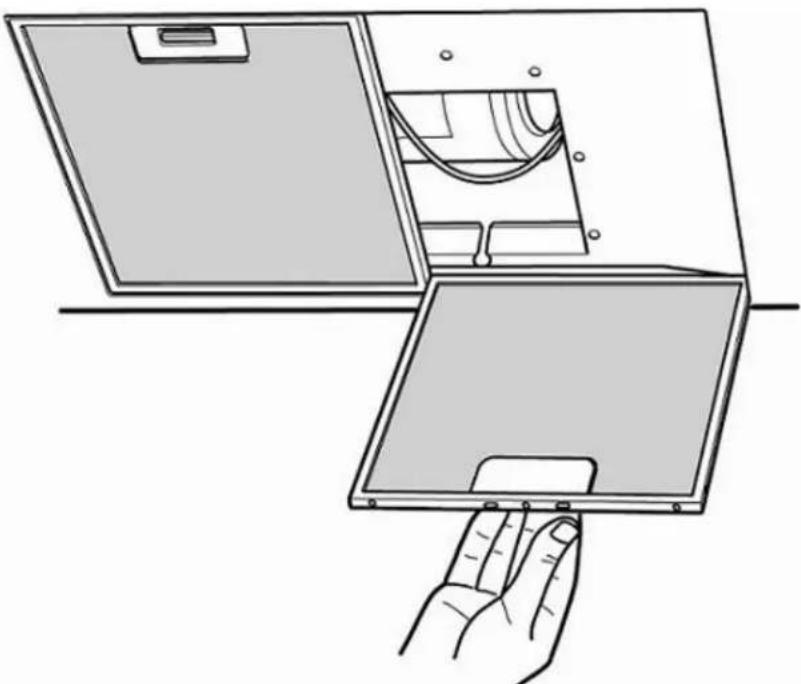
- If the cooker hood is supplied with a lower chimney piece that must be fixed to the hood body with screws, remove the anti-grease filters from the hood by acting on the relevant handles (Fig.12). Then screw the lower chimney piece pipe to the inside of the hood, using screws P(Fig.13). Re-locate the filters in their seat.
USE AND MAINTENANCE
- It is recommended to operate the appliance prior to cooking.
It is recommended to leave the appliance in operation for 15 minutes after cooking is terminated in order to completely eliminate cooking vapours and odours.
The proper function of the cooker hood is conditioned by the regularity of the maintenance operations, in particular, the active carbon filter.
- The anti-grease filters capture the grease particles suspended in the air, and are therefore subject to clogging according to the frequency of the use of the appliance.
In order to prevent fire hazard, it is recommendable to clean the filter at a maximum of 2 months by carrying out the following instructions:
- Remove the filters from the cooker hood and wash them in a solution of
water and neutral liquid detergent, leaving to soak.
- Rinse thoroughly with warm water and leave to dry.
- The filters may also be washed in the dishwasher.
The aluminum panels may alter in color after several washes. This is not cause for customer complaint nor replacement of panels.
- The active carbon filters purify the air that is replaced in the environment. The filters are not washable nor reusable and must be replaced at maximum every four months. The saturation of the active carbon filter depends on the frequency of use of the appliance, by the type of cooking and the regularity of cleaning the antigrease filters. (Fig.14) To remove the charcoal filters place on hand on one filter at a time and turn it toward the front part. The charcoal filter can now be removed. Always ensure to replace both filters at the same time.
- Clean the fan and other surfaces of the cooker hood regularly using a cloth moistened with denatured alcohol or non abrasive liquid detergent.
- The illumination installation is designed for use during cooking and not for prolonged general illumination of the environment. Prolonged use of the illumination installation notably reduces the duration of the bulb. Use a one-edged screwdriver or any other appropriate tool to lift and remove the overhead light fixture. Replace the damaged lamp. Use only halogen lamps as the original specification, avoiding contact with hands. Return the light fixture to its position (snap fastening). (Fig. 15)
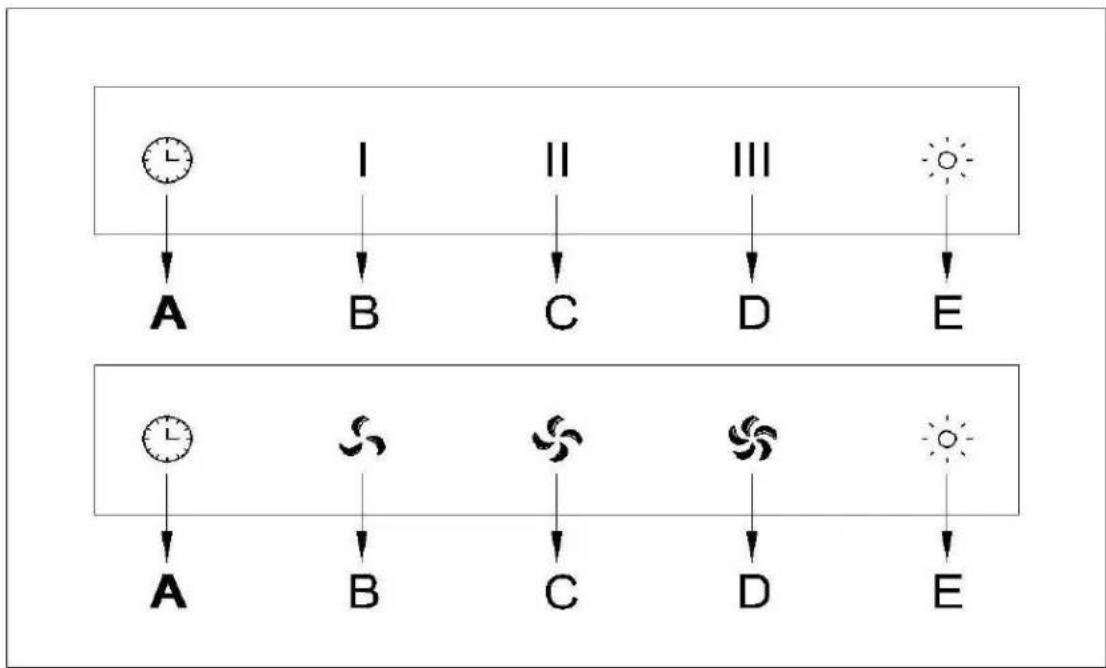
•COMMANDS PATTERN: (Fig.16)
$$ \mathrm{A} = \text { TIMER } - - 1 5 \text { MINUTES } $$
$$ \mathrm{B} = \text { S P E E D I / O F F } $$
$$ \mathbf {C} = \text { SPEED II / OFF } $$
$$ \mathbf {D} = \text { SPEED III / OFF } $$
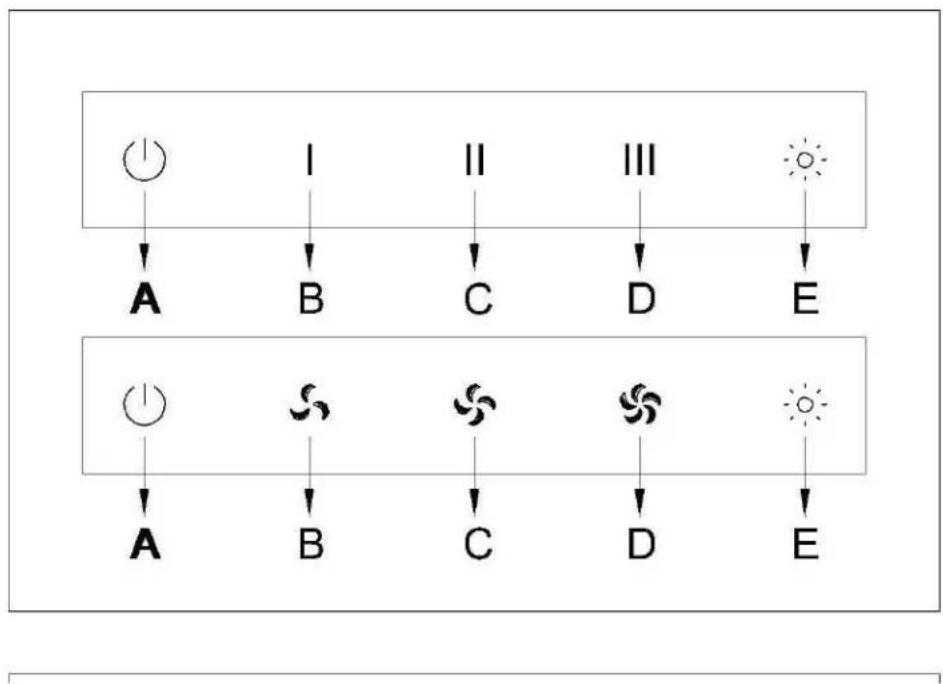
•COMMANDS PATTERN: (Fig.17)
$$ \mathrm{A} = \mathrm{OFF} $$
$$ \mathrm{B} = \text { S P E E D I } $$
$$ \mathbf {C} = \text { SPEED II } $$
$$ \mathbf {D} = \text { SPEED III } $$
$$ \mathrm{E} = \text {LIGHT} $$
E = LIGHT
- If your appliance does not have the INTENSIVE speed function, press key A for two seconds and it will be activated for 15 minutes after which it will return to the previously set speed. When the function is active the LED flashes.
By pressing any key for the exclusion of the hood light the hood will return immediately to its normal functioning.
The “automatic stop timer” delays stopping of the hood, which will continue functioning for 15 minutes at the operating speed set at the time this function is activated.
COMMANDS PATTERN: (Fig.18)
A= Timer (automatic shut off)
B= Speed 1 / adjust / switch off
C= digital display screen (showing timer and speed)
D= Speed 3 / adjust / switch off
E= Light
When pushing A, digital display screen shows "15 minutes" for timer, and the minutes can be adjusted by pushing "+" or "-" on B and D. And the first speed is on, pushing A once to switch off, the digital display shows "00".
When pushing B, it shows "F1" on the digital display screen, and the first speed is on. Pushing B once to switch off, and the digital display shows "00".
When pushing D, it shows "F3" on the digital display screen, and the third speed is on. Pushing D twice to switch off, and it shows "00" on the screen.
The second speed F2 and Turbo speed F4 can be adjusted by pushing B or D.
When pushing E, the buttons light is on and the light is on, only push E once again to switch off the light.
If the motor, light are working together, or only motor is working, pushing A, automatic switch off timer is on, and it will delay 15 minutes to turn off the motor and light. To push B or D to adjust the time, and to push A again to stop the timer.
Troubleshooting
| Problem | Possible reason | Solution |
| Hood doesn’t work | No electric supply | Check the plug is connected |
| Check the main switch is turned on | ||
| Poor airflow | Aluminum grease filters clogged | Clean the filters and replace when dry |
| Charcoal filters clogged | Replace the charcoal filters | |
| Motor running but no air flow | Butterfly valve jammed | Contact technician |
| Motor cuts after a few minutes | High temperature safety device activated | The kitchen is not sufficiently ventilated |
| The hood is installed too near the cooking stove | The hood must be least 65cm from stove | |
| Strong cooking smell | Charcoal filters not installed | In re-circulating mode, charcoal filters must be installed |
| Oil dripping onto stove | Oil cup missing or not installed | Remove aluminum filter and replace oil cup |
| Aluminum grease filter saturated | Wash the aluminum grease filters | |
| Whirring sound | Something in contact with fan blade | Contact with technician |
THE MANUFACTURORY DECLINES ALL RESPONSIBILITY FOR EVENTUAL DAMAGES CAUSED BY BREACHING THE ABOVE WARNINGS.
natural_image
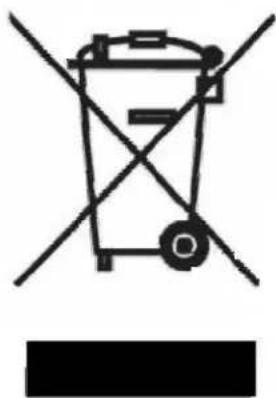
Symbol of a trash bin with crossed lines indicating no waste or discharge, and a solid black rectangle below (no text or labels)This appliance is marked according to the European directive 2002/96/EC on Waste Electrical and Electronic Equipment (WEEE).
By ensuring this product is disposed of correctly, you will help prevent potential negative consequences for the environment and human health, which could otherwise be caused by inappropriate waste handling of this product.
The symbol on the product indicates that this product may not be treated as household waste. Instead it shall be handed over to the applicable collection point for the recycling of electrical and electronic equipment.
Disposal must be carried out in accordance with local environmental regulations for waste disposal.
For more detailed information about treatment, recovery and recycling of this product, please contact your local city office, your household waste disposal service or the shop where you purchased the product.
Brand : KELVINATOR
Model : KCH110ST
Category : Refrigerator