
AT-3GSDI500 - Générateur de signal vidéo Atlona - Free user manual and instructions
Find the device manual for free AT-3GSDI500 Atlona in PDF.


| Product Type | 3G/HD/SD-SDI Signal Generator |
| Supported Video Standards | SMPTE 259M (SD-SDI), SMPTE 292M (HD-SDI), SMPTE 424M/425M (3G-SDI) |
| Output Resolutions | SD: 525i@59.94Hz, 625i@50Hz; HD: 720p@50/59.94/60Hz, 1080i@50/59.94/60Hz, 1080p@23.98/24/25/29.97/30Hz; 3G: 1080p@50/59.94/60Hz |
| Audio Support | 8-channel AES/EBU audio, SMPTE 291M/299M, adjustable audio group |
| Video Patterns | Over 50 patterns including SMPTE bars, 100% color bars, gradient, noise, checkerboard, moving squares |
| HDMI Bypass Mode | Yes, with EDID learning from connected HDMI display |
| Control Interface | Front panel buttons (Menu, Enter, Up, Down) and LCM display; bottom DIP switch for settings |
| Output Connectors | 2x BNC (SDI output), 75Ω interlocking socket |
| Input Connectors | 1x HDMI Type A (19-pin female) for bypass |
| Power Supply | 5V DC, 4A (included adapter), latch-locking connector |
| Power Consumption | 10 Watts max |
| Dimensions (unit) | 6" x 4.7" x 1.3" (154 x 119 x 33 mm) |
| Weight (unit) | 1.4 lbs (633 g) |
| Operating Temperature | 32~104°F (0~40°C) |
| Storage Temperature | -4~140°F (-20~60°C) |
| Relative Humidity | 20~90% RH (no condensation) |
| SDI Rate Detection | Automatic |
| Cable Equalization (Belden 1694A) | 3G-SDI up to 190ft (60m), HD-SDI up to 500ft (150m), SD-SDI up to 1000ft (300m) |
| Ancillary Data | EDH (RP-165), SMPTE 352M, SMPTE 291M |
| Package Contents | 1x AT-3GSDI500, 1x 5V power adapter, 1x user manual |
| Warranty | 3 years limited |
| Safety & Maintenance | Keep dry, use only included power supply, clean with damp cloth, no user-serviceable parts inside |
Frequently Asked Questions - AT-3GSDI500 Atlona
User questions about AT-3GSDI500 Atlona
0 question about this device. Answer the ones you know or ask your own.
Ask a new question about this device
Download the instructions for your Générateur de signal vidéo in PDF format for free! Find your manual AT-3GSDI500 - Atlona and take your electronic device back in hand. On this page are published all the documents necessary for the use of your device. AT-3GSDI500 by Atlona.
USER MANUAL AT-3GSDI500 Atlona
6.1.Bird's View 7
6.2.Input Panel 7
6.3. Output Panel 8
6.4. Bottom Panel 8
-
EDID LEARNING 9
-
NOTICE 10
-
APPENDIX 11
9.1. Data Identification Word of Ancillary Data Packet 11
9.2. Built-in Video Patterns 11
-
ATLONA PRODUCT REGISTRATION 14
-
SAFETY INFORMATION 15
-
WARRANTY 16
INTRODUCTION:
Atlona Technologies AT-3GSDI500 3G/HD/SD-SDI Signal Generator is an advanced SDI signal generator with multi-format (3G/HD/SD) and multi-pattern support. Besides still and moving video test patterns, other features such as audio (SMPTE-291M) are also provided. AT-3GSDI500 can support up to 8 channel AES compliant audio with 48KHz sample rate. Another attractive feature of AT-3GSDI500 comes from bypassing HDMI TH input and allows users with more testing patterns for connected display or treats AT-3GSDI500 as an advanced HDMI TH to SDI converter with 3G capability. With portable size, AT-3GSDI500 is equipped four buttons and LCM screen to ease the control. This device provides a cost effective way to calibrate and test SDI enable video devices and displays.
FEATURES:
• Supported output video resolution
SD-SDI — NTSC 525 @60Hz, PAL 625 @50Hz
HD-SDI — 720p @50Hz, 59.94Hz, 60Hz
1080i @50Hz, 59.94Hz, 60Hz
1080p @23.98Hz, 24Hz, 25Hz, 29.97Hz, 30Hz
3G-SDI — 1080p@50Hz, 59.94Hz, 60Hz
• Supported output audio format
SMPTE 291M, SMPTE 299M (8 channel audio, audio group can be adjusted)
- Bit rate
SD-SDI — 270Mbps
HD-SDI — 1.485Gbps, 1.4835Gbps
3G-SDI — 2.97Gbps, 2.967Gbps
- Video Patterns
• Supports HDMI H bypass mode
- Save settings to memory option
- ANC data
EDH (RP-165), SMPTE 352M, SMPTE291M
- Control
By LCM & Panel Buttons
- Video output
Dual 3G capable SDI output
100% Color Bars, Borderline, Random Noise, Check Field, Black, Vertical Lines, Black / White alternate fields, Full Grey / Full White, Black to White Gradient, Random Generator for all still patterns, moving squares White noise, Inverse effect with still pattern, Scrolling Title (see Appendix for illustrations)
PACKAGE CONTENTS:
- 1x AT-3GSDI500
• 1x 5V power supply unit
• 1x User's manual
SPECIFICATIONS:
| Model Name AT-3GSDI500 | |||
| Technical | |||
| Role of usage Pattern generator | |||
| SDI standards 3G / HD / SD-SDI | |||
| Auto SDI rate detection Yes | |||
| Supported protocols | SMPTE 259M (270Mbps / 360Mpbs)SMPTE 292M / HDTV (1.485 & 1.485/1.001Gbps)SMPTE 424M / 425M (2.97 & 2.97/1.001Gbps) | ||
| Video bandwidth 2.97Gpbs | |||
| Data rates 143 / 270 / 1483 / 1485 / 2967 / 2970 Mbps | |||
| Video support | [3G] 1080p@50/59.94/60 (4:2:2)[HD] 720p50/59.94/60, 1080p24/30, 1080i50/59.94/60[SD] NTSC@59.94Hz, PAL@50Hz | ||
| SDI signal type SMPTE-292M / 259M / 424M | |||
| Pathological pattern (RP-198) Immune | |||
| HDMI TH bypass Yes | |||
| Output impedance 75Ω | |||
| Cable (Belden 1694A) equalization / transmission | 3G-SDI - up to 190ft (60m)HD-SDI - up to 500ft (150m)SD-SDI - up to 1000ft (300m) | ||
| Audio support Yes | |||
| PCB Stack-up 4-layer board [impedance control — differential 100Ω; single 50Ω] | |||
| Input None | |||
| Output | 2x BNC [SDI] | ||
| BNC connector | 75Ω interlocking socket | ||
| HDMI TH connector | Type A [19-pin female] | ||
| [HD] Eye pattern characteristics | Amplitude: Within 800mV <10%Rise overshoot: Less than 2%Fall overshoot: Less than 2% | Long time jitter <1.0 UITiming jitter <1.0 UIAlignment jitter <0.2 UI | |
| Mechanical | |||
| Housing | Metal enclosure | ||
| Dimensions[L x W x H] | Model | 6" x 4.7" x 1.3" (154 x 119 x 33mm) | |
| Package | 7.7" x 12.8" x 3.6" (196 x 325 x 92mm) | ||
| Weight | Model | 1.4 lbs (633g) | |
| Package | 2.8 lbs (1260g) | ||
| Fixedness | Latch-locking power supply | ||
| Power supply | 5V 4A DC | ||
| Power consumption | 10 Watts [max] | ||
| Operation temperature | 32~104°F (0~40°C) | ||
| Storage temperature | -4~140°F (-20~60°C) | ||
| Relative humidity | 20~90% RH [no condensation] | ||
The measurement results are from Tektronix WFM-7120 with SDI through 3.3ft (1m) long Belden 1694A.
FUNCTION MENU:
5.1. Format
- Resolution – NTSC / PAL / 720p / 1080p / 1080i
- Frequency – 60Hz / 59.94Hz / 50Hz / 30Hz / 29.97Hz / 25Hz / 24Hz / 23.98Hz
- Output – YCbCr 4:2:2
5.2. Video
- Patterns – SMPTE Bar / 100% Bar / Check Field / EQ / PLL
Gradient R1 / Gradient G1 / Gradient B1
Gradient R2 / Gradient G2 / Gradient B2
Gradient R3 / Gradient G3 / Gradient B3
Gradient R4 / Gradient G4 / Gradient B4
Red Level 1 / Red Level 2
Green Level 1 / Green Level 2
Blue Level 1 / Blue Level 2
100% Red / 100% Green / 100% Blue / White / Gray Level
40% Gray / 70% Gray / Black / Noise
Circle 1 / Circle 2 / Moire
H Stripe R / H Stripe G / H Stripe B
V Stripe R / V Stripe G / V Stripe B
Chess 1 / Chess 2 / Sequence
- Text – Off / On-White / On-Black
- Timer – Off / On-W/B / On-B/W
5.3. Audio
- Mode - Off / On
- Group - 1+2 / 3+4
- Level --6dB / -12dB / -18dB / -24dB / -30dB / -36dB / -42dB / Silence / Random
- Mask – Off / CH 1234 / CH 1 / CH 2 / CH 3 / CH 4 / CH 1+2 / CH 3+4
5.4. Motion
- Motion – No Motion / Square 1 / Square 2 / 2 Squares / Square Inv
- Data Speed - 1 / 2 / 3 / 4 / 5 / 6 / 7 / 8
5.5. ANC Data
- SMPTE-352M - Off / On
- EDH - On / Off
5.6. System
- Status – No Change / Factory / Now Save
- Version – V1.01
PANEL DESCRIPTION:
6.1. Bird's View
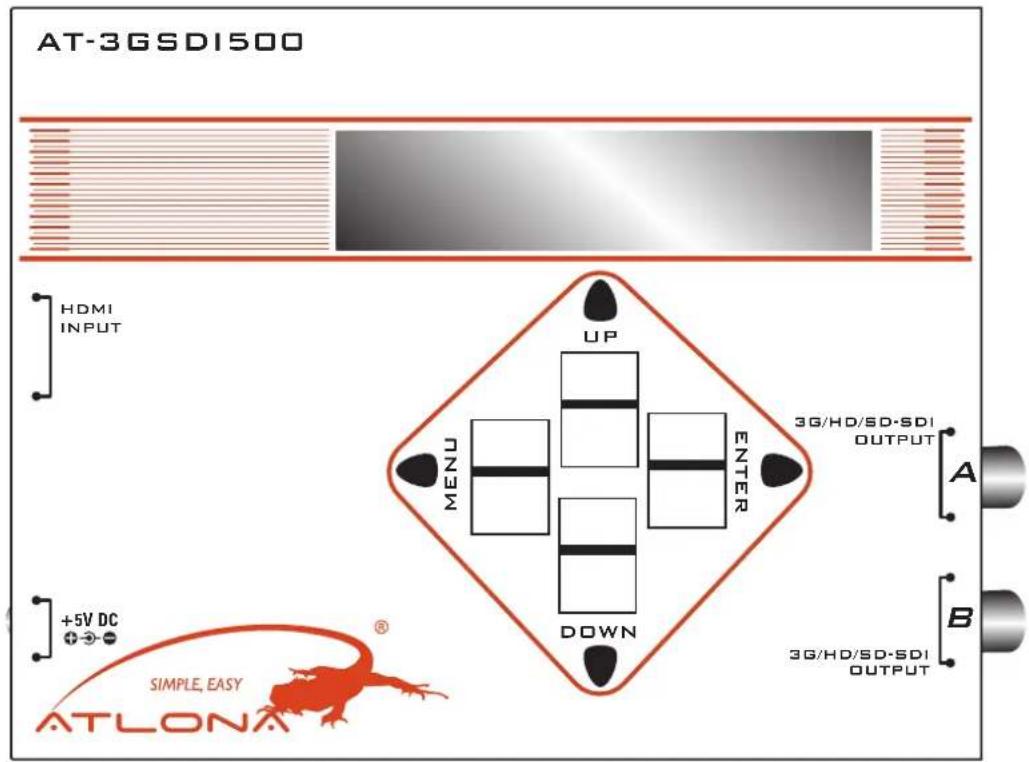
Button Function
Menu Trigger the function menu
Enter Enter the menu item
Up Choose the last menu item
Down Choose the next menu item
6.2. Input Panel

- HDMI TH INPUT: Plug in a HDMI TH cable to be linked to a HDMI TH source
- +5V DC: Connect to a 5V DC power supply unit
6.3. Output Panel
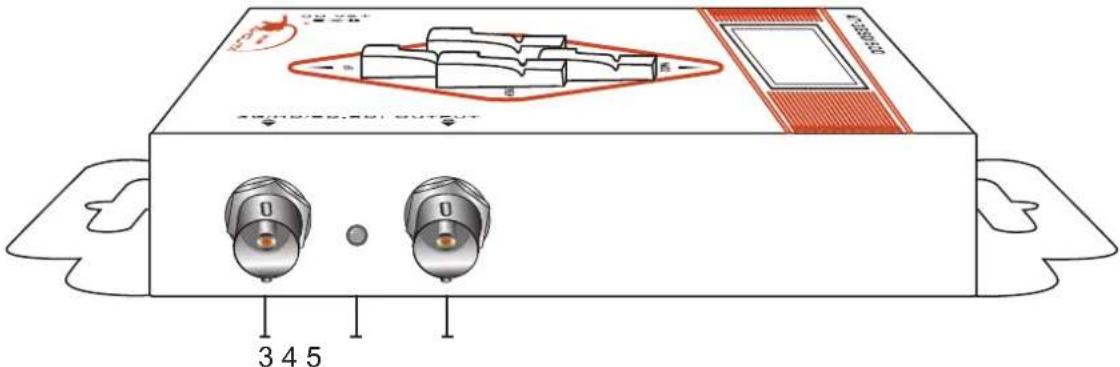
-
SDI OUTPUT A: Connect to a SDI device for SDI, HD-SDI, or 3G-SDI signal output either from the chosen pattern or the converted HDMI TH source signal
-
Lock LED: showing if the audio/video signal existed or not
-
SDI OUTPUT B: Connect to a SDI device for SDI, HD-SDI, 3G-SDI signal output either from the chosen pattern or the converted HDMI TH source signal
6.4. Bottom Panel

A 4-pin DIP switch is used for user interface, and users can access this switch from the bottom of the unit.
| Pin No. 1 2 3 4 | ||||
| ON (↑) | Used for SMPTE352M | 3G level B 10 Update EDID | ||
| OFF (↓) 3G level A | Not in use | Default EDID | ||
-
Factory default for 4-pin DIP switch: OFF-OFF-OFF-OFF [↓-↓-↓-↓]
-
In order to keep the compatibility of HDMI TH to most monitors, AT-3GSDI500 features EDID learning ability. The operation is shown in the EDID LEARNING section.
EDID LEARNING:
- Power off AT-3GSDI500 and set the pin 4 of DIP switch of AT-3GSDI500 to OFF [↓].
- Connect the HDTV to the HDMI TH port on the AT-3GSDI500, and then power on AT-3GSDI500.
- The Lock LED on the AT-3GSDI500 will dim and light again, which indicates the EDID learning process is done.
- Connect AT-3GSDI500 to the HDMI TH source through a HDMI TH cable and enjoy the experience.
NOTICE:
-
In HDMI TH bypass mode, users must be aware of that the jitters coming from HDMI TH sources, such as DVD players, may be much higher than typical requirement according to SMPTE request on HD-SDI signals. This will result in SDI output with high jitters or even no SDI outputs!
-
Due to the high frequency bandwidth and low jitter requirement of 3G-SDI signals, for single SDI output case, it is strongly recommended to use one 75 ohm terminator for the unused SDI output to keep the best performance.
APPENDIX:
9.1. Data Identification Word of Ancillary Data Packet
| ANC Data DID SDID / DBN | |
| 352M 0x41 0x01 | |
| RP-165-EDH* 0xF4 0x00 |
• Data Type 1(SMPTE-291M)
9.2. Built-in Video Patterns
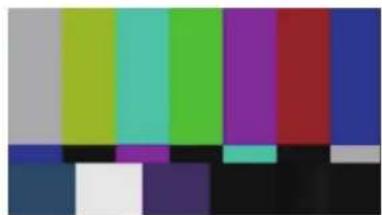
SMPTE Bar 100% Bar


Check Field EQ PLL


Gradient R1 Gradient G1 Gradient B1


Gradient R2 Gradient G2 Gradient B2


Gradient R3 Gradient G3 Gradient B3








Gradient R4 Gradient G4 Gradient B4


Red Level 1 Red Level 2


Green Level 1 Green Level 2


Blue Level 1 Blue Level 2


100% Red 100% Green 100% Blue


Gray Level 40% Gray 70% Gray

Black Noise


Circle 1 Circle 2 Moire


V Stripe R V Stripe G V Stripe B


H Stripe R H Stripe G

H Stripe B




Chess 1 Chess 2


Sequence
ATLONA PRODUCT REGISTRATION:
Thank you for purchasing this Atlona product — we hope you'll enjoy it.
We also hope that you'll take a few moments to register your new purchase. Registration creates an ownership record if your product is lost or stolen and helps ensure you'll receive notification of performance issues and firmware updates. At Atlona, we respect and protect your privacy and assure you that your registration information is completely secure. Of course, Atlona product registration is totally voluntary and failure to register will not diminish your limited warranty rights.
To register go to www.atlona.com/registration
SAFETY INFORMATION:
Safeguards
To reduce the risk of electric shock, do not expose this product to rain or moisture.
If the wall plug does not fit into your local power socket, hire an electrician to replace your obsolete socket.
Do not modify the wall plug.
Doing so will void the warranty and safety features.
This equipment should be installed near the socket outlet and the device should be easily accessible in case it requires disconnection.
Precautions
FCC Regulations state that any unauthorized changes or modifications to this equipment not expressly approved by the manufacturer could void the user's authority to operate this equipment.
Operate this product using only the included external power supply. Use of other power supplies could impair performance, damage the product or cause fires.
In the event of an electrostatic discharge, this device may automatically turn off. If this occurs, unplug the device, and plug it back in.
Protect and route power cords so they will not be stepped on or pinched by anything placed on or against them. Be especially careful of plug-ins, or cord exit points from this product.
Avoid excessive humidity, sudden temperature changes or temperature extremes.
Keep this product away from wet locations such as bathtubs, sinks, laundries, wet basements and swimming pools.
Use only accessories recommended by ATLONA to avoid fire, shock or other hazards.
Unplug the product before cleaning. Use a damp cloth for cleaning. Do not use cleaning fluid or aerosols, which could enter the unit and cause damage, fire or electrical shock. Some substances may also mar the finish of the product.
Never open or remove unit panels or make any adjustments not described in this manual. Attempting to do so could expose you to dan-gerous electrical shock or other hazards. It may also cause damage to your AT-3GSDI500. Opening the product will void the warranty.
Do not attempt to service the unit. Instead disconnect it and contact your Authorized ATLONA reseller or contact ATLONA directly.
WARRANTY:
1. LIMITED WARRANTY
Atlona Technologies warrants that (a) its products (the "Product") will perform substantially in accordance with the accompanying written materials for a period of 3 years from the date of receipt and (b) that the Product will be free from defects in materials and workmanship under normal use and service for a period of 3 years. In the event applicable law imposes any implied warranties, the implied warranty period is limited to 3 years from the date of receipt. Some jurisdictions do not allow such limitations on duration of an implied warranty, so the above limitation may not apply to Customer.
2. CUSTOMER REMEDIES
Atlona Technologies and its suppliers' entire liability and Customer's exclusive remedy shall be, at Atlona Technologies' option, either return of the price paid for the Product, or repair or replacement of the Product that does not meet this Limited Warranty and which is returned to Atlona Technologies with a copy of Customer's receipt. This Limited Warranty is void if failure of the Product has resulted from accident, abuse, or misapplication. Any replacement Product will be warranted for the remainder of the original warranty period or 3 year, whichever is longer.
3. NO OTHER WARRANTIES
TO THE MAXIMUM EXTENT PERMITTED BY APPLICABLE LAW, ATLONA TECHNOLOGIES AND ITS SUPPLIERS DISCLAIM ALL OTHER WARRANTIES, EITHER EXPRESS OR IMPLIED, INCLUDING, BUT NOT LIMITED TO IMPLIED WARRANTIES OF MERCHANTABILITY AND FITNESS FOR A PARTICULAR PURPOSE, WITH REGARD TO THE PRODUCT AND ANY RELATED WRITTEN MATERIALS. THIS LIMITED WARRANTY GIVES CUSTOMER SPECIFIC LEGAL RIGHTS. CUSTOMER MAY HAVE OTHER RIGHTS DEPENDING ON THE JURISDICTION.
4. NO LIABILITY FOR DAMAGES
TO THE MAXIMUM EXTENT PERMITTED BY APPLICABLE LAW, IN NO EVENT SHALL ATLONA TECHNOLOGIES OR ITS SUPPLIERS BE LIABLE FOR ANY DAMAGES WHATSOEVER (INCLUDING WITHOUT LIMITATION, SPECIAL, INCIDENTAL, CONSEQUEN-TIAL, OR INDIRECT DAMAGES FOR PERSONAL INJURY, LOSS OF BUSINESS PROFITS, BUSINESS INTERRUPTION, LOSS OF BUSINESS INFORMATION, OR ANY OTHER PECUNIARY LOSS) ARISING OUT OF THE USE OF OR INABILITY TO USE THIS PRODUCT, EVEN IF ATLONA TECHNOLOGIES HAS BEEN ADVISED OF THE POSSIBILITY OF SUCH DAMAGES. IN ANY CASE, ATLONA TECHNOLOGIES' AND ITS SUPPLIERS' ENTIRE LIABILITY UNDER ANY PROVISION OF THIS AGREEMENT SHALL BE LIMITED TO THE AMOUNT ACTUALLY PAID BY YOU FOR THE PRODUCT. BECAUSE SOME JURISDICTIONS DO NOT ALLOW THE EXCLUSION OR LIMITATION OF LIABILITY FOR CONSEQUENTIAL OR INCIDENTAL DAMAGES, THE ABOVE LIMITATION MAY NOT APPLY TO YOU.
- INTRODUCTION
- FEATURES
- PACKAGE CONTENTS
- FUNCTION MENU
- FORMAT
- VIDEO
- AUDIO
- MOTION
- ANC DATA
- SYSTEM
- PANEL DESCRIPTION
- BIRD'S VIEW
- BUTTON FUNCTION
- INPUT PANEL
- OUTPUT PANEL
- BOTTOM PANEL
- EDID LEARNING
- NOTICE
- APPENDIX
- DATA IDENTIFICATION WORD OF ANCILLARY DATA PACKET
- BUILT-IN VIDEO PATTERNS
- ATLONA PRODUCT REGISTRATION
- SAFETY INFORMATION
- SAFEGUARDS
- PRECAUTIONS
- WARRANTY
- LIMITED WARRANTY
- CUSTOMER REMEDIES
- NO OTHER WARRANTIES
- NO LIABILITY FOR DAMAGES
Brand : Atlona
Model : AT-3GSDI500
Category : Générateur de signal vidéo