Atdec AF-AA-P - Monitor stand

AF-AA-P - Monitor stand Atdec - Free user manual and instructions

Find the device manual for free AF-AA-P Atdec in PDF.

📄 4 pages English EN Download 💬 AI Question 10 questions ⚙️ Specs
Notice Atdec AF-AA-P - page 1
Pick your language and provide your email: we'll send you a specifically translated version.
Product TypeMonitor Mount / Arm
BrandAtdec
ModelAF-AA-P
Mounting TypeDesk clamp or grommet
VESA Compatibility75x75mm, 100x100mm
Weight CapacityUp to 12 kg (26.5 lbs)
MaterialAluminum alloy, steel
ColorBlack or silver (depending on variant)
Range of MotionArm extension up to 500mm, tilt +90°/-20°, swivel 360°, rotation 360°
Tilt+90° / -20°
Swivel360°
Rotation360° (portrait/landscape)
Cable ManagementIntegrated cable clips
InstallationEasy, no drilling required; clamp thickness up to 80mm
DimensionsArm: 100–500mm extension; pole: 200mm height
WeightApprox. 2.5 kg
Warranty5 years

Frequently Asked Questions - AF-AA-P Atdec

What is the maximum VESA size supported?
The AF-AA-P supports VESA patterns 75x75mm and 100x100mm, covering most monitors up to 32 inches.
Can this mount hold a 27-inch monitor?
Yes, the mount supports monitors up to 12 kg, which is sufficient for most 27-inch monitors. Check your monitor weight before installation.
Is the mount compatible with curved monitors?
Yes, the tilt and swivel features allow adjustment for curved monitors. Ensure the VESA pattern matches.
Does the AF-AA-P come with a desk clamp or grommet mount?
It includes both options. The clamp fits desks up to 80mm thick, and the grommet mount fits holes up to 60mm diameter.
How do I manage cables with this mount?
Integrated cable clips along the arm help route and hide cables, keeping your workspace tidy.
Can the monitor be rotated to portrait mode?
Yes, the mount allows 360° rotation, so you can switch between landscape and portrait orientations easily.
What tools are needed for installation?
Only a screwdriver (Phillips or hex key) is needed. All necessary hardware is included in the box.
Is the mount suitable for a glass desk?
The clamp can be used on glass desks if the glass is tempered and thick enough (at least 10mm). Ensure proper padding to avoid damage.
Does the arm provide height adjustment?
Yes, the arm includes gas spring height adjustment, allowing smooth vertical movement without tools.
What is the warranty period?
Atdec offers a 5-year warranty on the AF-AA-P against manufacturing defects.

User questions about AF-AA-P Atdec

0 question about this device. Answer the ones you know or ask your own.

Ask a new question about this device

The email remains private: it is only used to notify you if someone responds to your question.

No questions yet. Be the first to ask one.

Download the instructions for your Monitor stand in PDF format for free! Find your manual AF-AA-P - Atdec and take your electronic device back in hand. On this page are published all the documents necessary for the use of your device. AF-AA-P by Atdec.

USER MANUAL AF-AA-P Atdec

natural_image Technical line drawing of a mechanical tool assembly (no text or symbols)

COMPONENT CHECKLIST
A VESA head (x1) B Monitor arm (x1) C Hand grip assembly (x1) D Rotation limiter (x1) E Primary arm cable cover (x1) F Secondary arm cable cover (x1) G Security Screw M4 x 16mm (x1) H Mounting screws M4 x 10mm (x4) I Mounting screws M4 x 12mm (x4) J Mounting screws M4 x 16mm (x4)

Atdec AF-AA-P - 2

REQUIRED TOOLS

• Phillips Head Screwdriver

WEIGHT RANGE

kg (lb) 0 - 8kg (0 - 17.6lbs)

IMPORTANT INFORMATION

! Please ensure this product is installed as per these installation instructions.
! This product is compatible with the range of AF Poles and arms.
! The manufacturer accepts no responsibility for incorrect installation.

1. Install VESA monitor head

1.1 Install VESA monitor head as shown. Screen VESA monitor head M4x10/12/16mm Phillips Head Mounting Screws Spacers (may be required for recessed and uneven surfaces) 100mm 100mm

2. Install arm assembly

2.1 Remove Top Cap and Allen key from existing AF- pole product 2.2 OPTIONAL ROTATION LIMITER Insert rotation limiter for 180° rotation around mounting pole 2.3 Place handgrip tab in arm assembly Arm Assembly 2.4 Place arm and handgrip on to the pole Note Ensure handgrip tab lines up with slot in pole 2.5 Turn the handgrip to fix the height of the arm and place the top cap back on to the pole Pole Top Cap 5mm Allen Key

3. Mounting Monitor

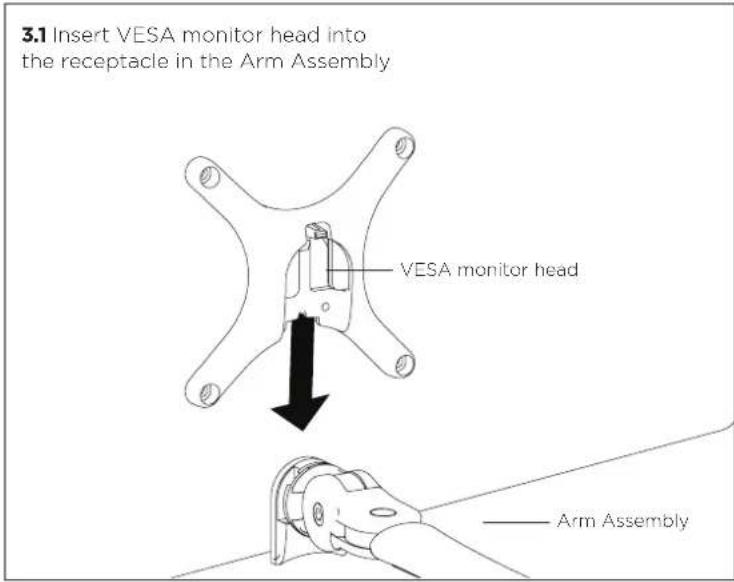
3.1 Insert VESA monitor head into the receptacle in the Arm Assembly VESA monitor head Arm Assembly

3.2 OPTIONAL SECURITY SCREW Ensure the Monitor is supported, then loosen the Monitor head screw with the 5mm Allen Key and tilt screen up before installing the M4 x 16mm Security Screw into the Security Screw hole Monitor head screw Security Screw Hole M4 x 16mm Security Screw Note: Support Screen when adjusting tilt. Loosen Tighten Phillips Head Screwdriver 5mm Allen Key

4. Adjusting Height

4.1 Unlock Handgrip ensuring both the screen and arm assembly are supported 4.2 Lift/Lower the Screen to the desired height. Move both Screen and Arm assembly together 4.3 Lock Handgrip firmly

5. Cable Management

5.1 After plugging in your cables, install the Cable Covers. Lock Slot Insert Cable Covers up into Lock Slots. 5.2 Push Cable Covers away from Elbow Joint to secure in place. 'click' Elbow Joint 'click' 5.3 Cable Clips and Cable Stops can be installed to further manage cables. Cable Stop Note: Ensure enough cable slack is given to allow for movement. Cable Clip

5. Cable Management (Cont)

Insert Cable Stop on one edge of the Pole Slot Press down firmly onto the other edge of the Cable Stop and hold. This allows the rear profile to flex in place Allen Key Storage

Adjusting the Display Bracket

Portrait/ Landscape
Atdec AF-AA-P - Adjusting the Display Bracket - 1

natural_image Simple line drawing of a stylized fish inside a dashed rectangular frame with curved arrows indicating rotation (no text or symbols)

Tilt (Screen angle up/down)
Loosen 5mm Allen Key Tighten

Pan (Screen angle left/right)
Atdec AF-AA-P - Adjusting the Display Bracket - 3

natural_image Diagram of a mechanical or electrical component with intersecting rods and a central rotating arrow (no text or symbols)

No Allen Key necessary No Allen Key necessaryNote: Support Screen when adjusting tilt.

Manual assistant
Powered by Anthropic
Waiting for your message
Product information

Brand : Atdec

Model : AF-AA-P

Category : Monitor stand