Pro 485 - Loudspeaker Wet Sounds - Free user manual and instructions
Find the device manual for free Pro 485 Wet Sounds in PDF.


| Product Type | Marine Coaxial Speaker |
| Brand | Wet Sounds |
| Model | Pro 485 |
| Speaker Size | 6.5 inches (165 mm) |
| Power Handling (RMS) | 100 watts |
| Power Handling (Peak) | 200 watts |
| Frequency Response | 45 Hz – 20 kHz |
| Impedance | 4 ohms |
| Sensitivity | 92 dB |
| Woofer Cone Material | Polypropylene with UV inhibitors |
| Tweeter Type | Titanium Diaphragm Compression Driver |
| Grille Material | Stainless Steel with Powder Coating |
| Mounting Depth | 3.75 inches (95 mm) |
| Mounting Cutout Diameter | 5.7 inches (145 mm) |
| Waterproof Rating | IPX6 (Water Resistant) |
| Weight per Speaker | 3.5 lbs (1.6 kg) |
| Recommended Amplifier Power | 50 – 150 watts RMS per channel |
| Operating Temperature Range | -20°C to 60°C |
| Compliance | CE, RoHS |
| Includes | Pair of speakers, mounting hardware, grille, and manual |
Frequently Asked Questions - Pro 485 Wet Sounds
It is recommended to use an amplifier delivering 50-150 watts RMS per channel.
It is designed for marine and outdoor use, but not for submersion.
Mounting depth is 3.75 inches (95 mm).
Mounting hardware is also included.
Factory stereos typically output 15-30 watts RMS, which may not fully drive the speakers.
Avoid harsh chemicals.
Rinse grilles with fresh water after saltwater exposure.
Contact Wet Sounds for details.
User questions about Pro 485 Wet Sounds
0 question about this device. Answer the ones you know or ask your own.
Ask a new question about this device
Download the instructions for your Loudspeaker in PDF format for free! Find your manual Pro 485 - Wet Sounds and take your electronic device back in hand. On this page are published all the documents necessary for the use of your device. Pro 485 by Wet Sounds.
USER MANUAL Pro 485 Wet Sounds
natural_image
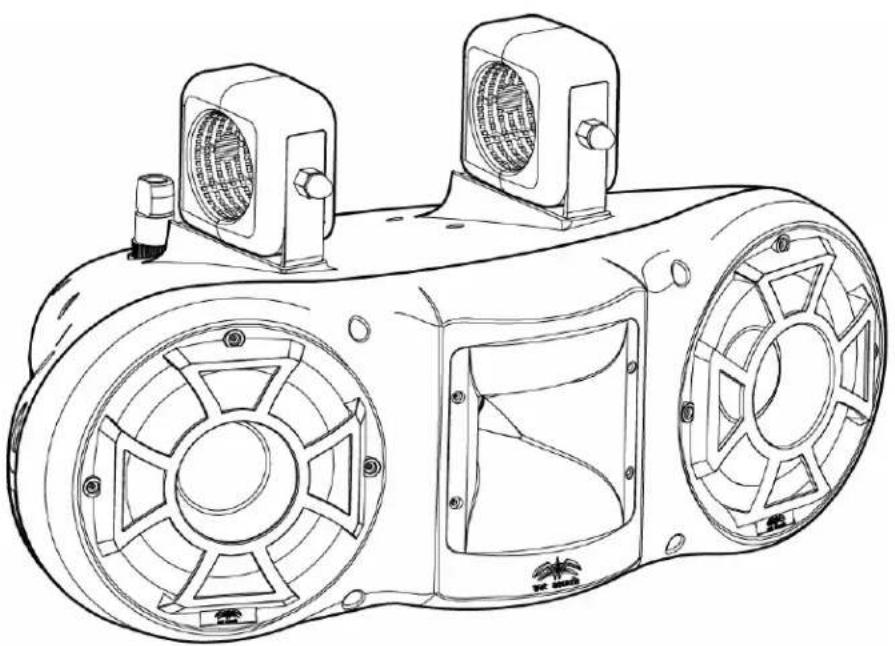
Technical line drawing of a mechanical device with two fans and three motors (no text or symbols)PRO 485
Owner's Manual & "Limited" Warranty
Technology Specifications:
Thank You for purchasing this Wet Sounds ^™ product. Wet Sounds ^™ marine audio products represent the ultimate in high performance standards. The PRO 485 is specifically engineered to withstand the rigorous marine environment. Utilizing the state of the art acoustic engineering and three dimensional computer aided design, the “PRO” series from Wet Sounds ^™ represents advanced technologies that are used today in professional concert hall and stadium applications.
Please take a moment to read the instruction manual before starting your installation. This manual will explain the benefits of the technologies developed by Wet Sounds ^™ and will help you understand the installation and use of this product. If you have any questions or concerns please contact your certified Wet Sounds ^™ dealer. You may also contact Wet Sounds ^™ technical support by dialing 1-877-WET-SPKR (1-877-938-7757)
SPEAKER SPECIFICATIONS:
RMS: 300 watts
Continual: 450 watts
Peak: 600 watts
Mid Bass: Dual 8 inch EFG (Epoxy/Fiberglass) cone with polyurethane surround
High Frequency: Titanium Diaphragm; High Output; HLCD (Horn Loaded Compression Driver)
Impedance: 4 ohm
Frequency Response: 20Hz to 20 kHz
Sensitivity: 90DB at 1W/1M
The PRO 485 has our proprietary WdET ^™ (Wide Dispersion Enhanced Throw) technology. Unlike most conventional designs, by having WdET ^™ technology, the PRO 485 provides remarkable volume and amazing sound quality off axis and on axis. Through several test the PRO 485 was confirmed to project volume at 150 feet without any loss of detail or information. Not only does the PRO 485 achieve volume and sound quality at a minimum of 150 ft, but with the WdET ^™ technology the rider can enjoy quality sound while riding outside the wake and being almost parallel to boat.
The driver compliment in each PRO 485 combines two 8 inch EFG ^TM drivers and one concentrically mounted HLCD (Horn Loaded Compression Driver). For stellar performance and higher yielding for the marine environment, Wet Sounds ^TM developed a proprietary cone material called EFG ^TM , which stands for epoxy and fiberglass composite mix. This cone material incorporates characteristic values that are impermeable to damage from intermittent Ultra Violet exposure and minimal moisture exposure. Like the EFG ^TM cone material, the Polyurethane that is used for the surround will provide protection against Ultra Violet exposure and moisture. This will prevent deterioration of the surround yielding longer life and better reliability. We do, however, encourage you to either remove or cover your tower speakers when they are not in use. Limiting exposure to Ultra Violet Rays and to moisture will help extend the life of your tower speakers.
The high frequency transducer is an HLCD (horn loaded compression driver). This driver was designed to provide a wide; horizontal trajectory that would not only produce sound in the directed path but will disperse sound off axis with little to no degradation. It is considered to be one of the most efficient transducer designs providing remarkable output while using less power.
***Caution: Do not spray any of the speakers directly with any liquid base substance.
Warranty will be voided if improper care is discovered during extensive examination of the product.
Installation:
Wiring Diagram Picture-See Attached
WC Speaker Connector Picture and Directions-See Attached
Trick Connect™ Bracket Assembly:
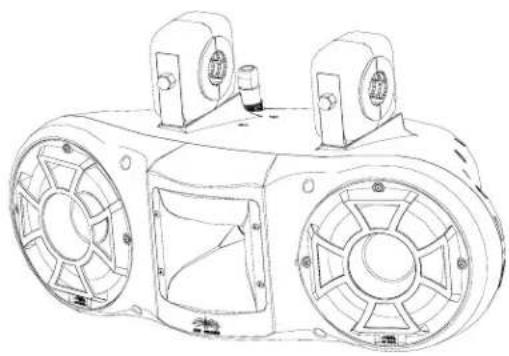
The PRO 485 uses two Trick Connect™ brackets per speaker. These brackets are designed to give you the option to have speakers facing the rear (stern) or facing forward (bow).
Trick Connect ^TM also allows you to remove the speakers fairly quick and painless.
There are three essential pieces to the Trick Connect ^TM bracket assembly; the tower clamp; the U-bracket and the rubber inserts.
The tower clamp attaches to the tower using the one of the six provided inserts. There is also a pair of rubber strips that you should use to wrap the tower. This will prevent scratching from the clamp and movement of the tower speaker.
The U-bracket that is attached to the speaker is designed to slide within the grooves of the clamp. DO NOT attach the speaker to the tower clamp until the clamp is securely attached to the tower first.
The bracket is a 2 7/8 inch bracket. If your tower is 2 7/8 inches, you will not need to use the inserts but we recommend that you still use the rubber strips to help secure and prevent scratching.
For other size towers there are 6 insert sizes per bracket for a total of 24 inserts.
The sizes are
| 212 | 134 |
| 214 | 158 |
| 2 | 112 |
Once you have determined what size tower inserts you need, there is a MOUNTING TEMPLATE that can be taped horizontally to the tower. Temporarily affix this template to the tower to determine appropriate distances between the two clamps needed for mounting the PRO 485. This will make it easier to mount the two brackets in the necessary location so that the U-brackets slide onto them properly. After determining the locations of where the brackets are going to be mounted, wrap the provided rubber strips around the tower in those exact placements. Once you have completed this you now need to place the inserts over the rubber strips. As stated earlier, the use of the rubber strips will protect your tower from abrasion and will help to prevent movement of the mounting clamp.
Now it's time to mount the clamps. Be sure to place the clamp over the inserts (if inserts are used). Make sure the inserts and the two pieces of the clamp are touching. There should be no gaps as the U-bracket has zero tolerance for flexing or movement. The U-bracket should slide right into the grooves of the clamp to complete a snug fit. If there is a gap, make sure you are using the proper size inserts and/or that the clamp is as tight as possible.
Attach the U-bracket to the speaker housing using the stainless steel bolts provided. Wet Sounds recommends the use of Lock-Tite for these bolts. Once you have securely tightened all the bolts in a crisscross pattern, you can then slide the speaker up onto the clamp.
Once the speaker is in place, use the Trick Connect™ bolts to hold the speaker in place. Please make certain that all bolts are in place and are tightened before removing the underneath support.
(Warning: It is the owner's responsibility to ensure that all bolts are securely attached. It is also recommend to re-check the Trick Connect™ bolts periodically as they will loosen with time. It is also recommend to remove the speakers from the tower if towing long distances)
Now that you have the PRO 485 securely in place, insert the speaker connector to complete the installation.
You are now ready to enjoy the greatest concert performance on water.
wet sounds

Assembly of Speaker Input
Figure 1
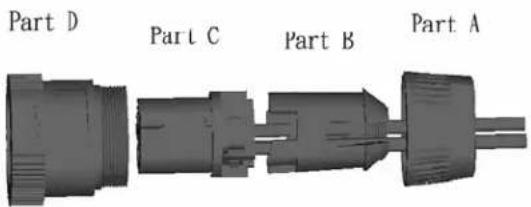
Figure 2
natural_image
3D rendering of a mechanical connector with two leads (no text or symbols visible)Figure 3
natural_image
3D rendering of a black electrical plug with a coiled cable (no text or symbols visible)Remove connector from packaging and disassemble. See figure 1.
Strip the ends of the speaker wires.
Place Blue Threaded Collar (part A) onto speaker wire. See figure 1.
Slide the clamping piece (part B) onto the speaker wire. See figure 1.
Attach the stripped ends of the speaker wires into the screw down terminals on part C. The terminals are labeled behind the screw heads. You will use 1+ and 1-. (see wiring diagram) 2+ and 2- will not be used. (Also, please note there are small metal inserts that may be placed into the terminals for smaller gauge wires)
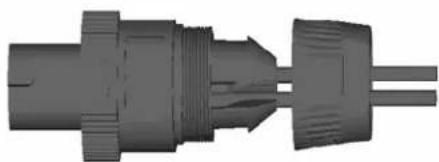
Once wires are attached slide Part D over Part C. There are tabs that must be aligned. You will need to rotate the parts. See figure 2.
Slide Part B into Parts C and D. There are also tabs that must be aligned. You will need to rotate the parts. See figure 2.
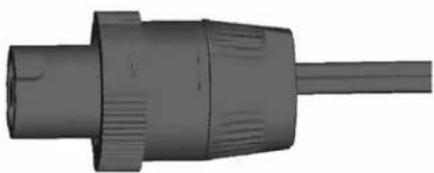
Thread Part A into Part D. Thread all the way down so the connector is tight.
The connector inserts into the speaker by aligning the tabs and a push and turn motion. Once inserted, screw down the blue collar on Part D to keep the connector tight.
wet sounds™

natural_image
Abstract black-and-white graphic with stylized bird-like shapes and a central star (no text or symbols)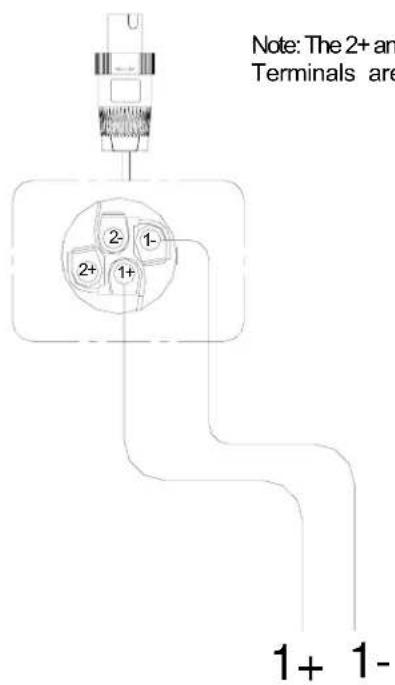
natural_image
Technical line drawing of a mechanical device with two circular components and mounting holes (no text or symbols)“Limited Warranty”
What This Warranty Covers
This is a “Limited” warranty. This warranty covers any defects in materials and workmanship with your new PRO 485. This warranty only applies to the original purchaser and is not transferable. This warranty is also only valid if the original purchase was made from an authorized Wet Sounds ^™ dealer.
How Long Coverage Last
This warranty runs for one year from the date of the purchase. ***You need to REGISTER your warranty online within 45 days of your purchase at www.wetsounds.com - click on “warranty registration” – to activate the full ONE YEAR warranty. If you do not register within time allotted then your warranty beyond 45 days is Null and Void.
What Is Not Covered
This warranty does not cover fading or discoloration caused by exposure to sunlight or chemicals such as ammonia, household bleach, or any cleaning material that contains abrasive substances. (For information on how to prevent fading or discoloration, consult www.wetsounds.com for recommendations on cleaning products) Wet Sounds, Inc. does not cover the cost for removal and reinstallation of your PRO 485. Additionally, shipping TO Wet Sounds, Inc. is covered by the purchaser. This warranty is void and inapplicable if Wet Sounds™ deems that the product was abused or misused; including but not limited to damage caused by accident, mishandling, improper installation, negligence, normal wear and tear, excessive water or heat damage, freight damage or speakers that have had the drivers removed by anyone other than Wet Sounds™ technical staff. Wet Sounds™ shall not be responsible for any incidental or consequential damages, except to the extent provided (or prohibited) by applicable law.
What Wet Sounds, Inc. Will Do
Wet Sounds, Inc will repair any part of your PRO 485 that proves to be defective in materials or workmanship. In the event repair is not possible, Wet Sounds, Inc will replace the part in question. If it is deemed necessary Wet Sounds, Inc. will either replace the entire PRO 485 with a refurbished PRO 485 or it will be replaced with a model that is similar in price if that model is no longer available. Labor cost and materials needed to complete this service will be at no charge to the purchaser. Additionally, the cost of shipping TO the consumer is also covered under this warranty.
How To Get Service
Contact Wet Sounds, Inc. either by phone at 877-938-7757 or by email at warranty@wetsounds.com. A service representative will assist you in the necessary actions to concur that the problem that you are experiencing is covered under warranty and what to do if it needs to be shipped to Wet Sounds, Inc.
How State Law Applies
This warranty gives you specific legal rights, and you may also have other rights which vary from state to state.
Internet Warning:
Wet Sounds, Inc. products sold on any non authorized web site or internet auction site are void of any and all manufacturer's warranty. Please contact Wet Sounds™ at 877-938-7757 or visit our web site at www.wetsounds.com to search for an authorized site and/or an authorized retailer near you.
Caution and Respect:
Wet Sounds ^™ speakers can achieve very high sound pressure levels. Please use this product responsibly. Be aware that sound travels great distances across water so please respect other boaters especially while loading/unloading at the ramp or dock. Wet Sounds, Inc. is not responsible for any violations of the law that may be a direct result of excessive volume. Please abide by the rules but have fun doing it.
Wet Sounds, Inc. 13207 Stafford Road Suite 900 Missouri City, Texas 77489 www.wetsounds.com Toll Free: 877-938-7757
PLEASE USE SERIAL NUMBER ATTACHED BELOW TO REGISTER THIS PRODUCT. THIS IS NEEDED TO ACTIVATE THE "LIMITED" WARRANTY.
(Register warranty at www.wetsounds.com)
Brand : Wet Sounds
Model : Pro 485
Category : Loudspeaker