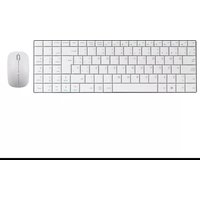
PHKEYULTRASLIMWSP - Keyboard Phoenix Technologies - Free user manual and instructions
Find the device manual for free PHKEYULTRASLIMWSP Phoenix Technologies in PDF.


| Product Type | Wireless Ultra-Slim Keyboard |
| Brand | Phoenix Technologies |
| Model | PHKEYULTRASLIMWSP |
| Dimensions (Keyboard) | 540 x 110 x 10 mm |
| Keyboard Weight | Approx. 300 g |
| Power Supply | 3V DC, 7mA (2 AAA batteries) |
| Connectivity | Wireless 2.4 GHz with Nano Receiver |
| Wireless Range | Up to 10 meters |
| Keyboard Material | Plastic shell with metal frame |
| Key Type | Scissor-switch (quiet design) |
| Special Features | Ultra-thin profile (3.3 mm keys), quiet keys, nano receiver storage |
| Multimedia Keys | Fn+ keys for Media, Stop, Volume, Mute, Previous, Next, Play/Pause |
| System Requirements | Windows, Mac, Linux with USB port |
| Compliance | RoHS, CE |
| Color | Black |
| Package Contents | Keyboard, Nano receiver, 2 AAA batteries, User manual |
| Cleaning Instructions | Clean with dry, soft cloth; do not use liquids |
| Battery Life | Approx. 6 months (typical use) |
Frequently Asked Questions - PHKEYULTRASLIMWSP Phoenix Technologies
User questions about PHKEYULTRASLIMWSP Phoenix Technologies
0 question about this device. Answer the ones you know or ask your own.
Ask a new question about this device
Download the instructions for your Keyboard in PDF format for free! Find your manual PHKEYULTRASLIMWSP - Phoenix Technologies and take your electronic device back in hand. On this page are published all the documents necessary for the use of your device. PHKEYULTRASLIMWSP by Phoenix Technologies.
USER MANUAL PHKEYULTRASLIMWSP Phoenix Technologies
1 Guidance for first installment XPhoenix
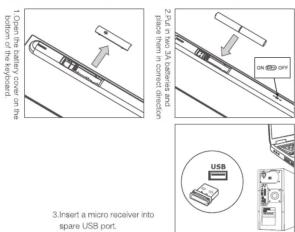
2 Guidance for first installment XPhoenix

3 Product features Phoenix
.Ultra-thin & Vogue
The thinnest part has been reduced to 5.3 mm, metallic stainless steel wire-drawing bottom cover, full of vogue, provides a comfortable and cool experience.
(一)监事会会议召开情况
. Quiet Keyboard Design
Unique scissor key structure and chocolate trapezoid key caps. The comfortable and soft touch provides an extremely quiet effect.
Stable technologies
3. Stable technologies
Cutting-edge US CYPRESS wireless stability solution, wireless high-speed stable
transmission, freely placed within 10 meters.
4.Nano Receiver
Honeycomb technology, one-to-many paired connection, all sharing one compact receiver, match code free, plug-play-forget.
Reserve: Match-Board has, plug-play target
6. Compact & Power-Saving
Compact for easy collection and carrying, suitable size, flexibility and comfort on operation, intelligent power-saving mode.
Poisonous or harmful materials and elements Phoenix
| Names and content of poisonous or harmful materials and elementsAccording to Regulations on Precious Control of Electronic Information Products of China | ||||||
| Names | Plumbum(Pb) | Hydrangruran(3M) | Cadmium(Ca) | Heuscent chloride(Ca(O)) | Polyureminated Diphenyl (PbH) | Polyureminated Diphenyl others (PbPO) |
| Wires | × | |||||
| Componentson circuit board | × | |||||
| Plastic shell | ||||||
| Plasticcomponents | ||||||
| Metalcomponents | × | |||||
- represents the content of such poisonous or
harmful materials in all homogeneous materials of such component is lower than the limit required.
SJ/T11363-2006 standard.
X represents the content of such poisonous or harmful material in all homogeneous materials
narnful materials in all homogeneous materials of component is higher than the limit required by
SJ/T11363-2006 standard.
Components on circuit board*: including printed board and its parts and electronic components e
| Notes: 90% of components of this product are made from non-poisonous or non-harmful environmentally friendly materials. Components containing poisonous or harmful material or element are limited by global technical development level, so it is impossible to achieve the substitution of poisonous or harmful materials. |
Note: The reference standard for service life of environmental protection depends on
product normal temperature and humidity
www.phoenixtechnologies.es
5 Specifications Phoenix
Specifications
| Model | PHKEYULTRASLIMSP |
| keyboard Rated working current | 3V · 7mA |
| keyboard size | 340 × 110 ± 19mm |
| Mouse Rated working current | 1.5V · 7mA |
| Mouse Resolution | 1000–2000dpi |
| Mouse size | 56 × 93 × 33mm |
| Mouse trailing system | Optics |
| Wireless carrier frequency | 2400MHz–2480MHz |
| Wireless frequency hopping channel | 78,automatic–hopping |
| System requirements | Windows XP / Vista Windows 7/Windows 8/Mac |
| Wireless transmission distance | 10m |
6 Application Method Phoenix
Multimedia hotkeys
dpi switching method
dpi switching method: hold down both the left mouse buttons and Wheel with your fingers for about 3 seconds to enable 1000-2000dpi two-way switch.
.Ultra-thin & Vogue
The thinnest part has been reduced to 5.3 mm, metallic stainless steel wire-drawing bottom cover, full of vogue, provides a comfortable and cool experience.
(一)监事会会议召开情况
. Quiet Keyboard Design
Unique scissor key structure and chocolate trapezoid key caps. The comfortable and soft touch provides an extremely quiet effect.
2.2.1 2017年1月1日
3. Stable technologies
Cutting-edge US CYPRESS wireless stability solution, wireless high-speed stable
transmission, freely placed within 10 meters.
4.Nano Receiver
Honeycomb technology, one-to-many paired connection, all sharing one compact receiver, match code free, plug-play-forget.
Reserve: Match-Board has, plug-play target
Compact for easy collection and carrying, suitable size, flexibility and comfort on operation, intelligent power-saving mode.
2.3.1.1.1.1.1.1.1.1.1.1.1.1.1.1.1.1.1.1.1.1.1.1.1.1.1.1.1.1.1.1.1.1.1.1.1.1.1.1.1.
Attention
+Better to place
- better to place the mouse on light-color, smooth surface rather than dark-color, reflective or rough surface.
• Don’t crash or throw the Produc
and other parts.
• Don't use it in high magnetic field: prevent the micro receiver from being
- Closely placed beside Bluetooth receiver which will have an impact on its
performance.
•Non-professional technician should not disassemble the Product or the micro
receiver.
• Clean the Product with dry and soft cotton materials.
Instructions for Battery Usage
• The product is used with alkaline batteries, and don’t throw the end-of-life
batteries away as dairy trash
• Don* It mix up batteries with different properties such as alkaline battery and
carbon zinc battery
- Don't touch the electrode with metal materials for which will lead to fire.
- Don't put the battery into water as other liquid.
• Don't put the battery into water or other liquid
• Don't disassemble heat, damage the battery
• Take the discharged batteries to a recycling station when replacing it.
• In order to extend service life of the mouse and keyboard when unused.
2014
CE
Imported by / Importado por: PHOENIX TECHNOLOGIES SPAIN S.L. CIF: D183/14112
Passive Metropolitano, C/ Los Visas N° 14 C.P.: 18130 Espízar, Granada (Spain).
Designed in Europe, made in P.R.G. / Diseñado en Europa, fat
Leans more / Más Información: www.phoenixtechnologyes.es
3 Product features Phoenix
- Compact & Power-Saving
Attentions Phoenix


Brand : Phoenix Technologies
Model : PHKEYULTRASLIMWSP
Category : Keyboard