
TF605 - Fax TOSHIBA - Free user manual and instructions
Find the device manual for free TF605 TOSHIBA in PDF.


| Product Type | Fax Machine |
| Brand | Toshiba |
| Model | TF605 |
| Dimensions (W x D x H) | 300 x 300 x 200 mm (approx.) |
| Weight | 5 kg (approx.) |
| Power Supply | 220-240V AC, 50/60 Hz |
| Power Consumption (Standby) | <10 W |
| Power Consumption (Active) | <50 W |
| Paper Capacity | Up to 50 sheets (A4) |
| Document Feeder Capacity | Up to 30 sheets |
| Fax Speed | 14.4 kbps |
| Transmission Time | Approx. 15 sec/page |
| Resolution (Standard) | 200 x 100 dpi |
| Resolution (Fine) | 200 x 200 dpi |
| Memory Capacity | Up to 50 pages |
| Functions | Fax send/receive, copy, telephone, answering machine |
| Dual Access | Yes (scan while sending/receiving) |
| Photo Mode | Yes |
| Energy Saving Mode | Yes |
| Display | 2-line LCD |
| Telephone Features | Flash, one-touch dialing, speed dial |
| Maintenance | Toner and drum replacement, roller cleaning |
| Safety Compliance | CE |
Frequently Asked Questions - TF605 TOSHIBA
User questions about TF605 TOSHIBA
0 question about this device. Answer the ones you know or ask your own.
Ask a new question about this device
Download the instructions for your Fax in PDF format for free! Find your manual TF605 - TOSHIBA and take your electronic device back in hand. On this page are published all the documents necessary for the use of your device. TF605 by TOSHIBA.
USER MANUAL TF605 TOSHIBA
natural_image
Line drawing of a computer tower with ventilation grilles and ventilation slots (no text or symbols)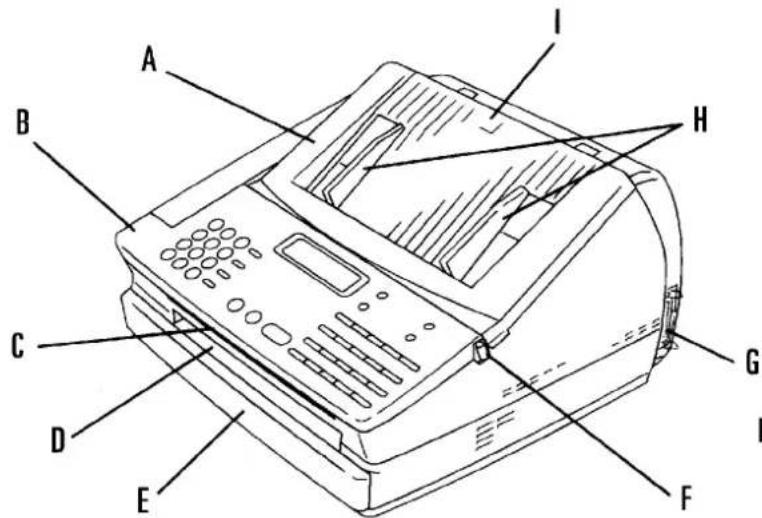

A Bovenklep
B Bedieningspaneel
C Dokument uitvoer
D Papier uitvoer
E Papiercassette
natural_image
Line drawing of a printer with an open lid and internal compartments (no text or symbols)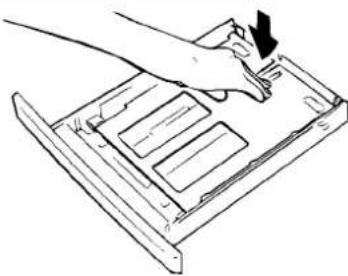
natural_image
Line drawing of a hand using a tool to press or install a device on a tray (no text or symbols)natural_image
Illustration of a hand pressing down on a rectangular object with an arrow indicating direction (no text or symbols)!
natural_image
Line drawing of a printer with paper feed and paper tray (no text or symbols)Tenslotte: Schuif de cassette terug
natural_image
Line drawing of a hand inserting a card into a stack of documents (no text or symbols visible)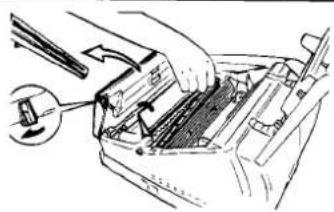
natural_image
Diagram of a hand using a tool to adjust or install a vehicle's internal components (no text or symbols visible)natural_image
Illustration of hands using a mechanical tool to adjust or install a component (no text or symbols visible)
natural_image
Line drawing of two hands holding a mechanical component (no text or symbols)Beweeg de procescartridge
natural_image
Line drawing of hands operating a device with a tray and control panel (no text or symbols)
natural_image
Line drawing of a hand inserting a card into a printer (no text or symbols)1 x 8 = T # 3 x 6 = 0 #
4 x 7 = S # 2 x 4 = H #
3 x 4 = 1 # 2 x 2 = B #
1 × 2 = A
natural_image
Simple line drawing of two overlapping sheets with a diagonal line crossing over them (no text or symbols)natural_image
Line drawing of a portable electronic device with a paper feed and control panel (no text or symbols)KIES NAAM /▲▼ NAAM: BLUME

START
OPDR.: 001 M 99 % DOC. INLEZEN P 001
15 MAR 19:56 S 99 % VOER DOCUMENT IN
Dokument invoeren
Let erop:
flowchart
graph TD
    A["TIJDELijke GROEP"] --> B["FAXNR. of VERKORTTNR. of 1-TOETS"]
    A --> C["FAXNR. of VERKORTTNR. of 1-TOETS"]
    A --> D["FAXNR. of VERKORTTNR. of 1-TOETS"]

15 MAR 19:56 M 100 % VOER DOCUMENT IN
KIEZEN OF KOPIÈREN KIES COMM OPTIE
6×F FLIGHTIE
MEERVOUDIG VERZENDEN DRUK OP FUNKTIE / ☒
START
① ② ③
4 5 6
7 8 9
* 0 #
I START
VIA EEN
VERKORT NR.
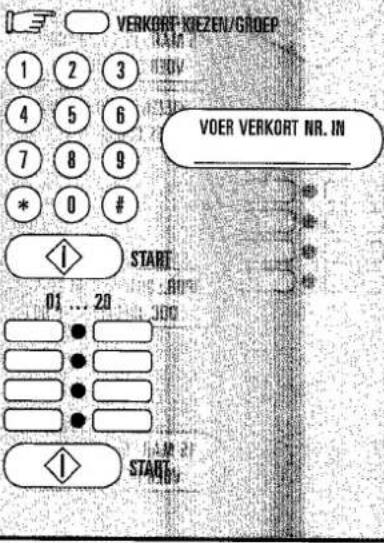
Dokument invoeren
BESTAAT REEDS 1 = VERVANGEN 2 = STOP
① ② ③
④ ⑤ ⑥
⑦ ⑧ ⑨
* 0 #
15 MAR 19:56 M 100 % VOER DOCUMENT IN
BIJ KEUZE = 1
POSTBUS VRIJ 1 = JA 2 = NEE
① ② ③
④ ⑤ ⑥
⑦ ⑧ ⑨
* 0 #
OPDR.: 001 M 99 % DOC. INLEZEN P 001
15 MAR 19:56 S 99 % VOER DOCUMENT IN
1 = Permanente reservering
2 = Eenmalige reservering
| 1 x 8 = T # | 3 x 6 = 0 # |
| 4 x 7 = S # | 2 x 4 = H # |
| 3 x 4 = I # | 2 x 2 = B # |
| 1 x 2 = A |
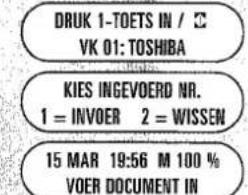
KIES INGEVOERD NR. 1 = INVOER 2 = WISSEN
15 MAR 19:56 M 100 % VOER DOCUMENT IN
NAAM INVOEREN NAAM: TOSHIBA

VOER VERKORT NR. IN /

1 x 8 = T # 3 x 6 = 0 #
4 x 7 = S # 2 x 4 = H #
3 x 4 = 1 # 2 x 2 = 8 #
1 x 2 = A
natural_image
Technical line drawing of a cable or connector being inserted into a bracket (no text or symbols present)natural_image
Diagram of a hand securing a cable with a spring, showing rope routing (no text or symbols)
Installeer nu de Windows™ printerdriver
De programma diskette ...
natural_image
Simple line drawing of a rectangular block (no text or symbols)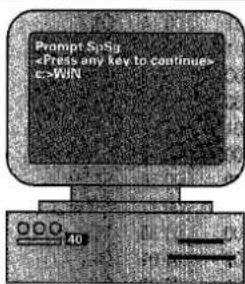
TOTAAL AFGEDRUKTE PAGINAS = 000012
TOTAAL VERZONDEN PAGINAS = 000000
TOTAAL ONTVANGEN PAGINAS = 000000
DRUMTELLER
= 000012
| NR. | DATUM | TIMER | MODE | NAAR/VAN | PAG. | TJD | CODE | OPDR.NR. |
| 01 | 07-06 | 18:52 | TX/SECM | +492131158907 | 001 | 00'21 | OK | 022 |
| 02 | 07-06 | 18:53 | TX/SECM | +492131158907 | 001 | 00'19 | OK | 023 |
| 03 | 07-06 | 18:53 | TX/ECM | +492131158901 | 001 | 00'19 | OK | 025 |
| 04 | 07-06 | 18:54 | TX/ECM | +492131158901 | 001 | 00'19 | OK | 026 |
| 05 | 07-06 | 19:03 | TX/SEHS | +492131158905 | 001 | 00'22 | OK | 038 |
| 06 | 07-06 | 19:04 | TX/SEHS | +492131158905 | 001 | 00'14 | OK | 039 |
| 07 | 07-06 | 19:05 | TX/SEHS | +492131158905 | 001 | 00'14 | OK | 040 |
| 08 | 07-06 | 19:05 | TX/SEHS | +492131158905 | 001 | 5'53 | OK | 041 |
| 09 | 07-06 | 19:13 | TX/ | Otto | 000 | 00'26 | 008 | 042 |
| 10 | 07-06 | 19:14 | TX/ | 5555 | 000 | 00'27 | 008 | 043 |
| 11 | 07-06 | 19:17 | TX/SEHS | +492131158905 | 001 | 01'24 | OK | 044 |
| 12 | 07-06 | 19:19 | TX/ECM | +492131158901 | 000 | 00'17 | STOP | 045 |
| 13 | 07-06 | 19:24 | TX/SEHS | +492131158905 | 000 | 00'56 | STOP | 046 |
| 14 | 07-06 | 19:53 | TX/ | Telly Savallas | 000 | 00'17 | STOP | 049 |
| 15 | 07-09 | 13:36 | RX/G3 | +49541131214 | 000 | 01'30 | 151 | |
| 16 | 07-09 | 13:40 | RX/G3 | +49541131214 | 002 | 01'01 | OK | |
| 17 | 07-09 | 13:43 | RX/G3 | +49541131214 | 001 | 00'39 | OK | |
| 18 | 07-09 | 13:44 | RX/G3 | +49541131214 | 004 | 02'11 | OK | |
| 19 | 07-09 | 14:14 | RX/G3 | +49211685973 | 001 | 00'44 | OK | |
| 20 | 07-09 | 14:16 | RX/G3 | +49211685973 | 001 | 01'03 | OK |
natural_image
Line drawing of a hand inserting a card into a printer (no text or symbols)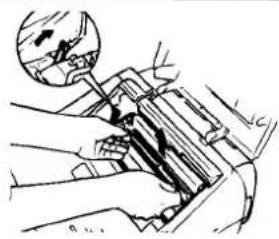
natural_image
Technical line drawing of a mechanical assembly with hand and tool (no visible text or symbols)natural_image
Illustration of hands using a tool to adjust or install a mechanical component (no text or symbols visible)
natural_image
Line drawing of a hand holding a cylindrical object with motion lines indicating direction (no text or symbols)De nieuwe tonercartridge ...
natural_image
Hand holding a tool over a mechanical component (no text or symbols visible)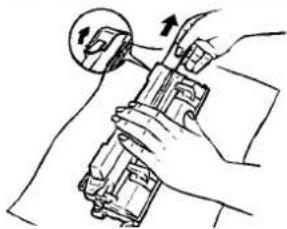
natural_image
Illustration of a hand holding a mechanical device with a circular arrow indicating rotation (no text or symbols)natural_image
Line drawing of hands using a handheld device to clean or install a document (no text or symbols visible)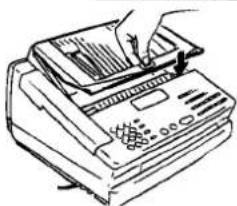
natural_image
Line drawing of a printer with a hand inserting paper into the cover (no text or symbols)natural_image
Line drawing of a hand inserting a card into a printer (no text or symbols)
natural_image
Diagram of a hand inserting a component into a car intake manifold, showing arrows and a magnified inset (no text or symbols)De rolreiniger:
natural_image
Hand holding a mechanical component with an arrow indicating direction (no text or symbols present)
natural_image
Line drawing of hands holding a mechanical component (no text or symbols)Beweeg de procescartridge
natural_image
Line drawing of hands using a handheld device to install a device into a box (no text or symbols visible)natural_image
Illustration of a printer with a hand inserting a page into it (no text or symbols visible)
natural_image
Line drawing of a mechanical device with a handle and arrow indicating direction (no text or symbols)natural_image
Illustration of a hand using a printer to press documents (no text or symbols visible)natural_image
Line drawing of a hand inserting a component into a device (no text or symbols)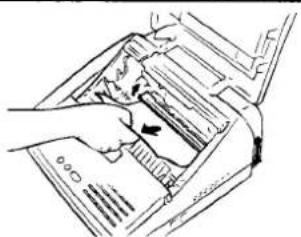
natural_image
Line drawing of a hand inserting a device into a printer (no text or symbols)natural_image
Illustration of a hand pressing down on a mechanical component with an inset showing a close-up of a small object (no text or symbols visible)
Bij het sluiten
Dual Access ..... 18, 19
Energiebesparing 17
FAX/ANTW 14,39
Flash 11,37
Foto mode 26
Foutcodes .... 48
Foutmeldingen 47
54 Index

Brand : TOSHIBA
Model : TF605
Category : Fax