
PLMRWB652LEW - Docking Stations & Stands Pyle - Free user manual and instructions
Find the device manual for free PLMRWB652LEW Pyle in PDF.


| Product Type | Tablet Stand & Docking Station |
| Brand | Pyle |
| Model | PLMRWB652LEW |
| Dimensions (L x W x H) | 10.5 x 6.3 x 4.1 inches |
| Weight | 1.2 lbs |
| Material | ABS Plastic with Rubber Grip |
| Compatible Devices | Tablets up to 12.9 inches |
| Adjustable Angle | 0° to 90° |
| Charging | Built-in USB-C Cable for Pass-Through Charging |
| Audio Output | 3.5mm Stereo Audio Jack |
| Anti-Slip Base | Yes |
| Cable Management | Integrated |
| Installation | No Tools Required |
| Cleaning Instructions | Wipe with a soft, dry cloth |
| Safety Features | Tip-resistant design, stable base |
| Spare Parts / Reparability | Contact Pyle Customer Support for replacements |
Frequently Asked Questions - PLMRWB652LEW Pyle
User questions about PLMRWB652LEW Pyle
0 question about this device. Answer the ones you know or ask your own.
Ask a new question about this device
Download the instructions for your Docking Stations & Stands in PDF format for free! Find your manual PLMRWB652LEW - Pyle and take your electronic device back in hand. On this page are published all the documents necessary for the use of your device. PLMRWB652LEW by Pyle.
USER MANUAL PLMRWB652LEW Pyle
PLMRWB652LEW/PLMRWB652LES/PLMRWB652LEB PLMRWB852LEW/PLMRWB852LES/PLMRWB852LEB
Product Technical Parameters
| MARINE SPEAKER MODEL | PLMRWB652LEW/PLMRWB652LES/PLMRWB652LEB |
| Dual 2-Way Mini Box Speaker System | 2x6.5" |
| - Long Excursion Woofer | |
| - 1.0"Titanium Dome Tweeter | |
| - Heavy Duty ABS Construction | |
| Quick Connect Speaker Terminals | |
| - Max Power 2x200 Watts | |
| - Magnet 10 Oz | |
| - Frequency Response | 60Hz-20KHz |
| - Impedance | 4 Ohms |
| - Sensitivity | 90 dB |
| - Dimensions(mm) | 283x480x240 mm (FlxWxD) |
| MARINE SPEAKER MODEL | PLMRWB852LEW/PLMRWB852LES/PLMRWB852LEB |
| - Dual 2-Way Mini Box Speaker System | 2x8" |
| - Long Excursion Woofer | |
| - 1.0"Titanium Dome Tweeter | |
| - Heavy Duty ABS Construction | |
| - Quick Connect Speaker Terminals | |
| - Max Power 2x300 Watts | |
| Magnet 20 Oz | |
| - Frequency Response | 40Hz 20KHz |
| - Impedance | 4 Ohms |
| Sensitivity | 91 dB |
| Dimensions(mm) | 340x577x290 mm (HxWxD) |
PART I.
- The base of the bracket.
- The connecting base of the bracket, 360^ ratation, connect to picture1.
- The cover of the bracket, is fixed by 4 mounting screws after picture 2 rotates to an angle.

Remark: two types of screws for choice: M5x65/M5x80
PART 2.


REMOTE CONTROL FEATURES
- Turn On / Standby: Press this key to turn on LEDs or switch to standby mode.
2 / 9. Dynamic Mode button: Switch from dynamic mode to color mode or switch between dynamic modes.
3 / 8. Dynamic Mode Speed button: Use these buttons to adjust dynamic mode speed. If the unit is in static mode, pressing these buttons will switch unit to dynamic mode.
4 / 5. Static Color Adjust button: Use this button to swithc between static colors. Pressing these keys while in dynamic mode will switch the unit to static mode.
6 / 7. Brightness Adjust button: Pressing these buttons will adjust brightness while in static mode. If these buttons are pressed while unit is in dynamic mode, it will switch to static mode. - Demo Mode button: this button will switch the unit into demo mode. While in demo mode, unit will loop through 9 of the dynamic modes with each repeating 3 times.
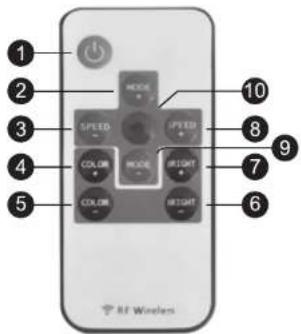
- Please remember to remove plastic insulator from remote unit battery compartment.
- This remote uses a 3 volt CR2025 type battery. When replacing be sure to use only the same type of battery
• The remote signal can pass though most obstacles. - Do not install unit in areas surrounded by metal as the remote signal will not reach the unit.

For more detailed information visit us at:
PyleAudio.com
1600-63rd Street
Brooklyn,NY 11204 USA
PYLE®
PyleAudio.com
Brand : Pyle
Model : PLMRWB652LEW
Category : Docking Stations & Stands